
codex-helper (Codex CLI Local Helper / Proxy)
Put Codex behind a small local “bumper”:
centralize all your relays / keys / quotas, auto-switch when an upstream is exhausted or failing, and get handy CLI helpers for sessions, filtering, and diagnostics.
Current version: v0.10.0
中文说明:
README.md
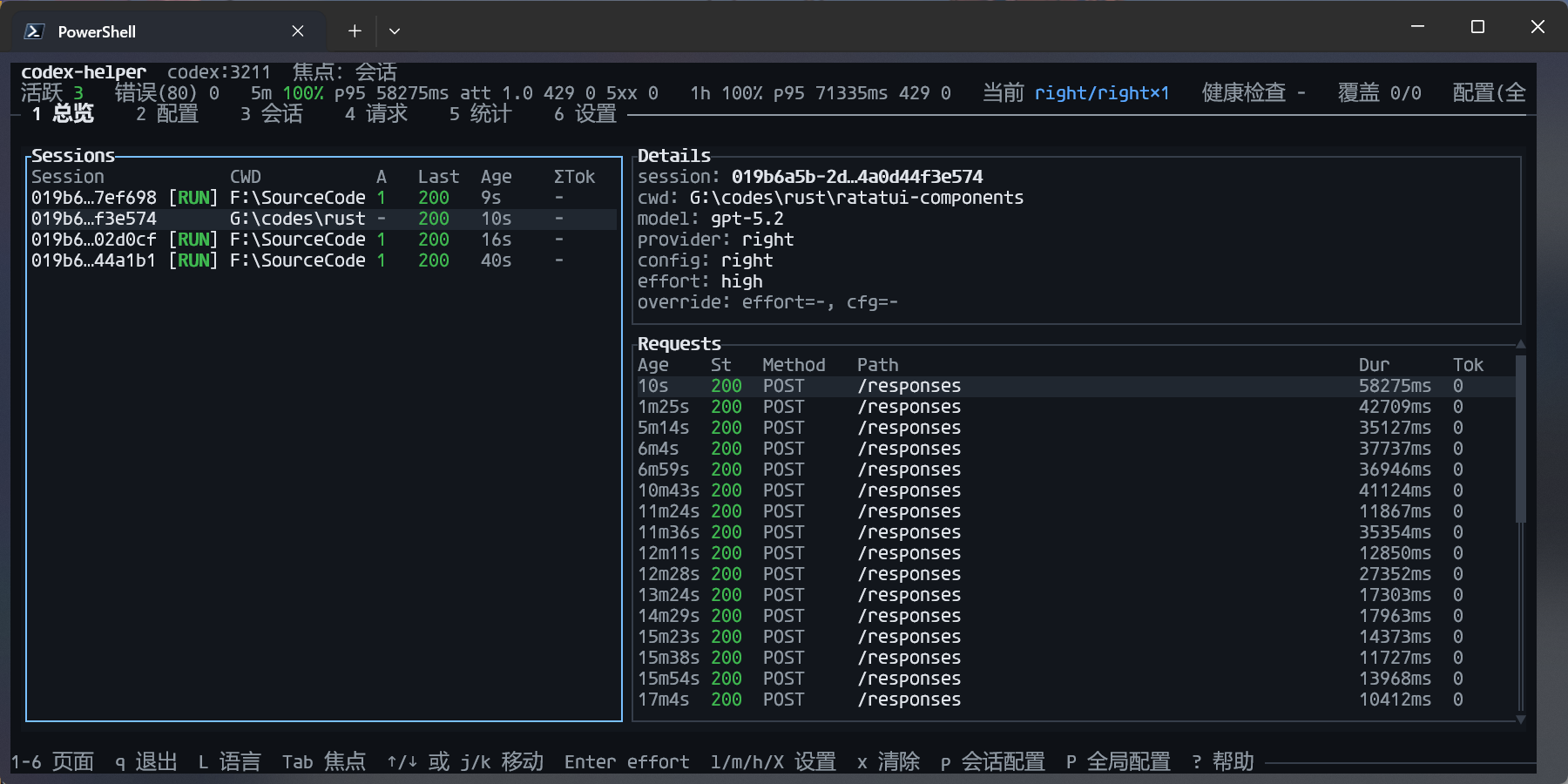
Screenshot
Why codex-helper?
codex-helper is a good fit if any of these sound familiar:
-
You’re tired of hand-editing
~/.codex/config.toml
Changingmodel_provider/base_urlby hand is easy to break and annoying to restore. -
You juggle multiple relays / keys and switch often
You’d like OpenAI / Packy / your own relays managed in one place, and a single command to select the “current” one. -
You discover exhausted quotas only after 401/429s
You’d prefer “auto-switch to a backup upstream when quota is exhausted” instead of debugging failures. -
You want a CLI way to quickly resume Codex sessions
For example: “show me the last session for this project and give mecodex resume <ID>.” -
You want a local layer for redaction + logging
Requests go through a filter first, and all traffic is logged to a JSONL file for analysis and troubleshooting.
Quick Start (TL;DR)
1. Install (recommended: cargo-binstall)
This installs codex-helper and ch into your Cargo bin directory (usually ~/.cargo/bin).
Make sure that directory is on your PATH so you can run them from anywhere.
Prefer building from source?
Runcargo build --releaseand usetarget/release/codex-helper/ch.
2. One-command helper for Codex (recommended)
# or shorter:
This will:
- Start a Codex proxy on
127.0.0.1:3211; - Guard and, if needed, rewrite
~/.codex/config.tomlto point Codex at the local proxy (backing up the original config on first run); - When writing
model_providers.codex_proxy, setrequest_max_retries = 0by default to avoid double-retry (Codex retries + codex-helper retries); you can override it in~/.codex/config.toml; - Automatically retry/fail over a small number of times for transient failures (429/5xx/network hiccups) and common provider auth/routing failures (e.g. 401/403/404/408) before any response bytes are streamed to the client (configurable);
- If
~/.codex-helper/config.toml/config.jsonis still empty, bootstrap a default upstream from~/.codex/config.toml+auth.json; - If running in an interactive terminal, show a built-in TUI dashboard (disable with
--no-tui; pressqto quit; use1-7to switch pages; use7to browse history; on Sessions/History presstto view transcript); - On Ctrl+C, attempt to restore the original Codex config from the backup.
After that, you keep using your usual codex ... commands; codex-helper just sits in the middle.
Optional: Codex notify integration (rate-limited, duration-based)
Codex can invoke an external program for "agent-turn-complete" events via the notify setting in ~/.codex/config.toml. codex-helper can act as that program and apply a low-noise policy:
- D (duration-based): only notify when the corresponding proxied request has
duration_ms >= min_duration_ms; - A (aggregation/rate-limit): merge bursts and enforce at most 1 notification per minute by default.
1) Configure Codex to call codex-helper
Add to ~/.codex/config.toml:
= ["codex-helper", "notify", "codex"]
This is independent from
tui.notifications. You can use both.
2) Enable notifications in ~/.codex-helper/config.toml (or config.json) (default: off)
Add (or edit) the notify section:
[]
= true
[]
= true
[]
= 60000
= 60000
= 10000
= 180000
Notes:
- codex-helper matches the Codex
"thread-id"to proxyFinishedRequest.session_idand uses/__codex_helper/status/recentto computeduration_ms. If Codex is not routed through codex-helper, duration matching is unavailable and notifications are skipped. - System notifications are implemented on Windows (toast via
powershell.exe) and macOS (viaosascript). Other platforms currently fall back to printing a short line. - Optional callback sink: set
notify.exec.enabled = trueandnotify.exec.command = ["your-program", "arg1"]to receive aggregated JSON on stdin.
Common configuration: multi-upstream failover
The most common and powerful way to use codex-helper is to let it fail over between multiple upstreams automatically when one is failing or out of quota.
The key idea: put your primary and backup upstreams in the same config’s upstreams array.
Note: if you split each provider into its own config and keep them all at the same
level(e.g. everything islevel = 1), codex-helper will still prefer theactiveconfig, but other same-level configs can participate in failover (to avoid a single point of failure).Important: a pinned override (e.g. TUI
p: session provider override/pinned; older builds may also have a global pinned override) forcespinnedrouting mode and will only use that single config, so it will not fail over across configs.
If you want “preferred + failover”, useactive(TUI:Pglobal active, orEnteron the Configs page) and clear any pinned override.
Scenario quick matrix
Think of codex-helper config in 2 layers:
- Grouping (routing): each config has a
level(1..=10).activeis preferred.enabled=falseexcludes a config from automatic routing (unless it is the active config). - Strategy (retry): controls how codex-helper retries/cools down/probes back.
If you already imported accounts via codex-helper config overwrite-from-codex --yes (most common), you usually don’t need to hand-write [[...upstreams]]. You only need:
- Grouping:
codex-helper config set-level <name> <level>+codex-helper config set-active <name> - Strategy:
codex-helper config set-retry-profile <balanced|same-upstream|aggressive-failover|cost-primary>
Note:
set-retry-profileoverwrites the whole[retry]block. If you want advanced tweaks (e.g.retry.upstream.max_attempts,retry.provider.on_status,transport_cooldown_secs, and guardrails likenever_on_status/never_on_class), apply a profile first, then edit the config file (legacy flat fields are still accepted, but the layered config is recommended).
| Goal | What to change after import | Suggested retry profile | Notes |
|---|---|---|---|
| One account, multiple endpoints (auto failover) | Merge multiple endpoints into one config’s upstreams (see Template A) |
balanced |
Simplest and most reliable |
| Multiple providers as same-level backups | Keep them at the same level (default is 1) and set one active (see Template B) |
balanced |
active is preferred; other same-level configs still participate in failover |
| Relay-first, direct/official backup | Put relays at level=1, direct/official at level=2 (see Template C) |
balanced |
Degrades across levels; fully cooled configs are skipped when alternatives exist |
| Monthly primary + pay-as-you-go backup (cost) | Same grouping as above, set the monthly relay as active (see Template D) |
cost-primary |
Degrade to backup when unstable, and “probe back” via cooldown/backoff |
Template A: one config with multiple upstream endpoints
= 1
[]
= "codex-main"
[]
= "codex-main"
= true
= 1
[[]]
= "https://codex-api.packycode.com/v1"
= { = "PACKYCODE_API_KEY" }
= { = "packycode", = "codex-config" }
[[]]
= "https://co.yes.vg/v1"
= { = "YESCODE_API_KEY" }
= { = "yes", = "codex-config" }
Notes:
activepoints to this config, so the LB can fail over between multiple upstream endpoints.- When an upstream fails or is marked
usage_exhausted, codex-helper prefers other upstreams when possible.
Template B: multiple providers as same-level backups (import-first)
# Pick a preferred config (still allows same-level failover)
If you prefer editing config.toml directly, the equivalent is:
[]
= "right"
[]
= "balanced"
Want fewer candidates? Disable configs you don’t want in automatic routing (active is still eligible):
codex-helper config disable some-provider.
Template C: relay-first, direct/official backup (level grouping)
right/packyapi/yescode/openaiare just example names; replace them with what you see incodex-helper config list.
# L1: relays
# L2: direct/official backup
Equivalent config.toml (example):
[]
= "right"
[]
= 1
[]
= 2
[]
= "balanced"
Template D: monthly primary + pay-as-you-go backup (cost + probe-back)
right/openaiare just example names; replace them with what you see incodex-helper config list.
# L1: monthly relay (cheap, may be flaky)
# L2: pay-as-you-go direct (more expensive, more reliable)
# Cost-primary enables cooldown exponential backoff for probe-back.
Equivalent config.toml (example):
[]
= "right"
[]
= 1
[]
= 2
[]
= "cost-primary"
Note: if a config name contains
-etc, quote it in TOML, e.g.[codex.configs."openai-main"].
Level-based multi-config failover (optional)
If you prefer to keep upstreams in separate configs, codex-helper also supports level-based config grouping:
- Each config has a
level(1..=10, lower is higher priority). - If there are multiple distinct levels, codex-helper routes from low to high (lower level is preferred).
- If all configs share the same level, they are treated as same-level candidates:
activeis preferred, but other configs can still be used for failover. - Within the same level, the
activeconfig is preferred. - Set
enabled = falseto exclude a config from automatic routing (unless it is the active config).
A common cost-optimization pattern is “monthly relay as primary, pay-as-you-go as backup”: set the cheaper relay as active with level = 1, keep your direct/official provider at level = 2, and use cooldown penalties (optionally with cooldown backoff) to periodically probe back to the primary without hammering it on every request.
Command cheatsheet
Daily use
- Start Codex helper (recommended):
codex-helper/ch
- Explicit Codex proxy:
codex-helper serve(default port 3211)codex-helper serve --no-tui(disable the built-in TUI dashboard)
Turn Codex on/off via local proxy
-
Switch Codex to the local proxy:
-
Restore original configs from backup:
-
Inspect current switch status:
Manage upstream configs (providers / relays)
-
List configs:
-
Add a new config:
-
Set the active config:
-
Set a curated retry profile (writes the
[retry]block; good when you only want “pick a strategy”): -
Level-based routing controls (multi-config failover):
-
Overwrite Codex configs from Codex CLI (reset to defaults):
# overwrite codex-helper Codex configs (resets active/enabled/level to defaults)
TUI Settings (runtime)
R: reload runtime config now (helps confirm manual edits; next request will use the new config)
Sessions, usage, diagnostics
-
Session helpers (Codex):
-
Usage & logs:
-
Status & doctor:
# JSON outputs for scripts / UI integration | |
Example workflows
Scenario 1: Manage multiple relays / keys and switch quickly
# 1. Add configs for different providers
# 2. Select which config is active
# 3. Point Codex at the local proxy (once)
# 4. Start the proxy with the current active config
Scenario 2: Resume Codex sessions by project
session list now includes the conversation rounds (rounds) and the last update timestamp (last_update, which prefers the last assistant response time when available).
You can also query sessions for any directory without cd:
This is especially handy when juggling multiple side projects: you don’t need to remember session IDs, just tell codex-helper which directory you care about and it will find the most relevant sessions and suggest codex resume <ID>.
Advanced configuration (optional)
Most users do not need to touch these. If you want deeper customization, these files are relevant:
- Main config:
~/.codex-helper/config.toml(preferred) or~/.codex-helper/config.json(legacy). If both exist,config.tomlwins. - Filter rules:
~/.codex-helper/filter.json - Usage providers:
~/.codex-helper/usage_providers.json - Request logs:
~/.codex-helper/logs/requests.jsonl - Detailed debug logs (optional):
~/.codex-helper/logs/requests_debug.jsonl(only created whenhttp_debugsplit is enabled) - Session stats cache (auto-generated):
~/.codex-helper/cache/session_stats.json(speeds upsession list/searchrounds/timestamps; invalidated by session filemtime+size—delete this file to force a full rescan if needed)
To quickly generate a commented config.toml template:
Notes:
- The generated template comments are Chinese by default.
- If
~/.codex/config.tomlis present, codex-helper will best-effort auto-import Codex providers into the generatedconfig.toml.- Use
codex-helper config init --no-importfor a template-only file.
Codex official files:
~/.codex/auth.json: managed bycodex login; codex-helper only reads it.~/.codex/config.toml: managed by Codex CLI; codex-helper touches it only viaswitch on/off.
Config structure (brief)
codex-helper supports both config.toml (preferred) and config.json (legacy). If both exist, config.toml wins.
= 1
[]
= "openai-main"
[]
= "openai-main"
= "Main OpenAI quota"
= true
= 1
[[]]
= "https://api.openai.com/v1"
= { = "OPENAI_API_KEY" }
= { = "codex-config", = "openai" }
Key ideas:
active: the name of the currently active config;configs: a map of named configs;level: priority group for level-based config routing (1..=10, lower is higher priority; defaults to 1);enabled: whether the config participates in automatic routing (defaults to true);- each
upstreamis one endpoint, ordered by priority (primary → backups).
usage_providers.json
Path: ~/.codex-helper/usage_providers.json. If it does not exist, codex-helper will write a default file similar to:
{
  "providers": [
    {
      "id": "packycode",
      "kind": "budget_http_json",
      "domains": ["packycode.com"],
      "endpoint": "https://www.packycode.com/api/backend/users/info",
      "token_env": null,
      "poll_interval_secs": 60
    }
  ]
}
For budget_http_json:
- up to date usage is obtained by calling
endpointwith a Bearer token (fromtoken_envor the associated upstream’sauth_token/auth_token_env); - if the upstream uses
auth_token_env, the token is read from that environment variable at runtime; - the response is inspected for fields like
monthly_budget_usd/monthly_spent_usdto decide if the quota is exhausted; - associated upstreams are then marked
usage_exhausted = truein LB state; when possible, LB avoids these upstreams.
Filtering & logging
-
Filter rules:
~/.codex-helper/filter.json, e.g.:[ { "op": "replace", "source": "your-company.com", "target": "[REDACTED_DOMAIN]" }, { "op": "remove", "source": "super-secret-token" } ]Filters are applied to the request body before sending it upstream; rules are reloaded based on file mtime.
-
Logs:
~/.codex-helper/logs/requests.jsonl, each line is a JSON object like:{ "timestamp_ms": 1730000000000, "service": "codex", "method": "POST", "path": "/v1/responses", "status_code": 200, "duration_ms": 1234, "config_name": "openai-main", "upstream_base_url": "https://api.openai.com/v1", "usage": { "input_tokens": 123, "output_tokens": 456, "reasoning_tokens": 0, "total_tokens": 579 } }
These fields form a stable contract: future versions will only add fields, not remove or rename existing ones, so you can safely build scripts and dashboards on top of them.
When retries happen, logs may also include a retry object (e.g. retry.attempts and retry.upstream_chain) to help you understand which upstreams were tried before the final result.
Optional HTTP debug logs (for 4xx/5xx)
To help diagnose upstream 400 and other non-2xx responses, codex-helper can optionally attach an http_debug object to each log line (request headers, request body preview, upstream response headers/body preview, etc.).
Enable it via env vars (off by default):
CODEX_HELPER_HTTP_DEBUG=1: only writehttp_debugfor non-2xx upstream responsesCODEX_HELPER_HTTP_DEBUG_ALL=1: writehttp_debugfor all requests (can grow logs quickly)CODEX_HELPER_HTTP_DEBUG_BODY_MAX=65536: max bytes for request/response body preview (will truncate)CODEX_HELPER_HTTP_DEBUG_SPLIT=1: write largehttp_debugblobs torequests_debug.jsonland keep onlyhttp_debug_refinrequests.jsonl(recommended when*_ALL=1)
You can also print a truncated http_debug JSON directly to the terminal on non-2xx responses (off by default):
CODEX_HELPER_HTTP_WARN=1: emit awarnlog withhttp_debugJSON for non-2xx upstream responsesCODEX_HELPER_HTTP_WARN_ALL=1: emit for all requests (not recommended)CODEX_HELPER_HTTP_WARN_BODY_MAX=65536: max bytes for body preview used by terminal output (will truncate)
Sensitive headers are redacted automatically (e.g. Authorization/Cookie). If you need to scrub secrets inside request bodies, consider using ~/.codex-helper/filter.json.
Two-layer retry + failover (defaults: 2 attempts per upstream; try up to 2 configs/providers; switch across upstreams within a config)
Some upstream failures are transient (network hiccups, 429 rate limits, 5xx/524, or Cloudflare/WAF-like HTML challenge pages) or provider-specific (common auth/routing failures like 401/403/404/408). codex-helper uses a two-layer model before any response bytes are streamed to the client: it retries within the current provider/config first (upstream layer), and if still failing, fails over to other upstreams and then other same-level configs/providers (provider/config layer).
- Strongly recommended: set Codex-side
model_providers.codex_proxy.request_max_retries = 0so retry/failover happens in codex-helper (and you don’t burn Codex’s default request retries on the same 502).switch onwrites0only when the key is absent. - Global defaults live under the
[retry]block in~/.codex-helper/config.toml(orconfig.json). Starting fromv0.8.0, retry parameters are no longer overridable via environment variables.
Example config (~/.codex-helper/config.toml, layered overrides; default profile is balanced):
[]
= "balanced"
[]
= 2
= "same_upstream"
= 200
= 2000
= 100
= "429,500-599,524"
= ["upstream_transport_error", "cloudflare_timeout", "cloudflare_challenge"]
[]
= 2
= "failover"
= "401,403,404,408,429,500-599,524"
= ["upstream_transport_error"]
= "400,413,415,422"
= ["client_error_non_retryable"]
= 300
= 60
= 30
= 1
= 600
# Compatibility: legacy flat fields (max_attempts/on_status/strategy/...) are still accepted,
# and are mapped to retry.upstream.* by default.
Note: retries may replay non-idempotent POST requests (potential double-billing or duplicate writes). Only enable retries if you accept this risk, and keep the attempt count low.
Log file size control (recommended)
requests.jsonl is append-only by default. To avoid it growing without bound, codex-helper supports automatic log rotation (enabled by default):
CODEX_HELPER_REQUEST_LOG_MAX_BYTES=52428800: maximum bytes per log file before rotating (requests.jsonl→requests.<timestamp_ms>.jsonl;requests_debug.jsonl→requests_debug.<timestamp_ms>.jsonl) (default 50MB)CODEX_HELPER_REQUEST_LOG_MAX_FILES=10: how many rotated files to keep (default 10)CODEX_HELPER_REQUEST_LOG_ONLY_ERRORS=1: only log non-2xx requests (reduces disk usage; off by default)
Relationship to cli_proxy and cc-switch
- cli_proxy: a multi-service daemon + Web UI with centralized monitoring.
- cc-switch: a desktop GUI supplier/MCP manager focused on “manage configs in one place, apply to many clients”.
codex-helper takes inspiration from both, but stays deliberately lightweight:
- focused on Codex CLI;
- single binary, no daemon, no Web UI;
- designed to be a small CLI companion you can run ad hoc, or embed into your own scripts and tooling.