## CodeSort
[![AGPL][s2]][l2] [![Latest Version][s1]][l1] [![Chat on Miaou][s4]][l4]
[s1]: https://img.shields.io/crates/v/codesort.svg
[l1]: https://crates.io/crates/codesort
[s2]: https://img.shields.io/badge/license-AGPL-blue.svg
[l2]: LICENSE
[s4]: https://miaou.dystroy.org/static/shields/room.svg
[l4]: https://miaou.dystroy.org/3490?codesort
Your code is full of lists: enum variants, struct fields, match arms, function declarations, etc.
When a list grows, it's sometimes useful to sort it alphabetically, to help you keep track of the parts.
Of course you can't just sort lines: the code wouldn't work anymore; comments and annotations would be lost, spacing would be off, etc.
And sorting code manually is a tedious task.
**codesort** can do it for you, directly in your IDE.
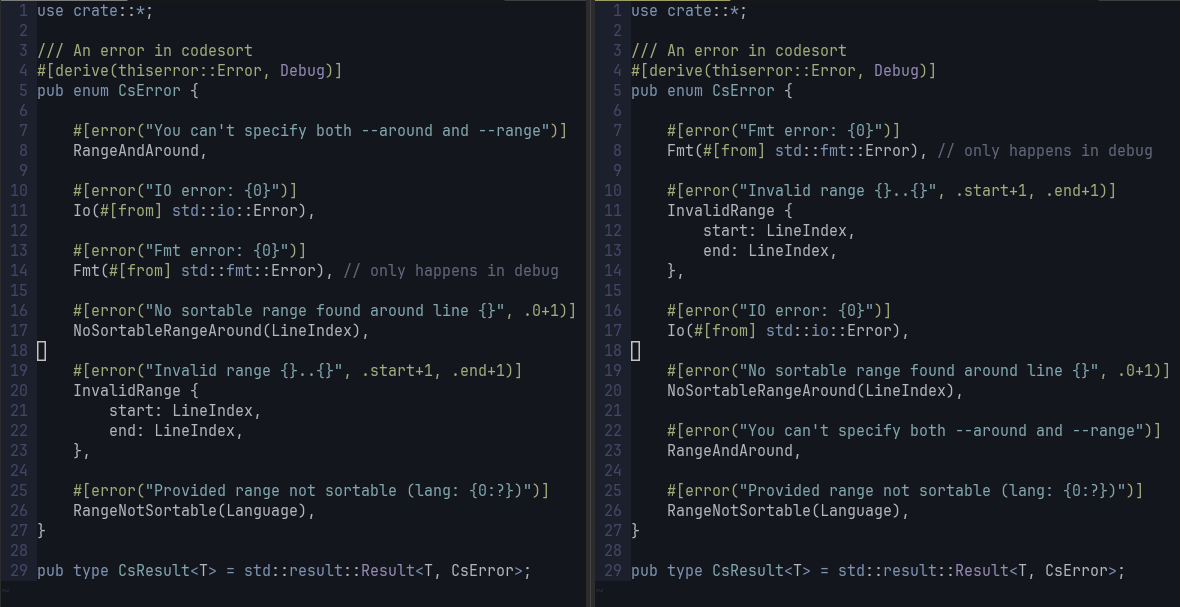
Here's the before and after of sorting around the cursor's line:
## Examples
<details><summary>Sort the variants of a rust enum</summary>
<img src=doc/cmd_result.png>
</details>
<details><summary>Sort the fields of a rust struct</summary>
<img src=doc/job.png>
</details>
<details><summary>Sort javascript function assignements</summary>
<img src=doc/notifs.png>
<i>Here, the range to sort has been visually selected.</i>
</details>
<details><summary>Sort the arms of a huge rust <code>match</code></summary>
<img src=doc/on_internal.png>
</details>
## Install codesort
Having Rust dev environment [installed](https://rustup.rs), run
```
cargo install codesort
```
## Usage
#### Sort a range in a file
```
codesort --range 6:26 src/my/file.rs
```
#### Sort around a line
Unless you specifically want to exclude a part of the list from sorting (eg a field you want to keep at the end of a struct), you should prefer to use `--around` which selects the range for you.
The first example of this readme has been sorted with the following command:
```
codesort --around 14 src/my/file.rs
```
Any other line number from `6` to `26` would have been fine, except the deeper lines `21` and `22`
(if you sort around line `22`, you sort `start` and `end`, which is probably not desired).
#### Sort from stdin, return to stdout
When no path is provided to codesort, specify the language using `--lang`/`-l`:
```
## Code Editor Integration
By default, **codesort** takes the code to sort from stdin and writes the sorted code to stdout.
It can sort either the whole input, a given range (with `--range`), or select the best range around a given line (using `--around`).
You can also change the input and output to be files, with `--src` and `--dst`.
If necessary, you can provide a filename to codesort for langage detection (the file doesn't have to exist, only the extension of the name will be used, eg `.js`).
Those options make it easy to integrate codesort in any editor. See below for vim.
## Use codesort in vim
#### Sort the selection
When you don't want to sort the whole range (for example because there's a specific entry that you want to keep at the beginning), you can specify the range.
Visually select the selection, then type `:`, then `!codesort`.
This changes the input to
```
:'<,'>!codesort
```
Press the `enter` key: the selection is sorted with codesort.
#### Add a binding to sort around the current line
You don't usually have to select the zone to sort.
You can ask codesort to automatically select the zone to sort around your current line.
Define this binding in your vim configuration:
```
" sort the optimal range around the current line
" See https://github.com/Canop/codesort
nnoremap <Leader>cs ma<ESC>:execute ":%!codesort --around ".line('.')." --detect ".shellescape(expand('%:t'))<CR>`a
```
Typing the leader key then 'cs' will automatically select the set of blocs around the current line and sort it.
Explanation of the command:
* the current position is saved in the `a` register with `ma`
* the command including the line number is built then executed with `:execute`
* the codesort command takes the current line number through `--around`
* the codesort command takes the filename, for langage detection, through `--detect`
* the previous position is then restored
## Supported Code kinds
3 code analyzers are available now:
* Rust / C / Zig
* Java
* JavaScript
## Contribute
Codesort is much tested on Rust, but would need tests and probably improvements for other languages.
Whatever the language and use case, please come discuss on [Miaou](https://miaou.dystroy.org/3768).
## Licence
**codesort** is licenced under [AGPL-3.0](https://www.gnu.org/licenses/agpl-3.0.en.html).
You're free to use the **codesort** program to sort the code of your choice, even commercial.