
codecraft




A minimalist 3D game engine in Rust, built on parts of Bevy (bevy_ecs,
bevy_color) with wgpu and winit.
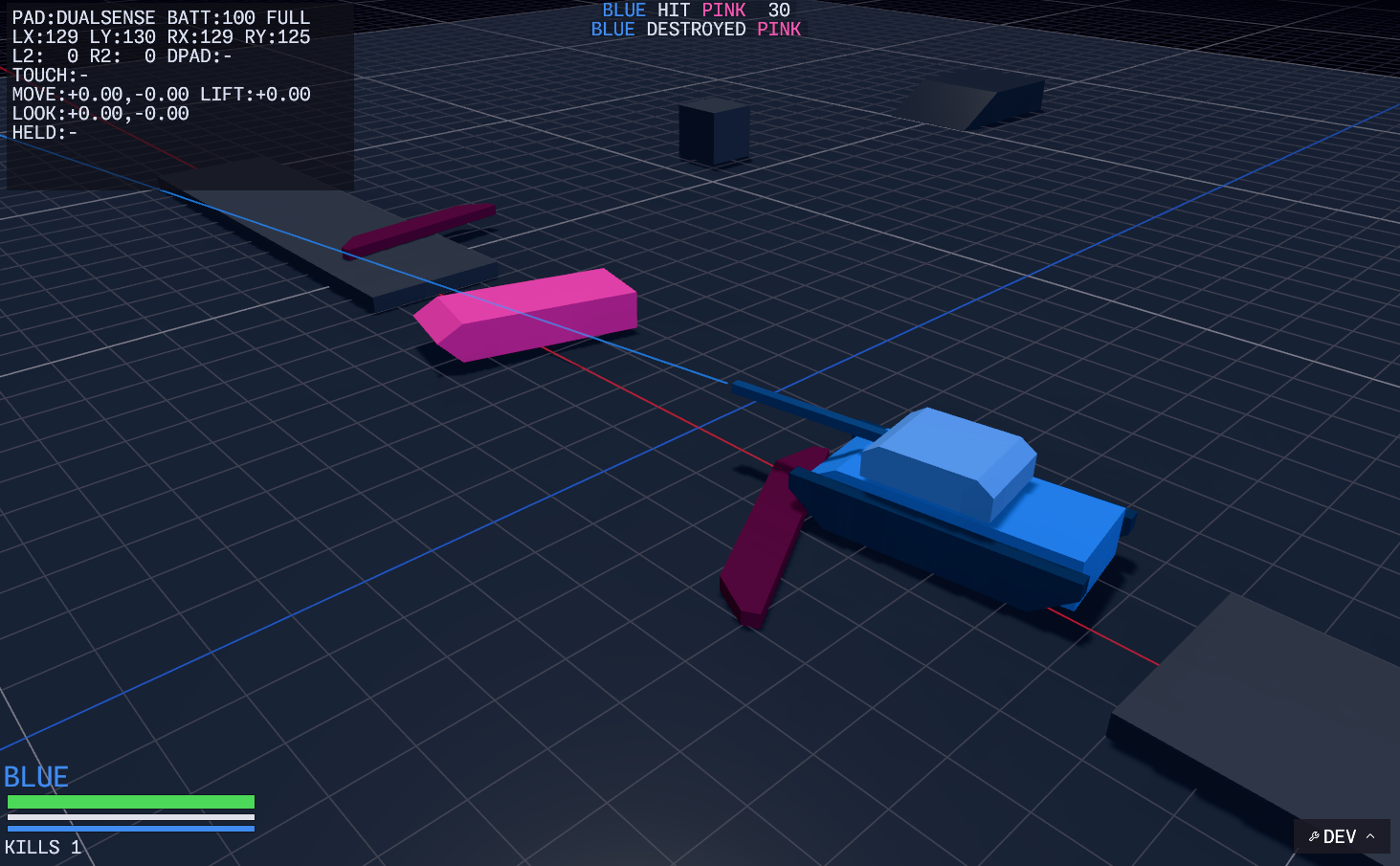
The tanks example in dev mode: OpenPBR shading, the HUD and battle log,
the DualSense overlay, and the grid.
A first scene
use Entity;
use Vec3;
use *;
use ;
A scene is a struct built with the app in hand: Hello::new spawns what it
needs and keeps the entity it will move. update runs every frame with the
whole app — the clock, the mouse, a ray under the cursor — and changes
components on that entity. This is cargo run --example hello.
Experimental. This is an early, in-progress engine. The API will change between releases without notice, and there are no stability promises yet. It is published so it can be used and looked at, not because it is done.
Where it is at
Today codecraft is the renderer and app shell that grew inside a couple of small games, pulled out into a crate of its own. What is in it:
- Rendering — physically based shading with OpenPBR materials, clustered lighting, a shadow-casting sun plus a second directional light, tonemapping to the display, and a wireframe/gizmo pass.
- Scenes — an
Appruns oneSceneat a time; a scene owns what it spawns and a scene change takes it all down. glTF meshes and code-built primitives (boxes, spheres, extrusions). - UI — immediate-mode, drawn with yakui every frame by whoever has something to show: menus, windows, an outliner, a frame profiler, a HUD. Icons are Phosphor, the font is Monaspace; both are compiled in.
- Input and feel — keyboard and mouse, an orbit camera rig, DualSense controllers over HID with haptics, trigger feedback, the lightbar and the pad's own speaker.
- Audio — sound sets and looping voices through
rodio. - Dev mode — F12 puts up a
DEVbadge with a menu, F11 an outliner of everything in the scene, F9 a profiler. A loopback control port can drive the app from a script and take screenshots of the actual frame. - The code map — the
codecraftbinary draws any folder as a 3D wall of nested boxes, and opens Rust files into their symbols (see below). It is the first step towards what the engine is for: editing code in 3D.
The code map
cargo install codecraft
cd some-folder
codecraft            # or: codecraft path/to/folder
The folder is walked (honouring .gitignore, skipping target and .git)
and drawn as wires and flat labels on a unit grid, read like a file
explorer: the folder is a wall, and every container lays its children out on
its front face — folders first, then files, in rows wrapped to a
screen-shaped block — with a margin round them and a header band for its
name. Each level sits one unit deeper than the one round it, so the nesting
reads in depth. A file's tile grows with its source — ten times the lines,
twice the side — and a Rust file opens into its structs, enums, traits,
functions, constants and macros as tiles, read with syn without compiling
anything. In a Cargo workspace the crates are picked out and their
dependencies, impl Trait for Type and use paths become relation lines.
Files show a thumbnail on their tile, made in the background and cached in
the user's cache directory: SVGs and raster images as themselves, fonts as
a type sample, glTF binaries as a shaded render, audio as its cover art or
a waveform, text and code as their first lines, archives as a listing, and
video frames and PDF pages when ffmpeg or pdftoppm/mutool are on the
path. Anything else gets a Phosphor icon for its kind. Boxes are coloured by nesting level, Rust orange at the top and
the hue turning with each level down, with translucent faces (the fill is
an option) so names read against them. Relation lines run from the thing that depends (white) to the thing it
depends on (that thing's colour): dashed for crate dependencies and
impl Trait for Type, solid for use; by default only the selected node's
are drawn.
Right-drag orbits, middle-drag pans, the wheel zooms, WASD/EQ move. Click a node to select it
(a module opens and closes), double-click or F to fly to it, / to search
by name, Home to fit everything, Esc to clear. Modules also open by
themselves as the camera comes near. Sources are watched and the map
re-indexes when they change.
The menu bar has the same under View, and Options sets how much is shown from far away: how many levels start open, how near the camera must be to open a module, the smallest label drawn, the range at which symbol labels are full size, how many labels at most, whose relation lines to draw, and whether private symbols appear. Forces pulls modules together in proportion to how much ties them, on top of the tree layout, so tightly coupled parts gather and outliers stay out; off, everything drifts back.
The longer-term aim is a 3D, structure-first code editor. None of that exists yet; what is here is the engine underneath it.
Examples
Small ones ship with the crate:
cargo run --example hello   # the first scene above: a cube that turns and follows clicks
cargo run --example cube    # a lit cube turning on a grid
cargo run --example menu    # two scenes and the buttons between them
Two games live in this repository as workspace members and are the real test of the engine:
cargo run -p tanks          # two-player tank battle, pads and haptics
cargo run -p chess          # 3D chess, playable on lichess
And cargo run on its own opens the code map of this repository.
Any app takes --headless to run without a window, and honours
RENDERER_CONTROL_PORT=<port> to accept commands (screenshot <path>,
key F12, quit, …) over loopback.
License
Licensed under either of Apache License, Version 2.0 or MIT license at your option.
Unless you explicitly state otherwise, any contribution intentionally submitted for inclusion in the work by you, as defined in the Apache-2.0 license, shall be dual licensed as above, without any additional terms or conditions.