<div align="center">
<a href="https://code2prompt.dev">
<img align="center" width="550px" src=".assets/logo_dark_v0.0.2.svg" alt="Code2prompt"/>
</a>
<p align="center">
<b>Convert your codebase into a single LLM prompt !</b>
</p>
</div>
<h1 align="center">
<a href="https://code2prompt.dev"><img src=".assets/CLI.png" alt="code2prompt"></a>
</h1>
<hr />
[](https://crates.io/crates/code2prompt)
[](https://github.com/mufeedvh/code2prompt/blob/master/LICENSE)
[](https://github.com/user/repo/pulls)
[](https://github.com/mufeedvh/code2prompt)
[](https://discord.com/invite/zxVMKtsFbK)
<hr />
<p align="center">
Want to engage with us ? Join our <a href="https://discord.com/invite/zxVMKtsFbK">Discord</a> channel!<br>
<i>Stay updated on new features</i> 📢<br>
<i>Give your insight and suggestion</i> 💬<br>
<i>Get help with configuration and usage</i> 🛠️<br>
<i>Report Bug</i> 🐛<br>
</p>
## Quick Install
With cargo:
```bash
cargo install code2prompt
```
## How is it useful?
`code2prompt` makes it easy to generate prompts for LLMs from your codebase. It traverses the directory, builds a tree structure, and collects information about each file. You can customize the prompt generation using Handlebars templates. The generated prompt is automatically copied to your clipboard and can also be saved to an output file. `code2prompt` helps streamline the process of creating LLM prompts for code analysis, generation, and other tasks.
## Documentation 📚
Check our online [documentation](https://odancona.github.io/code2prompt/) for usage
## Table of Contents ⛩️
- [Features](#features)
- [Installation](#installation)
- [Usage](#usage)
- [Templates](#templates)
- [User Defined Variables](#user-defined-variables)
- [Tokenizers](#tokenizers)
- [Python SDK](#python-sdk)
- [Contribution](#contribution)
- [License](#license)
## Features
You can run this tool on the entire directory and it would generate a well-formatted Markdown prompt detailing the source tree structure, and all the code. You can then upload this document to either GPT or Claude models with higher context windows and ask it to:
- Quickly generate LLM prompts from codebases of any size.
- Customize prompt generation with Handlebars templates. (See the [default template](src/default_template.hbs))
- Respects `.gitignore` (can be disabled with `--no-ignore`).
- Filter and exclude files using glob patterns.
- Control hidden file inclusion with `--hidden` flag.
- Display the token count of the generated prompt. (See [Tokenizers](#tokenizers) for more details)
- Optionally include Git diff output (staged files) in the generated prompt.
- Automatically copy the generated prompt to the clipboard.
- Save the generated prompt to an output file.
- Exclude files and folders by name or path.
- Add line numbers to source code blocks.
You can customize the prompt template to achieve any of the desired use cases. It essentially traverses a codebase and creates a prompt with all source files combined. In short, it automates copy-pasting multiple source files into your prompt and formatting them along with letting you know how many tokens your code consumes.
## Installation
### Binary releases
Download the latest binary for your OS from [Releases](https://github.com/mufeedvh/code2prompt/releases).
### Source build
Requires:
- [Git](https://git-scm.org/downloads), [Rust](https://rust-lang.org/tools/install) and Cargo.
```sh
git clone https://github.com/mufeedvh/code2prompt.git
cd code2prompt/
cargo build --release
```
## cargo
installs from the [`crates.io`](https://crates.io) registry.
```sh
cargo install code2prompt
```
For unpublished builds:
```sh
cargo install --git https://github.com/mufeedvh/code2prompt --force
```
### AUR
`code2prompt` is available in the [`AUR`](https://aur.archlinux.org/packages?O=0&K=code2prompt). Install it via any AUR helpers.
```sh
paru/yay -S code2prompt
```
### Nix
If you are on nix, You can use `nix-env` or `profile` to install.
```sh
# without flakes:
nix-env -iA nixpkgs.code2prompt
# with flakes:
nix profile install nixpkgs#code2prompt
```
## Usages
Generate a prompt from a codebase directory:
```sh
code2prompt path/to/codebase
```
Use a custom Handlebars template file:
```sh
code2prompt path/to/codebase --template path/to/template.hbs
```
Filter files using glob patterns:
```sh
code2prompt path/to/codebase --include="*.rs,*.toml"
```
Exclude files using glob patterns:
```sh
code2prompt path/to/codebase --exclude="*.txt,*.md"
```
Display the token count of the generated prompt:
```sh
code2prompt path/to/codebase --tokens
```
Specify a tokenizer for token count:
```sh
code2prompt path/to/codebase --tokens --encoding=p50k
```
Supported tokenizers: `cl100k`, `p50k`, `p50k_edit`, `r50k_bas`.
> [!NOTE]
> See [Tokenizers](#tokenizers) for more details.
Save the generated prompt to an output file:
```sh
code2prompt path/to/codebase --output-file=output.txt
```
Print output as JSON:
```sh
code2prompt path/to/codebase -O json
```
The JSON output will have the following structure:
```json
{
"prompt": "<Generated Prompt>",
"directory_name": "codebase",
"token_count": 1234,
"model_info": "ChatGPT models, text-embedding-ada-002",
"files": []
}
```
Generate a Git commit message (for staged files):
```sh
code2prompt path/to/codebase --diff --template templates/write-git-commit.hbs
```
Generate a Pull Request with branch comparing (for staged files):
```sh
code2prompt path/to/codebase --git-diff-branch 'main, development' --git-log-branch 'main, development' --template templates/write-github-pull-request.hbs
```
Add line numbers to source code blocks:
```sh
code2prompt path/to/codebase --line-number
```
Disable wrapping code inside markdown code blocks:
```sh
code2prompt path/to/codebase --no-codeblock
```
Include hidden files and directories:
```sh
code2prompt path/to/codebase --hidden
```
Skip .gitignore rules:
```sh
code2prompt path/to/codebase --no-ignore
```
## Templates
`code2prompt` comes with a set of built-in templates for common use cases. You can find them in the [`templates`](templates) directory.
### [`document-the-code.hbs`](templates/document-the-code.hbs)
Use this template to generate prompts for documenting the code. It will add documentation comments to all public functions, methods, classes and modules in the codebase.
### [`find-security-vulnerabilities.hbs`](templates/find-security-vulnerabilities.hbs)
Use this template to generate prompts for finding potential security vulnerabilities in the codebase. It will look for common security issues and provide recommendations on how to fix or mitigate them.
### [`clean-up-code.hbs`](templates/clean-up-code.hbs)
Use this template to generate prompts for cleaning up and improving the code quality. It will look for opportunities to improve readability, adherence to best practices, efficiency, error handling, and more.
### [`fix-bugs.hbs`](templates/fix-bugs.hbs)
Use this template to generate prompts for fixing bugs in the codebase. It will help diagnose issues, provide fix suggestions, and update the code with proposed fixes.
### [`write-github-pull-request.hbs`](templates/write-github-pull-request.hbs)
Use this template to create GitHub pull request description in markdown by comparing the git diff and git log of two branches.
### [`write-github-readme.hbs`](templates/write-github-readme.hbs)
Use this template to generate a high-quality README file for the project, suitable for hosting on GitHub. It will analyze the codebase to understand its purpose and functionality, and generate the README content in Markdown format.
### [`write-git-commit.hbs`](templates/write-git-commit.hbs)
Use this template to generate git commits from the staged files in your git directory. It will analyze the codebase to understand its purpose and functionality, and generate the git commit message content in Markdown format.
### [`improve-performance.hbs`](templates/improve-performance.hbs)
Use this template to generate prompts for improving the performance of the codebase. It will look for optimization opportunities, provide specific suggestions, and update the code with the changes.
You can use these templates by passing the `-t` flag followed by the path to the template file. For example:
```sh
code2prompt path/to/codebase -t templates/document-the-code.hbs
```
## User Defined Variables
`code2prompt` supports the use of user defined variables in the Handlebars templates. Any variables in the template that are not part of the default context (`absolute_code_path`, `source_tree`, `files`) will be treated as user defined variables.
During prompt generation, `code2prompt` will prompt the user to enter values for these user defined variables. This allows for further customization of the generated prompts based on user input.
For example, if your template includes `{{challenge_name}}` and `{{challenge_description}}`, you will be prompted to enter values for these variables when running `code2prompt`.
This feature enables creating reusable templates that can be adapted to different scenarios based on user provided information.
## Tokenizers
Tokenization is implemented using [`tiktoken-rs`](https://github.com/zurawiki/tiktoken-rs). `tiktoken` supports these encodings used by OpenAI models:
| `cl100k_base` | ChatGPT models, `text-embedding-ada-002` |
| `p50k_base` | Code models, `text-davinci-002`, `text-davinci-003` |
| `p50k_edit` | Use for edit models like `text-davinci-edit-001`, `code-davinci-edit-001` |
| `r50k_base` (or `gpt2`) | GPT-3 models like `davinci` |
| `o200k_base` | GPT-4o models |
For more context on the different tokenizers, see the [OpenAI Cookbook](https://github.com/openai/openai-cookbook/blob/66b988407d8d13cad5060a881dc8c892141f2d5c/examples/How_to_count_tokens_with_tiktoken.ipynb)
## Python SDK
code2prompt also provides Python bindings for seamless integration into Python applications. The Python SDK offers all the functionality of the CLI tool through an intuitive object-oriented interface.
See [python-sdk/README.md](python-sdk/README.md) for detailed documentation and usage examples.
Example usage:
```python
from code2prompt import CodePrompt
prompt = CodePrompt("./my_project", include_patterns=["*.py"])
result = prompt.generate(encoding="cl100k")
print(result["prompt"])
```
## Star History
[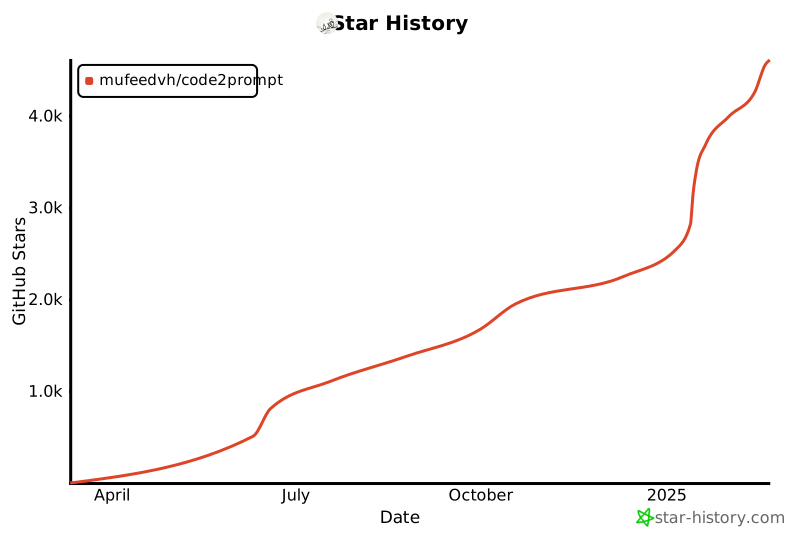](https://star-history.com/#mufeedvh/code2prompt&Date)
## License
Licensed under the MIT License, see <a href="https://github.com/mufeedvh/code2prompt/blob/master/LICENSE">LICENSE</a> for more information.
## Liked the project?
If you liked the project and found it useful, please give it a :star: !
## Contribution
Ways to contribute:
- Suggest a feature
- Report a bug
- Fix something and open a pull request
- Help me document the code
- Spread the word