# claude-oops
[](https://crates.io/crates/claude-oops)
[](https://github.com/silverhans/claude-oops/actions/workflows/ci.yml)
[](LICENSE)
[](https://github.com/silverhans/claude-oops/releases/latest)
> An undo button for Claude Code.
## What is this?
You're using **Claude Code** to help you write code. Claude is great, but
sometimes it gets enthusiastic — it deletes a file you needed, overwrites
something you weren't ready to lose, or runs `rm -rf` on the wrong folder.
By the time you notice, the work is gone.
`claude-oops` is a tiny tool that quietly takes a **snapshot of your
project** before Claude does anything risky, and once more after every
turn it finishes. If something goes wrong, you can rewind to any snapshot
in two seconds — even bringing back files Claude deleted entirely. You
don't have to remember to "save" anything; it happens automatically in
the background while you work.
Or, in one line: it gives you **git-style undo without giving Claude
git access**. Snapshots are stored as git objects, but Claude never sees
them — only you do.
It's like the **undo** button in your text editor, but for everything
Claude does to your project.
## A real "oh no" moment
You ask Claude:
> *"Clean up the old auth code, we're moving to OAuth."*
Claude is enthusiastic. It deletes `src/login.py`, `src/session.py`,
`src/users.py`, and rewrites half of `src/api.py`. You glance at the diff,
nod, move on.
Five minutes later you realize: **`session.py` actually had your
half-finished JWT implementation in it**. You hadn't committed yet. You
hadn't even saved a copy. Normally that would be the moment your stomach
drops.
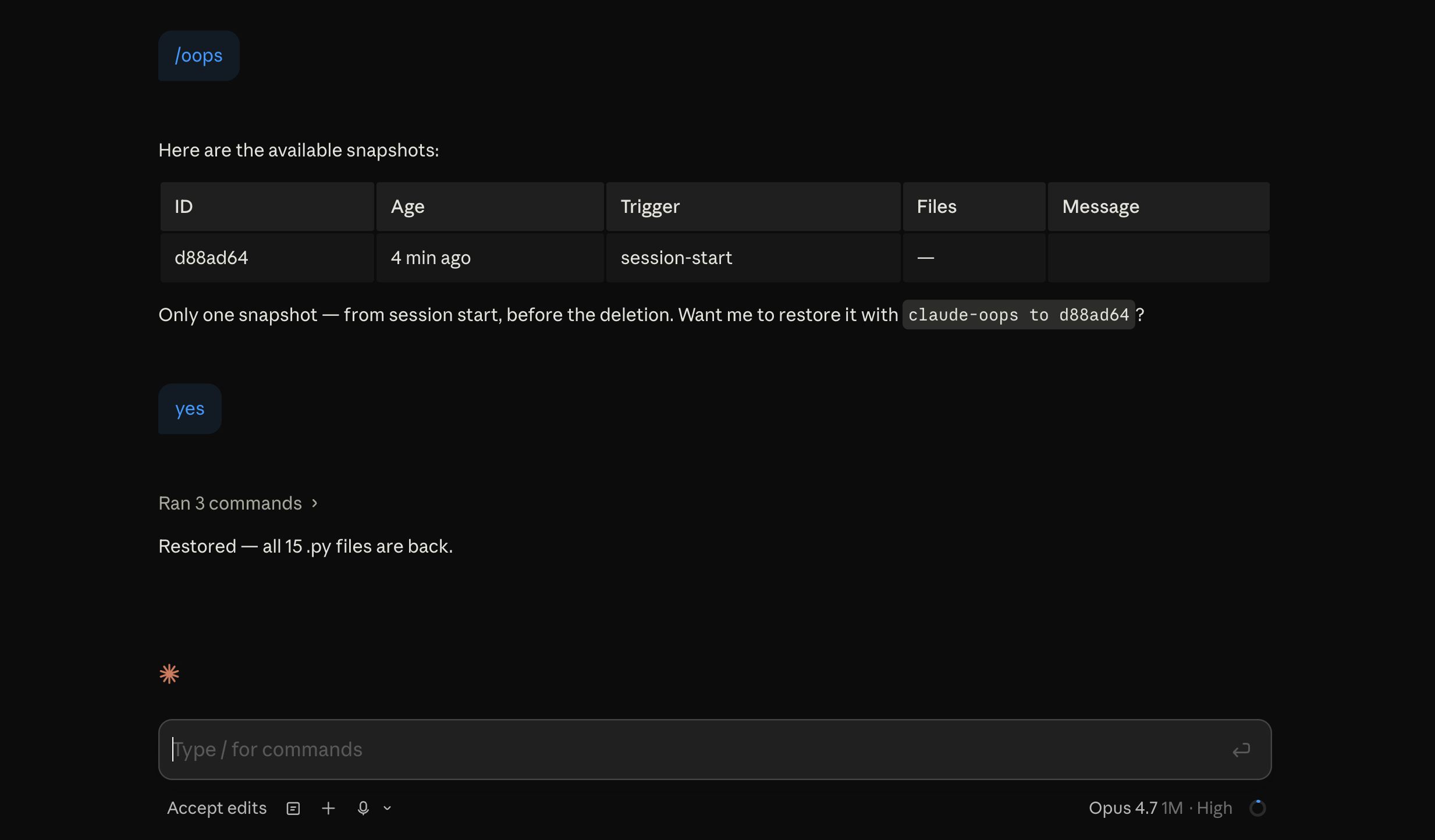
With `claude-oops` installed, you just type:
```
/oops
```
…inside your Claude Code session. Claude shows you a list of snapshots:
```
ID AGE TRIGGER MESSAGE
abc123f 2 min pre-bash rm src/session.py …
def4561 5 min pre-edit src/api.py
ghi789a 20 min session-start
```
You pick `abc123f` — the snapshot taken right before Claude started
deleting things. Claude (the assistant) restores everything for you. Your
JWT code is back. So is the rest of the world.
Total damage: 30 seconds and zero commits lost.
## Install
Both commands run in your terminal:
```bash
cargo install claude-oops # downloads the binary
claude-oops install # tells Claude Code to use it
```
That's it. Now open (or restart) any Claude Code session in a project
that's under git. `claude-oops` runs invisibly in the background.
> **Don't have Rust installed?** Pre-built binaries for macOS, Linux, and
> Windows are on the [Releases page](https://github.com/silverhans/claude-oops/releases/latest).
> Download, unzip, drop the binary somewhere on your `$PATH`, then run
> `claude-oops install`.
> **One requirement:** your project has to be a git repository. If it
> isn't, run `git init` once. (Snapshots are stored as git data, which is
> what makes them tiny and reliable. See [the FAQ](#faq) below for why.)
## How you actually use it
99% of the time, you don't. It just works. Snapshots happen automatically.
The 1% — when you want to undo something — you have two options.
### Option 1: from inside Claude Code (recommended)
Type `/oops` in the chat. Claude shows you the snapshot list and helps you
pick one to restore. It will preview which files are about to change before
actually doing it.
### Option 2: from your terminal
```bash
claude-oops list # show all snapshots
claude-oops show abc123f # which files would change on restore
claude-oops to abc123f # restore everything from this snapshot
claude-oops to abc123f -- src/auth.py # restore just one file
```
The terminal commands are useful when Claude isn't running, or when you
want to script things.
## When does it take snapshots?
`claude-oops` is designed to be **smart, not noisy**. A typical session
produces 3–7 snapshots, not 30. It only snapshots:
- **Once at the start** of every Claude Code session (a baseline you can
always rewind to).
- **Before Claude edits a file** — but only if your code actually changed
since the last snapshot, and at most once every 2 minutes.
- **Before Claude runs a dangerous shell command** — `rm -rf`,
`git reset --hard`, `sed -i`, `find … -delete`, and similar foot-guns.
Boring commands like `ls` or `npm test` don't trigger anything.
- **After Claude finishes a turn**, as a content-agnostic safety net.
This catches regressions even when the dangerous-command matcher missed
something (custom scripts, novel commands, tools the matcher doesn't
know about). Idempotency suppresses snapshots for chat-only turns
where nothing changed.
The last point matters especially in **agent-loop setups** where Claude
operates autonomously without git access — you can't trust Claude to
flag its own destructive moves, but every completed turn becomes an
atomic recoverable unit regardless.
You can also take a snapshot manually any time:
```bash
claude-oops snap -m "before refactor"
```
## All commands
| `snap [-m MSG]` | Take a snapshot right now. |
| `list [--json] [--limit N]` | Show snapshots in this project. |
| `show <id>` | Preview which files would change on restore. |
| `diff <id>` | Show the full diff vs a snapshot. |
| `to <id> [-f] [-- PATHS]` | Restore the working tree (or specific files). |
| `drop <id>` | Delete a snapshot. |
| `clean` | Apply retention (keep last 30, or last 7 days). |
| `status` | Snapshot count, latest, disk size. |
| `install` / `uninstall` | Wire up / remove the Claude Code hooks. |
`-f` skips the "are you sure?" prompt. Snapshot IDs can be shortened to any
unambiguous prefix.
## How it works under the hood
For the curious:
- **Storage.** Each snapshot is a real git commit object, pinned by a
reference at `refs/claude-oops/<id>`. Git's garbage collector leaves it
alone. Metadata (trigger, message, timestamp, line counts) lives in
`.git/claude-oops/index.jsonl` — one JSON object per line, append-only.
- **Capture.** We don't use `git stash` because it ignores untracked
files (which Claude creates and deletes all the time). Instead we build
a **private temporary index**, run `git add -A` into it, and `git
write-tree` — that gives us a tree object containing your entire
working state, including untracked files, without touching your real
index. So `git status` looks identical before and after a snapshot.
- **Restore.** `git read-tree <snapshot-tree>` into a private index, then
`git checkout-index -a -f` to extract everything. Files in your working
tree that aren't in the snapshot get deleted (because that's what
"restore the snapshot's state" means). **HEAD is never moved**, your
commit history is untouched.
- **Idempotency.** Auto-snapshots compare the captured tree SHA against
the previous snapshot. If nothing changed, no new snapshot is recorded.
Git's object store deduplicates anyway, so even without this you'd
pay almost zero disk for repeated snapshots.
## "If I need git anyway, why not just use git directly?"
Fair question. `claude-oops` isn't a storage tool — it's an **automation
layer** on top of git. Storage is git, and that's a feature: free,
deduplicated, no extra dependency to install. The value is in four
things bare git won't do for you:
1. **Capture untracked files without disturbing the working tree.**
`git stash` (default) ignores untracked. `git stash -u` captures them
but resets your working tree — that's not what you want a background
tool to do silently while you're working.
2. **Snapshot at the right moments, automatically.** With bare git you'd
have to remember to `git stash` before every risky thing Claude does.
Nobody actually does that. claude-oops hooks into Claude Code's
`SessionStart`, `PreToolUse`, and `Stop` events.
3. **Restore in two commands without spelunking the reflog.**
`claude-oops list` gives you a labelled, time-sorted table; `to <id>`
puts things back. The bare-git equivalent is some combination of
`git reflog` + `git stash list` + `git checkout-index` + tree-ish
syntax — workable when you're calm, less so when you've just realized
half your repo is gone.
4. **Give Claude undo without giving Claude git.** In agent-loop setups
where Claude operates autonomously, you often *don't* want to grant
it commit/branch/reset privileges (it breaks history, makes accidental
commits, destabilizes the repo). claude-oops puts the recovery layer
*outside* Claude's reach — every turn is automatically checkpointed,
and only you (or your supervising orchestrator) can rewind. **Git
semantics, without giving Claude the git CLI.**
Requiring git isn't really a requirement: git is on every dev machine,
and `git init` takes a second.
## FAQ
**Q: Will this clutter my git history with weird commits?**
No. Snapshots live under `refs/claude-oops/<id>`, not on any branch. They
don't show up in `git log`, don't get pushed when you run `git push` (which
only pushes `refs/heads/` and `refs/tags/` by default), and don't affect
your commit history at all. They're just object-store entries with a
private bookkeeping ref.
**Q: Will it make my repo huge?**
Almost certainly not. Git deduplicates by content, so if you take 50
snapshots of the same code, 49 of them are essentially free. A typical
session adds a few KB to your `.git` folder. The `clean` command prunes
old snapshots (keeps the last 30 or anything from the last 7 days).
**Q: Does this work outside Claude Code?**
Sort of — you can use `claude-oops snap` and `claude-oops to <id>` as a
manual undo system for any project under git. But the magic is the
**automatic** snapshots driven by Claude Code's hooks; without those, this
is just a clunky `git stash`.
**Q: What if my project isn't under git?**
Right now claude-oops requires a git repo. Snapshot-via-tarball is on the
roadmap but not implemented. For now, `git init` in your project — it
takes a second and you should probably be doing that anyway.
**Q: Will it survive me restarting my computer?**
Yes. Snapshots are stored on disk in your `.git` folder.
**Q: Will it sync to other machines?**
No, by design. Snapshots are local. They don't follow `git push`. If you
want a snapshot to survive on another machine, commit it normally.
## Limitations
- Files in `.gitignore` aren't captured. If `node_modules` is gitignored
and Claude deletes it, the snapshot won't bring it back. (`npm install`
will, though.)
- No cross-machine sync. Snapshots are local-only.
- No interactive TUI. List + restore is intentionally simple.
## Configuration
There's no config file. The defaults are tuned and hard-coded:
- 2-minute cooldown between auto-snapshots on edit-type events.
- Retention: keep the last 30 snapshots OR everything from the last 7
days, whichever is more permissive.
- Settings file: `~/.claude/settings.json` (override via env var
`CLAUDE_OOPS_SETTINGS`).
If you have a strong opinion about a default, [open an issue](https://github.com/silverhans/claude-oops/issues).
## Building from source
```bash
git clone https://github.com/silverhans/claude-oops
cd claude-oops
cargo install --path .
```
Quality bar: `cargo test`, `cargo clippy --all-targets -- -D warnings`,
and `cargo fmt --check` are all green on every commit. CI runs the test
suite on macOS, Linux, and Windows.
## License
MIT.
---
<details>
<summary><b>Show HN draft</b></summary>
> **Show HN: claude-oops — undo button for Claude Code**
>
> I built this after the third time Claude Code helpfully cleaned up my
> repo by removing files I needed. `claude-oops` takes a git-stash-style
> snapshot before risky operations and restores in two seconds.
>
> Install: `cargo install claude-oops && claude-oops install`. From then
> on every Edit/Write/dangerous Bash gets snapshotted. Type `/oops` in
> your Claude session, or run `claude-oops list` and `claude-oops to <id>`
> from a terminal.
>
> Source: <https://github.com/silverhans/claude-oops>. Built in Rust,
> single 1 MB binary, no runtime dependencies beyond git itself. Storage
> is git refs, so snapshots are local, free, and survive reboots.
>
> Happy to take design feedback — particularly on the hook trigger
> heuristics and the dangerous-bash pattern list.
</details>