# Claude Code Mux
[](https://github.com/9j/claude-code-mux/actions)
[](https://github.com/9j/claude-code-mux/releases/latest)
[](https://opensource.org/licenses/MIT)
[](https://www.rust-lang.org/)
[](https://github.com/9j/claude-code-mux)
[](https://github.com/9j/claude-code-mux/fork)
OpenRouter met Claude Code Router. They had a baby.
---
Now your coding assistant can use GLM 4.6 for one task, Kimi K2 Thinking for another, and Minimax M2 for a third. All in the same session. When your primary provider goes down, it falls back to your backup automatically.
⚡️ **Multi-model intelligence with provider resilience**
A lightweight, Rust-powered proxy that provides intelligent model routing, provider failover, streaming support, and full Anthropic API compatibility for Claude Code.
```
Claude Code → Claude Code Mux → Multiple AI Providers
(Anthropic API) (OpenAI/Anthropic APIs + Streaming)
```
## Table of Contents
- [Key Features](#key-features)
- [Installation](#installation)
- [Quick Start](#quick-start)
- [Screenshots](#screenshots)
- [Usage Guide](#usage-guide)
- [Routing Logic](#routing-logic)
- [Configuration Examples](#configuration-examples)
- [Supported Providers](#supported-providers)
- [Advanced Features](#advanced-features)
- [CLI Usage](#cli-usage)
- [Troubleshooting](#troubleshooting)
- [FAQ](#faq)
- [Performance](#performance)
- [Why Choose Claude Code Mux?](#why-choose-claude-code-mux)
- [Documentation](#documentation)
- [Changelog](#changelog)
- [Contributing](#contributing)
- [License](#license)
## Key Features
### 🎯 Core Features
- ✨ **Modern Admin UI** - Beautiful web interface with auto-save and URL-based navigation
- 🔐 **OAuth 2.0 Support** - FREE access for Claude Pro/Max, ChatGPT Plus/Pro, and Google AI Pro/Ultra
- 🧠 **Intelligent Routing** - Auto-route by task type (websearch, reasoning, background, default)
- 🔄 **Provider Failover** - Automatic fallback to backup providers with priority-based routing
- 🌊 **Streaming Support** - Full Server-Sent Events (SSE) streaming for real-time responses
- 🌐 **Multi-Provider Support** - 18+ providers including OpenAI, Anthropic, Google Gemini/Vertex AI, Groq, ZenMux, etc.
- ⚡️ **High Performance** - ~5MB RAM, <1ms routing overhead (Rust powered)
- 🎯 **Unified API** - Full Anthropic Messages API compatibility
### 🚀 Advanced Features
- 🔀 **Auto-mapping** - Regex-based model name transformation before routing (e.g., transform all `claude-*` to default model)
- 🎯 **Background Detection** - Configurable regex patterns for background task detection
- 🤖 **Multi-Agent Support** - Dynamic model switching via `CCM-SUBAGENT-MODEL` tags
- 📊 **Live Testing** - Built-in test interface to verify routing and responses
- ⚙️ **Centralized Settings** - Dedicated Settings tab for regex pattern management
## Screenshots
<details>
<summary>📸 Click to view screenshots (5 images)</summary>
### Overview Dashboard

*Main dashboard with router configuration and provider management*
### Provider Management

*Add and manage multiple AI providers with automatic format translation*
### Model Mappings with Fallback

*Configure models with priority-based fallback routing*
### Router Configuration

*Set up intelligent routing rules for different task types*
### Live Testing Interface
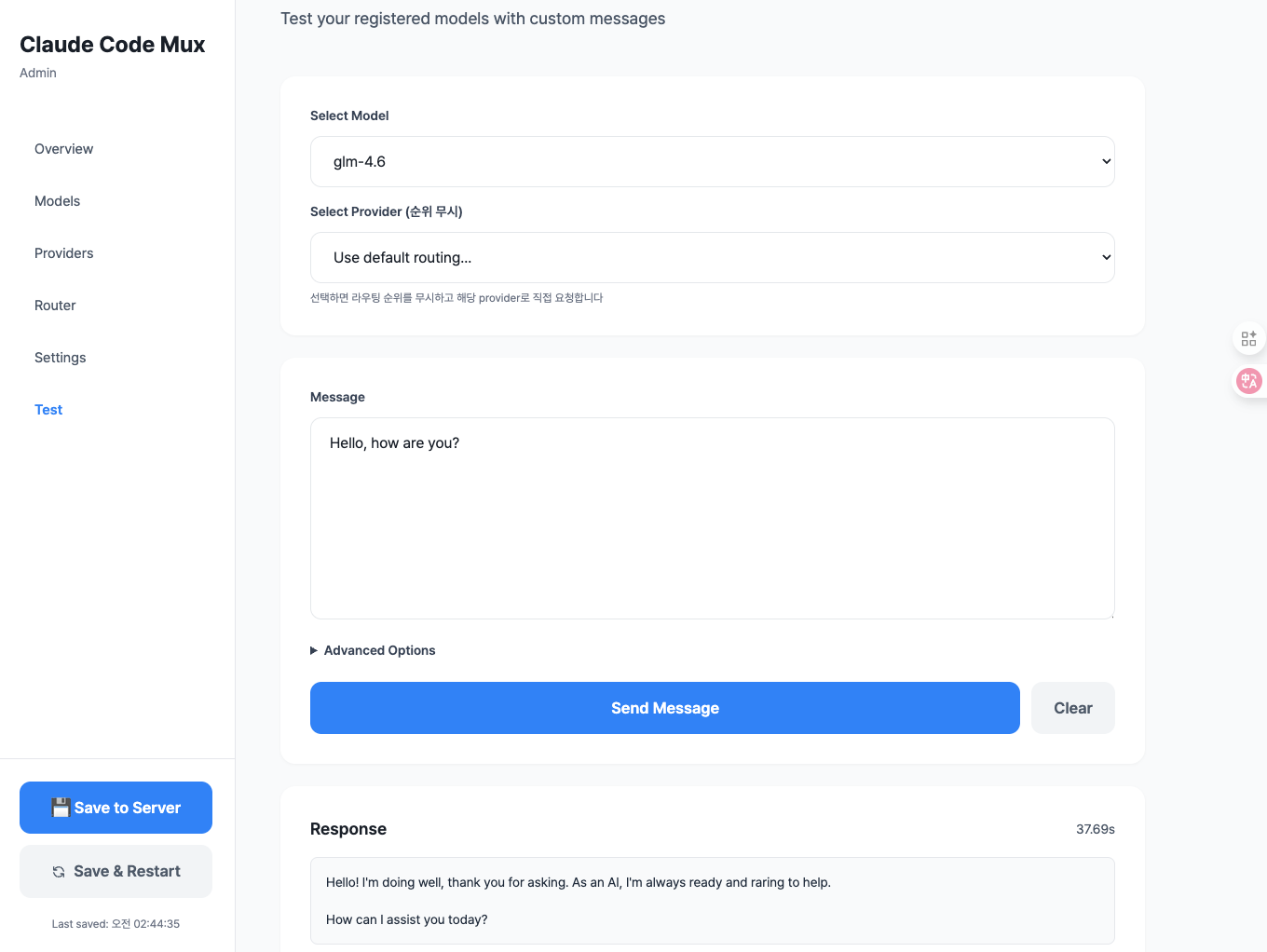
*Test your configuration with live API requests and responses*
</details>
## Supported Providers
**18+ AI providers with automatic format translation, streaming, and failover:**
- **Anthropic-compatible**: Anthropic (API Key/OAuth), ZenMux, z.ai, Minimax, Kimi
- **OpenAI-compatible**: OpenAI, OpenRouter, Groq, Together, Fireworks, Deepinfra, Cerebras, Moonshot, Nebius, NovitaAI, Baseten
- **Google AI**: Gemini (OAuth/API Key), Vertex AI (GCP ADC)
<details>
<summary>📋 View full provider details</summary>
### Anthropic-Compatible (Native Format)
- **Anthropic** - Official Claude API provider (supports both API Key and OAuth)
- **Anthropic (OAuth)** - 🆓 **FREE for Claude Pro/Max subscribers** via OAuth 2.0
- **ZenMux** - Unified API gateway (Sunnyvale, CA)
- **z.ai** - China-based, GLM models
- **Minimax** - China-based, MiniMax-M2 model
- **Kimi For Coding** - Premium membership for Kimi
### OpenAI-Compatible
- **OpenAI** - Official OpenAI API (supports both API Key and OAuth)
- **OpenAI (OAuth)** - 🆓 **FREE for ChatGPT Plus/Pro subscribers** via OAuth 2.0 (GPT-5.1, GPT-5.1 Codex)
- **OpenRouter** - Unified API gateway (500+ models)
- **Groq** - LPU inference (ultra-fast)
- **Together AI** - Open source model inference
- **Fireworks AI** - Fast inference platform
- **Deepinfra** - GPU inference
- **Cerebras** - Wafer-Scale Engine inference
- **Moonshot AI** - China-based, Kimi models (OpenAI-compatible)
- **Nebius** - AI inference platform
- **NovitaAI** - GPU cloud platform
- **Baseten** - ML deployment platform
### Google AI
- **Gemini** - Google AI Studio/Code Assist API (supports both OAuth and API Key)
- **Gemini (OAuth)** - 🆓 **FREE for Google AI Pro/Ultra subscribers** via OAuth 2.0 (Code Assist API)
- **Vertex AI** - GCP platform with ADC authentication (supports Gemini, Claude, Llama via Model Garden)
</details>
## Installation
### Option 1: Download Pre-built Binaries (Recommended)
Download the latest release for your platform from [GitHub Releases](https://github.com/9j/claude-code-mux/releases/latest).
#### Linux (x86_64)
```bash
# Download and extract (glibc)
curl -L https://github.com/9j/claude-code-mux/releases/latest/download/ccm-linux-x86_64.tar.gz | tar xz
# Or download musl version (static linking, more portable)
curl -L https://github.com/9j/claude-code-mux/releases/latest/download/ccm-linux-x86_64-musl.tar.gz | tar xz
# Move to PATH
sudo mv ccm /usr/local/bin/
```
#### macOS (Intel)
```bash
# Download and extract
curl -L https://github.com/9j/claude-code-mux/releases/latest/download/ccm-macos-x86_64.tar.gz | tar xz
# Move to PATH
sudo mv ccm /usr/local/bin/
```
#### macOS (Apple Silicon)
```bash
# Download and extract
# Move to PATH
sudo mv ccm /usr/local/bin/
```
#### Windows
1. Download [ccm-windows-x86_64.zip](https://github.com/9j/claude-code-mux/releases/latest/download/ccm-windows-x86_64.zip)
2. Extract the ZIP file
3. Add the directory containing `ccm.exe` to your PATH
#### Verify Installation
```bash
ccm --version
```
### Option 2: Install via Cargo
If you have Rust installed, you can install directly from crates.io:
```bash
cargo install claude-code-mux
```
This will download, compile, and install the `ccm` binary to your cargo bin directory (usually `~/.cargo/bin/`).
#### Verify Installation
```bash
ccm --version
```
### Option 3: Build from Source
#### Prerequisites
- Rust 1.70+ (install from [rustup.rs](https://rustup.rs/))
#### Build Steps
```bash
# Clone the repository
git clone https://github.com/9j/claude-code-mux
cd claude-code-mux
# Build the release binary
cargo build --release
# The binary will be available at target/release/ccm
```
#### Install to PATH (Optional)
```bash
# Copy to /usr/local/bin for global access
sudo cp target/release/ccm /usr/local/bin/
# Or add to your shell profile (e.g., ~/.zshrc or ~/.bashrc)
export PATH="$PATH:/path/to/claude-code-mux/target/release"
```
#### Run Directly Without Installing (Optional)
```bash
# From the project directory
cargo run --release -- start
```
## Quick Start
### 1. Start Claude Code Mux
```bash
ccm start
```
The server will start on `http://127.0.0.1:13456` with a web-based admin UI.
> **💡 First-time users**: A default configuration file will be automatically created at:
> - **Unix/Linux/macOS**: `~/.claude-code-mux/config.toml`
> - **Windows**: `%USERPROFILE%\.claude-code-mux\config.toml`
### 2. Open Admin UI
Navigate to:
```
http://127.0.0.1:13456
```
You'll see a modern admin interface with these tabs:
- **Overview** - System status and configuration summary
- **Providers** - Manage API providers
- **Models** - Configure model mappings and fallbacks
- **Router** - Set up routing rules (auto-saves on change!)
- **Test** - Test your configuration with live requests
### 3. Configure Claude Code
Set Claude Code to use the proxy:
```bash
export ANTHROPIC_BASE_URL="http://127.0.0.1:13456"
export ANTHROPIC_API_KEY="any-string"
claude
```
That's it! Your setup is complete.
## Usage Guide
### Step 1: Add Providers
Navigate to **Providers** tab → Click **"Add Provider"**
#### Example: Add Anthropic with OAuth (🆓 FREE for Claude Pro/Max)
1. Select provider type: **Anthropic**
2. Enter provider name: `claude-max`
3. Select authentication: **OAuth (Claude Pro/Max)**
4. Click **"🔐 Start OAuth Login"**
5. Authorize in the popup window
6. Copy and paste the authorization code
7. Click **"Complete Authentication"**
8. Click **"Add Provider"**
> **💡 Pro Tip**: Claude Pro/Max subscribers get **unlimited API access for FREE** via OAuth!
#### Example: Add ZenMux Provider
1. Select provider type: **ZenMux**
2. Enter provider name: `zenmux`
3. Select authentication: **API Key**
4. Enter API key: `your-zenmux-api-key`
5. Click **"Add Provider"**
#### Example: Add OpenAI Provider
1. Select provider type: **OpenAI**
2. Enter provider name: `openai`
3. Enter API key: `sk-...`
4. Click **"Add Provider"**
#### Example: Add z.ai Provider
1. Select provider type: **z.ai**
2. Enter provider name: `zai`
3. Enter API key: `your-zai-api-key`
4. Click **"Add Provider"**
#### Example: Add Google Gemini with OAuth (🆓 FREE for Google AI Pro/Ultra)
1. Select provider type: **Google Gemini**
2. Enter provider name: `gemini-pro`
3. Select authentication: **OAuth (Google AI Pro/Ultra)**
4. Click **"🔐 Start OAuth Login"**
5. Authorize in the popup window
6. Copy and paste the authorization code
7. Click **"Complete Authentication"**
8. Click **"Add Provider"**
> **💡 Pro Tip**: Google AI Pro/Ultra subscribers get **unlimited API access for FREE** via OAuth!
#### Example: Add Vertex AI Provider (GCP)
1. Select provider type: **☁️ Vertex AI**
2. Enter provider name: `vertex-ai`
3. Enter GCP Project ID: `your-gcp-project-id`
4. Enter Location: `us-central1` (or your preferred region)
5. Click **"Add Provider"**
> **Note**: Vertex AI uses Application Default Credentials (ADC). Make sure you've run `gcloud auth application-default login` first.
**Supported Providers**:
- Anthropic-compatible: Anthropic (API Key or OAuth), ZenMux, z.ai, Minimax, Kimi
- OpenAI-compatible: OpenAI, OpenRouter, Groq, Together, Fireworks, Deepinfra, Cerebras, Nebius, NovitaAI, Baseten
- Google AI: Gemini (OAuth/API Key), Vertex AI (GCP ADC)
### Step 2: Add Model Mappings
Navigate to **Models** tab → Click **"Add Model"**
#### Example: Minimax M2 (Ultra-fast, Low Cost)
1. Model Name: `minimax-m2`
2. Add mapping:
- Provider: `minimax`
- Actual Model: `MiniMax M2`
- Priority: `1`
3. Click **"Add Model"**
> **Why Minimax M2?** - $0.30/$1.20 per M tokens (8% of Claude Sonnet 4.5 cost), 100 TPS throughput, MoE architecture
#### Example: GLM-4.6 with Fallback (Cost Optimized)
1. Model Name: `glm-4.6`
2. Add mappings:
- **Mapping 1** (Primary):
- Provider: `zai`
- Actual Model: `glm-4.6`
- Priority: `1`
- **Mapping 2** (Fallback):
- Provider: `openrouter`
- Actual Model: `z-ai/glm-4.6`
- Priority: `2`
3. Click **"+ Fallback Provider Add"** to add more fallbacks
4. Click **"Add Model"**
> **How Fallback Works**: If `zai` provider fails, automatically falls back to `openrouter`
>
> **GLM-4.6 Pricing**: $0.60/$2.20 per M tokens (90% cheaper than Claude Sonnet 4.5), 200K context window
### Step 3: Configure Router
Navigate to **Router** tab
Configure routing rules (auto-saves on change!):
- **Default Model**: `minimax-m2` (general tasks - ultra-fast, 8% of Claude cost)
- **Think Model**: `kimi-k2` (plan mode with reasoning - 256K context)
- **Background Model**: `glm-4.5-air` (simple background tasks)
- **WebSearch Model**: `glm-4.6` (web search tasks)
- **Auto-map Regex Pattern**: `^claude-` (transform Claude models before routing)
- **Background Task Regex Pattern**: `(?i)claude.*haiku` (detect background tasks)
### Step 3.5: Configure Regex Patterns (Optional)
Navigate to **Settings** tab for centralized regex management:
- **Auto-mapping Pattern**: Regex to match models for transformation (e.g., `^claude-`)
- Matched models are transformed to the default model
- Then routing logic (WebSearch/Think/Background) is applied
- **Background Task Pattern**: Regex to detect background tasks (e.g., `(?i)claude.*haiku`)
- Matches against the ORIGINAL model name (before auto-mapping)
- Matched models use the background model
### Step 4: Save Configuration
Click **"💾 Save to Server"** to save configuration to disk, or **"🔄 Save & Restart"** to save and restart the server.
> **Note**: Router configuration auto-saves to localStorage on change, but you need to click "Save to Server" to persist to disk.
### Step 5: Test Your Setup
Navigate to **Test** tab:
1. Select a model (e.g., `minimax-m2` or `glm-4.6`)
2. Enter a message: `Hello, test message`
3. Click **"Send Message"**
4. View the response and check routing logs
## Routing Logic
**Flow**: Auto-map (transform) → WebSearch > Subagent > Think > Background > Default
### 0. Auto-mapping (Model Name Transformation)
- **Trigger**: Model name matches `auto_map_regex` pattern
- **Example**: Request with `model="claude-4-5-sonnet"` and regex `^claude-`
- **Action**: Transform `claude-4-5-sonnet` → `minimax-m2` (default model)
- **Then**: Continue to routing logic below
- **Configuration**: Set in Router or Settings tab
> **Key Point**: Auto-mapping is NOT a routing decision - it transforms the model name BEFORE routing logic is applied.
### 1. WebSearch (Highest Priority)
- **Trigger**: Request contains `web_search` tool in tools array
- **Example**: Claude Code using web search tool
- **Routes to**: `websearch` model (e.g., GLM-4.6)
### 2. Subagent Model
- **Trigger**: System prompt contains `<CCM-SUBAGENT-MODEL>model-name</CCM-SUBAGENT-MODEL>` tag
- **Example**: AI agent specifying model for sub-task
- **Routes to**: Specified model (tag auto-removed)
### 3. Think Mode
- **Trigger**: Request has `thinking` field with `type: "enabled"`
- **Example**: Claude Code Plan Mode (`/plan`)
- **Routes to**: `think` model (e.g., Kimi K2 Thinking, Claude Opus)
### 4. Background Tasks
- **Trigger**: ORIGINAL model name matches `background_regex` pattern
- **Default Pattern**: `(?i)claude.*haiku` (case-insensitive)
- **Example**: Request with `model="claude-4-5-haiku"` (checked BEFORE auto-mapping)
- **Routes to**: `background` model (e.g., GLM-4.5-air)
- **Configuration**: Set in Router or Settings tab
> **Important**: Background detection uses the ORIGINAL model name, not the auto-mapped one.
### 5. Default (Fallback)
- **Trigger**: No routing conditions matched
- **Routes to**: Transformed model name (if auto-mapped) or original model name
## Routing Examples
### Example 1: Claude Haiku with Web Search
```
Request: model="claude-4-5-haiku", tools=[web_search]
Config: auto_map_regex="^claude-", background_regex="(?i)claude.*haiku", websearch="glm-4.6"
Flow:
1. Auto-map: "claude-4-5-haiku" → "minimax-m2" (transformed)
2. WebSearch check: tools has web_search → Route to "glm-4.6"
Result: glm-4.6 (websearch model)
```
### Example 2: Claude Haiku (No Special Conditions)
```
Request: model="claude-4-5-haiku"
Config: auto_map_regex="^claude-", background_regex="(?i)claude.*haiku", background="glm-4.5-air"
Flow:
1. Auto-map: "claude-4-5-haiku" → "minimax-m2" (transformed)
2. WebSearch check: No web_search tool
3. Think check: No thinking field
4. Background check on ORIGINAL: "claude-4-5-haiku" matches "(?i)claude.*haiku" → Route to "glm-4.5-air"
Result: glm-4.5-air (background model)
```
### Example 3: Claude Sonnet with Think Mode
```
Request: model="claude-4-5-sonnet", thinking={type:"enabled"}
Config: auto_map_regex="^claude-", think="kimi-k2-thinking"
Flow:
1. Auto-map: "claude-3-5-sonnet" → "minimax-m2" (transformed)
2. WebSearch check: No web_search tool
3. Think check: thinking.type="enabled" → Route to "kimi-k2-thinking"
Result: kimi-k2-thinking (think model)
```
### Example 4: Non-Claude Model (No Auto-mapping)
```
Request: model="glm-4.6"
Config: auto_map_regex="^claude-", default="minimax-m2"
Flow:
1. Auto-map: "glm-4.6" doesn't match "^claude-" → No transformation
2. WebSearch check: No web_search tool
3. Think check: No thinking field
4. Background check: "glm-4.6" doesn't match background regex
5. Default: Use model name as-is
Result: glm-4.6 (original model name, routed through model mappings)
```
## Configuration Examples
### Cost Optimized Setup (~$0.35/1M tokens avg)
**Providers**:
- Minimax (ultra-fast, ultra-cheap)
- z.ai (GLM models)
- Kimi (for thinking tasks)
- OpenRouter (fallback)
**Models**:
- `minimax-m2` → Minimax (`MiniMax M2`) — $0.30/$1.20 per M tokens
- `glm-4.6` → z.ai (`glm-4.6`) with OpenRouter fallback — $0.60/$2.20 per M tokens
- `glm-4.5-air` → z.ai (`glm-4.5-air`) — Lower cost than GLM-4.6
- `kimi-k2-thinking` → Kimi (`kimi-k2-thinking`) — Reasoning optimized, 256K context
**Routing**:
- Default: `minimax-m2` (8% of Claude cost, 100 TPS)
- Think: `kimi-k2-thinking` (thinking model with 256K context)
- Background: `glm-4.5-air` (simple tasks)
- WebSearch: `glm-4.6` (web search + reasoning)
- Auto-map Regex: `^claude-` (transform Claude models to minimax-m2)
- Background Regex: `(?i)claude.*haiku` (detect Haiku models for background)
**Cost Comparison** (per 1M tokens):
- Minimax M2: $0.30 input / $1.20 output
- GLM-4.6: $0.60 input / $2.20 output
- Claude Sonnet 4.5: $3.00 input / $15.00 output
- **Savings**: ~90% cost reduction vs Claude
### Quality Focused Setup
**Providers**:
- Anthropic (native Claude)
- OpenRouter (for fallbacks)
**Models**:
- `claude-sonnet-4-5` → Anthropic native
- `claude-opus-4-1` → Anthropic native
**Routing**:
- Default: `claude-sonnet-4-5`
- Think: `claude-opus-4-1`
- Background: `claude-haiku-4-5`
- WebSearch: `claude-sonnet-4-5`
### Multi-Provider with Fallback
**Providers**:
- Minimax (primary, ultra-fast)
- z.ai (for GLM models)
- OpenRouter (fallback for all)
**Models**:
- `minimax-m2`:
- Priority 1: Minimax → `MiniMax-M2`
- Priority 2: OpenRouter → `minimax/minimax-m2` (if available)
- `glm-4.6`:
- Priority 1: z.ai → `glm-4.6`
- Priority 2: OpenRouter → `z-ai/glm-4.6`
**Routing**:
- Default: `minimax-m2` (falls back to OpenRouter if Minimax fails)
- Think: `glm-4.6` (with OpenRouter fallback)
- Background: `glm-4.5-air`
- WebSearch: `glm-4.6`
## Advanced Features
### OAuth Authentication (FREE for Claude Pro/Max, ChatGPT Plus/Pro & Google AI Pro/Ultra)
Claude Pro/Max, ChatGPT Plus/Pro, and Google AI Pro/Ultra subscribers can use their respective APIs **completely free** via OAuth 2.0 authentication.
#### Setting Up OAuth
**Via Web UI** (Recommended):
**For Claude Pro/Max**:
1. Navigate to **Providers** tab → **"Add Provider"**
2. Select provider type: **Anthropic**
3. Enter provider name (e.g., `claude-max`)
4. Select authentication: **OAuth (Claude Pro/Max)**
5. Click **"🔐 Start OAuth Login"**
6. Complete authorization in popup window
7. Copy and paste the authorization code
8. Click **"Complete Authentication"**
**For ChatGPT Plus/Pro**:
1. Navigate to **Providers** tab → **"Add Provider"**
2. Select provider type: **OpenAI**
3. Enter provider name (e.g., `chatgpt-codex`)
4. Select authentication: **OAuth (ChatGPT Plus/Pro)**
5. Click **"🔐 Start OAuth Login"**
6. Complete authorization in popup window (port 1455)
7. Copy and paste the authorization code
8. Click **"Complete Authentication"**
**For Google AI Pro/Ultra**:
1. Navigate to **Providers** tab → **"Add Provider"**
2. Select provider type: **Google Gemini**
3. Enter provider name (e.g., `gemini-pro`)
4. Select authentication: **OAuth (Google AI Pro/Ultra)**
5. Click **"🔐 Start OAuth Login"**
6. Complete authorization in popup window
7. Copy and paste the authorization code
8. Click **"Complete Authentication"**
> **💡 Supported Models**:
> - **Claude OAuth**: All Claude models (Opus, Sonnet, Haiku)
> - **ChatGPT OAuth**: GPT-5.1, GPT-5.1 Codex (with reasoning blocks converted to thinking)
> - **Gemini OAuth**: All Gemini models via Code Assist API (Pro, Flash, Ultra)
**Via CLI Tool**:
```bash
# Run OAuth login tool
cargo run --example oauth_login
# Or if installed
./examples/oauth_login
```
The tool will:
1. Generate an authorization URL
2. Open your browser for authorization
3. Prompt for the authorization code
4. Exchange code for access/refresh tokens
5. Save tokens to `~/.claude-code-mux/oauth_tokens.json`
#### Managing OAuth Tokens
Navigate to **Settings** tab → **OAuth Tokens** section to:
- **View token status** (Active/Needs Refresh/Expired)
- **Refresh tokens** manually (auto-refresh happens 5 minutes before expiry)
- **Delete tokens** when no longer needed
**Token Features**:
- 🔐 Secure PKCE-based OAuth 2.0 flow
- 🔄 Automatic token refresh (5 min before expiry)
- 💾 Persistent storage with file permissions (0600)
- 🎨 Visual status indicators (green/yellow/red)
**Security Notes**:
- Tokens are stored with `0600` permissions (owner read/write only)
- Never commit `oauth_tokens.json` to version control
- Tokens auto-refresh before expiration
- PKCE protects against authorization code interception
#### OAuth API Endpoints
For advanced integrations:
- `POST /api/oauth/authorize` - Get authorization URL
- `POST /api/oauth/exchange` - Exchange code for tokens
- `GET /api/oauth/tokens` - List all tokens
- `POST /api/oauth/tokens/refresh` - Refresh a token
- `POST /api/oauth/tokens/delete` - Delete a token
See `docs/OAUTH_TESTING.md` for detailed API documentation.
### Auto-mapping with Regex
Automatically transform model names before routing logic is applied:
1. Navigate to **Router** or **Settings** tab
2. Set **Auto-map Regex Pattern**: `^claude-`
3. All requests for `claude-*` models will be transformed to your default model
4. Then routing logic (WebSearch/Think/Background) is applied to the transformed request
**Use Cases**:
- Transform all Claude models to cost-optimized alternative: `^claude-`
- Transform both Claude and GPT models: `^(claude-|gpt-)`
- Transform specific models only: `^(claude-sonnet|claude-opus)`
**Example**:
```
Config: auto_map_regex="^claude-", default="minimax-m2", websearch="glm-4.6"
Request: model="claude-sonnet", tools=[web_search]
Flow:
1. Transform: "claude-sonnet" → "minimax-m2"
2. Route: WebSearch detected → "glm-4.6"
Result: glm-4.6 model
```
### Background Task Detection with Regex
Automatically detect and route background tasks using regex patterns:
1. Navigate to **Router** or **Settings** tab
2. Set **Background Regex Pattern**: `(?i)claude.*haiku`
3. All requests matching this pattern will use your background model
**Use Cases**:
- Route all Haiku models to cheap background model: `(?i)claude.*haiku`
- Route specific model tiers: `(?i)(haiku|flash|mini)`
- Custom patterns for your naming convention
**Important**: Background detection checks the ORIGINAL model name (before auto-mapping)
### Streaming Responses
Full Server-Sent Events (SSE) streaming support:
```bash
curl -X POST http://127.0.0.1:13456/v1/messages \
-H "Content-Type: application/json" \
-H "anthropic-version: 2023-06-01" \
-d '{
"model": "minimax-m2",
"max_tokens": 1000,
"stream": true,
"messages": [{"role": "user", "content": "Hello"}]
}'
```
**Supported Providers**:
- ✅ Anthropic-compatible: ZenMux, z.ai, Kimi, Minimax
- ✅ OpenAI-compatible: OpenAI, OpenRouter, Groq, Together, Fireworks, etc.
### Provider Failover
Automatic failover with priority-based routing:
```toml
[[models]]
name = "glm-4.6"
[[models.mappings]]
actual_model = "glm-4.6"
priority = 1
provider = "zai"
[[models.mappings]]
actual_model = "z-ai/glm-4.6"
priority = 2
provider = "openrouter"
```
If z.ai fails, automatically falls back to OpenRouter. Works with all providers!
## CLI Usage
### Start the Server
```bash
# Start with default config (~/.claude-code-mux/config.toml)
# Config file is automatically created if it doesn't exist
ccm start
# Start with custom config
ccm start --config path/to/config.toml
# Start on custom port
ccm start --port 8080
```
**Default Config Location**:
- **Unix/Linux/macOS**: `~/.claude-code-mux/config.toml`
- **Windows**: `%USERPROFILE%\.claude-code-mux\config.toml` (e.g., `C:\Users\<username>\.claude-code-mux\config.toml`)
### Run in Background
#### Using nohup (Unix/Linux/macOS)
```bash
# Start in background
nohup ccm start > ccm.log 2>&1 &
# Check if running
# Stop the server
pkill ccm
```
#### Using systemd (Linux)
Create `/etc/systemd/system/ccm.service`:
```ini
[Unit]
Description=Claude Code Mux
After=network.target
[Service]
Type=simple
User=your-username
WorkingDirectory=/path/to/claude-code-mux
ExecStart=/path/to/claude-code-mux/target/release/ccm start
Restart=on-failure
RestartSec=5s
[Install]
WantedBy=multi-user.target
```
Then:
```bash
# Reload systemd
sudo systemctl daemon-reload
# Enable on boot
sudo systemctl enable ccm
# Start service
sudo systemctl start ccm
# Check status
sudo systemctl status ccm
# View logs
sudo journalctl -u ccm -f
```
#### Using launchd (macOS)
Create `~/Library/LaunchAgents/com.ccm.plist`:
```xml
<?xml version="1.0" encoding="UTF-8"?>
<!DOCTYPE plist PUBLIC "-//Apple//DTD PLIST 1.0//EN" "http://www.apple.com/DTDs/PropertyList-1.0.dtd">
<plist version="1.0">
<dict>
<key>Label</key>
<string>com.ccm</string>
<key>ProgramArguments</key>
<array>
<string>/path/to/claude-code-mux/target/release/ccm</string>
<string>start</string>
</array>
<key>RunAtLoad</key>
<true/>
<key>KeepAlive</key>
<true/>
<key>StandardOutPath</key>
<string>/tmp/ccm.log</string>
<key>StandardErrorPath</key>
<string>/tmp/ccm.error.log</string>
</dict>
</plist>
```
Then:
```bash
# Load and start
launchctl load ~/Library/LaunchAgents/com.ccm.plist
# Stop
launchctl unload ~/Library/LaunchAgents/com.ccm.plist
# Check status
launchctl list | grep ccm
```
### Other Commands
```bash
# Show version
ccm --version
# Show help
ccm --help
```
## Supported Features
- ✅ Full Anthropic API compatibility (`/v1/messages`)
- ✅ Token counting endpoint (`/v1/messages/count_tokens`)
- ✅ Extended thinking (Plan Mode support)
- ✅ **Streaming responses** (SSE format)
- ✅ System prompts (string and array formats)
- ✅ Tool calling
- ✅ Vision (image inputs)
- ✅ **Auto-mapping** with regex patterns
- ✅ **Provider failover** with priority-based routing
- ✅ Auto-strip incompatible parameters for OpenAI models
## Troubleshooting
### Check if server is running
```bash
curl http://127.0.0.1:13456/api/config/json
```
### Enable debug logging
Set environment variable:
```bash
RUST_LOG=debug ccm start
```
Or update your config file (`~/.claude-code-mux/config.toml`):
```toml
[server]
log_level = "debug"
```
### Test routing directly
```bash
curl -X POST http://127.0.0.1:13456/v1/messages \
-H "Content-Type: application/json" \
-H "anthropic-version: 2023-06-01" \
-d '{
"model": "minimax-m2",
"max_tokens": 100,
"messages": [{"role": "user", "content": "Hello"}]
}'
```
### View real-time logs
```bash
# If running with RUST_LOG
RUST_LOG=info ccm start
# Check system logs
tail -f ~/.claude-code-mux/ccm.log
```
## Performance
- **Memory**: ~6MB RAM (vs ~156MB for Node.js routers) - **25x more efficient**
- **Startup**: <100ms cold start
- **Routing**: <1ms overhead per request
- **Throughput**: Handles 1000+ req/s on modern hardware
- **Streaming**: Zero-copy SSE streaming with minimal latency
## FAQ
<details>
<summary><b>Does it work with my existing Claude Code setup?</b></summary>
Yes! Just set two environment variables:
```bash
export ANTHROPIC_BASE_URL="http://127.0.0.1:13456"
export ANTHROPIC_API_KEY="any-string"
claude
```
</details>
<details>
<summary><b>What happens if all providers fail?</b></summary>
The proxy returns an error response with details about the failover chain and which providers were attempted. Check the logs for debugging information.
</details>
<details>
<summary><b>Can I use this with Claude Pro/Max, ChatGPT Plus/Pro, or Google AI Pro/Ultra subscription?</b></summary>
Yes! Claude Code Mux supports OAuth 2.0 authentication for all three providers:
- **Claude Pro/Max**: Providers tab → Add Provider → Select "Anthropic" → Choose "OAuth (Claude Pro/Max)"
- **ChatGPT Plus/Pro**: Providers tab → Add Provider → Select "OpenAI" → Choose "OAuth (ChatGPT Plus/Pro)"
- **Google AI Pro/Ultra**: Providers tab → Add Provider → Select "Google Gemini" → Choose "OAuth (Google AI Pro/Ultra)"
All three provide **FREE unlimited API access** to subscribers!
</details>
<details>
<summary><b>How do I add a new AI provider?</b></summary>
1. Navigate to the **Providers** tab in the admin UI
2. Click **"Add Provider"**
3. Select provider type (Anthropic-compatible or OpenAI-compatible)
4. Enter provider name, API key, and base URL
5. Click **"Add Provider"**
6. Click **"Save to Server"**
</details>
<details>
<summary><b>Why is my routing not working as expected?</b></summary>
Check the routing order:
1. **WebSearch** (highest priority) - if request has `web_search` tool
2. **Subagent** - if system prompt contains `<CCM-SUBAGENT-MODEL>` tag
3. **Think Mode** - if request has `thinking` field
4. **Background** - if ORIGINAL model name matches background regex
5. **Default** - fallback
Enable debug logging with `RUST_LOG=debug ccm start` to see routing decisions.
</details>
<details>
<summary><b>How do I report bugs or request features?</b></summary>
- **Bug reports**: [Open a GitHub issue](https://github.com/9j/claude-code-mux/issues/new)
- **Feature requests**: [Start a discussion](https://github.com/9j/claude-code-mux/discussions)
- **Security issues**: Email the maintainer (see GitHub profile)
</details>
## Why Choose Claude Code Mux?
### 🎯 Two Core Advantages
#### 1. **Automatic Failover** 🔄
Priority-based provider fallback - if your primary provider fails, automatically route to backup:
```toml
[[models]]
name = "glm-4.6"
[[models.mappings]]
actual_model = "glm-4.6"
priority = 1
provider = "zai"
[[models.mappings]]
actual_model = "z-ai/glm-4.6"
priority = 2
provider = "openrouter"
```
If `zai` fails → automatically falls back to `openrouter`. **No manual intervention needed.**
> **💡 Why This Matters**: Claude Code Router doesn't have failover - if a provider goes down, your workflow stops. With Claude Code Mux, you get uninterrupted coding even during provider outages.
#### 2. **Simpler & More Efficient** ⚡️
| Feature | Claude Code Router | Claude Code Mux |
|---------|-------------------|----------------|
| **UI Access** | `ccr ui` (separate launch) | Built-in at `http://localhost:13456` |
| **Config Format** | JSON + Transformers | TOML (simpler) |
| **Memory Usage** | ~156MB (Node.js) | ~6MB (Rust) - **25x lighter** |
| **Failover** | ❌ Not supported | ✅ Priority-based automatic failover |
| **Claude Pro/Max** | API Key only | ✅ OAuth 2.0 supported |
| **Router Auto-save** | Manual save only | Auto-saves to localStorage |
| **Config Sharing** | Share JSON file | Share URL (`?tab=router`) |
### 💡 What This Means
**Reliability**: Automatic failover keeps you coding when providers go down. (CCR lacks this)
**Faster Setup**: Built-in UI (no `ccr ui` needed) + simpler TOML config.
**Performance**: 25x more memory efficient (6MB vs 156MB).
**Claude Pro/Max Compatible**: OAuth 2.0 authentication supported (CCR requires API key only).
**Simplicity**: TOML is easier than JSON with complex transformer configurations.
## Documentation
- [Design Principles](docs/design-principles.md) - Claude Code Mux design philosophy and UX guidelines
- [URL-based State Management](docs/url-state-management.md) - Admin UI URL-based state management pattern
- [LocalStorage-based State Management](docs/localstorage-state-management.md) - Admin UI localStorage-based client state management
## Changelog
See [CHANGELOG.md](CHANGELOG.md) for detailed release history or view [GitHub Releases](https://github.com/9j/claude-code-mux/releases) for downloads.
## Contributing
We love contributions! Here's how you can help:
### 🐛 Report Bugs
Found a bug? [Open an issue](https://github.com/9j/claude-code-mux/issues/new) with:
- Clear description of the problem
- Steps to reproduce
- Expected vs actual behavior
- Your environment (OS, Rust version)
### 💡 Suggest Features
Have an idea? [Start a discussion](https://github.com/9j/claude-code-mux/discussions) or open an issue with:
- Use case description
- Proposed solution
- Alternative approaches considered
### 🔧 Submit Pull Requests
1. Fork the repository
2. Create a feature branch (`git checkout -b feature/amazing-feature`)
3. Make your changes
4. Run tests: `cargo test`
5. Run formatting: `cargo fmt`
6. Run linting: `cargo clippy`
7. Commit with clear message
8. Push and create a Pull Request
### 📝 Improve Documentation
- Fix typos or unclear explanations
- Add examples or use cases
- Translate docs to other languages
- Create tutorials or guides
### 🌟 Support the Project
- Star the repo on GitHub
- Share with others who might benefit
- Write blog posts or create videos
- Join discussions and help other users
See [CONTRIBUTING.md](CONTRIBUTING.md) for detailed guidelines.
## License
MIT License - see [LICENSE](LICENSE)
## Acknowledgments
- [claude-code-router](https://github.com/musistudio/claude-code-router) - Original TypeScript implementation inspiration
- [Anthropic](https://anthropic.com) - Claude API
- Rust community for amazing tools and libraries
---
**Made with ⚡️ in Rust**