# clap-tui
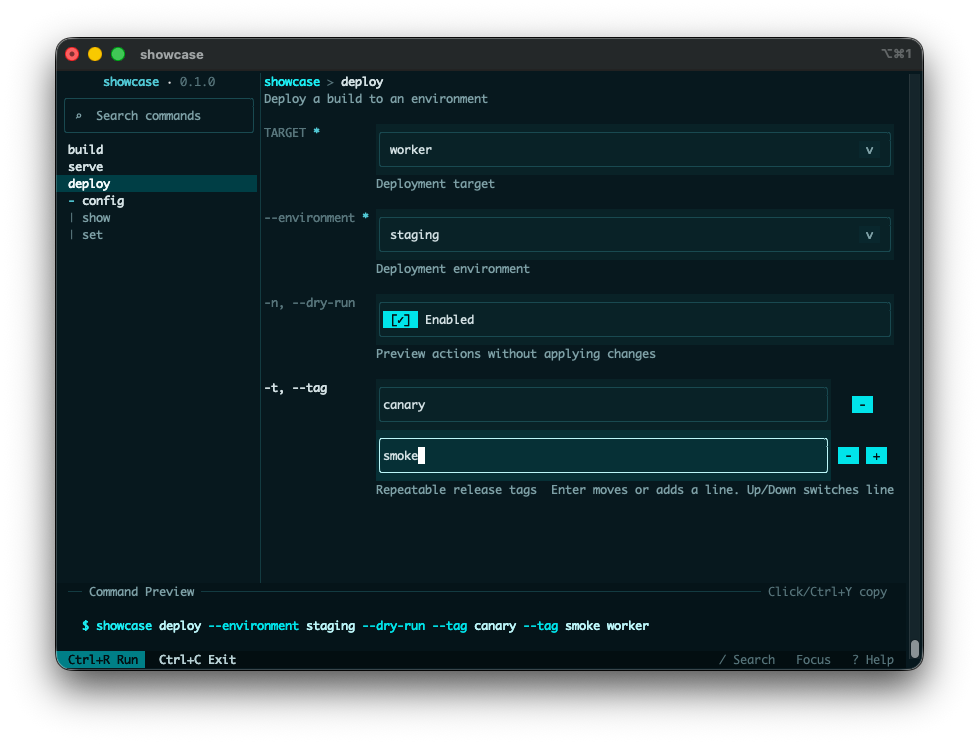
`clap-tui` turns a `clap` CLI into an interactive terminal UI while preserving the original command-line interface. You can keep `clap` as the source of truth, collect input in a terminal form, and then continue your normal application dispatch with the selected typed command value.
It reduces trial-and-error for complex CLIs by making commands, flags, and values easier to explore before execution. It also improves discoverability without changing the CLI behavior your existing scripts and docs already rely on.
This crate was heavily inspired by [Trogon](https://github.com/Textualize/trogon). `clap-tui` is a community crate and is not an official `clap` project.
## Add `clap-tui` to your project
```toml
[dependencies]
clap = { version = "4.5", features = ["derive", "env"] }
clap-tui = "0.1.3"
```
Minimum supported Rust version: `1.88`.
## Quick start
Add a `Tui` subcommand and delegate to `Tui::run()`.
The recommended 0.1.3 integration model is an explicit `Command::Tui` dispatch branch that calls `Tui::<Command>::hide_entrypoint("tui")?.run()`.
```rust
use clap::Parser;
use clap_tui::Tui;
#[derive(Debug, Parser, PartialEq, Eq)]
#[command(name = "tool")]
enum Command {
Tui,
Hello {
#[arg(long, default_value = "world")]
name: String,
},
}
fn dispatch(command: Command) {
match command {
Command::Tui => {}
Command::Hello { name } => println!("Hello, {name}!"),
}
}
fn main() -> Result<(), clap_tui::TuiError> {
match Command::parse() {
Command::Tui => {
if let Some(command) = Tui::<Command>::new().hide_entrypoint("tui")?.run()? {
dispatch(command);
}
}
command => dispatch(command),
}
Ok(())
}
```
`Tui::<T>::run()` returns:
- `Some(T)` when the user submits a valid command
- `None` when the user cancels before submission
- `Err(TuiError)` for runtime failures or clap-driven flows such as help and version handling
See `TuiError` for the detailed error taxonomy.
## Choose an entrypoint
- Use `Tui::<T>::run()` (recommended) when you want typed results from a derive-based clap parser.
- Use `TuiApp::from_command(...)` when you already have a hand-built `clap::Command` or need the lower-level untyped argv or `ArgMatches` flow.
## Supported customization seams
- `TuiConfig` controls theme, layout, key bindings, and initial command selection.
- `TuiApp::with_runtime(...)` and the exported `Runtime` event types support custom event loops or embedding into existing runtimes.
- `TuiConfig.start_command` lets you preselect a command path such as `build::release`.
Internal reducers, projections, render helpers, and other support modules are not stable extension points.
## Feature flags
- `mouse` is enabled by default and turns on mouse capture plus mouse-driven controls.
## Terminal expectations
- `clap-tui` requires an interactive terminal that supports raw mode and an alternate screen.
- The default `CrosstermRuntime` restores the terminal before returning, including when the user cancels.
- Mouse interactions require the default `mouse` feature.
- Validation stays inside the TUI flow: invalid forms show inline feedback instead of returning partially parsed values.
## Example guide
- `simple` shows minimal `Command::Tui` setup with the entrypoint hidden from the rendered TUI.
- `showcase` shows a realistic, readable CLI with a small nested config area.
- `subcommands` shows typed dispatch across command trees.
- `clap_features` is the diagnostic compatibility fixture for the full
`TuiApp::from_command(...)` surface. It launches the TUI directly, expects an interactive
terminal, and is not intended for non-interactive `--help` usage.
```bash
cargo run -p clap-tui --example simple -- tui
cargo run -p clap-tui --example showcase -- tui
cargo run -p clap-tui --example subcommands -- tui
cargo run -p clap-tui --example clap_features
```
## Release verification
Maintainers can run `./scripts/verify.sh` for the same formatting, linting, test, and package-surface checks that the GitHub `verify` workflow enforces. See [docs/release-readiness.md](https://github.com/gitseti/clap-tui/blob/main/docs/release-readiness.md) for the routine release runbook, [docs/publishing-setup.md](https://github.com/gitseti/clap-tui/blob/main/docs/publishing-setup.md) for one-time publishing setup, and [docs/release-troubleshooting.md](https://github.com/gitseti/clap-tui/blob/main/docs/release-troubleshooting.md) for troubleshooting and local simulation notes.
## Theme presets
```rust
use clap_tui::{Theme, ThemePreset, TuiConfig};
let mut config = TuiConfig::default();
config.theme = Theme::from_preset(ThemePreset::Light);
```
Available presets:
- `ThemePreset::CalmDark` (default)
- `ThemePreset::HighContrastDark`
- `ThemePreset::Light`
## Controls
- `Tab` switches focus
- `Shift+Tab` cycles tabs
- `?` toggles the Help tab
- `/` opens command search
- `Ctrl+R` runs the current selection
- `Ctrl+Enter` runs when supported by the terminal
- `Ctrl+C` exits without running
- typing edits the focused field