1
2
3
4
5
6
7
8
9
10
11
12
13
14
15
16
17
18
19
20
21
22
23
24
25
26
27
28
29
30
31
32
33
34
35
36
37
38
39
40
41
42
43
44
45
46
47
48
49
50
51
52
53
54
55
56
57
58
59
60
61
62
63
64
65
66
67
68
69
70
71
72
73
74
75
76
77
78
79
80
81
82
83
84
85
86
87
88
89
90
91
92
93
94
95
96
97
98
99
100
101
102
103
104
105
106
107
108
109
110
111
112
113
114
115
116
117
118
119
120
121
122
123
124
125
126
127
128
129
130
131
132
133
134
135
136
137
138
139
140
141
142
143
144
145
146
147
148
149
150
151
152
153
154
155
156
157
158
159
160
161
162
163
164
165
166
167
168
169
170
171
172
173
174
175
176
177
178
179
180
181
182
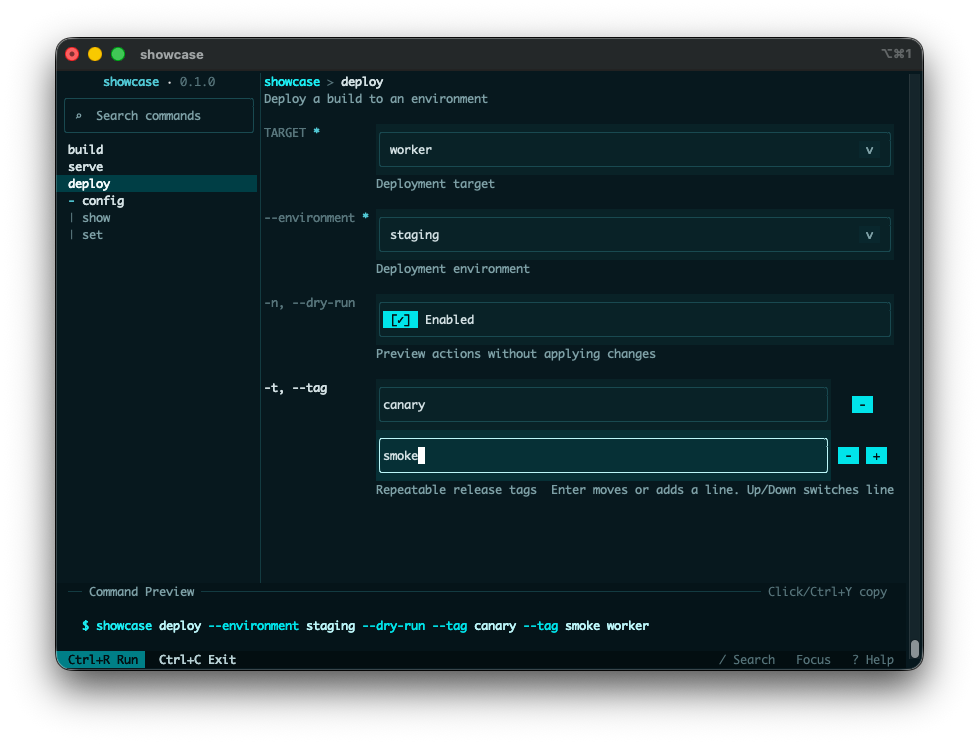
//! `clap-tui` turns a `clap` CLI into an interactive terminal UI while preserving the original
//! command-line interface.
//!
//! You can keep `clap` as the source of truth, collect input in the TUI, and then hand the
//! selected command value back to your normal application dispatch.
//!
//! It reduces trial-and-error for complex CLIs by making commands, flags, and values easier to
//! explore before execution. It also improves discoverability without changing the CLI behavior
//! your existing scripts and docs already rely on.
//!
//! This crate was heavily inspired by [Trogon](https://github.com/Textualize/trogon).
//! `clap-tui` is a community crate and is not an official `clap` project.
//!
//! 
//!
//! # Quick Start
//!
//! Add a `Tui` subcommand and delegate to [`Tui::run`].
//!
//! The recommended integration model is to define a normal `tui` subcommand in your own CLI and
//! run [`Tui`] from that dispatch branch:
//!
//! ```no_run
//! use clap::Parser;
//! use clap_tui::Tui;
//!
//! #[derive(Debug, Parser, PartialEq, Eq)]
//! #[command(name = "tool")]
//! enum Command {
//! Tui,
//! Hello {
//! #[arg(long, default_value = "world")]
//! name: String,
//! },
//! }
//!
//! fn dispatch(command: Command) {
//! match command {
//! Command::Tui => {}
//! Command::Hello { name } => println!("Hello, {name}!"),
//! }
//! }
//!
//! fn main() -> Result<(), clap_tui::TuiError> {
//! match Command::parse() {
//! Command::Tui => {
//! if let Some(command) = Tui::<Command>::new().hide_entrypoint("tui")?.run()? {
//! dispatch(command);
//! }
//! }
//! command => dispatch(command),
//! }
//!
//! Ok(())
//! }
//! ```
//!
//! # Choosing An Entry Point
//!
//! Use [`Tui`] (recommended).
//!
//! - Use [`Tui::<T>::run()`][Tui::run] when you want typed results from a derive-based parser.
//! - Use [`Tui::<T>::run_with_argv()`][Tui::run_with_argv] when you also need the canonical argv
//! used for typed reparsing.
//! - Use [`TuiApp`] when you are working directly with a hand-built [`clap::Command`] or need a
//! lower-level integration surface.
//!
//! # Typed Outcomes
//!
//! You can also use [`Tui`] with a single struct instead of an enum:
//!
//! ```no_run
//! use clap::Parser;
//! use clap_tui::Tui;
//!
//! #[derive(Debug, Parser, PartialEq, Eq)]
//! #[command(name = "tool")]
//! struct Cli {
//! #[arg(long)]
//! name: String,
//! }
//!
//! fn main() -> Result<(), clap_tui::TuiError> {
//! if let Some(cli) = Tui::<Cli>::new().run()? {
//! println!("Hello, {}!", cli.name);
//! }
//! Ok(())
//! }
//! ```
//!
//! [`Tui::run`] returns:
//! - `Some(T)` when the user submits a valid command
//! - `None` when the user cancels before submission
//! - `Err(TuiError)` for runtime failures or clap-driven flows such as help and version handling
//!
//! See [`TuiError`] for the detailed error taxonomy.
//!
//! # Retaining Canonical Argv
//!
//! Use [`Tui::run_with_argv`] when the application also needs canonical argv:
//!
//! ```no_run
//! use clap::Parser;
//! use clap_tui::Tui;
//!
//! #[derive(Debug, Parser)]
//! #[command(name = "tool")]
//! struct Cli {
//! #[arg(long, default_value = "world")]
//! name: String,
//! }
//!
//! fn main() -> Result<(), clap_tui::TuiError> {
//! if let Some(invocation) = Tui::<Cli>::new().run_with_argv()? {
//! eprintln!("Running argv: {:?}", invocation.argv);
//! println!("Hello, {}!", invocation.command.name);
//! }
//! Ok(())
//! }
//! ```
//!
//! [`TuiInvocation::argv`] is canonical argv with the program name as its first element.
//!
//! # Feature Flags
//!
//! - The default `mouse` feature enables mouse capture and mouse-driven controls.
//!
//! # Runtime Expectations
//!
//! - The default [`CrosstermRuntime`] requires a terminal supporting raw mode and an alternate
//! screen.
//!
//! # Customization
//!
//! - [`TuiConfig`] controls theme, layout, key bindings, and initial command selection.
//! - [`Theme`] and [`ThemePreset`] help you start from a built-in look and adjust from there.
//! - [`Runtime`] plus the exported runtime event types support custom event loops or embedding into
//! existing runtimes.
//!
//! # Examples
//!
//! The crate ships with five public examples:
//! - `simple` for minimal `Command::Tui` setup
//! - `run_with_argv` for a minimal typed invocation with canonical argv
//! - `showcase` for a realistic, compact command tree
//! - `subcommands` for typed dispatch across command trees
//! - `clap_features` for the full [`TuiApp`] compatibility fixture
/// TUI application entry points and typed invocation result.
pub use ;
/// Public configuration and theming types.
pub use ;
/// Error type returned by public `clap-tui` operations.
pub use TuiError;
/// Runtime customization surface for advanced integrations.
pub use ;