[](https://github.com/smessmer/clap-logflag/actions/workflows/ci.yml)
[](https://crates.io/crates/clap-logflag)
[](https://docs.rs/clap-logflag)
[](https://github.com/smessmer/clap-logflag/blob/master/LICENSE-MIT)
[](https://github.com/smessmer/clap-logflag/blob/master/LICENSE-APACHE)
[](https://codecov.io/gh/smessmer/clap-logflag)
[](https://github.com/rust-secure-code/safety-dance/)
# clap-logflag
The [clap-logflag](https://crates.io/crates/clap-logflag) library can be used to add a `--log` flag to
[clap](https://crates.io/crates/clap) based command line applications that allows users to configure
logging from the command line. It can log to stderr, files and syslog, powered by the
[fern](https://crates.io/crates/fern) logging backend.
## Examples
```bash
# Log to a single destination
$ ./your-cli --log syslog
$ ./your-cli --log file:/path/to/file
# Log to both stderr and a file
$ ./your-cli --log stderr --log file:/path/to/file
# Filter log levels. Debug (and higher) gets logged to stderr.
# Info (and higher) additionally gets logged to a file.
$ ./your-cli --log DEBUG:stderr --log INFO:file:/path/to/file
# Disable logging
$ ./your-cli --log none
# Use default logging setup (defined by the application developer)
$ ./your-cli
```
## Setup
To use clap-logflag, first add [clap-logflag](https://crates.io/crates/clap-logflag), [clap](https://crates.io/crates/clap) and [log](https://crates.io/crates/log) to your `Cargo.toml`.
Then, add the [LogArgs](https://docs.rs/clap-logflag/latest/clap_logflag/clap/struct.LogArgs.html) struct to your clap definition and initialize logging with it:
```rust
use clap::Parser;
use clap_logflag::LoggingConfig;
use log::LevelFilter;
#[derive(Debug, Parser)]
struct CliArgs {
// Use this to add the log flags to your application
#[clap(flatten)]
log: clap_logflag::LogArgs,
// ... your other cli args ...
}
fn main() {
let args = CliArgs::parse();
// Initialize logging with the flags from clap
clap_logflag::init_logging!(
args.log
// If no `--log` arguments are present, disable logging.
// You can change this to define the default behavior,
// see the "default_logging" example.
.or_default(LoggingConfig::disabled()),
// Any `--log` argument that doesn't define a level filter will use the
// default level filter defined here, `Info` in this example.
LevelFilter::Info,
);
// Issue some log messages
log::trace!("Some trace log");
log::debug!("Some debug log");
log::info!("Some info log");
log::warn!("Some warn log");
log::error!("Some error log");
}
```
## Command Line Syntax
See [LogArgs](https://docs.rs/clap-logflag/latest/clap_logflag/clap/struct.LogArgs.html) for a detailed explanation of the syntax for the `--log` argument.
## Log Format
The format of the log messages uses an opinionated, reasonably pretty format by default. At the moment, this library does not offer a way to modify the format.
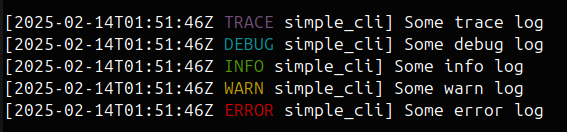
Log lines contain a UTC timestamp, the log level and an executable name.
When the logging destination is stderr and stderr is a terminal, then the log level is colorized.
When logging to a file, syslog or to a stderr that is redirected to a file, the log level is not colorized.
## Help message
[clap-logflag](https://crates.io/crates/clap-logflag) will automatically add a detailed help message to the `--help` output of your application,
explaining the usage of the `--log` flag to your users.
At the moment, this library does not offer a way to modify the help message.
```bash
Usage: simple_cli [OPTIONS]
Options:
--log <LOG>
Log definition consisting of an optional log level filter, and a log destination.
You can define this argument multiple times for multiple log destinations.
Logging can be disabled with `--log none`.
If combined with other log definitions, those will take precedence and logging will not be disabled.
The argument can be combined with a level filter to only log messages of a certain level or higher to that destination.
Format: destination | level_filter:destination
* level_filter = "ERROR" | "WARN" | "INFO" | "DEBUG" | "TRACE"
* destination = "stderr" | "syslog" | "file:path" | "none"
Examples:
* `--log syslog`
* `--log stderr`
* `--log file:/path/to/file`
* `--log INFO:stderr`
* `--log DEBUG:file:/path/to/file`
* `--log TRACE:syslog`
* `--log none`
-h, --help
Print help (see a summary with '-h')
```
License: MIT OR Apache-2.0
