<!DOCTYPE HTML>
<html lang="en" class="sidebar-visible no-js light">
<head>
<meta charset="UTF-8">
<title>docs</title>
<meta name="robots" content="noindex" />
<meta content="text/html; charset=utf-8" http-equiv="Content-Type">
<meta name="description" content="">
<meta name="viewport" content="width=device-width, initial-scale=1">
<meta name="theme-color" content="#ffffff" />
<link rel="icon" href="favicon.svg">
<link rel="shortcut icon" href="favicon.png">
<link rel="stylesheet" href="css/variables.css">
<link rel="stylesheet" href="css/general.css">
<link rel="stylesheet" href="css/chrome.css">
<link rel="stylesheet" href="css/print.css" media="print">
<link rel="stylesheet" href="FontAwesome/css/font-awesome.css">
<link rel="stylesheet" href="fonts/fonts.css">
<link rel="stylesheet" href="highlight.css">
<link rel="stylesheet" href="tomorrow-night.css">
<link rel="stylesheet" href="ayu-highlight.css">
</head>
<body>
<script type="text/javascript">
var path_to_root = "";
var default_theme = window.matchMedia("(prefers-color-scheme: dark)").matches ? "navy" : "light";
</script>
<script type="text/javascript">
try {
var theme = localStorage.getItem('mdbook-theme');
var sidebar = localStorage.getItem('mdbook-sidebar');
if (theme.startsWith('"') && theme.endsWith('"')) {
localStorage.setItem('mdbook-theme', theme.slice(1, theme.length - 1));
}
if (sidebar.startsWith('"') && sidebar.endsWith('"')) {
localStorage.setItem('mdbook-sidebar', sidebar.slice(1, sidebar.length - 1));
}
} catch (e) { }
</script>
<script type="text/javascript">
var theme;
try { theme = localStorage.getItem('mdbook-theme'); } catch(e) { }
if (theme === null || theme === undefined) { theme = default_theme; }
var html = document.querySelector('html');
html.classList.remove('no-js')
html.classList.remove('light')
html.classList.add(theme);
html.classList.add('js');
</script>
<script type="text/javascript">
var html = document.querySelector('html');
var sidebar = 'hidden';
if (document.body.clientWidth >= 1080) {
try { sidebar = localStorage.getItem('mdbook-sidebar'); } catch(e) { }
sidebar = sidebar || 'visible';
}
html.classList.remove('sidebar-visible');
html.classList.add("sidebar-" + sidebar);
</script>
<nav id="sidebar" class="sidebar" aria-label="Table of contents">
<div class="sidebar-scrollbox">
<ol class="chapter"><li class="chapter-item expanded "><a href="chess-engine.html"><strong aria-hidden="true">1.</strong> chess-engine</a></li></ol>
</div>
<div id="sidebar-resize-handle" class="sidebar-resize-handle"></div>
</nav>
<div id="page-wrapper" class="page-wrapper">
<div class="page">
<div id="menu-bar-hover-placeholder"></div>
<div id="menu-bar" class="menu-bar sticky bordered">
<div class="left-buttons">
<button id="sidebar-toggle" class="icon-button" type="button" title="Toggle Table of Contents" aria-label="Toggle Table of Contents" aria-controls="sidebar">
<i class="fa fa-bars"></i>
</button>
<button id="theme-toggle" class="icon-button" type="button" title="Change theme" aria-label="Change theme" aria-haspopup="true" aria-expanded="false" aria-controls="theme-list">
<i class="fa fa-paint-brush"></i>
</button>
<ul id="theme-list" class="theme-popup" aria-label="Themes" role="menu">
<li role="none"><button role="menuitem" class="theme" id="light">Light (default)</button></li>
<li role="none"><button role="menuitem" class="theme" id="rust">Rust</button></li>
<li role="none"><button role="menuitem" class="theme" id="coal">Coal</button></li>
<li role="none"><button role="menuitem" class="theme" id="navy">Navy</button></li>
<li role="none"><button role="menuitem" class="theme" id="ayu">Ayu</button></li>
</ul>
<button id="search-toggle" class="icon-button" type="button" title="Search. (Shortkey: s)" aria-label="Toggle Searchbar" aria-expanded="false" aria-keyshortcuts="S" aria-controls="searchbar">
<i class="fa fa-search"></i>
</button>
</div>
<h1 class="menu-title">docs</h1>
<div class="right-buttons">
<a href="print.html" title="Print this book" aria-label="Print this book">
<i id="print-button" class="fa fa-print"></i>
</a>
</div>
</div>
<div id="search-wrapper" class="hidden">
<form id="searchbar-outer" class="searchbar-outer">
<input type="search" name="search" id="searchbar" name="searchbar" placeholder="Search this book ..." aria-controls="searchresults-outer" aria-describedby="searchresults-header">
</form>
<div id="searchresults-outer" class="searchresults-outer hidden">
<div id="searchresults-header" class="searchresults-header"></div>
<ul id="searchresults">
</ul>
</div>
</div>
<script type="text/javascript">
document.getElementById('sidebar-toggle').setAttribute('aria-expanded', sidebar === 'visible');
document.getElementById('sidebar').setAttribute('aria-hidden', sidebar !== 'visible');
Array.from(document.querySelectorAll('#sidebar a')).forEach(function(link) {
link.setAttribute('tabIndex', sidebar === 'visible' ? 0 : -1);
});
</script>
<div id="content" class="content">
<main>
<h1 id="chess-engine"><a class="header" href="#chess-engine">chess-engine</a></h1>
<p>A pure Rust, dependency-free chess engine built to run anywhere.</p>
<h2 id="why-write-a-chess-engine"><a class="header" href="#why-write-a-chess-engine">Why write a Chess engine?</a></h2>
<p>I love chess a <em>lot</em>. It's definitely one of my favorite games ever. However, I've always been disappointed when trying to play chess digitally. Although wonderful websites like <a href="https://chess.com/">chess.com</a> and <a href="https://lichess.org/">lichess</a> exist, it's near impossible to find something that runs on everything.</p>
<p>chess-engine is a solution to my problem. If you want a chess engine that runs on embedded devices, the terminal, <a href="https://github.com/adam-mcdaniel/chess-engine/tree/main/examples/chess-gui">the desktop (with a gui)</a>, <em>and</em> <a href="https://adam-mcdaniel.github.io/chess-engine/docs/book/index.html#average-ai">the web</a>, this is probably your best bet.</p>
<h2 id="how-does-it-work"><a class="header" href="#how-does-it-work">How does it work?</a></h2>
<p>This particular AI works using the <a href="https://en.wikipedia.org/wiki/Minimax">Minimax algorithm</a>, along with <a href="https://en.wikipedia.org/wiki/Alpha%E2%80%93beta_pruning">Alpha-Beta pruning</a> for optimization.</p>
<p>Now, let's unpack that.</p>
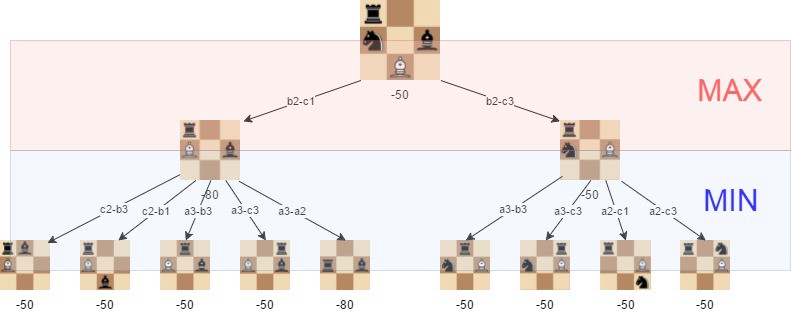
<p>The Minimax algorithm essentially iterates through all possible moves recursively, and assumes that whenever the computer plays, the human player will always respond with the best move.</p>
<p><img src="move-generation.png" alt="Move generation" /></p>
<p>This allows the computer to almost always play objectively better moves than the player.</p>
<p><img src="mini-max.jpeg" alt="Minimax" /></p>
<p>As you can see with a little experimentation, it works quite well. </p>
<h4 id="average-ai"><a class="header" href="#average-ai">Average AI</a></h4>
<h5 id="keep-in-mind-this-is-at-a-low-difficulty-setting-for-speed-in-the-browser"><a class="header" href="#keep-in-mind-this-is-at-a-low-difficulty-setting-for-speed-in-the-browser">Keep in mind, this is at a low difficulty setting for speed in the browser.</a></h5>
<embed type="text/html" src="https://adam-mcdaniel.github.io/chess-engine/examples/chess-web/chess-best.html" width="420" height="420"/>
<h3 id="abusing-minimax"><a class="header" href="#abusing-minimax">Abusing Minimax</a></h3>
<p>Because Minimax works by simply maximizing the AI's material advantage over the player, it's incredibly simple to abuse the algorithm by changing what it is maximizing.</p>
<p>Here, for example, is the <strong><em>opposite</em></strong> of a good AI. This AI tries to maximize <em><strong>YOUR</strong></em> material value, and will desperately try to offer you its pieces while still making legal moves.</p>
<embed type="text/html" src="https://adam-mcdaniel.github.io/chess-engine/examples/chess-web/chess-worst.html" width="420" height="420"/>
<h2 id="other-features"><a class="header" href="#other-features">Other features</a></h2>
<p>Additionally, builtin, chess-engine offers an incredibly simple chess variant called <a href="https://www.chess.com/terms/horde-chess">Horde</a>, which I find very fun.</p>
<embed type="text/html" src="https://adam-mcdaniel.github.io/chess-engine/examples/chess-web/chess-horde.html" width="420" height="420"/>
<p>Additionally, chess-engine supports getting all of the legal moves for a player. So, naturally, I had to add a random-move AI.</p>
<embed type="text/html" src="https://adam-mcdaniel.github.io/chess-engine/examples/chess-web/chess-random.html" width="420" height="420"/>
</main>
<nav class="nav-wrapper" aria-label="Page navigation">
<div style="clear: both"></div>
</nav>
</div>
</div>
<nav class="nav-wide-wrapper" aria-label="Page navigation">
</nav>
</div>
<script type="text/javascript">
window.playground_copyable = true;
</script>
<script src="elasticlunr.min.js" type="text/javascript" charset="utf-8"></script>
<script src="mark.min.js" type="text/javascript" charset="utf-8"></script>
<script src="searcher.js" type="text/javascript" charset="utf-8"></script>
<script src="clipboard.min.js" type="text/javascript" charset="utf-8"></script>
<script src="highlight.js" type="text/javascript" charset="utf-8"></script>
<script src="book.js" type="text/javascript" charset="utf-8"></script>
<script type="text/javascript">
window.addEventListener('load', function() {
window.setTimeout(window.print, 100);
});
</script>
</body>
</html>