Chap


Chap is an easy to learn, dynamic, interpretive language written in Rust.
The Chap joke: Chap is like Communism✊, It's useless and people think it's because it's not implemented correctly 🫳🏻🎤, (We need to test it on an smaller society first).
Besides the comedy part, It actually does have some cool new Ideas about programming languages in general.
ChapApp the WebIDE (WASM).
Table of content
- Why was it named 'Chap'?
- Features
- Keywords
- Syntax
- Operators
- ControlFlow
- Samples
- Data Types
- Memory Management
- Installation
- How to use
- Builtin function
Name
Rust or راست in persian means right and Chap or چپ means left.
Chap unlocks Two-Dimensional Full Stack Development. Front⬆️End, Back⬇️End, Rust➡️End, Chap⬅️End.
Features
- Easy to learn and fun to code (hard to code, honestly).
- Keyword-less
- Actually left-to-right syntax
- Cross platform (It runs on Linux, MacOS, Windows, Web(WASM))
Keywords
What makes a programming language hard to learn?
"Keywords"
There are no keywords in Chap.
Syntax
There is only one syntax in Chap, Other ones are just sugar syntaxes.
A normal line of code in chap has 3 chunks separated with -> operator:
chunk1 -> chunk2 -> chunk3
| Chunk 1 | Chunk 2 | Chunk 3 |
|---|---|---|
| input params | function name | output variable |
param1, param2 -> function_name -> $output_variable
For example:
1, 2 -> add -> $sum
1 and 2 separated by "," are input params.
These input params are moving to "add" function.
Finally $sum is a variable that holds the add result in it.
Note: "add" is not a keyword, it's a builtin function.
Ok but why?
English language is a "left to right" (aka LTR) language, and programming languages should follow the same rule, right?
Wrong:
// c base languages:
result = ;
↑ ↑ ↑ ↑ ↑
5 4 2 1 3
But chap:
// chap
1,2 -> add -> sqrt -> to_string -> send -> $result
        ↑       ↑         ↑          ↑        ↑
        1       2         3          4        5
This is actually left to right like normal english.
Note: "Chain" syntax is added in version 2.0.0
Syntax Rules
Make a comment with // and anything you write on the right side will be ignored by compiler.
1, 2 -> add -> $sum // this is a comment
You can write many lines of code in one line by separating lines by ";"
1 -> $a; $a, 2-> sum -> $b; $b -> print -> $_
Input params are separated by comma character ",".
Input params can be:
- Variable
- String with " character around like: "hello world"
- Int just a number: 5
- Float just a normal form of floating point number 3.14
- Bool is a boolean value which is a true or false
- Tags start with @. (more on control flow)
- Lists can be created like this: [ 1 "hello" "world"] (space separated).
- Maps can be created like this: {"name":"Ali" "age":26} (space separated)
$a, "hello", 5, 3.14, false -> function_name -> $output_var
Function names are not case-sensitive.
Function names are not sensitive about anything else:
// to_string = ToString = TOSTRING = to string = t o s t r_i_n_g
Variables should start with $ which is known as the most loved feature of PHP.
Variable name rules:
$12 // Ok
$sp a ce // OK
$#^3 // Ok
$a,b // comma not allowed
$really? // question mark at the end not allowed
$rea?lly // OK
$some->thing // "->" is not allowed
Sugar syntaxes
If a function has no output variable you can remove chunk3:
"hello world" -> print
    ↑              ↑         ↑
   input         function   removed chunk3
If a function has no input param you can remove chunk1:
              input -> $user_input
 ↑              ↑         ↑
nothing      function    output
Removing chunk2 (function name) means assigning a variable:
1 -> $variable
// it's actually short for:
// 1 -> assign -> $variable
If a function has no input param and output_var you just write function name:
exit
If a function has output var but you removed chunk3 the result of function will get printed:
1, 2 -> add
// it's short for:
// 1, 2 -> add -> print
If you just write some params. chap will print them:
1, 2
// result: 1, 2

// or
$a
// prints whatever $a is
As you can guess, we have the world's smallest hello world:
"Hello World"
I wish I could remove double quotes too :)
Chain syntax (aka pipe)
Sometimes you have a collection of function calls like this:
1, 2 -> add -> $tmp1
$tmp1 -> sqrt -> $tmp2
$tmp2 -> print
As you can see, output of a function call is input of the next function call.
In this case, you can use piping syntax to write functions next to each other and get rid of temp variables:
1, 2 -> add -> sqrt -> print
Parentheses
You can't use Piping when one of the functions has more than one param.
1,2 -> add -> add -> print
               ↑
               This needs two input params
In this case you can use Parentheses:
(1,2 -> add), (3 -> sqrt) -> add -> print
This converts two:
1,2 -> add -> $TMP1
3 -> sqrt -> $TMP2
$TMP1, $TMP2 -> add -> print
Operators
There is one operator -> which moves data from left to right and it is language logo.
Why are operators bad?
Because they behave different with different types.
Look at this python example:
=
= * 5 # multiply number by 5
Following code has a bug and the result will be:
: 3
3 * 5 = 33333
# no runtime error
Why? Because Python uses the same operator for math.multiply and strings.repeat.
So * operator "IS NOT A TYPE SAFE" operator and it will "DO UNEXPECTED THINGS" when your forget to pass the right type to it and it will happen without throwing runtime errors (which is bad).
Same code in Chap:
input -> $number
$number, 5 -> multiply -> $result
$result
// error in line 2: multiply function works only with numbers int and float
Runtime errors are much better than logical errors, and in chap we have the repeat function:
"foo ", 3 -> repeat
// foo foo foo
In many languages "+" operator has the same problem:
# Python
+ # concat or add? both?
# 12
# 3
// Chap:
"1", "2" -> concat // 12
1, 2 -> concat // 12 // you can concat integers safely
1, 2 -> add // 3
"1", "2" -> add // runtime error
Debugger
You can put a ? at the end of function name to debug that line:
1 -> $a
2 -> $b
$a, $b -> add? -> $c
// result 1, 2 -> add -> 3
Chap also has a function called "dump" which prints every variable you have.
Control Flow
You can create a tag like this:
@tag_name
And you can jump to it:
@tag_name -> jump
// or
@tag_name, true -> jump_if
// or
@tag_name, 1, 1 -> jump_if_equal
// or
@tag_name, 1, 0 -> jump_if_not_equal
loop
Jumping backward makes loops:
@l
    "Hello until your battery dies"
@l -> jump
if
@i, 1, 1 -> jump_if_equal
    "this will not print"
@i
Note: Indention is not necessary
Array
Initialize:
[1 2 3 4] -> $myArray
Insert:
$myArray, 5 -> insert
Pop:
$myArray-> pop -> $last_item
Get item by index:
$myArray, 1 -> get -> $first_item
// arrays index start from 1
Samples
Note: You can test and tweak samples at ChapApp.
hello_world.chp
"Hello world"
counter.chp
0 -> $counter
@l
    $counter -> increase
@l, $counter, 100 -> jump_if_not_equal
$counter
number_guess_game.chp
1,10 -> random_number -> $answer
@loop
    input -> $guess
    $guess -> to_int -> $guess
    @win, $answer, $guess -> jump_if_equal
    "wrong"
@loop -> jump

@win
"you win"
christmas_tree.chp
0 -> $counter
@loop
    $counter -> increase

    (" ", (10, $counter -> minus) -> repeat),
    ("*", ($counter, 2 -> multiply) -> repeat) ->
    cat
@loop, $counter, 10 -> jump if not equal
DataTypes
1 -> type_of
int

3.14 -> type of
float

"ali" -> TypeOf
string

true -> type
boolean

-> [1 2 3] -> type
list

-> {"name":"Ali"} -> type
map
Memory Management
Your OS will free memory after process is done!
Installation
Download release
Build from source
How To Use
REPL (Run Execute Print Loop)
File_executor
Use As lib
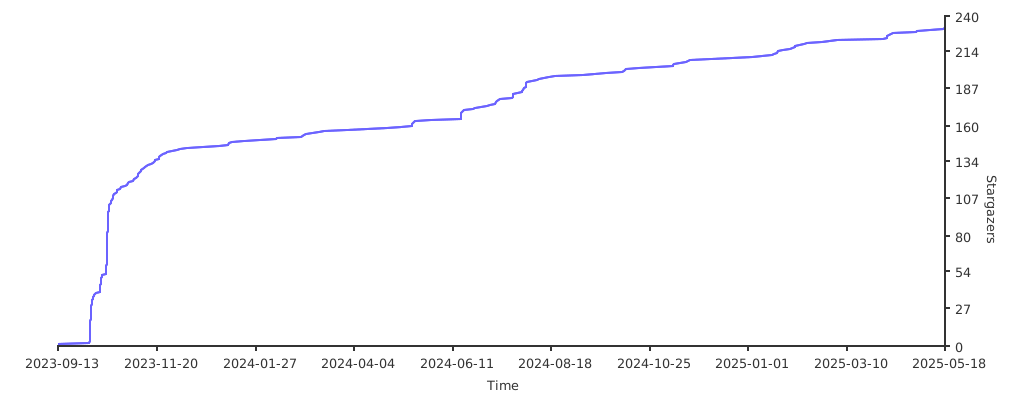
Stars