# caterpillar
A tool for the detection and installation of [RAUC](https://rauc.readthedocs.io/en/latest/) update bundles found on attached block devices.
RAUC is a way to update firmware on embedded devices.
Caterpillar makes use of [D-Bus](https://gitlab.freedesktop.org/dbus/dbus) to communicate with
* [UDisks2](https://github.com/storaged-project/udisks/) (for enumeration and (un)mounting of block devices)
* [RAUC](https://github.com/rauc/rauc/) (for validation and installation of update bundles)
* [logind](https://github.com/systemd/systemd) (for reboot after successful installation)
The application also exposes its own [D-Bus interface](./dist/dbus/de.sleepmap.Caterpillar.xml). More information on how to use it can be found in the [interactive update](#Interactive_update) section.
## Configuration
Some aspects of `caterpillar`'s behavior can be configured using a [configuration file](./dist/config/caterpillar.toml) in `/etc/caterpillar/caterpillar.toml`.
It is also possible to override behavior using environment variables in all caps, prefixed with `CATERPILLAR_` (e.g. `autorun = true` -> `CATERPILLAR_AUTORUN=true`).
## Use-cases
Caterpillar supports two modes of operation, non-interactive and interactive, which are explained in more detail in the sections below.
The application is run in the background using the [`caterpillar.service`](./dist/systemd/caterpillar.service) systemd unit.
Other applications running as `root` can communicate with it over D-Bus.
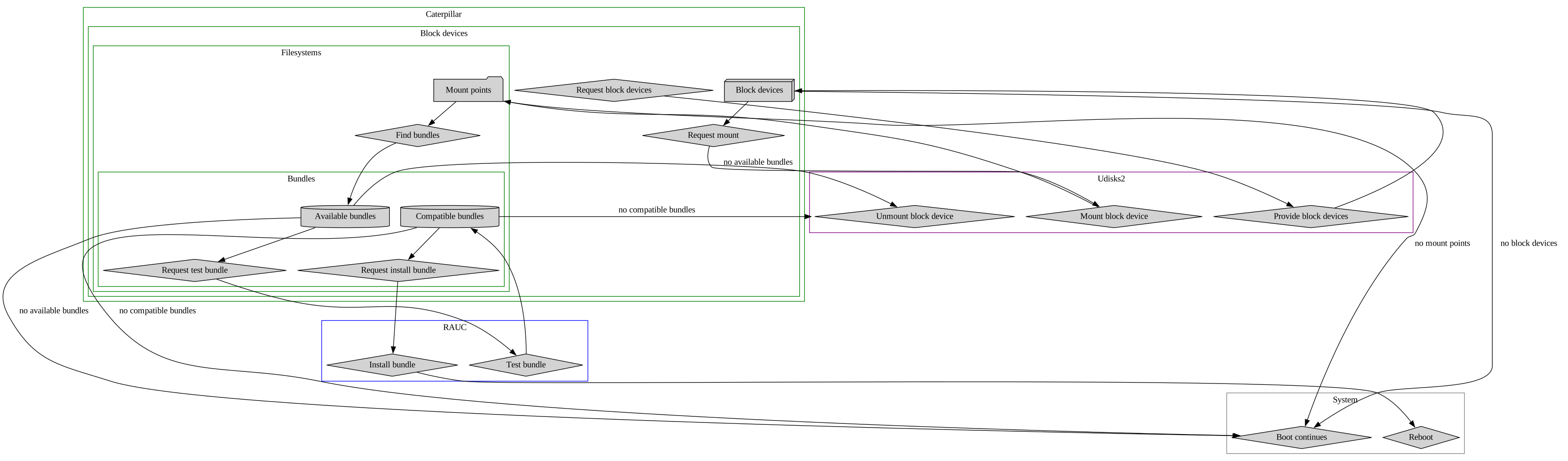
Caterpillar takes care of detecting all attached block devices and mounts compatible filesystems found on them.
In the top-level directory of each mounted filesystem it searches for compatible RAUC update bundles with a version higher than the current system version and allows for installing them.
When placing a single compatible bundle in a configurable override directory, `caterpillar` is able to install bundles of lower version as well.
**NOTE**: Only [semver](https://crates.io/crates/semver) version comparison is supported!
After successful update, `caterpillar` unmounts all previously mounted devices and can optionally trigger a reboot of the system (to boot into the updated system).
A rough overview of `caterpillar`'s interaction with `rauc` and `udisks2` is outlined in the below diagram:
### Interactive update
Caterpillar exposes a D-Bus interface, which allows external applications running as `root` to communicate with it.
#### Introspection
The application starts in `idle` mode, waiting on external input.
```shell
[root@system ~]# busctl introspect de.sleepmap.Caterpillar /de/sleepmap/Caterpillar de.sleepmap.Caterpillar
NAME TYPE SIGNATURE RESULT/VALUE FLAGS
.InstallUpdate method bb - -
.SearchForUpdate method - - -
.MarkedForReboot property b false emits-change
.State property s "idle" emits-change
.Updated property b false emits-change
.UpdateFound signal a(sssb) - -
```
#### Searching for updates
**NOTE**: It is advised to subscribe to the `UpdateFound` signal, which will propagate a found update.
Using the `SearchForUpdate` method, `caterpillar` can be requested to search for compatible updates:
```shell
[root@system ~]# busctl call de.sleepmap.Caterpillar /de/sleepmap/Caterpillar de.sleepmap.Caterpillar SearchForUpdate
```
If a compatible update is found, `caterpillar`'s `State` property changes to `updatefound` (`noupdatefound`, if no update is found, shortly after which it unmounts mounted devices again and returns to `idle`).
```shell
[root@system ~]# busctl introspect de.sleepmap.Caterpillar /de/sleepmap/Caterpillar de.sleepmap.Caterpillar
NAME TYPE SIGNATURE RESULT/VALUE FLAGS
.InstallUpdate method bb - -
.SearchForUpdate method - - -
.MarkedForReboot property b false emits-change
.State property s "updatefound" emits-change
.Updated property b false emits-change
.UpdateFound signal a(sssb) - -
```
The `UpdateFound` signal is emitted, providing an array of length one with information on the available update:
* absolute path of update file (s)
* current version (s)
* new version (s)
* whether the update is an override (b)
```shell
[root@system ~]# dbus-monitor --system "type='signal',path='/de/sleepmap/Caterpillar',interface='de.sleepmap.Caterpillar',member='UpdateFound'"
signal time=1695853835.109057 sender=:1.37 -> destination=(null destination) serial=8 path=/de/sleepmap/Caterpillar; interface=de.sleepmap.Caterpillar; member=UpdateFound
array [
struct {
string "/run/media/root/bundle_disk_btrfs/update.raucb"
string "0.0.0"
string "1.0.0"
boolean false
}
]
```
#### Installing updates
Using the `InstallUpdate` method, `caterpillar` can be triggered to either install (and optionally reboot) or skip a found update.
When requesting to skip the update and not reboot (requesting to reboot has no effect when not also updating), `caterpillar` unmounts all previously mounted devices and returns to its `idle` state (with the `Updated` property unchanged).
```shell
[root@system ~]# busctl call de.sleepmap.Caterpillar /de/sleepmap/Caterpillar de.sleepmap.Caterpillar InstallUpdate bb false false
[root@system ~]# busctl introspect de.sleepmap.Caterpillar /de/sleepmap/Caterpillar de.sleepmap.Caterpillar
NAME TYPE SIGNATURE RESULT/VALUE FLAGS
.InstallUpdate method bb - -
.SearchForUpdate method - - -
.MarkedForReboot property b false emits-change
.State property s "idle" emits-change
.Updated property b false emits-change
.UpdateFound signal a(sssb) - -
```
When requested to update but not reboot, `caterpillar` updates the system, unmounts all previously mounted devices and returns to its `idle` state, setting its `Updated` property to `true` on successful update.
```shell
[root@system ~]# busctl call de.sleepmap.Caterpillar /de/sleepmap/Caterpillar de.sleepmap.Caterpillar InstallUpdate bb true false
[root@system ~]# busctl introspect de.sleepmap.Caterpillar /de/sleepmap/Caterpillar de.sleepmap.Caterpillar
NAME TYPE SIGNATURE RESULT/VALUE FLAGS
.InstallUpdate method bb - -
.SearchForUpdate method - - -
.MarkedForReboot property b false emits-change
.State property s "updating" emits-change
.Updated property b false emits-change
.UpdateFound signal a(sssb) - -
[root@system ~]# busctl introspect de.sleepmap.Caterpillar /de/sleepmap/Caterpillar de.sleepmap.Caterpillar
NAME TYPE SIGNATURE RESULT/VALUE FLAGS
.InstallUpdate method bb - -
.SearchForUpdate method - - -
.MarkedForReboot property b false emits-change
.State property s "idle" emits-change
.Updated property b true emits-change
.UpdateFound signal a(sssb) - -
```
When requested to update and reboot, `caterpillar` updates the system, unmounts all previously mounted devices and goes to `done` state. Its `Updated` and `MarkedForReboot` properties are both set to `true`.
```shell
[root@system ~]# busctl call de.sleepmap.Caterpillar /de/sleepmap/Caterpillar de.sleepmap.Caterpillar InstallUpdate bb true false
[root@system ~]# busctl introspect de.sleepmap.Caterpillar /de/sleepmap/Caterpillar de.sleepmap.Caterpillar
NAME TYPE SIGNATURE RESULT/VALUE FLAGS
.InstallUpdate method bb - -
.SearchForUpdate method - - -
.MarkedForReboot property b true emits-change
.State property s "updating" emits-change
.Updated property b false emits-change
.UpdateFound signal a(sssb) - -
[root@system ~]# busctl introspect de.sleepmap.Caterpillar /de/sleepmap/Caterpillar de.sleepmap.Caterpillar
NAME TYPE SIGNATURE RESULT/VALUE FLAGS
.InstallUpdate method bb - -
.SearchForUpdate method - - -
.MarkedForReboot property b true emits-change
.State property s "done" emits-change
.Updated property b true emits-change
.UpdateFound signal a(sssb) - -
```
### Non-interactive update during boot
Caterpillar can be configured to run non-interactively the first time it is run, using the `autorun` configuration option.
In this mode the application will automatically (without user input):
* detect all block devices and mount compatible filesystems
* search and select one compatible update bundle
* if a (top-level) override directory with a single update bundle in it is found in the mountpoint
* if more than one update bundle exists in the (top-level) directory of the mountpoint, the one with the highest version is selected
* install the selected update bundle
* reboot
## Building
Caterpillar is written in [Rust](https://www.rust-lang.org/) and built using [cargo](https://doc.rust-lang.org/cargo/index.html):
```shell
cargo build --frozen --release --all-features
```
## Tests
Unit tests can be executed using
```shell
cargo test -- --skip integration
```
**NOTE**: The integration test setup requires quite some space (ca. 10 - 20 GiB) and can only be run serially (which takes quite long).
```shell
cargo test integration
```
The integration tests require the following tools to be available on the test system:
- *guestmount* ([libguestfs](https://libguestfs.org/))
- *guestunmount* ([libguestfs](https://libguestfs.org/))
- *mkosi* ([mkosi](https://github.com/systemd/mkosi))
- *openssl* ([openssl](https://www.openssl.org))
- *pacman* ([pacman](https://archlinux.org/pacman/))
- *qemu-img* ([QEMU](https://archlinux.org/pacman/))
- *qemu-system-x86_64* ([QEMU](https://archlinux.org/pacman/))
- *rauc* ([RAUC](https://rauc.io))
## License
All code contributions are dual-licensed under the terms of the [Apache-2.0](https://spdx.org/licenses/Apache-2.0.html) and [MIT](https://spdx.org/licenses/MIT.html).
For further information on licensing refer to the contributing guidelines.
## Funding
This project has been made possible by the funding of [Nonlinear Labs GmbH](https://www.nonlinear-labs.de/).