# cargo-samply
[](https://github.com/PhilippPolterauer/cargo-samply/actions/workflows/ci.yml)
[](https://docs.rs/cargo-samply)

Profile Rust code with `samply`, without remembering the build/run ceremony.
> **Important:** This project is **not affiliated with, endorsed by, or maintained by** the official `samply` project or its authors. It is an independent Cargo subcommand that integrates with the `samply` profiler.
## What it does
`cargo samply` automates the usual profiling workflow:
- Builds your project (optionally with a custom Cargo profile)
- Runs the resulting artifact under the `samply` profiler
- Supports binaries, examples, benchmark, and test targets
### Why use it?
- **Automated "Profile Ceremony"**: It handles the `[profile.samply]` management for you, ensuring optimized code with debug symbols without manual `Cargo.toml` edits.
- **Unified Target Selection**: No more hunting for compiled artifacts in `target/release/examples/...`. Just use `--bin`, `--example`, `--bench`, or `--test`.
- **Smart Benchmark Handling**: Automatically injects the correct runtime flags (like `--bench`) for Criterion-style benchmarks, which are often missed when profiling manually.
- **Proactive Validation**: Checks for `samply` installation before starting the build, so you find out immediately if something is missing.
- **Lower Friction**: By making profiling a single command, it encourages frequent performance checks throughout development.
## Installation
### Prerequisites
- A working Rust toolchain (via `rustup`)
- `samply` installed and available in your `PATH`
### Install from crates.io
```bash
cargo install cargo-samply
cargo install samply
```
### Install from git
```bash
cargo install --git https://github.com/PhilippPolterauer/cargo-samply.git
```
## Quickstart
From any Rust project:
```console
$ cargo samply
```
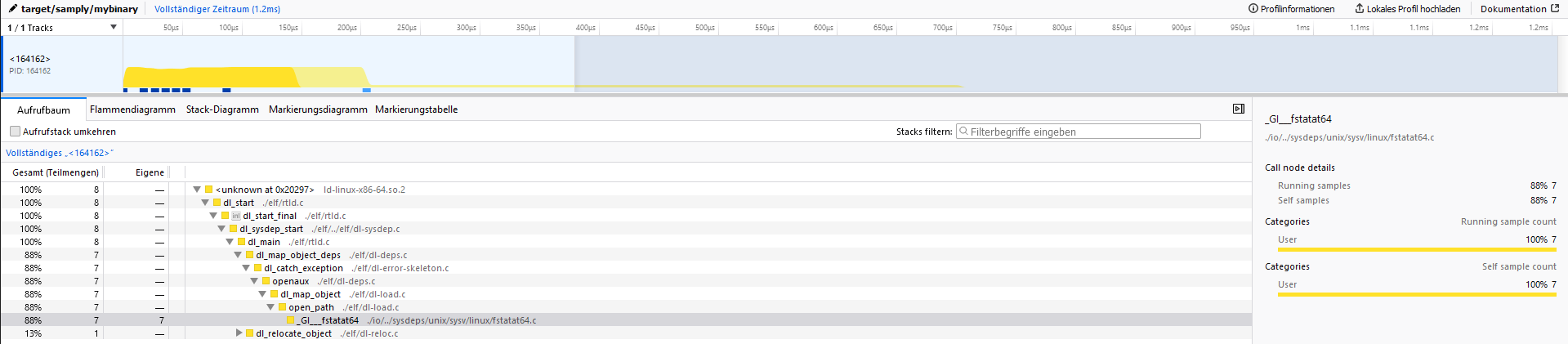
Once `samply` starts its local UI server, open the printed address (typically `127.0.0.1:3001`).
## Usage
```console
$ cargo samply --help
The samply subcommand
Usage: cargo samply [OPTIONS] [TRAILING_ARGUMENTS]...
Arguments:
[TRAILING_ARGUMENTS]... Trailing arguments passed to the binary being profiled
Options:
--profile <PROFILE> Build with the specified profile [default: samply]
-p, --package <PACKAGE> Package to profile (in a workspace)
-b, --bin <BIN> Binary to run
-e, --example <EXAMPLE> Example to run
--bench <BENCH> Benchmark target to run (e.g. `cargo samply --bench throughput`)
--test <TEST> Test target to run (e.g. `cargo samply --test integration_test`)
--bench-flag <BENCH_FLAG> The flag to use when running the benchmark target [default: --bench]
--samply-args <SAMPLY_ARGS> Arguments to pass to samply (e.g. `--samply-args="--rate 2000"`)
-f, --features <FEATURES> Build features to enable
--no-default-features Disable default features
-v, --verbose Print extra output to help debug problems
-q, --quiet Suppress all output except errors
-n, --no-samply Disable the automatic samply start
--dry-run Print the build and run commands without executing them
--no-profile-inject Do not modify Cargo.toml to add the samply profile
--list-targets List all available targets in the workspace and exit
-h, --help Print help
-V, --version Print version
```
## Common recipes
```bash
# Profile the default binary target
cargo samply
# Profile a specific binary
cargo samply --bin my-binary
# Profile an example
cargo samply --example my-example
# Profile a benchmark (Criterion harness validated)
cargo samply --bench throughput -- --sample-size 10
# Profile an integration test
cargo samply --test my_integration_test
# Build using a different profile
cargo samply --profile release
# Enable specific features
cargo samply --features feature1,feature2
# Disable default features
cargo samply --no-default-features
# Pass arguments to the program being profiled
cargo samply -- arg1 arg2 --flag value
# Pass arguments to samply (e.g., set sample rate)
# Use "=" so "--rate 2000" is treated as the value of --samply-args
cargo samply --samply-args="--rate 2000" --bin my-binary
# Run without starting samply (useful for debugging build/target selection)
cargo samply --no-samply
```
### Notes on benchmarks
- When you use `--bench <name>`, `cargo-samply` prefixes the runtime invocation with `--bench` (mirroring `cargo bench`).
- This behavior has been validated with Criterion-driven benches only; other harnesses/runners may require manual adjustments.
- Benchmark targets must be referenced by their exact Cargo target name (no suffix rewriting or aliasing is performed).
### Notes on tests
- When you use `--test <name>`, `cargo-samply` builds the test binary in test mode and runs it for profiling.
- This is useful for profiling integration tests or test scenarios that exercise specific code paths.
### Advanced options
#### Profiling tests (`--test`)
Profile integration tests or test binaries:
```bash
cargo samply --test integration_suite
```
#### Passing arguments to samply (`--samply-args`)
Pass additional arguments directly to `samply`:
```bash
# Set sample rate
cargo samply --samply-args="--rate 2000" --bin my-binary
# Pass multiple samply options
cargo samply --samply-args="--rate 2000 --save-only profile.json" --bin my-binary
```
Use "=" so the full string is treated as the value of `--samply-args`, even
when it starts with `--`.
#### Selecting a package in a workspace (`-p, --package`)
In a workspace with multiple packages, specify which package to profile:
```bash
cargo samply -p my-package --bin my-binary
```
#### Inspecting planned commands (`--dry-run`)
Use `--dry-run` to preview the build and run commands without executing them:
```bash
cargo samply --dry-run --bin my-binary
```
This prints the `cargo build` invocation and the `samply record` command that would be executed, along with any environment variable overrides.
#### Customizing benchmark flags (`--bench-flag`)
By default, benchmark targets are invoked with `--bench` (as Criterion expects). For custom harnesses, you can override this:
```bash
# Use a custom flag
cargo samply --bench throughput --bench-flag=--my-custom-flag
# Disable flag injection entirely
cargo samply --bench throughput --bench-flag=none
```
#### Listing available targets (`--list-targets`)
To see all available binaries, examples, and benchmarks in the workspace:
```bash
cargo samply --list-targets
```
#### Disabling profile injection (`--no-profile-inject`)
By default, `cargo-samply` adds a `[profile.samply]` section to your `Cargo.toml` to ensure optimized builds with debug symbols. To prevent this modification:
```bash
cargo samply --no-profile-inject
```
> **Note:** If the profile is missing, the build may fail or produce binaries without debug symbols.
## Environment variables
| `CARGO_SAMPLY_SAMPLY_PATH` | Override the path to the `samply` binary (default: uses `samply` from `PATH`). |
| `CARGO_SAMPLY_NO_PROFILE_INJECT` | If set (any non-empty value), prevents modification of `Cargo.toml`. Equivalent to `--no-profile-inject`. |
| `CARGO_SAMPLY_NO_SYSROOT_INJECTION` | If set, disables automatic injection of Rust sysroot library paths into `LD_LIBRARY_PATH`/`DYLD_LIBRARY_PATH`/`PATH`. Useful if you manage library paths manually. |
## Development
This project includes a `justfile` for common development tasks. Install [just](https://github.com/casey/just) and use:
```bash
# Run tests (matches CI configuration)
just test
# Update test snapshots when needed
just test-overwrite
# Clean all target directories
just clean-all
# Clean only test project target directories
just clean
# Clean only main project
just clean-main
```
### Testing
The project uses `trycmd` for integration testing, which validates CLI behavior against snapshot files.
When making changes that affect command output:
1. Run `just test`
2. If output changed intentionally, run `just test-overwrite`
3. Review the snapshot diffs in git
## Contributing
Issues and PRs are welcome.
1. Fork the repository
2. Create a feature branch
3. Make your changes
4. Run `just test`
5. Open a pull request