# calcli
[](https://crates.io/crates/calcli) [](https://docs.rs/calcli) [](LICENSE)
A fast terminal calculator (TUI) with an editable history, stored variables and a few helpers engineers reach for. Built with [Ratatui](https://ratatui.rs).
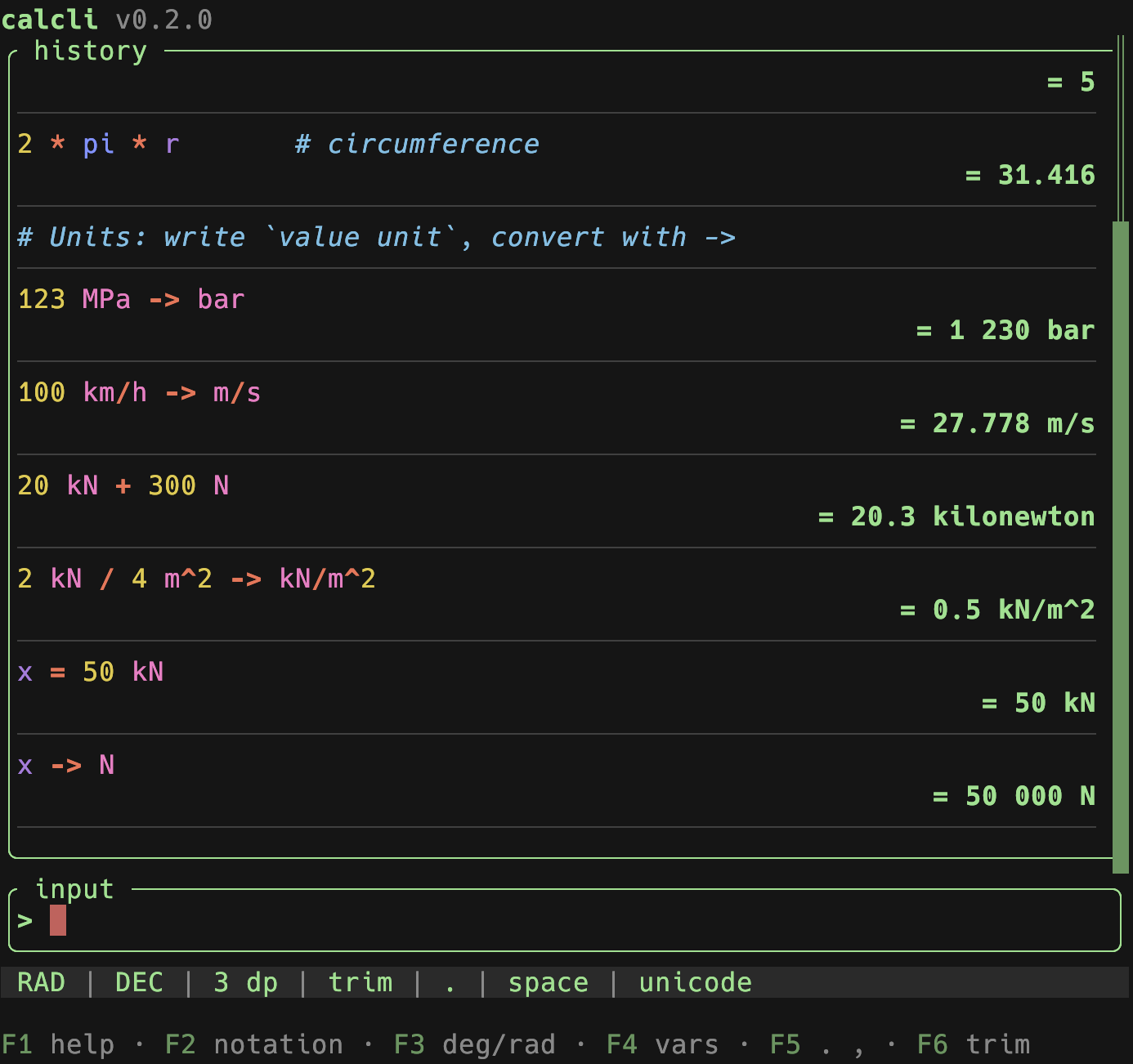
Type an expression, press Enter, keep going. The previous result is available as `ans`, every line stays in an editable history (editing a line recomputes everything below it), and results keep full `f64` precision internally even when the display is rounded.
## Features
- **History with recompute** – each entry shows the input with its result on the line below (both soft-wrap long content). Edit any earlier line and every line below is re-evaluated, so `ans` chains stay correct.
- **Full precision** – the rounded value you see is only for display; further math always uses the exact internal value.
- **Three views** – Calc, Variables and Settings, switched with `Alt+1` / `Alt+2` / `Alt+3` (the Calc view is a text field, so bare digits stay typeable). The active view is restored on the next start.
- **Variables** – save with `=name` (stores the last answer) or `name = expr`. Manage them in their own view: insert, copy, delete, reset all. Persisted.
- **Notation** – cycle decimal / scientific / SI-prefixed (`F2`); trailing fractional zeros are dropped by default (`12`, not `12.000`), toggle with `F6` or the `trim_trailing_zeros` config key.
- **Angle mode** – toggle degrees / radians for trig (`F3`).
- **Lenient input** – spaces, `_` and the non-decimal one of `.`/`,` are accepted as thousands separators; SI prefixes like `3.3k`, `100u` are expanded. Function arguments use `;` (e.g. `max(1;2)`).
- **Clipboard** – `y` copies the plain, full-precision value (no grouping); `Y` copies it as shown (rounded, grouped).
- **Growing input** – long expressions soft-wrap and the input field grows (up to `input_max_lines`); `↑/↓` move the caret across the wrapped lines, `↑` on the first line enters the history.
- **Syntax highlighting** – functions, constants, operators (bold), numbers, defined variables, units, parentheses and `ans` are coloured in the input, the history and while editing. Colours are configurable in the `[highlight]` table; unknown identifiers stay neutral.
- **Live feedback** – as you type, the input border shows a dim `= value` preview while the expression is valid and a subtle warning marker when it looks complete but won't parse (silent while still mid-typing). Toggle with `live_feedback` in the config.
- **Settings view** – every display setting on one editable list (`←`/`→` steps the focused value, applied live), including the theme and the glyph set. The function keys keep working from every view.
- **Shortcut hints** – the footer lists the current view's keys, grouped, with a closing `Global` group. `F1` hides the whole band (the state is remembered); `F12` or `?` opens the scrollable, fuzzy-filtered help overlay.
- **Persistence** – settings, variables, history and the interface state (active view, theme, glyphs, hint visibility) are saved on exit and restored next time (settings restore is configurable). Writes are atomic, and a `state.toml` from any older calcli still loads.
## Install
calcli builds on Rust 1.88 or newer (MSRV).
From crates.io:
```sh
cargo install calcli
```
Or from a local checkout:
```sh
cargo install --path .
```
Or run without installing:
```sh
cargo run --release
```
## Command line
calcli has exactly one job and therefore no subcommands: called without arguments it opens the calculator.
```text
Usage: calcli [OPTIONS]
Options:
--demo Fills the session with sample data and leaves the saved state alone
-h, --help Shows this help and exits
-V, --version Shows the version and exits
```
`--demo` fills the session with sample data (history, variables, unit conversions) for a quick tour and never writes to your saved session:
```sh
calcli --demo
```
Exit codes follow the usual convention: `0` on success, `1` on a runtime error, `2` on a usage error (an unknown option). Errors go to stderr as `calcli: error: …`.
## Keys
Every key below is rebindable under `[keys]` in the config, with three exceptions: `Ctrl+Q` and `F1` belong to the toolkit, and the clipboard chords `Ctrl+C` / `Ctrl+X` / `Ctrl+V` belong to the text editor rather than to the action catalog. The footer and the help overlay (`F12` or `?`) are both generated from that catalog, so they can never disagree with each other – and a test holds this table to it.
### Global
Available everywhere. The function keys and `Alt` chords also work while typing, because they are not themselves expression characters.
> `AltGr` is the exception, and it types. A terminal reports it as Control+Alt, so the characters it produces – `@`, `\`, `[`, `~` on a German layout – would otherwise read as chords; they reach the input instead.
> `Alt+N` reaches the app only if your terminal sends `Alt` as a meta prefix. Ghostty, WezTerm, Alacritty and kitty do by default. In iTerm2 set *Left Option key* to `Esc+`; in macOS Terminal.app enable *Use Option as Meta key*. Otherwise rebind `view_calc` / `view_variables` / `view_settings` under `[keys]` – `F4` already reaches the Variables view unaided.
| Key | Action |
| --- | --- |
| `Alt+1` / `Alt+2` / `Alt+3` | switch to Calc / Variables / Settings |
| `F4` | switch to Variables |
| `F2` | cycle notation (dec / sci / SI) |
| `F3` | toggle angle mode (deg / rad) |
| `F5` | toggle decimal separator (`.` / `,`) |
| `F6` | toggle trailing-zero trimming |
| `Ctrl+Y` | copy the last result (plain) |
| `Ctrl+R` | search the history and recall a line into the input |
| `Ctrl+P` | open the command palette (run any action by name) |
| `F12` / `?` | open the help overlay |
| `q` | quit (outside the input; use `:q` while typing) |
| `F1` | show / hide the shortcut hints |
| `Ctrl+Q` | quit at once, from anywhere (a modal included) |
`q` and `?` are ordinary characters while the input or an in-place edit has the keyboard, so they are typed rather than acted on. Use `:q` to quit from there.
With `confirm_quit = true` the soft quit (`q`, `:q`) asks first; `Ctrl+Q` never asks. Both save the session on the way out.
### Calc – typing
| Key | Action |
| --- | --- |
| `Enter` | evaluate the expression |
| `↑` / `PgUp` | enter the history (`↑` only from the first wrapped line) |
| `Esc` | clear the input |
| `Ctrl+C` / `X` / `V` | copy / cut / paste in the input |
Typing an identifier opens a suggestion dropdown of matching variables, built-in functions and constants. `↑` / `↓` pick a suggestion, `Enter` / `Tab` / `→` accept it, and `Esc` closes the dropdown. While it is open `↑` steers it rather than the history, so use `PgUp` to browse the history from there.
### Calc – browsing the history (after `↑`)
| Key | Action |
| --- | --- |
| `↑` `↓` / `PgUp` `PgDn` / `Home` `End` | move the selection |
| `Alt+↑` / `Alt+↓` | move the selected line up / down (recomputes) |
| `o` / `O` | insert a line below / above and edit it |
| `Enter` / `e` | edit the selected line (recomputes below) |
| `d` / `Del` | delete the selected line (asks first) |
| `D` | clear the whole history (asks first) |
| `y` | copy the value (plain, full precision) |
| `Y` | copy the value (as shown, grouped) |
| `Esc` | back to the input |
Reordering, inserting and deleting all re-evaluate the affected lines, so `ans` and variable assignments stay consistent with the new order.
### Calc – editing a line in place
| Key | Action |
| --- | --- |
| `Enter` | apply the edit |
| `Esc` | cancel (a freshly inserted line is removed) |
Switching views is locked while a line is being edited; the tab bar dims to say so. Finish or cancel the edit first.
### Variables (`Alt+2` or `F4`)
| Key | Action |
| --- | --- |
| `↑` `↓` | select (cyclic) |
| `PgUp` `PgDn` | move by one screenful (clamped) |
| `Home` `End` | jump to the first / last variable |
| `Enter` | insert the name into the input and return to Calc |
| `y` / `Y` | copy the value (plain / as shown) |
| `d` / `Del` | delete the variable |
| `R` | reset all variables (asks first) |
| `Esc` | back to Calc |
### Settings (`Alt+3`)
| Key | Action |
| --- | --- |
| `↑` `↓` | select a setting (cyclic) |
| `PgUp` `PgDn` | move by one screenful (clamped) |
| `Home` `End` | jump to the first / last setting |
| `←` / `→` or `Enter` | step the focused value (applied live) |
| `Esc` | back to Calc |
Notation, decimals, angle mode, trailing zeros, the decimal and thousands marks, the glyph set and the theme. The theme and glyph choice are persisted.
### Typed commands (in the input)
`:d[n]`, `:s[n]`, `:si[n]` set notation (and optional decimals); `:deg` / `:rad` set the angle mode; `:clear` clears the history (asks first); `:q` quits.
## Expressions
Backed by [`meval`](https://crates.io/crates/meval): `+ - * / ^` (and `**` for power), parentheses, constants `pi`, `e`, and functions such as `sqrt`, `exp`, `ln`, `abs`, `sin`, `cos`, `tan`, `asin`, `acos`, `atan`, `sinh`/`cosh`/`tanh`, `floor`, `ceil`, `round`, `min`, `max`, `atan2`. Trig respects the angle mode.
- `ans` – the previous result. A line starting with an operator (e.g. `+5`) continues from it automatically.
- `=name` – save the previous answer to `name`.
- `name = expr` – evaluate and store. `ans`, `pi` and `e` are reserved.
- SI prefixes on numbers: `k M G T m µ u n p` (e.g. `4.7k` → `4700`).
- Units, conversion & arithmetic: write a quantity as `value unit` (space-separated, e.g. `123 MPa`) and convert with `->` (or `to`): `123 MPa -> bar`, `1 l -> dm^3`, `100 km/h -> m/s`, `ans -> psi`, `x = 50 kN` then `x -> N`. You can also calculate *with* units – `20 kN + 300 N` → `20.3 kN`, `1 m + 50 cm` → `1.5 m`, `1 m * 2 m` → `2 m^2`, `2 kN / 4 m^2 -> kN/m^2` → `0.5 kN/m^2`. `ans` and variables keep their unit. Units are powered by [`rink-core`](https://crates.io/crates/rink-core); a conversion is shown in the unit you typed, a derived result in a sensible symbol (pin any other unit with `->`). Exponents use `^` (`cm^3`, `m^2`).
- Comments: everything after `#` is ignored by the calculation but kept in the history (e.g. `2*pi*r # circumference`). A line that is only a comment is kept as a note (no result); notes don't break the `ans` chain.
## Configuration
`calcli` reads `config.toml` from `$XDG_CONFIG_HOME/calcli/` (or `~/.config/calcli/`). Every key is optional, and merging is per key rather than per section. See [`examples/config.toml`](examples/config.toml) for the full, commented list.
| Section | Holds |
| --- | --- |
| top level | notation, decimals, angle mode, separators, max history, the `restore_last_settings` / `live_feedback` / `confirm_delete` / `confirm_quit` switches and the history-list options |
| `[appearance]` | the theme name, the glyph set and per-colour palette overrides |
| `[highlight]` | the eight syntax-highlight token colours |
| `[themes.<name>]` | your own themes, selectable by name |
| `[keys]` | the key bound to each action |
Environment variables override the file for a single run: `CALCLI_DECIMALS`, `CALCLI_DECIMAL_SEPARATOR`, `CALCLI_THEME`, `CALCLI_ACCENT`, `CALCLI_GLYPHS`, `CALCLI_CONFIRM_QUIT`, `CALCLI_CONFIRM_DELETE`.
A `config.toml` written for calcli 0.2 (a flat `[theme]` table and a top-level `glyphs` key) still loads unchanged; its colours are mapped onto the sections above. The 0.2 shape is deprecated but supported.
The session (settings, variables, history and the interface state) is stored in `state.toml` under `$XDG_STATE_HOME/calcli/` (or `~/.local/state/calcli/`); see [`examples/state.toml`](examples/state.toml). It is written atomically, and a `state.toml` from any earlier calcli still loads. History values are recomputed on load so the `ans` chain stays consistent with the active settings.
> `glyphs = "ascii"` switches the warning marker and the toolkit's list markers to ASCII; borders and a few separators use broadly-compatible Unicode box-drawing and middle-dot glyphs.
## Architecture
Layered, with the composition root in `main.rs` and dependencies pointing inward to `domain`:
- `domain/` – pure core: evaluation (`Evaluator` trait + meval), the `units` engine (rink), expression preprocessing, number formatting, variables, history (and its replay), and the domain error type.
- `services/` – `CalcService`: orchestration (submit / edit / delete + recompute, variables, settings). Also the error funnel: a `StorageError` is converted here into a domain error, so nothing below names files or TOML.
- `storage/` – `StateRepository` port + an atomic TOML implementation.
- `config/` – `Config`, the appearance/highlight sections and the loader (defaults → TOML → `CALCLI_*`).
- `keymap.rs` – the action catalog and the scope rule: the single source for key dispatch, the footer hints, the help overlay and the `[keys]` config names. The chord grammar itself comes from `ratada::keymap`.
- `tui/` – the Ratatui front-end: a shared `appframe`, one module per view, and an `Interaction` port so the key path is testable without a terminal.
- `util/` – atomic writes, paths, logging.
The terminal toolkit (widgets, theming, modals, the event loop, the chord grammar, the clipboard) comes from [`ratada`](../../libs/ratada), so calcli holds no copy of it. The one deliberate exception is `tui/text_edit.rs`: calcli syntax-highlights its input per character, and `ratada`'s text widgets render plain text only. Even there the exception is the rendering – the key rules come from the toolkit.
Dimensionless math runs through the `Evaluator` trait (meval), keeping full `f64` precision and the angle mode; anything involving units is routed to the `domain::units` wrapper around `rink-core`, which owns conversion and unit arithmetic.
## Development
```sh
cargo fmt --check # formatting
cargo clippy --all-targets -- -D warnings # must be warning-free
cargo test # unit + integration tests
cargo run -- --demo # a session filled with sample data
```
See [`docs/DEVELOPMENT.md`](docs/DEVELOPMENT.md) for the project layout and `CLAUDE.md` for the coding standards this project follows.
When you change a shortcut, the footer and the help overlay follow the action catalog in `src/keymap.rs` automatically – but the key tables in this README and the `[keys]` block in `examples/config.toml` have to be updated by hand.
## License
Licensed under the [MIT License](LICENSE).