# calamine
An Excel/OpenDocument Spreadsheets file reader/deserializer, in pure Rust.
[](https://github.com/tafia/calamine/actions)
[](https://ci.appveyor.com/project/tafia/calamine/branch/master)
[Documentation](https://docs.rs/calamine/)
## Description
**calamine** is a pure Rust library to read and deserialize any spreadsheet file:
- excel like (`xls`, `xlsx`, `xlsm`, `xlsb`, `xla`, `xlam`)
- opendocument spreadsheets (`ods`)
As long as your files are *simple enough*, this library should just work.
## Examples
### Serde deserialization
It is as simple as:
```rust
use calamine::{open_workbook, Error, Xlsx, Reader, RangeDeserializerBuilder};
fn example() -> Result<(), Error> {
let path = format!("{}/tests/temperature.xlsx", env!("CARGO_MANIFEST_DIR"));
let mut workbook: Xlsx<_> = open_workbook(path)?;
let range = workbook.worksheet_range("Sheet1")?;
let mut iter = RangeDeserializerBuilder::new().from_range(&range)?;
if let Some(result) = iter.next() {
let (label, value): (String, f64) = result?;
assert_eq!(label, "celsius");
assert_eq!(value, 22.2222);
Ok(())
} else {
Err(From::from("expected at least one record but got none"))
}
}
```
Calamine provides helper functions to deal with invalid type values. For
instance, to deserialize a column which should contain floats but may also
contain invalid values (i.e. strings), you can use the
[`deserialize_as_f64_or_none`](https://docs.rs/calamine/latest/calamine/fn.deserialize_as_f64_or_none.html)
helper function with Serde's
[`deserialize_with`](https://serde.rs/field-attrs.html) field attribute:
```rust
use calamine::{deserialize_as_f64_or_none, open_workbook, RangeDeserializerBuilder, Reader, Xlsx};
use serde::Deserialize;
#[derive(Deserialize)]
struct Record {
metric: String,
#[serde(deserialize_with = "deserialize_as_f64_or_none")]
value: Option<f64>,
}
fn main() -> Result<(), Box<dyn std::error::Error>> {
let path = format!("{}/tests/excel.xlsx", env!("CARGO_MANIFEST_DIR"));
let mut excel: Xlsx<_> = open_workbook(path)?;
let range = excel
.worksheet_range("Sheet1")
.map_err(|_| calamine::Error::Msg("Cannot find Sheet1"))?;
let iter_records =
RangeDeserializerBuilder::with_headers(&["metric", "value"]).from_range(&range)?;
for result in iter_records {
let record: Record = result?;
println!("metric={:?}, value={:?}", record.metric, record.value);
}
Ok(())
}
```
The
[`deserialize_as_f64_or_none`](https://docs.rs/calamine/latest/calamine/fn.deserialize_as_f64_or_none.html)
function discards all invalid values. If instead you would like to return them
as `String`s, you can use the similar
[`deserialize_as_f64_or_string`](https://docs.rs/calamine/latest/calamine/fn.deserialize_as_f64_or_string.html)
function.
### Reader: Simple
```rust
use calamine::{Reader, Xlsx, open_workbook};
let mut excel: Xlsx<_> = open_workbook("file.xlsx").unwrap();
if let Ok(r) = excel.worksheet_range("Sheet1") {
for row in r.rows() {
println!("row={:?}, row[0]={:?}", row, row[0]);
}
}
```
### Reader: With header row
```rs
use calamine::{HeaderRow, Reader, Xlsx, open_workbook};
let mut excel: Xlsx<_> = open_workbook("file.xlsx").unwrap();
let sheet1 = excel
.with_header_row(HeaderRow::Row(3))
.worksheet_range("Sheet1")
.unwrap();
```
Note that `xlsx` and `xlsb` files support lazy loading, so specifying a
header row takes effect immediately when reading a sheet range.
In contrast, for `xls` and `ods` files, all sheets are loaded at once when
opening the workbook with default settings.
As a result, setting the header row only applies afterward and does not
provide any performance benefits.
### Reader: More complex
Let's assume
- the file type (xls, xlsx ...) cannot be known at static time
- we need to get all data from the workbook
- we need to parse the vba
- we need to see the defined names
- and the formula!
```rust
use calamine::{Reader, open_workbook_auto, Xlsx, DataType};
// opens a new workbook
let path = ...; // we do not know the file type
let mut workbook = open_workbook_auto(path).expect("Cannot open file");
// Read whole worksheet data and provide some statistics
if let Some(Ok(range)) = workbook.worksheet_range("Sheet1") {
let total_cells = range.get_size().0 * range.get_size().1;
let non_empty_cells: usize = range.used_cells().count();
println!("Found {} cells in 'Sheet1', including {} non empty cells",
total_cells, non_empty_cells);
// alternatively, we can manually filter rows
assert_eq!(non_empty_cells, range.rows()
.flat_map(|r| r.iter().filter(|&c| c != &DataType::Empty)).count());
}
// Check if the workbook has a vba project
if let Some(Ok(mut vba)) = workbook.vba_project() {
let vba = vba.to_mut();
let module1 = vba.get_module("Module 1").unwrap();
println!("Module 1 code:");
println!("{}", module1);
for r in vba.get_references() {
if r.is_missing() {
println!("Reference {} is broken or not accessible", r.name);
}
}
}
// You can also get defined names definition (string representation only)
for name in workbook.defined_names() {
println!("name: {}, formula: {}", name.0, name.1);
}
// Now get all formula!
let sheets = workbook.sheet_names().to_owned();
for s in sheets {
println!("found {} formula in '{}'",
workbook
.worksheet_formula(&s)
.expect("sheet not found")
.expect("error while getting formula")
.rows().flat_map(|r| r.iter().filter(|f| !f.is_empty()))
.count(),
s);
}
```
## Features
- `dates`: Add date related fn to `DataType`.
- `picture`: Extract picture data.
### Others
Browse the [examples](https://github.com/tafia/calamine/tree/master/examples) directory.
## Performance
As `calamine` is readonly, the comparisons will only involve reading an excel `xlsx` file and then iterating over the rows. Along with `calamine`, three other libraries were chosen, from three different languages:
- [`excelize`](https://github.com/qax-os/excelize) written in `go`
- [`ClosedXML`](https://github.com/ClosedXML/ClosedXML) written in `C#`
- [`openpyxl`](https://foss.heptapod.net/openpyxl/openpyxl) written in `python`
The benchmarks were done using this [dataset](https://raw.githubusercontent.com/wiki/jqnatividad/qsv/files/NYC_311_SR_2010-2020-sample-1M.7z), a `186MB` `xlsx` file when the `csv` is converted. The plotting data was gotten from the [`sysinfo`](https://github.com/GuillaumeGomez/sysinfo) crate, at a sample interval of `200ms`. The program samples the reported values for the running process and records it.
The programs are all structured to follow the same constructs:
`calamine`:
```rust
use calamine::{open_workbook, Reader, Xlsx};
fn main() {
// Open workbook
let mut excel: Xlsx<_> =
open_workbook("NYC_311_SR_2010-2020-sample-1M.xlsx").expect("failed to find file");
// Get worksheet
let sheet = excel
.worksheet_range("NYC_311_SR_2010-2020-sample-1M")
.unwrap()
.unwrap();
// iterate over rows
for _row in sheet.rows() {}
}
```
`excelize`:
```go
package main
import (
"fmt"
"github.com/xuri/excelize/v2"
)
func main() {
// Open workbook
file, err := excelize.OpenFile(`NYC_311_SR_2010-2020-sample-1M.xlsx`)
if err != nil {
fmt.Println(err)
return
}
defer func() {
// Close the spreadsheet.
if err := file.Close(); err != nil {
fmt.Println(err)
}
}()
// Select worksheet
rows, err := file.Rows("NYC_311_SR_2010-2020-sample-1M")
if err != nil {
fmt.Println(err)
return
}
// Iterate over rows
for rows.Next() {
}
}
```
`ClosedXML`:
```csharp
using ClosedXML.Excel;
internal class Program
{
private static void Main(string[] args)
{
// Open workbook
using var workbook = new XLWorkbook("NYC_311_SR_2010-2020-sample-1M.xlsx");
// Get Worksheet
// "NYC_311_SR_2010-2020-sample-1M"
var worksheet = workbook.Worksheet(1);
// Iterate over rows
foreach (var row in worksheet.Rows())
{
}
}
}
```
`openpyxl`:
```python
from openpyxl import load_workbook
# Open workbook
wb = load_workbook(
filename=r'NYC_311_SR_2010-2020-sample-1M.xlsx', read_only=True)
# Get worksheet
ws = wb['NYC_311_SR_2010-2020-sample-1M']
# Iterate over rows
for row in ws.rows:
_ = row
# Close the workbook after reading
wb.close()
```
### Benchmarks
The benchmarking was done using [`hyperfine`](https://github.com/sharkdp/hyperfine) with `--warmup 3` on an `AMD RYZEN 9 5900X @ 4.0GHz` running `Windows 11`. Both `calamine` and `ClosedXML` were built in release mode.
```bash
0.22.1 calamine.exe
Time (mean ± σ): 25.278 s ± 0.424 s [User: 24.852 s, System: 0.470 s]
Range (min … max): 24.980 s … 26.369 s 10 runs
v2.8.0 excelize.exe
Time (mean ± σ): 44.254 s ± 0.574 s [User: 46.071 s, System: 7.754 s]
Range (min … max): 42.947 s … 44.911 s 10 runs
0.102.1 closedxml.exe
Time (mean ± σ): 178.343 s ± 3.673 s [User: 177.442 s, System: 2.612 s]
Range (min … max): 173.232 s … 185.086 s 10 runs
3.0.10 openpyxl.py
Time (mean ± σ): 238.554 s ± 1.062 s [User: 238.016 s, System: 0.661 s]
Range (min … max): 236.798 s … 240.167 s 10 runs
```
`calamine` is 1.75x faster than `excelize`, 7.05x faster than `ClosedXML`, and 9.43x faster than `openpyxl`.
The spreadsheet has a range of 1,000,001 rows and 41 columns, for a total of 41,000,041 cells in the range. Of those, 28,056,975 cells had values.
Going off of that number:
- `calamine` => 1,122,279 cells per second
- `excelize` => 633,998 cells per second
- `ClosedXML` => 157,320 cells per second
- `openpyxl` => 117,612 cells per second
### Plots
#### Disk Read
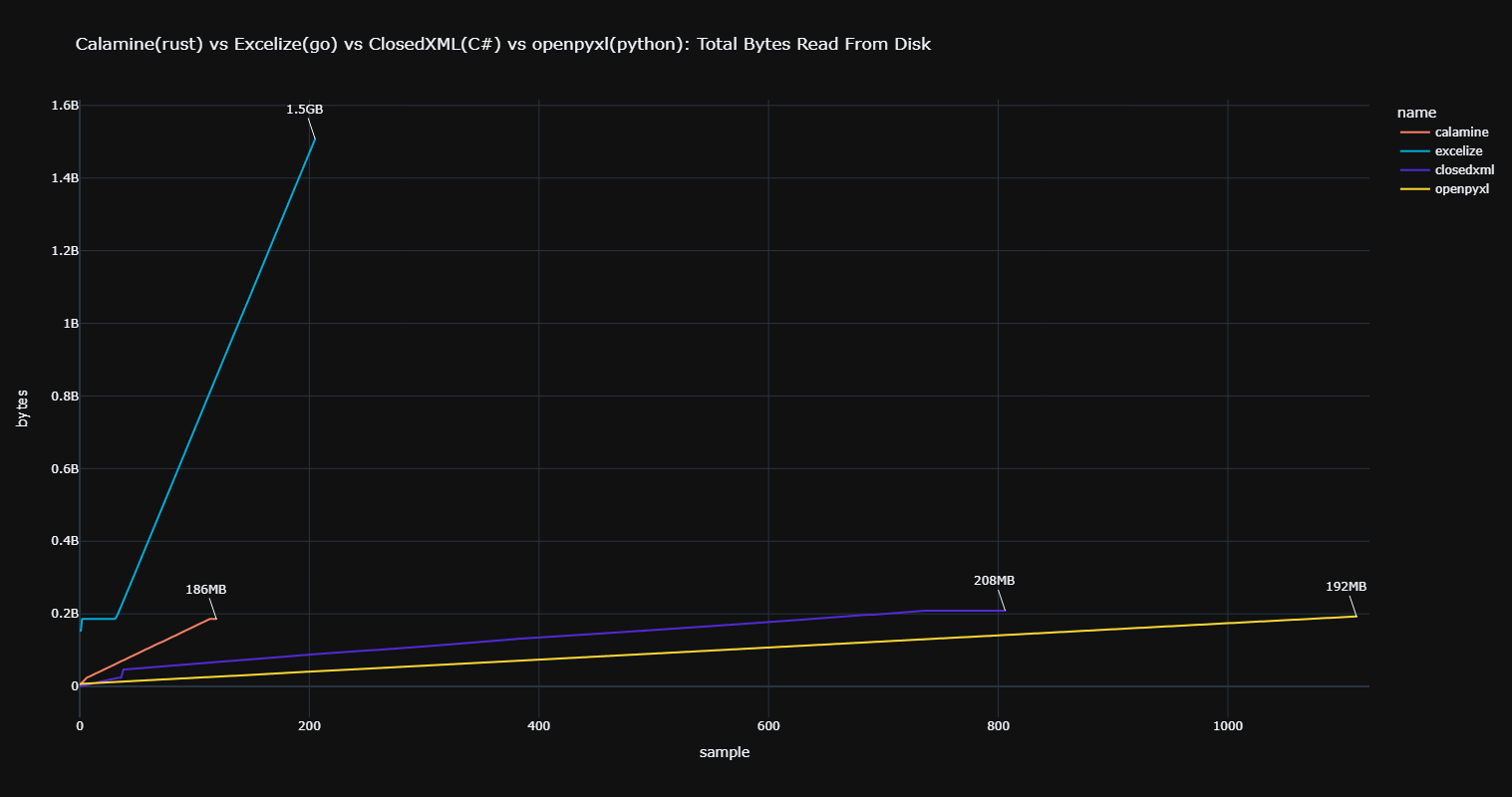
As stated, the filesize on disk is `186MB`:
- `calamine` => `186MB`
- `ClosedXML` => `208MB`.
- `openpyxl` => `192MB`.
- `excelize` => `1.5GB`.
When asking one of the maintainers of `excelize`, I got this [response](https://github.com/qax-os/excelize/issues/1695#issuecomment-1772239230):
> To avoid high memory usage for reading large files, this library allows user-specific UnzipXMLSizeLimit options when opening the workbook, to set the memory limit on the unzipping worksheet and shared string table in bytes, worksheet XML will be extracted to the system temporary directory when the file size is over this value, so you can see that data written in reading mode, and you can change the default for that to avoid this behavior.
>
> \- xuri
#### Disk Write
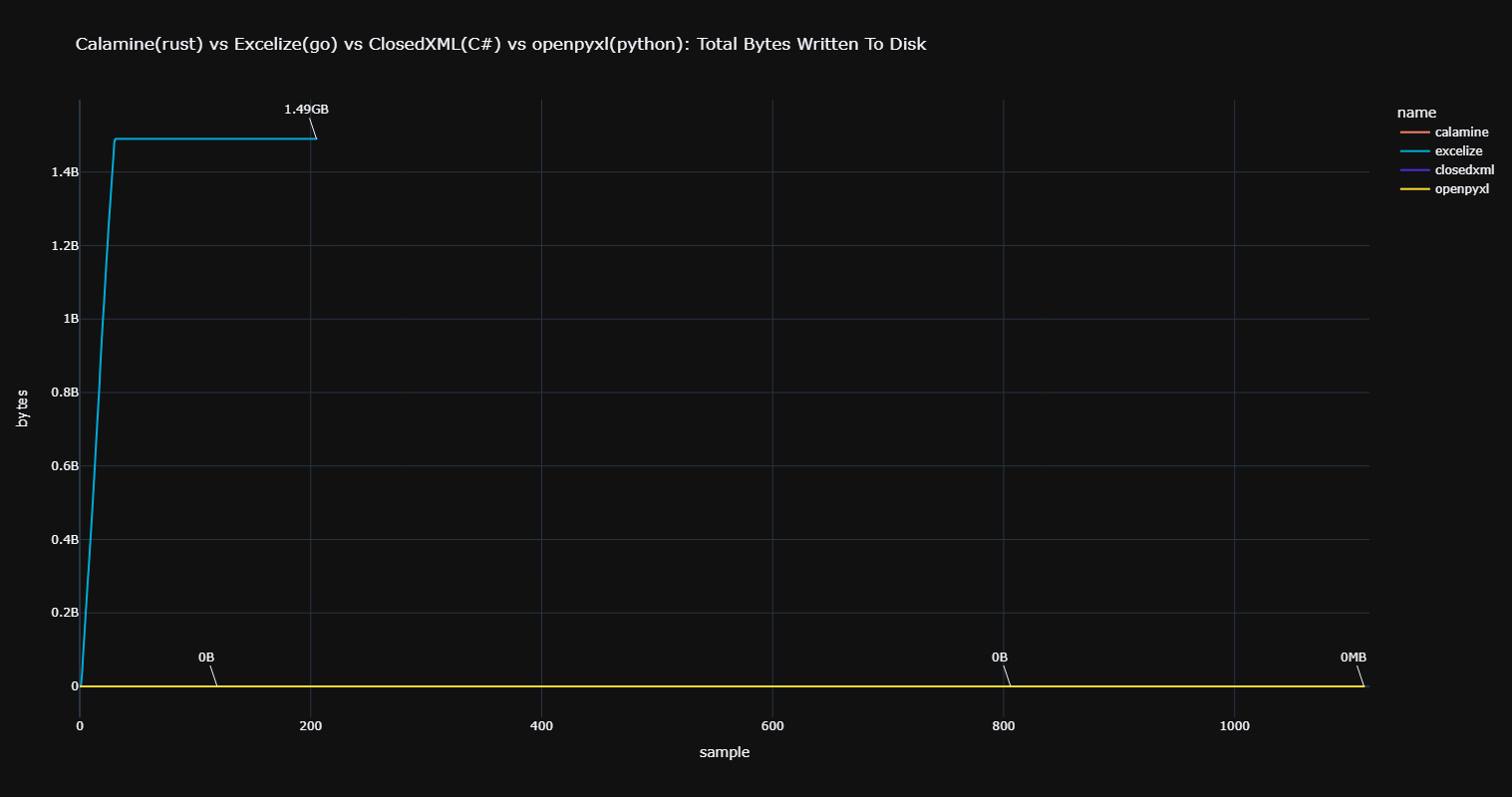
As seen in the previous section, `excelize` is writing to disk to save memory. The others don't employ that kind of mechanism.
#### Memory
> [!NOTE]
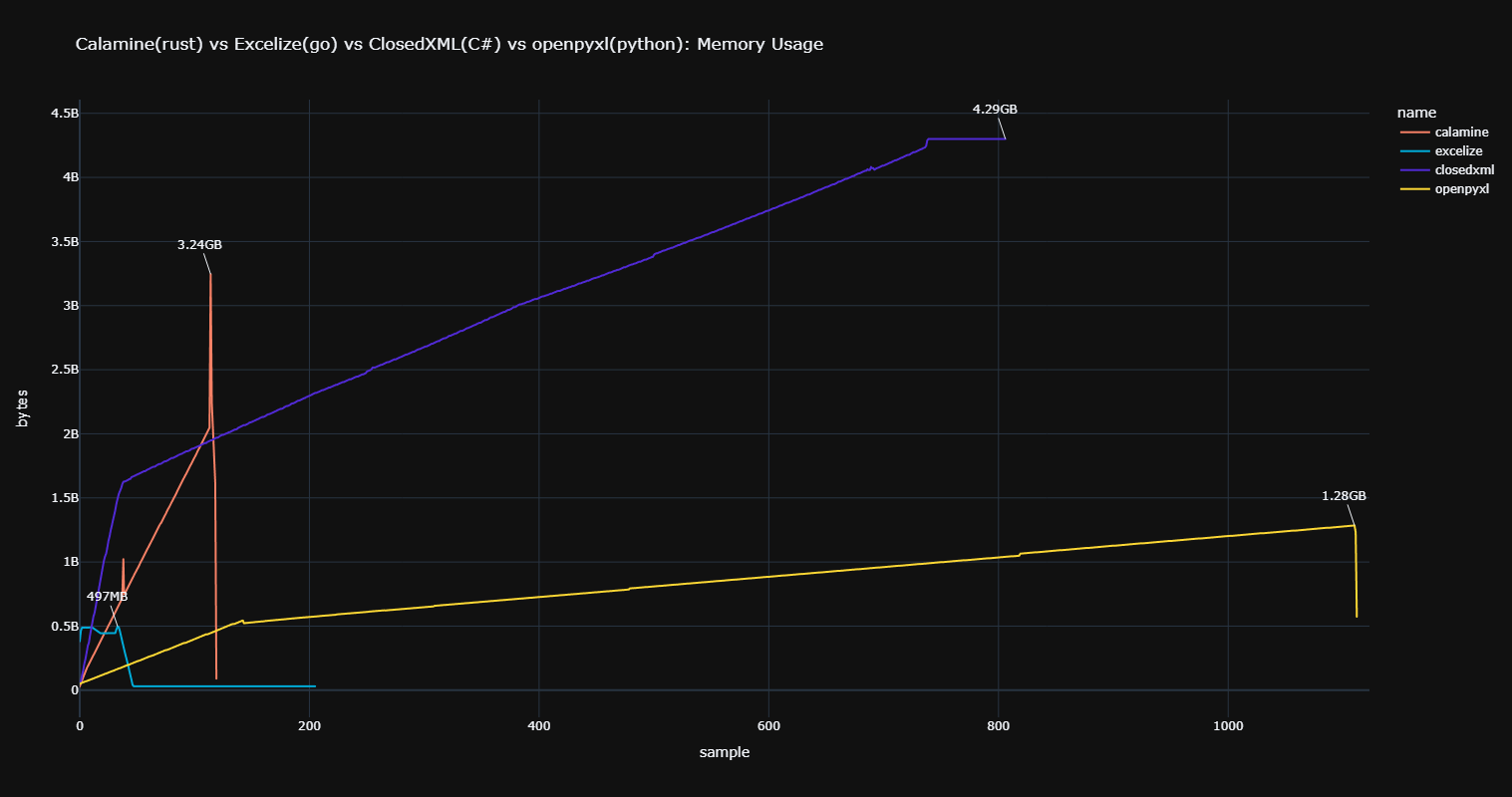
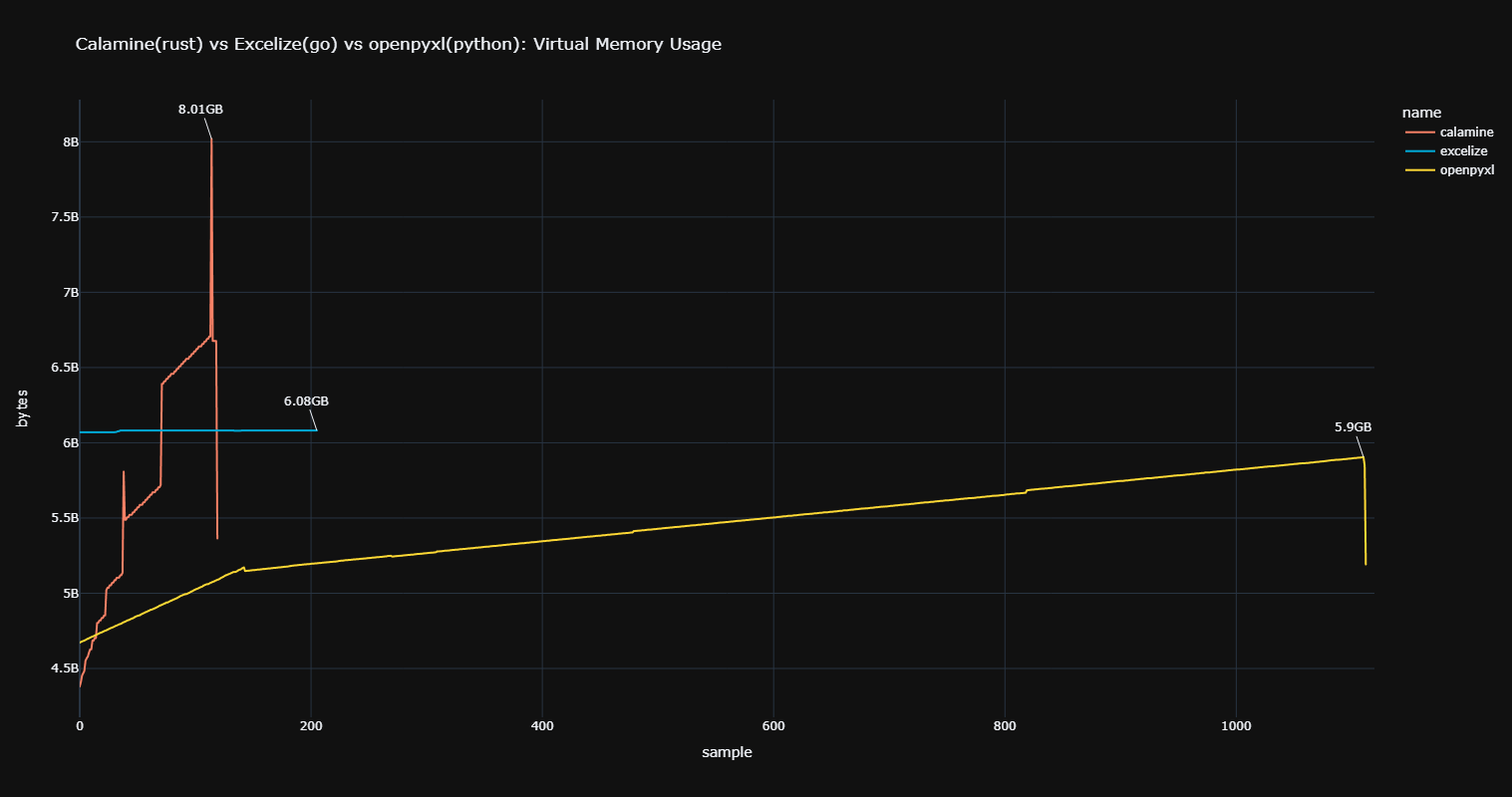
> `ClosedXML` was reporting a constant `2.5TB` of virtual memory usage, so it was excluded from the chart.
The stepping and falling for `calamine` is from the grows of `Vec`s and the freeing of memory right after, with the memory usage dropping down again. The sudden jump at the end is when the sheet is being read into memory. The others, being garbage collected, have a more linear climb all the way through.
#### CPU
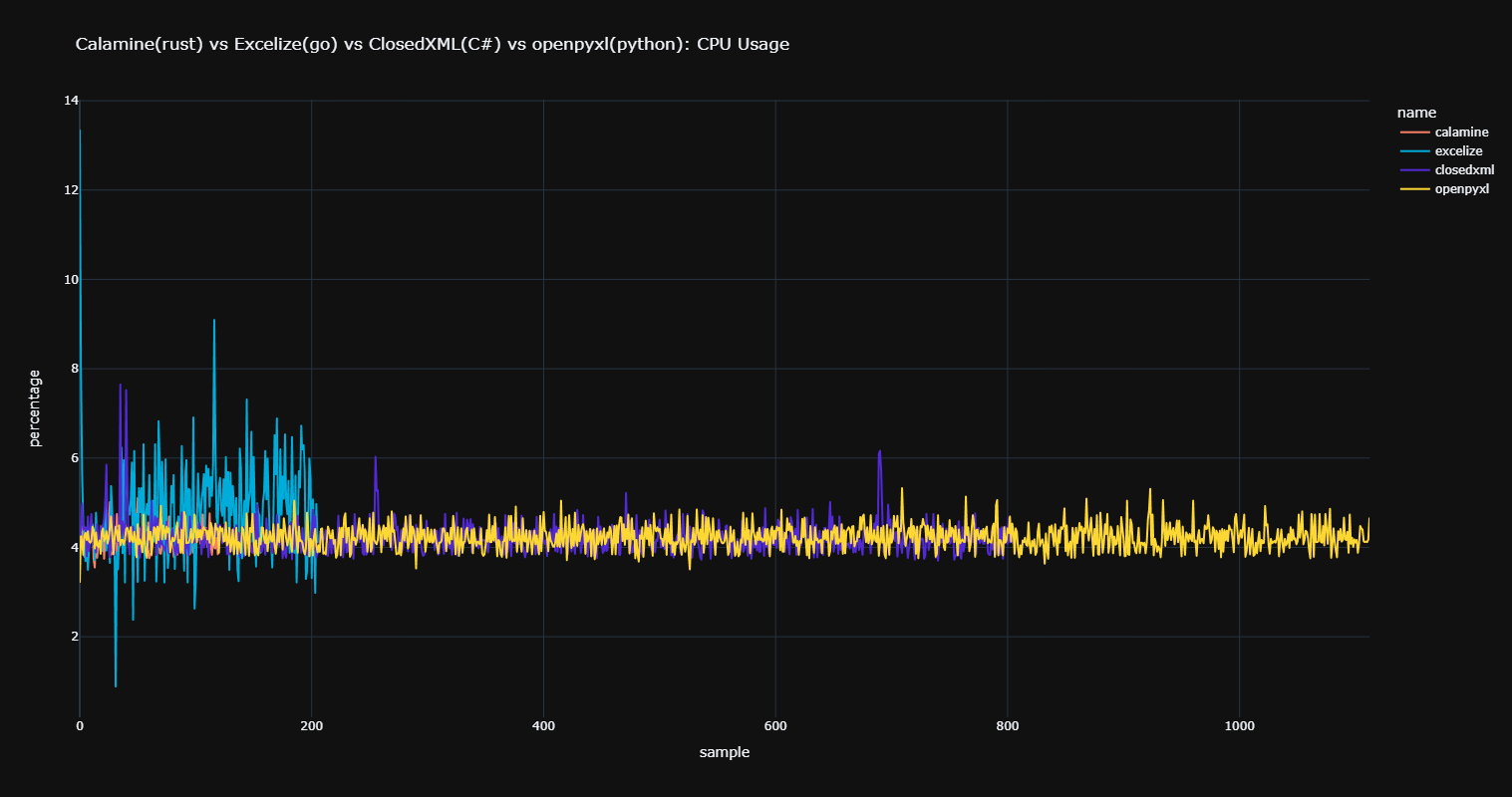
Very noisy chart, but `excelize`'s spikes must be from the GC?
## Unsupported
Many (most) part of the specifications are not implemented, the focus has been put on reading cell **values** and **vba** code.
The main unsupported items are:
- no support for writing excel files, this is a read-only library
- no support for reading extra contents, such as formatting, excel parameter, encrypted components etc ...
- no support for reading VB for opendocuments
## Credits
Thanks to [xlsx-js](https://github.com/SheetJS/js-xlsx) developers!
This library is by far the simplest open source implementation I could find and helps making sense out of official documentation.
Thanks also to all the contributors!
## License
MIT