# bunflared
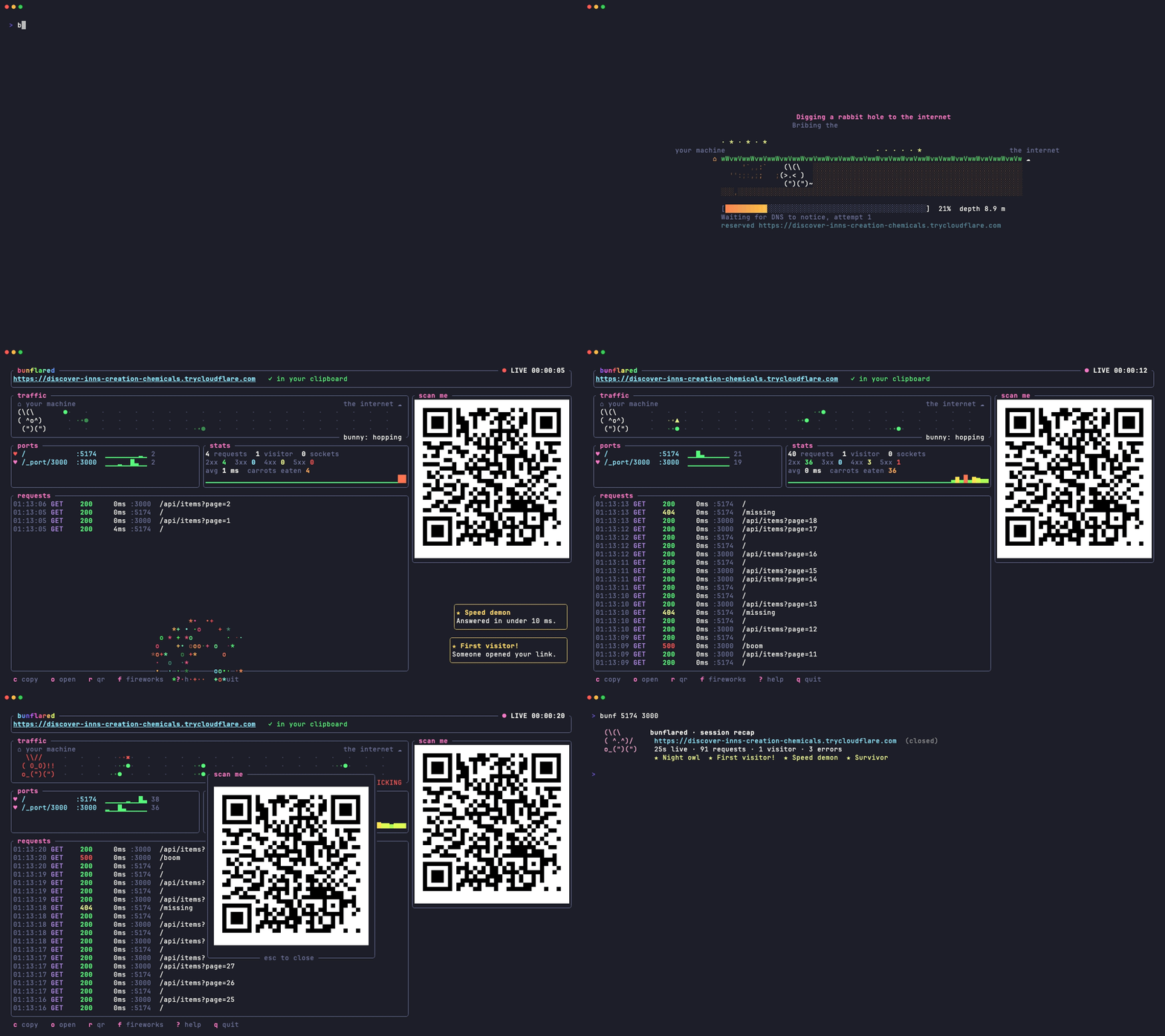
`bunflared 5173 3000` puts your local app on a temporary
`https://<words>.trycloudflare.com` link, through a Cloudflare quick tunnel.
No account, no deploy. Send the link to a client, open it on your phone,
close the terminal and it is gone.
No port to remember: type `bunf` alone in your project. It finds the apps
you are running, ticks the one started from that folder, and Enter shares
it, on a public link or only on this computer. The next time, one key
shares the same way again.
It shares several ports behind one link, so a frontend and its API travel
together: the first port is served at `/`, the others under `/_port/<port>`,
and `http://localhost:<port>` inside your pages and scripts is rewritten to
match. WebSockets pass through, so hot reload keeps working for the person on
the other end.
And it is a show. The screen catches fire while the tunnel opens, meteors
crash into the flames, a firefighter bunny tries his best, and a phoenix rises
out of the fire carrying your link. Then every request flies across a traffic
lane, the bunny naps when nobody visits and panics on a 5xx. There are
achievements. There are secrets.
And it is a live session with the people on the link: chat with them, send
them to the page you just fixed, see where their pointer is, get their
reactions and their notes pinned on the exact element they mean.
## Install
macOS and Linux:
```sh
Windows (PowerShell):
```powershell
That is all: no Rust, no `cloudflared` to install first. You get `bunflared`
and its short name `bunf`. On the first share, bunflared downloads
Cloudflare's own `cloudflared` if it is not already installed.
With Rust: `cargo install bunflared`.
Then, once, so your coding agents know to reach for it when you ask to share
something:
```sh
bunflared agents
```
## Use
Start with `bunf` alone, in your project's folder. It lists the apps
listening on this machine, the ones started from that folder first and the
first of them already ticked, so Enter shares it:
| `Space` | tick or untick an app; the first ticked is served at `/` |
| `Tab` | a public link, or only on this computer |
| `Enter` | share, and open the dashboard |
| `q` `Esc` | leave without sharing |
Two options tick the same way: the feedback button and the animations. The
command that does the same is written at the bottom, to reuse in a script.
The next time in that folder, the first line offers the same share again:
Enter relaunches it. An app started while the screen is open shows up within
a second.
The ports can also be given directly, which skips that screen:
```sh
bunf 5173 # share one app
bunf 5173 3000 # app at /, its API at /_port/3000
bunf 5173 --calm # same dashboard, no animations
bunf 5173 --local # on this computer only, no tunnel, no link
```
`--local` serves the app with the widget on `http://127.0.0.1:<port>`, in
well under a second: the same dashboard, notes and live session, for you and
your own browser, with nothing reaching Cloudflare. Only this computer can
open that address. `-l` is the short form, and `bunf -l` opens the home
screen with that mode already picked.
`bunf` and `bunflared` are the same command.
In the dashboard:
| `c` | copy the link (it is already in your clipboard) |
| `o` | open it in your browser |
| `r` | big QR code, for phones (it flashes when already on screen) |
| `f` | fireworks |
| `↑` `↓` | pick a visitor; commands then go to them only |
| `Tab` | switch between the visitors and the requests |
| `Esc` | pick nobody: commands go to everyone again |
| `m` | message the visitor, or everyone |
| `g` | send them to a page (the pages already seen are offered) |
| `R` | reload their page, after a fix |
| `e` | send them a reaction |
| `x` | clear the chat panel (the session file keeps everything) |
| `Enter` | on a request: its headers and bodies |
| `p` | replay the picked request to your local server |
| `?` | help |
| `q` | stop sharing |
Colors follow your terminal: bunflared asks it for its background and picks a
light or dark palette. `--theme light` or `--theme dark` forces one. `NO_COLOR`
is respected. When a shared port stops answering, visitors get a
small bunny page that retries by itself.
## Feedback from the people you share with
Every shared page gets a small tab on its edge. It tucks half away while the
page scrolls, your client can drag it up, down or to the other edge, or push it
against the edge to leave only a thin line: it never sits on the page's own
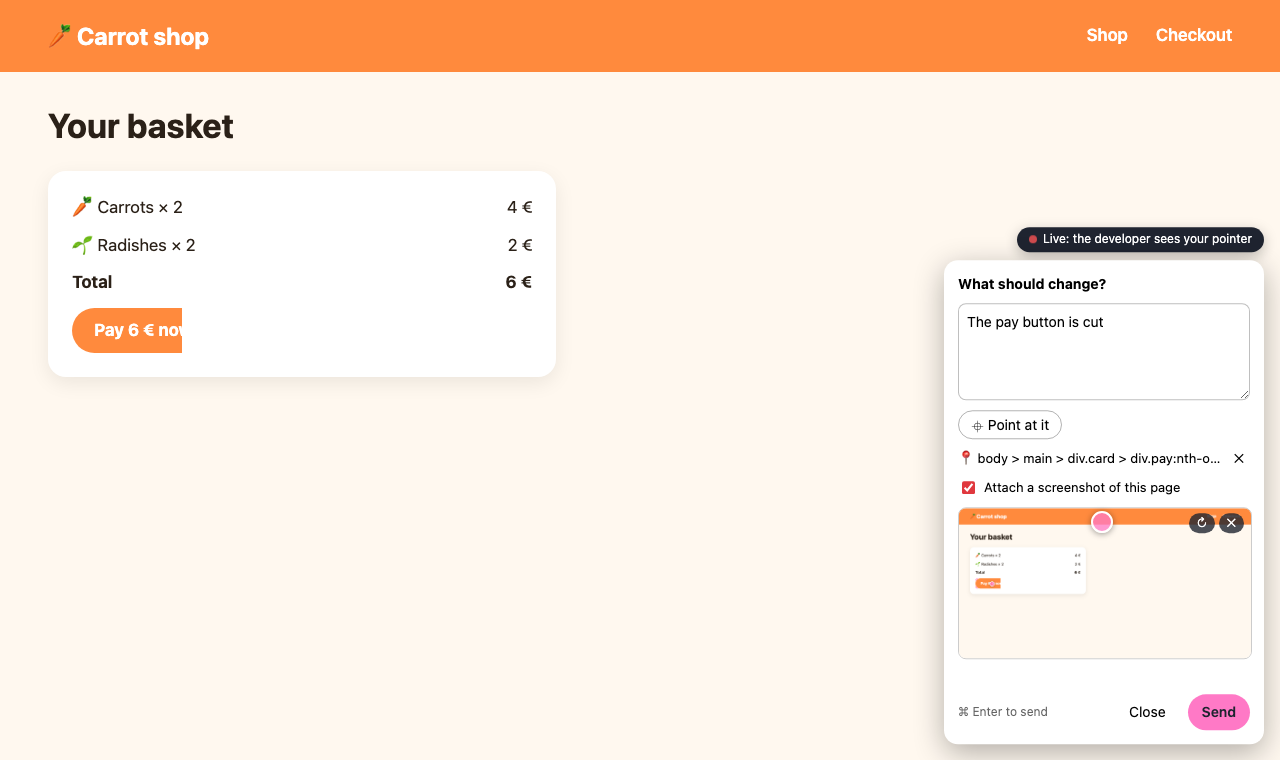
buttons. A tap opens the note: they write a remark, a screenshot of the page
is attached (or they paste their own), and it lands in `bunflared-feedback/`,
in the folder you ran bunflared from: one Markdown file per note, the image
next to it. With **Point at it** they click the element they mean first: the
note records its CSS selector, its text and its position, and the screenshot
shows it outlined.
That folder ignores itself
in git, so client notes never end up in a commit. Hand it to your coding
agent: "read the feedback and fix what they found".
Meanwhile the dashboard shows who is on which page, whether their tab is in
front, how long they have been idle and how many times they clicked.
## Live session
Each page holds a live connection to the dashboard, and reconnects by itself.
The GIF at the top is one: a message from the terminal, the answer from the
page, a reaction.
- **Chat**: `m` opens a message box. The message shows as a badge and a short
preview on their tab, they answer from the panel, and the answer lands in the
chat panel and as a toast. Their notes join the chat panel too, with the
element they point at and whether a screenshot came. On the page, the
conversation folds away or clears with one tap.
- **Drive the demo**: `g` sends them to a page, `R` reloads it.
- **Radar**: pick a visitor and the radar draws their pointer on an outline of
their screen. Their tab wears a red ring while it is followed, and
nothing is sent while the pointer rests.
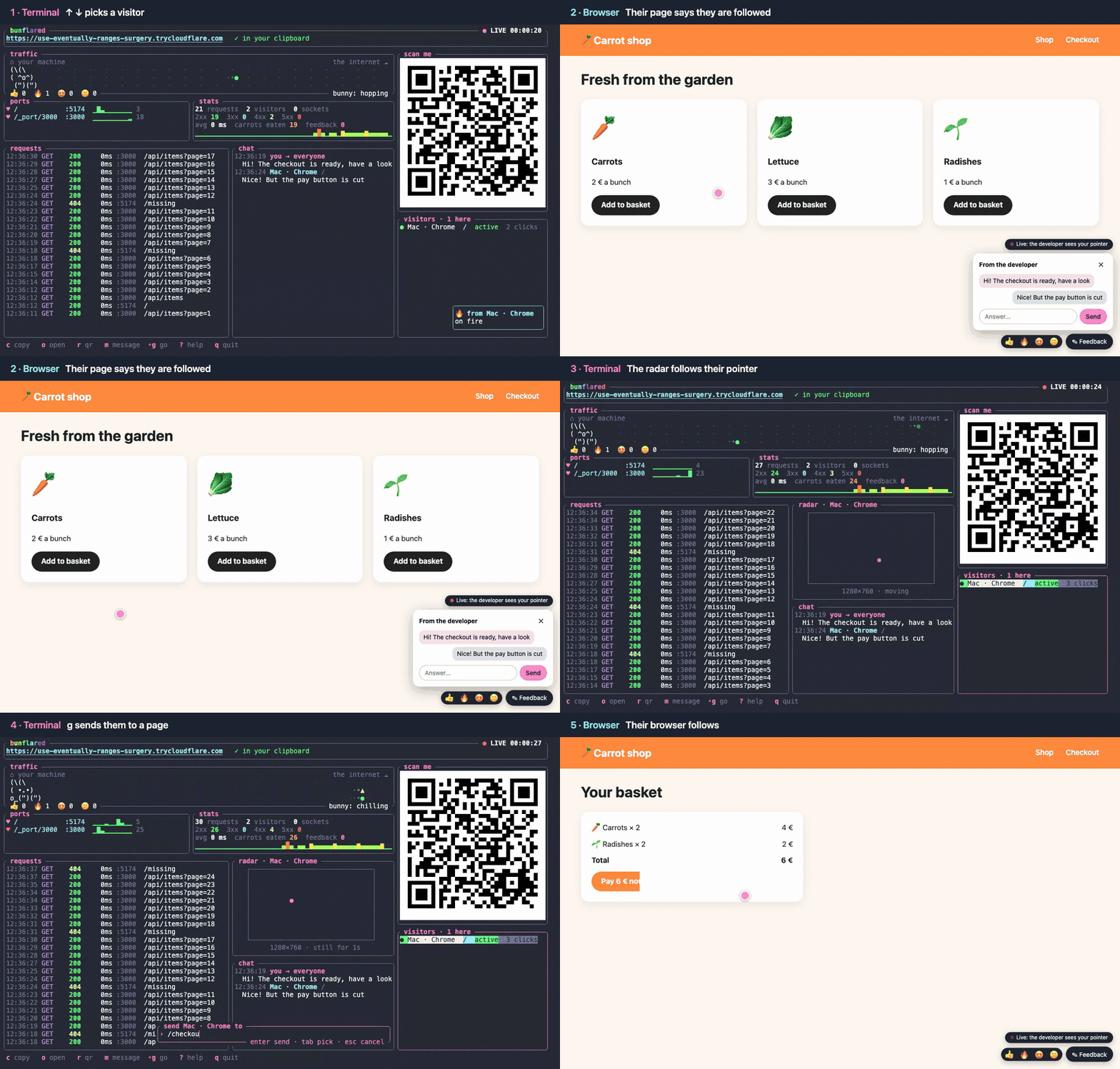
- **Reactions**: 👍 🔥 😍 😕 above the note. Each one has its own
show in the dashboard, confetti, fireworks, hearts or a worried bunny, and a
counter. `e` sends one back.
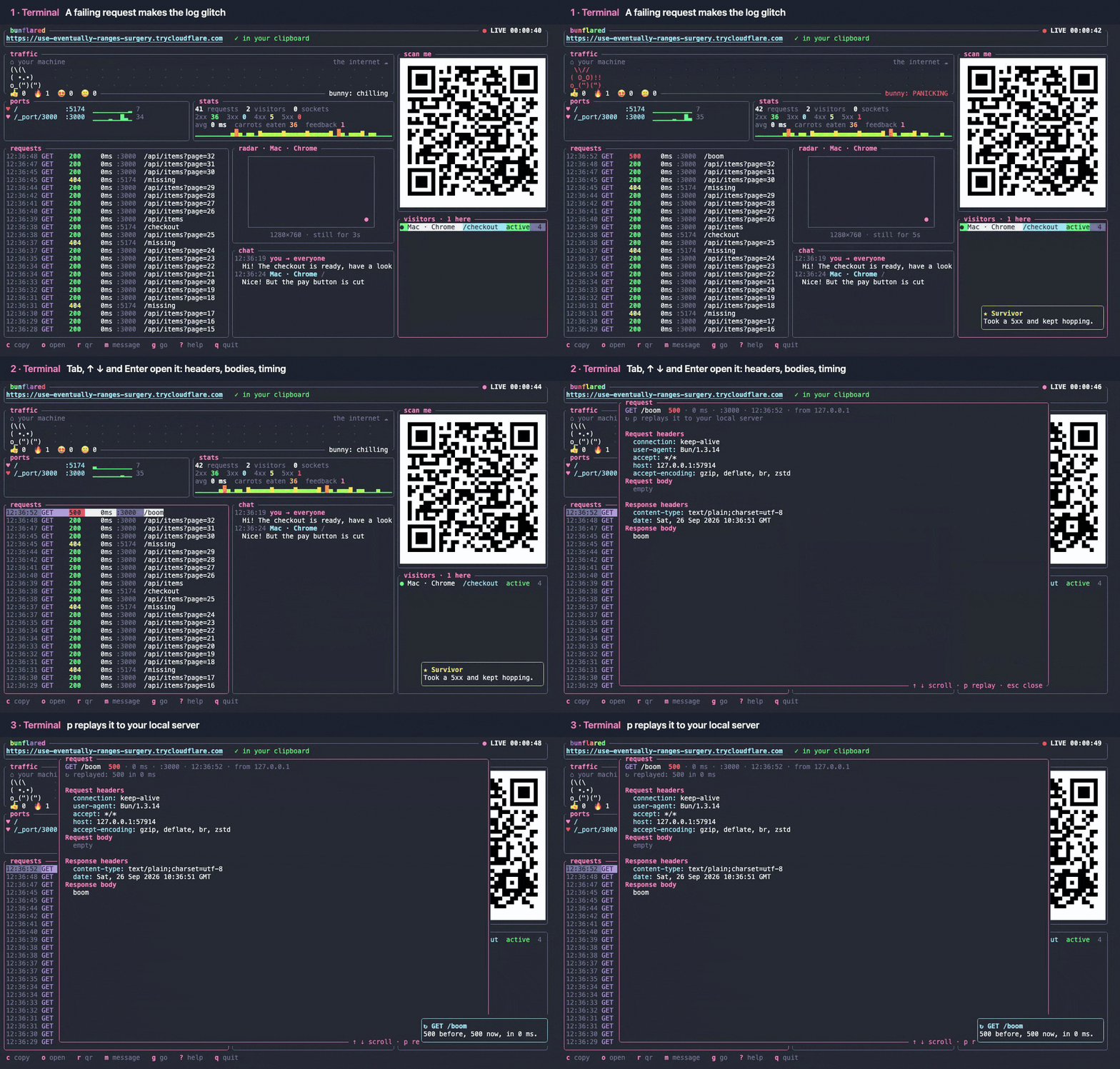
- **Inspector**: `Tab` to the requests, pick one, `Enter` shows its headers
and the start of its bodies, `p` replays it to your local server and shows
the new status next to the old one.
The chat, the reactions and a link to every note are kept in one
`session_<date>.md` next to the notes, so the whole conversation is there for
you or your coding agent afterwards. On a phone the panel opens as a sheet
from the bottom, and the widget follows the page's light or dark look.
Tell the people you share with that their visit is followed. `--no-widget`
leaves the pages untouched. The screenshot library is loaded from jsDelivr
only when someone sends a screenshot.
## For AI agents
Outside a terminal, or with `--json`, there is no dashboard: one JSON line on
stdout once the link works, one on stderr if it fails, and a meaningful exit
code. `--detach` returns as soon as the link works and keeps sharing in the
background.
```sh
bunflared 5173 3000 --detach # {"id":"4242","url":"https://...","routes":{...},...}
bunflared ls --json
bunflared down 4242 # or: bunflared down --all
```
The feedback button stays on the pages of a detached share: you can leave
notes on your app while your agent works, and it reads them in
`bunflared-feedback/`.
### Your agent in the live session
`bunflared mcp` is an MCP server on stdio. Your agent opens its own shares
and does what the dashboard does: talk to the visitors, send them to a page,
reload it after a fix, read their messages and notes as they come, inspect
and replay the requests. Add it to Claude Code once:
```sh
claude mcp add bunflared -- bunflared mcp # this project
claude mcp add -s user bunflared -- bunflared mcp # every project
```
Shares opened by the agent are local by default: you point at an element of
your own page, leave a note, and watch the agent fix it and reload your tab.
It asks for a public link only when someone else needs one. They show up in
`bunflared ls`, `bunflared down <id>` stops one, and they all close when the
agent's session ends. Notes land in `bunflared-feedback/` of the project the
agent works in.
| `open`, `list`, `close` | start a share (local, or `public`), list them, stop one |
| `visitors` | who is on a share: device, page, active or idle |
| `say`, `go`, `reload` | a chat bubble, a page to go to, a reload: for one visitor or everyone |
| `events` | messages, notes, reactions, arrivals and departures since a cursor; it can wait for the next one |
| `requests`, `request`, `replay` | the latest requests, one in full, sent again |
Claude Code's channels (a research preview) bring each message and note into
the session by itself, without the agent asking. bunflared is not on
Anthropic's list of approved channels, so start Claude Code with:
```sh
claude --dangerously-load-development-channels server:bunflared
```
### Teach your agents
`bunflared agents` writes a short note into the global instructions of
every coding agent it finds, so any session knows the command without being
told:
| Claude Code | `~/.claude/rules/bunflared.md` |
| omp | `~/.omp/agent/rules/bunflared.md` |
| pi | `~/.pi/agent/AGENTS.md`, in a marked block |
| prime-agent | `~/.prime/agent/AGENTS.md`, in a marked block |
| Codex | `~/.codex/AGENTS.md`, in a marked block |
Run it again after an update to refresh the note, `bunflared agents --remove`
to take it back out. For any other agent, paste the output of
`bunflared agents --print` into its rules.
Prefer skills? `skills/bunflared/SKILL.md` follows the Agent Skills format, and
[skills](https://github.com/vercel-labs/skills) installs it into Claude Code,
Codex, Cursor, pi and many more in one line:
```sh
npx skills add mirkobozzetto/bunflared -g
```
## Limits
- Anyone with the link reaches your dev server. The random name is the only
protection.
- Quick tunnels allow 200 requests in flight and do not carry Server-Sent
Events ([Cloudflare docs](https://developers.cloudflare.com/cloudflare-one/networks/connectors/cloudflare-tunnel/do-more-with-tunnels/trycloudflare/)).
- Quick tunnels refuse to start while `~/.cloudflared/config.yaml` exists.
`--local` does not care.
- Cloudflare hands out a limited number of new quick links in a short time.
Past it, bunflared says so: wait a few minutes.
- The inspector keeps the first 32 KiB of each body, in memory, for the last
200 requests. A request with a bigger body cannot be replayed.
- Tested by hand on macOS. The Linux and Windows builds compile in CI but
have not been tried by hand yet.
## License
MIT