[](https://stand-with-ukraine.pp.ua)
# brickbeam

[](https://codecov.io/gh/azachar/brickbeam)
**brickbeam** is an open source Rust library designed to let you build your very own Infra Red LEGO® remote controllers with minimal fuss. With brickbeam, you can create easy-to-use remote control applications for projects like a LEGO® train—bringing your imagination to life without getting bogged down in low-level technical details.
Instead of wrestling with complex IR protocols, brickbeam provides a high-level API that abstracts the intricate workings of LEGO® Power Functions‑style IR signals. Whether you’re controlling a LEGO® train, a motorized build, or any project that benefits from wireless IR control, brickbeam empowers you to design and deploy remote controllers rapidly on a Raspberry Pi or any Linux system equipped with `/dev/lircX` (provided by modern LIRC/rc-core kernel drivers).
> **Disclaimer**
> - This project is **not** sponsored, authorized, or endorsed by the LEGO Group.
> - “LEGO”® is a trademark of the LEGO Group.
> - The official [LEGO Power Functions RC Protocol v1.20 PDF](https://www.philohome.com/pf/LEGO_Power_Functions_RC_v120.pdf) is © 2010 The LEGO Group, intended for “personal, non-commercial use only.”
---
## Table of Contents
1. [Overview](#overview)
2. [Features](#features)
3. [Installation](#installation)
4. [Usage](#usage)
- [Enabling IR on the Raspberry Pi](#enabling-ir-on-the-raspberry-pi)
- [Examples](#examples)
- [Speed Remote Controller Example](#speed-remote-controller-example)
- [Direct Remote Controller Example](#direct-remote-controller-example)
- [Combo Speed Remote Controller Example](#combo-speed-remote-controller-example)
- [Extended Remote Controller Example](#extended-remote-controller-example)
- [Full Example (Train Control)](#full-example-train-control)
5. [Development](#development)
6. [Contributing](#contributing)
7. [Motivation](#motivation)
8. [License](#license)
---
## Overview
**brickbeam** is a Rust library that lets you transmit IR signals mimicking **LEGO® Power Functions** remote commands.
By interacting directly with the **Linux kernel’s modern LIRC interface** via `/dev/lirc0`, it offers precise control over LEGO® IR signals without using an external IR daemon.
This project has been tested on Raspberry Pi OS 64-bit (Debian 12/bookworm) and is designed to work on any latest Linux system where LIRC (rc-core) is available.
---
## Features
1. **Comprehensive Remote Controller Suite**
brickbeam exposes four distinct “remote controller” structs that correspond to the major modes of LEGO Power Functions.
- **Speed Remote Controller (Single Output Protocol):**
Ideal for single-output commands (e.g., the official 8879 “Speed Remote”). Supports both *PWM* control (`-7` through `+7`, plus a special “brake = 8” value) and *discrete* command toggles.
- **Direct Remote Controller (Combo Direct Protocol):**
Uses discrete on/off/forward/back states (e.g. `Forward`, `Float`, `Backward`, `Brake`) independently on two outputs.
- **Combo Speed Remote Controller (Combo PWM Protocol):**
Simultaneously control two outputs at different PWM speeds, handy for dual motors or other combined mechanisms.
- **Extended Remote Controller:**
Offers specialized operations such as “brake then float,” toggling addresses (if you have multiple receivers), incremental speed changes, etc.
2. **Fluent, High-Level API**
Send commands like `motor.send(SingleOutputCommand::PWM(7))?;` without handling the low-level IR waveforms.
3. **Linux-Based Implementation**
- Targets **Linux systems** where `/dev/lircX` is available (e.g. Raspberry Pi).
- Uses the [cir crate](https://docs.rs/cir) underneath for raw IR pulse output.
- Avoids legacy LIRC user daemons. Leverages the direct `/dev/lircX` approach in the kernel’s rc-core subsystem.
---
## Installation
1. Install prerequisites for building on Bookworm Raspberry Pi
```bash
sudo apt-get update
sudo apt-get install wget gnupg software-properties-common
add-apt-repository "deb http://apt.llvm.org/bookworm/ llvm-toolchain-focal-17 main" && sudo apt-get update
sudo apt-get install llvm-17-dev llvm-17-tools libffi-dev
```
Ensure that `export LLVM_SYS_170_PREFIX="/usr/lib/llvm-17"` is available for cargo commands.
2. Add brickbeam as a cargo dependency
```bash
export LLVM_SYS_170_PREFIX="/usr/lib/llvm-17"
cargo add brickbeam
```
1. If you are building for a native Linux environment
and using the IR transmit device at `/dev/lirc0` for direct,
hardware-accelerated IR signal transmission via the cir library,
then use the default dependency configuration.
This setting ensures that brickbeam uses dedicated IR hardware dependencies.
```toml
[dependencies]
brickbeam = { version = "0.1.0"}
```
2. For platforms such as macOS – where some of the IR hardware dependencies
(used by the default "cir" feature) may not compile – you can build using only the emulator.
To do so, disable the default features and enable the emulator feature as follows:
```toml
[dependencies]
brickbeam = { version = "0.1.0", default-features = false}
```
> **Warning:**
> Use the IR transmission emulator for **development** only (e.g., on macOS).
> Do not use `default-features = false` in production!
> In production, the cir feature must be enabled (this is the default setting).
---
## Usage
Below are instructions tailored for the **Raspberry Pi**, but adapt as needed for other Linux environments with `/dev/lircX`.
### Enabling IR on the Raspberry Pi
1. **Select an IR Overlay:**
- **`gpio-ir-tx`**: Uses a GPIO pin (bit-banged transmission).
- **`pwm-ir-tx`**: Uses hardware PWM on specific pins for lower CPU usage.
2. **Update `/boot/firmware/config.txt`:**
For GPIO (example using GPIO17):
```ini
dtoverlay=gpio-ir-tx,gpio_pin=17
```
Or for PWM (example using GPIO18):
```ini
dtoverlay=pwm-ir-tx,gpio_pin=18
```
Reboot after saving the changes.
3. **Wire Your IR LED:**
Follow instructions such as [Gordon Turner’s IR transmitter guide](https://blog.gordonturner.com/2020/06/10/raspberry-pi-ir-transmitter/).
4. **Verify your IR device node:**
```bash
ls -l /dev/lirc0
```
If present, your IR overlay is active. (brickbeam supports any `/dev/lircX`)
---
## Examples
See the [examples](./examples) directory for full example programs demonstrating each protocol.
- [Speed Remote Controller Example](./examples/speed.rs)
- [Direct Remote Controller Example](./examples/direct.rs)
- [Combo Speed Controller Example](./examples/combo.rs)
- [Extended Protocol Example](./examples/extended.rs)
Below are brief demonstrations of each controller type:
### Speed Remote Controller Example
Implements `single_output` protocol for [LEGO® Power Functions IR Speed Remote Control 8879](https://www.lego.com/en-us/product/lego-power-functions-ir-speed-remote-control-8879)
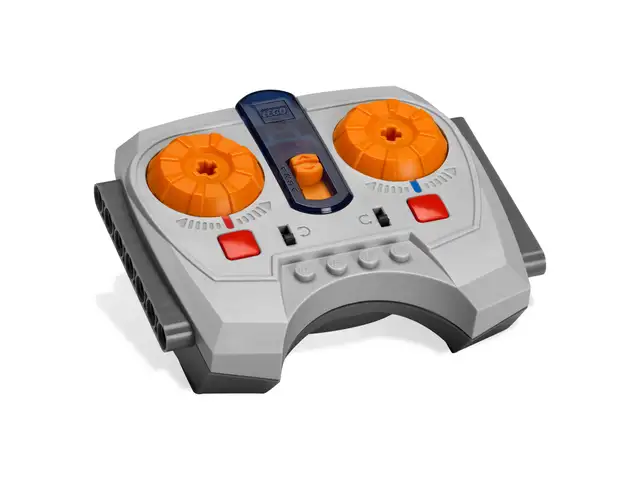
Send a Single Output command. You can send a PWM value or a discrete command. For example, to set PWM speed to 5 (forward) on Channel Two, Output Red:
```rust
use brickbeam::{BrickBeam, Channel, Output, SingleOutputCommand, Result};
fn main() -> Result<()> {
let brick_beam = BrickBeam::new("/dev/lirc0")?;
let mut motor = brick_beam.create_speed_remote_controller(Channel::One, Output::RED)?;
// Single Output commands: PWM value in the command.
motor.send(SingleOutputCommand::PWM(5))?;
Ok(())
}
```
To send a discrete command (e.g. ToggleDirection):
```rust
use brickbeam::{BrickBeam, Channel, Output, SingleOutputCommand::Discrete, SingleOutputDiscrete, Result};
fn main() -> Result<()> {
let brick_beam = BrickBeam::new("/dev/lirc0")?;
let mut motor = brick_beam.create_speed_remote_controller(Channel::Two, Output::RED)?;
motor.send(Discrete(SingleOutputDiscrete::ToggleDirection))?;
Ok(())
}
```
---
### Direct Remote Controller Example
Implements `combo_direct` protocol for [LEGO® Power Functions IR Remote Control 8885](https://www.lego.com/en-au/product/lego-power-functions-ir-remote-control-8885)
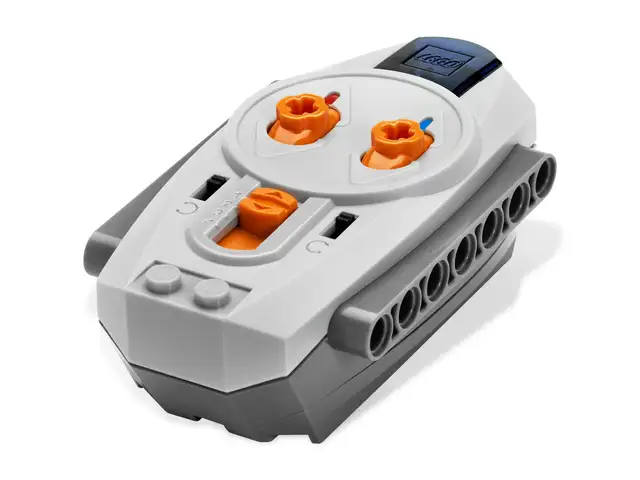
Send a Combo Direct command by specifying the discrete states for outputs A and B on a given channel. For example, to set Output Red to Forward and Output Blue to Float on Channel Three:
```rust
use brickbeam::{BrickBeam, Channel, ComboDirectCommand, DirectState, Result};
fn main() -> Result<()> {
let brick_beam = BrickBeam::new("/dev/lirc0")?;
let mut motors = brick_beam.create_direct_remote_controller(Channel::One)?;
motors.send(ComboDirectCommand {
red: DirectState::Forward,
blue: DirectState::Float,
})?;
Ok(())
}
```
---
### Combo Speed Remote Controller Example
Implements `combo_pwm` protocol for [LEGO® Power Functions IR Speed Remote Control 8879](https://www.lego.com/en-us/product/lego-power-functions-ir-speed-remote-control-8879)

Send a Combo PWM command by specifying PWM speeds for both outputs on a channel. For example, to set Output Red (left motor) to forward speed 5 and Output Blue (right motor) to backward speed 3 on Channel Four:
```rust
use brickbeam::{BrickBeam, Channel, ComboPwmCommand, Result};
fn main() -> Result<()> {
let brick_beam = BrickBeam::new("/dev/lirc0")?;
let mut motors = brick_beam.create_combo_speed_remote_controller(Channel::One)?;
println!("Running train red Forward and train red Backward...");
motors.send(ComboPwmCommand {
speed_red: 5,
speed_blue: -3,
})?;
Ok(())
}
```
---
### Extended Remote Controller Example
Send an Extended command (e.g. Brake) on Channel One:
```rust
use brickbeam::{BrickBeam, Channel, ExtendedCommand, Result};
fn main() -> Result<()> {
let brick_beam = BrickBeam::new("/dev/lirc0")?;
let mut motor = brick_beam.create_extended_remote_controller(Channel::One)?;
// Extended commands: BrakeThenFloatOnRedOutput, IncrementSpeedOnRedOutput, DecrementSpeedOnRedOutput, ToggleForwardOrFloatOnBlueOutput, ToggleAddress, AlignToggle.
motor.send(ExtendedCommand::BrakeThenFloatOnRedOutput)?;
Ok(())
}
```
*Note:* When `ToggleAddress` is sent, the Extended protocol toggles its internal address automatically.
---
### Full Example (Train Control)
This example uses the Single Output protocol to run “red train” (Channel One, Output RED) forward at PWM speed 5 for 3 seconds, then increases speed to PWM 7 for 2 seconds, and finally stops the train:
```rust
use brickbeam::{BrickBeam, Channel, Output, SingleOutputCommand, Result};
use std::{thread, time::Duration};
fn main() -> Result<()> {
println!("Initializing brickbeam library for lego power functions infra red controller ...");
let brick_beam = BrickBeam::new("/dev/lirc0")?;
let mut motor = brick_beam.create_speed_remote_controller(Channel::One, Output::RED)?;
println!("Running a red train forward with speed 5 for 3 seconds...");
motor.send(SingleOutputCommand::PWM(5))?;
thread::sleep(Duration::from_secs(3));
println!("Increasing a red train speed to 7 for 2 seconds...");
motor.send(SingleOutputCommand::PWM(7))?;
thread::sleep(Duration::from_secs(2));
println!("Stopping a red train...");
motor.send(SingleOutputCommand::PWM(0))?;
println!("Done.");
Ok(())
}
```
---
## Development
To begin developing with brickbeam, first install all required dependencies as detailed in the [Installation](#installation) section.
For cross-compiling to Linux from macOS, ensure that Docker is installed. Then follow these steps:
1. **Install Cross**
```bash
cargo install cross
```
### Development on Non-Raspberry Pi Platforms
When building brickbeam for actual LEGO® Power Functions control on a Linux system (for example, the Raspberry Pi), the default "cir" feature is enabled. However, on platforms like macOS—where some IR hardware dependencies (used by the "cir" feature) may not compile—you can build using only the emulator. To do so, disable the default features by adding the `--no-default-features` parameter to your commands.
1. **Check with Linux cir Dependencies**
```bash
cross check --lib --examples
```
2. **Build Without Linux cir Dependencies**
```bash
cargo build --lib --examples --no-default-features
```
3. **Test Without `/dev/lircX`**
```bash
cargo test --no-default-features
```
> Note: Running tests on platforms without the `/dev/lircX` device (such as non-Linux systems, non-Raspberry Pi devices, or Docker-based cross compilation environments) can be problematic since the required kernel device is not available. In Docker environments it is especially challenging to enable the necessary kernel module. For reliable testing, we recommend performing tests on a native Raspberry Pi with the kernel module for the lirc device enabled.
4. **Test Coverage**
You can view the coverage report via GitHub Actions online. Locally, first install the coverage tool and then generate the report, which will be available in [target/tarpaulin-report.html].
```bash
cargo install cargo-tarpaulin
```
To run tests and generate the coverage report, execute:
```bash
cargo tarpaulin --no-default-features --out html --output-dir target
```
5. **Generating docs locally**
To generate and view the documentation on your local machine, run one of the following commands:
For systems using the cross-compilation tool:
```bash
cross doc --open
```
Or, if you prefer to use Cargo directly (with the IR hardware features disabled):
```bash
cargo doc --open --no-default-features
```
---
## Contributing
1. **Fork** this repository.
2. **Create a branch** (`git checkout -b feature/my-improvement`).
3. **Commit and push** your changes, including documentation and tests.
4. **Open a Pull Request** describing your improvements.
Contributions are welcome—bug fixes, new features, documentation, etc.
---
## Motivation
I wanted to control a **LEGO® train** using the Raspberry Pi **Build Hat** in 2025, but powering both the Pi and the motors from the same battery setup was not ideal. As an alternative, I decided to drive **older LEGO® train motors** using the [**Power Functions™ LPF RC Protocol**](https://www.philohome.com/pf/pf.htm).
While many existing implementations relied on obsolete **LIRC daemons** or interpreted languages, brickbeam adopts a modern approach by using direct IR signaling via `/dev/lirc0` and the kernel’s `rc-core`—eliminating the need for legacy systems like lircd. Some references:
- [lego-lirc (iConor)](https://github.com/iConor/lego-lirc)
- [lego-power-scratch (dspinellis)](https://github.com/dspinellis/lego-power-scratch)
- [TypeScript-based lego-pf-transmitter (aorczyk)](https://aorczyk.github.io/lego-pf-transmitter/)
- [C++ implementation (TheDIYGuy999)](https://github.com/TheDIYGuy999/RC_Transmitter)
- [Power Functions™ presentation](https://www.philohome.com/pf/pf.htm)
This Rust-based solution is designed for stability, minimal CPU usage, straightforward integration, and a modern approach to IR control.
---
## License
Copyright (C) 2025 Andrej ZACHAR
This project is licensed under the [MIT License](LICENSE).
> **Disclaimer**:
> - This project is **not** sponsored, authorized, or endorsed by the LEGO Group.
> - “LEGO”® is a trademark of the LEGO Group.
> - The official LEGO [Power Functions](https://www.philohome.com/pf/pf.htm) RC Protocol is © 2010 The LEGO Group, intended for “personal, non-commercial use only.”
>
> **Acknowledgements**:
> Special thanks to my brother for his unwavering support throughout this project.
---
**Enjoy building!** If you have feedback or run into issues, please [open an issue](https://github.com/azachar/brickbeam/issues) or submit a pull request.