# bookvert
[<img alt="github" src="https://img.shields.io/badge/github-udoprog/bookvert-8da0cb?style=for-the-badge&logo=github" height="20">](https://github.com/udoprog/bookvert)
[<img alt="crates.io" src="https://img.shields.io/crates/v/bookvert.svg?style=for-the-badge&color=fc8d62&logo=rust" height="20">](https://crates.io/crates/bookvert)
[<img alt="docs.rs" src="https://img.shields.io/badge/docs.rs-bookvert-66c2a5?style=for-the-badge&logoColor=white&logo=data:image/svg+xml;base64,PHN2ZyByb2xlPSJpbWciIHhtbG5zPSJodHRwOi8vd3d3LnczLm9yZy8yMDAwL3N2ZyIgdmlld0JveD0iMCAwIDUxMiA1MTIiPjxwYXRoIGZpbGw9IiNmNWY1ZjUiIGQ9Ik00ODguNiAyNTAuMkwzOTIgMjE0VjEwNS41YzAtMTUtOS4zLTI4LjQtMjMuNC0zMy43bC0xMDAtMzcuNWMtOC4xLTMuMS0xNy4xLTMuMS0yNS4zIDBsLTEwMCAzNy41Yy0xNC4xIDUuMy0yMy40IDE4LjctMjMuNCAzMy43VjIxNGwtOTYuNiAzNi4yQzkuMyAyNTUuNSAwIDI2OC45IDAgMjgzLjlWMzk0YzAgMTMuNiA3LjcgMjYuMSAxOS45IDMyLjJsMTAwIDUwYzEwLjEgNS4xIDIyLjEgNS4xIDMyLjIgMGwxMDMuOS01MiAxMDMuOSA1MmMxMC4xIDUuMSAyMi4xIDUuMSAzMi4yIDBsMTAwLTUwYzEyLjItNi4xIDE5LjktMTguNiAxOS45LTMyLjJWMjgzLjljMC0xNS05LjMtMjguNC0yMy40LTMzLjd6TTM1OCAyMTQuOGwtODUgMzEuOXYtNjguMmw4NS0zN3Y3My4zek0xNTQgMTA0LjFsMTAyLTM4LjIgMTAyIDM4LjJ2LjZsLTEwMiA0MS40LTEwMi00MS40di0uNnptODQgMjkxLjFsLTg1IDQyLjV2LTc5LjFsODUtMzguOHY3NS40em0wLTExMmwtMTAyIDQxLjQtMTAyLTQxLjR2LS42bDEwMi0zOC4yIDEwMiAzOC4ydi42em0yNDAgMTEybC04NSA0Mi41di03OS4xbDg1LTM4Ljh2NzUuNHptMC0xMTJsLTEwMiA0MS40LTEwMi00MS40di0uNmwxMDItMzguMiAxMDIgMzguMnYuNnoiPjwvcGF0aD48L3N2Zz4K" height="20">](https://docs.rs/bookvert)
[<img alt="build status" src="https://img.shields.io/github/actions/workflow/status/udoprog/bookvert/ci.yml?branch=main&style=for-the-badge" height="20">](https://github.com/udoprog/bookvert/actions?query=branch%3Amain)
This is a .cbz batch conversion tool which scans directories for image
files, groups them by their directory and creates books out of them.
You can install bookvert with cargo:
```sh
cargo install bookvert
```
<br>
## Usage
The idea is that you have a group of semi-structured directories containing
lexically sorted image files and you run bookvert against it. Like this:
* `That time I sorted books/Chapter 1/`
* `That time I sorted books/Chapter 1 - Fix/`
* `That time I sorted books/Chapter 2/`
> This is available as an example in the [`examples` directory][examples]
> and can be run like this:
>
> ```sh
> cargo run --example examples
> ```
We then group all the books into *catalogues*. A catalogue is determine by
all numerical components in the folder name of the book.
So we run bookvert against the `examples` directory above and there are two
folders which will be in catalogue #1. This then prompts `bookvert` to ask
the user to select which one to use:
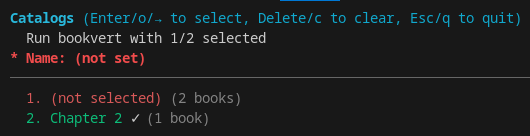
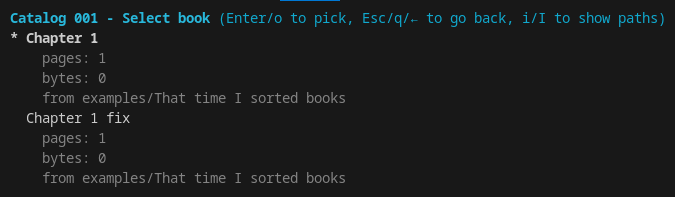
Once you are done, if you set the name to `That time I sorted books` and you
select which directory to use for Chapter 1, bookvert will create `That time
I sorted books1.cbz` and `That time I sorted books2.cbz` in the specified
output directory.
<br>
## Policies
If you don't like the interactive mode, you can set a pick policy using the
`--pick` argument. This lets you specify how a book should be picked
depending on which catalogue it is part of.
> For the most up-to-date information, se `--help`.
<br>
#### Pick books with `--pick`
Format: `[from=]to` where `from` is an book number or range to match.
The range in `from` is specified as `n..m` (exclusive), `n..=m` (inclusive),
or `n..` (open-ended) or `..` (all). The `to` target can be `first`, `last`,
`most-pages`, a zero-based index, or a regular expression for the exact
match to pick.
Examples:
- `-p most-pages` picks the match with the most pages for all books.
- `-p 3=first` picks the first match for book number 3.
- `-p 3=1` picks the second match for book number 3.
- `-p 1..=5=most-pages` picks the match with the most pages for books 1
through 5.
- `-p fix` will match *any* book that contains the string `fix`.
[examples]: https://github.com/udoprog/bookvert/tree/main/examples