

bma-benchmark
Benchmark for Rust and humans
What is this for
A lightweight and simple benchmarking library for Rust.
How to use
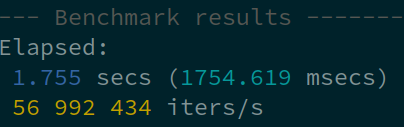
Let us create a simple benchmark, using the crate macros only:
extern crate bma_benchmark;
use Mutex;
let n = 100_000_000;
let mutex = new;
warmup!;
benchmark_start!;
black_box;
benchmark_print!;
The same can also be done with a single "benchmark" macro:
extern crate bma_benchmark;
use Mutex;
let mutex = new;
benchmark!;
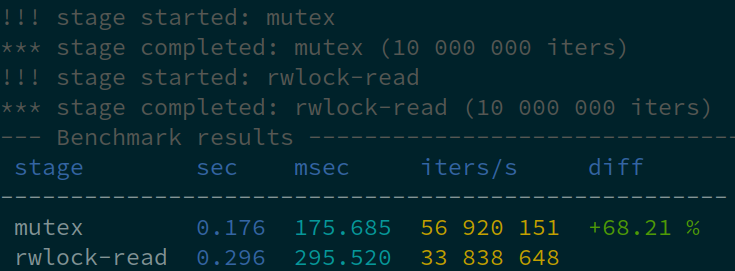
Let us create a more complicated staged benchmark and compare e.g. Mutex vs RwLock. Staged benchmarks display a comparison table. If the reference stage is specified, the table also contains speed difference for all others.
extern crate bma_benchmark;
use ;
let n = 10_000_000;
let mutex = new;
let rwlock = new;
warmup!;
staged_benchmark_start!;
black_box;
staged_benchmark_finish_current!;
staged_benchmark_start!;
black_box;
staged_benchmark_finish_current!;
staged_benchmark_print_for!;
The same can also be done with a couple of staged_benchmark macros (black box is applied automatically):
extern crate bma_benchmark;
use ;
let n = 10_000_000;
let mutex = new;
let rwlock = new;
warmup!;
staged_benchmark!;
staged_benchmark!;
staged_benchmark_print_for!;
Or split into functions with benchmark_stage attributes:
use ;
extern crate bma_benchmark;
let mutex = new;
let rwlock = new;
benchmark_mutex;
benchmark_rwlock;
staged_benchmark_print_for!;
Errors
The macros benchmark_print, staged_benchmark_finish and staged_benchmark_finish_current accept error count as an additional parameter.
For code blocks, macros benchmark_check and staged_benchmark_check can be used. In this case, a statement MUST return true for the normal execution and false for errors:
#[macro_use]
extern crate bma_benchmark;

use std::sync::Mutex;

let mutex = Mutex::new(0);
benchmark_check!(10_000_000, {
    mutex.lock().is_ok()
    });
The benchmark_stage attribute has got check option, which behaves similarly. If used, the function body MUST (not return but) END with a bool as well.
If any errors are reported, additional columns appear, success count, error count and error rate:

Latency benchmarks
(warming up and applying a black box is not recommended for latency benchmarks)
use LatencyBenchmark;
let mut lb = new;
for _ in 0..1000
lb.print;
latency (μs) avg: 883, min: 701, max: 1_165
Performance measurements
(warming up and applying a black box is not recommended for latency benchmarks)
use Perf;
let file_path = "largefile";
let mut perf = new;
for _ in 0..10
perf.print;
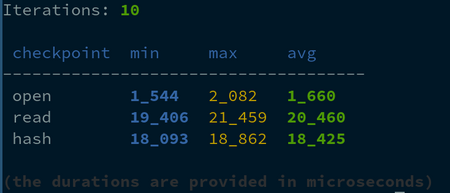
Need anything more sophisticated? Check the crate docs and use its structures directly.
Enjoy!