
bevy_speech_bubbles
A dialog kit for Bevy 0.20: world-space speech and thought balloons, a conversation graph with a runtime, paced barks, and a skinnable screen dialog box.
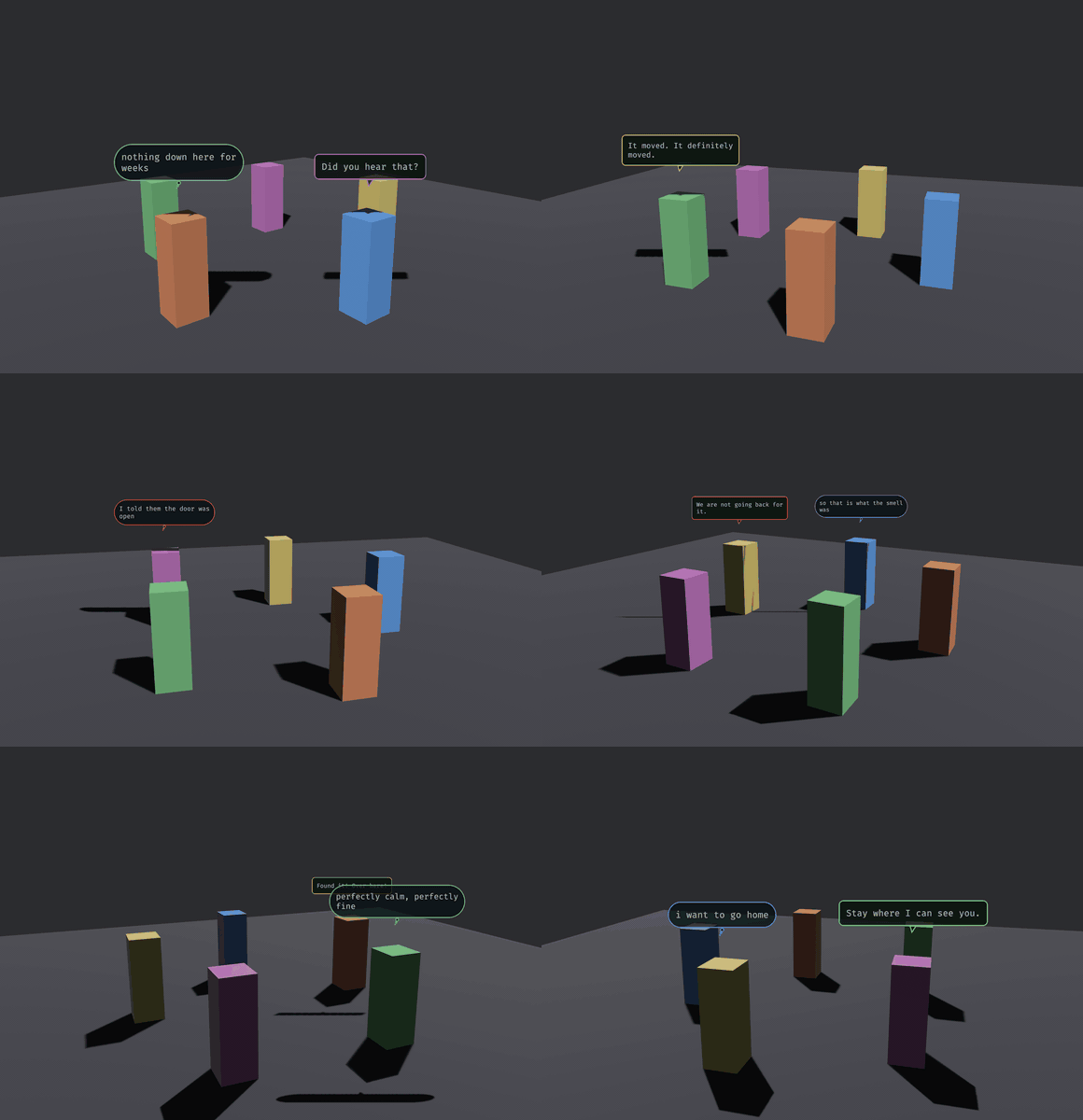
That is examples/chatter.rs. The balloons are quads in the scene, not a UI layer: they hold a world position above their owner, they can be occluded, and they turn because track_bubbles turns them. Two shapes carry the channel (a tailed balloon for what is said aloud, a soft pill with a dot-tail for what is only thought) and the border tint carries the affect.
This repository is canonical: MIT OR Apache-2.0, Bevy 0.20, and it co-evolves with the game it was built for, Sanctuary, as a path dependency.
What is in it
- Balloons (
balloon):build_bubble,track_bubbles::<C>,expire_bubbles, and aBalloonSkinfor the palette.BalloonSkin::crt()is the phosphor look;BalloonSkin::ink_on_paper()is parchment with hard pixel edges (pixel: truedraws without anti-aliasing and uses a nearest sampler). A balloon's owner can sit anywhere in a hierarchy (a riderChildOfa cart):track_bubblesfloats it over the owner's world position in the same frame and hides it when the owner is hidden, through a parent too. - A conversation kit (
conversation): aDialogueScriptof namedConversations, each a graph ofNode::LineandNode::Choice,validate_script, and a runtime driven by the messagesStartConversation,ChoicePickedandConversationEnded.DialogueNodeEnteredis written each time the cursor moves onto a node (the start, after each line, after each choice), so a host can attach effects to it. The model isserde: load it from YAML or RON. Speakers are strings the host resolves throughSpeakers.Barks are paced one-off balloons. - A screen dialog box (
dialog_box): Bevy UI nodes skinned byDialogSkin(9-sliced frame, tiled paper, name tag, portrait, caret), with a typewriter, a pop on each line, and choices you can click, hover, arrow through, or pick with the number keys. SpeechBubblesPlugin::<C>: wires the three together, generic over the marker of the camera balloons face.
Use
app.add_plugins
.insert_resource // or Presenter::Balloons, the default
.insert_resource // a DialogSkin built from your theme
.insert_resource; // a DialogueScript, validated
// Balloons need a font (yours to load) and a quad:
commands.insert_resource;
speakers.0.insert;
starts.write;
barks.write;
While a conversation runs the resource ConversationLock exists: pause on it, and yield your own click handling to it. A script looks like this (RON; any serde format works):
(conversations: {
  "gate": (start: "greet", nodes: {
    "greet": Line(speaker: "keeper", text: "The gate has held three nights.", next: Some("ask")),
    "ask": Choice(speaker: "keeper", prompt: "Take the watch?", options: [
      (text: "I will.", next: "yes"),
      (text: "Ask someone else.", next: "no"),
    ]),
    "yes": Line(speaker: "keeper", text: "Good.", next: None),
    "no": Line(speaker: "keeper", emotion: Sadness, text: "Then I will ask the boy.", next: None),
  }),
})
Presenter::Balloons puts every line over its speaker's head and auto-advances after a reading-speed dwell; a speaker with no entity (a narrator) is skipped. Presenter::DialogBox shows the screen box and waits for the player: Space, Enter or a click completes a typing line and then advances it; 1-9, the arrows with Enter, or the mouse pick an option. Barks are always world balloons.
Scale and pixel balloons
Balloon size is the host's call. BalloonScale { world_per_px, anchor_y } (inserted with the default by the plugin; track_bubbles reads it every frame) sets world units per raster texel and the float height, so a world in feet and one in metres both fit, and changing it as the camera zooms resizes every live balloon. Spawn your own balloon quads with BubblePx(rendered.px) so track_bubbles can size them. BalloonSkin::text_px is the glyph size in raster px, and padding, tail, border and corner radius scale with it: BalloonSkin::ink_on_paper() has text_px: 16 with pixel: true, which rasterizes at the native size of a 16 px pixel font (one texel per font pixel, a one-texel border, glyphs on whole texels, nearest sampler), roughly 150 to 200 texels wide for a 20-character line.
Name your camera
track_bubbles and the plugin are generic over a camera marker component, deliberately. Bevy's Single<..> silently skips its system when the query does not match exactly one entity, so a tracking system filtered on With<Camera3d> works until something spawns a second 3D camera (a render-to-texture pass, a portal, a minimap), and then every balloon quietly stops tracking and nothing reports an error. Being generic makes it impossible for this crate to write that filter for you.
The font is yours to load
BubbleAssets holds a quad mesh and a FontArc, and the dialog box takes TextFonts in its skin; this crate never reads a file. BubbleAssets::from_font_bytes(quad, bytes) builds the resource from raw font bytes, and FontArc is re-exported, so you need no ab_glyph dependency. A library that hardcoded assets/fonts/… would be hardcoding your project layout.
Why the balloon text is rasterized here
Bevy's text stack has no public "rasterize this string into a standalone Image" API, and a world-space balloon has no 2D camera to host a Text2d. So glyphs go through ab_glyph into an RGBA buffer, once per line, and the buffer becomes a texture. The screen dialog box needs none of that and uses ordinary Text.
Cosmetic by construction
Everything runs on Time<Real>, so balloons still expire and the typewriter still types while the host has paused virtual time. The conversation runtime runs in PreUpdate after Bevy's input systems, in the public DialogInputSet, and consumes the key and click presses it uses (clear_just_pressed): order your own PreUpdate systems .after(DialogInputSet) and a Space that ended a line is no longer just_pressed for them. The cosmetic systems (typewriter, caret, balloon tracking and expiry) stay in Update. The typewriter reads DialogSkin::chars_per_second every tick, so a settings menu can change the speed of the line on screen.
Examples
two_balloons is the smallest thing that works; its thinker rides a cart as a child entity, and BUBBLES_SHOT=<file.png> (after BUBBLES_FRAMES, default 90) renders a still offscreen and exits. chatter is the gif above. dialog_box runs a four-node script with a choice in the screen box, skinned with flat colours generated in code (F cycles the typewriter speed). All three need a GPU and take the font path as a required argument. bench is headless, takes a font path too (the test font keeps its numbers independent of the host's fonts), and prints what the kit costs its caller, one line per case.
License
MIT OR Apache-2.0, at your option.