# bevy_repl
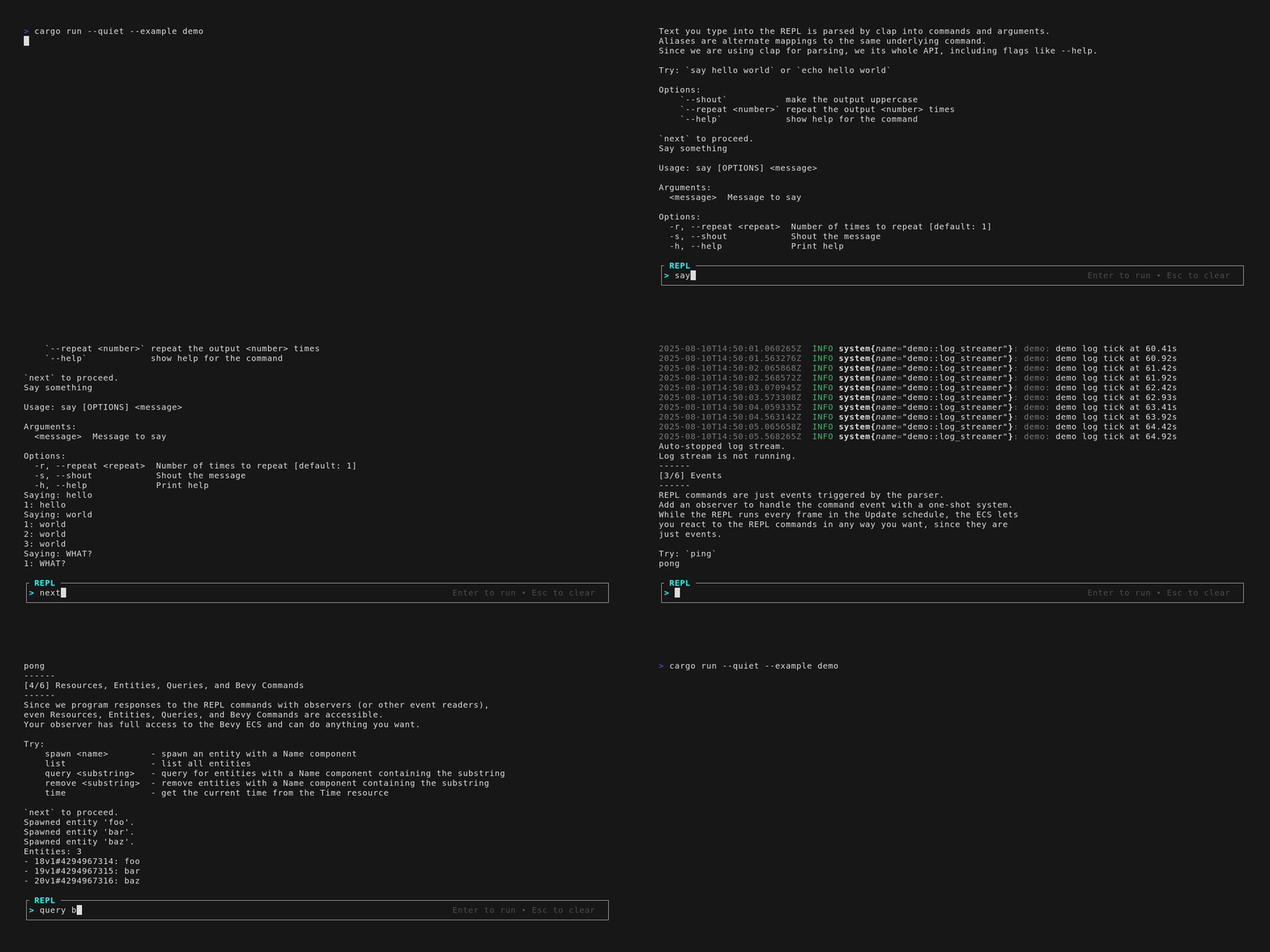
An interactive REPL for headless Bevy apps powered by `clap` for command parsing
and `bevy_ratatui` for terminal input and output. The plugin adds a text input
area below the terminal output for interaction even in headless mode.
- Unobtrusive TUI console below normal terminal output
- Command parsing and CLI features from `clap`
- Observer-based command execution system with full Bevy ECS access for both
read and write operations
- Logging integration with `bevy_log` and `tracing` for unified output display
- Support for custom prompt rendering and minimal prompt mode
- Works in tandem with windowed apps from the terminal
- Built-in commands for common tasks (just `quit` for now)
The REPL is designed as an alternative to
[makspll/bevy-console](https://github.com/makspll/bevy-console) for Bevy apps
that want a terminal-like console to modify the game at runtime without
implementing a full TUI or rendering features.
> This is my first public Bevy plugin, and I vibe-coded a large part
> of it. **You have been warned.**
## Table of Contents
- [bevy\_repl](#bevy_repl)
- [Table of Contents](#table-of-contents)
- [Features](#features)
- [Derive](#derive)
- [Built-in commands](#built-in-commands)
- [Prompt styling](#prompt-styling)
- [Custom renderer (feature-gated: `pretty`)](#custom-renderer-feature-gated-pretty)
- [Plugin groups and alternate screen](#plugin-groups-and-alternate-screen)
- [Robust printing in raw/alternate screen terminals](#robust-printing-in-rawalternate-screen-terminals)
- [Routing Bevy logs to the REPL](#routing-bevy-logs-to-the-repl)
- [Startup ordering (PostStartup)](#startup-ordering-poststartup)
- [Usage](#usage)
- [REPL lifecycle (v1)](#repl-lifecycle-v1)
- [Builder pattern (default)](#builder-pattern-default)
- [Derive pattern (requires `derive` feature)](#derive-pattern-requires-derive-feature)
- [Prompt styling](#prompt-styling-1)
- [Default keybinds](#default-keybinds)
- [Design](#design)
- [Headless mode](#headless-mode)
- [REPL Console](#repl-console)
- [Command parsing](#command-parsing)
- [Scheduling](#scheduling)
- [Directly modifying the terminal (to-do)](#directly-modifying-the-terminal-to-do)
- [Prompt styling](#prompt-styling-2)
- [Known issues \& limitations](#known-issues--limitations)
- [Built-in `help` and `clear` commands are not yet implemented](#built-in-help-and-clear-commands-are-not-yet-implemented)
- [Runtime toggle is not supported](#runtime-toggle-is-not-supported)
- [Key events are not forwarded to Bevy](#key-events-are-not-forwarded-to-bevy)
- [Minimal renderer prompt does not scroll with terminal output](#minimal-renderer-prompt-does-not-scroll-with-terminal-output)
- [Pretty renderer log history doesn't scroll at all](#pretty-renderer-log-history-doesnt-scroll-at-all)
- [Shift+ aren't entered into the buffer](#shift-arent-entered-into-the-buffer)
- [Aspirations](#aspirations)
- [License](#license)
## Features
Theoretically all clap features are supported, but I have only tested `derive`.
Override the `clap` features in your `Cargo.toml` to enable or disable
additional features at your own risk.
### Derive
Use the `derive` feature to support clap's derive pattern for REPL commands.
`#[derive(ReplCommand)]` will automatically implement the `ReplCommand` trait
and create an event with the command's arguments and options. Configure the
response by adding an observer for the REPL command like normal.
### Built-in commands
Enable built-in commands with feature flags. Each command is enabled separately
by a feature flag. Use the `default_commands` feature to enable all built-in
commands.
| `default_commands` | `quit`, `help`, `clear` | Enable all built-in commands |
| `quit` | `quit`, `q`, `exit` | Gracefully terminate the application |
| `help` | `help` | Show clap help text (not yet implemented) |
| `clear` | `clear` | Clear the terminal output |
### Prompt styling
The prompt can be styled with the `pretty` feature. The feature adds a border,
colorful styles for title/prompt/hints, and a right-aligned hint text.
- __Minimal (default)__
- Appearance: 1-line bottom prompt with symbol + input. No border/colors/hint.
- Compilation: no styling code compiled; lean terminal manipulation only.
- Config: only `ReplPromptConfig.symbol` is honored.
- Use: `cargo run` (no extra feature flags).
- __Pretty (`--features pretty`)__
- Appearance: border with title, colored styles, right-aligned usage hint.
- Compilation: styling code compiled and enabled.
- Config: presets or explicit `ReplPromptConfig { symbol, border, color, hint }`.
- Use `ReplPlugins.set(PromptPlugin::pretty())` as shown below.
#### Custom renderer (feature-gated: `pretty`)
You can swap the prompt renderer at runtime by overriding the `ActiveRenderer` resource
with your own implementation of the `PromptRenderer` trait. This is the recommended
extension point for custom styles.
- Build and run the demo custom renderer example:
```bash
cargo run --example custom_renderer --features pretty
```
- Minimal usage (in your Bevy app):
```rust
use bevy_repl::prompt::renderer::{PromptRenderer, RenderCtx};
struct MyRenderer;
impl PromptRenderer for MyRenderer {
fn render(&self, f: &mut ratatui::Frame<'_>, ctx: &RenderCtx) {
let area = bevy_repl::prompt::renderer::helpers::bottom_bar_area(ctx.area, 1);
let prompt = ctx.prompt.symbol.clone().unwrap_or_default();
let spans = [ratatui::text::Span::raw(prompt), ratatui::text::Span::raw(&ctx.repl.buffer)];
f.render_widget(ratatui::widgets::Paragraph::new(ratatui::text::Line::from(spans)), area);
}
}
App::new()
.add_plugins(ReplPlugins.set(PromptPlugin {
renderer: MyRenderer,
..default()
}))
.run();
```
The example and docs assume the `pretty` feature is enabled so the rendering
infrastructure is available. Custom renderers can ignore colors/borders entirely
if you want a minimal look.
#### Plugin groups and alternate screen
- __When is the alternate screen active?__
- The alternate screen is active when `bevy_ratatui::RatatuiPlugins` is added to your app.
- Using `ReplPlugins` (the default/turnkey group) automatically adds `RatatuiPlugins`, so the REPL renders in the alternate screen via `RatatuiContext`.
- Using `MinimalReplPlugins` adds some but not all Ratatui Plugins; the prompt renders on the main terminal screen using the fallback `FallbackTerminalContext`.
- __Minimal (no alternate screen, no built-ins)__
```rust
use bevy::{app::ScheduleRunnerPlugin, prelude::*};
use bevy_repl::plugin::MinimalReplPlugins;
use std::time::Duration;
fn main() {
App::new()
.add_plugins((
MinimalPlugins.set(ScheduleRunnerPlugin::run_loop(Duration::from_secs_f64(1.0/60.0))),
MinimalReplPlugins,
))
.run();
}
```
- __Default/turnkey (alternate screen + built-ins)__
```rust
use bevy::{app::ScheduleRunnerPlugin, prelude::*};
use bevy_repl::plugin::ReplPlugins;
use std::time::Duration;
fn main() {
App::new()
.add_plugins((
MinimalPlugins.set(ScheduleRunnerPlugin::run_loop(Duration::from_secs_f64(1.0/60.0))),
ReplPlugins,
))
.run();
}
```
- __How to choose__
- Choose `MinimalReplPlugins` if you:
- Want to stay on the main terminal screen (no full TUI/pane UX).
- Intend to manage `bevy_ratatui` or other input/render stacks yourself.
- Prefer to opt-in to commands individually (no built-ins by default).
- Choose `ReplPlugins` if you:
- Want a turnkey setup with reliable prompt rendering in the alternate screen.
- Prefer sane defaults including built-in commands (`quit`, `help`, `clear`).
- Don’t need to wire `RatatuiPlugins` manually.
By default `ReplPlugins` uses the minimal prompt renderer. To enable the pretty renderer when the `pretty` feature is on, use `ReplPlugins.set(PromptPlugin::pretty())`.
### Robust printing in raw/alternate screen terminals
When the REPL is active, the terminal often runs in raw mode and may use the alternate screen. In these contexts, normal `println!` can leave the cursor in an odd position or produce inconsistent newlines. To ensure safe, consistent output, use the provided `bevy_repl::repl_println!` macro instead of `println!`.
- __What it does__
- Minimal renderer: moves the cursor to column 0 before printing, writes CRLF (`\r\n`), and flushes stdout.
- Pretty renderer: additionally cooperates with the terminal scroll region reserved for the prompt; before printing it moves to the last scrollable line so output scrolls above the prompt without overwriting it.
- __When to use__
- Any time you print from systems/observers while the REPL is active
- Especially in raw mode or when using the alternate screen (e.g., with `ReplPlugins`)
- __Example__
```rust
fn on_ping(_trigger: Trigger<PingCommand>) {
bevy_repl::repl_println!("Pong");
}
fn instructions() {
bevy_repl::repl_println!();
bevy_repl::repl_println!("Welcome to the Bevy REPL!");
}
```
If you truly need to emit raw `stdout` (e.g., piping to tools) while the REPL is active, consider temporarily suspending the TUI or buffering output and emitting it via `repl_println!`.
### Routing Bevy logs to the REPL
You can route logs produced by Bevy's `tracing` pipeline to the REPL so they appear above the prompt and scroll correctly.
- __How it works__
- A custom `tracing` Layer captures log events and forwards them through an `mpsc` channel to a Non-Send resource.
- A system transfers messages from the channel into an `Event<LogEvent>`.
- You can then read `Event<LogEvent>` yourself, or use the provided system that prints via `repl_println!` so lines render above the prompt.
- __API__
- Module: `bevy_repl::log_ecs`
- Layer hook for Bevy's `LogPlugin`: `repl_log_custom_layer`
- Event type: `LogEvent`
- Optional print system: `print_log_events_system`
- __Recommended setup (preserve colors/format & avoid duplicate stdout)__
If you primarily want logs to print above the prompt with the usual colors/formatting, install the REPL-aware fmt layer and disable the native stdout logger. Importantly, call the installer BEFORE adding `DefaultPlugins`.
```rust
use bevy::prelude::*;
use bevy_repl::prelude::*;
fn main() {
// 1) Install REPL-aware fmt layer before plugins
tracing_to_repl_fmt();
App::new()
.add_plugins((
// 2) Disable Bevy's stdout logger to prevent duplicate/garbled output
DefaultPlugins.build().disable::<bevy::log::LogPlugin>(),
ReplPlugins.set(PromptPlugin::pretty()),
))
.run();
}
```
### Startup ordering (PostStartup)
- __Why__: In pretty mode, the prompt reserves the bottom lines with a terminal scroll region. Startup prints (like instructions) should run after this region is established to avoid overlapping the prompt.
- __How__: Use the global `ScrollRegionReadySet` to order your startup prints. This label exists in all builds; in minimal mode it’s a no-op.
```rust
use bevy::prelude::*;
use bevy_repl::prelude::*;
fn instructions() {
bevy_repl::repl_println!("Welcome!");
}
fn main() {
App::new()
.add_plugins(ReplPlugins)
.add_systems(PostStartup, instructions.after(ScrollRegionReadySet))
.run();
}
```
## Usage
> Note: When routing logs to the REPL (to keep formatting/colors and avoid prompt corruption), we recommend disabling Bevy's native stdout logger: `DefaultPlugins.build().disable::<bevy::log::LogPlugin>()`. Use the provided REPL-aware formatter (see Routing Bevy logs to the REPL) or a custom layer instead.
The REPL is designed to be used in headless mode, but it can be used in windowed
mode too through the terminal while the app is running.
### REPL lifecycle (v1)
For v1 there is no runtime toggle. The REPL is enabled when you add the plugin group and remains active for the run.
Trigger commands by typing them in the REPL input buffer and pressing `Enter`.
The REPL will parse the command and trigger an event with the command's arguments
and options.
### Builder pattern (default)
1. Make a Bevy event struct that represents the command and its arguments and
options. This is the event that will be triggered when the command is executed.
2. Implement the `ReplCommand` trait for the event struct.
1. `fn clap_command() -> clap::Command` - Use the `clap` builder pattern to
describe the command and its arguments or options.
2. `fn to_event(matches: &clap::ArgMatches) -> ReplResult<Self>` - Implement
the `to_event` method to convert the command's arguments and options into
the event struct. This is where you validate the command's arguments
and options and map them to the event fields or return an error if they are
invalid. If the command has no arguments or options, return `Ok(Self)`.
**Tip:** If the command has no arguments or options, implement the `Default`
trait. You don't implement `to_event` in this case, since the default
implementation will return `Ok(Self)`.
3. Add the command to the app with `.add_repl_command<YourReplCommand>()`.
4. Add an observer for the command with `.add_observer(your_observer)`. The
observer is a one-shot system that receives a trigger event with the command's
arguments and options.
```rust
use bevy::prelude::*;
use bevy_repl::prelude::*;
#[derive(Debug, Clone, Event, Default)]
struct SimpleCommandWithoutArgs;
impl ReplCommand for SimpleCommandWithoutArgs {
fn clap_command() -> clap::Command {
clap::Command::new("simple")
.about("A simple command")
}
}
fn on_simple(_trigger: Trigger<SimpleCommandWithoutArgs>) {
println!("You triggered a simple command without args");
}
struct CommandWithArgs {
arg1: String,
arg2: String,
}
impl ReplCommand for CommandWithArgs {
fn clap_command() -> clap::Command {
clap::Command::new("command")
.about("A command with args")
.arg(clap::Arg::new("arg1").required(true))
.arg(clap::Arg::new("arg2").required(true))
}
fn to_event(matches: &clap::ArgMatches) -> ReplResult<Self> {
Ok(CommandWithArgs {
arg1: matches.get_one::<String>("arg1").unwrap().clone(),
arg2: matches.get_one::<String>("arg2").unwrap().clone(),
})
}
}
fn on_command_with_args(trigger: Trigger<CommandWithArgs>) {
println!("You triggered a command with args: {} {}", trigger.arg1, trigger.arg2);
}
fn main() {
App::new()
.add_plugins((
// Run headless in the terminal
MinimalPlugins.set(
bevy::app::ScheduleRunnerPlugin::run_loop(
Duration::from_secs_f32(1. / 60.)
)
),
// Bevy input plugin is required to detect keyboard inputs
bevy::input::InputPlugin::default(),
// Default REPL stack (alternate screen, built-ins) with minimal renderer
ReplPlugins,
))
.add_repl_command::<SimpleCommandWithoutArgs>()
.add_observer(on_simple)
.add_repl_command::<CommandWithArgs>()
.add_observer(on_command_with_args)
.run();
}
```
### Derive pattern (requires `derive` feature)
Enable the `derive` feature in your `Cargo.toml` to use the derive pattern.
```toml
[dependencies]
bevy_repl = { version = "0.3.0", features = ["derive"] }
```
Then derive the `ReplCommand` trait on your command struct along with clap's
`Parser` trait. Add the command to the app with `.add_repl_command<YourReplCommand>()`
and add an observer for the command with `.add_observer(your_observer)` as usual.
```rust
use bevy::prelude::*;
use bevy_repl::prelude::*;
use clap::Parser;
#[derive(ReplCommand, Parser, Default, Event)]
struct SimpleCommandWithoutArgs;
#[derive(ReplCommand, Parser, Event, Default)]
#[clap(about = "A command with args")]
struct CommandWithArgs {
#[clap(short, long)]
arg1: String,
#[clap(short, long)]
arg2: String,
}
```
### Prompt styling
- __Appearance__
- Without the `pretty` feature (default): minimal prompt. One-line bar fixed to the bottom, showing only the prompt symbol and input buffer. No border, colors, or hint.
- With the `pretty` feature: enhanced prompt. Optional border with title, colored styles for title/prompt/hints, and a right-aligned usage hint.
- __Compilation__
- Minimal build (no `pretty`): styling code is not compiled. No extra terminal manipulation beyond positioning the single-line prompt.
- Pretty build (`--features pretty`): styling code is compiled in and used by the renderer.
- __Configuration__
- The prompt is configured via `ReplPromptConfig`. In minimal builds, only the `symbol` is honored; styling options are ignored.
- In pretty builds, you can use presets or customize:
```rust
app.insert_resource(bevy_repl::prompt::ReplPromptConfig::pretty());
app.insert_resource(bevy_repl::prompt::ReplPromptConfig::minimal());
app.insert_resource(bevy_repl::prompt::ReplPromptConfig {
symbol: Some("> ".to_string()),
border: Some(bevy_repl::prompt::PromptBorderConfig::default()),
color: Some(bevy_repl::prompt::PromptColorConfig::default()),
hint: Some(bevy_repl::prompt::PromptHintConfig::default()),
});
```
- To run the pretty example:
```bash
cargo run --example pretty --features pretty
```
### Default keybinds
When the REPL is enabled, the following keybinds are available:
| `Enter` | Submit command |
| `Esc` | Clear input buffer |
| `Left/Right` | Move cursor |
| `Home/End` | Jump to start/end of line |
| `Backspace` | Delete character before cursor |
| `Delete` | Delete character at cursor |
| `Esc` | Clear input buffer |
Note: `Ctrl+C` behaves like a normal terminal interrupt and is not handled by the REPL.
## Design
### Headless mode
["Headless" mode] is when a Bevy app runs in the terminal without a renderer. To
run Bevy in headless mode, disable all windowing features for Bevy in
`Cargo.toml`. Then configure the schedule runner to loop forever instead of
exiting the app after one frame. Running the app from the terminal only displays
log messages from the engine to the terminal and cannot accept input.
Normally the open window keeps the app running, and the exit event happens when
closing the window. In headless mode there isn't a window to close, so the app
runs until we kill the process or another system triggers the `AppExit` event
with a keycode event reader (like press Q to quit).
["Headless" mode]:
https://github.com/bevyengine/bevy/blob/main/examples/app/headless.rs
```toml
[dependencies]
bevy = { version = "*", default-features = false }
# replace "*" with the most recent version of bevy
```
```rust
fn main() {
let mut app = App::new();
// Run in headless mode at 60 fps
app.add_plugins((
MinimalPlugins,
bevy::app::ScheduleRunnerPlugin::run_loop(
std::time::Duration::from_secs_f64(1.0 / 60.0),
)
));
// Exit with Ctrl+C
app.run();
}
```
### REPL Console
`bevy_repl` takes the idea of a Half-Life 2 debug console and brings it to
headless mode, so an app can retain command style interaction without depending
on windowing, rendering, or UI features.
Instead of rendering a fullscreen text user interface (TUI), which would kinda
defeat the purpose of headless mode, we render a small "partial-TUI" at the
bottom of the terminal that supports keyboard input. The normal headless output
is shifted up to make room for the input console, and everything else is
printed to the terminal normally. The app is truly running headless, and the
"partial-TUI" is directly modifying the terminal output with `crossterm`.
Fancy REPL styling like a border and colors are available with the `pretty` feature.
```toml
[dependencies]
bevy_repl = { version = "0.3.0", features = ["default-commands"] }
```
**REPL disabled (regular headless mode):**
```text
┌───your terminal──────────────────────────────────────────────────────────────┐
│ INFO: 2025-07-28T12:00:00.000Z: bevy_repl: Starting REPL │
│ INFO: 2025-07-28T12:00:00.000Z: bevy_repl: Type 'help' for commands │
│ │
│ [Game logs and command output appear here...] │
└──────────────────────────────────────────────────────────────────────────────┘
```
**REPL enabled:**
```text
┌───your terminal──────────────────────────────────────────────────────────────┐
│ INFO: 2025-07-28T12:00:00.000Z: bevy_repl: Starting REPL │
│ INFO: 2025-07-28T12:00:00.000Z: bevy_repl: Type 'help' for commands │
│ │
│ [Game logs and command output appear here...] │
│ │
┌───REPL───────────────────────────────────────────────────────────────────────┐
│ > spawn-player Bob │
└──────────────────────────────────────────────────────────────────────────────┘
```
### Command parsing
Input is parsed via `clap` commands and corresponding observer systems that
execute when triggered by the command.
Use clap's [builder pattern] to describe the command and its arguments or
options. Then add the command to the app with
`.add_repl_command<YourReplCommand>()`. The REPL fires an event (e.g.
`YourReplCommand`) when the command is parsed from the prompt.
Make an observer for the command with `.add_observer(your_observer)`. The
observer is a one-shot system that receives a trigger event with the command's
arguments and options. As a system, it is executed in the `PostUpdate` schedule
and has full access to the Bevy ECS.
[builder pattern]: https://docs.rs/clap/latest/clap/_tutorial/index.html#tutorial-for-the-builder-api
```rust
use bevy::prelude::*;
use bevy_repl::prelude::*;
fn main() {
let frame_time = Duration::from_secs_f32(1. / 60.);
let mut app = App::new()
.add_plugins((
MinimalPlugins.set(ScheduleRunnerPlugin::run_loop(frame_time)),
));
app.add_plugins((
ReplPlugin,
ReplDefaultCommandsPlugin,
))
.add_repl_command::<SayCommand>()
.add_observer(on_say);
app.run();
}
struct SayCommand {
message: String,
}
impl ReplCommand for SayCommand {
fn command() -> clap::Command {
clap::Command::new("say")
.about("Say something")
.arg(
clap::Arg::new("message")
.short('m')
.long("message")
.help("Message to say")
.required(true)
.takes_value(true)
)
}
fn to_event(matches: &clap::ArgMatches) -> ReplResult<Self> {
Ok(SayCommand {
message: matches.get_all::<String>("message").unwrap().join(" "),
})
}
}
fn on_say(trigger: Trigger<SayCommand>) {
println!("{}", trigger.message);
}
```
### Scheduling
The REPL reads input events and emits trigger events alongside the `bevy_ratatui`
[input handling system set](https://github.com/cxreiff/bevy_ratatui/blob/main/src/crossterm_context/event.rs).
The REPL text buffer is updated and emits command triggers during
`InputSet::EmitBevy`. The prompt is updated during `InputSet::Post` to reflect
the current state of the input buffer.
All REPL input systems run in the `Update` schedule, but as they are
event-based, they may not run every frame. Commands are executed in the
`PostUpdate` schedule as observers.
For headless command output, use the regular `info!` or `debug!` macros and the
`RUST_LOG` environment variable to configure messages printed to the console or
implement your own TUI panels with `bevy_ratatui`.
### Directly modifying the terminal (to-do)
The REPL uses `crossterm` events generated by `bevy_ratatui` to read input events
from the keyboard. When the REPL is enabled, the terminal is in raw mode and the
REPL has direct access to the terminal cursor. The crate uses observers to
disable raw mode when the REPL is disabled or the app exits. If raw mode isn't
handled correctly, the terminal cursor may be left in an unexpected state.
Keycode forwarding from crossterm to Bevy is disabled (except for the
REPL toggle key) to avoid passing events to Bevy when you are typing a command.
Disabling the REPL returns the terminal to normal headless mode, and keycodes
are propagated to Bevy as normal.
We use Bevy keycode events for toggle behavior so that the REPL can be toggled
when the terminal is NOT in raw mode. This is to avoid the need to place the
terminal in raw mode even when the REPL is disabled. This is a tradeoff
between simplicity and utility. It would be simpler to enable raw mode all the
time and detect raw keycode commands for the toggle key, then forward the raw
inputs to Bevy as normal keycode events. However, this means that the app input
handling fundamentally changes, even when the REPL is disabled. For development,
it is more useful to have the app behave exactly as a normal headless app when
the REPL is disabled to preserve consistency in input handling behavior.
### Prompt styling
The REPL prompt supports two visual modes controlled by a simple resource and optional feature flag:
- __Minimal__ (default baseline): 1-line bottom bar, no border/colors/hint.
- Opt-in at runtime with `PromptMinimalPlugin`:
```rust
app.add_plugins(PromptMinimalPlugin);
```
- __Pretty__ (feature-gated): border, colorful title/prompt, right-aligned hint.
- Enable feature and run:
```bash
cargo run --example pretty --features pretty
```
- When the `pretty` feature is enabled, `ReplPlugins` uses the pretty preset automatically. You can still override visuals by inserting `ReplPromptConfig` at runtime.
Advanced users can customize visuals via the `ReplPromptConfig` resource:
```rust
// Use presets
app.insert_resource(ReplPromptConfig::pretty());
// or
app.insert_resource(ReplPromptConfig::minimal());
// Or customize explicitly
app.insert_resource(ReplPromptConfig { border: true, color: false, hint: true });
```
## Known issues & limitations
### Built-in `help` and `clear` commands are not yet implemented
I have `help` and `clear` implemented as placeholders. I don't consider this
crate to be feature-complete until these are implemented.
### Runtime toggle is not supported
For a true "console" experience, the REPL should be able to be toggled on and
off at runtime. Ideally, you could run your headless application with it
disabled and then toggle it on when you need to debug.
This is not supported yet (believe me, I tried!) mostly because I was running
into too many issues with raw mode, crossterm events, and bevy events all at the
same time. It's definitely possible, but I haven't had the time to implement it.
### Key events are not forwarded to Bevy
All key events are cleared by the REPL when it is enabled, so they are not
forwarded to Bevy and causing unexpected behavior when typing in the prompt.
This is a tradeoff between simplicity and utility. It would be simpler to enable
raw mode and detect raw keycode commands for the toggle key, then forward the
raw inputs to Bevy as normal keycode events. However, this means that the app
input handling fundamentally changes, even when the REPL is disabled. For
development, it is more useful to have the app behave exactly as a normal
headless app when the REPL is disabled to preserve consistency in input handling
behavior.
If you really need key events or button input while the REPL is enabled, you can place your event
reader system _before_ the `ReplPlugin` in the app schedule. This will ensure
that your system is called before the REPL plugin, so keyboard and button
inputs can be read before the REPL clears them.
```rust
App::new()
.add_plugins((
MinimalPlugins.set(ScheduleRunnerPlugin::run_loop(Duration::from_secs_f64(1.0/60.0))),
// Minimal REPL: core + prompt + parser; main-screen rendering
MinimalReplPlugins,
))
.add_systems(Update, your_event_reader_system.before(bevy_repl::ReplSet::Pre))
.run();
```
### Minimal renderer prompt does not scroll with terminal output
This is a limitation of the minimal renderer. The prompt is rendered in the
terminal below the normal stdout, but it does not stay at the bottom of the
terminal if there are other messages sent to stdout. The REPL works as expected
(inputs are loaded to the buffer and commands are parsed and executed normally),
but the prompt may be hidden by other output.
Instead of fixing this, I am focusing on the pretty prompt renderer, which
resolves these issues at the cost of complexity and overhead. The pretty renderer
uses a full TUI stack to render the prompt, which means it can stay at the bottom
of the terminal and be visible even when other messages are sent to stdout. This
also means that it is an "alternate screen" from the main terminal, so it only
shows text that is sent to the alternate screen.
If you don't want the pretty renderer, try to minimize outputs sent to stdout
that come from systems other than REPL command observers. This is pretty easy to
do by disabling `bevy::input::InputPlugin` or setting the max level log messages
to be `warn` or `error`.
### Pretty renderer log history doesn't scroll at all
You can't scroll up to see earlier logs in the history because the TUI doesn't
have scrolling enabled (yet). This is possible, just not implemented yet.
If you have a lot of logs or history is important, stick to the minimal
renderer.
### Shift+<Char> aren't entered into the buffer
`Shift + lowercase letter` is ignored by the prompt. This is because the prompt
captures only characters, not chords. Since shift is a modifier, extra logic is
needed to support it. This is not implemented yet.
## Aspirations
- [x] **Derive pattern** - Describe commands with clap's derive pattern.
- [ ] **Toggleable** - The REPL is disabled by default and can be toggled. When
disabled, the app runs normally in the terminal, no REPL systems run, and the
prompt is hidden.
- [x] **Pretty prompt** - Show the prompt in the terminal below the normal
stdout, including the current buffer content.
- [ ] **Scrolling pretty prompt** - The pretty renderer makes an alternate
screen but doesn't allow you to scroll up to see past input.
- [x] **Support for games with rendering and windowing** - The REPL is designed to
work from the terminal, but the terminal normally prints logs when there is a
window too. The REPL still works from the terminal while using the window for
rendering if the console is enabled.
- [ ] **Support for games with TUIs** - The REPL is designed to work as a sort of
sidecar to the normal terminal output, so _in theory_ it should be compatible
with games that use an alternate TUI screen. I don't know if it actually
works, probably only with the minimal renderer or perhaps a custom renderer.
- [ ] **Customizable keybinds** - Allow the user to configure the REPL keybinds for
all REPL controls, not just the toggle key.
- [ ] **Command history** - Use keybindings to navigate past commands
- [ ] **Help text and command completion** - Use `clap`'s help text and completion
features to provide a better REPL experience and allow for command discovery.
## License
Except where noted (below and/or in individual files), all code in this
repository is dual-licensed under either:
- MIT License ([LICENSE-MIT](LICENSE-MIT) or
[http://opensource.org/licenses/MIT](http://opensource.org/licenses/MIT))
- Apache License, Version 2.0 ([LICENSE-APACHE](LICENSE-APACHE) or
[http://www.apache.org/licenses/LICENSE-2.0](http://www.apache.org/licenses/LICENSE-2.0))
at your option. This means you can select the license you prefer! This
dual-licensing approach is the de-facto standard in the Rust ecosystem and there
are [very good reasons](https://github.com/bevyengine/bevy/issues/2373) to
include both.