# ballin
[Crates.io](https://crates.io/crates/ballin)
A colorful interactive physics simulator with thousands of balls, but in your terminal!
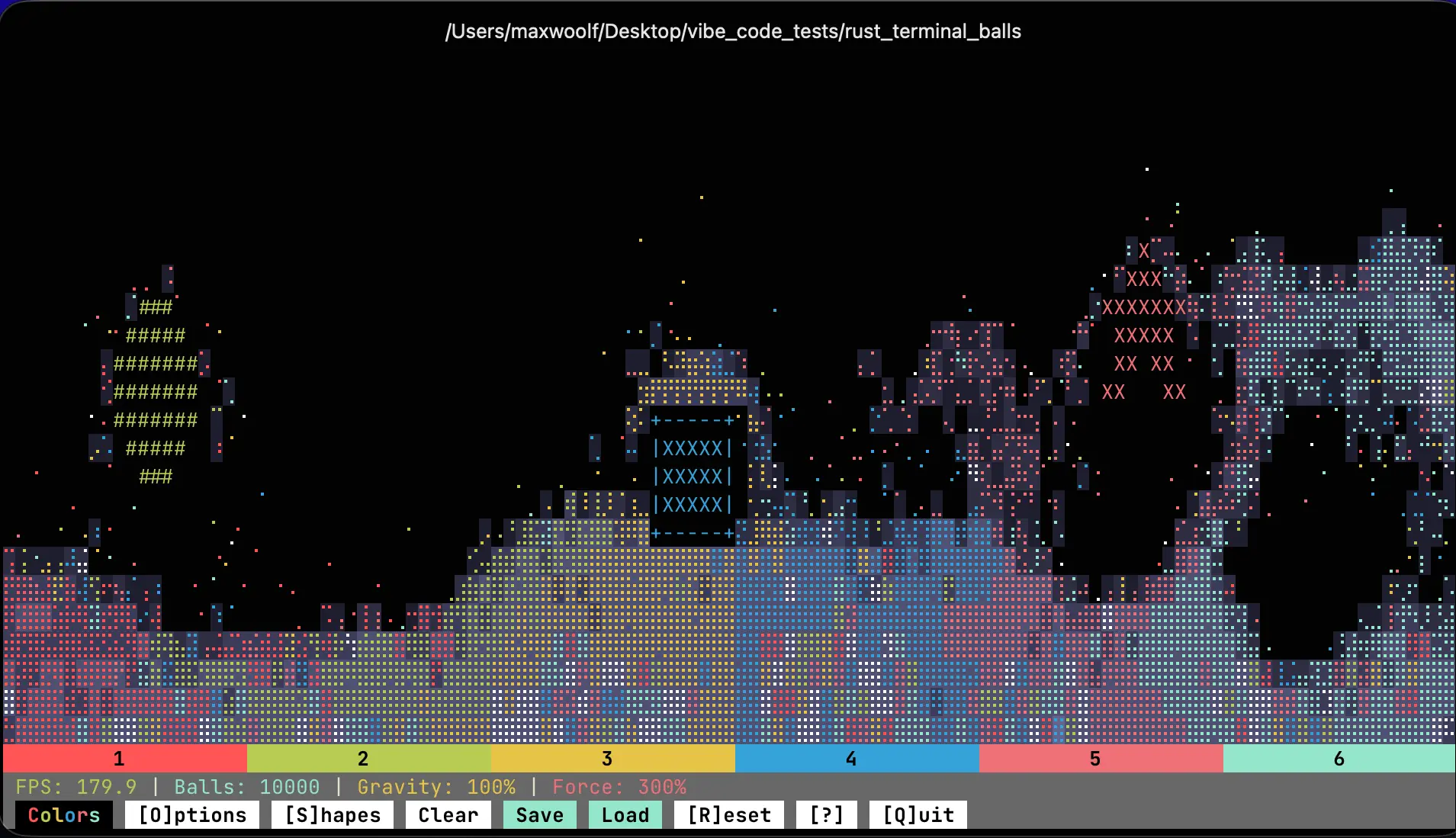
`ballin` is a fun TUI app written in Rust that simulates thousands of logical balls, but despite the inherent character constraints of a terminal, you can see the realistic physics of the balls in action:
- Extremely high performance using the `rapier` 2D Rust physics engine: it can handle physics actions on 10,000 balls at effective 120+ FPS!
- Uses [Braille Unicode](https://www.unicode.org/charts/nameslist/c_2800.html) to allow visualizing small, discrete balls.
- Clicking the balls to cause a repulsing burst, or by using the geysers by pressing `1-6` or clicking them.
- Clicking the top area of the canvas spawns more balls: clicking-and-holding spawns _many_ balls.
- Shake the entire canvas by resizing the terminal vertically, or by pressing the arrow keys to perform a pinball tilt.
- Change the amount of gravity, friction, and the force of interactive effects to generate some very wacky interactions!
- Add shape objects to obstruct the balls and create your own physics gym. You can even change the colors of the shapes to make it beautiful!
- Save your constructed physics environment as a sharable JSON file!
Watch the color explosion in action!
https://github.com/user-attachments/assets/fa1cfe4a-8626-4544-af63-39ca9ba9fd9a
_**Disclosure:** This crate was developed with the assistance of [Claude Opus 4.5](https://www.anthropic.com/news/claude-opus-4-5) initially to answer the shower thought "would the Braille Unicode trick work to visually simulate complex ball physics in a terminal?" Opus 4.5 [one-shot the problem](https://bsky.app/profile/minimaxir.bsky.social/post/3mbzxfz242c22), so I decided to further experiment to make it more fun and colorful. The full list of prompts used with Claude Code is present in [PROMPTS.md](PROMPTS.md)._
## Installation
The app binaries can be downloaded from the [Releases page](https://github.com/minimaxir/ballin/releases) for your platform of choice, or by using the following terminal commands:
```sh
# macOS Apple Silicon
curl -sL https://github.com/minimaxir/ballin/releases/latest/download/ballin-macos-arm.tar.gz | tar xz
# macOS Intel
curl -sL https://github.com/minimaxir/ballin/releases/latest/download/ballin-macos-intel.tar.gz | tar xz
# Linux ARM64
curl -sL https://github.com/minimaxir/ballin/releases/latest/download/ballin-linux-arm64.tar.gz | tar xz
# Linux x64
curl -sL https://github.com/minimaxir/mballin/releases/latest/download/ballin-linux.tar.gz | tar xz
```
For Windows, download and unzip the binary [from here](https://github.com/minimaxir/ballin/releases/latest/download/ballin-windows.zip).
If Rust is installed, you can install the crate directly via `cargo`:
```bash
cargo install ballin
```
## Example Usage
_It is VERY strongly recommended to use a terminal emulator such as [Ghostty](https://ghostty.org) as normal terminals may have their frame rates capped at 30 FPS and the output looks choppy. The app looks comparatively poor in the native macOS Terminal.app, for example._
To run `ballin`: if you downloaded the binary, run it in the terminal with `./ballin`. If you installed via Rust, run `cargo run`. The physics simulation will start with some shape objects randomly present to let the hilarity ensue immediately!
Press keys, click areas, see what happens? You can press `?` for the full list of keyboard shortcuts.
Balls can be added to the machine by clicking the upper area: you can also hold `Space` to drop balls from all areas, or `Shift+1/2/3/4/5/6` to drop balls in a specific section. You can also open Options to change the number of balls manually to a specified value, or `Reset` to return to the base number of balls.
For terminal compatability and accessibility reasons, Color Mode is disabled by default. To toggle it, just click the appropriately colorful `Colors` button (or press `c`) and the colors will appear! When triggering a geyser, it will color all affected balls the corresponding color.
Shapes can be inserted from the Shape menu. You can also click a Shape to select it: use the arrow keys to move a selected shape, press `n`/`m` to cycle through colors for the shape, or click-and-hold to drag the shape around.
Levels, which include options and shape objects, can be exported using `Save` and loaded using `Load`. The `ballin` level used in the video above is available in the `level.json` file.
You can also use the CLI arguments of `--color` to enable color by default, or `--balls 10000` to increase the default number of starting balls.
## Notes
- The app intentionally uses the non-latest version of the `rapier` physics engine (0.31.0) because using latest version (0.32.0) frequently caused app panics in the constraints solver even at small numbers of balls. This is likely due to 0.32.0 [changing the underlying linear algebra crates](https://dimforge.com/blog/2026/01/09/the-year-2025-in-dimforge/) in the engine. Unfortunately, I don't know the engine well enough to construct a minimal reproducible test case to file as a regression bug report, or be able to isolate it as a side effect of a new API not well-known by Opus 4.5.
- There is a hardcoded maximum of 15,000 balls in the simulator to avoid crashing on lower-specced hardware: on my MacBook Pro M3 Pro, any physics action drops the FPS below 30. Additionally, the terminal becomes too full of balls at standard terminal sizes.
- It is possible for balls to go through line shapes if they are fast enough. This is expected: it's a phenomenon in physics engines known as [tunneling](https://gamedev.stackexchange.com/a/192403), but the workaround of enabling [Continuous Collision Detection (CDD)](https://rapier.rs/docs/user_guides/bevy_plugin/rigid_body_ccd/) for every ball causes severe performance degradation with thousands of balls so it is not implemented.
- The geyser feature is inspired by those weird mini-aquarium toys for kids at doctor's offices where pressing a button redirects the hydraulic force to disperse and scatter the colorful sparkles inside.
- All colors within `ballin` are based on your defined terminal colors. The Ghostty terminal theme used in the example image/video is by David Crespo and is available [here](https://github.com/david-crespo/dotfiles/blob/main/ghostty/config), although the examples use the [Jetbrains Mono](https://www.jetbrains.com/lp/mono/) fontface instead.
- `ballin` is the most perfect name for this crate and I will never name a Rust crate as good as this.
## Maintainer/Creator
Max Woolf ([@minimaxir](https://minimaxir.com))
_Max's open-source projects are supported by his [Patreon](https://www.patreon.com/minimaxir) and [GitHub Sponsors](https://github.com/sponsors/minimaxir). If you found this project helpful, any monetary contributions to the Patreon are appreciated and will be put to good creative use._
## License
MIT