

Please check the build logs for more information.
See Builds for ideas on how to fix a failed build, or Metadata for how to configure docs.rs builds.
If you believe this is docs.rs' fault, open an issue.



English | 中文
Introduction
AxVisor is a Hypervisor implemented based on the ArceOS kernel. Its goal is to leverage the basic operating system functionalities provided by ArceOS as a foundation to implement a lightweight unified modular Hypervisor.
-
Unified means using the same codebase to support three architectures: x86_64, Arm (aarch64), and RISC-V, maximizing the reuse of architecture-agnostic code and simplifying development and maintenance costs.
-
Modular means that the Hypervisor's functionalities are decomposed into multiple independently usable components. Each component implements a specific function, and components communicate through standardized interfaces to achieve decoupling and reusability.
Architecture
The software architecture of AxVisor is divided into five layers as shown in the diagram below. Each box represents an independent component, and components communicate with each other through standard interfaces. The complete architecture description can be found in the documentation.
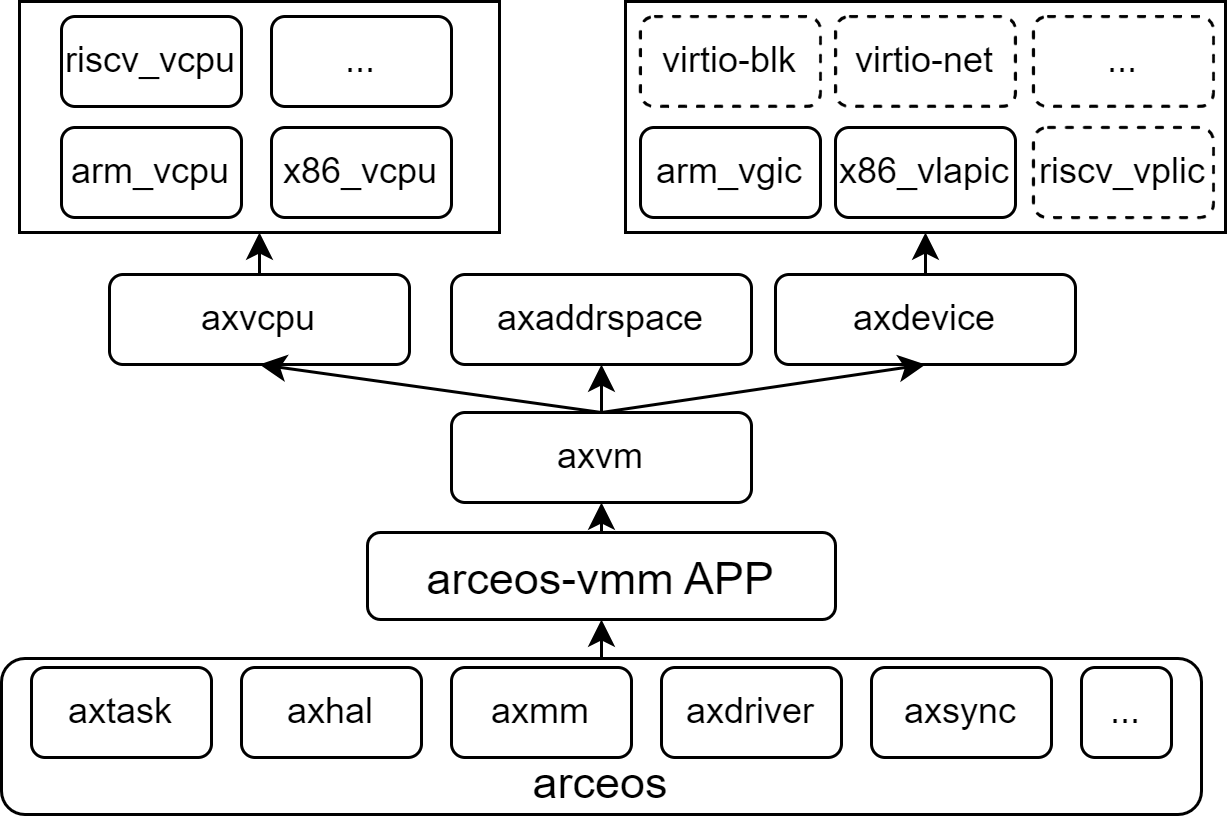
Hardware Platforms
AxVisor has been verified on multiple hardware platforms, covering extensive support from virtualization environments to actual physical devices. To facilitate rapid user deployment, we provide one-click build scripts for each platform in the axvisor-guest repository, which can automatically generate corresponding image files.
| Platform Name | Architecture Support | Key Features |
|---|---|---|
| QEMU | ARM64, x86_64 | Virtualization platform, supports multiple architectures, for development and testing |
| Orange Pi 5 Plus | ARM64 | Development board based on Rockchip RK3588, high-performance ARM platform |
| Phytium Pi | ARM64 | Development board based on Phytium E2000Q processor, domestic ARM platform |
| ROC-RK3568-PC | ARM64 | Development board based on Rockchip RK3568, suitable for industrial applications |
| EVM3588 | ARM64 | Evaluation board based on Rockchip RK3588, enterprise-level applications |
Guest Systems
AxVisor supports multiple operating systems as guests, with good compatibility from lightweight microkernels to mature macrokernel systems. To simplify the user deployment process, we provide one-click build scripts for different guest systems in the axvisor-guest repository, which can quickly generate adapted guest images.
| Guest System | System Type | Architecture Support | Feature Description |
|---|---|---|---|
| ArceOS | Unikernel | ARM64, x86_64, RISC-V | Rust-based componentized operating system, lightweight and high-performance |
| Starry-OS | Macrokernel OS | ARM64, x86_64 | Real-time operating system for embedded scenarios |
| Linux | Macrokernel OS | ARM64, x86_64, RISC-V | Mature and stable general-purpose operating system, rich software ecosystem |
Build
AxVisor is built based on the Rust ecosystem, providing complete project build, configuration management, and debugging support through the extended xtask toolchain, offering developers a unified and efficient development experience.
Build Environment
Quick Start: Run
cargo xtask axvisor test qemu --arch aarch64 --test-group normal --test-case smokefrom the workspace root.
First, in a Linux environment, you need to install basic development tool packages such as libssl-dev gcc libudev-dev pkg-config.
Second, AxVisor is written in the Rust programming language, so you need to install the Rust development environment according to the official Rust website instructions, and use the cargo install cargo-binutils command to install cargo-binutils to use tools like rust-objcopy and rust-objdump.
If necessary, you may also need to install musl-gcc to build guest applications.
Configuration Files
AxVisor uses a layered configuration system, including hardware platform configuration and guest configuration, both in TOML format.
Hardware Platform Configuration
Hardware platform configuration files are located in the configs/board/ directory, with each configuration file corresponding to a development board (or QEMU platform architecture) that we have verified. They specify the target architecture, feature sets, driver support, log levels, and build options.
The guest configuration item
vm_configsis not specified by default and needs to be specified in actual use.
Guest Configuration
Guest configuration files are located in the configs/vms/ directory, defining the runtime parameters of guests, including basic information, kernel configuration, memory regions, and device configuration details.
Guest configs are organized by platform first. QEMU configs live under configs/vms/qemu/<arch>/, while board configs live under configs/vms/<board>/. File names keep only the guest system and variant, such as configs/vms/qemu/aarch64/arceos-smp1.toml or configs/vms/roc-rk3568-pc/linux-smp1.toml.
On x86_64, boot_protocol selects the guest firmware flow. multiboot keeps the legacy axvm-bios path and patches the generated multiboot info into the BIOS image, while uefi loads the external firmware from uefi_firmware_path without multiboot patching. Legacy UEFI configs that still use bios_path are accepted as a compatibility fallback.
Management Shell Syntax
The AxVisor management shell tokenizes command lines with shlex POSIX-style rules. Single and double quotes group words, backslashes follow shlex escaping rules, and "" or '' produces an empty argument. Unclosed quotes and a trailing standalone backslash are syntax errors. Only ASCII shell whitespace separates arguments.
Tokenization does not provide variable expansion, globbing, pipelines, general redirection, or job control. Command lookup, option validation, and handler behavior remain AxVisor-specific.
Compilation
AxVisor uses the xtask tool for build management, supporting multiple hardware platforms and configuration options. For a quick build and run of AxVisor, please refer to the Quick Start chapter in the configuration documentation.
-
List Available Boards: Use
cargo xtask axvisor config lsto view the available board names underconfigs/board/. -
Generate Configuration: Use
cargo xtask axvisor defconfig <board_name>to copy the selected board-level configuration to.build.toml. -
Execute Build: Use
cargo xtask axvisor buildto compile AxVisor according to.build.toml. You can also pass an explicit config file viacargo xtask axvisor build --config configs/board/<board_name>.toml. -
Run on QEMU: From the workspace root, use
cargo xtask axvisor test qemu --arch aarch64 --test-group normal --test-case smoketo run the maintained smoke case.
Contributing
Welcome to fork this repository and submit pull requests. The existence and development of this project is thanks to the support of all contributors.
You are also welcome to scan the QR code below to join the discussion group (please send a note with: AxVisor). We look forward to consulting on issues, exchanging experiences, and receiving feedback suggestions.

License
AxVisor is licensed under the Apache License, Version 2.0. See the LICENSE file for details.