# awsipranges
_Quickly query the AWS IP Ranges_
[](https://opensource.org/license/bsdpluspatent)
[](https://crates.io/crates/awsipranges)
[](https://docs.rs/awsipranges/latest/awsipranges/)
[](https://github.com/cmlccie/awsipranges/actions/workflows/tests.yml)
[](https://codecov.io/gh/cmlccie/awsipranges)
---
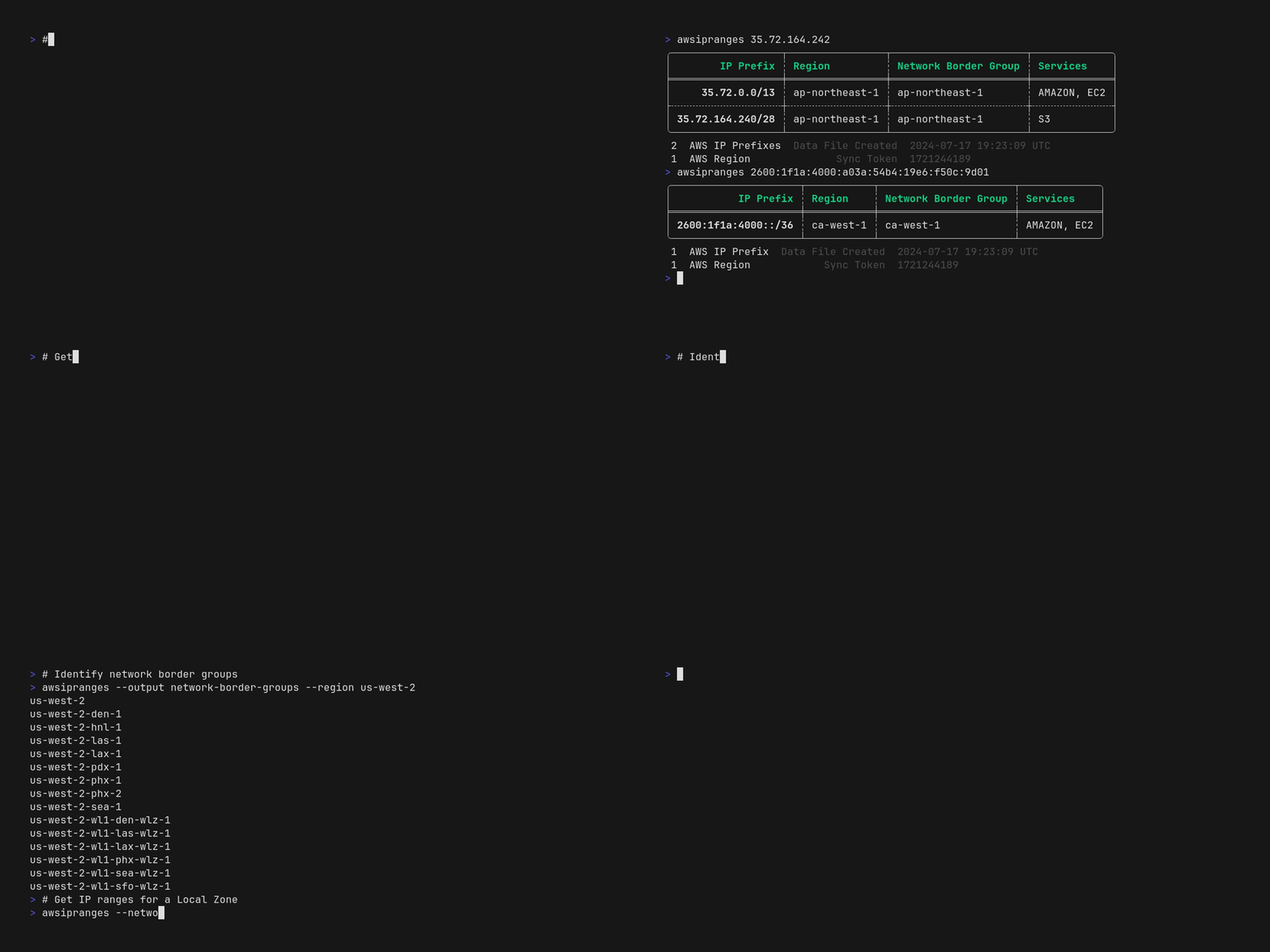
`awsipranges` allows you to search, filter, and use public [AWS IP address ranges](https://docs.aws.amazon.com/vpc/latest/userguide/aws-ip-ranges.html) from the command line without writing complicated JSON parsing scripts or commands. This single-purpose CLI tool allows you to quickly answer questions like:
- Is some IPv4/IPv6 `<address>` a public AWS IP address?
- What region is it in?
- What service(s) does it belong to?
- What supernets does it belong to?
- What are the supernets of `<some-cidr-block>`?
- What services publish their IP ranges in the `ip-ranges.json` file?
- What IP ranges are used by `<some-supported-service>` in `<some-region>`?
- What Local / Wavelength Zones are attached to `<some-region>`?
- What are the IP ranges for `<some-local-zone>`?
You could get answers to some of these ☝️ questions by [filtering the JSON file](https://docs.aws.amazon.com/vpc/latest/userguide/aws-ip-work-with.html#filter-json-file), but `awsipranges` [features](#features) make filtering more accessible. `awsipranges` parses and understands the structure of IPv4 and IPv6 CIDRs allowing you to work with IP ranges as they were meant to - as structured data - enabling you to output the results in human and machine friendly formats.
## Features
- **Retrieve & Cache**: [`ip-ranges.json`](https://ip-ranges.amazonaws.com/ip-ranges.json) to `${HOME}/.aws/ip-ranges.json`; refreshing the cache after 24 hours (by default).
- **Search**: IP ranges for an _**IPv4/IPv6 address**_ or _**CIDR**_ (any prefix length) to view the AWS IP ranges that contain the provided address or CIDR.
- **Filter**: IP ranges by region, service, network border group, and IP version (IPv4/IPv6).
- **Multiple Output Formats**: Table, CIDR, and netmask output formats for easy integration with other tools.
- **Save Results to CSV**: Save your search and filter results to CSV for programmatic use or analysis in your favorite spreadsheet app.
- **Rust Crate:** This CLI tool's core functionality is also available as a library, allowing you to easily add it to your own Rust utility or application.
## Installation
### Cargo
To build and install the latest `awsipranges` CLI from source, you will need the [Rust toolchain installed](https://www.rust-lang.org/tools/install) on your system, and then you can simply run:
```bash
cargo install awsipranges
```
## Why did I make this?
I frequently need to get answers from the AWS IP ranges. I published a similar [Python library](https://github.com/aws-samples/awsipranges) while working at AWS. Then, when learning Rust, I needed something to build! 😎 This tool has been helpful to me - perhaps it will be useful to you.
## Acknowledgements
I appreciate the following teams and individuals without which this tool would not be possible or as quickly constructed:
- The AWS Networking team that publishes and maintains the [AWS IP address ranges](https://docs.aws.amazon.com/vpc/latest/userguide/aws-ip-ranges.html).
- Abhishek Chanda ([@achanda](https://www.github.com/achanda)) for publishing the excellent [`ipnetwork`](https://crates.io/crates/ipnetwork) crate, which makes parsing and working with IPv4 and IPv6 prefixes a breeze.