<div align="center">
# APS - Agentic Prompt Sync
**Compose and sync your own collection of AGENTS.md, Skills, and other agentic prompts.**
[](https://github.com/westonplatter/aps/actions/workflows/ci.yml)
[](https://crates.io/crates/aps)
[](https://crates.io/crates/aps)
[](https://github.com/westonplatter/aps/stargazers)
[](LICENSE)
**Cross-platform support:** macOS • Linux • Windows
</div>
## Features
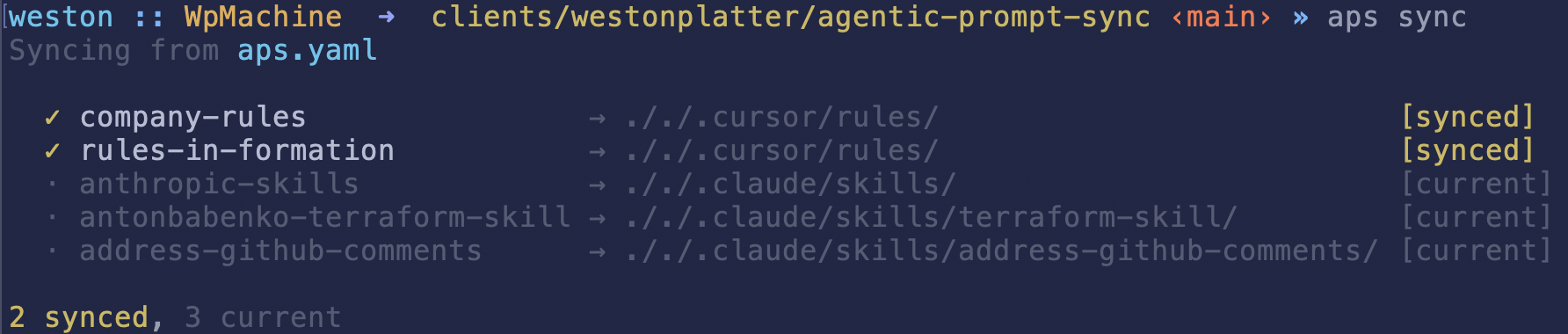
`aps` is a manifest-driven, CLI tool for syncing agentic assets (Cursor rules, Agent Skills, and AGENTS.md files) from sources like git or your filesystem in your project folders.
- **Declarative manifest-driven sync** - Define your agentic assets in a YAML manifest
- **Composable AGENTS.md** - Merge multiple AGENTS.md files from local or remote sources into one
- **Safe installs** - Automatic conflict detection and backup creation
- **Deterministic lockfile** - Idempotent syncs that only update when needed
## Installation
### Quick Install (macOS/Linux)
Install or update `aps` using cargo
```bash
# install the latest version
cargo install aps
```
Or use curl,
```bash
# or override the install location
### Download Binary
Pre-built binaries for all platforms are available on the [Releases page](https://github.com/westonplatter/aps/releases).
| Linux x64 | `aps-linux-x64-musl.tar.gz` |
| Linux ARM64 | `aps-linux-arm64.tar.gz` |
| macOS Intel | `aps-macos-x64.tar.gz` |
| macOS ARM | `aps-macos-arm64.tar.gz` |
| Windows x64 | `aps-windows-x64.zip` |
### Build from Source
```bash
git clone https://github.com/westonplatter/aps.git
cd agentic-prompt-sync
cargo build --release
# Binary at target/release/aps
```
## Getting Started
### Quick Start
1. **Initialize a manifest** in your project:
```bash
aps init
```
This creates a `aps.yaml` manifest file with an example entry.
2. **Add skills directly from GitHub URLs:**
```bash
aps add https://github.com/hashicorp/agent-skills/blob/main/terraform/module-generation/skills/refactor-module/SKILL.md
aps add https://github.com/hashicorp/agent-skills/tree/main/terraform/module-generation/skills/refactor-module
```
This parses the GitHub URL, adds an entry to `aps.yaml`, and syncs **only that skill** immediately (other entries are not affected).
3. **Or manually edit the manifest** to define your assets:
```yaml
entries:
- id: my-agents
kind: agents_md
source:
type: filesystem
root: $HOME
path: personal-generic-AGENTS.md
dest: ./AGENTS.md
```
4. **Sync and install** your assets:
```bash
aps sync
```
5. **Check status** of synced assets:
```bash
aps status
```
## Commands
| `aps init` | Create a new manifest file and update .gitignore |
| `aps add` | Add a skill from a GitHub URL and sync it |
| `aps sync` | Sync all entries from manifest and install assets |
| `aps validate` | Validate manifest schema and check sources |
| `aps status` | Display last sync information from lockfile |
### Common Options
- `--verbose` - Enable verbose logging
- `--manifest <path>` - Specify manifest file path (default: `aps.yaml`)
### Add Options
- `--id <name>` - Custom entry ID (defaults to skill folder name)
- `--kind <type>` - Asset kind: `agent-skill`, `cursor-rules`, `cursor-skills-root`, `agents-md` (default: `agent-skill`)
- `--no-sync` - Only add to manifest, don't sync immediately
- `--all` - Add all discovered skills without prompting (for repo-level URLs or directories)
- `--yes` / `-y` - Skip confirmation prompts
### Skill Discovery
When you point `aps add` at a repository or directory that doesn't directly contain a `SKILL.md`, aps automatically discovers all skills within it. Skills are identified by recursively searching for directories containing a `SKILL.md` file.
**From a GitHub repository:**
```bash
# Discover all skills in a repo (or a subdirectory within it)
aps add https://github.com/anthropics/skills
# Narrow discovery to a specific path within the repo
aps add https://github.com/anthropics/skills/tree/main/skills
```
**From a local directory:**
```bash
# Discover skills in a local directory
aps add ~/my-skills
# Supports shell variable expansion
aps add $HOME/work/shared-skills
```
After discovery, aps presents an interactive toggle picker showing **all** discovered skills. Already-installed skills appear pre-checked, so you can add new skills and remove existing ones in a single pass.
```bash
Found 5 skill(s) (2 installed, 3 new):
? Toggle skills (space to toggle, enter to confirm) ›
> ✔ refactor-module Transform monolithic Terraform configurations into reusable modules
✔ plan-review Review Terraform plan output for potential issues
○ test-gen Generate unit tests for Terraform modules
○ lint-check Lint Terraform files for best practices
○ cost-estimator Estimate cloud costs from Terraform plans
```
After confirming, aps shows a summary of changes:
```bash
✓ Will add: test-gen, cost-estimator
✗ Will remove: plan-review
· Unchanged: refactor-module
Proceed? [Y/n]
```
To skip prompts and add everything, use `--all`. To skip the confirmation, use `--yes` / `-y`:
```bash
aps add --all https://github.com/anthropics/skills
aps add --yes https://github.com/anthropics/skills
```
### Sync Options
- `--yes` - Non-interactive mode, automatically confirm overwrites
- `--dry-run` - Preview changes without applying them
- `--only <id>` - Only sync specific entry by ID
### Sync Behavior
When you run `aps sync`:
1. **Entries are synced** - Each entry in `aps.yaml` is installed to its destination
2. **Stale entries are cleaned** - Entries in the lockfile that no longer exist in `aps.yaml` are automatically removed
3. **Lockfile is saved** - The updated lockfile is written to disk
Note: Stale entry cleanup only happens during a full sync. When using `--only <id>` to sync specific entries, other lockfile entries are preserved.
## Configuration
### Manifest File (`aps.yaml`)
```yaml
entries:
# Single AGENTS.md file from one source
- id: my-agents
kind: agents_md
source:
type: filesystem
root: $HOME
path: AGENTS-generic.md
dest: ./AGENTS-simple.md
# Composite AGENTS.md - merge multiple markdown files into one
- id: composite-agents
kind: composite_agents_md
sources:
- type: filesystem
root: $HOME/agents
path: AGENT.python.md
- type: filesystem
root: $HOME/agents
path: AGENT.docker.md
- type: git
repo: https://github.com/apache/airflow.git
ref: main
path: AGENTS.md
dest: ./AGENTS.md
# Pull in Agent Skills from a public git repo
- id: anthropic-skills
kind: agent_skill
source:
type: git
repo: git@github.com:anthropics/skills.git
ref: main
path: skills
include:
- pdf
- skill-creation
dest: ./.claude/skills/
# Pull Cursor Rules from a private git repo
- id: personal-rules
kind: cursor_rules
source:
type: git
repo: git@github.com:your-username/dotfiles.git
ref: main
path: .cursor/rules
# shallow: false # full clone
dest: ./.cursor/rules/
# Pull in more Cursor Rules from a local file system
- id: company-rules
kind: cursor_rules
source:
type: filesystem
root: $HOME/work/acme-corp/internal-prompts
path: rules
# symlink: false # copy files instead of symlinking
dest: ./.cursor/rules/
```
### Asset Types
| Kind | Description | Default Destination |
| --------------------- | -------------------------------------- | ------------------- |
| `agents_md` | Single AGENTS.md file | `./AGENTS.md` |
| `composite_agents_md` | Merge multiple markdown files into one | `./AGENTS.md` |
| `cursor_rules` | Directory of Cursor rules | `./.cursor/rules/` |
| `cursor_hooks` | Directory of Cursor hooks | `./.cursor/hooks/` |
| `cursor_skills_root` | Directory with skill subdirs | `./.cursor/skills/` |
| `agent_skill` | Claude agent skill directory | `./.claude/skills/` |
### Source Types
| Type | Description | Key Properties |
| ------------ | --------------------------- | -------------------------------- |
| `filesystem` | Sync from a local directory | `root`, `path`, `symlink` |
| `git` | Sync from a git repository | `repo`, `ref`, `path`, `shallow` |
**Shell Variable Expansion**: Path values in `root` and `path` fields support shell variable expansion (e.g., `$HOME`, `$USER`). This makes manifests portable across different machines and users.
### Filtering with `include`
When a source contains multiple subdirectories (e.g., a skills repo with many skills), use the `include` field to sync only specific ones:
```yaml
- id: anthropic-skills
kind: agent_skill
source:
type: git
repo: git@github.com:anthropics/skills.git
ref: main
path: skills
include:
- pdf
- skill-creation
dest: ./.claude/skills/
```
Each value in `include` is matched against subdirectory names within the source `path`. Only matching subdirectories are synced. If `include` is omitted, all subdirectories are synced.
### Composite AGENTS.md
The `composite_agents_md` kind allows you to merge multiple markdown files into a single `AGENTS.md` file. This is useful when you want to organize agent definitions across separate files (e.g., by language or framework) and combine them at sync time.
```yaml
entries:
- id: my-composite-agents
kind: composite_agents_md
sources:
# Local filesystem sources
- type: filesystem
root: $HOME/agents-md-partials
path: AGENT.docker.md
# Remote git sources
- type: git
repo: https://github.com/westonplatter/agentically.git
ref: main
path: agents-md-partials/AGENTS.python.md
dest: ./AGENTS.md
```
Key features:
- **Mixed sources**: Combine local filesystem and remote git sources
- **Order preserved**: Files are merged in the order specified in `sources`
- **Auto-generated header**: Output includes a comment indicating it was composed by aps
### Lockfile (`aps.lock.yaml`)
The lockfile tracks installed assets and is automatically created/updated by `aps sync`. **This file should be committed to version control** to ensure reproducible installations across your team. It stores:
- APS version that generated/modified the lockfile
- Source information
- Destination paths
- Last update timestamp
- Content checksum (SHA256)
**Environment Variables Are Preserved**: Unlike other package managers (npm, uv, bundler) that expand environment variables to concrete paths, `aps` preserves shell variables like `$HOME` in the lockfile. This makes lockfiles portable across different machines and users who have the same relative directory structure.
## Examples
### Non-interactive sync for CI/CD
```bash
aps sync --yes
```
### Validate manifest before sync
```bash
aps validate --strict
```
## Contributing
See [CONTRIBUTING.md](CONTRIBUTING.md) for development setup, building, testing, and linting instructions.
## Inspiration
Built based on inspiration from these other projects,
- [rule-tool](https://github.com/circleci-petri/rule-tool/)
## License
See [LICENSE](LICENSE) for details.