[](https://crates.io/crates/analiticcl)
[](https://docs.rs/analiticcl/)
[](https://github.com/proycon/analiticcl/actions/)
[](https://GitHub.com/proycon/analiticcl/releases/)
[](https://www.repostatus.org/#active)
# Analiticcl
## Introduction
Analiticcl is an approximate string matching or fuzzy-matching system that can be used for spelling
correction or text normalisation (such as post-OCR correction or post-HTR correction). Texts can be checked against a
validated or corpus-derived lexicon (with or without frequency information) and spelling variants will be returned.
The distinguishing feature of the system is the usage of anagram hashing to drastically reduce the search space and make
quick lookups possible even over larger edit distances. The underlying idea is largely derived from prior work *TICCL*
(Reynaert 2010; Reynaert 2004), which was implemented in [ticcltools](https://github.com/languagemachines/ticcltools).
This *analiticcl* implementation attempts to re-implement the core of these ideas from scratch, but also introduces some
novelties, such as the introduction of prime factors for improved anagram hashing. We aim at a high-performant
implementation written in [Rust](https://www.rust-lang.org).
Aside from reading this documentation, you can also view an in-depth [presentation
video](https://diode.zone/w/kkrqA4MocGwxyC3s68Zsq7) that was presented at the KNAW Humanities Cluster in January 2022.
If you plan to use analiticcl from Python, then we recommend you to also follow [this tutorial](tutorial.ipynb) in the form of a jupyter notebook.
## Demo
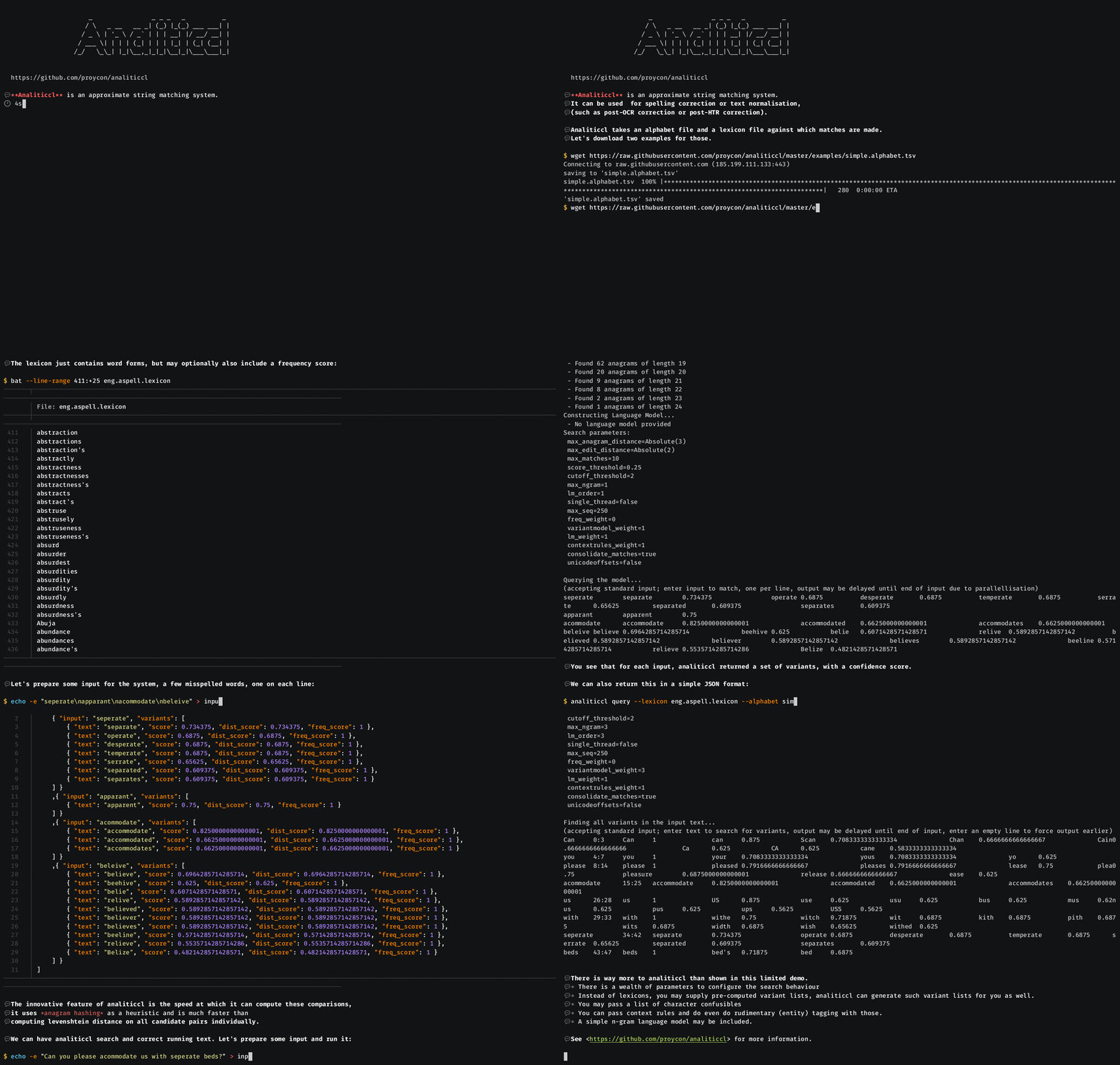
## Features
* Quick retrieval of spelling variants given an input word due to smart anagram hashing lookup. This is the main feature
that drastically reduces the search spaces.
* Works against a lexicon, which can either be a validated lexicon (preferred), or a lexicon derived from a corpus.
* Uses a user-provided alphabet file for anagram hashing, in which multiple characters may be mapped to a single alphabet entry if so
desired (e.g. for casing or for more phonetic-like lookup behaviour like soundex)
* Can take into account frequency information from the lexicon
* Matching against final candidates using a variety of possible distance metrics. Scoring and ranking is implemented as
a weighted linear combination including the following components:
* Damerau-Levenshtein
* Longest common substring
* Longest common prefix/suffix
* Casing difference (boolean)
An exact match always has distance score 1.0.
* Additionally, frequency information can be used to influence ranking.
* A confusable list with known confusable patterns and weights can be provided. This is used to favour or penalize certain
confusables in the ranking stage (this weight is applied to the whole score).
* Rather than look up words in spelling-correction style, users may also output the entire hashed anagram index, or
output a reverse index of all variants found the supplied input data for each item in the lexicon.
* Also supports ingesting explicit variant lists/error lists.
* Support for language models to consider context information.
* Multi-threading support
The current implementation is still a work in progress and should be considered experimental. Especially the search mode
and the use of language models is still being evaluated and improved.
## Installation
You can build and install the latest stable analiticcl release using Rust's package manager:
```
cargo install analiticcl
```
or if you want the development version after cloning this repository:
```
cargo install --path .
```
No cargo/rust on your system yet? Do ``sudo apt install cargo`` on Debian/ubuntu based systems, ``brew install rust`` on mac, or use [rustup](https://rustup.rs/).
Note that 32-bit architectures are not supported.
## Usage
Analiticcl is typically used through its command line interface or through the [Python binding](https://github.com/proycon/analiticcl/tree/master/bindings/python). Full syntax help for the command line tool is always available through ``analiticcl --help``.
Analiticcl can be run in several **modes**, each is invoked through a subcommand, each subcommand also takes its own
``--help`` parameter for detailed usage information.
* **Query mode** - ``analiticcl query`` - Queries the model for variants for the provided input item (one per line)
* **Search mode** - ``analiticcl search`` - Searches for variants in running text. This encompasses detection and correction whereas the above query mode only handles correction.
* **Learn mode** - ``analiticcl learn`` - Learns variants from the input for each item in the lexicon and outputs a weighted variant list.
* **Index mode** - ``analiticcl index`` - Computes and outputs the anagram index, takes no further input
In all modes, the performance of the system depends to a large depree on the quality of the lexicons, including the **background lexicon**, the importance of which can not be understated so we dedicate a special section to it later, and the chosen parameters.
### Query Mode
The query mode takes one input item per line and outputs all variants and their scores found for the given input.
Default output is TSV (tab separated fields) in which the first column contains the input and the variants and scores
are tab delimited fields in the columns thereafter.
You need to pass at least an [alphabet file](#alphabet-file) and a [lexicon file](#lexicon-file) against which matches
are made.
Example:
```
$ analiticcl query --interactive --lexicon examples/eng.aspell.lexicon --alphabet examples/simple.alphabet.tsv
Initializing model...
Loading lexicons...
Building model...
Computing anagram values for all items in the lexicon...
- Found 119773 instances
Adding all instances to the index...
- Found 108802 anagrams
Creating sorted secondary index...
Sorting secondary index...
...
Querying the model...
(accepting standard input; enter input to match, one per line)
```
The program is now taking standard input, enter a word to query and press ENTER to get the variants and the scores.
Specify the ``--interactive`` parameter otherwise output may not be returned immediately but will be buffered for
parallellisation:
```tsv
seperate
seperate separate 0.734375 operate 0.6875 desperate 0.6875 temperate 0.6875 serrate 0.65625 separates 0.609375 separated 0.609375
```
Rather than running it interactively, you can use your shell's standard redirection facilities to provide input and output, multiple variants will be processed in parallel.
```
$ analiticcl query --lexicon examples/eng.aspell.lexicon --alphabet examples/simple.alphabet.tsv < input.tsv >
output.tsv
```
The ``--lexicon`` argument can be specified multiple times for multiple lexicons. Lexicons may contain absolute
frequency information, but frequencies between multiple lexicons must be balanced! In case you are using multiple
lexicons, you can get analiticcl to output information on which lexicon a match was found in by setting.
``--output-lexmatch``. The order of the lexicons (and variant lists) matters if there is associated frequency
information. If an entry occurs in multiple lexicons, they will all be returned.
If you want JSON output rather than TSV, use the ``--json`` flag. The JSON output includes more details than the TSV
output. Most notable, you will see the distance score (aka similarity score) and the frequency scores seperated, whereas
the TSV mode only outputs the combined score.
```
$ analiticcl query --lexicon examples/eng.aspell.lexicon --alphabet examples/simple.alphabet.tsv --output-lexmatch
--json < input.tsv > output.json
```
```json
[
{ "input": "seperate", "variants": [
{ "text": "separate", "score": 0.734375, "dist_score": 0.734375, "freq_score": 1, "lexicons": [ "examples/eng.aspell.lexicon" ] },
{ "text": "desperate", "score": 0.6875, "dist_score": 0.6875, "freq_score": 1, "lexicons": [ "examples/eng.aspell.lexicon" ] },
{ "text": "operate", "score": 0.6875, "dist_score": 0.6875, "freq_score": 1, "lexicons": [ "examples/eng.aspell.lexicon" ] },
{ "text": "temperate", "score": 0.6875, "dist_score": 0.6875, "freq_score": 1, "lexicons": [ "examples/eng.aspell.lexicon" ] },
{ "text": "serrate", "score": 0.65625, "dist_score": 0.65625, "freq_score": 1, "lexicons": [ "examples/eng.aspell.lexicon" ] },
{ "text": "separated", "score": 0.609375, "dist_score": 0.609375, "freq_score": 1, "lexicons": [ "examples/eng.aspell.lexicon" ] },
{ "text": "separates", "score": 0.609375, "dist_score": 0.609375, "freq_score": 1, "lexicons": [ "examples/eng.aspell.lexicon" ] }
] }
]
```
### Learn Mode
In learn mode, analiticcl takes a lexicon, and collects variants from the input for each item in the lexicon.
It takes input similar like search mode or query mode (add an extra ``--strict`` flag if your input is a list/lexicon
rather than running text). Instead of outputting the results directly, it collects all varaints and associates them with
the items in the lexicon, effectively updating the model with this information. The output this mode provides is
the inverse of what search or query does; for each item in the lexicon, all variants that were found (and their scores
are listed). This output constitutes a weighted variant
list which can be loaded in again using ``--variants``.
The learned variants are used as intermediate words to guide the system towards a desired solution. Assume for instance
that our lexicon contains the word ``separate``, and we found the variant ``seperate`` in the data during learning. This
variant is now associated with the right reference, and on subsequent runs matches against ``seperate`` will count
towards matches on ``separate``. This mechanism allows the system to bridge larger edit distances even when it is
contrained to smaller ones. For example: ``seperete`` will match against ``seperate`` but not ``separate`` when the
edit/anagram distance is constrained to 1.
Learn mode may do multiple iterations over the same data (set ``--iterations``). As iterations grow, larger edit
distances can be covered, but this is also a source for extra noise so accuracy will go down too.
When using learn mode, make sure to choose tight constraints (e.g. ``--max-matches 1`` and a high
``--score-threshold``). Learning on a list/lexicon using ``--strict`` rather than on running text, generally leads to
better results.
### Search Mode
In query mode you provide an exact input string and ask Analiticcl to correct it as a single unit. Query mode
effectively implements the *correction* part of a spelling-correction system, but does not really handle the *detection*
aspect. This is where *search mode* comes in. In search mode you can provide running text as input and the system will
automatically attempt to detect the parts of your input that can corrected, and give the suggestions for correction.
In the output, Analiticcl will return UTF-8 byte offsets for fragments in your data that it finds variants for. You can
set ``--unicode-offsets`` if you want unicode codepoint offsets instead. Both types of offsets are zero-indexed and
the end offset is always non-inclusive.
Your input does not have to be tokenised, because tokenisation errors in the
input may in itself account for variation which the system will attempt to resolve. Search mode can look at n-grams to
this end, which effectively makes Analiticcl context-aware. You can use the ``--max-ngram-order`` parameter to set the
maximum n-gram order you want to consider. Any setting above 1 enables a language modelling component in Analiticcl,
which requires a frequency list of n-grams as input (using ``--lm``).
### Index Mode
The index mode simply outputs the anagram index, it takes no further input.
```
$ analiticcl index --lexicon examples/eng.aspell.lexicon --alphabet examples/simple.alphabet.tsv
```
It may be insightful to sort on the number of anagrams and show the top 20 , with a bit of awk scripting and some piping:
```
```
```tsv
8 1227306 least slate Stael stale steal tales teals Tesla
7 98028906 elan's lane's Lane's lean's Lean's Lena's Neal's
7 55133630 actors castor Castor Castro costar Croats scrota
7 485214 abets baste bates Bates beast beats betas
7 416874 bares baser bears braes saber sabre Sabre
7 411761163 luster lustre result rustle sutler ulster Ulster
7 409102 alts last lats LSAT salt SALT slat
7 3781815 notes onset Seton steno stone Stone tones
7 33080178 carets caster caters crates reacts recast traces
7 2951915777547 luster's lustre's result's rustle's sutler's ulster's Ulster's
7 286404699 merits mister Mister miters mitres remits timers
7 28542 east East eats etas sate seat teas
7 28365 ergo goer gore Gore ogre Oreg Roeg
7 27489162 capers crapes pacers parsec recaps scrape spacer
7 1741062 aster rates resat stare tares tears treas
7 17286 ales Elsa lase leas Lesa sale seal
7 1446798 pares parse pears rapes reaps spare spear
7 1403315 opts post Post pots spot stop tops
7 13674 elan lane Lane lean Lean Lena Neal
6 96935466 parses passer spares sparse spears Spears
```
The large number is the [anagram value](#theoretical-background) of the anagram.
### Background Lexicon
We can not understate the importance of the background lexicon to reduce false positives. Analiticcl will eagerly
attempt to match your test input to whatever lexicons you provide. This demands a certain degree of completeness in your
lexicons. If your lexicon contains a relatively rare word like "boulder" and not a more common word like "builder", then
analiticcl will happily suggest all instantes of "builder" to be "boulder". The risk for this increases as the allowed
edit distances increase.
Such background lexicons should also contain morphological variants and not just lemma. Ideally it is derived automatically from a fully spell-checked corpus.
Analiticcl **will not** work for you if you just feed it some small lexicons and no complete enough background lexicons, unless you are sure your test texts have a very constrained limited vocabulary.
### Scores and ranking
In query mode, analiticcl will return a similarity/distance score between your input and any matching variants. This
score is expressed on a scale of 1.0 (exact match) to 0.0. The score takes the length of the input into account, so a
levenshtein difference of 2 on a word weighs less than a levenshtein distance of 2 on a shorter word. The distance score
itself consists of multiple components, each with a configurable weight:
* Damerau-Levenshtein
* Longest common substring
* Longest common prefix
* Longest common suffix
* Casing difference (boolean)
A frequency score on a scale of 1.0 (most frequent variant) to 0.0 is returned separately (not shown in TSV output).
By default, the ranking of variants is based primarily on the distance score, the frequency score is only used as a
secondary key in case there is a tie (multiple items with the same distance score).
If you do want frequency information to play a larger role in the ranking of variants, you can use the ``--freq-ranking`` parameter, the value of
which is a weight to attribute to frequency ranking in relation to the distance component and should be in the range 0.0
to 1.0, where a smaller value around 0.25 is recommended. This is used to compute a ranking score as follows:
```
ranking_score = (distance_score + freq_weight * freq_score) / (1 + freq_weight)
```
This ranking score is subsequently used to rank the results. This may result in a variant with less similarity to the
input being preferred over a variant with more similarity to the input, if that first variant is far more frequent.
## Data Formats
All input for analiticcl must be UTF-8 encoded and use unix-style line endings, NFC unicode normalisation is strongly
recommended.
### Alphabet File
The alphabet file is a TSV file (tab separated fields) containing all characters of the alphabet. Each line describes a
single alphabet 'character'. An alphabet file may for example start as follows:
```
a
b
c
```
Multiple values on a line may be tab separated and are used to denote equivalents. A single line
representing a single character could for example look like:
```tsv
a A á à ä Á À Ä
```
This means that these are all encoded the same way and are considered identical for all anagram hashing and distance
metrics. A common situation is that all numerals are encoded indiscriminately, which you can accomplish with an alphabet entry
like:
```tsv
0 1 2 3 4 5 6 7 8 9
```
It is recommended to order the lines in the alphabet file based on the frequency of the character, as this will lead to
the most optimal performance (i.e. generally smaller anagram values), but this is not a hard requirement by any means.
Entries in the alphabet file are not constrained to a single character but may also correspond to multiple characters, for instance:
```tsv
ae æ
```
Encoding always proceeds according to a greedy matching algorithm in the exact order entries are defined in the alphabet
file.
### Lexicon File
The lexicon is a TSV file (tab separated fields) containing either validated or corpus-derived
words or phrases, one lexicon entry per line. The first column typically (this is configurable) contains the word
and the optional second column contains the absolute frequency count. If no frequency information is available, all
items in the lexicon carry the exact same weight.
Multiple lexicons may be passed and analiticcl will remember which lexicon was matched against, so you could use this
information for some simple tagging.
### Variant List
A variant list explicitly relates spelling variants to preferred forms, and in doing so go a step further than a simple lexicon which only
specifies the validated or corpus-derived form.
A variant list is *directed* and *weighted*, it specifies a normalised/preferred form first, and then specifies variants and variant scores. Take the following example (all fields are tab separated):
```tsv
huis huys 1.0 huijs 1.0
```
This states that the preferred word *huis* has two variants (historical spelling in this case), and both have a score
(0-1) that expresses how likely the variant maps to the preferred word. When loaded into analiticcl with
``--variants``, both the preferred form and the variants will be valid results in normalization (as if you
loaded a lexicon with all three words in it). Any matches on the variants will automatically *expand* to also match on
the preferred form.
What you might be more interested in, is a special flavour of the variant list called an *error list*, loaded
into analiticcl using ``--errors``. Consider the following example:
```tsv
separate seperate 1.0 seperete 1.0
```
This states that the preferred word ``seperate`` has two variants that are considered errors. In this case, analiticcl considers these variants *transparent*, it will still match against the variants but but they will never be returned as a solution; the preferred variant will be returned as a solution instead. This mechanism helps bridge larger edit distances. In the JSON output, the "via" property conveys that a transparent variant was used in matching.
A variant list may also contain an extra column of absolute frequencies, provided that it's consistently
provided for *all* references and variants:
```tsv
separate 531 seperate 1.0 4 seperete 1.0 1
```
Here the reference occurs 531 times, the first misspelling 4 times, and the last variant only 1 time.
Analiticcl can also *output* variant lists, given input lexicons and a text to train on, this occurs when you run it in *learn mode*.
### Confusable List
The confusable list is a TSV file (tab separated fields) containing known confusable patterns and weights to assign to
these patterns when they are found. The file contains one confusable pattern per line. The patterns are expressed in the
edit script language of [sesdiff](https://github.com/proycon/sesdiff). Consider the following example:
```tsv
-[y]+[i] 1.1
```
This pattern expressed a deletion of the letter ``y`` followed by insertion of ``i``, which comes down to substitution
of ``y`` for ``i``. Edits that match against this confusable pattern receive the weight *1.1*, meaning such an edit is
given preference over edits with other confusable patterns, which by definition have weight *1.0*. Weights greater than
*1.0* are being given preference in the score weighting, weights smaller than ``1.0`` imply a penalty. When multiple
confusable patterns match, the products of their weights is taken. The final weight is applied to the whole candidate
score, so weights should be values fairly close to ``1.0`` in order not to introduce too large bonuses/penalties.
The edit script language from sesdiff also allows for matching on immediate context, consider the following variant of the above
which only matches the substituion when it comes after a ``c`` or a ``k``:
```tsv
=[c|k]-[y]+[i] 1.1
```
To force matches on the beginning or end, start or end the pattern with respectively a ``^`` or a ``$``. A further description of the edit script language
can be found in the [sesdiff](https://github.com/proycon/sesdiff) documentation.
### Language Model
In order to consider context information, analiticcl can construct and apply a simple n-gram language model. The input for this language
model is an n-gram frequency list, provided through the ``--lm`` parameter. It is used in analiticcl's *search mode*.
This should be a corpus-derived list of unigrams and bigrams, optionally also trigrams (and even all up to quintgrams if
needed, higher-order ngrams are not supported though). This is a TSV file containing the the ngram in the first column
(space character acts as token separator), and the absolute frequency count in the second column. It is also recommended
it contains the special tokens ``<bos>`` (begin of sentence) and ``<eos>`` end of sentence. The items in this list are
**NOT** used for variant matching, use ``--lexicon`` instead if you want to also match against
these items. It is fine to have an entry in both the language model and lexicon, analiticcl will store it only once
internally.
### Context Rules
Another way to consider context information is through context rules. The context rules define certain patterns that are
to be either favoured or penalized. The context rules are expressed in a tab separated file which can be passed to
analiticcl using ``--contextrules``. The first column contains a sequence separated by semicolons, and the second a
score close to 1.0 (lower scores penalize the pattern, higher scores favour it):
```tsv
hello ; world 1.1
```
This means that if the words "hello world" appear as a solution a text/sentence, its total context score will be boosted
(proportial to the length of the match), effectively preferring this solution over others. This context score is an
independent component in the final score function and its weight can be set using ``--contextrules-weight``.
Note that the words also need to be in a lexicon you provide for a rule to work. You can express disjunctions using the
pipe character (``|``), as follows:
```tsv
This will match all four possible combinations. Rather than match the text, you can match specific lexicons you loaded
using the `@` prefix. This makes sense mainly if you use different lexicons and could be used as a form of elementary tagging:
```tsv
@greetings.tsv ; world 1.1
```
Here too you can create disjunctions using the pipe character:
```tsv
If you want to negate a match, just add ``!`` as a prefix. This also works in combination with ``@``, allowing you to match anything *except* the words from a particular the lexicon. If you want to negate an entire disjunction, use parenthesis like ``!(a|b|c|)``.
There are two standalone characters you may use in matching:
* ``?`` - Matches anything
* ``^`` - Matches anything that does not match with *any* lexicon (i.e. out of vocabulary words)
Note that in all cases, you'll still need to explicitly load the lexicons (or variants lists) using ``--lexicon``, ``--variants``,
etc...
The rules are applied in the exact order you specify them. Note that a certain words in a text may only match against
one pattern (the first that is found). When defining context rules, you'll generally want to specify longer rules before
shorter ones, as otherwise the longer rules might never be considered. For example, in the following example, the second
pattern would never apply because the first one already matches:
```tsv
hello 1.1
hello ; world 1.1
```
### Entity Tagging
Analiticcl can be used as a simple entity tagger using its context rules. Make sure you understand the above section before you
continue reading.
You may pass two additional tab-separated columns to the context rules file, the third column specifies a tag to assign
to any matches, and an *optional* fourth column specifies an offset for tagging (more about this later). For example:
```tsv
hello ; world 1.1 greeting
```
Any instances of "hello world" will be assigned the tag "greeting", more specifically "hello" will be assigned the tag
"greeting" and gets sequence number 0, "world" gets the same tag and sequence number 1.
If you want to tag only a subset and leave certain left or right context untagged, then you can do so by specifying an
offset (in matches aka words, not characters). Such an offset takes the form ``offset:length``. For example:
```tsv
hello ; world 1.1 greeting 1:1
```
In this case only the word "world" will get the tag greeting (and sequence number 0).
It is also possible to assign multiple (even overlapping) tags with a single context rule. Use a semicolon to separate multiple tags and multiplet tag offsets (must be equal amount). However, it is not possible to apply multiple context rules once one has matched:
```tsv
@firstname.tsv ; @lastname.tsv 1.0 person;firstname;lastname 0:2;0:1;1:2
```
This mechanism can also be used to assign tags based on lexicons whilst allowing some form of lexicon weighting, even if
no further context is included:
```tsv
@greetings.tsv 1.0 greeting
```
## Theoretical Background
A naive approach to find variants would be to compute the edit distance between the input string and all ``n`` items in
the lexicon. This, however, is prohibitively expensive (``O(mn)``) when ``m`` input items need to be compared. Anagram
hashing (Reynaert 2010; Reynaert 2004) aims to drastically reduce the variant search space. For all items in the
lexicon, an order-independent **anagram value** is computed over all characters that make up the item. All words with
the same set of characters (allowing for duplicates) obtain an identical anagram value. This value is subsequently used
as a hash in a hash table that maps each anagram value to all variant instances. This is effectively what is outputted
when running ``analiticcl index``.
Unlike earlier work, Analiticcl uses prime factors for computation of anagram values. Each character in the alphabet
gets assigned a prime number (e.g. a=2, b=3, c=5, d=7, e=11) and the product of these forms the anagram value. This
provides the following useful properties:
* We can multiply any two anagram values to get an anagram that represents the union set of all characters in both
(including duplicates): ``av(A) ∙ av(B) = av(AB)``
* If anavalue A can be divided by anavalue B (``av(A) % av(B) = 0``), then the set of characters represented by B is fully contained within A.
* ``av(A) / av(B) = av(A-B)`` contains the set difference (aka relative complement). It consists of
the set of all characters in A that are not in B.
The caveat of this approach is that it results in fairly large anagram values that quickly exceed a 64-bit register, the
analiticcl implementation therefore uses a big-number implementation to deal with arbitrarily large integers.
The properties of the anagram values facilitate a much quicker lookup, when given an input word to seek variants for
(e.g. using ``analiticcl query``), we take the following steps:
* we compute the anagram value for the input
* we look up this anagram value in the index (if it exists) and gather the variant candidates associated with the
anagram value
* we compute all deletions within a certain distance (e.g. by removing any 2 characters). This is a division operation
on the anagram values. The maximum distance is set using the ``-k`` parameter.
* for all of the anagram values resulting from these deletions, we look which anagram values in our index match or contain (``av(A) % av(B) = 0``) the value under consideration. We again gather the candidates that result from all matches.
* To facilitate this lookup, we make use of a *secondary index*, the secondary index is grouped by the number of
characters. For each length it enumerates, in sorted order, all anagram values that exist for that particular length. This means we
can apply a binary search to find the anagrams that we should check our anagram value against (i.e. to check whether it is a subset of the anagram), rather than needing to exhaustively try all anagram values in our index.
* Via the anagram index, we have collected all possibly relevant variant instances, which is a considerably smaller than
the entire set we'd get if we didn't have the anagram heuristic. Now the set is reduced we apply more conventional
measures:
* We compute several metrics between the input and the possible variants:
* Damerau-Levenshtein
* Longest common substring
* Longest common prefix/suffix
* Casing difference (binary, different case or not)
* A score is computed that is an expression of a weighted linear combination of the above items (the actual weights
are configurable). An exact match always has score 1.0.
* A cut-off value prunes the list of candidates that score too low (the parameter ``-n`` expresses how many variants
we want)
* Optionally, if a confusable list was provided, we compute the edit script between the input and each variant, and
rescore when there are known confusables that are either favoured or penalized.
## Licence
Analiticcl is open-source software licenced under the GNU Public Licence v3.
## References
* Boytsov, Leonid. (2011). Indexing methods for approximate dictionary searching: Comparative analysis. ACM Journal of Experimental Algorithmics. 16. https://doi.org/10.1145/1963190.1963191.
* Reynaert, Martin. (2004) Text induced spelling correction. In: Proceedings COLING 2004, Geneva (2004). https://doi.org/10.3115/1220355.1220475
* Reynaert, Martin. (2011) Character confusion versus focus word-based correction of spelling and OCR variants in corpora. IJDAR 14, 173–187 (2011). https://doi.org/10.1007/s10032-010-0133-5
## Acknowledgement
🦊 In memoriam Martin Reynaert (1963-2025), whose research lies at the foundation of this software.
Analiticcl was developed at the [KNAW Humanities Cluster](https://huc.knaw.nl/). Its development was funded in the scope of the [Golden Agents](https://www.goldenagents.org/) project.