# amoxide-tui
<p align="center">
<a href="https://crates.io/crates/amoxide-tui"><img src="https://img.shields.io/crates/v/amoxide-tui.svg" alt="crates.io"/></a>
<a href="https://github.com/sassman/amoxide-rs/blob/main/LICENSE"><img src="https://img.shields.io/badge/license-GPLv3-blue" alt="license"/></a>
</p>
Interactive TUI for [amoxide](https://crates.io/crates/amoxide) — navigate, add, move, and delete aliases and profiles visually.
## Install
```shell
cargo install amoxide-tui
```
This installs the `am-tui` binary. You can also launch it via `am tui` if `amoxide` is installed.
## Requires amoxide
This crate extends `amoxide` (the `am` CLI) with an interactive terminal interface. It reads and writes the same configuration files. Install both:
```shell
cargo install amoxide # the `am` CLI
cargo install amoxide-tui # the `am-tui` interactive TUI
```
## Screenshot
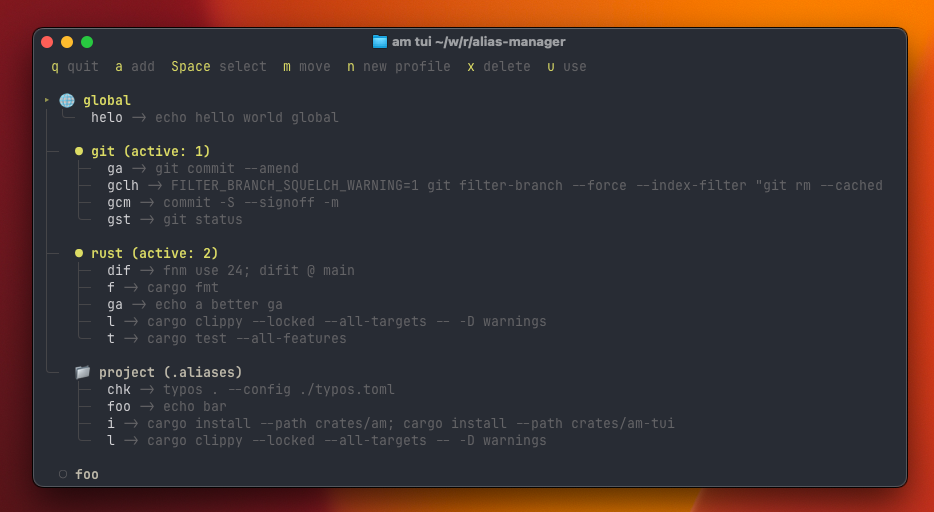
`am-tui` lets you browse profiles, aliases, and manage them with keyboard shortcuts:
## Shell Support
| Fish | Fully supported and tested |
| PowerShell | Supported and tested (5.1 + 7) |
| Zsh | Supported, not yet tested |
| Bash, Nushell | Not yet implemented |
See [amoxide](https://crates.io/crates/amoxide) for details.
## Documentation
Full documentation with CLI examples and setup instructions: [GitHub](https://github.com/sassman/amoxide-rs)