
alttabway
Finally, an alt-tab window switcher with actual window previews. Currently supported compositors: Hyprland, Sway.
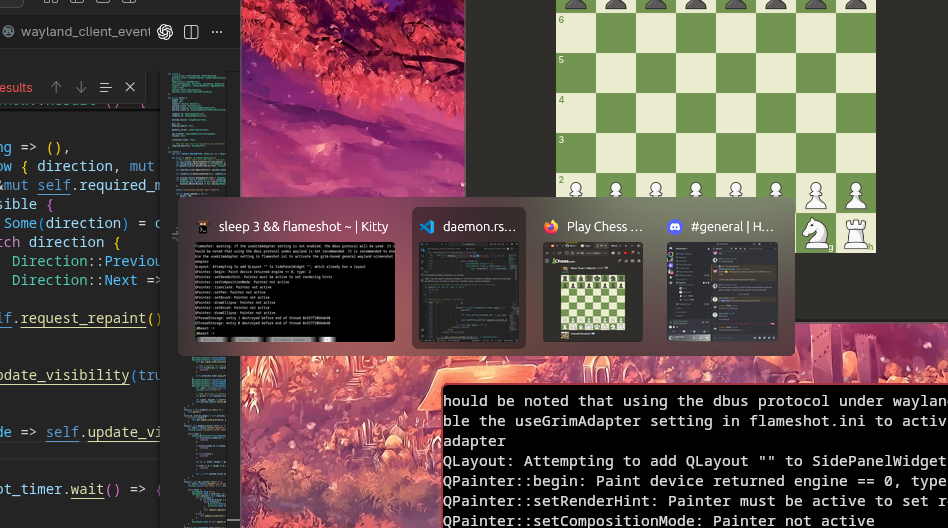
Usage
You will need cargo installed.
alttabway is now installed! Follow compositor specific instructions to start the daemon and bind the hotkey.
-
Hyprland
Add the following lines to your
~/.config/hypr/hyprland.confexec-once = alttabway daemon & binde = ALT, Tab, exec, alttabway show --next binde = ALT SHIFT, Tab, exec, alttabway show --previous # Optional - set this if you have blur enabled on Hyprland layerrule = blur on, ignore_alpha 0, match:namespace ^alttabway$ -
Sway
Add the following lines to your
~/.config/sway/configexec alttabway daemon bindsym Mod1+Tab exec alttabway show --next bindsym Mod1+Shift+Tab exec alttabway show --previous
Configuration
When running alttabway daemon, it will create a configuration file in ~/.config/alttabway/alttabway.toml with all the default configuration values if it doesn't exist. Here you can configure the colors and styles of the created window.
# Set the render backend. Options: Default, Vulkan, Gl, Software
= "Software"
[]
= 10 # Outer padding around all items (px)
= 6.0 # Corner radius of the window (px)
= "#222222ee"
= [10, 10] # Horizontal and vertical gap between items (px)
= 50 # If 1-100, the maximum width is the percentage of the total available width. If > 100, this is absolute maximum value in px
[]
= 7 # Inner padding within each item (px)
= 6.0 # Corner radius of each item (px)
= 2 # Border thickness (px)
= "#eeeeee00"
= "#6f6f6f77"
= "#ccccccff"
= "#11111100"
= "#11111144"
= "#11111144"
= 18 # App icon size (px)
= "#bbbbbb"
= [7, 5] # Horizontal and vertical gap inside the item (px)
FAQ
The window preview is sometimes missing. Why?
alttabway uses wlr-screencopy-unstable-v1 to generate a preview of your active window. Sometimes, it is unable to generate this preview if you open a window and navigate away from it too quickly.
Sometimes there's a delay between holding the alt-tab hotkey and the window showing up
Window preview resizing runs on the main thread and needs to move to a background thread. Should be fixed soon.
Can I use a different hotkey combination?
You can use a different modifier key by specifying it via the --modifiers-held flag. Example Hyprland configuration:
# Activate using Ctrl+Super+Tab
binde = CTRL SUPER, Tab, exec, alttabway show --next --modifiers-held ctrl,super
binde = CTRL SUPER SHIFT, Tab, exec, alttabway show --previous --modifiers-held ctrl,super
Please support $COMPOSITOR
alttabway currently supports Hyprland and Sway. Open an issue if you'd like support for your compositor. Typically the compositor should implement the following protocols.
- wlr-foreign-toplevel-management-unstable-v1 for the list of top level windows and to activate one
- wlr-screencopy-unstable-v1 to take a capture of a region on screen.
- Window positions/dimensions are required as well, typically via ipc.
The alttabway window doesn't show up
Try setting render_backend to Vulkan, Gl or Software in the configuration.
Compile fails with "try setting PKG_CONFIG_PATH to the directory containing wayland-client.pc/xkbcommon.pc"
Some required dependencies are missing. On debian based distros, run apt install libwayland-dev libxkbcommon-dev