<!--
Copyright 2026 AlphaOne LLC
SPDX-License-Identifier: Apache-2.0
-->
<!DOCTYPE html>
<html lang="en">
<head>
<meta charset="UTF-8">
<meta name="viewport" content="width=device-width, initial-scale=1.0">
<title>ai-memory™ -- Persistent Memory for Any AI</title>
<meta name="description" content="Give any AI persistent memory across sessions. MCP-based memory management for Claude, ChatGPT, Grok, Llama, and any MCP-compatible platform. A single Rust binary with three interfaces (MCP, HTTP, CLI), four feature tiers (keyword, semantic, smart, autonomous) with local LLMs via Ollama, SQLite FTS5, HNSW vector index, and 6-factor ranking.">
<meta name="theme-color" content="#0d1117">
<meta property="og:title" content="ai-memory — Persistent Memory for Any AI">
<meta property="og:description" content="Give any AI persistent memory. Works with Claude, ChatGPT, Grok, Llama, Cursor, and more. Zero token cost until recall. 17 MCP tools, 20 HTTP endpoints, 25 CLI commands.">
<meta property="og:url" content="https://alphaonedev.github.io/ai-memory-mcp/">
<meta property="og:type" content="website">
<meta property="og:site_name" content="ai-memory">
<meta name="twitter:card" content="summary">
<meta name="twitter:title" content="ai-memory — Persistent Memory for Any AI">
<meta name="twitter:description" content="Give any AI persistent memory. Works with Claude, ChatGPT, Grok, Llama, Cursor, and more. Zero token cost until recall.">
<link rel="canonical" href="https://alphaonedev.github.io/ai-memory-mcp/">
<style>
/* ============================================================
DESIGN TOKENS
============================================================ */
:root {
--bg: #000000;
--bg-raised: #0a0a0a;
--bg-card: #111111;
--bg-code: #1a1a1a;
--border: #333333;
--border-hl: #555555;
--text: #ffffff;
--text-muted: #999999;
--accent: #ffffff;
--accent-dim: #cccccc;
--green: #ffffff;
--orange: #cccccc;
--purple: #dddddd;
--red: #ffffff;
--cyan: #cccccc;
--font-mono: 'SF Mono','Cascadia Code','Fira Code','JetBrains Mono',Consolas,monospace;
--font-sans: -apple-system,BlinkMacSystemFont,'Segoe UI',Helvetica,Arial,sans-serif;
--max-w: 1140px;
}
/* ============================================================
RESET + BASE
============================================================ */
*,*::before,*::after{margin:0;padding:0;box-sizing:border-box}
html{scroll-behavior:smooth;scroll-padding-top:4rem}
body{font-family:var(--font-sans);background:var(--bg);color:var(--text);line-height:1.65;-webkit-font-smoothing:antialiased;overflow-x:hidden}
a{color:var(--accent);text-decoration:none}
a:hover{text-decoration:underline}
code,pre{font-family:var(--font-mono);font-size:.875rem}
code{background:var(--bg-code);padding:.15em .4em;border-radius:4px}
pre{background:var(--bg-code);border:1px solid var(--border);border-radius:8px;padding:1.25rem;overflow-x:auto;line-height:1.55;position:relative}
pre code{background:none;padding:0}
.container{max-width:var(--max-w);margin:0 auto;padding:0 1.5rem}
/* ============================================================
SYNTAX HIGHLIGHTING (CSS-only)
============================================================ */
.tok-kw{color:var(--red)}
.tok-str{color:#a5d6ff}
.tok-cm{color:var(--text-muted);font-style:italic}
.tok-fn{color:#d2a8ff}
.tok-num{color:#79c0ff}
.tok-op{color:var(--text)}
.tok-flag{color:var(--orange)}
.tok-cmd{color:var(--green)}
.tok-url{color:var(--cyan)}
/* Code block label */
pre .lang-label{position:absolute;top:.55rem;right:.75rem;font-size:.65rem;color:var(--text-muted);text-transform:uppercase;letter-spacing:.06em;user-select:none}
/* ============================================================
NAV
============================================================ */
nav{position:fixed;top:0;left:0;right:0;z-index:100;background:rgba(13,17,23,.92);backdrop-filter:blur(14px);border-bottom:1px solid var(--border);padding:.7rem 0;transition:box-shadow .3s}
nav .container{display:flex;align-items:center;gap:1.25rem;flex-wrap:wrap}
nav .logo{font-weight:800;font-size:1rem;color:var(--text);white-space:nowrap;letter-spacing:-.02em}
nav .links{display:flex;gap:.85rem;flex-wrap:wrap}
nav .links a{color:var(--text-muted);font-size:.82rem;transition:color .15s}
nav .links a:hover{color:var(--text);text-decoration:none}
/* ============================================================
HERO
============================================================ */
.hero{padding:8.5rem 0 4rem;text-align:center;background:linear-gradient(180deg,rgba(255,255,255,.07) 0%,transparent 55%)}
.hero h1{font-size:clamp(2rem,5vw,3.4rem);font-weight:800;margin-bottom:1rem;letter-spacing:-.025em;line-height:1.15}
.hero h1 span{color:var(--accent)}
.hero .bluf{color:var(--text-muted);font-size:1.2rem;max-width:720px;margin:0 auto 2.5rem;line-height:1.6}
.stats-row{display:flex;justify-content:center;gap:2rem;flex-wrap:wrap;margin-bottom:2.5rem}
.stat{text-align:center}
.stat .num{font-size:2.2rem;font-weight:800;display:block;background:linear-gradient(135deg,var(--accent),var(--cyan));-webkit-background-clip:text;-webkit-text-fill-color:transparent;background-clip:text}
.stat .label{font-size:.75rem;color:var(--text-muted);text-transform:uppercase;letter-spacing:.06em}
.hero-cta{display:inline-flex;align-items:center;gap:.5rem;background:#333333;color:#fff;font-weight:700;font-size:1rem;padding:.75rem 1.75rem;border-radius:8px;transition:background .2s,transform .15s;border:1px solid #555555;cursor:pointer}
.hero-cta:hover{background:#555555;text-decoration:none;transform:translateY(-1px)}
/* ============================================================
PLATFORM CARDS (Works With)
============================================================ */
.platform-grid{display:grid;grid-template-columns:repeat(auto-fill,minmax(180px,1fr));gap:1rem;margin:1.5rem 0}
.platform-card{background:var(--bg-card);border:1px solid var(--border);border-radius:10px;padding:1.35rem 1rem;text-align:center;transition:border-color .2s,transform .2s,box-shadow .2s}
.platform-card:hover{border-color:var(--accent-dim);transform:translateY(-3px);box-shadow:0 6px 28px rgba(0,0,0,.3)}
.platform-card .platform-icon{font-size:2rem;margin-bottom:.6rem;display:block}
.platform-card h4{font-size:.95rem;margin-bottom:.3rem}
.platform-card p{font-size:.78rem;color:var(--text-muted);margin:0}
.platform-card .platform-tag{display:inline-block;font-size:.65rem;font-weight:600;text-transform:uppercase;letter-spacing:.04em;padding:.15em .5em;border-radius:3px;margin-top:.5rem}
.tag-mcp{color:var(--purple);background:rgba(188,140,255,.12)}
.tag-http{color:var(--orange);background:rgba(210,153,34,.12)}
.tag-universal{color:var(--cyan);background:rgba(57,210,192,.12)}
/* ============================================================
SECTIONS
============================================================ */
section{padding:4.5rem 0}
section.alt{background:var(--bg-raised)}
section h2{font-size:1.75rem;font-weight:700;margin-bottom:.5rem;display:flex;align-items:center;gap:.6rem;flex-wrap:wrap}
section h2 .badge{font-size:.6rem;font-weight:700;text-transform:uppercase;background:var(--accent-dim);color:#fff;padding:.2em .65em;border-radius:4px;letter-spacing:.05em}
section .section-subtitle{color:var(--text-muted);margin-bottom:1.75rem;max-width:780px;font-size:1.05rem}
section h3{font-size:1.15rem;font-weight:600;margin:2rem 0 .75rem;color:var(--text)}
section p{color:var(--text-muted);margin-bottom:1rem;max-width:780px}
/* ============================================================
CARDS
============================================================ */
.card-grid{display:grid;grid-template-columns:repeat(auto-fill,minmax(260px,1fr));gap:1rem;margin:1.5rem 0}
.card{background:var(--bg-card);border:1px solid var(--border);border-radius:8px;padding:1.25rem;transition:border-color .2s,transform .2s,box-shadow .2s}
.card:hover{border-color:var(--accent-dim);transform:translateY(-2px);box-shadow:0 4px 24px rgba(0,0,0,.25)}
.card h4{font-size:.95rem;margin-bottom:.4rem}
.card p{font-size:.85rem;color:var(--text-muted);margin:0}
.card .tool-name{color:var(--cyan);font-family:var(--font-mono);font-size:.85rem;font-weight:600;display:block;margin-bottom:.35rem}
.card .card-icon{font-size:1.4rem;margin-bottom:.5rem;display:block}
/* Feature cards (wider) */
.feature-grid{display:grid;grid-template-columns:repeat(auto-fill,minmax(300px,1fr));gap:1.25rem;margin:1.5rem 0}
.feature-card{background:var(--bg-card);border:1px solid var(--border);border-radius:10px;padding:1.5rem;transition:border-color .2s,transform .2s}
.feature-card:hover{border-color:var(--border-hl);transform:translateY(-2px)}
.feature-card h4{font-size:1rem;margin-bottom:.5rem}
.feature-card p{font-size:.88rem;color:var(--text-muted);margin:0}
.feature-card .icon-box{width:40px;height:40px;border-radius:8px;display:flex;align-items:center;justify-content:center;font-size:1.2rem;margin-bottom:.75rem;font-weight:700;font-family:var(--font-mono)}
.icon-store{background:rgba(255,255,255,.12);color:var(--accent)}
.icon-recall{background:rgba(63,185,80,.12);color:var(--green)}
.icon-secure{background:rgba(255,255,255,.12);color:var(--red)}
.icon-fast{background:rgba(210,153,34,.12);color:var(--orange)}
.icon-sync{background:rgba(188,140,255,.12);color:var(--purple)}
.icon-auto{background:rgba(57,210,192,.12);color:var(--cyan)}
/* ============================================================
TABLES
============================================================ */
.table-wrap{overflow-x:auto;margin:1.25rem 0;border:1px solid var(--border);border-radius:8px}
.api-table{width:100%;border-collapse:collapse;font-size:.85rem}
.api-table th,.api-table td{text-align:left;padding:.65rem .85rem;border-bottom:1px solid var(--border)}
.api-table tr:last-child td{border-bottom:none}
.api-table th{color:var(--text-muted);font-weight:600;font-size:.72rem;text-transform:uppercase;letter-spacing:.06em;background:var(--bg-card);position:sticky;top:0}
.api-table code{font-size:.8rem}
.api-table tbody tr{transition:background .15s}
.api-table tbody tr:hover{background:rgba(255,255,255,.04)}
.method{font-weight:700;font-family:var(--font-mono);font-size:.72rem;padding:.15em .45em;border-radius:3px;white-space:nowrap}
.method-get{color:var(--green);background:rgba(63,185,80,.1)}
.method-post{color:var(--accent);background:rgba(255,255,255,.1)}
.method-put{color:var(--orange);background:rgba(210,153,34,.1)}
.method-delete{color:var(--red);background:rgba(255,255,255,.1)}
/* Feature tier highlights */
.tier-keyword{color:var(--green)}
.tier-semantic{color:var(--accent)}
.tier-smart{color:var(--orange)}
.tier-autonomous{color:var(--purple)}
.tier-tag{font-size:.65rem;font-weight:700;text-transform:uppercase;letter-spacing:.04em;padding:.15em .55em;border-radius:3px;white-space:nowrap}
.tier-tag-keyword{color:var(--green);background:rgba(63,185,80,.12)}
.tier-tag-semantic{color:var(--accent);background:rgba(255,255,255,.12)}
.tier-tag-smart{color:var(--orange);background:rgba(210,153,34,.12)}
.tier-tag-autonomous{color:var(--purple);background:rgba(188,140,255,.12)}
/* Category label in CLI table */
.cat-label{font-size:.65rem;font-weight:600;text-transform:uppercase;letter-spacing:.05em;padding:.15em .5em;border-radius:3px;white-space:nowrap}
.cat-core{color:var(--accent);background:rgba(255,255,255,.1)}
.cat-query{color:var(--green);background:rgba(63,185,80,.1)}
.cat-manage{color:var(--orange);background:rgba(210,153,34,.1)}
.cat-ops{color:var(--purple);background:rgba(188,140,255,.1)}
.cat-io{color:var(--cyan);background:rgba(57,210,192,.1)}
.cat-server{color:var(--red);background:rgba(255,255,255,.1)}
/* ============================================================
SVG DIAGRAMS
============================================================ */
.diagram-wrap{margin:2rem 0;overflow-x:auto}
.diagram-wrap svg{display:block;margin:0 auto;max-width:100%;height:auto}
/* ============================================================
FORMULA
============================================================ */
.formula-box{background:var(--bg-card);border:1px solid var(--border);border-radius:8px;padding:1.5rem;margin:1.5rem 0;font-family:var(--font-mono);font-size:.9rem;line-height:2.2;text-align:center}
.formula-box .factor{display:inline-block;padding:.15em .5em;border-radius:4px;margin:0 .1em;transition:transform .2s}
.formula-box .factor:hover{transform:scale(1.08)}
.f-fts{background:rgba(255,255,255,.15);color:var(--accent)}
.f-priority{background:rgba(210,153,34,.15);color:var(--orange)}
.f-access{background:rgba(63,185,80,.15);color:var(--green)}
.f-confidence{background:rgba(188,140,255,.15);color:var(--purple)}
.f-tier{background:rgba(57,210,192,.15);color:var(--cyan)}
.f-recency{background:rgba(255,255,255,.15);color:var(--red)}
.factor-grid{display:grid;grid-template-columns:repeat(auto-fill,minmax(200px,1fr));gap:.75rem;margin:1.25rem 0}
.factor-item{display:flex;align-items:center;gap:.6rem;font-size:.85rem;color:var(--text-muted)}
.factor-dot{width:10px;height:10px;border-radius:50%;flex-shrink:0}
/* ============================================================
TIER VISUALIZATION
============================================================ */
.tier-cards{display:grid;grid-template-columns:repeat(3,1fr);gap:1.25rem;margin:1.5rem 0}
.tier-card{background:var(--bg-card);border:1px solid var(--border);border-radius:10px;padding:1.5rem;text-align:center;position:relative;overflow:hidden;transition:transform .2s}
.tier-card:hover{transform:translateY(-3px)}
.tier-card::before{content:'';position:absolute;top:0;left:0;right:0;height:3px}
.tier-card h4{margin-bottom:.35rem;font-size:1rem}
.tier-card .ttl{font-size:2rem;font-weight:800;margin-bottom:.5rem}
.tier-card .tier-desc{font-size:.85rem;color:var(--text-muted)}
.tier-card .tier-detail{font-size:.78rem;color:var(--text-muted);margin-top:.5rem;padding-top:.5rem;border-top:1px solid var(--border)}
.tier-short .ttl{color:var(--red)}
.tier-short::before{background:var(--red)}
.tier-mid .ttl{color:var(--orange)}
.tier-mid::before{background:var(--orange)}
.tier-long .ttl{color:var(--green)}
.tier-long::before{background:var(--green)}
/* ============================================================
SECURITY CARDS
============================================================ */
.security-grid{display:grid;grid-template-columns:repeat(auto-fill,minmax(240px,1fr));gap:1rem;margin:1.5rem 0}
.security-card{background:var(--bg-card);border:1px solid var(--border);border-radius:8px;padding:1.25rem;border-left:3px solid var(--green)}
.security-card h4{font-size:.9rem;margin-bottom:.35rem;color:var(--green)}
.security-card p{font-size:.82rem;color:var(--text-muted);margin:0}
/* ============================================================
FEATURE MATRIX
============================================================ */
.matrix-check{color:var(--green);font-weight:700}
.matrix-dash{color:var(--text-muted)}
/* ============================================================
STEP LIST (Install)
============================================================ */
.steps{counter-reset:step;list-style:none;margin:1.5rem 0}
.steps li{counter-increment:step;position:relative;padding-left:3.5rem;margin-bottom:2rem}
.steps li::before{content:counter(step);position:absolute;left:0;top:0;width:2.25rem;height:2.25rem;background:var(--accent-dim);color:#fff;border-radius:50%;display:flex;align-items:center;justify-content:center;font-weight:800;font-size:.95rem}
.steps li h4{font-size:1.05rem;margin-bottom:.5rem}
.steps li p{color:var(--text-muted);font-size:.9rem;margin-bottom:.75rem}
/* ============================================================
INTEGRATION TABS
============================================================ */
.integration-tabs{display:flex;gap:.5rem;flex-wrap:wrap;margin-bottom:1.25rem}
.integration-tab{background:var(--bg-card);border:1px solid var(--border);border-radius:6px;padding:.5rem 1rem;font-size:.82rem;font-weight:600;color:var(--text-muted);cursor:pointer;transition:all .2s}
.integration-tab:hover,.integration-tab.active{color:var(--accent);border-color:var(--accent-dim);background:rgba(255,255,255,.06)}
.integration-panel{display:none}
.integration-panel.active{display:block}
/* ============================================================
ANIMATIONS
============================================================ */
@keyframes flow{0%{stroke-dashoffset:20}100%{stroke-dashoffset:0}}
@keyframes fadeInUp{from{opacity:0;transform:translateY(20px)}to{opacity:1;transform:translateY(0)}}
@keyframes pulse{0%,100%{opacity:1}50%{opacity:.5}}
@keyframes shimmer{0%{background-position:-200% 0}100%{background-position:200% 0}}
.animate-flow{stroke-dasharray:8 4;animation:flow 1s linear infinite}
.animate-pulse{animation:pulse 2.5s ease-in-out infinite}
/* Fade-in for sections (CSS-only via :target or scroll) */
.fade-target{opacity:0;transform:translateY(16px);animation:fadeInUp .6s ease forwards}
section:target .fade-target{animation-delay:.1s}
/* Glow effect for hero stats */
.stat .num{text-shadow:0 0 30px rgba(255,255,255,.15)}
/* ============================================================
FOOTER
============================================================ */
footer{padding:3.5rem 0;border-top:1px solid var(--border);text-align:center;color:var(--text-muted);font-size:.85rem}
footer a{color:var(--text-muted);transition:color .15s}
footer a:hover{color:var(--accent)}
footer .footer-links{display:flex;justify-content:center;gap:1.5rem;flex-wrap:wrap;margin-bottom:1rem}
/* ============================================================
RESPONSIVE
============================================================ */
@media(max-width:768px){
.stats-row{gap:1rem}
.stat .num{font-size:1.6rem}
section h2{font-size:1.4rem}
.card-grid,.feature-grid{grid-template-columns:1fr}
.tier-cards{grid-template-columns:1fr}
.security-grid{grid-template-columns:1fr}
.platform-grid{grid-template-columns:repeat(2,1fr)}
nav .links{gap:.5rem}
nav .links a{font-size:.75rem}
.steps li{padding-left:3rem}
}
@media(max-width:420px){
.platform-grid{grid-template-columns:1fr}
}
</style>
</head>
<body>
<!-- ================================================================
NAV
================================================================ -->
<nav>
<div class="container">
<span class="logo">ai-memory</span>
<div class="links">
<a href="#platforms">Platforms</a>
<a href="#install">Install</a>
<a href="#claude-integration">Claude Code</a>
<a href="#features">Features</a>
<a href="#mcp">Interfaces</a>
<a href="#architecture">Architecture</a>
<a href="#benchmarks">Benchmarks</a>
<a href="https://github.com/alphaonedev/ai-memory-mcp-dev/blob/develop/ROADMAP.md">Roadmap</a>
<a href="https://github.com/alphaonedev/ai-memory-mcp">GitHub</a>
</div>
</div>
</nav>
<!-- ================================================================
HERO + BLUF
================================================================ -->
<section class="hero">
<div class="container">
<img src="ai-memory-logo.jpg" alt="ai-memory logo" style="width:160px;height:auto;margin-bottom:1.5rem;border-radius:16px;filter:drop-shadow(0 0 24px rgba(255,255,255,.25))">
<h1>Persistent Memory for <span>Any AI</span></h1>
<div style="max-width:760px;margin:0 auto 1.5rem;background:linear-gradient(135deg,rgba(255,255,255,.08) 0%,rgba(255,255,255,.08) 100%);border:1px solid var(--border-hl);border-radius:10px;padding:1.25rem 1.5rem">
<p style="font-size:.7rem;text-transform:uppercase;letter-spacing:.15em;color:var(--orange);margin-bottom:.5rem;font-weight:700">BLUF — Bottom Line Up Front</p>
<p style="font-size:1rem;line-height:1.6;margin:0"><strong style="color:var(--text)">ai-memory replaces AI vendors' built-in memory features.</strong> Disable AI vendor memory to stop paying for idle context tokens wasted on every message. A moderate end user wastes <strong style="color:var(--red)">~11M input tokens per year</strong> on memory context loaded into every single message whether needed or not — via vendor AI auto memory or similar AI vendor memory facilities.</p>
</div>
<p class="bluf" style="max-width:680px;margin:0 auto 1.5rem">
<strong style="color:var(--green)">Zero token cost until recalled.</strong>
Built-in memory systems load your entire memory into every message. ai-memory uses zero context tokens until the AI calls <code>memory_recall</code> — only relevant memories come back, ranked and compressed via TOON format (79% smaller than JSON).
</p>
<p style="font-size:.85rem;color:var(--text-muted);margin-bottom:2rem">
Works with Claude · ChatGPT · <a href="https://github.com/alphaonedev/grok-cli" style="color:var(--accent);text-decoration:none;">Grok CLI</a> · Grok API · Cursor · Windsurf · Continue.dev · OpenClaw <img src="pixel-lobster.svg" alt="OpenClaw lobster" style="height:1.2em;vertical-align:middle"> · Hermes Agent · Llama · any MCP client
</p>
<div class="stats-row">
<div class="stat"><span class="num">97.8%</span><span class="label">Recall@5</span></div>
<div class="stat"><span class="num">23</span><span class="label">MCP Tools</span></div>
<div class="stat"><span class="num">4</span><span class="label">Feature Tiers</span></div>
<div class="stat"><span class="num">188</span><span class="label">Tests</span></div>
</div>
<a href="#install" class="hero-cta">Get Started in 60 Seconds</a>
</div>
</section>
<!-- ================================================================
BENCHMARK SUMMARY (compact banner)
================================================================ -->
<section style="padding:2.5rem 0;border-bottom:1px solid var(--border);background:linear-gradient(180deg,rgba(63,185,80,.04) 0%,transparent 100%)">
<div class="container" style="text-align:center">
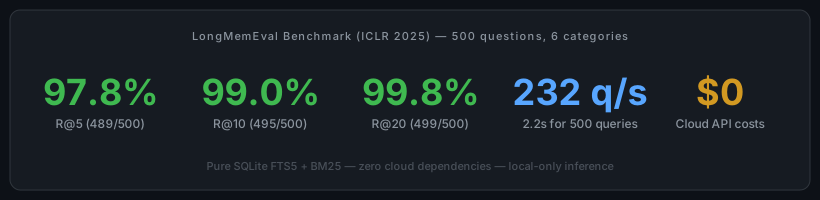
<p style="font-size:.75rem;text-transform:uppercase;letter-spacing:.1em;color:var(--text-muted);margin-bottom:.75rem">LongMemEval Benchmark (ICLR 2025) — 500 questions, 6 categories</p>
<div style="display:flex;justify-content:center;gap:2.5rem;flex-wrap:wrap;margin-bottom:1rem">
<div>
<span style="font-size:2.2rem;font-weight:800;color:var(--green);line-height:1">97.8%</span>
<span style="display:block;font-size:.75rem;color:var(--text-muted)">R@5 (489/500)</span>
</div>
<div>
<span style="font-size:2.2rem;font-weight:800;color:var(--green);line-height:1">99.0%</span>
<span style="display:block;font-size:.75rem;color:var(--text-muted)">R@10 (495/500)</span>
</div>
<div>
<span style="font-size:2.2rem;font-weight:800;color:var(--green);line-height:1">99.8%</span>
<span style="display:block;font-size:.75rem;color:var(--text-muted)">R@20 (499/500)</span>
</div>
<div>
<span style="font-size:2.2rem;font-weight:800;color:var(--accent);line-height:1">2.2s</span>
<span style="display:block;font-size:.75rem;color:var(--text-muted)">232 q/s (keyword)</span>
</div>
<div>
<span style="font-size:2.2rem;font-weight:800;color:var(--orange);line-height:1">$0</span>
<span style="display:block;font-size:.75rem;color:var(--text-muted)">Cloud API costs</span>
</div>
</div>
<p style="font-size:.85rem;color:var(--text-muted)">Pure SQLite FTS5 + BM25 — zero cloud dependencies — <a href="#benchmarks">full benchmark details & replication steps</a></p>
</div>
</section>
<!-- ================================================================
WORKS WITH (Platform Cards)
================================================================ -->
<section id="platforms" class="alt">
<div class="container">
<h2>Works With Any AI Platform</h2>
<p class="section-subtitle">MCP is the universal integration layer. The HTTP API works with literally anything that can make a request. No vendor lock-in.</p>
<div class="platform-grid">
<div class="platform-card">
<span class="platform-icon">C</span>
<h4>Claude Code</h4>
<p>Anthropic's Claude Code, Claude Desktop, and any Claude-based tool</p>
<span class="platform-tag tag-mcp">MCP Native</span>
</div>
<div class="platform-card">
<span class="platform-icon">O</span>
<h4>OpenAI Codex CLI</h4>
<p>OpenAI's Codex command-line agent with TOML-based MCP config</p>
<span class="platform-tag tag-mcp">MCP Native</span>
</div>
<div class="platform-card">
<span class="platform-icon">G</span>
<h4>Google Gemini CLI</h4>
<p>Google's Gemini CLI with JSON-based MCP server configuration</p>
<span class="platform-tag tag-mcp">MCP Native</span>
</div>
<div class="platform-card">
<span class="platform-icon">Cu</span>
<h4>Cursor IDE</h4>
<p>AI-powered code editor with built-in MCP support</p>
<span class="platform-tag tag-mcp">MCP Native</span>
</div>
<div class="platform-card">
<span class="platform-icon">W</span>
<h4>Windsurf</h4>
<p>Codeium's AI IDE with MCP tool integration</p>
<span class="platform-tag tag-mcp">MCP Native</span>
</div>
<div class="platform-card">
<span class="platform-icon">Co</span>
<h4>Continue.dev</h4>
<p>Open-source AI code assistant with YAML-based MCP config</p>
<span class="platform-tag tag-mcp">MCP Native</span>
</div>
<div class="platform-card" style="border-color:#60a5fa;">
<span class="platform-icon">G</span>
<h4><a href="https://github.com/alphaonedev/grok-cli" style="color:inherit;text-decoration:none;">Grok CLI</a></h4>
<p>Deep integration — auto-recall, compaction store, all-mode MCP</p>
<span class="platform-tag tag-mcp">MCP Native (stdio)</span>
</div>
<div class="platform-card">
<span class="platform-icon">X</span>
<h4>xAI Grok API</h4>
<p>Grok API and xAI-based applications via remote MCP</p>
<span class="platform-tag tag-http">Remote MCP (HTTPS)</span>
</div>
<div class="platform-card">
<span class="platform-icon">L</span>
<h4>META Llama</h4>
<p>Llama Stack toolgroup registration via HTTP server</p>
<span class="platform-tag tag-http">HTTP / MCP</span>
</div>
<div class="platform-card">
<span class="platform-icon" style="font-size:1.8rem">🦞</span>
<h4>OpenClaw <img src="pixel-lobster.svg" alt="lobster" style="height:1.2em;vertical-align:middle"></h4>
<p>Self-hosted AI assistant with MCP via <code>mcp.servers</code> config</p>
<span class="platform-tag tag-mcp">MCP Native</span>
</div>
<div class="platform-card">
<span class="platform-icon" style="font-size:1.8rem">🪽</span>
<h4>Hermes Agent</h4>
<p>Nous Research open-weight agent with YAML-based MCP config</p>
<span class="platform-tag tag-mcp">MCP Native</span>
</div>
<div class="platform-card">
<span class="platform-icon">*</span>
<h4>Any MCP Client</h4>
<p>Any tool that speaks the Model Context Protocol -- present or future</p>
<span class="platform-tag tag-universal">Universal</span>
</div>
</div>
<p style="text-align:center;margin-top:1.5rem;font-size:.9rem;color:var(--text-muted)">
<strong style="color:var(--accent)">MCP</strong> = native tool integration (stdio JSON-RPC) |
<strong style="color:var(--orange)">HTTP</strong> = REST API on localhost:9077 (works with anything) |
<strong style="color:var(--green)">CLI</strong> = shell commands (scriptable, pipeable)
</p>
</div>
</section>
<!-- ================================================================
INSTALL
================================================================ -->
<section id="install">
<div class="container">
<h2>Install</h2>
<p class="section-subtitle">One command. No dependencies for pre-built binaries. Eight installation methods.</p>
<!-- ---- Install Methods ---- -->
<div style="display:grid;grid-template-columns:repeat(auto-fill,minmax(320px,1fr));gap:1.25rem;margin:2rem 0">
<div style="background:var(--bg-card);border:1px solid var(--border);border-radius:10px;padding:1.5rem;position:relative">
<span style="position:absolute;top:1rem;right:1rem;font-size:.6rem;font-weight:700;text-transform:uppercase;background:rgba(63,185,80,.15);color:var(--green);padding:.25em .7em;border-radius:3px;letter-spacing:.06em">Recommended</span>
<h4 style="font-size:1rem;margin-bottom:.25rem;color:var(--text)">macOS / Linux</h4>
<p style="font-size:.8rem;color:var(--text-muted);margin-bottom:.75rem">Pre-built binary. Auto-detects OS & architecture.</p>
<pre style="margin:0;font-size:.78rem"><code><span class="tok-cmd">curl</span> <span class="tok-flag">-fsSL</span> <span class="tok-url">https://raw.githubusercontent.com/alphaonedev/ai-memory-mcp/main/install.sh</span> | <span class="tok-cmd">sh</span></code></pre>
</div>
<div style="background:var(--bg-card);border:1px solid var(--border);border-radius:10px;padding:1.5rem">
<h4 style="font-size:1rem;margin-bottom:.25rem;color:var(--text)">Windows</h4>
<p style="font-size:.8rem;color:var(--text-muted);margin-bottom:.75rem">PowerShell installer. Adds to PATH automatically.</p>
<pre style="margin:0;font-size:.78rem"><code><span class="tok-cmd">irm</span> <span class="tok-url">https://raw.githubusercontent.com/alphaonedev/ai-memory-mcp/main/install.ps1</span> | <span class="tok-cmd">iex</span></code></pre>
</div>
<div style="background:var(--bg-card);border:1px solid var(--border);border-radius:10px;padding:1.5rem">
<h4 style="font-size:1rem;margin-bottom:.25rem;color:var(--text)">Ubuntu <span style="font-size:.7rem;color:var(--text-muted);font-weight:400">(PPA)</span></h4>
<p style="font-size:.8rem;color:var(--text-muted);margin-bottom:.75rem">Native apt package. Auto-updates with system.</p>
<pre style="margin:0;font-size:.78rem"><code><span class="tok-cmd">sudo</span> add-apt-repository ppa:jbridger2021/ppa
<span class="tok-cmd">sudo</span> apt update
<span class="tok-cmd">sudo</span> apt install ai-memory</code></pre>
</div>
<div style="background:var(--bg-card);border:1px solid var(--border);border-radius:10px;padding:1.5rem">
<h4 style="font-size:1rem;margin-bottom:.25rem;color:var(--text)">Fedora / RHEL <span style="font-size:.7rem;color:var(--text-muted);font-weight:400">(COPR)</span></h4>
<p style="font-size:.8rem;color:var(--text-muted);margin-bottom:.75rem">Native dnf package. Auto-updates with system.</p>
<pre style="margin:0;font-size:.78rem"><code><span class="tok-cmd">sudo</span> dnf copr enable alpha-one-ai/ai-memory
<span class="tok-cmd">sudo</span> dnf install ai-memory</code></pre>
</div>
<div style="background:var(--bg-card);border:1px solid var(--border);border-radius:10px;padding:1.5rem">
<h4 style="font-size:1rem;margin-bottom:.25rem;color:var(--text)">Homebrew <span style="font-size:.7rem;color:var(--text-muted);font-weight:400">(macOS + Linux)</span></h4>
<p style="font-size:.8rem;color:var(--text-muted);margin-bottom:.75rem">Tap formula. Pre-built binary, no compile.</p>
<pre style="margin:0;font-size:.78rem"><code><span class="tok-cmd">brew</span> install alphaonedev/tap/ai-memory</code></pre>
</div>
<div style="background:var(--bg-card);border:1px solid var(--border);border-radius:10px;padding:1.5rem">
<h4 style="font-size:1rem;margin-bottom:.25rem;color:var(--text)">Cargo <span style="font-size:.7rem;color:var(--text-muted);font-weight:400">(crates.io)</span></h4>
<p style="font-size:.8rem;color:var(--text-muted);margin-bottom:.75rem">From source. Needs <a href="https://rustup.rs">Rust</a> + C compiler.</p>
<pre style="margin:0;font-size:.78rem"><code><span class="tok-cmd">cargo</span> install ai-memory</code></pre>
</div>
<div style="background:var(--bg-card);border:1px solid var(--border);border-radius:10px;padding:1.5rem">
<h4 style="font-size:1rem;margin-bottom:.25rem;color:var(--text)">Docker</h4>
<p style="font-size:.8rem;color:var(--text-muted);margin-bottom:.75rem">Containerized HTTP server on port 9077.</p>
<pre style="margin:0;font-size:.78rem"><code><span class="tok-cmd">docker</span> build <span class="tok-flag">-t</span> ai-memory .
<span class="tok-cmd">docker</span> run <span class="tok-flag">-p</span> <span class="tok-num">9077</span>:<span class="tok-num">9077</span> <span class="tok-flag">-v</span> data:/data ai-memory</code></pre>
</div>
<div style="background:var(--bg-card);border:1px solid var(--border);border-radius:10px;padding:1.5rem">
<h4 style="font-size:1rem;margin-bottom:.25rem;color:var(--text)">cargo-binstall</h4>
<p style="font-size:.8rem;color:var(--text-muted);margin-bottom:.75rem">Pre-built binary via cargo. No compile step.</p>
<pre style="margin:0;font-size:.78rem"><code><span class="tok-cmd">cargo</span> binstall ai-memory</code></pre>
</div>
</div>
<div style="text-align:center;margin-bottom:2.5rem">
<p style="font-size:.8rem;color:var(--text-muted);margin:0">
<strong style="color:var(--text)">Supported platforms:</strong>
macOS (Intel + Apple Silicon) •
Linux (x86_64 + ARM64) •
Windows (x86_64) •
WSL •
Docker
</p>
<p style="font-size:.75rem;color:var(--text-muted);margin:.4rem 0 0">
<strong style="color:var(--text)">Build from source?</strong>
Ubuntu/Debian: <code>sudo apt install build-essential pkg-config</code> •
Fedora/RHEL: <code>sudo dnf install gcc pkg-config</code> •
macOS: Xcode CLT (pre-installed) •
Windows: MSVC C++ build tools
</p>
</div>
<ol class="steps">
<li style="list-style:none;counter-increment:none">
<h4 style="margin-bottom:.75rem">Optional: Ollama for Smart & Autonomous tiers <span style="font-size:.65rem;font-weight:700;text-transform:uppercase;background:rgba(210,153,34,.12);color:var(--orange);padding:.2em .6em;border-radius:3px;letter-spacing:.05em;vertical-align:middle;margin-left:.5rem">Optional</span></h4>
<p style="font-size:.85rem;color:var(--text-muted);margin-bottom:1rem">The <strong style="color:var(--green)">keyword</strong> and <strong style="color:var(--accent)">semantic</strong> tiers work with zero dependencies. The <strong style="color:var(--orange)">smart</strong> and <strong style="color:var(--purple)">autonomous</strong> tiers add LLM-powered query expansion, auto-tagging, and neural reranking via <a href="https://ollama.com">Ollama</a>.</p>
<li>
<h4>Install Ollama <span style="font-size:.65rem;font-weight:700;text-transform:uppercase;background:rgba(210,153,34,.12);color:var(--orange);padding:.2em .6em;border-radius:3px;letter-spacing:.05em;vertical-align:middle;margin-left:.5rem">Smart & Autonomous Tiers</span></h4>
<p>The <strong style="color:var(--orange)">smart</strong> and <strong style="color:var(--purple)">autonomous</strong> tiers use local LLMs via <a href="https://ollama.com">Ollama</a> for query expansion, auto-tagging, contradiction detection, and cross-encoder reranking. Skip this step if you only need keyword or semantic search.</p>
<div style="display:grid;grid-template-columns:repeat(auto-fill,minmax(300px,1fr));gap:1rem;margin:1.25rem 0">
<div style="background:var(--bg-card);border:1px solid var(--border);border-radius:8px;padding:1.25rem">
<h4 style="font-size:.95rem;margin-bottom:.6rem;color:var(--text)">macOS</h4>
<pre style="margin:0;font-size:.8rem"><code><span class="tok-cm"># Install via Homebrew</span>
<span class="tok-cmd">brew</span> install ollama
<span class="tok-cm"># Or download the macOS app:</span>
<span class="tok-cm"># https://ollama.com/download/mac</span>
<span class="tok-cm"># Start the Ollama service</span>
<span class="tok-cmd">ollama</span> serve &
<span class="tok-cm"># (or launch the Ollama.app -- it runs as a menu bar item)</span>
<span class="tok-cm"># Pull models for your tier</span>
<span class="tok-cmd">ollama</span> pull nomic-embed-text <span class="tok-cm"># Embeddings (smart+)</span>
<span class="tok-cmd">ollama</span> pull gemma4:e2b <span class="tok-cm"># LLM — Smart (~1GB)</span>
<span class="tok-cmd">ollama</span> pull gemma4:e4b <span class="tok-cm"># LLM — Autonomous (~2.3GB)</span></code></pre>
</div>
<div style="background:var(--bg-card);border:1px solid var(--border);border-radius:8px;padding:1.25rem">
<h4 style="font-size:.95rem;margin-bottom:.6rem;color:var(--text)">Linux</h4>
<pre style="margin:0;font-size:.8rem"><code><span class="tok-cm"># One-line install script</span>
<span class="tok-cmd">curl</span> -fsSL https://ollama.com/install.sh | sh
<span class="tok-cm"># Enable and start the systemd service</span>
<span class="tok-cmd">sudo</span> systemctl enable ollama
<span class="tok-cmd">sudo</span> systemctl start ollama
<span class="tok-cm"># Pull models for your tier</span>
<span class="tok-cmd">ollama</span> pull nomic-embed-text <span class="tok-cm"># Embeddings (smart+)</span>
<span class="tok-cmd">ollama</span> pull gemma4:e2b <span class="tok-cm"># LLM — Smart (~1GB)</span>
<span class="tok-cmd">ollama</span> pull gemma4:e4b <span class="tok-cm"># LLM — Autonomous (~2.3GB)</span></code></pre>
</div>
<div style="background:var(--bg-card);border:1px solid var(--border);border-radius:8px;padding:1.25rem">
<h4 style="font-size:.95rem;margin-bottom:.6rem;color:var(--text)">Windows</h4>
<pre style="margin:0;font-size:.8rem"><code><span class="tok-cm"># Install via winget</span>
<span class="tok-cmd">winget</span> install Ollama.Ollama
<span class="tok-cm"># Or download the installer:</span>
<span class="tok-cm"># https://ollama.com/download/windows</span>
<span class="tok-cm"># Ollama runs as a system service after install</span>
<span class="tok-cm"># Pull models for your tier</span>
<span class="tok-cmd">ollama</span> pull nomic-embed-text <span class="tok-cm"># Embeddings (smart+)</span>
<span class="tok-cmd">ollama</span> pull gemma4:e2b <span class="tok-cm"># LLM — Smart (~1GB)</span>
<span class="tok-cmd">ollama</span> pull gemma4:e4b <span class="tok-cm"># LLM — Autonomous (~2.3GB)</span></code></pre>
</div>
</div>
<div style="background:var(--bg-card);border:1px solid var(--border);border-radius:8px;padding:1.25rem;margin-top:1rem">
<h4 style="font-size:.95rem;margin-bottom:.6rem;color:var(--text)">Verify Ollama</h4>
<pre style="margin:0 0 .75rem;font-size:.8rem"><code><span class="tok-cm"># Check Ollama is running and models are available</span>
<span class="tok-cmd">curl</span> http://localhost:11434/api/tags
<span class="tok-cmd">ollama</span> run gemma4:e2b <span class="tok-str">"Hello, world"</span> <span class="tok-cm"># Should respond in ~1s</span></code></pre>
<p style="font-size:.85rem;color:var(--text-muted);margin:0">ai-memory connects to Ollama at <code>localhost:11434</code> automatically. Override with <code>ollama_url</code> in <code>~/.config/ai-memory/config.toml</code> or <code>--ollama-url</code> flag. If Ollama is unavailable, ai-memory gracefully falls back to the semantic tier.</p>
</div>
</li>
<li>
<h4>Configure your AI platform</h4>
<p>Choose the integration method that fits your setup.</p>
<div class="integration-tabs">
<span class="integration-tab active" onclick="switchTab('tab-claude')">Claude Code</span>
<span class="integration-tab" onclick="switchTab('tab-codex')">Codex CLI</span>
<span class="integration-tab" onclick="switchTab('tab-gemini')">Gemini CLI</span>
<span class="integration-tab" onclick="switchTab('tab-cursor')">Cursor</span>
<span class="integration-tab" onclick="switchTab('tab-windsurf')">Windsurf</span>
<span class="integration-tab" onclick="switchTab('tab-continue')">Continue.dev</span>
<span class="integration-tab" onclick="switchTab('tab-grok-cli')">Grok CLI</span>
<span class="integration-tab" onclick="switchTab('tab-grok')">Grok API</span>
<span class="integration-tab" onclick="switchTab('tab-llama')">Llama</span>
<span class="integration-tab" onclick="switchTab('tab-openclaw')">OpenClaw <img src="pixel-lobster.svg" alt="lobster" style="height:1em;vertical-align:middle"></span>
<span class="integration-tab" onclick="switchTab('tab-hermes')">Hermes Agent</span>
<span class="integration-tab" onclick="switchTab('tab-mcp-generic')">Any MCP Client</span>
</div>
<div id="tab-claude" class="integration-panel active">
<p><strong>Claude Code MCP Configuration Scopes:</strong></p>
<table style="font-size:.85rem; margin-bottom:1rem; width:100%; border-collapse:collapse;">
<tr style="border-bottom:1px solid #ddd;"><th style="text-align:left;padding:4px 8px;">Scope</th><th style="text-align:left;padding:4px 8px;">File</th><th style="text-align:left;padding:4px 8px;">Applies to</th></tr>
<tr style="border-bottom:1px solid #eee;"><td style="padding:4px 8px;"><strong>User</strong> (global)</td><td style="padding:4px 8px;"><code>~/.claude.json</code></td><td style="padding:4px 8px;">All projects on your machine</td></tr>
<tr style="border-bottom:1px solid #eee;"><td style="padding:4px 8px;"><strong>Project</strong> (shared)</td><td style="padding:4px 8px;"><code>.mcp.json</code> in project root</td><td style="padding:4px 8px;">Everyone on the project (via git)</td></tr>
<tr><td style="padding:4px 8px;"><strong>Local</strong> (private)</td><td style="padding:4px 8px;"><code>~/.claude.json</code> under <code>projects</code></td><td style="padding:4px 8px;">One project, just you</td></tr>
</table>
<p style="font-size:.85rem"><strong>User scope (recommended)</strong> — merge <code>mcpServers</code> into your existing <code>~/.claude.json</code> (macOS/Linux) or <code>%USERPROFILE%\.claude.json</code> (Windows):</p>
<pre><code>{
<span class="tok-str">"mcpServers"</span>: {
<span class="tok-str">"memory"</span>: {
<span class="tok-str">"command"</span>: <span class="tok-str">"ai-memory"</span>,
<span class="tok-str">"args"</span>: [<span class="tok-str">"--db"</span>, <span class="tok-str">"~/.claude/ai-memory.db"</span>, <span class="tok-str">"mcp"</span>, <span class="tok-str">"--tier"</span>, <span class="tok-str">"semantic"</span>]
}
}
}<span class="lang-label">json</span></code></pre>
<p style="font-size:.85rem">Restart Claude Code. It will discover all 17 memory tools natively. No daemon, no ports. MCP servers do <strong>not</strong> go in <code>settings.json</code> or <code>settings.local.json</code>. The <code>--tier</code> flag is required — options: <code>keyword</code>, <code>semantic</code> (default), <code>smart</code>, <code>autonomous</code>. Smart/autonomous require <a href="https://ollama.com">Ollama</a>.</p>
<p style="font-size:.85rem"><strong>Windows:</strong> Use <code>ai-memory.exe</code> for the command and forward slashes in paths: <code>"C:/Users/YourName/.claude/ai-memory.db"</code></p>
</div>
<div id="tab-codex" class="integration-panel">
<p><strong>OpenAI Codex CLI Configuration Scopes:</strong></p>
<table style="font-size:.85rem; margin-bottom:1rem; width:100%; border-collapse:collapse;">
<tr style="border-bottom:1px solid #ddd;"><th style="text-align:left;padding:4px 8px;">Scope</th><th style="text-align:left;padding:4px 8px;">File</th><th style="text-align:left;padding:4px 8px;">Applies to</th></tr>
<tr style="border-bottom:1px solid #eee;"><td style="padding:4px 8px;"><strong>Global</strong> (user)</td><td style="padding:4px 8px;"><code>~/.codex/config.toml</code></td><td style="padding:4px 8px;">All projects on your machine</td></tr>
<tr><td style="padding:4px 8px;"><strong>Project</strong></td><td style="padding:4px 8px;"><code>.codex/config.toml</code> in project root</td><td style="padding:4px 8px;">Trusted projects only</td></tr>
</table>
<p style="font-size:.85rem"><strong>Windows:</strong> <code>%USERPROFILE%\.codex\config.toml</code>. Override config dir with <code>CODEX_HOME</code> env var.</p>
<pre><code><span class="tok-cm"># OpenAI Codex CLI MCP configuration</span>
<span class="tok-flag">[mcp_servers.memory]</span>
<span class="tok-str">command</span> = <span class="tok-str">"ai-memory"</span>
<span class="tok-str">args</span> = [<span class="tok-str">"--db"</span>, <span class="tok-str">"~/.local/share/ai-memory/memories.db"</span>, <span class="tok-str">"mcp"</span>, <span class="tok-str">"--tier"</span>, <span class="tok-str">"semantic"</span>]
<span class="tok-str">enabled</span> = <span class="tok-str">true</span><span class="lang-label">toml</span></code></pre>
<p style="font-size:.85rem">CLI shortcut: <code>codex mcp add memory -- ai-memory --db ~/.local/share/ai-memory/memories.db mcp --tier semantic</code></p>
<p style="font-size:.85rem">Codex uses TOML with underscored key <code>mcp_servers</code> (not camelCase). Supports <code>env</code>, <code>env_vars</code>, <code>enabled_tools</code>, <code>disabled_tools</code>, <code>startup_timeout_sec</code>, <code>tool_timeout_sec</code>. Use <code>/mcp</code> in the TUI to view server status. <strong>Windows/WSL:</strong> WSL uses Linux home by default — set <code>CODEX_HOME</code> to share config with Windows host. See <a href="https://developers.openai.com/codex/mcp">Codex MCP docs</a>.</p>
</div>
<div id="tab-gemini" class="integration-panel">
<p><strong>Google Gemini CLI Configuration Scopes:</strong></p>
<table style="font-size:.85rem; margin-bottom:1rem; width:100%; border-collapse:collapse;">
<tr style="border-bottom:1px solid #ddd;"><th style="text-align:left;padding:4px 8px;">Scope</th><th style="text-align:left;padding:4px 8px;">File</th><th style="text-align:left;padding:4px 8px;">Applies to</th></tr>
<tr style="border-bottom:1px solid #eee;"><td style="padding:4px 8px;"><strong>User</strong> (global)</td><td style="padding:4px 8px;"><code>~/.gemini/settings.json</code></td><td style="padding:4px 8px;">All projects on your machine</td></tr>
<tr><td style="padding:4px 8px;"><strong>Project</strong></td><td style="padding:4px 8px;"><code>.gemini/settings.json</code> in project root</td><td style="padding:4px 8px;">Scoped to that project</td></tr>
</table>
<p style="font-size:.85rem"><strong>Windows:</strong> <code>%USERPROFILE%\.gemini\settings.json</code>. Env vars: <code>$VAR</code> / <code>${VAR}</code> (all platforms), <code>%VAR%</code> (Windows).</p>
<pre><code>{
<span class="tok-str">"mcpServers"</span>: {
<span class="tok-str">"memory"</span>: {
<span class="tok-str">"command"</span>: <span class="tok-str">"ai-memory"</span>,
<span class="tok-str">"args"</span>: [<span class="tok-str">"--db"</span>, <span class="tok-str">"~/.local/share/ai-memory/memories.db"</span>, <span class="tok-str">"mcp"</span>, <span class="tok-str">"--tier"</span>, <span class="tok-str">"semantic"</span>],
<span class="tok-str">"timeout"</span>: <span class="tok-num">30000</span>
}
}
}<span class="lang-label">json</span></code></pre>
<p style="font-size:.85rem">CLI shortcut: <code>gemini mcp add memory ai-memory -- --db ~/.local/share/ai-memory/memories.db mcp --tier semantic</code></p>
<p style="font-size:.85rem">Avoid underscores in server names (use hyphens). Tool names are auto-prefixed as <code>mcp_memory_<toolName></code>. Env vars in <code>env</code> field support <code>$VAR</code> / <code>${VAR}</code> (all platforms) and <code>%VAR%</code> (Windows). Gemini sanitizes sensitive patterns (<code>*TOKEN*</code>, <code>*SECRET*</code>) from inherited env unless declared. Add <code>"trust": true</code> to skip confirmation. CLI: <code>gemini mcp list/remove/enable/disable</code>. See <a href="https://geminicli.com/docs/tools/mcp-server/">Gemini CLI MCP docs</a>.</p>
</div>
<div id="tab-cursor" class="integration-panel">
<p><strong>Cursor IDE Configuration Scopes:</strong></p>
<table style="font-size:.85rem; margin-bottom:1rem; width:100%; border-collapse:collapse;">
<tr style="border-bottom:1px solid #ddd;"><th style="text-align:left;padding:4px 8px;">Scope</th><th style="text-align:left;padding:4px 8px;">File</th><th style="text-align:left;padding:4px 8px;">Applies to</th></tr>
<tr style="border-bottom:1px solid #eee;"><td style="padding:4px 8px;"><strong>Global</strong> (user)</td><td style="padding:4px 8px;"><code>~/.cursor/mcp.json</code></td><td style="padding:4px 8px;">All projects on your machine</td></tr>
<tr><td style="padding:4px 8px;"><strong>Project</strong></td><td style="padding:4px 8px;"><code>.cursor/mcp.json</code> in project root</td><td style="padding:4px 8px;">Overrides global for same-named servers</td></tr>
</table>
<p style="font-size:.85rem"><strong>Windows:</strong> <code>%USERPROFILE%\.cursor\mcp.json</code>. Also configurable via <strong>Settings > Tools & MCP</strong>.</p>
<pre><code>{
<span class="tok-str">"mcpServers"</span>: {
<span class="tok-str">"memory"</span>: {
<span class="tok-str">"command"</span>: <span class="tok-str">"ai-memory"</span>,
<span class="tok-str">"args"</span>: [<span class="tok-str">"--db"</span>, <span class="tok-str">"~/.local/share/ai-memory/memories.db"</span>, <span class="tok-str">"mcp"</span>, <span class="tok-str">"--tier"</span>, <span class="tok-str">"semantic"</span>]
}
}
}<span class="lang-label">json</span></code></pre>
<p style="font-size:.85rem">Or add via <strong>Cursor Settings > Tools & MCP</strong>. Restart Cursor after editing. Verify with green dot in Settings. Supports <code>env</code>, <code>envFile</code>, <code>${env:VAR_NAME}</code> interpolation (can be unreliable for shell profile vars — use <code>envFile</code> as workaround). <strong>~40 tool limit</strong> across all servers. See <a href="https://cursor.com/docs/context/mcp">Cursor MCP docs</a>.</p>
</div>
<div id="tab-windsurf" class="integration-panel">
<p><strong>Windsurf (Codeium) Configuration Scopes:</strong></p>
<table style="font-size:.85rem; margin-bottom:1rem; width:100%; border-collapse:collapse;">
<tr style="border-bottom:1px solid #ddd;"><th style="text-align:left;padding:4px 8px;">Scope</th><th style="text-align:left;padding:4px 8px;">File</th><th style="text-align:left;padding:4px 8px;">Applies to</th></tr>
<tr><td style="padding:4px 8px;"><strong>Global only</strong></td><td style="padding:4px 8px;"><code>~/.codeium/windsurf/mcp_config.json</code></td><td style="padding:4px 8px;">All projects (no project scope)</td></tr>
</table>
<p style="font-size:.85rem"><strong>Windows:</strong> <code>%USERPROFILE%\.codeium\windsurf\mcp_config.json</code>. Also configurable via MCP Marketplace or <strong>Settings > Cascade > MCP Servers</strong>.</p>
<pre><code>{
<span class="tok-str">"mcpServers"</span>: {
<span class="tok-str">"memory"</span>: {
<span class="tok-str">"command"</span>: <span class="tok-str">"ai-memory"</span>,
<span class="tok-str">"args"</span>: [<span class="tok-str">"--db"</span>, <span class="tok-str">"~/.codeium/windsurf/ai-memory.db"</span>, <span class="tok-str">"mcp"</span>, <span class="tok-str">"--tier"</span>, <span class="tok-str">"semantic"</span>]
}
}
}<span class="lang-label">json</span></code></pre>
<p style="font-size:.85rem">Supports <code>${env:VAR_NAME}</code> interpolation in <code>command</code>, <code>args</code>, <code>env</code>, <code>serverUrl</code>, <code>url</code>, and <code>headers</code>. <strong>100 tool limit</strong> across all servers. Can also add via MCP Marketplace or Settings > Cascade > MCP Servers. See <a href="https://docs.windsurf.com/windsurf/cascade/mcp">Windsurf MCP docs</a>.</p>
</div>
<div id="tab-continue" class="integration-panel">
<p><strong>Continue.dev Configuration Scopes:</strong></p>
<table style="font-size:.85rem; margin-bottom:1rem; width:100%; border-collapse:collapse;">
<tr style="border-bottom:1px solid #ddd;"><th style="text-align:left;padding:4px 8px;">Scope</th><th style="text-align:left;padding:4px 8px;">File</th><th style="text-align:left;padding:4px 8px;">Applies to</th></tr>
<tr style="border-bottom:1px solid #eee;"><td style="padding:4px 8px;"><strong>User</strong> (global)</td><td style="padding:4px 8px;"><code>~/.continue/config.yaml</code></td><td style="padding:4px 8px;">All projects on your machine</td></tr>
<tr><td style="padding:4px 8px;"><strong>Project</strong></td><td style="padding:4px 8px;"><code>.continue/mcpServers/</code> dir in project root</td><td style="padding:4px 8px;">Per-server YAML/JSON files</td></tr>
</table>
<p style="font-size:.85rem"><strong>Windows:</strong> <code>%USERPROFILE%\.continue\config.yaml</code>. Project dir auto-detects JSON configs from other tools.</p>
<pre><code><span class="tok-cm"># Continue.dev MCP configuration</span>
<span class="tok-flag">mcpServers</span>:
- <span class="tok-str">name</span>: <span class="tok-str">memory</span>
<span class="tok-str">command</span>: <span class="tok-str">ai-memory</span>
<span class="tok-str">args</span>:
- <span class="tok-str">"--db"</span>
- <span class="tok-str">"~/.continue/ai-memory.db"</span>
- <span class="tok-str">"mcp"</span>
- <span class="tok-str">"--tier"</span>
- <span class="tok-str">"semantic"</span><span class="lang-label">yaml</span></code></pre>
<p style="font-size:.85rem">MCP tools only work in agent mode. Supports <code>${{ secrets.SECRET_NAME }}</code> for secret interpolation. Project-level <code>.continue/mcpServers/</code> directory auto-detects JSON configs from other tools (Claude Code, Cursor, etc.). See <a href="https://docs.continue.dev/customize/deep-dives/mcp">Continue MCP docs</a>.</p>
</div>
<div id="tab-grok-cli" class="integration-panel">
<p><strong><a href="https://github.com/alphaonedev/grok-cli">Grok CLI</a> (AlphaOne fork) — Deep Integration:</strong></p>
<table style="font-size:.85rem; margin-bottom:1rem; width:100%; border-collapse:collapse;">
<tr style="border-bottom:1px solid #ddd;"><th style="text-align:left;padding:4px 8px;">Scope</th><th style="text-align:left;padding:4px 8px;">Config File</th><th style="text-align:left;padding:4px 8px;">Applies to</th></tr>
<tr><td style="padding:4px 8px;"><strong>User-level</strong></td><td style="padding:4px 8px;"><code>~/.grok/user-settings.json</code></td><td style="padding:4px 8px;">All sessions</td></tr>
</table>
<pre><code><span class="tok-cm">// ~/.grok/user-settings.json</span>
{
<span class="tok-key">"mcp"</span>: {
<span class="tok-key">"servers"</span>: [
{
<span class="tok-key">"id"</span>: <span class="tok-str">"ai-memory"</span>,
<span class="tok-key">"label"</span>: <span class="tok-str">"AI Memory"</span>,
<span class="tok-key">"enabled"</span>: <span class="tok-num">true</span>,
<span class="tok-key">"transport"</span>: <span class="tok-str">"stdio"</span>,
<span class="tok-key">"command"</span>: <span class="tok-str">"ai-memory"</span>,
<span class="tok-key">"args"</span>: [<span class="tok-str">"mcp"</span>, <span class="tok-str">"--tier"</span>, <span class="tok-str">"semantic"</span>]
}
]
}
}<span class="lang-label">json</span></code></pre>
<p style="font-size:.85rem"><strong>Deep integration features:</strong> Auto-recall on session start (injects relevant memories into system prompt), compaction summaries auto-stored as mid-tier memories, MCP tools available in all modes (agent, plan, ask), session-scoped connections (binary spawns once per session, not per message). Default tier <code>semantic</code> uses local MiniLM embeddings — no Ollama required. Install: <code>curl -fsSL https://raw.githubusercontent.com/alphaonedev/grok-cli/main/install.sh | bash</code></p>
</div>
<div id="tab-grok" class="integration-panel">
<p><strong>xAI Grok API Configuration:</strong></p>
<table style="font-size:.85rem; margin-bottom:1rem; width:100%; border-collapse:collapse;">
<tr style="border-bottom:1px solid #ddd;"><th style="text-align:left;padding:4px 8px;">Scope</th><th style="text-align:left;padding:4px 8px;">Method</th><th style="text-align:left;padding:4px 8px;">Applies to</th></tr>
<tr><td style="padding:4px 8px;"><strong>Per-request</strong></td><td style="padding:4px 8px;">API <code>tools</code> array (no config file)</td><td style="padding:4px 8px;">Each API call individually</td></tr>
</table>
<p style="font-size:.85rem">Remote HTTPS only (no stdio). Start ai-memory behind an HTTPS reverse proxy.</p>
<pre><code><span class="tok-cm"># Step 1: Start the ai-memory HTTP server</span>
<span class="tok-cmd">ai-memory</span> serve <span class="tok-flag">--host</span> <span class="tok-num">127.0.0.1</span> <span class="tok-flag">--port</span> <span class="tok-num">9077</span> &
<span class="tok-cm"># Expose via HTTPS reverse proxy (nginx, caddy, cloudflare tunnel, etc.)</span>
<span class="tok-cm"># Step 2: Add the MCP server to your Grok API call</span>
<span class="tok-cmd">curl</span> https://api.x.ai/v1/responses \
<span class="tok-flag">-H</span> <span class="tok-str">"Authorization: Bearer $XAI_API_KEY"</span> \
<span class="tok-flag">-H</span> <span class="tok-str">"Content-Type: application/json"</span> \
<span class="tok-flag">-d</span> <span class="tok-str">'{
"model": "grok-3",
"tools": [{
"type": "mcp",
"server_url": "https://your-server.example.com/mcp",
"server_label": "memory",
"server_description": "Persistent AI memory with recall and search"
}],
"input": "What do you remember about our project?"
}'</span><span class="lang-label">bash</span></code></pre>
<p style="font-size:.85rem"><strong>HTTPS required.</strong> <code>server_label</code> is required. Supports Streamable HTTP and SSE transports. Optional: <code>allowed_tools</code>, <code>authorization</code>, <code>headers</code>. Works with xAI SDK, OpenAI-compatible Responses API, and Voice Agent API. See <a href="https://docs.x.ai/docs/guides/tools/remote-mcp-tools">xAI Remote MCP docs</a>.</p>
</div>
<div id="tab-llama" class="integration-panel">
<p><strong>META Llama Stack Configuration:</strong></p>
<table style="font-size:.85rem; margin-bottom:1rem; width:100%; border-collapse:collapse;">
<tr style="border-bottom:1px solid #ddd;"><th style="text-align:left;padding:4px 8px;">Scope</th><th style="text-align:left;padding:4px 8px;">Method</th><th style="text-align:left;padding:4px 8px;">Applies to</th></tr>
<tr style="border-bottom:1px solid #eee;"><td style="padding:4px 8px;"><strong>Declarative</strong></td><td style="padding:4px 8px;"><code>run.yaml</code> — <code>tool_groups</code> section</td><td style="padding:4px 8px;">Deployment-wide (supports <code>${env.VAR}</code>)</td></tr>
<tr><td style="padding:4px 8px;"><strong>Programmatic</strong></td><td style="padding:4px 8px;">Python/Node SDK — <code>toolgroups.register()</code></td><td style="padding:4px 8px;">Runtime registration</td></tr>
</table>
<p style="font-size:.85rem">Llama Stack uses toolgroup registration with an HTTP backend.</p>
<pre><code><span class="tok-cm"># Step 1: Start the ai-memory HTTP server</span>
<span class="tok-cmd">ai-memory</span> serve <span class="tok-flag">--host</span> <span class="tok-num">127.0.0.1</span> <span class="tok-flag">--port</span> <span class="tok-num">9077</span> &
<span class="tok-cm"># Step 2: Register as a Llama Stack toolgroup</span>
<span class="tok-cm"># In your Llama Stack config, register the MCP endpoint:</span>
<span class="tok-cm"># toolgroup: ai-memory</span>
<span class="tok-cm"># provider: remote::mcp-endpoint</span>
<span class="tok-cm"># url: http://127.0.0.1:9077</span>
<span class="tok-cm"># Or use the REST API directly in custom tool definitions:</span>
<span class="tok-cm"># POST /api/v1/memories, GET /api/v1/recall, etc.</span><span class="lang-label">bash</span></code></pre>
<p style="font-size:.85rem">META Llama uses Llama Stack for tool registration. Run <code>ai-memory serve</code> and register as a toolgroup via Python SDK or <code>run.yaml</code> (supports <code>${env.VAR_NAME}</code> interpolation). Transport migrating from SSE to Streamable HTTP. See <a href="https://llama-stack.readthedocs.io/en/latest/building_applications/tools.html">Llama Stack Tools docs</a>.</p>
</div>
<div id="tab-openclaw" class="integration-panel">
<p><strong>OpenClaw Configuration:</strong></p>
<table style="font-size:.85rem; margin-bottom:1rem; width:100%; border-collapse:collapse;">
<tr style="border-bottom:1px solid #ddd;"><th style="text-align:left;padding:4px 8px;">Scope</th><th style="text-align:left;padding:4px 8px;">File</th><th style="text-align:left;padding:4px 8px;">Applies to</th></tr>
<tr><td style="padding:4px 8px;"><strong>Single config</strong></td><td style="padding:4px 8px;">Platform config file</td><td style="padding:4px 8px;">All projects (single config file)</td></tr>
</table>
<p style="font-size:.85rem"><strong>Important:</strong> OpenClaw uses <code>mcp.servers</code> (NOT <code>mcpServers</code>). The key structure is different from most other platforms.</p>
<pre><code>{
<span class="tok-str">"mcp"</span>: {
<span class="tok-str">"servers"</span>: {
<span class="tok-str">"memory"</span>: {
<span class="tok-str">"command"</span>: <span class="tok-str">"ai-memory"</span>,
<span class="tok-str">"args"</span>: [<span class="tok-str">"--db"</span>, <span class="tok-str">"~/.local/share/ai-memory/memories.db"</span>, <span class="tok-str">"mcp"</span>, <span class="tok-str">"--tier"</span>, <span class="tok-str">"semantic"</span>]
}
}
}
}<span class="lang-label">json</span></code></pre>
<p style="font-size:.85rem"><strong>CLI shortcut:</strong></p>
<pre><code><span class="tok-cmd">openclaw</span> mcp set memory <span class="tok-str">'{"command":"ai-memory","args":["--db","~/.local/share/ai-memory/memories.db","mcp","--tier","semantic"]}'</span><span class="lang-label">bash</span></code></pre>
<p style="font-size:.85rem"><strong>Management:</strong> <code>openclaw mcp list</code> · <code>openclaw mcp show <name></code> · <code>openclaw mcp unset <name></code>. See <a href="https://docs.openclaw.ai/cli/mcp">OpenClaw MCP docs</a>.</p>
</div>
<div id="tab-hermes" class="integration-panel">
<p><strong>Nous Research Hermes Agent Configuration:</strong></p>
<table style="font-size:.85rem; margin-bottom:1rem; width:100%; border-collapse:collapse;">
<tr style="border-bottom:1px solid #ddd;"><th style="text-align:left;padding:4px 8px;">Scope</th><th style="text-align:left;padding:4px 8px;">File</th><th style="text-align:left;padding:4px 8px;">Applies to</th></tr>
<tr><td style="padding:4px 8px;"><strong>Global only</strong></td><td style="padding:4px 8px;"><code>~/.hermes/config.yaml</code></td><td style="padding:4px 8px;">All projects (no per-project scope)</td></tr>
</table>
<p style="font-size:.85rem"><strong>Important:</strong> Hermes uses YAML format with <code>mcp_servers</code> (underscored, NOT camelCase).</p>
<pre><code><span class="tok-cm"># Hermes Agent MCP configuration</span>
<span class="tok-cm"># File: ~/.hermes/config.yaml</span>
<span class="tok-key">mcp_servers</span>:
<span class="tok-key">memory</span>:
<span class="tok-key">command</span>: <span class="tok-str">ai-memory</span>
<span class="tok-key">args</span>:
- <span class="tok-str">"--db"</span>
- <span class="tok-str">"~/.local/share/ai-memory/memories.db"</span>
- <span class="tok-str">"mcp"</span>
- <span class="tok-str">"--tier"</span>
- <span class="tok-str">"semantic"</span><span class="lang-label">yaml</span></code></pre>
<p style="font-size:.85rem"><strong>HTTP remote (alternative):</strong></p>
<pre><code><span class="tok-key">mcp_servers</span>:
<span class="tok-key">memory</span>:
<span class="tok-key">url</span>: <span class="tok-str">"http://localhost:9077/mcp"</span><span class="lang-label">yaml</span></code></pre>
<p style="font-size:.85rem">Supports both stdio (local) and HTTP (remote) transports. Per-server tool filtering via <code>tools.include</code>/<code>tools.exclude</code>. Additional fields: <code>env</code>, <code>timeout</code>, <code>connect_timeout</code>, <code>enabled</code>, <code>sampling</code>. See <a href="https://hermes-agent.nousresearch.com/docs/user-guide/features/mcp">Hermes MCP docs</a>.</p>
</div>
<div id="tab-mcp-generic" class="integration-panel">
<p><strong>Generic MCP Client Configuration:</strong></p>
<table style="font-size:.85rem; margin-bottom:1rem; width:100%; border-collapse:collapse;">
<tr style="border-bottom:1px solid #ddd;"><th style="text-align:left;padding:4px 8px;">Transport</th><th style="text-align:left;padding:4px 8px;">Method</th><th style="text-align:left;padding:4px 8px;">Details</th></tr>
<tr style="border-bottom:1px solid #eee;"><td style="padding:4px 8px;"><strong>stdio</strong></td><td style="padding:4px 8px;"><code>ai-memory mcp</code></td><td style="padding:4px 8px;">JSON-RPC 2.0, spawned by AI client</td></tr>
<tr><td style="padding:4px 8px;"><strong>HTTP</strong></td><td style="padding:4px 8px;"><code>ai-memory serve</code></td><td style="padding:4px 8px;">REST API on localhost:9077</td></tr>
</table>
<p style="font-size:.85rem">Point your MCP client at the ai-memory binary with the <code>mcp</code> subcommand:</p>
<pre><code>{
<span class="tok-str">"mcpServers"</span>: {
<span class="tok-str">"memory"</span>: {
<span class="tok-str">"command"</span>: <span class="tok-str">"ai-memory"</span>,
<span class="tok-str">"args"</span>: [<span class="tok-str">"--db"</span>, <span class="tok-str">"path/to/memory.db"</span>, <span class="tok-str">"mcp"</span>, <span class="tok-str">"--tier"</span>, <span class="tok-str">"semantic"</span>]
}
}
}<span class="lang-label">json</span></code></pre>
<p style="font-size:.85rem">The MCP server exposes 26 tools over stdio using JSON-RPC. Any client that speaks MCP will discover them automatically. Adjust the <code>--db</code> path to your preferred location.</p>
</div>
</li>
<li>
<h4>Verify it works</h4>
<p>Check that your AI has access to memory tools.</p>
<pre><code><span class="tok-cm"># MCP: Ask your AI "What memory tools do you have?"</span>
<span class="tok-cm"># HTTP: curl http://127.0.0.1:9077/api/v1/health</span>
<span class="tok-cm"># CLI: ai-memory stats</span><span class="lang-label">text</span></code></pre>
</li>
</ol>
</div>
</section>
<!-- ================================================================
CLAUDE CODE INTEGRATION
================================================================ -->
<section id="claude-integration">
<div class="container">
<h2>Claude Code Integration <span class="badge">CLI & Desktop</span></h2>
<p class="section-subtitle">Make Claude Code proactively use ai-memory in every conversation. Works with both <strong>Claude Code CLI</strong> and <strong>Claude Code Desktop</strong>.</p>
<div style="display:grid;grid-template-columns:repeat(auto-fit,minmax(320px,1fr));gap:1.5rem;margin-top:1.5rem">
<!-- Step 1: MCP -->
<div class="card" style="border-left:3px solid var(--green)">
<h3 style="color:var(--green);margin-bottom:.75rem">Step 1: MCP Server</h3>
<p style="font-size:.9rem;margin-bottom:.75rem">Add to <code>~/.claude.json</code> (user scope) so ai-memory is available in every project:</p>
<pre style="font-size:.8rem"><code>{
<span class="tok-str">"mcpServers"</span>: {
<span class="tok-str">"memory"</span>: {
<span class="tok-str">"command"</span>: <span class="tok-str">"ai-memory"</span>,
<span class="tok-str">"args"</span>: [<span class="tok-str">"--db"</span>, <span class="tok-str">"~/.claude/ai-memory.db"</span>,
<span class="tok-str">"mcp"</span>, <span class="tok-str">"--tier"</span>, <span class="tok-str">"semantic"</span>]
}
}
}<span class="lang-label">json</span></code></pre>
<p style="font-size:.8rem;color:var(--text-muted)">This gives Claude 17 native memory tools. No daemon, no ports.</p>
</div>
<!-- Step 2: Disable auto-memory -->
<div class="card" style="border-left:3px solid var(--orange)">
<h3 style="color:var(--orange);margin-bottom:.75rem">Step 2: Disable Auto-Memory</h3>
<p style="font-size:.9rem;margin-bottom:.75rem">Stop paying for 200+ lines of built-in memory context on every message:</p>
<pre style="font-size:.8rem"><code><span class="tok-cm">// ~/.claude/settings.json</span>
{
<span class="tok-str">"autoMemoryEnabled"</span>: <span class="tok-kw">false</span>
}<span class="lang-label">json</span></code></pre>
<p style="font-size:.8rem;color:var(--text-muted)">ai-memory uses zero tokens until explicitly recalled — far more efficient than auto-memory.</p>
</div>
<!-- Step 3: CLAUDE.md -->
<div class="card" style="border-left:3px solid var(--accent)">
<h3 style="color:var(--accent);margin-bottom:.75rem">Step 3: Project CLAUDE.md</h3>
<p style="font-size:.9rem;margin-bottom:.75rem">Add a <code>CLAUDE.md</code> to your project root so Claude <strong>proactively</strong> uses ai-memory:</p>
<pre style="font-size:.8rem"><code><span class="tok-cm"># Project — Claude Instructions</span>
<span class="tok-cm">## AI Memory (MANDATORY)</span>
Use <span class="tok-str">`ai-memory`</span> for persistent memory.
<span class="tok-cm">### On every conversation start:</span>
1. Run <span class="tok-cmd">ai-memory recall "<topic>"</span>
2. Recall related memories for prior work
<span class="tok-cm">### While working:</span>
- Store findings and decisions as they happen
- Use namespace <span class="tok-str">`my-project`</span>
<span class="tok-cm">### When finishing:</span>
- Store a summary of what was done<span class="lang-label">markdown</span></code></pre>
</div>
</div>
<!-- Why CLAUDE.md matters -->
<div class="card" style="margin-top:1.5rem;border-left:3px solid var(--purple)">
<h3 style="color:var(--purple);margin-bottom:.75rem">Why CLAUDE.md Matters</h3>
<p style="font-size:.9rem;line-height:1.7">Without <code>CLAUDE.md</code>, Claude has the memory tools (via MCP) but may not use them unless explicitly asked. The <code>CLAUDE.md</code> file is read at the start of <strong>every</strong> conversation — it instructs Claude to recall context before starting work and store findings as it goes. This turns ai-memory from a passive tool into an <strong>active memory system</strong> that Claude uses autonomously.</p>
<div style="display:grid;grid-template-columns:repeat(auto-fit,minmax(280px,1fr));gap:1rem;margin-top:1rem">
<div style="background:var(--bg-code);padding:1rem;border-radius:8px">
<h4 style="font-size:.85rem;color:var(--text-muted);margin-bottom:.5rem">CLAUDE.md Placement</h4>
<table style="font-size:.8rem;width:100%;border-collapse:collapse">
<tr style="border-bottom:1px solid var(--border)"><td style="padding:4px 0"><code><project>/CLAUDE.md</code></td><td style="padding:4px 0;color:var(--text-muted)">Project-wide (default)</td></tr>
<tr style="border-bottom:1px solid var(--border)"><td style="padding:4px 0"><code><subfolder>/CLAUDE.md</code></td><td style="padding:4px 0;color:var(--text-muted)">Subdirectory scope</td></tr>
<tr><td style="padding:4px 0"><code>~/.claude/CLAUDE.md</code></td><td style="padding:4px 0;color:var(--text-muted)">User-global (all projects)</td></tr>
</table>
</div>
<div style="background:var(--bg-code);padding:1rem;border-radius:8px">
<h4 style="font-size:.85rem;color:var(--text-muted);margin-bottom:.5rem">CLI vs Desktop</h4>
<p style="font-size:.8rem;line-height:1.6">Both <strong>Claude Code CLI</strong> and <strong>Claude Code Desktop</strong> read the same <code>CLAUDE.md</code> files and use the same MCP configuration. No separate setup needed — one configuration works for both.</p>
</div>
<div style="background:var(--bg-code);padding:1rem;border-radius:8px">
<h4 style="font-size:.85rem;color:var(--text-muted);margin-bottom:.5rem">Best Practice</h4>
<p style="font-size:.8rem;line-height:1.6">Use <strong>MCP + CLAUDE.md together</strong>. MCP gives Claude the tools; CLAUDE.md tells Claude when and how to use them. Session hooks (<code>hooks/session-start.sh</code>) provide an optional third layer of auto-recall.</p>
</div>
</div>
</div>
<!-- Full CLAUDE.md template -->
<details style="margin-top:1.5rem">
<summary style="cursor:pointer;font-weight:600;color:var(--accent);font-size:1rem;padding:.75rem 0">Full CLAUDE.md Template (copy-paste ready)</summary>
<pre style="margin-top:.75rem;font-size:.8rem"><code><span class="tok-cm"># Project — Claude Instructions</span>
<span class="tok-cm">## AI Memory (MANDATORY)</span>
Use `ai-memory` for persistent memory across conversations. This is NOT optional.
<span class="tok-cm">### On every conversation start:</span>
1. Run `ai-memory recall "<topic>"` to check for relevant context before starting work
2. If the user references prior work, recall related memories first
<span class="tok-cm">### While working:</span>
- Store important findings, decisions, and bug fixes as they happen — don't wait until the end
- Use namespace `my-project` for all project memories
- Default tier: `long`, default priority: `5` (use `9-10` for critical knowledge)
<span class="tok-cm">### When finishing work:</span>
- Store a memory summarizing what was done, why, and any gotchas for next time
- Update existing memories if your work changes previously recorded facts
<span class="tok-cm">### Quick reference:</span>
```bash
ai-memory recall "search query" <span class="tok-cm"># fuzzy search</span>
ai-memory search "exact keywords" <span class="tok-cm"># precise match</span>
ai-memory store -T "Title" -n my-project -t long -p 5 -c "content" <span class="tok-cm"># store</span>
ai-memory update <id> -c "new content" <span class="tok-cm"># update</span>
ai-memory list -n my-project <span class="tok-cm"># browse</span>
```<span class="lang-label">markdown</span></code></pre>
</details>
</div>
</section>
<!-- ================================================================
WHAT IT DOES
================================================================ -->
<section id="features" class="alt">
<div class="container">
<h2>What It Does</h2>
<p class="section-subtitle">Every capability at a glance. 4 feature tiers (keyword to autonomous), 17 MCP tools, three interfaces, one shared database. Works with any AI that supports MCP or HTTP.</p>
<div class="feature-grid">
<div class="feature-card" style="border:1px solid var(--green);background:rgba(63,185,80,.04)">
<div class="icon-box icon-recall">$0</div>
<h4 style="color:var(--green)">Zero Token Cost</h4>
<p>Built-in memory systems (Claude auto-memory, ChatGPT memory) load your entire memory into <strong>every</strong> conversation -- burning tokens and money on every message. ai-memory uses <strong>zero context tokens until recalled</strong>. Only relevant memories come back, ranked by score. Replace auto-memory and stop paying for 200+ lines of idle context.</p>
</div>
<div class="feature-card">
<div class="icon-box icon-store">S</div>
<h4>Store and Recall</h4>
<p>Save memories with a title, content, tier, tags, and priority. Recall them later with fuzzy search that ranks results by 6 factors including recency decay.</p>
</div>
<div class="feature-card">
<div class="icon-box icon-recall">3T</div>
<h4>Three-Tier Memory</h4>
<p>Short (6h), mid (7d), and long (permanent). Memories auto-promote to long-term after 5 accesses. TTL extends on every recall.</p>
</div>
<div class="feature-card">
<div class="icon-box icon-fast">FTS</div>
<h4>Full-Text + Semantic Search</h4>
<p>SQLite FTS5 for keyword search plus vector embeddings for semantic similarity. Hybrid recall blends both FTS5 and cosine similarity for best-of-both-worlds relevance.</p>
</div>
<div class="feature-card">
<div class="icon-box icon-auto">4T</div>
<h4>4 Feature Tiers</h4>
<p>Scale from zero-dependency keyword search to full autonomous memory management. Each tier adds capabilities: keyword, semantic, smart, and autonomous.</p>
</div>
<div class="feature-card">
<div class="icon-box icon-sync">L</div>
<h4>Memory Links</h4>
<p>Connect memories with typed relations: related_to, supersedes, contradicts, derived_from. Resolve contradictions with a single command.</p>
</div>
<div class="feature-card">
<div class="icon-box icon-secure">LLM</div>
<h4>LLM-Powered Features</h4>
<p>Smart and autonomous tiers use Ollama (Gemma 4) for query expansion, auto-tagging, auto-consolidation, cross-encoder reranking, and contradiction analysis.</p>
</div>
<div class="feature-card" style="border:1px solid var(--orange);background:rgba(210,153,34,.04)">
<div class="icon-box icon-fast">T</div>
<h4 style="color:var(--orange)">TOON Format</h4>
<p>Token-Oriented Object Notation eliminates repeated field names in recall responses. Pass <code>format: "toon"</code> for 61% fewer bytes or <code>"toon_compact"</code> for 79% fewer. Field names declared once as a header, values as pipe-delimited rows. LLMs parse it natively.</p>
</div>
<div class="feature-card" style="border:1px solid var(--purple);background:rgba(188,140,255,.04)">
<div class="icon-box icon-sync">P</div>
<h4 style="color:var(--purple)">MCP Prompts</h4>
<p>Two MCP prompts teach AI clients to use memory proactively. <strong>recall-first</strong>: 9 behavioral rules (recall at start, store corrections, TOON format, tier strategy, dedup). <strong>memory-workflow</strong>: quick reference card for all tool patterns. AI clients receive these at connection time via <code>prompts/list</code>.</p>
</div>
</div>
</div>
</section>
<!-- ================================================================
FEATURE TIERS
================================================================ -->
<section id="feature-tiers">
<div class="container">
<h2>Feature Tiers <span class="badge">4 Levels</span></h2>
<p class="section-subtitle">Each tier builds on the one below it. Choose based on your resources and needs. Set via <code>ai-memory mcp --tier <name></code> or in <code>~/.config/ai-memory/config.toml</code>.</p>
<div class="table-wrap">
<table class="api-table">
<thead>
<tr><th>Tier</th><th>RAM</th><th>Embedding Model</th><th>LLM</th><th>Dependencies</th><th>Key Features</th></tr>
</thead>
<tbody>
<tr>
<td><span class="tier-tag tier-tag-keyword">keyword</span></td>
<td>0 MB</td>
<td class="matrix-dash">—</td>
<td class="matrix-dash">—</td>
<td>None</td>
<td>FTS5 full-text search, 13 MCP tools</td>
</tr>
<tr>
<td><span class="tier-tag tier-tag-semantic">semantic</span></td>
<td>~256 MB</td>
<td>all-MiniLM-L6-v2 <span style="color:var(--text-muted);font-size:.75rem">(384-dim, local via Candle)</span></td>
<td class="matrix-dash">—</td>
<td>None <span style="color:var(--text-muted);font-size:.75rem">(model auto-downloads ~90MB)</span></td>
<td>+ Hybrid recall (FTS5 + cosine similarity), HNSW vector index, 14 MCP tools</td>
</tr>
<tr>
<td><span class="tier-tag tier-tag-smart">smart</span></td>
<td>~1 GB</td>
<td>nomic-embed-text-v1.5 <span style="color:var(--text-muted);font-size:.75rem">(768-dim, via Ollama)</span></td>
<td>Gemma 4 E2B <span style="color:var(--text-muted);font-size:.75rem">(~1GB)</span></td>
<td><a href="https://ollama.com">Ollama</a></td>
<td>+ LLM query expansion, auto-tagging, auto-consolidation, 17 MCP tools</td>
</tr>
<tr>
<td><span class="tier-tag tier-tag-autonomous">autonomous</span></td>
<td>~4 GB</td>
<td>nomic-embed-text-v1.5 <span style="color:var(--text-muted);font-size:.75rem">(768-dim, via Ollama)</span></td>
<td>Gemma 4 E4B <span style="color:var(--text-muted);font-size:.75rem">(~2.3GB)</span></td>
<td><a href="https://ollama.com">Ollama</a></td>
<td>+ Neural cross-encoder reranking (ms-marco-MiniLM), contradiction analysis, 17 MCP tools</td>
</tr>
</tbody>
</table>
</div>
<div class="feature-grid" style="margin-top:1.5rem">
<div class="feature-card" style="border-left:3px solid var(--green)">
<h4 style="color:var(--green)">Keyword Tier</h4>
<p>Pure SQLite FTS5 full-text search. Zero ML dependencies, zero memory overhead. The binary is entirely self-contained. Ideal for low-resource environments, CI runners, or when you just need fast text matching.</p>
</div>
<div class="feature-card" style="border-left:3px solid var(--accent)">
<h4 style="color:var(--accent)">Semantic Tier <span style="font-size:.7rem;color:var(--text-muted)">(default)</span></h4>
<p>Adds dense vector embeddings via <strong>all-MiniLM-L6-v2</strong> (384-dim), loaded locally through the Candle ML framework. Recall blends FTS5 keyword scores with cosine similarity using adaptive content-length weighting (50/50 for short memories, 85/15 FTS-weighted for long content). HNSW index for fast approximate nearest-neighbor search. The model auto-downloads from HuggingFace on first run (~90MB).</p>
</div>
<div class="feature-card" style="border-left:3px solid var(--orange)">
<h4 style="color:var(--orange)">Smart Tier</h4>
<p>Upgrades to <strong>nomic-embed-text-v1.5</strong> (768-dim) via Ollama for higher-quality embeddings. Adds an on-device LLM (<strong>Gemma 4 Effective 2B</strong>) that powers three new tools: <code>memory_expand_query</code> (semantic query broadening), <code>memory_auto_tag</code> (content-aware tagging), and <code>memory_detect_contradiction</code> (conflict detection). Requires <a href="https://ollama.com">Ollama</a> running locally.</p>
</div>
<div class="feature-card" style="border-left:3px solid var(--purple)">
<h4 style="color:var(--purple)">Autonomous Tier</h4>
<p>Upgrades the LLM to <strong>Gemma 4 Effective 4B</strong> for more nuanced reasoning. Adds a neural <strong>cross-encoder reranker</strong> (ms-marco-MiniLM-L-6-v2) that re-scores (query, document) pairs after hybrid retrieval for significantly better recall precision. Full autonomous memory reflection and contradiction resolution. Requires <a href="https://ollama.com">Ollama</a>.</p>
</div>
</div>
<h3 style="margin-top:2.5rem;margin-bottom:.75rem">Capability Matrix</h3>
<p style="font-size:.9rem;color:var(--text-muted);margin-bottom:1rem">Every capability mapped to its minimum tier. Each tier includes all capabilities from the tiers below it.</p>
<div class="table-wrap">
<table class="api-table">
<thead>
<tr>
<th>Capability</th>
<th><span class="tier-tag tier-tag-keyword">keyword</span></th>
<th><span class="tier-tag tier-tag-semantic">semantic</span></th>
<th><span class="tier-tag tier-tag-smart">smart</span></th>
<th><span class="tier-tag tier-tag-autonomous">autonomous</span></th>
</tr>
</thead>
<tbody>
<tr><td colspan="5" style="color:var(--text-muted);font-weight:600;font-size:.75rem;text-transform:uppercase;letter-spacing:.06em;background:var(--bg-raised)">Search & Recall</td></tr>
<tr><td>FTS5 keyword search (<code>memory_search</code>)</td><td class="matrix-check">Yes</td><td class="matrix-check">Yes</td><td class="matrix-check">Yes</td><td class="matrix-check">Yes</td></tr>
<tr><td>Semantic embedding (cosine similarity)</td><td class="matrix-dash">—</td><td class="matrix-check">Yes</td><td class="matrix-check">Yes</td><td class="matrix-check">Yes</td></tr>
<tr><td>Hybrid recall (FTS5 + cosine, adaptive blend)</td><td class="matrix-dash">—</td><td class="matrix-check">Yes</td><td class="matrix-check">Yes</td><td class="matrix-check">Yes</td></tr>
<tr><td>HNSW approximate nearest-neighbor index</td><td class="matrix-dash">—</td><td class="matrix-check">Yes</td><td class="matrix-check">Yes</td><td class="matrix-check">Yes</td></tr>
<tr><td>LLM query expansion (<code>memory_expand_query</code>)</td><td class="matrix-dash">—</td><td class="matrix-dash">—</td><td class="matrix-check">Yes</td><td class="matrix-check">Yes</td></tr>
<tr><td>Neural cross-encoder reranking (ms-marco-MiniLM)</td><td class="matrix-dash">—</td><td class="matrix-dash">—</td><td class="matrix-dash">—</td><td class="matrix-check">Yes</td></tr>
<tr><td colspan="5" style="color:var(--text-muted);font-weight:600;font-size:.75rem;text-transform:uppercase;letter-spacing:.06em;background:var(--bg-raised)">Memory Management</td></tr>
<tr><td>Store, update, delete, promote</td><td class="matrix-check">Yes</td><td class="matrix-check">Yes</td><td class="matrix-check">Yes</td><td class="matrix-check">Yes</td></tr>
<tr><td>Link memories (4 relation types)</td><td class="matrix-check">Yes</td><td class="matrix-check">Yes</td><td class="matrix-check">Yes</td><td class="matrix-check">Yes</td></tr>
<tr><td>Bulk forget by pattern/namespace/tier</td><td class="matrix-check">Yes</td><td class="matrix-check">Yes</td><td class="matrix-check">Yes</td><td class="matrix-check">Yes</td></tr>
<tr><td>Manual consolidation (user-provided summary)</td><td class="matrix-check">Yes</td><td class="matrix-check">Yes</td><td class="matrix-check">Yes</td><td class="matrix-check">Yes</td></tr>
<tr><td>Auto-consolidation (LLM-generated summary)</td><td class="matrix-dash">—</td><td class="matrix-dash">—</td><td class="matrix-check">Yes</td><td class="matrix-check">Yes</td></tr>
<tr><td>Auto-tagging (<code>memory_auto_tag</code>)</td><td class="matrix-dash">—</td><td class="matrix-dash">—</td><td class="matrix-check">Yes</td><td class="matrix-check">Yes</td></tr>
<tr><td>Contradiction detection (<code>memory_detect_contradiction</code>)</td><td class="matrix-dash">—</td><td class="matrix-dash">—</td><td class="matrix-check">Yes</td><td class="matrix-check">Yes</td></tr>
<tr><td>Autonomous memory reflection</td><td class="matrix-dash">—</td><td class="matrix-dash">—</td><td class="matrix-dash">—</td><td class="matrix-check">Yes</td></tr>
<tr><td colspan="5" style="color:var(--text-muted);font-weight:600;font-size:.75rem;text-transform:uppercase;letter-spacing:.06em;background:var(--bg-raised)">Embedding Model</td></tr>
<tr><td>Model</td><td class="matrix-dash">—</td><td>all-MiniLM-L6-v2</td><td>nomic-embed-text-v1.5</td><td>nomic-embed-text-v1.5</td></tr>
<tr><td>Dimensions</td><td class="matrix-dash">—</td><td>384</td><td>768</td><td>768</td></tr>
<tr><td>Runtime</td><td class="matrix-dash">—</td><td>Candle (local)</td><td>Ollama</td><td>Ollama</td></tr>
<tr><td>Model size</td><td class="matrix-dash">—</td><td>~90 MB</td><td>~274 MB</td><td>~274 MB</td></tr>
<tr><td colspan="5" style="color:var(--text-muted);font-weight:600;font-size:.75rem;text-transform:uppercase;letter-spacing:.06em;background:var(--bg-raised)">LLM (Language Model)</td></tr>
<tr><td>Model</td><td class="matrix-dash">—</td><td class="matrix-dash">—</td><td>Gemma 4 Effective 2B</td><td>Gemma 4 Effective 4B</td></tr>
<tr><td>Ollama tag</td><td class="matrix-dash">—</td><td class="matrix-dash">—</td><td><code>gemma4:e2b</code></td><td><code>gemma4:e4b</code></td></tr>
<tr><td>Model size</td><td class="matrix-dash">—</td><td class="matrix-dash">—</td><td>~7.2 GB</td><td>~9.6 GB</td></tr>
<tr><td colspan="5" style="color:var(--text-muted);font-weight:600;font-size:.75rem;text-transform:uppercase;letter-spacing:.06em;background:var(--bg-raised)">Resources</td></tr>
<tr><td>Total RAM</td><td>0 MB</td><td>~256 MB</td><td>~1 GB</td><td>~4 GB</td></tr>
<tr><td>External dependencies</td><td>None</td><td>None</td><td>Ollama</td><td>Ollama</td></tr>
<tr><td>MCP tools exposed</td><td>13</td><td>14</td><td>17</td><td>17</td></tr>
<tr><td>Ollama models to pull</td><td class="matrix-dash">—</td><td class="matrix-dash">—</td><td><code>nomic-embed-text</code> + <code>gemma4:e2b</code></td><td><code>nomic-embed-text</code> + <code>gemma4:e4b</code></td></tr>
</tbody>
</table>
</div>
<p style="font-size:.88rem;margin-top:1.5rem">
<strong>Tiers gate features, not models.</strong> The <code>--tier</code> flag controls which tools are exposed. The LLM model is independently configurable via <code>llm_model</code> in <code>config.toml</code>.
For example, run autonomous tier (all features) with the faster e2b model: <code>llm_model = "gemma4:e2b"</code> (46 tok/s vs 26 tok/s for e4b).
If Ollama is unavailable at startup, smart and autonomous tiers fall back to semantic automatically.
</p>
<div style="background:var(--bg-card);border:1px solid var(--border);border-radius:8px;padding:1.25rem;margin-top:1.25rem">
<h4 style="font-size:.95rem;margin-bottom:.6rem;color:var(--text)">Configuration File</h4>
<pre style="margin:0;font-size:.8rem"><code><span class="tok-cm"># ~/.config/ai-memory/config.toml</span>
<span class="tok-cm"># Created automatically on first run with defaults commented out</span>
<span class="tok-flag">tier</span> = <span class="tok-str">"autonomous"</span> <span class="tok-cm"># keyword | semantic | smart | autonomous</span>
<span class="tok-flag">db</span> = <span class="tok-str">"~/.claude/ai-memory.db"</span> <span class="tok-cm"># SQLite database path</span>
<span class="tok-flag">ollama_url</span> = <span class="tok-str">"http://localhost:11434"</span> <span class="tok-cm"># Ollama API endpoint</span>
<span class="tok-flag">llm_model</span> = <span class="tok-str">"gemma4:e2b"</span> <span class="tok-cm"># independently configurable (e2b=46tok/s, e4b=26tok/s)</span>
<span class="tok-flag">cross_encoder</span> = <span class="tok-kw">true</span> <span class="tok-cm"># Neural reranking (autonomous tier)</span>
<span class="tok-flag">default_namespace</span> = <span class="tok-str">"global"</span> <span class="tok-cm"># Default namespace for new memories</span><span class="lang-label">toml</span></code></pre>
</div>
</div>
</section>
<!-- ================================================================
17 MCP TOOLS
================================================================ -->
<section id="mcp">
<div class="container">
<h2>23 MCP Tools <span class="badge">Universal Integration</span></h2>
<p class="section-subtitle">
ai-memory runs as a Model Context Protocol (MCP) tool server over stdio.
Any MCP-compatible AI client -- Claude, ChatGPT, Grok, Llama, or custom agents -- discovers these tools automatically.
</p>
<div class="diagram-wrap">
<svg viewBox="0 0 800 280" xmlns="http://www.w3.org/2000/svg" role="img" aria-label="MCP integration flow with multiple AI clients and feature tiers">
<!-- AI Client 1: Claude -->
<rect x="10" y="10" width="130" height="40" rx="6" fill="#111111" stroke="#ffffff" stroke-width="1.5"/>
<text x="75" y="28" text-anchor="middle" fill="#ffffff" font-family="system-ui" font-size="11" font-weight="700">Claude</text>
<text x="75" y="42" text-anchor="middle" fill="#999999" font-family="system-ui" font-size="9">MCP native</text>
<!-- AI Client 2: ChatGPT -->
<rect x="10" y="60" width="130" height="40" rx="6" fill="#111111" stroke="#cccccc" stroke-width="1.5"/>
<text x="75" y="78" text-anchor="middle" fill="#cccccc" font-family="system-ui" font-size="11" font-weight="700">ChatGPT</text>
<text x="75" y="92" text-anchor="middle" fill="#999999" font-family="system-ui" font-size="9">MCP / HTTP</text>
<!-- AI Client 3: Grok -->
<rect x="10" y="110" width="130" height="40" rx="6" fill="#111111" stroke="#999999" stroke-width="1.5"/>
<text x="75" y="128" text-anchor="middle" fill="#999999" font-family="system-ui" font-size="11" font-weight="700">Grok</text>
<text x="75" y="142" text-anchor="middle" fill="#999999" font-family="system-ui" font-size="9">MCP / HTTP</text>
<!-- AI Client 4: Llama -->
<rect x="10" y="160" width="130" height="40" rx="6" fill="#111111" stroke="#bbbbbb" stroke-width="1.5"/>
<text x="75" y="178" text-anchor="middle" fill="#bbbbbb" font-family="system-ui" font-size="11" font-weight="700">Llama</text>
<text x="75" y="192" text-anchor="middle" fill="#999999" font-family="system-ui" font-size="9">MCP / HTTP</text>
<!-- Converging arrows -->
<line x1="140" y1="30" x2="270" y2="100" stroke="#ffffff" stroke-width="1.5" class="animate-flow"/>
<line x1="140" y1="80" x2="270" y2="100" stroke="#cccccc" stroke-width="1.5" class="animate-flow"/>
<line x1="140" y1="130" x2="270" y2="110" stroke="#999999" stroke-width="1.5" class="animate-flow"/>
<line x1="140" y1="180" x2="270" y2="115" stroke="#bbbbbb" stroke-width="1.5" class="animate-flow"/>
<text x="210" y="75" text-anchor="middle" fill="#999999" font-family="monospace" font-size="9">stdio /</text>
<text x="210" y="86" text-anchor="middle" fill="#999999" font-family="monospace" font-size="9">HTTP</text>
<!-- MCP Server -->
<rect x="275" y="80" width="190" height="60" rx="8" fill="#111111" stroke="#bbbbbb" stroke-width="2"/>
<text x="370" y="100" text-anchor="middle" fill="#ffffff" font-family="system-ui" font-size="13" font-weight="700">MCP Server</text>
<text x="370" y="116" text-anchor="middle" fill="#999999" font-family="system-ui" font-size="10">JSON-RPC / up to 26 tools</text>
<text x="370" y="131" text-anchor="middle" fill="#999999" font-family="monospace" font-size="8">--tier keyword|semantic|smart|autonomous</text>
<!-- Arrow to SQLite -->
<line x1="465" y1="100" x2="530" y2="100" stroke="#bbbbbb" stroke-width="2" class="animate-flow"/>
<polygon points="530,95 540,100 530,105" fill="#bbbbbb"/>
<text x="497" y="90" text-anchor="middle" fill="#999999" font-family="monospace" font-size="9">rusqlite</text>
<!-- SQLite + HNSW -->
<rect x="545" y="75" width="190" height="55" rx="8" fill="#111111" stroke="#cccccc" stroke-width="2"/>
<text x="640" y="97" text-anchor="middle" fill="#ffffff" font-family="system-ui" font-size="13" font-weight="700">SQLite + FTS5</text>
<text x="640" y="117" text-anchor="middle" fill="#999999" font-family="system-ui" font-size="10">WAL mode | HNSW index</text>
<!-- Arrow from MCP down to Ollama -->
<line x1="370" y1="140" x2="370" y2="175" stroke="#999999" stroke-width="1.5" class="animate-flow"/>
<polygon points="366,175 370,182 374,175" fill="#999999"/>
<text x="395" y="165" text-anchor="start" fill="#999999" font-family="monospace" font-size="8" opacity=".7">smart+ tiers</text>
<!-- Ollama box -->
<rect x="275" y="185" width="190" height="55" rx="8" fill="#111111" stroke="#999999" stroke-width="1.5"/>
<text x="370" y="207" text-anchor="middle" fill="#999999" font-family="system-ui" font-size="12" font-weight="700">Ollama (local LLM)</text>
<text x="370" y="224" text-anchor="middle" fill="#999999" font-family="system-ui" font-size="9">nomic-embed | Gemma 4 E2B/E4B</text>
<!-- Smart tier capabilities -->
<rect x="510" y="185" width="230" height="55" rx="6" fill="#111111" stroke="#555555" stroke-width="1"/>
<text x="625" y="202" text-anchor="middle" fill="#999999" font-family="system-ui" font-size="9" font-weight="600">Smart: query expansion, auto-tag</text>
<text x="625" y="216" text-anchor="middle" fill="#bbbbbb" font-family="system-ui" font-size="9" font-weight="600">Autonomous: + cross-encoder reranker</text>
<text x="625" y="230" text-anchor="middle" fill="#999999" font-family="system-ui" font-size="8">contradiction detection, neural reranking</text>
<!-- Arrow from Ollama to capabilities -->
<line x1="465" y1="212" x2="510" y2="212" stroke="#999999" stroke-width="1" class="animate-flow" opacity=".6"/>
<text x="400" y="265" text-anchor="middle" fill="#ffffff" font-family="system-ui" font-size="11" font-weight="600">ai-memory --db path/to/memory.db mcp --tier smart</text>
</svg>
</div>
<div class="card-grid">
<div class="card">
<span class="tool-name">memory_store</span>
<p>Store a new memory. Deduplicates by title+namespace. Detects contradictions with existing memories.</p>
</div>
<div class="card">
<span class="tool-name">memory_recall</span>
<p>Fuzzy OR search with 6-factor ranking. Auto-touches recalled memories (extends TTL, may promote).</p>
</div>
<div class="card">
<span class="tool-name">memory_search</span>
<p>Exact keyword AND search. Returns memories matching all terms.</p>
</div>
<div class="card">
<span class="tool-name">memory_list</span>
<p>Browse memories with filters: namespace, tier, tags, date range.</p>
</div>
<div class="card">
<span class="tool-name">memory_get</span>
<p>Retrieve a single memory by ID, including all its links.</p>
</div>
<div class="card">
<span class="tool-name">memory_update</span>
<p>Update an existing memory: change title, content, tier, priority, or tags.</p>
</div>
<div class="card">
<span class="tool-name">memory_delete</span>
<p>Delete a specific memory by ID. Links cascade automatically.</p>
</div>
<div class="card">
<span class="tool-name">memory_promote</span>
<p>Promote a memory to long-term permanent storage. Clears expiry.</p>
</div>
<div class="card">
<span class="tool-name">memory_forget</span>
<p>Bulk delete by pattern, namespace, or tier.</p>
</div>
<div class="card">
<span class="tool-name">memory_link</span>
<p>Link two memories: related_to, supersedes, contradicts, or derived_from.</p>
</div>
<div class="card">
<span class="tool-name">memory_get_links</span>
<p>Get all links for a memory by ID.</p>
</div>
<div class="card">
<span class="tool-name">memory_consolidate</span>
<p>Merge multiple memories into one long-term summary.</p>
</div>
<div class="card">
<span class="tool-name">memory_stats</span>
<p>Database statistics: counts by tier, namespaces, link count, DB size.</p>
</div>
<div class="card">
<span class="tool-name">memory_capabilities</span>
<p>Returns available capabilities for the current feature tier. Lets the AI discover what tools and features are active.</p>
</div>
<div class="card">
<span class="tool-name">memory_expand_query</span>
<p>LLM-powered query expansion. Broadens a recall query with synonyms and related terms for better recall coverage. (smart+ tiers)</p>
</div>
<div class="card">
<span class="tool-name">memory_auto_tag</span>
<p>LLM-powered auto-tagging. Analyzes memory content and suggests relevant tags automatically. (smart+ tiers)</p>
</div>
<div class="card">
<span class="tool-name">memory_detect_contradiction</span>
<p>LLM-powered contradiction analysis. Compares a memory against existing memories to detect conflicts and inconsistencies. (smart+ tiers)</p>
</div>
</div>
</div>
</section>
<!-- ================================================================
20 HTTP API ENDPOINTS
================================================================ -->
<section id="api" class="alt">
<div class="container">
<h2>20 HTTP API Endpoints <span class="badge">Universal Fallback</span></h2>
<p class="section-subtitle">
Start with <code>ai-memory serve</code> (default: <code>http://127.0.0.1:9077</code>).
The HTTP API works with any AI platform, any programming language, any framework. If it can make an HTTP request, it can use ai-memory.
</p>
<div class="table-wrap">
<table class="api-table">
<thead>
<tr><th>Method</th><th>Endpoint</th><th>Description</th></tr>
</thead>
<tbody>
<tr><td><span class="method method-get">GET</span></td><td><code>/health</code></td><td>Deep health check (DB + FTS5 integrity)</td></tr>
<tr><td><span class="method method-get">GET</span></td><td><code>/memories</code></td><td>List memories (filter: namespace, tier, priority, date range, tags)</td></tr>
<tr><td><span class="method method-post">POST</span></td><td><code>/memories</code></td><td>Create memory (dedup on title+namespace, contradiction detection)</td></tr>
<tr><td><span class="method method-post">POST</span></td><td><code>/memories/bulk</code></td><td>Bulk create (up to 1000 items per request)</td></tr>
<tr><td><span class="method method-get">GET</span></td><td><code>/memories/{id}</code></td><td>Get memory by ID (includes links)</td></tr>
<tr><td><span class="method method-put">PUT</span></td><td><code>/memories/{id}</code></td><td>Update memory (partial update, validated)</td></tr>
<tr><td><span class="method method-delete">DELETE</span></td><td><code>/memories/{id}</code></td><td>Delete memory (links cascade)</td></tr>
<tr><td><span class="method method-post">POST</span></td><td><code>/memories/{id}/promote</code></td><td>Promote memory to long-term (clears expiry)</td></tr>
<tr><td><span class="method method-get">GET</span></td><td><code>/search</code></td><td>FTS5 AND search with 6-factor ranking</td></tr>
<tr><td><span class="method method-get">GET</span></td><td><code>/recall</code></td><td>Fuzzy OR recall + touch + auto-promote</td></tr>
<tr><td><span class="method method-post">POST</span></td><td><code>/recall</code></td><td>Recall via POST body (for longer queries)</td></tr>
<tr><td><span class="method method-post">POST</span></td><td><code>/forget</code></td><td>Bulk delete by pattern/namespace/tier</td></tr>
<tr><td><span class="method method-post">POST</span></td><td><code>/consolidate</code></td><td>Merge 2-100 memories into one long-term summary</td></tr>
<tr><td><span class="method method-post">POST</span></td><td><code>/links</code></td><td>Create memory link (4 relation types)</td></tr>
<tr><td><span class="method method-get">GET</span></td><td><code>/links/{id}</code></td><td>Get all links for a memory</td></tr>
<tr><td><span class="method method-get">GET</span></td><td><code>/namespaces</code></td><td>List namespaces with counts</td></tr>
<tr><td><span class="method method-get">GET</span></td><td><code>/stats</code></td><td>Aggregate statistics</td></tr>
<tr><td><span class="method method-post">POST</span></td><td><code>/gc</code></td><td>Run garbage collection on expired memories</td></tr>
<tr><td><span class="method method-get">GET</span></td><td><code>/export</code></td><td>Export all memories + links as JSON</td></tr>
<tr><td><span class="method method-post">POST</span></td><td><code>/import</code></td><td>Import memories + links from JSON</td></tr>
</tbody>
</table>
</div>
<h3>Integration Examples</h3>
<pre><code><span class="tok-cm"># Python (works with any AI backend: OpenAI, Anthropic, local Llama, etc.)</span>
<span class="tok-kw">import</span> requests
<span class="tok-kw">def</span> <span class="tok-fn">ai_store_memory</span>(title, content, tier=<span class="tok-str">"mid"</span>):
requests.post(<span class="tok-str">"http://127.0.0.1:9077/api/v1/memories"</span>, json={
<span class="tok-str">"title"</span>: title, <span class="tok-str">"content"</span>: content, <span class="tok-str">"tier"</span>: tier
})
<span class="tok-kw">def</span> <span class="tok-fn">ai_recall</span>(context):
r = requests.get(<span class="tok-str">"http://127.0.0.1:9077/api/v1/recall"</span>, params={<span class="tok-str">"context"</span>: context})
<span class="tok-kw">return</span> r.json()
<span class="tok-cm"># Use in your AI's tool/function definitions</span>
<span class="tok-cm"># Works with OpenAI function calling, Anthropic tool use, etc.</span><span class="lang-label">python</span></code></pre>
</div>
</section>
<!-- ================================================================
25 CLI COMMANDS
================================================================ -->
<section id="cli">
<div class="container">
<h2>25 CLI Commands <span class="badge">Universal</span></h2>
<p class="section-subtitle">
Global flags: <code>--db <path></code> and <code>--json</code>.
Scriptable, pipeable, works in any shell. Use directly or wrap in your AI's tool layer.
</p>
<div class="table-wrap">
<table class="api-table">
<thead>
<tr><th>Category</th><th>Command</th><th>Description</th></tr>
</thead>
<tbody>
<tr><td><span class="cat-label cat-server">Server</span></td><td><code>mcp</code></td><td>Run as MCP tool server over stdio (primary integration for MCP clients)</td></tr>
<tr><td><span class="cat-label cat-server">Server</span></td><td><code>serve</code></td><td>Start HTTP daemon (--host, --port, default 9077) -- universal API for any AI</td></tr>
<tr><td><span class="cat-label cat-core">Core</span></td><td><code>store</code></td><td>Store memory (-T title, -c content, --tier, --namespace, --tags, --priority, --confidence, --source)</td></tr>
<tr><td><span class="cat-label cat-core">Core</span></td><td><code>update</code></td><td>Update memory by ID (partial fields)</td></tr>
<tr><td><span class="cat-label cat-core">Core</span></td><td><code>delete</code></td><td>Delete memory by ID (links cascade)</td></tr>
<tr><td><span class="cat-label cat-core">Core</span></td><td><code>promote</code></td><td>Promote to long-term (clears expiry)</td></tr>
<tr><td><span class="cat-label cat-query">Query</span></td><td><code>recall</code></td><td>Fuzzy OR recall with 6-factor ranking (--namespace, --limit, --tags, --since)</td></tr>
<tr><td><span class="cat-label cat-query">Query</span></td><td><code>search</code></td><td>AND keyword search (--namespace, --tier, --limit, --since, --until, --tags)</td></tr>
<tr><td><span class="cat-label cat-query">Query</span></td><td><code>get</code></td><td>Get memory by ID (includes links)</td></tr>
<tr><td><span class="cat-label cat-query">Query</span></td><td><code>list</code></td><td>List with filters (--namespace, --tier, --limit, --since, --until, --tags)</td></tr>
<tr><td><span class="cat-label cat-manage">Manage</span></td><td><code>forget</code></td><td>Bulk delete (--namespace, --pattern, --tier)</td></tr>
<tr><td><span class="cat-label cat-manage">Manage</span></td><td><code>link</code></td><td>Link two memories (--relation: related_to, supersedes, contradicts, derived_from)</td></tr>
<tr><td><span class="cat-label cat-manage">Manage</span></td><td><code>consolidate</code></td><td>Merge N memories into one (-T title, -s summary, --namespace)</td></tr>
<tr><td><span class="cat-label cat-manage">Manage</span></td><td><code>resolve</code></td><td>Resolve contradiction: winner supersedes loser (demotes loser: priority=1, confidence=0.1)</td></tr>
<tr><td><span class="cat-label cat-manage">Manage</span></td><td><code>auto-consolidate</code></td><td>Auto-group by namespace+tag and consolidate (--dry-run, --short-only, --min-count, --namespace)</td></tr>
<tr><td><span class="cat-label cat-ops">Ops</span></td><td><code>gc</code></td><td>Run garbage collection on expired memories</td></tr>
<tr><td><span class="cat-label cat-ops">Ops</span></td><td><code>stats</code></td><td>Show statistics (counts, tiers, namespaces, links, DB size)</td></tr>
<tr><td><span class="cat-label cat-ops">Ops</span></td><td><code>namespaces</code></td><td>List all namespaces with memory counts</td></tr>
<tr><td><span class="cat-label cat-ops">Ops</span></td><td><code>sync</code></td><td>Sync databases (--direction pull|push|merge, dedup-safe upsert)</td></tr>
<tr><td><span class="cat-label cat-io">I/O</span></td><td><code>export</code></td><td>Export all memories + links as JSON (stdout)</td></tr>
<tr><td><span class="cat-label cat-io">I/O</span></td><td><code>import</code></td><td>Import memories + links from JSON (stdin)</td></tr>
<tr><td><span class="cat-label cat-io">I/O</span></td><td><code>completions</code></td><td>Generate shell completions (bash, zsh, fish)</td></tr>
<tr><td><span class="cat-label cat-io">I/O</span></td><td><code>man</code></td><td>Generate roff man page to stdout</td></tr>
<tr><td><span class="cat-label cat-io">I/O</span></td><td><code>mine</code></td><td>Import memories from historical conversations (Claude, ChatGPT, Slack)</td></tr>
<tr><td><span class="cat-label cat-ops">Ops</span></td><td><code>shell</code></td><td>Interactive REPL with color output (recall, search, list, get, stats, namespaces, delete)</td></tr>
</tbody>
</table>
</div>
</div>
</section>
<!-- ================================================================
THREE-TIER MEMORY
================================================================ -->
<section id="tiers" class="alt">
<div class="container">
<h2>Three-Tier Memory</h2>
<p class="section-subtitle">Memories are organized into three tiers that mirror human memory systems. Each tier has automatic TTL management, and memories flow upward through access patterns.</p>
<div class="tier-cards">
<div class="tier-card tier-short">
<h4>Short-Term</h4>
<div class="ttl">6h</div>
<p class="tier-desc">Ephemeral context. Current task state, debugging notes, transient observations.</p>
<p class="tier-detail">Extends +1h on each recall. Good for "what am I working on right now" context.</p>
</div>
<div class="tier-card tier-mid">
<h4>Mid-Term</h4>
<div class="ttl">7d</div>
<p class="tier-desc">Working knowledge. Sprint goals, recent decisions, active project context.</p>
<p class="tier-detail">Extends +1d on recall. Auto-promotes to long-term at 5 accesses.</p>
</div>
<div class="tier-card tier-long">
<h4>Long-Term</h4>
<div class="ttl">∞</div>
<p class="tier-desc">Permanent. Architecture, user preferences, hard-won lessons, corrections.</p>
<p class="tier-detail">Never expires. Highest tier boost (3.0) in recall ranking. The knowledge bedrock.</p>
</div>
</div>
<!-- Tier flow diagram -->
<div class="diagram-wrap">
<svg viewBox="0 0 800 200" xmlns="http://www.w3.org/2000/svg" role="img" aria-label="Memory lifecycle flow">
<!-- Create -->
<rect x="10" y="70" width="100" height="50" rx="8" fill="#111111" stroke="#ffffff" stroke-width="1.5"/>
<text x="60" y="93" text-anchor="middle" fill="#ffffff" font-family="system-ui" font-size="12" font-weight="700">Store</text>
<text x="60" y="108" text-anchor="middle" fill="#999999" font-family="system-ui" font-size="10">create</text>
<line x1="110" y1="95" x2="145" y2="95" stroke="#333333" stroke-width="1.5" class="animate-flow"/>
<polygon points="145,91 152,95 145,99" fill="#333333"/>
<!-- Recall -->
<rect x="155" y="70" width="100" height="50" rx="8" fill="#111111" stroke="#cccccc" stroke-width="1.5"/>
<text x="205" y="93" text-anchor="middle" fill="#cccccc" font-family="system-ui" font-size="12" font-weight="700">Recall</text>
<text x="205" y="108" text-anchor="middle" fill="#999999" font-family="system-ui" font-size="10">touch + rank</text>
<line x1="255" y1="95" x2="290" y2="95" stroke="#333333" stroke-width="1.5" class="animate-flow"/>
<polygon points="290,91 297,95 290,99" fill="#333333"/>
<!-- TTL Extend -->
<rect x="300" y="70" width="110" height="50" rx="8" fill="#111111" stroke="#999999" stroke-width="1.5"/>
<text x="355" y="93" text-anchor="middle" fill="#999999" font-family="system-ui" font-size="12" font-weight="700">TTL Extend</text>
<text x="355" y="108" text-anchor="middle" fill="#999999" font-family="system-ui" font-size="10">+1h / +1d</text>
<line x1="410" y1="95" x2="445" y2="95" stroke="#333333" stroke-width="1.5" class="animate-flow"/>
<polygon points="445,91 452,95 445,99" fill="#333333"/>
<!-- Auto-Promote -->
<rect x="455" y="70" width="120" height="50" rx="8" fill="#111111" stroke="#bbbbbb" stroke-width="1.5"/>
<text x="515" y="93" text-anchor="middle" fill="#bbbbbb" font-family="system-ui" font-size="12" font-weight="700">Auto-Promote</text>
<text x="515" y="108" text-anchor="middle" fill="#999999" font-family="system-ui" font-size="10">at 5 accesses</text>
<line x1="575" y1="95" x2="610" y2="95" stroke="#333333" stroke-width="1.5" class="animate-flow"/>
<polygon points="610,91 617,95 610,99" fill="#333333"/>
<!-- Consolidate -->
<rect x="620" y="70" width="120" height="50" rx="8" fill="#111111" stroke="#dddddd" stroke-width="1.5"/>
<text x="680" y="93" text-anchor="middle" fill="#dddddd" font-family="system-ui" font-size="12" font-weight="700">Consolidate</text>
<text x="680" y="108" text-anchor="middle" fill="#999999" font-family="system-ui" font-size="10">merge N to 1</text>
<!-- Annotations -->
<text x="60" y="56" text-anchor="middle" fill="#999999" font-family="system-ui" font-size="9">dedup on title+ns</text>
<text x="205" y="150" text-anchor="middle" fill="#999999" font-family="system-ui" font-size="9">+1 priority every 10 accesses</text>
<text x="355" y="150" text-anchor="middle" fill="#999999" font-family="system-ui" font-size="9">short: +1h, mid: +1d</text>
<text x="515" y="150" text-anchor="middle" fill="#999999" font-family="system-ui" font-size="9">mid to long, clears expiry</text>
<text x="680" y="150" text-anchor="middle" fill="#999999" font-family="system-ui" font-size="9">auto-consolidate groups</text>
<!-- Contradiction branch -->
<line x1="60" y1="120" x2="60" y2="160" stroke="#333333" stroke-width="1"/>
<polygon points="56,160 60,167 64,160" fill="#333333"/>
<rect x="5" y="167" width="110" height="30" rx="6" fill="#111111" stroke="#ffffff" stroke-width="1"/>
<text x="60" y="186" text-anchor="middle" fill="#ffffff" font-family="system-ui" font-size="10" font-weight="600">Contradiction detect</text>
</svg>
</div>
</div>
</section>
<!-- ================================================================
RECALL SCORING
================================================================ -->
<section id="ranking">
<div class="container">
<h2>6-Factor Recall Scoring</h2>
<p class="section-subtitle">Every recall query computes a composite score entirely in SQLite. Higher scores rank first. No external ML or embedding service required.</p>
<div class="formula-box">
score = <span class="factor f-fts">fts_rank * -1</span>
+ <span class="factor f-priority">priority * 0.5</span>
+ <span class="factor f-access">MIN(access_count, 50) * 0.1</span>
+ <span class="factor f-confidence">confidence * 2.0</span>
+ <span class="factor f-tier">tier_boost</span>
+ <span class="factor f-recency">1/(1 + days * 0.1)</span>
</div>
<div class="factor-grid">
<div class="factor-item"><span class="factor-dot" style="background:var(--accent)"></span>FTS Relevance -- SQLite FTS5 rank (negated: lower = better)</div>
<div class="factor-item"><span class="factor-dot" style="background:var(--orange)"></span>Priority -- 1-10 weighted by 0.5 (range: 0.5 - 5.0)</div>
<div class="factor-item"><span class="factor-dot" style="background:var(--green)"></span>Access Count -- weighted by 0.1 (unbounded, rewards frequent use)</div>
<div class="factor-item"><span class="factor-dot" style="background:var(--purple)"></span>Confidence -- 0.0-1.0 weighted by 2.0 (range: 0.0 - 2.0)</div>
<div class="factor-item"><span class="factor-dot" style="background:var(--cyan)"></span>Tier Boost -- long=3.0, mid=1.0, short=0.0</div>
<div class="factor-item"><span class="factor-dot" style="background:var(--red)"></span>Recency -- 1/(1 + days_since_update * 0.1), today=1.0, 10d=0.5</div>
</div>
<h3>Recency Decay Curve</h3>
<div class="diagram-wrap">
<svg viewBox="0 0 600 220" xmlns="http://www.w3.org/2000/svg" role="img" aria-label="Recency decay curve">
<line x1="60" y1="180" x2="570" y2="180" stroke="#333333" stroke-width="1"/>
<line x1="60" y1="20" x2="60" y2="180" stroke="#333333" stroke-width="1"/>
<text x="52" y="35" text-anchor="end" fill="#999999" font-family="monospace" font-size="10">1.0</text>
<text x="52" y="102" text-anchor="end" fill="#999999" font-family="monospace" font-size="10">0.5</text>
<text x="52" y="185" text-anchor="end" fill="#999999" font-family="monospace" font-size="10">0.0</text>
<text x="60" y="198" text-anchor="middle" fill="#999999" font-family="monospace" font-size="10">0</text>
<text x="162" y="198" text-anchor="middle" fill="#999999" font-family="monospace" font-size="10">10d</text>
<text x="264" y="198" text-anchor="middle" fill="#999999" font-family="monospace" font-size="10">20d</text>
<text x="366" y="198" text-anchor="middle" fill="#999999" font-family="monospace" font-size="10">30d</text>
<text x="468" y="198" text-anchor="middle" fill="#999999" font-family="monospace" font-size="10">40d</text>
<text x="570" y="198" text-anchor="middle" fill="#999999" font-family="monospace" font-size="10">50d</text>
<text x="315" y="215" text-anchor="middle" fill="#999999" font-family="system-ui" font-size="11">Days since last update</text>
<text x="18" y="100" text-anchor="middle" fill="#999999" font-family="system-ui" font-size="11" transform="rotate(-90,18,100)">Decay factor</text>
<line x1="60" y1="100" x2="570" y2="100" stroke="#333333" stroke-width="0.5" stroke-dasharray="4"/>
<path d="M60,20 C70,52 80,75 90,88 C110,108 140,128 170,140 C200,148 240,156 280,160 C320,163 370,166 420,168 C470,169 520,170 570,171"
fill="none" stroke="#ffffff" stroke-width="2.5" stroke-linecap="round">
<animate attributeName="stroke-dashoffset" from="600" to="0" dur="2s" fill="freeze"/>
<animate attributeName="stroke-dasharray" from="600" to="600" dur="0.01s" fill="freeze"/>
</path>
<circle cx="60" cy="20" r="4" fill="#ffffff"><animate attributeName="opacity" from="0" to="1" dur="0.5s" begin="0.5s" fill="freeze"/></circle>
<circle cx="162" cy="100" r="4" fill="#ffffff"><animate attributeName="opacity" from="0" to="1" dur="0.5s" begin="1s" fill="freeze"/></circle>
<circle cx="264" cy="127" r="4" fill="#ffffff"><animate attributeName="opacity" from="0" to="1" dur="0.5s" begin="1.3s" fill="freeze"/></circle>
<circle cx="366" cy="140" r="4" fill="#ffffff"><animate attributeName="opacity" from="0" to="1" dur="0.5s" begin="1.5s" fill="freeze"/></circle>
<circle cx="468" cy="148" r="4" fill="#ffffff"><animate attributeName="opacity" from="0" to="1" dur="0.5s" begin="1.7s" fill="freeze"/></circle>
<text x="75" y="16" fill="#ffffff" font-family="monospace" font-size="10">today: 1.00</text>
<text x="170" y="96" fill="#ffffff" font-family="monospace" font-size="10">10d: 0.50</text>
<text x="280" y="124" fill="#ffffff" font-family="monospace" font-size="10">20d: 0.33</text>
</svg>
</div>
</div>
</section>
<!-- ================================================================
SECURITY
================================================================ -->
<section id="security" class="alt">
<div class="container">
<h2>Security</h2>
<p class="section-subtitle">Defense in depth, even for a local tool. Every input is validated, every error is sanitized, every write is transactional.</p>
<div class="security-grid">
<div class="security-card">
<h4>Transaction Safety</h4>
<p>Every write operation is wrapped in a SQLite transaction. WAL mode enables concurrent reads without blocking. Schema migrations are atomic.</p>
</div>
<div class="security-card">
<h4>FTS5 Injection Prevention</h4>
<p>Search queries are sanitized before reaching FTS5. All special characters including <code>|</code> (pipe/OR operator), <code>"</code>, <code>*</code>, <code>^</code>, <code>:</code>, <code>-</code>, braces, and parentheses are stripped. Boolean operators (AND, OR, NOT, NEAR) are filtered as standalone tokens. Every term is double-quoted.</p>
</div>
<div class="security-card">
<h4>Body Size Limits</h4>
<p>HTTP request bodies are capped at 50MB via <code>DefaultBodyLimit</code>. Prevents memory exhaustion from oversized payloads at the transport layer.</p>
</div>
<div class="security-card">
<h4>CORS (Permissive for Localhost)</h4>
<p>The HTTP server applies <code>CorsLayer::permissive()</code> -- open CORS policy appropriate for localhost-bound services. Safe because the server defaults to 127.0.0.1 binding.</p>
</div>
<div class="security-card">
<h4>Sanitized Error Responses</h4>
<p>Error messages never leak database internals, file paths, or stack traces. Handlers return generic "internal server error" strings; details go to <code>tracing::error!</code> only.</p>
</div>
<div class="security-card">
<h4>Bulk Limits (1000)</h4>
<p>Bulk create and import operations cap at 1000 items per request (<code>MAX_BULK_SIZE</code>). Prevents memory exhaustion and denial-of-service from oversized batches.</p>
</div>
<div class="security-card">
<h4>AtomicBool Thread Safety</h4>
<p>Color output uses <code>AtomicBool</code> with atomic ordering for thread-safe global state. No mutexes needed for the color-enabled flag across threads.</p>
</div>
<div class="security-card">
<h4>Link Validation in Sync</h4>
<p>During database sync (pull, push, merge), every imported link is validated via <code>validate::validate_link()</code> before insertion. Invalid links are silently skipped to prevent corrupt cross-references.</p>
</div>
<div class="security-card">
<h4>JSON-RPC Version Validation</h4>
<p>The MCP server validates that every incoming request has <code>jsonrpc: "2.0"</code>. Non-conformant requests are rejected before any tool dispatch occurs.</p>
</div>
<div class="security-card">
<h4>Arguments Validation</h4>
<p>MCP tool calls extract <code>arguments</code> from the request params object. Non-object arguments default to an empty object, preventing type-confusion attacks on tool handlers.</p>
</div>
<div class="security-card">
<h4>Input Validation</h4>
<p>Shared validation layer across CLI, HTTP, and MCP. Title max 512B, content max 64KB, namespace alphanumeric, source whitelisted, priority 1-10, confidence 0.0-1.0.</p>
</div>
<div class="security-card">
<h4>Localhost-Only Binding</h4>
<p>The HTTP server binds to 127.0.0.1 by default. Your memories never leave your machine unless you explicitly configure otherwise.</p>
</div>
</div>
</div>
</section>
<!-- ================================================================
ARCHITECTURE
================================================================ -->
<section id="architecture">
<div class="container">
<h2>Architecture</h2>
<p class="section-subtitle">Single Rust binary. Three universal interfaces. Four feature tiers with optional local LLMs via Ollama.</p>
<div class="diagram-wrap">
<svg viewBox="0 0 760 480" xmlns="http://www.w3.org/2000/svg" role="img" aria-label="Architecture diagram showing multiple AI clients, feature tiers, and Ollama integration">
<!-- Multiple AI Clients -->
<rect x="40" y="10" width="100" height="35" rx="6" fill="#111111" stroke="#ffffff" stroke-width="1.5"/>
<text x="90" y="32" text-anchor="middle" fill="#ffffff" font-family="system-ui" font-size="10" font-weight="700">Claude</text>
<rect x="160" y="10" width="100" height="35" rx="6" fill="#111111" stroke="#cccccc" stroke-width="1.5"/>
<text x="210" y="32" text-anchor="middle" fill="#cccccc" font-family="system-ui" font-size="10" font-weight="700">ChatGPT</text>
<rect x="280" y="10" width="100" height="35" rx="6" fill="#111111" stroke="#999999" stroke-width="1.5"/>
<text x="330" y="32" text-anchor="middle" fill="#999999" font-family="system-ui" font-size="10" font-weight="700">Grok</text>
<rect x="400" y="10" width="100" height="35" rx="6" fill="#111111" stroke="#bbbbbb" stroke-width="1.5"/>
<text x="450" y="32" text-anchor="middle" fill="#bbbbbb" font-family="system-ui" font-size="10" font-weight="700">Llama</text>
<rect x="520" y="10" width="130" height="35" rx="6" fill="#111111" stroke="#dddddd" stroke-width="1.5"/>
<text x="585" y="32" text-anchor="middle" fill="#dddddd" font-family="system-ui" font-size="10" font-weight="700">Any MCP Client</text>
<!-- Connecting lines down to interfaces -->
<line x1="90" y1="45" x2="90" y2="80" stroke="#ffffff" stroke-width="1" opacity=".5"/>
<line x1="210" y1="45" x2="350" y2="80" stroke="#cccccc" stroke-width="1" opacity=".5"/>
<line x1="330" y1="45" x2="350" y2="80" stroke="#999999" stroke-width="1" opacity=".5"/>
<line x1="450" y1="45" x2="350" y2="80" stroke="#bbbbbb" stroke-width="1" opacity=".5"/>
<line x1="585" y1="45" x2="350" y2="80" stroke="#dddddd" stroke-width="1" opacity=".5"/>
<line x1="90" y1="45" x2="350" y2="80" stroke="#ffffff" stroke-width="1" opacity=".3"/>
<line x1="210" y1="45" x2="600" y2="80" stroke="#cccccc" stroke-width="1" opacity=".3"/>
<!-- Three interfaces -->
<rect x="30" y="80" width="140" height="48" rx="8" fill="#111111" stroke="#cccccc" stroke-width="1.5"/>
<text x="100" y="102" text-anchor="middle" fill="#cccccc" font-family="system-ui" font-size="12" font-weight="700">CLI</text>
<text x="100" y="118" text-anchor="middle" fill="#999999" font-family="system-ui" font-size="10">25 commands</text>
<rect x="280" y="80" width="140" height="48" rx="8" fill="#111111" stroke="#bbbbbb" stroke-width="1.5"/>
<text x="350" y="102" text-anchor="middle" fill="#bbbbbb" font-family="system-ui" font-size="12" font-weight="700">MCP Server</text>
<text x="350" y="118" text-anchor="middle" fill="#999999" font-family="system-ui" font-size="10">26 tools / stdio</text>
<rect x="530" y="80" width="140" height="48" rx="8" fill="#111111" stroke="#999999" stroke-width="1.5"/>
<text x="600" y="102" text-anchor="middle" fill="#999999" font-family="system-ui" font-size="12" font-weight="700">HTTP API</text>
<text x="600" y="118" text-anchor="middle" fill="#999999" font-family="system-ui" font-size="10">24 endpoints / Axum</text>
<!-- Labels under interfaces -->
<text x="100" y="146" text-anchor="middle" fill="#999999" font-family="system-ui" font-size="8">Universal</text>
<text x="350" y="146" text-anchor="middle" fill="#999999" font-family="system-ui" font-size="8">Universal</text>
<text x="600" y="146" text-anchor="middle" fill="#999999" font-family="system-ui" font-size="8">Universal</text>
<!-- Down to validation -->
<line x1="100" y1="150" x2="100" y2="175" stroke="#333333" stroke-width="1"/>
<line x1="350" y1="150" x2="350" y2="175" stroke="#333333" stroke-width="1"/>
<line x1="600" y1="150" x2="600" y2="175" stroke="#333333" stroke-width="1"/>
<!-- Validation layer -->
<rect x="50" y="175" width="600" height="30" rx="6" fill="#111111" stroke="#ffffff" stroke-width="1"/>
<text x="350" y="195" text-anchor="middle" fill="#ffffff" font-family="system-ui" font-size="11" font-weight="600">Validation Layer (validate.rs) + Structured Errors (errors.rs)</text>
<!-- Down from validation to feature tier bar -->
<line x1="350" y1="205" x2="350" y2="225" stroke="#333333" stroke-width="1.5"/>
<!-- ================================================ -->
<!-- FEATURE TIERS — the new visualization -->
<!-- ================================================ -->
<rect x="30" y="225" width="700" height="95" rx="8" fill="#000000" stroke="#555555" stroke-width="1" stroke-dasharray="4 2"/>
<text x="380" y="242" text-anchor="middle" fill="#999999" font-family="system-ui" font-size="9" font-weight="600" letter-spacing=".06em" text-transform="uppercase">FEATURE TIERS</text>
<!-- Keyword tier -->
<rect x="45" y="252" width="140" height="55" rx="6" fill="#111111" stroke="#cccccc" stroke-width="1.5"/>
<text x="115" y="271" text-anchor="middle" fill="#cccccc" font-family="system-ui" font-size="11" font-weight="700">Keyword</text>
<text x="115" y="284" text-anchor="middle" fill="#999999" font-family="system-ui" font-size="8">FTS5 only</text>
<text x="115" y="298" text-anchor="middle" fill="#999999" font-family="system-ui" font-size="8">0 MB | 13 tools</text>
<!-- Semantic tier -->
<rect x="200" y="252" width="140" height="55" rx="6" fill="#111111" stroke="#ffffff" stroke-width="1.5"/>
<text x="270" y="271" text-anchor="middle" fill="#ffffff" font-family="system-ui" font-size="11" font-weight="700">Semantic</text>
<text x="270" y="284" text-anchor="middle" fill="#999999" font-family="system-ui" font-size="8">MiniLM-L6 384d</text>
<text x="270" y="298" text-anchor="middle" fill="#999999" font-family="system-ui" font-size="8">256 MB | 14 tools</text>
<!-- Candle label -->
<text x="270" y="250" text-anchor="middle" fill="#ffffff" font-family="monospace" font-size="7" opacity=".6">candle (local)</text>
<!-- Arrow from keyword to semantic -->
<line x1="185" y1="280" x2="200" y2="280" stroke="#333333" stroke-width="1" class="animate-flow"/>
<polygon points="197,277 203,280 197,283" fill="#333333"/>
<!-- Smart tier -->
<rect x="355" y="252" width="155" height="55" rx="6" fill="#111111" stroke="#999999" stroke-width="1.5"/>
<text x="432" y="271" text-anchor="middle" fill="#999999" font-family="system-ui" font-size="11" font-weight="700">Smart</text>
<text x="432" y="284" text-anchor="middle" fill="#999999" font-family="system-ui" font-size="8">nomic 768d + Gemma4 E2B</text>
<text x="432" y="298" text-anchor="middle" fill="#999999" font-family="system-ui" font-size="8">1 GB | 26 tools</text>
<!-- Arrow from semantic to smart -->
<line x1="340" y1="280" x2="355" y2="280" stroke="#333333" stroke-width="1" class="animate-flow"/>
<polygon points="352,277 358,280 352,283" fill="#333333"/>
<!-- Autonomous tier -->
<rect x="525" y="252" width="190" height="55" rx="6" fill="#111111" stroke="#bbbbbb" stroke-width="1.5"/>
<text x="620" y="271" text-anchor="middle" fill="#bbbbbb" font-family="system-ui" font-size="11" font-weight="700">Autonomous</text>
<text x="620" y="284" text-anchor="middle" fill="#999999" font-family="system-ui" font-size="8">nomic 768d + Gemma4 E4B + reranker</text>
<text x="620" y="298" text-anchor="middle" fill="#999999" font-family="system-ui" font-size="8">4 GB | 26 tools + cross-encoder</text>
<!-- Arrow from smart to autonomous -->
<line x1="510" y1="280" x2="525" y2="280" stroke="#333333" stroke-width="1" class="animate-flow"/>
<polygon points="522,277 528,280 522,283" fill="#333333"/>
<!-- ================================================ -->
<!-- Ollama box (right side, connected to smart/auto) -->
<!-- ================================================ -->
<rect x="600" y="335" width="140" height="50" rx="8" fill="#111111" stroke="#999999" stroke-width="1.5"/>
<text x="670" y="357" text-anchor="middle" fill="#999999" font-family="system-ui" font-size="12" font-weight="700">Ollama</text>
<text x="670" y="373" text-anchor="middle" fill="#999999" font-family="system-ui" font-size="9">localhost:11434</text>
<!-- Animated lines from Ollama up to smart and autonomous -->
<line x1="670" y1="335" x2="620" y2="307" stroke="#999999" stroke-width="1.2" class="animate-flow" opacity=".7"/>
<line x1="650" y1="335" x2="432" y2="307" stroke="#999999" stroke-width="1.2" class="animate-flow" opacity=".5"/>
<!-- Ollama model labels -->
<text x="540" y="330" text-anchor="middle" fill="#999999" font-family="monospace" font-size="7" opacity=".7">gemma4:e2b / e4b</text>
<text x="680" y="330" text-anchor="middle" fill="#999999" font-family="monospace" font-size="7" opacity=".7">nomic-embed-text</text>
<!-- Down from tier bar to DB -->
<line x1="350" y1="320" x2="350" y2="345" stroke="#333333" stroke-width="1.5"/>
<polygon points="346,345 350,352 354,345" fill="#333333"/>
<!-- DB layer -->
<rect x="120" y="352" width="360" height="55" rx="8" fill="#111111" stroke="#dddddd" stroke-width="2"/>
<text x="300" y="375" text-anchor="middle" fill="#dddddd" font-family="system-ui" font-size="13" font-weight="700">SQLite + FTS5 + HNSW (db.rs)</text>
<text x="300" y="395" text-anchor="middle" fill="#999999" font-family="system-ui" font-size="10">WAL mode | schema v5 | embeddings | 191 tests</text>
<!-- Memory tiers -->
<rect x="145" y="420" width="70" height="22" rx="4" fill="rgba(255,255,255,.15)" stroke="#ffffff" stroke-width="1"/>
<text x="180" y="435" text-anchor="middle" fill="#ffffff" font-family="monospace" font-size="10">short 6h</text>
<rect x="250" y="420" width="70" height="22" rx="4" fill="rgba(210,153,34,.15)" stroke="#999999" stroke-width="1"/>
<text x="285" y="435" text-anchor="middle" fill="#999999" font-family="monospace" font-size="10">mid 7d</text>
<rect x="355" y="420" width="90" height="22" rx="4" fill="rgba(63,185,80,.15)" stroke="#cccccc" stroke-width="1"/>
<text x="400" y="435" text-anchor="middle" fill="#cccccc" font-family="monospace" font-size="10">long forever</text>
<!-- HNSW label near DB -->
<text x="300" y="460" text-anchor="middle" fill="#999999" font-family="monospace" font-size="8">instant-distance HNSW | cosine similarity | 6-factor ranking</text>
</svg>
</div>
</div>
</section>
<!-- ================================================================
FEATURE MATRIX
================================================================ -->
<section id="matrix" class="alt">
<div class="container">
<h2>Feature Matrix</h2>
<p class="section-subtitle">All three interfaces are universal -- any AI platform can use any of them. They share the same validation layer and database.</p>
<div class="table-wrap">
<table class="api-table">
<thead>
<tr><th>Capability</th><th>CLI (Universal)</th><th>HTTP API (Universal)</th><th>MCP (Universal)</th></tr>
</thead>
<tbody>
<tr><td>Store memory</td><td class="matrix-check">Yes</td><td class="matrix-check">Yes</td><td class="matrix-check">Yes</td></tr>
<tr><td>Update memory</td><td class="matrix-check">Yes</td><td class="matrix-check">Yes</td><td class="matrix-check">Yes</td></tr>
<tr><td>Recall (fuzzy OR)</td><td class="matrix-check">Yes</td><td class="matrix-check">Yes</td><td class="matrix-check">Yes</td></tr>
<tr><td>Search (AND)</td><td class="matrix-check">Yes</td><td class="matrix-check">Yes</td><td class="matrix-check">Yes</td></tr>
<tr><td>Get by ID</td><td class="matrix-check">Yes</td><td class="matrix-check">Yes</td><td class="matrix-check">Yes</td></tr>
<tr><td>List with filters</td><td class="matrix-check">Yes</td><td class="matrix-check">Yes</td><td class="matrix-check">Yes</td></tr>
<tr><td>Delete</td><td class="matrix-check">Yes</td><td class="matrix-check">Yes</td><td class="matrix-check">Yes</td></tr>
<tr><td>Promote</td><td class="matrix-check">Yes</td><td class="matrix-check">Yes</td><td class="matrix-check">Yes</td></tr>
<tr><td>Forget (bulk delete)</td><td class="matrix-check">Yes</td><td class="matrix-check">Yes</td><td class="matrix-check">Yes</td></tr>
<tr><td>Link memories</td><td class="matrix-check">Yes</td><td class="matrix-check">Yes</td><td class="matrix-check">Yes</td></tr>
<tr><td>Get links</td><td class="matrix-check">Yes</td><td class="matrix-check">Yes</td><td class="matrix-check">Yes</td></tr>
<tr><td>Consolidate</td><td class="matrix-check">Yes</td><td class="matrix-check">Yes</td><td class="matrix-check">Yes</td></tr>
<tr><td>Stats</td><td class="matrix-check">Yes</td><td class="matrix-check">Yes</td><td class="matrix-check">Yes</td></tr>
<tr><td>Bulk create</td><td class="matrix-dash">--</td><td class="matrix-check">Yes</td><td class="matrix-dash">--</td></tr>
<tr><td>Resolve contradictions</td><td class="matrix-check">Yes</td><td class="matrix-dash">--</td><td class="matrix-dash">--</td></tr>
<tr><td>Auto-consolidate</td><td class="matrix-check">Yes</td><td class="matrix-dash">--</td><td class="matrix-dash">--</td></tr>
<tr><td>Sync databases</td><td class="matrix-check">Yes</td><td class="matrix-dash">--</td><td class="matrix-dash">--</td></tr>
<tr><td>Interactive shell</td><td class="matrix-check">Yes</td><td class="matrix-dash">--</td><td class="matrix-dash">--</td></tr>
<tr><td>Export / Import</td><td class="matrix-check">Yes</td><td class="matrix-check">Yes</td><td class="matrix-dash">--</td></tr>
<tr><td>Garbage collection</td><td class="matrix-check">Yes</td><td class="matrix-check">Yes</td><td class="matrix-dash">--</td></tr>
<tr><td>Namespaces list</td><td class="matrix-check">Yes</td><td class="matrix-check">Yes</td><td class="matrix-dash">--</td></tr>
<tr><td>Shell completions</td><td class="matrix-check">Yes</td><td class="matrix-dash">--</td><td class="matrix-dash">--</td></tr>
<tr><td>Man page</td><td class="matrix-check">Yes</td><td class="matrix-dash">--</td><td class="matrix-dash">--</td></tr>
</tbody>
</table>
</div>
</div>
</section>
<!-- ================================================================
INTERACTIVE SHELL
================================================================ -->
<section id="shell">
<div class="container">
<h2>Interactive Shell</h2>
<p class="section-subtitle"><code>ai-memory shell</code> opens a REPL with color-coded output. Tiers are red/yellow/green, priority is visualized as bars, namespaces appear in cyan.</p>
<div class="diagram-wrap">
<svg viewBox="0 0 700 310" xmlns="http://www.w3.org/2000/svg" role="img" aria-label="Interactive shell mockup">
<!-- Terminal frame -->
<rect x="20" y="10" width="660" height="290" rx="10" fill="#000000" stroke="#333333" stroke-width="2"/>
<rect x="20" y="10" width="660" height="30" rx="10" fill="#111111"/>
<rect x="20" y="30" width="660" height="10" fill="#111111"/>
<circle cx="42" cy="25" r="6" fill="#ffffff"/>
<circle cx="62" cy="25" r="6" fill="#999999"/>
<circle cx="82" cy="25" r="6" fill="#cccccc"/>
<text x="350" y="28" text-anchor="middle" fill="#999999" font-family="monospace" font-size="11">ai-memory shell</text>
<text x="35" y="60" fill="#ffffff" font-family="monospace" font-size="11" font-weight="700">ai-memory shell -- type 'help' for commands, 'quit' to exit</text>
<text x="35" y="85" fill="#dddddd" font-family="monospace" font-size="11">memory></text>
<text x="100" y="85" fill="#ffffff" font-family="monospace" font-size="11">recall database setup</text>
<text x="45" y="110" fill="#cccccc" font-family="monospace" font-size="11">[long]</text>
<text x="100" y="110" fill="#ffffff" font-family="monospace" font-size="11" font-weight="700">Project uses PostgreSQL 15</text>
<text x="360" y="110" fill="#cccccc" font-family="monospace" font-size="11">score: 8.42</text>
<text x="55" y="128" fill="#999999" font-family="monospace" font-size="10">Main database is PostgreSQL 15 with pgvector for embeddings...</text>
<text x="45" y="153" fill="#999999" font-family="monospace" font-size="11">[mid]</text>
<text x="95" y="153" fill="#ffffff" font-family="monospace" font-size="11" font-weight="700">Database migration to v3</text>
<text x="340" y="153" fill="#999999" font-family="monospace" font-size="11">score: 5.71</text>
<text x="55" y="171" fill="#999999" font-family="monospace" font-size="10">Sprint goal: migrate schema from v2 to v3 by end of week...</text>
<text x="45" y="196" fill="#ffffff" font-family="monospace" font-size="11">[short]</text>
<text x="108" y="196" fill="#ffffff" font-family="monospace" font-size="11" font-weight="700">Debug: connection pool exhausted</text>
<text x="415" y="196" fill="#ffffff" font-family="monospace" font-size="11">score: 2.38</text>
<text x="55" y="214" fill="#999999" font-family="monospace" font-size="10">Seeing connection pool exhaustion under load in staging...</text>
<text x="45" y="239" fill="#ffffff" font-family="monospace" font-size="11">3 memory(ies) recalled</text>
<text x="35" y="264" fill="#dddddd" font-family="monospace" font-size="11">memory></text>
<text x="100" y="264" fill="#ffffff" font-family="monospace" font-size="11">stats</text>
<text x="45" y="284" fill="#ffffff" font-family="monospace" font-size="11">total: 47, links: 12, db: 284 KB</text>
<text x="55" y="298" fill="#cccccc" font-family="monospace" font-size="10">long: 18</text>
<text x="140" y="298" fill="#999999" font-family="monospace" font-size="10">mid: 21</text>
<text x="220" y="298" fill="#ffffff" font-family="monospace" font-size="10">short: 8</text>
</svg>
</div>
</div>
</section>
<!-- ================================================================
QUICK START ALTERNATIVES
================================================================ -->
<section id="quickstart" class="alt">
<div class="container">
<h2>Usage Examples</h2>
<p class="section-subtitle">All interfaces work with any AI platform. Choose the one that fits your setup.</p>
<h3>CLI Usage</h3>
<pre><code><span class="tok-cm"># Store a memory</span>
<span class="tok-cmd">ai-memory</span> store <span class="tok-flag">-T</span> <span class="tok-str">"Project uses Rust 2021 edition"</span> \
<span class="tok-flag">-c</span> <span class="tok-str">"Rust 2021, Axum for HTTP, SQLite for storage."</span> \
<span class="tok-flag">--tier</span> long <span class="tok-flag">--priority</span> <span class="tok-num">7</span>
<span class="tok-cm"># Recall relevant memories</span>
<span class="tok-cmd">ai-memory</span> recall <span class="tok-str">"what language and framework"</span>
<span class="tok-cm"># Exact keyword search</span>
<span class="tok-cmd">ai-memory</span> search <span class="tok-str">"Axum"</span>
<span class="tok-cm"># List all, JSON output</span>
<span class="tok-cmd">ai-memory</span> list <span class="tok-flag">--json</span><span class="lang-label">bash</span></code></pre>
<h3>HTTP API Usage</h3>
<pre><code><span class="tok-cm"># Start the daemon</span>
<span class="tok-cmd">ai-memory</span> serve &
<span class="tok-cm"># Store via API (works from any language, any AI backend)</span>
<span class="tok-cmd">curl</span> <span class="tok-flag">-X POST</span> <span class="tok-url">http://127.0.0.1:9077/api/v1/memories</span> \
<span class="tok-flag">-H</span> <span class="tok-str">'Content-Type: application/json'</span> \
<span class="tok-flag">-d</span> <span class="tok-str">'{"title":"Test","content":"It works.","tier":"short"}'</span>
<span class="tok-cm"># Recall</span>
<span class="tok-cmd">curl</span> <span class="tok-url">"http://127.0.0.1:9077/api/v1/recall?context=test"</span><span class="lang-label">bash</span></code></pre>
</div>
</section>
<!-- ================================================================
CI/CD
================================================================ -->
<section id="ci">
<div class="container">
<h2>CI/CD Pipeline</h2>
<p class="section-subtitle">GitHub Actions runs on every push and PR. Releases are automated on tag push with cross-platform binaries.</p>
<div class="diagram-wrap">
<svg viewBox="0 0 700 110" xmlns="http://www.w3.org/2000/svg" role="img" aria-label="CI/CD pipeline">
<rect x="10" y="30" width="80" height="40" rx="6" fill="#111111" stroke="#ffffff" stroke-width="1.5"/>
<text x="50" y="54" text-anchor="middle" fill="#ffffff" font-family="system-ui" font-size="11" font-weight="700">Push</text>
<line x1="90" y1="50" x2="120" y2="50" stroke="#333333" stroke-width="1.5" class="animate-flow"/>
<polygon points="120,46 127,50 120,54" fill="#333333"/>
<rect x="127" y="30" width="80" height="40" rx="6" fill="#111111" stroke="#cccccc" stroke-width="1"/>
<text x="167" y="48" text-anchor="middle" fill="#cccccc" font-family="monospace" font-size="10">fmt</text>
<text x="167" y="62" text-anchor="middle" fill="#999999" font-family="monospace" font-size="9">check</text>
<line x1="207" y1="50" x2="227" y2="50" stroke="#333333" stroke-width="1.5" class="animate-flow"/>
<rect x="227" y="30" width="80" height="40" rx="6" fill="#111111" stroke="#999999" stroke-width="1"/>
<text x="267" y="48" text-anchor="middle" fill="#999999" font-family="monospace" font-size="10">clippy</text>
<text x="267" y="62" text-anchor="middle" fill="#999999" font-family="monospace" font-size="9">-D warnings</text>
<line x1="307" y1="50" x2="327" y2="50" stroke="#333333" stroke-width="1.5" class="animate-flow"/>
<rect x="327" y="30" width="80" height="40" rx="6" fill="#111111" stroke="#bbbbbb" stroke-width="1"/>
<text x="367" y="48" text-anchor="middle" fill="#bbbbbb" font-family="monospace" font-size="10">test</text>
<text x="367" y="62" text-anchor="middle" fill="#999999" font-family="monospace" font-size="9">191 tests</text>
<line x1="407" y1="50" x2="427" y2="50" stroke="#333333" stroke-width="1.5" class="animate-flow"/>
<rect x="427" y="30" width="80" height="40" rx="6" fill="#111111" stroke="#dddddd" stroke-width="1"/>
<text x="467" y="48" text-anchor="middle" fill="#dddddd" font-family="monospace" font-size="10">build</text>
<text x="467" y="62" text-anchor="middle" fill="#999999" font-family="monospace" font-size="9">release</text>
<line x1="507" y1="50" x2="527" y2="50" stroke="#333333" stroke-width="1.5" class="animate-flow"/>
<rect x="527" y="30" width="120" height="40" rx="6" fill="#111111" stroke="#ffffff" stroke-width="1"/>
<text x="587" y="48" text-anchor="middle" fill="#ffffff" font-family="monospace" font-size="10">release</text>
<text x="587" y="62" text-anchor="middle" fill="#999999" font-family="monospace" font-size="9">linux + macOS</text>
<text x="350" y="95" text-anchor="middle" fill="#999999" font-family="system-ui" font-size="10">ubuntu-latest + macos-latest | x86_64-linux + aarch64-darwin</text>
<text x="587" y="18" text-anchor="middle" fill="#999999" font-family="system-ui" font-size="10">on tag: v*</text>
</svg>
</div>
</div>
</section>
<!-- ================================================================
BENCHMARKS
================================================================ -->
<section id="benchmarks" class="alt">
<div class="container">
<h2>LongMemEval Benchmark</h2>
<p class="section-subtitle">ICLR 2025 dataset, 500 questions, 6 categories</p>
<h3>Results</h3>
<div class="table-wrap">
<table class="api-table">
<thead>
<tr><th>Config</th><th>R@1</th><th>R@5</th><th>R@10</th><th>R@20</th><th>Time</th><th>Speed</th></tr>
</thead>
<tbody>
<tr><td>Parallel FTS5 (keyword)</td><td>86.2%</td><td>97.0%</td><td>98.2%</td><td>99.4%</td><td>2.2s</td><td>232 q/s</td></tr>
<tr><td>LLM-expanded + parallel FTS5</td><td>86.8%</td><td>97.8%</td><td>99.0%</td><td>99.8%</td><td>3.5s</td><td>142 q/s</td></tr>
</tbody>
</table>
</div>
<h3>Per-Category Breakdown (LLM-expanded)</h3>
<div class="table-wrap">
<table class="api-table">
<thead>
<tr><th>Category</th><th>R@1</th><th>R@5</th><th>R@10</th><th>R@20</th></tr>
</thead>
<tbody>
<tr><td>single-session-assistant</td><td>100.0%</td><td>100.0%</td><td>100.0%</td><td>100.0%</td></tr>
<tr><td>knowledge-update</td><td>91.0%</td><td>100.0%</td><td>100.0%</td><td>100.0%</td></tr>
<tr><td>single-session-user</td><td>88.6%</td><td>98.6%</td><td>100.0%</td><td>100.0%</td></tr>
<tr><td>multi-session</td><td>88.0%</td><td>97.7%</td><td>98.5%</td><td>100.0%</td></tr>
<tr><td>temporal-reasoning</td><td>79.7%</td><td>96.2%</td><td>98.5%</td><td>99.2%</td></tr>
<tr><td>single-session-preference</td><td>73.3%</td><td>93.3%</td><td>96.7%</td><td>100.0%</td></tr>
<tr style="font-weight:700"><td>OVERALL</td><td>86.8%</td><td>97.8%</td><td>99.0%</td><td>99.8%</td></tr>
</tbody>
</table>
</div>
<div class="card-grid" style="grid-template-columns:repeat(auto-fill,minmax(200px,1fr));margin:2rem 0">
<div class="card" style="text-align:center">
<span style="font-size:1.8rem;font-weight:800;color:var(--green);display:block;margin-bottom:.25rem">499/500</span>
<span style="font-size:.82rem;color:var(--text-muted)">recalled at R@20</span>
</div>
<div class="card" style="text-align:center">
<span style="font-size:1.8rem;font-weight:800;color:var(--accent);display:block;margin-bottom:.25rem">$0</span>
<span style="font-size:.82rem;color:var(--text-muted)">Zero cloud API costs</span>
</div>
<div class="card" style="text-align:center">
<span style="font-size:1.8rem;font-weight:800;color:var(--orange);display:block;margin-bottom:.25rem">3.5s</span>
<span style="font-size:.82rem;color:var(--text-muted)">recall on 10 cores</span>
</div>
<div class="card" style="text-align:center">
<span style="font-size:1.8rem;font-weight:800;color:var(--purple);display:block;margin-bottom:.25rem">FTS5</span>
<span style="font-size:.82rem;color:var(--text-muted)">Pure SQLite FTS5 + BM25</span>
</div>
</div>
<h3>Reproduce</h3>
<pre><code><span class="tok-cm"># 1. Clone dataset</span>
<span class="tok-cmd">git</span> clone <span class="tok-flag">--depth</span> <span class="tok-num">1</span> <span class="tok-url">https://github.com/xiaowu0162/LongMemEval</span> /tmp/LongMemEval
<span class="tok-kw">cd</span> /tmp/LongMemEval/data
<span class="tok-cmd">curl</span> <span class="tok-flag">-sLO</span> <span class="tok-url">https://huggingface.co/datasets/xiaowu0162/longmemeval-cleaned/resolve/main/longmemeval_s_cleaned.json</span>
<span class="tok-kw">cd</span> -
<span class="tok-cm"># 2. Install</span>
<span class="tok-cmd">cargo</span> install <span class="tok-flag">--git</span> <span class="tok-url">https://github.com/alphaonedev/ai-memory-mcp.git</span>
<span class="tok-cmd">pip</span> install tabulate requests
<span class="tok-cm"># 3. Run (keyword -- 2.2s)</span>
<span class="tok-cmd">python3</span> benchmarks/longmemeval/harness_99.py <span class="tok-flag">--dataset-path</span> /tmp/LongMemEval <span class="tok-flag">--variant</span> S <span class="tok-flag">--no-expand</span> <span class="tok-flag">--workers</span> <span class="tok-num">10</span>
<span class="tok-cm"># 4. Run (LLM-expanded -- requires Ollama with gemma3:4b)</span>
<span class="tok-cmd">python3</span> benchmarks/longmemeval/harness_99.py <span class="tok-flag">--dataset-path</span> /tmp/LongMemEval <span class="tok-flag">--variant</span> S <span class="tok-flag">--workers</span> <span class="tok-num">10</span><span class="lang-label">bash</span></code></pre>
</div>
</section>
<!-- ================================================================
FOOTER
================================================================ -->
<footer>
<div class="container">
<div class="footer-links">
<a href="https://github.com/alphaonedev/ai-memory-mcp">GitHub</a>
<a href="https://github.com/alphaonedev/ai-memory-mcp/blob/main/docs/INSTALL.md">Install Guide</a>
<a href="https://github.com/alphaonedev/ai-memory-mcp/blob/main/docs/USER_GUIDE.md">User Guide</a>
<a href="https://github.com/alphaonedev/ai-memory-mcp/blob/main/docs/DEVELOPER_GUIDE.md">Developer Guide</a>
<a href="https://github.com/alphaonedev/ai-memory-mcp/blob/main/docs/ADMIN_GUIDE.md">Admin Guide</a>
<a href="https://github.com/alphaonedev/ai-memory-mcp/blob/main/CLAUDE.md">CLAUDE.md</a>
<a href="https://github.com/alphaonedev/ai-memory-mcp/blob/main/README.md">README</a>
</div>
<p>
<strong>ai-memory™</strong> v0.5.4 — AI-Agnostic MCP Memory Server
</p>
<p style="margin-top:.5rem">
Copyright © 2026 <strong>AlphaOne LLC</strong>. ai-memory is a trademark of AlphaOne LLC.
</p>
<p style="margin-top:.25rem;font-size:.78rem">
Licensed under the <a href="https://github.com/alphaonedev/ai-memory-mcp/blob/main/LICENSE">Apache License, Version 2.0</a>.
Built with Rust, SQLite, FTS5, and Axum. Works with Claude, ChatGPT, Grok, Llama, OpenClaw <img src="pixel-lobster.svg" alt="OpenClaw lobster" style="height:1em;vertical-align:middle">, and any MCP-compatible AI.
</p>
<p style="margin-top:.75rem;font-size:.72rem;color:#6e7681;max-width:700px;margin-left:auto;margin-right:auto;line-height:1.5">
THIS SOFTWARE IS PROVIDED "AS IS", WITHOUT WARRANTY OF ANY KIND, EXPRESS OR IMPLIED.
The authors and AlphaOne LLC accept no liability for any use, misuse, or consequence arising from this software.
See <a href="https://github.com/alphaonedev/ai-memory-mcp/blob/main/LICENSE">LICENSE</a> for full terms.
</p>
</div>
</footer>
<script>
function switchTab(id) {
document.querySelectorAll('.integration-panel').forEach(p => p.classList.remove('active'));
document.querySelectorAll('.integration-tab').forEach(t => t.classList.remove('active'));
document.getElementById(id).classList.add('active');
event.target.classList.add('active');
}
</script>
</body>
</html>