<div align="center">
<img src="https://raw.githubusercontent.com/lanegrid/agtrace/main/docs/images/agtrace-icon.png" width="96" alt="agtrace logo">
<h1>agtrace</h1>
<p><strong>See What Your AI Agent Is Actually Doing</strong></p>
[](https://www.npmjs.com/package/@lanegrid/agtrace)
[](https://crates.io/crates/agtrace)
</div>
---
## The Problem I Had
When I started using AI coding agents (Claude Code, Codex, Gemini), I realized I was working with a **black box**. I couldn't see:
- How much of the context window was being consumed
- What the agent was actually doing between my prompts
- When the conversation was getting too long and performance would degrade
I found myself *guessing* the agent's internal state. That felt wrong.
## What Changed
Now I always run **agtrace** alongside my coding agent. It's become essential.
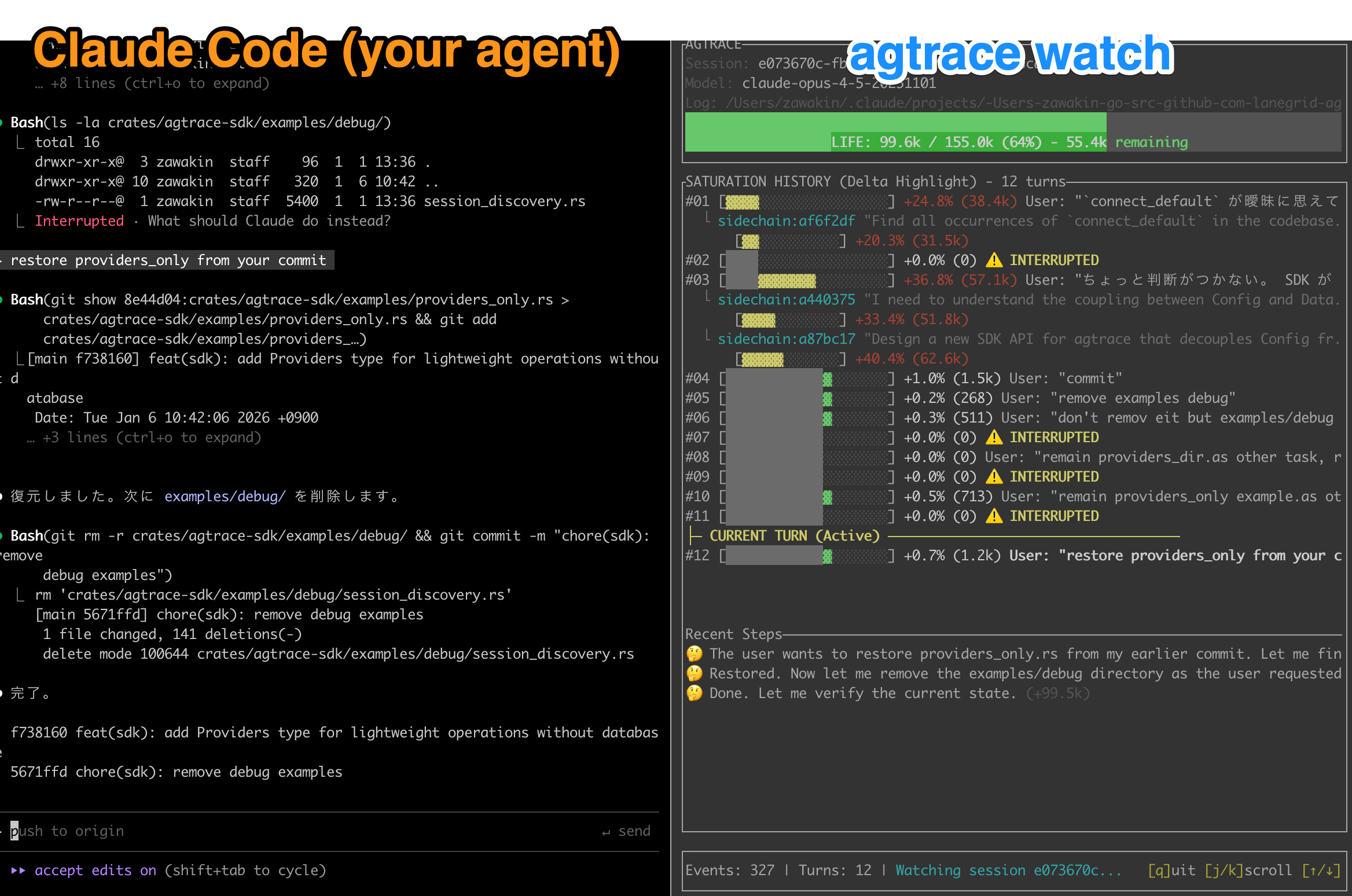
What I see:
- **Context window usage** — A color-coded bar showing how full the conversation is
- **Token consumption trends** — How much context each task uses over time
- **Live activity** — Tool calls, file reads, reasoning traces as they happen
For the first time, I can make informed decisions about when to start a new session, how to scope my requests, and whether the agent is stuck in a loop.
---

## Try It
```bash
npm install -g @lanegrid/agtrace
cd my-project
agtrace init # One-time setup
agtrace watch # Launch dashboard in a separate terminal
```
Works with Claude Code, Codex (OpenAI), and Gemini. Zero config — just discovers existing logs.
## Give Your Agent Memory of Past Sessions
One thing I didn't expect: agents can also query their own execution history via [MCP](https://modelcontextprotocol.io):
```bash
# Claude Code
claude mcp add agtrace -- agtrace mcp serve
# Codex
codex mcp add agtrace -- agtrace mcp serve
```
Now your agent can search what it did yesterday, find past errors, and learn from previous sessions.
See the [MCP Integration Guide](docs/mcp-integration.md) for more.
## Other Commands
```bash
agtrace session list # Browse past sessions
agtrace lab grep "error" # Search across all sessions
```
## For Tool Builders
If you're building your own IDE plugin, dashboard, or observability tool:
```toml
[dependencies]
agtrace-sdk = "0.6"
```
See [SDK Documentation](https://docs.rs/agtrace-sdk) and [Examples](crates/agtrace-sdk/examples/).
## Documentation
- [Getting Started](docs/getting-started.md)
- [MCP Integration](docs/mcp-integration.md)
- [Architecture](docs/architecture.md)
- [Full Documentation](docs/README.md)
## Feedback
Have ideas?
- [RFC: Watch TUI Display](https://github.com/lanegrid/agtrace/discussions/36)
- [RFC: MCP Tools](https://github.com/lanegrid/agtrace/discussions/37)
## License
MIT / Apache 2.0