# Aggligator — your friendly link aggregator
[](https://crates.io/crates/aggligator)
[](https://docs.rs/aggligator)
[](https://raw.githubusercontent.com/surban/aggligator/master/LICENSE)
Aggligator aggregates multiple links into one connection.
Aggligator takes multiple network links (for example [TCP] connections) between two
endpoints and combines them into one connection that has the combined bandwidth
of all links. Additionally it provides resiliency against failure of individual
links and allows adding and removing of links on-the-fly.
It serves the same purpose as [Multipath TCP] and [SCTP] but works over existing,
widely adopted protocols such as TCP, HTTPS, TLS, USB and WebSockets and is completely
implemented in user space without the need for any support from the operating system.
Aggligator is written in 100% safe [Rust] and builds upon the [Tokio]
asynchronous runtime. It works on all major native platform as well as WebAssembly.
[TCP]: https://en.wikipedia.org/wiki/Transmission_Control_Protocol
[Multipath TCP]: https://en.wikipedia.org/wiki/Multipath_TCP
[SCTP]: https://en.wikipedia.org/wiki/Stream_Control_Transmission_Protocol
[Rust]: https://www.rust-lang.org/
[Tokio]: https://tokio.rs/
## Crate features
The following optional crate features are available:
* `dump` — enables saving of analysis data to disk, mainly useful for debugging
connection performance issues; also enables [Serde] support on some data types,
* `js` — enables support for execution in a JavaScript runtime environment (web browser).
[Serde]: https://serde.rs/
### JavaScript and web support
Aggligator supports compiling to the WebAssembly targets `wasm32-unknown-unknown`,
`wasm32-wasip1` and `wasm32-wasip1-threads`. If you are targeting a JavaScript
runtime environment (like a web browser) you must enable the `js` crate feature.
This will enable JavaScript promises support and spawn tasks onto the browser's
native event queue.
## Companion crates
The following [crates provide transports]:
* [aggligator-transport-bluer] — transport over Bluetooth on Linux,
* [aggligator-transport-tcp] — transport over TCP with optional TLS encryption,
* [aggligator-transport-usb] — transport over USB for native platforms,
* [aggligator-transport-webusb] — transport over WebUSB for the web targeting WebAssembly,
* [aggligator-transport-websocket] — transport over WebSockets for native platforms,
* [aggligator-transport-websocket-web] — transport over WebSockets for the web targeting WebAssembly.
[crates provide transports]: https://crates.io/keywords/aggligator-transport
[aggligator-transport-bluer]: https://crates.io/crates/aggligator-transport-bluer
[aggligator-transport-tcp]: https://crates.io/crates/aggligator-transport-tcp
[aggligator-transport-usb]: https://crates.io/crates/aggligator-transport-usb
[aggligator-transport-webusb]: https://crates.io/crates/aggligator-transport-webusb
[aggligator-transport-websocket]: https://crates.io/crates/aggligator-transport-websocket
[aggligator-transport-websocket-web]: https://crates.io/crates/aggligator-transport-websocket-web
The following crates provide transport wrappers:
* [aggligator-wrapper-tls] — transport wrapper providing TLS security.
[aggligator-wrapper-tls]: https://crates.io/crates/aggligator-wrapper-tls
The following crates provide utility functions and command line tools:
* [aggligator-monitor] — interactive text-based link monitor and speed test,
* [aggligator-util] — command line utilities including tunneling of TCP connections.
[aggligator-monitor]: https://crates.io/crates/aggligator-monitor
[aggligator-util]: https://crates.io/crates/aggligator-util
## Demo
Two machines are connected via Ethernet and Wi-Fi.
Machine A, called `dino` and acting as the speed test server, has two interfaces:
`enp8s0` (gigabit ethernet, IP address ending in `::b01`) and `wlp6s0` (Wi-Fi, IP address ending in `::83e`).
Both IP addresses are registered with the DNS server.
Machine B, acting as the speed test client, has four interfaces: `enp0s25` (gigabit ethernet),
`enxf8eXXXXdd` (gigabit ethernet via USB), `enxf8eXXXXc5` (gigabit ethernet via USB) and `wlp3s0` (Wi-Fi).
Running the `agg-speed` tool from the [aggligator-util] crate on Machine B shows the following.
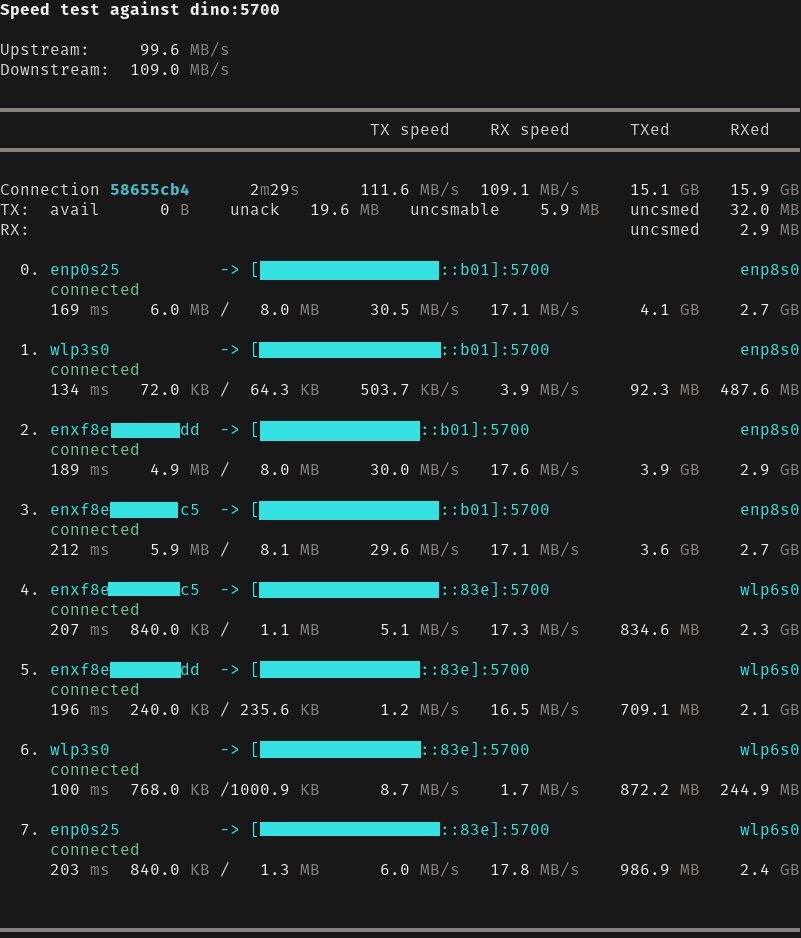
Aggligator has created 8 links between the machines, one for each pair of machine A and machine B interfaces.
The connection speed is about 100 MB/s in both directions which is expected from a full-duplex gigabit ethernet link.
Unplugging ethernet cables or disabling the Wi-Fi results in redistribution of the
traffic over the remaining links, but has no effect on the connection.
If the ethernet cable is plugged in again or Wi-Fi is re-enabled, the link is
automatically re-established.
## Minimum supported Rust version
The minimum supported Rust version (MSRV) is 1.80.
## License
Aggligator is licensed under the [Apache 2.0 license].
[Apache 2.0 license]: https://github.com/surban/aggligator/blob/master/LICENSE
### Contribution
Unless you explicitly state otherwise, any contribution intentionally submitted
for inclusion in Aggligator by you, shall be licensed as Apache 2.0, without any
additional terms or conditions.