# Agentusage
[](https://github.com/binzhango/agentusage/actions/workflows/ci.yml)
[](https://github.com/binzhango/agentusage/releases/latest)
[](LICENSE)
**A private, local-first usage dashboard for AI coding agents.**
Agentusage turns the history already written by Codex, Claude Code, OpenCode,
Pi, and GitHub Copilot into a browser dashboard, terminal UI, JSON API, and CLI
reports. Use it to compare model activity, understand token and cache usage,
and track estimated cost without sending usage data to a hosted service.

> **Status:** Early access. Provider formats evolve frequently, so sanitized
> fixtures, bug reports, and pull requests are especially valuable.
## Highlights
- Browser dashboard with provider cards and dedicated full-page views
- Today, 7-day, 30-day, and all-time usage windows
- Per-model trend lines with detailed hover data
- Token, cache, request, session, cost, and code-change metrics
- Downloadable SVG snapshots of provider cards
- Hideable provider cards with persistent dashboard preferences
- Interactive terminal dashboard and period-based CLI reports
- Local JSON API for scripts and custom integrations
- SQLite by default, with optional PostgreSQL
- Incremental, idempotent ingestion with raw event preservation
- Light and dark themes
## Supported providers
| `codex` | Codex rollout JSONL | Tokens, models, cache, cost, sessions, code changes |
| `claude_code` | Claude Code session JSONL | Tokens, models, sessions |
| `opencode` | OpenCode session JSONL | Tokens, models, sessions, cost |
| `copilot` | Copilot CLI databases and VS Code logs | CLI/IDE attribution, models, tokens, AI credits |
| `pi` | Pi append-only session JSONL | Providers, models, prompts, tokens, cost, projects, tools |
## Quick start
Install the `agentusage` command and its shorter `au` alias:
```bash
cargo install --git https://github.com/binzhango/agentusage --locked --bins
au --version
```
Synchronize the providers you use, then open the dashboard:
```bash
au sync codex
au sync claude_code
au sync copilot
au sync pi
au server --open
```
If the browser does not open automatically, visit
[http://127.0.0.1:8787](http://127.0.0.1:8787).
Only synchronized providers are available. If a provider card reports that its
storage is uninitialized, run `au sync <provider>` or hide the card when you do
not use that provider.
## Ways to explore usage
### Browser dashboard
```bash
au server --open
```
The dashboard includes summary metrics, daily trends, per-model breakdowns,
full-page provider views, persistent card visibility, themes, and SVG export.
It is embedded in the Rust binary; no Node.js runtime or separate frontend
server is required.
### Terminal dashboard
```bash
au dashboard
```
Use `w` to change the time window, `r` to refresh, and `q` to quit.

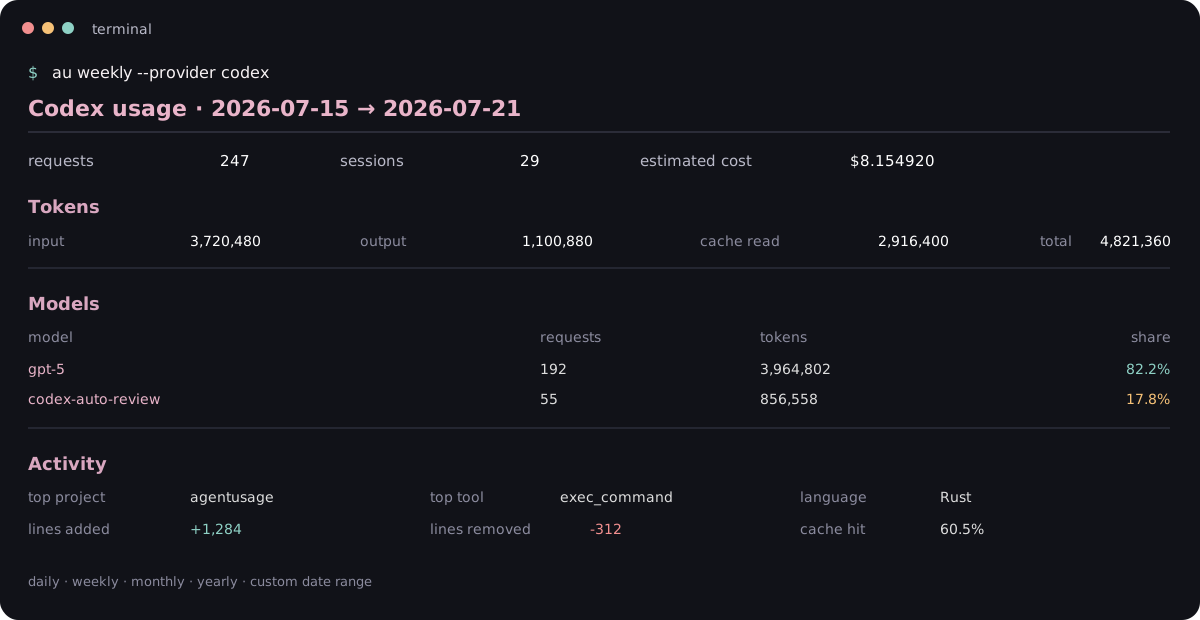
### CLI reports
```bash
au daily --provider codex
au weekly --provider codex
au monthly --provider copilot --month 2026-07
au range --provider pi --from 2026-07-01 --to 2026-07-31
```
### JSON API
```bash
au server
curl 'http://127.0.0.1:8787/api/summary?provider=codex&window=30d'
```
The local server exposes provider availability, aggregate summaries, and daily
trend data. See the [API reference](docs/API.md) for routes and response fields.
## Installation
Download a prebuilt archive from the
[latest release](https://github.com/binzhango/agentusage/releases/latest), or
install from a local checkout:
```bash
cargo install --path . --locked --bins
```
Release archives are available for macOS Apple Silicon, Linux ARM64, Linux
x86_64, and Windows x86_64. Each archive contains both `agentusage` and `au`,
plus checksums in `SHA256SUMS`.
## How it works
Agentusage reads provider history during incremental synchronization, normalizes
and deduplicates usage events, and stores them in provider-specific databases.
Reports, dashboards, and API requests query the normalized database rather than
rescanning source files.
```mermaid
flowchart LR
Sources[Agent history files] --> Sync[Incremental sync]
Hooks[Telemetry hooks] --> Normalize[Normalize and deduplicate]
Sync --> Normalize
Normalize --> Storage[(SQLite or PostgreSQL)]
Storage --> CLI[CLI reports]
Storage --> TUI[Terminal dashboard]
Storage --> Web[Browser dashboard and API]
```
SQLite and all browser endpoints are local by default. PostgreSQL is used only
when explicitly configured.
## Documentation
| [Usage guide](docs/USAGE.md) | Synchronization, dashboard, reports, Pi, and command examples |
| [API reference](docs/API.md) | HTTP routes, parameters, response fields, and error behavior |
| [Configuration](docs/CONFIGURATION.md) | Storage, automatic sync, PostgreSQL, telemetry, and privacy |
| [Development](docs/DEVELOPMENT.md) | Local setup, tests, and contributor checks |
| [Releasing](docs/RELEASING.md) | Versioning, builds, crates.io, and GitHub releases |
| [Changelog](CHANGELOG.md) | Release history |
## Privacy and security
Agentusage does not require a hosted account and does not send usage data to a
project-controlled service. Provider history, normalized databases, raw events,
and PostgreSQL credentials may contain sensitive information and should be
protected accordingly.
The HTTP server binds to `127.0.0.1` by default and has no built-in
authentication. Do not expose it to an untrusted network without a protective
reverse proxy.
## Contributing
Bug reports and pull requests are welcome. When changing provider ingestion:
1. Include a sanitized fixture or regression test when possible.
2. Preserve idempotent ingestion and backward-compatible storage behavior.
3. Run the checks in [docs/DEVELOPMENT.md](docs/DEVELOPMENT.md).
4. Never commit credentials, private transcripts, or local databases.
## License
Agentusage is available under the [MIT License](LICENSE).