# Twilio Integration Guide
This guide explains how to connect `active-call` to [Twilio Elastic SIP Trunking](https://www.twilio.com/en-us/sip-trunking). Because Twilio uses standard SIP, the integration is almost identical to the [Telnyx SIP Trunk integration](./telnyx_integration.md). No Twilio SDK is required.
## How It Works
```
Twilio Elastic SIP Trunk
│
SIP/TLS (5061)
│
active-call (Rust)
│
AI Pipeline (ASR → LLM → TTS)
```
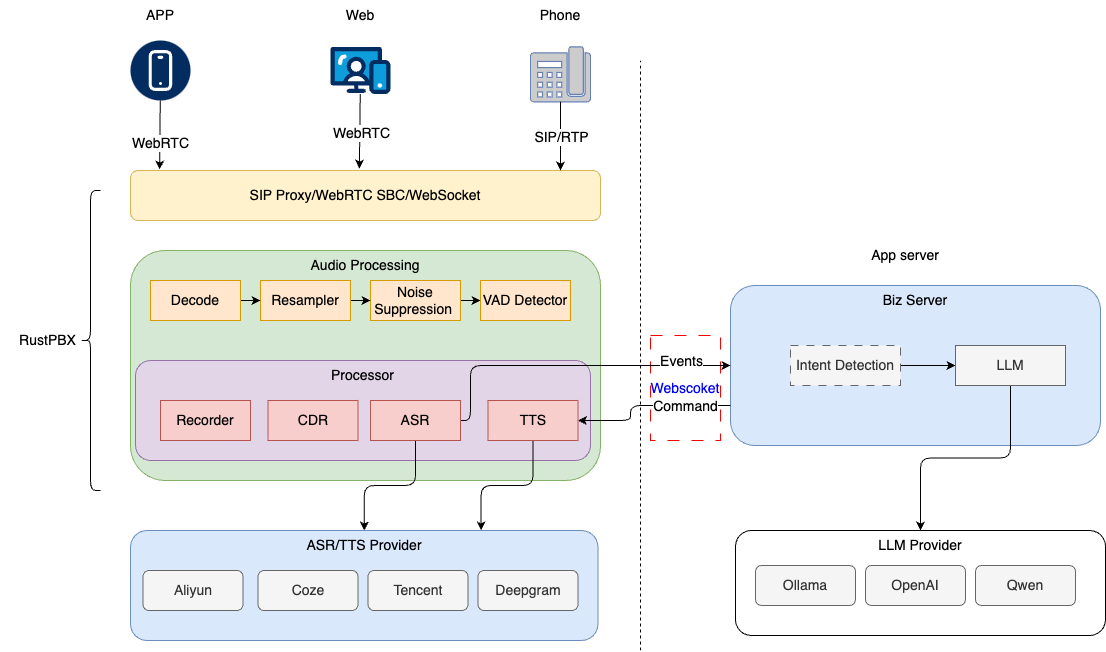
Twilio terminates the PSTN call and forwards it to `active-call` over SIP. All call intelligence runs inside `active-call`; Twilio acts purely as the carrier.
> **Key difference from Telnyx**: Twilio Elastic SIP Trunking uses **IP authentication** for inbound calls — it does **not** support SIP REGISTER for receiving inbound traffic. For outbound calls, digest authentication (username/password) **is** used.
---
## Prerequisites
- A Twilio account with **Elastic SIP Trunking** enabled
- A public IP address reachable by Twilio's SIP network
- A TLS certificate (self-signed or CA-signed) for SIPS (recommended)
- `active-call` ≥ v0.3.38
---
## Step 1: Configure the Twilio SIP Trunk
### 1.1 Create a SIP Trunk
1. Log in to the [Twilio Console](https://console.twilio.com).
2. Navigate to **Elastic SIP Trunking → Trunks → Create new SIP Trunk**.
3. Give it a descriptive name (e.g. `active-call-trunk`).
### 1.2 Configure Origination (Inbound Calls → active-call)
Twilio sends inbound calls to your server via **Origination URIs**. Because Twilio uses IP authentication for inbound, no SIP REGISTER is needed.
1. In your trunk, go to **Origination**.
2. Add an Origination URI:
```
sip:YOUR_PUBLIC_IP:5061;transport=tls
```
Or, if using plain UDP (not recommended for production):
```
sip:YOUR_PUBLIC_IP:5060
```
3. Set the **Priority** and **Weight** as required.
### 1.3 Configure Termination (active-call → PSTN via Twilio)
1. In your trunk, go to **Termination**.
2. Note the **Termination SIP URI**, e.g.:
```
yourdomain.pstn.twilio.com
```
3. Under **Authentication**, create a **Credential List**:
- Add a username/password pair (e.g. `active-call` / `strongpassword`).
- These credentials will be used in your `active-call.toml`.
### 1.4 Assign Phone Numbers
1. Go to **Phone Numbers → Active Numbers**.
2. Click a number and assign it to your trunk under **Voice & Fax → SIP Trunk**.
---
## Step 2: Configure active-call
### Full TOML Example (TLS + SRTP)
```toml
# SIP server bind address
addr = "0.0.0.0"
# Public UDP port (fallback / plain SIP)
udp_port = 5060
# TLS port for SIPS — required for Twilio production
tls_port = 5061
tls_cert_file = "./certs/cert.pem"
tls_key_file = "./certs/key.pem"
# Enable SRTP for encrypted media (recommended when tls_port is active)
enable_srtp = true
# Public IP for SDP/media negotiation
external_ip = "YOUR_PUBLIC_IP"
# RTP port range
rtp_start_port = 12000
rtp_end_port = 42000
# HTTP API port
http_addr = "0.0.0.0:8080"
```
### Outbound (active-call → Twilio) — SIP Registration
For **outbound calls**, configure a SIP registration to your Twilio Termination URI:
```toml
[[sip_registrations]]
name = "twilio"
username = "active-call" # Credential List username
password = "strongpassword" # Credential List password
server = "yourdomain.pstn.twilio.com"
realm = "yourdomain.pstn.twilio.com"
```
> **Note**: Twilio's Termination URI accepts SIP REGISTER, which keeps the trunk authenticated for outbound dialing.
### Inbound Handler
Configure how `active-call` handles incoming calls from Twilio:
```toml
[handler]
type = "playbook"
default = "greeting.md"
```
Or use a webhook to make the routing decision externally:
```toml
[handler]
type = "webhook"
url = "http://localhost:8090/twilio-inbound"
method = "POST"
```
---
## Step 3: TLS Certificate Setup
Twilio strongly recommends (and may require) SIPS (SIP over TLS) for production trunks.
### Option A: Self-signed certificate (development / testing)
```bash
openssl req -x509 -newkey rsa:2048 -keyout certs/key.pem \
-out certs/cert.pem -days 365 -nodes \
-subj "/CN=YOUR_PUBLIC_IP"
```
> Self-signed certificates work for testing, but Twilio may reject them in strict TLS mode. Use a CA-signed certificate for production.
### Option B: Let's Encrypt (if you have a domain)
```bash
certbot certonly --standalone -d sip.yourdomain.com
# Then reference:
# tls_cert_file = "/etc/letsencrypt/live/sip.yourdomain.com/fullchain.pem"
# tls_key_file = "/etc/letsencrypt/live/sip.yourdomain.com/privkey.pem"
```
---
## Step 4: Making Outbound Calls
### Via HTTP API
```bash
curl -X POST http://localhost:8080/call \
-H "Content-Type: application/json" \
-d '{
"callee": "sip:+18005551234@yourdomain.pstn.twilio.com",
"playbook": "sales.md",
"sip": {
"username": "active-call",
"password": "strongpassword",
"realm": "yourdomain.pstn.twilio.com",
"enableSrtp": true
}
}'
```
`enableSrtp` is a **per-call override**. It takes priority over the global `enable_srtp` config. This lets you dial SRTP calls to Twilio while keeping plain RTP for internal SIP extensions, or vice versa.
### SRTP Priority Chain
```
API call sip.enableSrtp → overrides everything
Config enable_srtp → global default
Fallback → plain RTP (false)
```
---
## SIP Variable Support
`active-call` automatically extracts SIP headers from inbound INVITE requests. You can use them as variables in Playbooks:
```yaml
# In your Playbook, access SIP headers:
# {{ X-Twilio-CallSid }} — Twilio's unique call identifier
# {{ X-Twilio-ToE164 }} — called number in E.164 format
# {{ X-Twilio-FromE164 }} — caller number in E.164 format
```
---
## Troubleshooting
### Twilio can't reach active-call
- Verify your firewall allows **TCP port 5061** (SIPS) and **UDP/TCP port 5060** (SIP) from Twilio's IP ranges.
- Twilio's SIP IP ranges are published at: https://www.twilio.com/en-us/help/article/twilio-sip-network
### Audio is one-way or silent
- Check that `external_ip` matches the public IP Twilio can reach.
- Ensure the **RTP port range** (`rtp_start_port` – `rtp_end_port`) is open in your firewall.
- If you enabled `enable_srtp = true`, confirm Twilio's trunk also has SRTP enabled (Twilio enables it by default on TLS trunks).
### Outbound calls fail with 401 Unauthorized
- Confirm the Credential List username/password in Twilio matches `username`/`password` in your `[[sip_registrations]]` block.
- The `realm` field must match Twilio's Termination SIP URI domain exactly.
### TLS handshake fails
- If using a self-signed cert, the CN (Common Name) must match your public IP or domain.
- Check active-call logs for `TLS SIP transport started` to confirm TLS initialized correctly.
---
## Comparison: Twilio vs Telnyx
| Protocol | Standard SIP | Standard SIP |
| Inbound auth | IP allowlist | SIP REGISTER or IP |
| Outbound auth | Digest (Credential List) | Digest (Credential List) |
| TLS support | Recommended | Optional |
| SRTP support | Supported | Supported |
| SIP REGISTER inbound | ❌ Not supported | ✅ Supported |
---
## Reference
- [Twilio Elastic SIP Trunking Docs](https://www.twilio.com/docs/sip-trunking)
- [Twilio SIP Trunk Origination](https://www.twilio.com/docs/sip-trunking/origination)
- [Twilio SIP Trunk Termination](https://www.twilio.com/docs/sip-trunking/termination)
- [Telnyx Integration Guide](./telnyx_integration.md) — for comparison
- [Configuration Guide](./config_guide.en.md) — full config reference