# Active Call Configuration Guide
This document provides detailed information about the `active-call` configuration file (`active-call.toml`) parameters and configuration strategies for different calling scenarios.
## Table of Contents
- [Basic Configuration](#basic-configuration)
- [Network Configuration](#network-configuration)
- [TLS & SRTP Configuration](#tls--srtp-configuration)
- [Media Configuration](#media-configuration)
- [Inbound Call Handler Configuration](#inbound-call-handler-configuration)
- [Recording & CDR Configuration](#recording--cdr-configuration)
- [Call Scenarios](#call-scenarios)
- [Scenario 1: WebRTC Calls (Browser Communication)](#scenario-1-webrtc-calls-browser-communication)
- [Scenario 2: SIP Calls (PBX/FS Gateway Integration)](#scenario-2-sip-calls-pbxfs-gateway-integration)
- [Scenario 3: WebSocket Calls (Custom Applications)](#scenario-3-websocket-calls-custom-applications)
- [Scenario 4: SIP Inbound (Register to PBX)](#scenario-4-sip-inbound-register-to-pbx)
---
## Basic Configuration
```toml
# SIP service bind address
addr = "0.0.0.0"
# HTTP service address
http_addr = "0.0.0.0:8080"
# UDP port (for SIP and RTP, default 25060)
udp_port = 25060
# Enable HTTP Gzip compression (optional)
# http_gzip = true
# Log level: trace, debug, info, warn, error
log_level = "debug"
# Log file path (optional)
# log_file = "/tmp/active-call.log"
# Skip access logging for specific HTTP paths (optional)
# http_access_skip_paths = ["/health", "/metrics*"]
# Media cache path
media_cache_path = "./config/mediacache"
```
### Configuration Parameters
- **addr**: SIP service bind address
- **http_addr**: HTTP service address (IP:Port)
- **udp_port**: UDP port for SIP signaling and RTP media
- **log_level**: Logging level, recommend `info` or `warn` for production
- **media_cache_path**: Cache directory for media files (e.g., TTS audio)
---
## Network Configuration
### NAT and External IP Configuration
If the server is behind NAT, configure the public IP:
```toml
# External IP address (for SIP signaling and media negotiation)
# If server is behind NAT, set public IP here (without port)
external_ip = "1.2.3.4"
```
### RTP Port Range
```toml
# RTP port range
rtp_start_port = 12000
rtp_end_port = 42000
```
### STUN/TURN Server Configuration (WebRTC)
For WebRTC client NAT traversal:
```toml
# STUN server
[[ice_servers]]
urls = ["stun:stun.l.google.com:19302"]
# TURN server (requires authentication)
[[ice_servers]]
urls = ["turn:turn.example.com:3478"]
username = "turnuser"
credential = "turnpass"
```
---
## TLS & SRTP Configuration
For PSTN carrier integrations (e.g. Twilio, Telnyx) that require or recommend encrypted signaling and media.
### SIP over TLS (SIPS)
```toml
# TLS port for encrypted SIP signaling (SIPS)
# Twilio requires TLS; recommended for any production carrier connection
tls_port = 5061
tls_cert_file = "./certs/cert.pem" # Path to TLS certificate (PEM format)
tls_key_file = "./certs/key.pem" # Path to TLS private key (PEM format)
```
When `tls_port` is set, active-call starts a second SIP listener on that port using TLS. The existing UDP listener on `udp_port` continues to run in parallel.
**Generating a self-signed certificate** (for testing):
```bash
mkdir -p certs
openssl req -x509 -newkey rsa:2048 -keyout certs/key.pem \
-out certs/cert.pem -days 365 -nodes \
-subj "/CN=YOUR_PUBLIC_IP_OR_DOMAIN"
```
For production, use a CA-signed certificate (e.g. from Let's Encrypt).
### SRTP (Encrypted Media)
```toml
# Enable SRTP for encrypted media transport (global default)
# Recommended when tls_port is active
enable_srtp = true
```
SRTP can also be **overridden per-call** via the HTTP API:
```json
{
"callee": "sip:+18005551234@yourdomain.pstn.twilio.com",
"sip": {
"enableSrtp": true
}
}
```
**SRTP priority chain** (highest to lowest):
1. `sip.enableSrtp` in the API call body — per-call override
2. `enable_srtp` in `active-call.toml` — global default
3. `false` — plain RTP (fallback)
### Complete Example: Twilio-Ready Configuration
```toml
addr = "0.0.0.0"
udp_port = 5060
tls_port = 5061
tls_cert_file = "./certs/cert.pem"
tls_key_file = "./certs/key.pem"
enable_srtp = true
external_ip = "YOUR_PUBLIC_IP"
rtp_start_port = 12000
rtp_end_port = 42000
```
See the [Twilio Integration Guide](./twilio_integration.md) for the full carrier setup walkthrough.
---
## Media Configuration
### ASR/TTS Engine Defaults
When using Playbooks or initiating calls via the API, if no provider is specified, Active Call will use the following defaults:
- **Chinese (zh)**: TTS defaults to **aliyun**, ASR defaults to **sensevoice** (offline) or **aliyun** (online).
- **English (en)**: TTS defaults to **supertonic**, ASR defaults to **sensevoice** (offline) or **openai** (online).
### SIP Configuration
```toml
# SIP service bind address (corresponds to addr in basic config)
addr = "0.0.0.0"
# SIP service port (corresponds to udp_port in basic config)
udp_port = 25060
```
**Note**: It's recommended not to use port 5060, as many network environments apply special handling to this port.
---
## Inbound Call Handler Configuration
Active Call supports two types of SIP inbound call handling:
### Method 1: Webhook Handler
Forward inbound requests to an HTTP endpoint for external service decision:
```toml
[handler]
type = "webhook"
url = "http://localhost:8090/webhook"
method = "POST"
```
**Webhook Request Format**:
```json
{
"caller": "sip:alice@example.com",
"callee": "sip:bob@pbx.example.com",
"call_id": "abc123",
"from_tag": "tag1",
"to_tag": "tag2"
}
```
### Method 2: Playbook Handler
Automatically route to corresponding Playbook based on caller/callee numbers:
```toml
[handler]
type = "playbook"
default = "default.md" # Optional: default playbook when no rules match
# Rule 1: US numbers calling support line
[[handler.rules]]
caller = "^\\+1\\d{10}$" # Match US number format
callee = "^sip:support@.*" # Match support line
playbook = "support.md" # Use support playbook
# Rule 2: Chinese numbers automatically use Chinese playbook
[[handler.rules]]
caller = "^\\+86\\d+" # Match Chinese numbers
playbook = "chinese.md" # Match caller only
# Rule 3: Sales line
[[handler.rules]]
callee = "^sip:sales@.*" # Match callee only
playbook = "sales.md"
```
**Rule Matching Logic**:
- Rules are evaluated in order from top to bottom
- Each rule can specify `caller` and/or `callee` regex patterns
- Both patterns must match (omitted patterns match any value)
- First matching rule determines which playbook to use
- If no rules match and no default is set, the call is rejected
### CLI Quick Configuration
You can also quickly configure handlers via command-line parameters:
```bash
# Webhook handler
./active-call --handler https://example.com/webhook
# Playbook handler (default playbook)
./active-call --handler default.md
# Make an outgoing SIP call using a playbook
./active-call --call sip:1001@127.0.0.1 --handler greeting.md
# Set external IP and supported codecs
./active-call --external-ip 1.2.3.4 --codecs pcmu,pcma,opus
```
---
## Recording & CDR Configuration
### Recording Configuration
```toml
[recording]
enabled = true # Enable recording
auto_start = true # Automatically start recording
```
### CDR (Call Detail Record) Configuration
```toml
[callrecord]
type = "local"
root = "./config/cdr"
```
CDR files will be saved in the specified directory, containing detailed information for each call.
---
## Call Scenarios
Active Call supports multiple calling scenarios through different WebSocket interfaces. Here are common scenarios with their configurations and usage methods.
### Scenario 1: WebRTC Calls (Browser Communication)
**Use Case**: Web applications, browser clients directly communicating with AI Agent.
> **Note**: WebRTC requires a Secure Context. Ensure you are accessing your web client via **HTTPS** or **127.0.0.1**, otherwise the browser will not enable WebRTC functionality.
#### Configuration Points
```toml
# Basic configuration
http_addr = "0.0.0.0:8080"
# Configure STUN/TURN servers (for NAT traversal)
[[ice_servers]]
urls = ["stun:stun.l.google.com:19302"]
[[ice_servers]]
urls = ["turn:turn.example.com:3478"]
username = "turnuser"
credential = "turnpass"
# If behind NAT, configure external IP
external_ip = "1.2.3.4"
```
#### Initiating a Call
Connect via WebSocket to the `/call/webrtc` endpoint:
```javascript
// Establish WebSocket connection
const ws = new WebSocket('ws://localhost:8080/call/webrtc?id=session123');
// Create WebRTC PeerConnection
const pc = new RTCPeerConnection({
iceServers: [
{ urls: 'stun:stun.l.google.com:19302' }
]
});
// Add local audio stream
const stream = await navigator.mediaDevices.getUserMedia({ audio: true });
stream.getTracks().forEach(track => pc.addTrack(track, stream));
// Create and send Offer
const offer = await pc.createOffer();
await pc.setLocalDescription(offer);
ws.send(JSON.stringify({
command: "invite",
option: {
sdp: offer.sdp,
codec: "opus",
playbook: "greeting.md"
}
}));
// Receive Answer
ws.onmessage = async (event) => {
const msg = JSON.parse(event.data);
if (msg.event === "answer") {
await pc.setRemoteDescription({
type: "answer",
sdp: msg.sdp
});
}
};
```
#### Advantages
- Native browser support, no plugins needed
- Low latency, suitable for real-time conversations
- Automatic NAT traversal
- Supports Opus high-quality audio codec
---
### Scenario 2: SIP Calls (PBX/FS Gateway Integration)
**Use Case**: Integration with enterprise PBX systems, [RustPBX](https://github.com/restsend/rustpbx), FreeSWITCH, Asterisk, and traditional telephony networks.
#### Configuration Points
```toml
# SIP service configuration
addr = "0.0.0.0"
udp_port = 25060
# If behind NAT, configure external IP
external_ip = "1.2.3.4"
# RTP port range
rtp_start_port = 12000
rtp_end_port = 42000
```
#### Initiating SIP Call
Connect via WebSocket to the `/call/sip` endpoint:
```javascript
const ws = new WebSocket('ws://localhost:8080/call/sip?id=session456');
ws.onopen = () => {
// Initiate SIP call
ws.send(JSON.stringify({
command: "invite",
option: {
caller: "sip:agent@active-call.com",
callee: "sip:1001@pbx.example.com:5060",
codec: "pcmu", // or "pcma", "g722"
playbook: "customer_service.md",
asr: {
provider: "openai",
model: "whisper-1",
language: "en-US"
},
tts: {
provider: "openai",
model: "tts-1",
voice: "alloy"
}
}
}));
};
// Handle events
ws.onmessage = (event) => {
const msg = JSON.parse(event.data);
console.log('Event:', msg.event);
if (msg.event === "answer") {
console.log('Call answered');
} else if (msg.event === "transcript") {
console.log('User said:', msg.text);
} else if (msg.event === "end") {
console.log('Call ended');
}
};
```
#### PBX System Integration Examples
**RustPBX Dialplan Configuration**:
```yaml
# RustPBX dialplan.yml
rules:
- match: "^9999$"
actions:
- bridge: "sip:agent@active-call-server:13050"
```
**FreeSWITCH Dialplan Configuration**:
```xml
<extension name="call_ai_agent">
<condition field="destination_number" expression="^9999$">
<action application="bridge" data="sofia/external/agent@active-call-server:13050"/>
</condition>
</extension>
```
#### Advantages
- Integration with traditional telephony networks
- Standard SIP protocol support
- Compatible with various PBX systems
- Supports G.711, G.722, and other telephony audio codecs
---
### Scenario 3: WebSocket Calls (Custom Applications)
**Use Case**: Custom applications requiring full control of audio streams, or scenarios where WebRTC/SIP is not desired.
#### Configuration Points
```toml
# Basic HTTP configuration is sufficient
http_addr = "0.0.0.0:8080"
```
#### Initiating WebSocket Call
Connect via WebSocket to the `/call` endpoint:
```javascript
const ws = new WebSocket('ws://localhost:8080/call?id=session789');
ws.onopen = () => {
// Start call (no SDP negotiation needed)
ws.send(JSON.stringify({
command: "start",
option: {
codec: "pcm", // or "pcma", "pcmu", "g722"
sampleRate: 16000,
playbook: "assistant.md",
vad: {
type: "silero",
samplerate: 16000,
speechPadding: 300,
silencePadding: 500
}
}
}));
};
// Send audio data
function sendAudio(audioData) {
// audioData is PCM16 format audio data (ArrayBuffer)
ws.send(audioData);
}
// Receive audio and events
ws.onmessage = (event) => {
playAudio(event.data);
} else {
// JSON event
const msg = JSON.parse(event.data);
handleEvent(msg);
}
};
```
#### Audio Formats
WebSocket calls support the following audio formats:
- **PCM**: 16-bit signed, little-endian
- **PCMA**: G.711 A-law
- **PCMU**: G.711 μ-law
- **G722**: G.722 wideband codec
#### Advantages
- Simplest integration method
- Full control over audio streams
- Low overhead, no RTP/RTCP protocol
- Suitable for internal system integration
---
### Scenario 4: SIP Inbound (Register to PBX)
**Use Case**: Active Call registers as a SIP endpoint to [RustPBX](https://github.com/restsend/rustpbx), FreeSWITCH, Asterisk, or other PBX systems to receive inbound calls.
#### Configure SIP Registration
```toml
# SIP service configuration (use addr and udp_port from basic config)
addr = "0.0.0.0"
udp_port = 25060
# SIP registration accounts (multiple accounts supported)
[[register_users]]
server = "pbx.example.com:5060"
username = "1001"
disabled = false
[register_users.credential]
username = "1001"
password = "secret123"
realm = "pbx.example.com"
[[register_users]]
server = "pbx.example.com:5060"
username = "1002"
disabled = false
[register_users.credential]
username = "1002"
password = "secret456"
realm = "pbx.example.com"
```
#### Configure Inbound Handler
Use Playbook handler to automatically route different inbound calls:
```toml
[handler]
type = "playbook"
default = "default.md"
# Route by callee number
[[handler.rules]]
callee = "^sip:1001@.*"
playbook = "tech_support.md"
[[handler.rules]]
callee = "^sip:1002@.*"
playbook = "sales.md"
# Route by caller number
[[handler.rules]]
caller = "^sip:vip.*"
playbook = "vip_service.md"
```
#### PBX System Configuration Examples
**RustPBX Configuration**:
```yaml
# RustPBX users.yml
users:
- username: "1001"
password: "secret123"
domain: "pbx.example.com"
enabled: true
```
**FreeSWITCH Configuration**:
Create user in FreeSWITCH:
```xml
<!-- conf/directory/default/1001.xml -->
<include>
<user id="1001">
<params>
<param name="password" value="secret123"/>
</params>
</user>
</include>
```
#### Advantages
- Acts as standard SIP endpoint
- Can receive transfers from PBX
- Supports multiple simultaneous account registrations
- Flexible inbound routing rules
---
## Complete Configuration Examples
### Example 1: Pure WebRTC Scenario
```toml
addr = "0.0.0.0"
http_addr = "0.0.0.0:8080"
log_level = "info"
media_cache_path = "./config/mediacache"
[[ice_servers]]
urls = ["stun:stun.l.google.com:19302"]
[[ice_servers]]
urls = ["turn:turn.example.com:3478"]
username = "user"
credential = "pass"
[recording]
enabled = true
auto_start = true
[callrecord]
type = "local"
root = "./config/cdr"
```
### Example 2: SIP + WebRTC Hybrid Scenario
```toml
addr = "0.0.0.0"
http_addr = "0.0.0.0:8080"
udp_port = 25060
log_level = "info"
external_ip = "203.0.113.1"
media_cache_path = "./config/mediacache"
rtp_start_port = 12000
rtp_end_port = 42000
[[ice_servers]]
urls = ["stun:stun.l.google.com:19302"]
[handler]
type = "playbook"
default = "default.md"
[[handler.rules]]
callee = "^sip:support@.*"
playbook = "support.md"
[recording]
enabled = true
auto_start = true
[callrecord]
type = "local"
root = "./config/cdr"
```
### Example 3: Enterprise PBX Integration Scenario
```toml
addr = "0.0.0.0"
http_addr = "0.0.0.0:8080"
udp_port = 25060
log_level = "info"
external_ip = "203.0.113.1"
media_cache_path = "./config/mediacache"
# SIP account registration
[[register_users]]
server = "pbx.company.com:5060"
username = "ai-agent-1"
disabled = false
[register_users.credential]
username = "ai-agent-1"
password = "ComplexPassword123"
realm = "pbx.company.com"
# Webhook handler (external system determines routing)
[handler]
type = "webhook"
url = "http://crm.company.com:8090/call-routing"
method = "POST"
[recording]
enabled = true
auto_start = true
[callrecord]
type = "local"
root = "/var/recordings"
```
---
## CLI Parameters
In addition to configuration files, you can quickly start with command-line parameters:
```bash
# Basic usage
./active-call --conf active-call.toml
# Override HTTP address
./active-call --conf active-call.toml --http 0.0.0.0:9090
# Override SIP address
./active-call --conf active-call.toml --sip 0.0.0.0:13050
# Quick setup Webhook handler
./active-call --handler https://api.example.com/webhook
# Quick setup Playbook handler
./active-call --handler default.md
# Make an outgoing SIP call
./active-call --call sip:1001@127.0.0.1 --handler greeting.md
# Set external IP and supported codecs
./active-call --external-ip 1.2.3.4 --codecs pcmu,pcma,opus
# Combined usage
./active-call --conf active-call.toml \
--http 0.0.0.0:8080 \
--sip 0.0.0.0:13050 \
--handler https://api.example.com/webhook \
--external-ip 1.2.3.4 \
--codecs pcmu,pcma,opus
```
---
## Reference Documentation
- [API Documentation](./api.md) - Detailed WebSocket API reference
- [Playbook Tutorial](./playbook_tutorial.en.md) - Playbook authoring guide
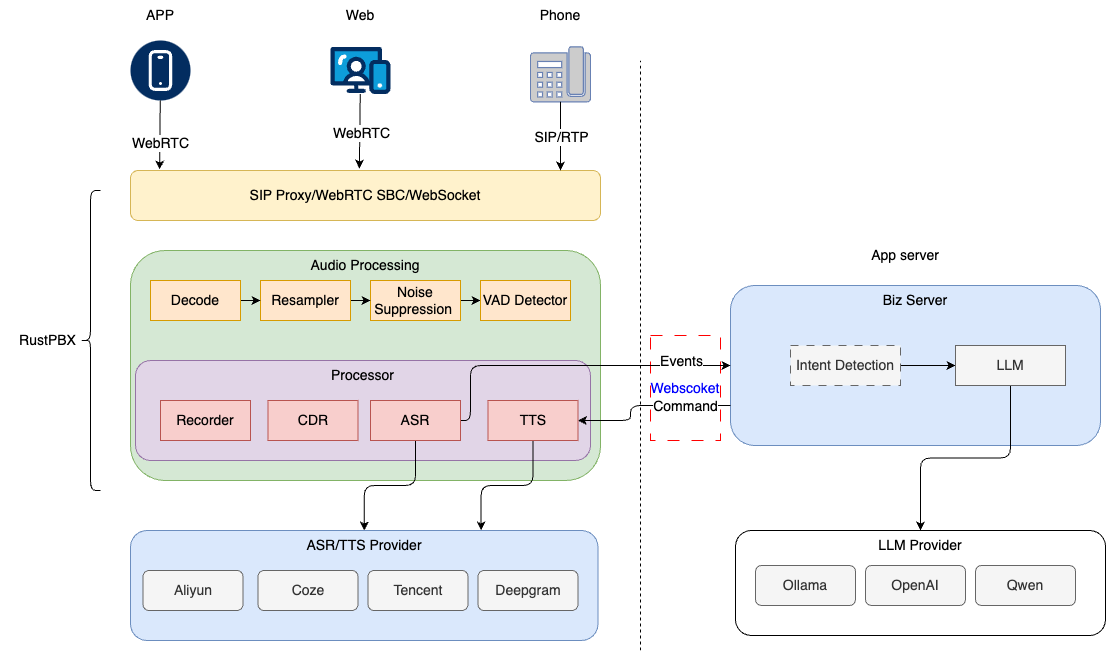
- [Architecture Design](./a%20decoupled%20architecture%20for%20AI%20Voice%20Agent%20en.md) - System architecture overview
- [WebRTC and SIP Integration](./how%20webrtc%20work%20with%20sip(en).md) - Technical implementation details
---
## FAQ
### Q: How to choose which calling method to use?
- **Browser applications** → Use WebRTC (`/call/webrtc`)
- **Telephony network integration** → Use SIP (`/call/sip`)
- **Custom apps/WeChat mini-programs** → Use WebSocket (`/call`)
- **Receiving phone calls** → Configure SIP registration and inbound handler
### Q: How to configure behind NAT?
Set `external_ip` to your public IP address, and open the corresponding ports on your firewall:
- HTTP/WebSocket: 8080 (or custom)
- SIP: 13050 (or custom)
- RTP: 20000-30000 (or custom range)
### Q: How to implement call load balancing?
Deploy a load balancer (e.g., Nginx, HAProxy) in front of Active Call, noting:
- WebSocket connections need Upgrade support
- SIP and RTP use UDP protocol, requiring special handling
- Recommend using source IP hash for session affinity
### Q: Which audio codecs are supported?
- **WebRTC**: PCM, Opus, PCMA, PCMU, G722
- **SIP**: PCM, PCMA, PCMU, G722
- **WebSocket**: PCM, PCMA, PCMU, G722
### Q: How to debug configuration issues?
1. Set `log_level = "debug"` for detailed logs
2. Use `log_file` to output logs to a file
3. Check firewall and network configuration
4. Use SIP debugging tools (e.g., sngrep) to view SIP signaling