# Active Call
[](https://crates.io/crates/active-call)
[](https://crates.io/crates/active-call)
[](https://github.com/miuda-ai/active-call/commits/main)
[](https://opensource.org/licenses/MIT)
`active-call` is a standalone Rust crate for building AI Voice Agents. It provides high-performance infrastructure bridging AI models with real-world telephony and web communications.
## Key Capabilities
### 1. Multi-Protocol Audio Gateway
- **SIP (Telephony)**: UDP, TCP, TLS (SIPS), WebSocket. Register as extension to FreeSWITCH / Asterisk / [RustPBX](https://github.com/restsend/rustpbx), or handle direct SIP calls. PSTN via [Twilio](./docs/twilio_integration.md) and [Telnyx](./docs/telnyx_integration.md).
- **WebRTC**: Browser-to-agent SRTP. *(Requires HTTPS or 127.0.0.1)*
- **Voice over WebSocket**: Push raw PCM/encoded audio, receive real-time events.
### 2. Dual-Engine Dialogue
- **Traditional Pipeline**: VAD → ASR → LLM → TTS. Supports OpenAI, Aliyun, Azure, Tencent, Deepgram and more.
- **Realtime Streaming**: Native OpenAI/Azure Realtime API — full-duplex, ultra-low latency.
- **Audio Processing**: Built-in noise reduction (nnnoiseless), WebRTC AGC2 automatic gain control, configurable interruption strategy with filler-word filtering.
### 3. Playbook — Stateful Voice Agents
Define personas, scenes, and flows in Markdown files with rich config:
```markdown
---
asr:
provider: "sensevoice"
tts:
provider: "supertonic"
speaker: "F1"
llm:
provider: "openai"
model: "${OPENAI_MODEL}"
apiKey: "${OPENAI_API_KEY}"
features: ["intent_clarification", "emotion_resonance"]
dtmf:
"0": { action: "hangup" }
dtmfCollectors:
order_number:
description: "Collect order number"
maxDigits: 6
finishKey: "#"
timeout: 15
interruption:
strategy: "both"
fillerWordFilter: true
agc: {}
denoise: true
ringbackDetection:
enabled: true
sip:
extractHeaders: ["X-Customer-Id"]
posthook:
url: "https://api.example.com/webhook"
summary: "detailed"
---
# Scene: greeting
<dtmf digit="1" action="goto" scene="tech_support" />
<dtmf digit="2" action="transfer" target="sip:billing@domain.com" />
You are a friendly AI for {{ company_name }}. Greet the caller warmly.
To look up info: <http url="https://api.example.com/user/{{ sip["X-Customer-Id"] }}" />
To collect order: <collect type="order_number" var="order_id" prompt="Please enter your 6-digit order number." />
To send metadata: <message body="order={{ order_id }}" />
# Scene: tech_support
How can I help with your system? I can transfer you: <refer to="sip:human@domain.com" />
To search knowledge base: <http url="https://kb.example.com/search" body='{"q":"{{ caller }}"}' method="POST" />
```
- `${VAR}` = environment variables (config-time). `{{var}}` = runtime variables (per-call).
- Built-in vars: `{{ session_id }}`, `{{ call_type }}`, `{{ caller }}`, `{{ callee }}`, `{{ start_time }}`
- SIP header access: `{{ sip["X-Header-Name"] }}`
- Scene-level `<collect>` triggers DTMF digit collection; results stored as `{{ var }}`.
- `<set_var key="k" value="v" />` and `<http url="..." />` extend LLM capabilities at runtime.
### 4. Offline AI (Privacy-First)
Run ASR and TTS locally — no cloud API required:
- **Offline ASR**: [SenseVoice](https://github.com/FunAudioLLM/SenseVoice) — zh, en, ja, ko, yue
- **Offline TTS**: [Supertonic](https://github.com/supertone-inc/supertonic) — en, ko, es, pt, fr
```bash
# Download models
docker run --rm -v $(pwd)/data/models:/models \
ghcr.io/miuda-ai/active-call:latest \
--download-models all --models-dir /models --exit-after-download
# Run with offline models
docker run -d --net host \
-v $(pwd)/data/models:/app/models \
-v $(pwd)/config:/app/config \
ghcr.io/miuda-ai/active-call:latest
```
> **Mainland China**: Add `-e HF_ENDPOINT=https://hf-mirror.com` to use the HuggingFace mirror.
### 5. High-Performance Media Core
| **TinySilero** | ~60 ms | 0.0010 | >2.5× faster ONNX |
| **ONNX Silero** | ~158 ms | 0.0026 | Standard baseline |
| **WebRTC VAD** | ~3 ms | 0.00005| Legacy |
Codec support: PCM16, G.711 (PCMU/PCMA), G.722, Opus.
### 6. Audio Processing
| **Denoise** | nnnoiseless-based real-time noise reduction |
| **AGC** | WebRTC AGC2 adaptive gain control |
| **Ambiance** | Background audio mixing with ducking |
| **Interruption** | Configurable VAD/ASR/None strategy + fade-out |
### 7. Call Management
- **Bridge/Unbridge**: Bidirectional audio patching between two active calls (media only, no SIP signaling).
- **Pause/Resume**: Pause/resume server-side TTS or file playback.
- **Mute/Unmute**: Mute/unmute specific audio tracks.
- **Graceful Shutdown**: Waits for active calls to finish naturally before exit.
## Quick Start
```bash
# Webhook handler
./active-call --handler https://example.com/webhook
# Playbook handler
./active-call --handler config/playbook/greeting.md
# Outbound SIP call
./active-call --call sip:1001@127.0.0.1:5060 --handler greeting.md
# With external IP and codecs
./active-call --handler default.md --external-ip 1.2.3.4 --codecs pcmu,pcma,opus
```
### Docker
```bash
docker run -d --net host \
--name active-call \
-v $(pwd)/config.toml:/app/config.toml:ro \
-v $(pwd)/config:/app/config \
ghcr.io/miuda-ai/active-call:latest
```
### Playbook Handler Routing
```toml
[handler]
type = "playbook"
default = "greeting.md"
[[handler.rules]]
caller = "^\\+1\\d{10}$"
callee = "^sip:support@.*"
playbook = "support.md"
[[handler.rules]]
caller = "^\\+86\\d+"
playbook = "chinese.md"
```
## SIP Carrier Integration
### TLS + SRTP (Required by Twilio)
```toml
tls_port = 5061
tls_cert_file = "./certs/cert.pem"
tls_key_file = "./certs/key.pem"
enable_srtp = true
```
- [Twilio Elastic SIP Trunking Guide](./docs/twilio_integration.md)
- [Telnyx SIP Trunking Guide](./docs/telnyx_integration.md)
## Feature Flags
| **offline** (default) | `--features offline` | SenseVoice ASR + Supertonic TTS |
| **cross** | `--features cross` | offline + AWS-LC bindgen (cross-compile) |
| **ringback-detection** | `--features ringback-detection` | Ringback tone detection |
| **opus** | `--features opus` | Opus codec support |
| **not_vad** | `--no-default-features` | Exclude VAD (for external VAD) |
```bash
cargo build --release
cargo build --release --features ringback-detection,opus
```
## Building from Source
```bash
# rustc may require extra stack when compiling certain crates
export RUST_MIN_STACK=16777216
cargo build --release
```
Or add to your shell profile:
```bash
echo 'export RUST_MIN_STACK=16777216' >> ~/.bashrc
```
## Environment Variables
```bash
# OpenAI / Azure
OPENAI_API_KEY=sk-...
AZURE_OPENAI_API_KEY=...
AZURE_OPENAI_ENDPOINT=https://your-resource.openai.azure.com/
# Aliyun DashScope
DASHSCOPE_API_KEY=sk-...
# Tencent Cloud
TENCENT_APPID=...
TENCENT_SECRET_ID=...
TENCENT_SECRET_KEY=...
# Deepgram
DEEPGRAM_API_KEY=...
# Offline models
OFFLINE_MODELS_DIR=/path/to/models
```
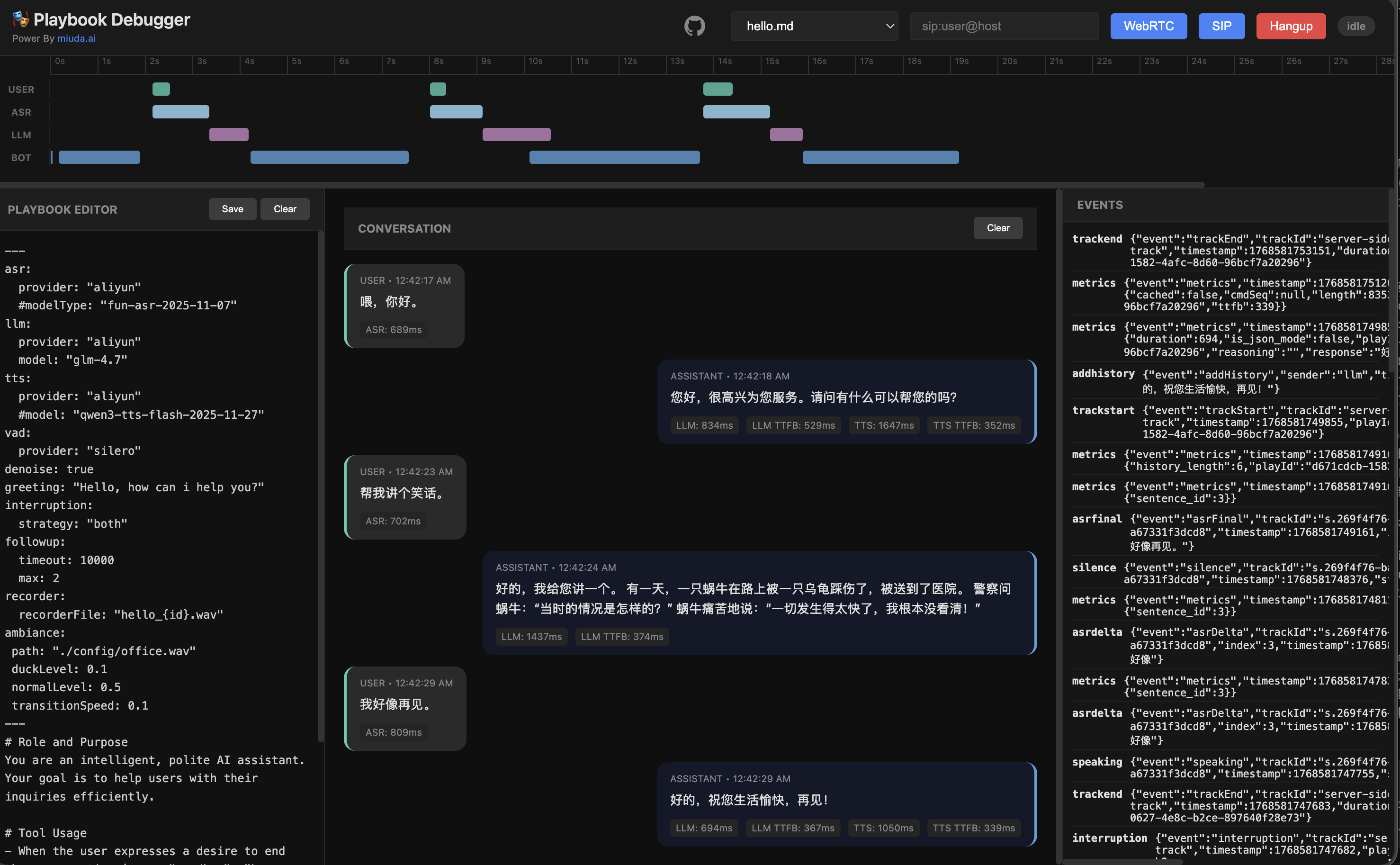
## Demo
## REST API
| GET | `/call` | WebSocket call handler |
| GET | `/call/webrtc` | WebRTC call handler |
| GET | `/call/sip` | SIP call handler |
| GET | `/list` | List all active calls |
| GET | `/kill/{id}` | Force-terminate an active call |
| GET | `/events/{id}` | SSE event stream for a call |
| POST | `/command/{id}` | Send command to an active call |
| POST | `/precache` | Pre-generate TTS audio to cache |
| GET | `/iceservers` | ICE server configuration for WebRTC |
| GET | `/api/playbooks` | List available playbooks |
| GET | `/api/playbooks/{name}` | Get playbook content |
| POST | `/api/playbooks/{name}` | Save/update a playbook |
| POST | `/api/playbook/run` | Associate a playbook with a new session |
| GET | `/api/records` | List call event records |
| GET | `/` | Serve built-in web client |
Full command/event reference → [API Documentation](./docs/api.md)
## SDKs
- **Go**: [rustpbxgo](https://github.com/restsend/rustpbxgo) — Official Go client
## Documentation
| **English** | [Docs Hub](./docs/en/README.md) · [API Reference](./docs/api.md) · [Config Guide](./docs/en/config_guide.md) · [Playbook Tutorial](./docs/en/playbook_tutorial.md) · [Advanced Features](./docs/en/playbook_advanced_features.md) |
| **中文** | [文档中心](./docs/zh/README.md) · [API 文档](./docs/api.md) · [配置指南](./docs/zh/config_guide.md) · [Playbook 教程](./docs/zh/playbook_tutorial.md) · [高级特性](./docs/zh/playbook_advanced_features.md) |
## License
MIT — see [LICENSE](./LICENSE)