# Realtime API Playbook Example

This example demonstrates how to configure a Playbook to use the OpenAI Realtime API instead of the traditional serial ASR-LLM-TTS pipeline.

## 1. Playbook Configuration

In your Playbook YAML or Markdown Front Matter, you can specify the `realtime` configuration.

```yaml
title: "Realtime Voice Agent"
voice: "alloy"
prompt: |
  You are a helpful assistant. You speak in a natural, conversational tone.
  If the user asks for a transfer, call the `transfer_call` tool.

realtime:
  provider: "openai"
  model: "gpt-4o-realtime-preview-2024-10-01"
  # Optional: API key can be set here or via environment variable OPENAI_API_KEY
  api_key: "${OPENAI_API_KEY}"
  # Advanced settings
  turn_detection:
    type: "server_vad"
    threshold: 0.5
    prefix_padding_ms: 300
    silence_duration_ms: 500
  tools:
    - name: "transfer_call"
      description: "Transfer the call to another department"
      parameters:
        type: "object"
        properties:
          department:
            type: "string"
            enum: ["sales", "support"]
```

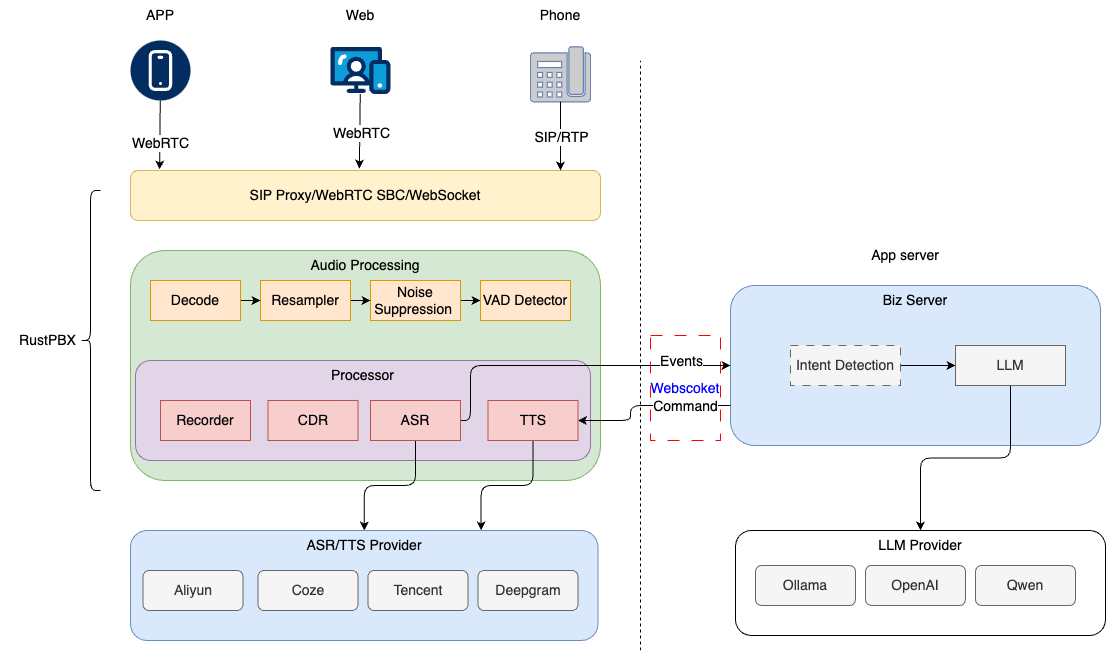
## 2. Architecture Comparison

### Traditional Pipeline
User Audio -> `VadProcessor` -> `AsrProcessor` -> `LLM` -> `TtsProcessor` -> Agent Audio

### Realtime Pipeline
User Audio -> `RealtimeProcessor` (WebSocket) -> OpenAI Realtime -> `RealtimeProcessor` -> Agent Audio

## 3. Key Benefits

- **Ultra-low latency**: No waiting for full sentence ASR or full sentence TTS synthesis.
- **Natural interruptions**: The server-side VAD can stop the agent immediately when the user starts speaking.
- **Emotional nuance**: The model hears the user's tone and responds with corresponding emotion in its voice.

## 4. Implementation Details

When `realtime` is enabled in the Playbook:
1. The `StreamEngine` will skip adding `VadProcessor` and `AsrProcessor`.
2. It will add a `RealtimeProcessor` to the `ProcessorChain`.
3. The `RealtimeProcessor` will manage the WebSocket connection to OpenAI/Azure.
4. Incoming audio frames are sent as `input_audio_buffer.append`.
5. Received audio deltas are enqueued for playback in the `MediaStream`.