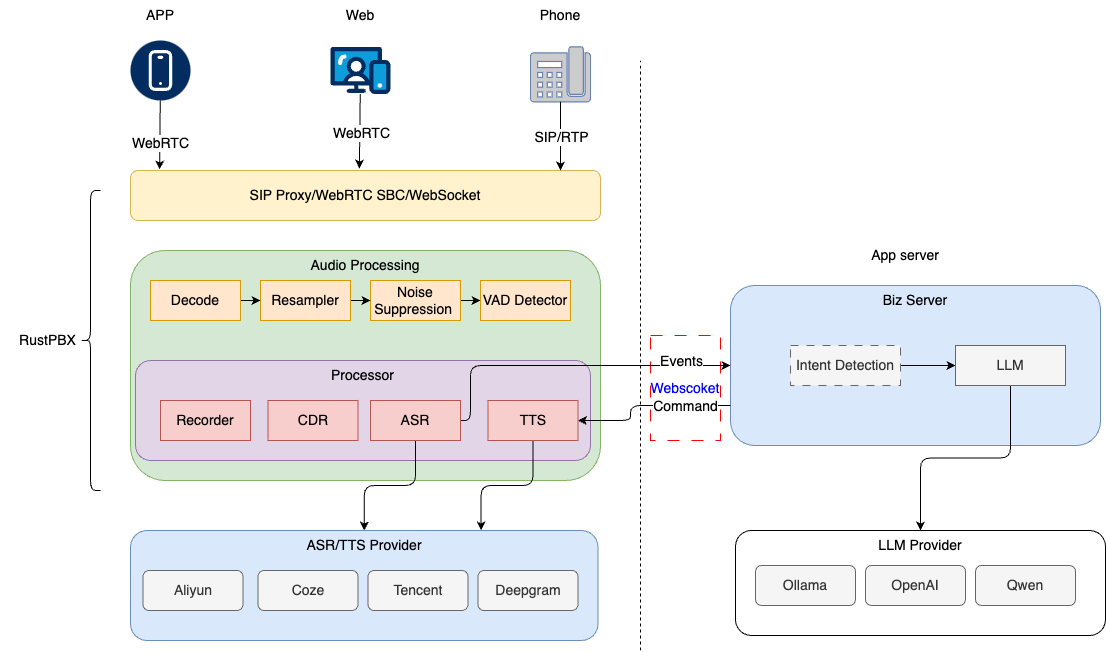
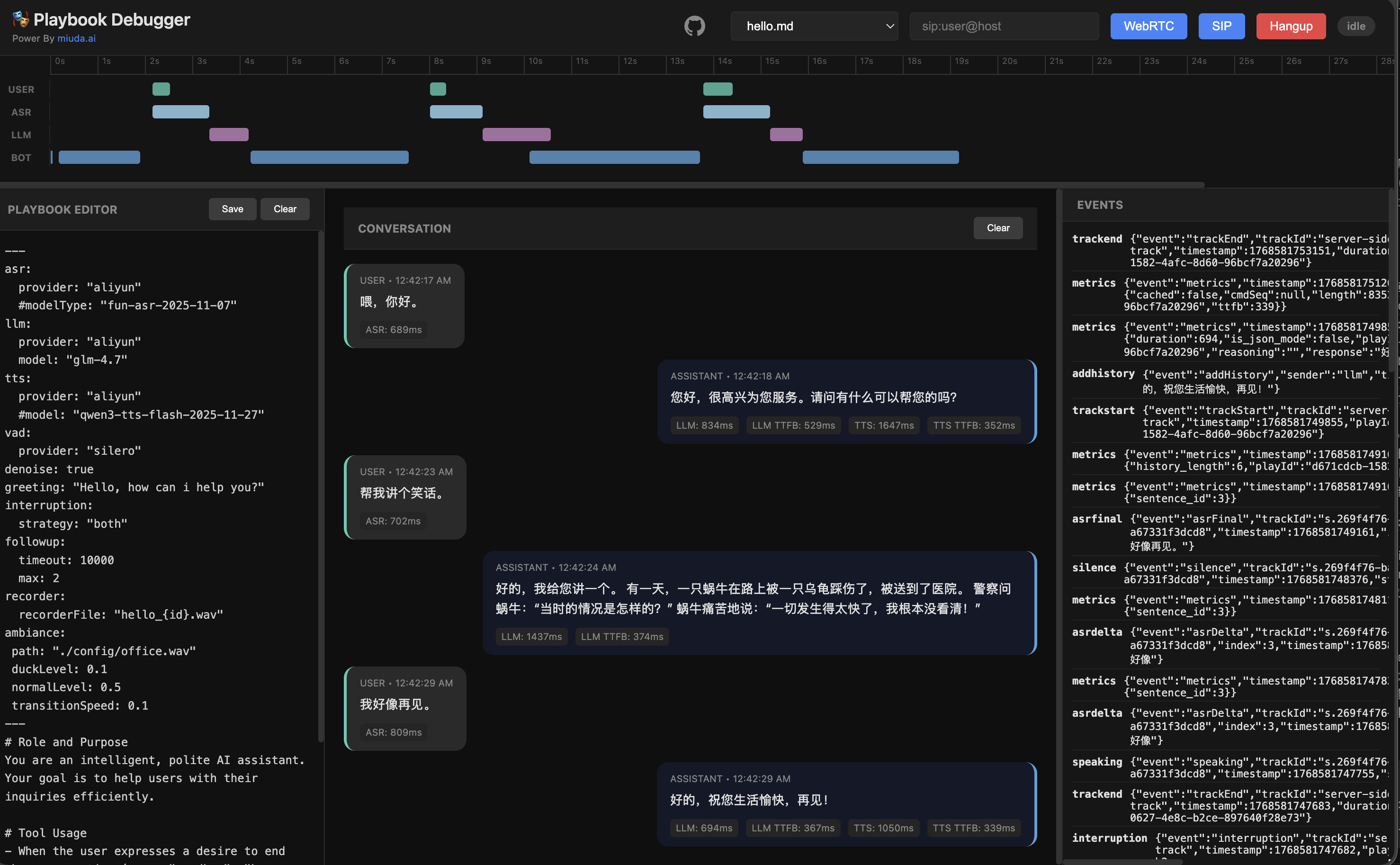
# Playbook Advanced Features Guide
This document covers advanced features in the Active-Call Playbook system, including environment variable support, SIP Headers extraction, variable management, and HTTP calls.
## Table of Contents
- [Environment Variables (Universal)](#environment-variables-universal)
- [SIP Headers Extraction](#sip-headers-extraction)
- [Variable Management (`<set_var>`)](#variable-management-set_var)
- [HTTP External Calls (`<http>`)](#http-external-calls-http)
- [SIP BYE Headers Customization](#sip-bye-headers-customization)
- [Complete Workflow Example](#complete-workflow-example)
---
## Environment Variables (Universal)
### ✨ New Feature: All Config Fields Support `${VAR_NAME}` Syntax
Starting from v0.3.37+, **all Playbook configuration fields** support environment variable template syntax.
### Syntax
```yaml
# String fields
provider: "${MY_PROVIDER}"
api_key: "${OPENAI_API_KEY}"
# Numeric fields (no quotes needed)
speed: ${TTS_SPEED}
temperature: ${LLM_TEMPERATURE}
max_tokens: ${LLM_MAX_TOKENS}
# Nested fields
base_url: "${OPENAI_BASE_URL}"
language: "${ASR_LANGUAGE}"
```
### Example
```yaml
---
asr:
provider: "${ASR_PROVIDER}" # sensevoice, tencent, aliyun
language: "${ASR_LANGUAGE}" # zh, en, auto
tts:
provider: "${TTS_PROVIDER}" # supertonic, cosyvoice
speaker: "${TTS_SPEAKER}" # F1, M1, M2, F2
speed: ${TTS_SPEED} # 0.8, 1.0, 1.2
llm:
provider: "${LLM_PROVIDER}" # openai, azure, dashscope
model: "${LLM_MODEL}" # gpt-4o, gpt-4o-mini
apiKey: "${LLM_API_KEY}"
baseUrl: "${LLM_BASE_URL}"
temperature: ${LLM_TEMPERATURE} # 0.0 - 2.0
max_tokens: ${LLM_MAX_TOKENS} # integer
---
```
### Benefits
1. **Security**: API keys never committed to repository
2. **Flexibility**: Same playbook, different configs per environment
3. **Dynamic**: Switch models, languages at runtime
4. **Universal**: Works for all field types (strings, numbers, nested objects)
### Fallback Behavior
- If environment variable is undefined, `${VAR_NAME}` is kept as-is
- YAML parser may fail if required field has invalid value
- Best practice: Always set required environment variables
### Complete Example
See: [Environment Variables Example](../config/playbook/env_vars_example.md)
### ⚠️ Difference from Runtime Variables `{{var}}`
**Important**: `${VAR}` and `{{var}}` are two **different capabilities** that don't conflict!
| `${VAR}` | Environment vars | Playbook load (static) | YAML config | System env vars |
| `{{var}}` | Runtime vars | During conversation (dynamic) | Prompt text | SIP Headers, set_var |
**Example**:
```markdown
---
# Config uses ${VAR} - read from environment
llm:
apiKey: "${OPENAI_API_KEY}" # ← Replaced at load time
model: "${LLM_MODEL}"
sip:
extract_headers:
- "X-Customer-Name"
---
# Prompt uses {{var}} - replaced at runtime
# Scene: main
Hello, {{X-Customer-Name}}! # ← Different for each call
```
**Detailed comparison**: See [Template Syntax Comparison](template_syntax_comparison.en.md)
---
## SIP Headers Extraction
### 1. Configure Extraction Rules
Specify which SIP Headers to extract in the Playbook YAML config:
```yaml
---
sip:
extract_headers:
- "X-CID" # Customer ID
- "X-Session-Type" # Session type
- "X-Agent-ID" # Agent ID
llm:
provider: "aliyun"
model: "qwen-turbo"
---
```
### 2. Use in Playbook
Extracted Headers are automatically injected into the Playbook's variable context. Since Header names typically contain hyphens (like `X-Customer-ID`), and Jinja2 interprets hyphens as subtraction operators, you must use **dictionary access syntax**:
```markdown
Hello! Your customer ID is {{ sip["X-CID"] }}.
Session type: {{ sip["X-Session-Type"] }}.
```
**Key Points**:
- ✅ **Recommended**: `{{ sip["X-Header-Name"] }}` - Use `sip` dictionary access for variables with hyphens
- ❌ **Wrong**: `{{ X-Header-Name }}` - Will be parsed as `X minus Header minus Name`, causing errors
- 📋 **sip Dictionary Scope**: Contains only SIP Headers (variables starting with `X-` or `x-`)
- ✅ **Regular Variables**: For variables without hyphens (like `customer_id`), you can use `{{ customer_id }}` directly
### 3. LLM Access
LLM can access these variables through system messages (automatically injected into context):
```
User: What's my customer ID?
LLM: According to our records, your customer ID is {{ sip["X-CID"] }}.
```
### 4. Using set_var to Update SIP Headers
During conversation, LLM can use `<set_var>` to dynamically set or update individual SIP Headers:
```markdown
LLM: Your ticket has been created <set_var key="X-Ticket-ID" value="TKT-12345" />
LLM: Call rating is excellent <set_var key="X-Call-Rating" value="excellent" />
```
These set headers will:
- Be immediately written to `ActiveCall.extras`
- Be available in `render_sip_headers` for BYE requests
- Be referenceable in subsequent templates
### 5. BYE Headers Rendering
At hangup, you can configure `hangup_headers` templates that access all variables (including both SIP headers and regular variables):
```yaml
---
sip:
extract_headers:
- "X-Customer-ID"
hangup_headers:
X-Call-Result: "{{ call_result }}" # Regular variable
X-Customer: "{{ sip[\"X-Customer-ID\"] }}" # SIP Header
X-Agent: "{{ agent_name }}" # Regular variable
---
```
Set variables during conversation:
```markdown
<set_var key="call_result" value="successful" />
<set_var key="agent_name" value="Alice" />
```
### 6. Advanced: Regex Validation
Use regex patterns to validate and extract specific formats:
```yaml
sip:
extract_headers:
- name: "X-Phone"
pattern: "^\\d{11}$" # 11-digit phone number
- name: "X-Order-ID"
pattern: "^ORD-\\d{8}$" # Format: ORD-12345678
```
**Invalid headers are automatically ignored**, preventing malformed data from entering the system.
---
## Built-in Session Variables
The system automatically injects a set of built-in variables into `ActiveCall.extras` when a call is established. These can be used in prompts and templates without manual setup.
### Variable List
| `session_id` | Unique call session identifier | `"abc123-def456"` |
| `call_type` | Call type | `"sip"` / `"websocket"` / `"webrtc"` / `"b2bua"` |
| `caller` | Caller SIP URI | `"sip:13800138000@domain.com"` |
| `callee` | Callee SIP URI | `"sip:10086@domain.com"` |
| `start_time` | Call start time (RFC 3339 format) | `"2025-01-15T10:30:00+08:00"` |
### Usage in Prompts
```markdown
# Scene: main
Session ID: {{ session_id }}
Call type: {{ call_type }}
Start time: {{ start_time }}
Caller: {{ caller }}
Callee: {{ callee }}
```
### Notes
- Built-in variables use `entry().or_insert_with()` pattern, so they **won't override** externally passed variables with the same name
- `caller` and `callee` are only available for SIP calls
- All built-in variables can be used in prompts via dynamic rendering during scene switches
---
## Dynamic Scene Prompt Rendering
### Problem Background
In multi-scene Playbooks, prompt templates are rendered when the Playbook loads (`{{var}}` gets replaced). This means variables set via `<set_var>` during conversation **cannot** be referenced in other scene prompts.
**Example**:
```markdown
# Scene: collect_info
Please collect the user's intent.
# Scene: confirm
The user's intent is: {{ intent }} ← intent doesn't exist at load time, renders to empty
```
### Solution
Starting from v0.3.38, the system supports **dynamic scene prompt rendering**:
1. When parsing the Playbook, the original template is preserved in `Scene.raw_prompt`
2. Each time a scene switch occurs (`<goto>`), the prompt is re-rendered using current variables from `extras`
3. On render failure, the system falls back to the existing prompt, ensuring uninterrupted conversation
### Usage Example
```markdown
---
sip:
extract_headers:
- "X-Jobid"
llm:
provider: "openai"
model: "gpt-4o"
---
# Scene: collect
You are an intent collection assistant.
Please collect the user's purchase intent. After collection, output <set_var key="intent" value="user intent" /> then output <goto scene="confirm" />
# Scene: confirm
You are a confirmation assistant.
Job ID: {{ sip["X-Jobid"] }}
Session ID: {{ session_id }}
User intent: {{ intent }}
Please confirm the above information with the user.
```
**Execution Flow**:
1. Call starts, enters `collect` scene
2. LLM collects info and executes `<set_var key="intent" value="buy snacks" />`
3. LLM outputs `<goto scene="confirm" />`
4. System switches scene, reads `confirm` scene's `raw_prompt`, re-renders with current extras (including `intent="buy snacks"`, `session_id`, etc.)
5. `confirm` scene's prompt becomes: "User intent: buy snacks", "Session ID: abc123"
### Supported Variable Types
All variable types are available during dynamic rendering:
| `<set_var>` variables | `{{ intent }}` | Variables set during conversation |
| SIP Headers | `{{ sip["X-Jobid"] }}` | Accessed via sip dictionary |
| Built-in variables | `{{ session_id }}` | Auto-injected by system |
### Error Handling
- Referencing non-existent variables renders as empty string (MiniJinja default behavior)
- Template syntax errors fall back to the existing prompt without interrupting the call
- Render failures are logged with details for troubleshooting
---
## Variable Management (`<set_var>`)
### Purpose
The `<set_var>` tag allows LLM to **dynamically set variables** during conversations for:
- Recording user inputs (name, phone, address)
- Storing API responses
- Managing conversation state
- Passing data between scenes
### Syntax
```xml
<set_var key="variable_name" value="variable_value" />
```
**Supports both single and double quotes**:
```xml
<set_var key="user_name" value="John Doe" />
<set_var key='user_email' value='john@example.com' />
<set_var key="order_id" value='ORD-12345' />
```
### Usage Examples
#### 1. Basic Information Collection
```markdown
# Scene: collect_info
Please provide your name for registration.
[After user responds]
<set_var key="user_name" value="Zhang San" />
Thank you, Zhang San! Now please provide your phone number.
<set_var key="user_phone" value="13800138000" />
```
#### 2. JSON Values
```xml
<set_var key="user_data" value='{"name":"Zhang San","age":25,"city":"Beijing"}' />
```
#### 3. State Management
```xml
<set_var key="verification_passed" value="true" />
<set_var key="retry_count" value="2" />
<set_var key="current_step" value="payment" />
```
### Access Variables
Variables set by `<set_var>` can be accessed later:
```markdown
Hello again, {{user_name}}!
Your verification status: {{verification_passed}}
```
### System Processing
1. **LLM generates** `<set_var>` tags in response
2. **System extracts** and stores in state
3. **Variables available** in subsequent prompts via `{{var}}`
4. **Can be used** in BYE headers or webhooks
---
## HTTP External Calls (`<http>`)
### Purpose
The `<http>` tag enables LLM to call external APIs for:
- Customer data lookup
- Order status queries
- Business system integration
- Real-time information retrieval
### Syntax
```xml
<http url="..." method="GET" set_var="response_data" />
```
### Parameters
- **url** (required): API endpoint URL
- **method** (required): HTTP method (`GET` or `POST`)
- **body** (optional): Request body for POST requests (JSON format)
- **set_var** (optional): Store response in a variable
### Usage Examples
#### 1. GET Request - Customer Lookup
```markdown
# Scene: customer_service
Let me check your account information...
<http url="https://api.example.com/customers/{{ sip[\"X-CID\"] }}" method="GET" />
[System receives response and continues]
```
#### 2. POST Request - Create Order
```xml
<http
url="https://api.example.com/orders"
method="POST"
body='{"customer_id":"{{ sip[\"X-CID\"] }}","product":"widget","quantity":1}'
/>
```
#### 3. Store Response in Variable
```xml
<http
url="https://api.example.com/user/{{user_id}}"
method="GET"
set_var="user_info"
/>
Customer details: {{user_info}}
```
### Response Handling
**Automatic injection**: HTTP responses are injected into conversation history as system messages:
```
Assistant: <http url="..." method="GET" />
System: HTTP Response: {"status":"active","balance":1000,"vip_level":"gold"}
Assistant: Your account is active with a balance of 1000, gold VIP level!
```
**Response format**: `HTTP Response: <response_body>`
### Error Handling
- Network errors are logged but don't interrupt the call
- LLM can continue conversation even if API call fails
- Timeout: 10 seconds (configurable)
### Security Considerations
- Only call trusted APIs
- Validate response data
- Don't expose sensitive information in URLs
- Use HTTPS for production
---
## SIP BYE Headers Customization
### Purpose
Add custom headers to SIP BYE requests when call ends, useful for:
- Passing conversation summary to PBX
- Recording call results
- Triggering downstream workflows
- CDR enrichment
### Configuration
```yaml
---
sip:
bye_headers:
- name: "X-Call-Result"
value: "{{call_result}}"
- name: "X-Customer-Satisfied"
value: "{{customer_satisfied}}"
- name: "X-Order-ID"
value: "{{order_id}}"
---
```
### How It Works
1. **During conversation**: Variables set via `<set_var>` or extracted from SIP headers
2. **Call ends**: System renders BYE headers using Jinja2
3. **BYE request sent**: Headers included in SIP BYE message
4. **PBX receives**: Custom headers available for processing
### Complete Example
```markdown
---
sip:
extract_headers:
- "X-CID"
bye_headers:
- name: "X-Customer-ID"
value: "{{ sip[\"X-CID\"] }}"
- name: "X-Call-Result"
value: "{{call_result}}"
- name: "X-User-Confirmed"
value: "{{user_confirmed}}"
llm:
provider: "openai"
---
# Scene: main
Hello! Your customer ID is {{ sip["X-CID"] }}.
[Collect information...]
<set_var key="user_confirmed" value="true" />
<set_var key="call_result" value="success" />
Thank you for calling!
```
**BYE request will include**:
```
BYE sip:user@domain SIP/2.0
X-Customer-ID: C12345
X-Call-Result: success
X-User-Confirmed: true
```
---
## Complete Workflow Example
### Scenario: Customer Service with CRM Integration
```markdown
---
# Configuration
asr:
provider: "${ASR_PROVIDER}"
language: "${ASR_LANGUAGE}"
tts:
provider: "${TTS_PROVIDER}"
speaker: "${TTS_SPEAKER}"
speed: ${TTS_SPEED}
llm:
provider: "${LLM_PROVIDER}"
model: "${LLM_MODEL}"
apiKey: "${LLM_API_KEY}"
temperature: ${LLM_TEMPERATURE}
sip:
extract_headers:
- "X-Customer-ID"
- "X-Customer-Name"
- "X-Call-Source"
bye_headers:
- name: "X-Call-Result"
value: "{{call_result}}"
- name: "X-Issue-Resolved"
value: "{{issue_resolved}}"
- name: "X-Follow-Up-Required"
value: "{{follow_up_required}}"
posthook:
url: "${WEBHOOK_URL}"
summary: "detailed"
---
# Scene: greeting
Hello {{ sip["X-Customer-Name"] }}! Your customer ID is {{ sip["X-Customer-ID"] }}.
I see you're calling from {{ sip["X-Call-Source"] }}.
How can I help you today?
# Scene: verify_account
Let me verify your account information...
<http
url="https://crm.example.com/api/customers/{{ sip[\"X-Customer-ID\"] }}"
method="GET"
set_var="customer_info"
/>
I've pulled up your account. You have {{customer_info.active_orders}} active orders.
# Scene: resolve_issue
[Conversation continues...]
<set_var key="issue_type" value="billing" />
<set_var key="issue_resolved" value="true" />
<set_var key="call_result" value="success" />
# Scene: create_ticket
Let me create a follow-up ticket for you...
<http
url="https://crm.example.com/api/tickets"
method="POST"
body='{"customer_id":"{{ sip[\"X-Customer-ID\"] }}","issue":"{{issue_type}}","priority":"normal"}'
set_var="ticket_response"
/>
Your ticket number is {{ticket_response.ticket_id}}.
<set_var key="follow_up_required" value="true" />
# Scene: farewell
Thank you for calling! Have a great day!
```
### Workflow Steps
1. **Call Starts**
- Extract SIP headers: `X-Customer-ID`, `X-Customer-Name`
- Variables available: `{{ sip["X-Customer-ID"] }}`, `{{ sip["X-Customer-Name"] }}`
2. **Account Verification**
- HTTP GET to CRM API
- Response stored in `{{customer_info}}`
- Access nested data: `{{customer_info.active_orders}}`
3. **Issue Resolution**
- Set variables: `issue_type`, `issue_resolved`, `call_result`
- Variables track conversation state
4. **Ticket Creation**
- HTTP POST with request body
- Use previously set variables in body
- Store ticket ID in `{{ticket_response.ticket_id}}`
5. **Call Ends**
- BYE headers rendered with final variable values
- Webhook called with conversation summary
- All data available for downstream processing
### Environment Variables Setup
```bash
# .env file
ASR_PROVIDER=sensevoice
ASR_LANGUAGE=zh
TTS_PROVIDER=supertonic
TTS_SPEAKER=F1
TTS_SPEED=1.0
LLM_PROVIDER=openai
LLM_MODEL=gpt-4o-mini
LLM_API_KEY=sk-xxx
LLM_TEMPERATURE=0.7
WEBHOOK_URL=https://webhook.example.com/call-summary
```
---
## Best Practices
### 1. Variable Naming
- Use descriptive names: `user_phone` not `p1`
- Follow convention: `snake_case` for variables
- Prefix by type: `api_response_`, `user_`, `system_`
### 2. Error Handling
- Assume HTTP calls may fail
- Don't block conversation on API responses
- Provide fallback messages
### 3. Security
- Never log sensitive data (passwords, payment info)
- Use `${VAR}` for API keys, not hardcode
- Validate all user inputs before API calls
### 4. Performance
- Minimize HTTP calls
- Cache frequently accessed data
- Use async operations when possible
### 5. Testing
- Test with missing environment variables
- Verify SIP header extraction
- Validate HTTP endpoint responses
- Check BYE header rendering
---
## Troubleshooting
### Issue: Variables not replaced
**Problem**: `{{var}}` appears literally in output
**Solutions**:
- Ensure variable is set before use
- Check variable name spelling
- Verify SIP header was extracted
- Confirm `<set_var>` executed successfully
### Issue: HTTP calls timeout
**Problem**: API calls take too long
**Solutions**:
- Check network connectivity
- Verify API endpoint is accessible
- Increase timeout in config
- Use faster API endpoints
### Issue: Environment variables not expanded
**Problem**: `${VAR}` not replaced in config
**Solutions**:
- Verify environment variable is set: `echo $VAR_NAME`
- Check variable name matches exactly
- Ensure quotes around string values
- Reload playbook after changing env vars
### Issue: BYE headers not included
**Problem**: Custom headers missing in BYE request
**Solutions**:
- Verify `bye_headers` syntax in YAML
- Check variable values are set
- Ensure call completes normally (not error/timeout)
- Review SIP logs
---
## Additional Resources
- [Environment Variables Example](../config/playbook/env_vars_example.md) - Complete env var guide
- [Simple CRM Example](../config/playbook/simple_crm.md) - Basic integration pattern
- [Webhook Example](../config/playbook/webhook_example.md) - HTTP webhook patterns
- [Advanced Example](../config/playbook/advanced_example.md) - Production-ready playbook
- [Template Syntax Comparison](template_syntax_comparison.en.md) - `${VAR}` vs `{{var}}`
---
## Version History
- **v0.3.38**: Built-in session variables (session_id, call_type, caller, callee, start_time); Dynamic scene prompt rendering (set_var variables applied to prompts on scene switch)
- **v0.3.37**: Universal `${VAR_NAME}` support for all config fields
- **v0.3.36**: Added `<http>` response injection
- **v0.3.35**: SIP BYE headers customization
- **v0.3.34**: `<set_var>` single/double quote support
- **v0.3.30**: Initial SIP headers extraction
---
**Questions or issues?** Check the main [README](../README.md) or [Configuration Guide](config_guide.en.md).