# Active Call
`active-call` is a standalone Rust crate designed for building AI Voice Agents. It provides a high-performance infrastructure for bridging AI models with real-word telephony and web communications.
## 📖 Documentation
For comprehensive guides and tutorials, visit:
- **[Documentation Hub](./docs/README.md)** - Complete documentation index
- **[Configuration Guide](./docs/config_guide.en.md)** - Detailed configuration for all call scenarios
- **[配置指南(中文)](./docs/config_guide.zh.md)** - 完整的中文配置指南
- **[API Documentation](./docs/api.md)** - WebSocket API reference
- **[Playbook Tutorial](./docs/playbook_tutorial.en.md)** - Building stateful voice agents
## Key Capabilities
### 1. Multi-Protocol Audio Gateway
`active-call` supports a wide range of communication protocols, ensuring compatibility with both legacy and modern systems:
- **SIP (Telephony)**: Supports standard SIP signaling. Can act as a **SIP Client/Extension** to register with PBX systems like **[RustPBX](https://github.com/restsend/rustpbx)**, **FreeSWITCH** or **Asterisk**, or handle direct SIP incoming/outgoing calls.
- **WebRTC**: Direct browser-to-agent communication with low-latency SRTP.
- **Voice over WebSocket**: A highly flexible API for custom integrations. Push raw PCM/encoded audio over WebSocket and receive real-time events.
### 2. Dual-Engine Dialogue Support
Choose the pipeline that fits your latency and cost requirements:
- **Traditional Serial Pipeline**: Integrated **VAD → ASR → LLM → TTS** flow. Supports various providers (OpenAI, Aliyun, Azure, Tencent) with optimized buffering and endpoints.
- **Realtime Streaming Pipeline**: Native support for **OpenAI/Azure Realtime API**. True full-duplex conversational AI with ultra-low latency, server-side VAD, and emotional nuance.
### 3. Playbook: The Best Practice for Dialogue
The **Playbook** system is our recommended way to build complex, stateful voice agents:
- **Markdown-Driven**: Define personas, instructions, and flows in readable Markdown files.
- **Stateful Scenes**: Manage conversation stages with easy transitions (`Scene` switching).
- **Tool Integration**: Built-in support for DTMF, SIP Refer (Transfer), and custom Function Calling.
- **Advanced Interaction**: Smart interruptions, filler word filtering, background ambiance, and automated post-call summaries via Webhooks.
### 4. High-Performance Media Core
- **Low-Latency VAD**: Includes **TinySilero** (optimized Rust implementation), significantly faster than standard ONNX models.
- **Flexible Processing Chain**: Easily add noise reduction, echo cancellation, or custom audio processors.
- **Codec Support**: PCM16, G.711 (PCMU/PCMA), G.722, and Opus.
### 5. Offline AI Capabilities (NEW)
**Privacy-First & Cost-Effective**: Run ASR and TTS locally without cloud APIs
- **Offline ASR**: [SenseVoice](https://github.com/FunAudioLLM/SenseVoice) multi-language speech recognition (Chinese, English, Japanese, Korean, Cantonese)
- **Offline TTS**: [Supertonic](https://github.com/supertone-inc/supertonic) high-quality multi-lingual text-to-speech (English, Korean, Spanish, Portuguese, French)
- **Zero Latency Penalty**: Global singleton ONNX sessions shared across all calls
- **Easy Setup**: One-command model download from HuggingFace
- **No API Keys**: Perfect for on-premise deployments and GDPR compliance
#### Quick Start with Offline Models
We recommend using Docker to run `active-call` with offline models. The easiest way is to download the models first using a temporary container.
**1. Download Models**
```bash
# Create a local directory for models
mkdir -p $(pwd)/data/models
# Download all models (SenseVoice & Supertonic)
docker run --rm \
-v $(pwd)/data/models:/models \
ghcr.io/restsend/active-call:latest \
--download-models all --models-dir /models
```
> **Note for users in Mainland China**:
> If you experience slow downloads from HuggingFace, you can use the mirror site by setting the `HF_ENDPOINT` environment variable:
> ```bash
> docker run --rm \
> -e HF_ENDPOINT=https://hf-mirror.com \
> -v $(pwd)/data/models:/models \
> ghcr.io/restsend/active-call:latest \
> --download-models all --models-dir /models
> ```
**2. Run with Models Mounted**
Once downloaded, mount the models directory when running the service:
```bash
docker run -d \
-p 8080:8080 \
-p 13050:13050/udp \
-v $(pwd)/data/models:/app/models \
-v $(pwd)/config:/app/config \
ghcr.io/restsend/active-call:latest
```
#### Configuration
```yaml
# In your playbook .md file
---
asr:
provider: "sensevoice" # Offline ASR
language: "zh" # auto, zh, en, ja, ko, yue
tts:
provider: "supertonic" # Offline TTS
speaker: "M1" # M1, M2, F1, F2
speed: 1.0
language: "en" # en, ko, es, pt, fr
vad:
provider: "silero" # Uses built-in TinySilero
---
```
**Benefits:**
- 🔒 **Privacy**: All audio processing happens locally
- 💰 **Cost**: No per-minute API charges
- 🚀 **Performance**: Single model instance shared across calls
- 🌍 **Offline**: Works without internet connection
- 📦 **Self-Contained**: ~500MB model files, no external dependencies
## Protocol Flexibility
### Voice over WebSocket
For developers who need full control, `active-call` provides a raw audio-over-websocket interface. This is ideal for custom web apps or integration with existing AI pipelines where you want to handle the audio stream manually.
### SIP PBX Integration
`active-call` can be integrated into existing corporate telephony:
- **As an Extension**: Register `active-call` to your [RustPBX](https://github.com/restsend/rustpbx), FreeSWITCH or Asterisk PBX like any other VoIP phone. AI agents can then receive calls from internal extensions or external trunks.
- **As a Trunk**: Handle incoming SIP traffic directly from carriers.
### SIP Invitation Handlers
`active-call` provides flexible handling of incoming SIP invitations through configurable handlers:
#### Quick CLI Configuration
For rapid setup without editing config files, use the `--handler` CLI parameter:
```bash
# Webhook handler
./active-call --handler https://example.com/webhook
# Playbook handler (default playbook)
./active-call --handler default.md
```
The handler type is automatically detected:
- URLs starting with `http://` or `https://` become **Webhook handlers**
- Files ending with `.md` become **Playbook handlers** (set as default)
#### Webhook Handler
Forward incoming SIP invitations to an HTTP endpoint for custom call routing logic:
```toml
[handler]
type = "webhook"
url = "http://localhost:8090/webhook"
method = "POST"
```
#### Playbook Handler
Automatically route calls to specific playbooks based on caller/callee patterns using regex matching:
```toml
[handler]
type = "playbook"
default = "default.md" # Optional: fallback when no rules match
[[handler.rules]]
caller = "^\\+1\\d{10}$" # Match US numbers
callee = "^sip:support@.*" # Match support line
playbook = "support.md" # Use support playbook
[[handler.rules]]
caller = "^\\+86\\d+" # Match Chinese numbers
playbook = "chinese.md" # Language-specific playbook
[[handler.rules]]
callee = "^sip:sales@.*" # Match sales line
playbook = "sales.md" # Use sales playbook
```
**How it works:**
- Rules are evaluated in order from top to bottom
- Each rule can specify `caller` and/or `callee` regex patterns
- Both patterns must match for the rule to apply (omitted patterns match any value)
- The first matching rule determines which playbook to use
- If no rules match and no default is set, the call is rejected
- Playbook files should be placed in the `config/playbook/` directory
**Use cases:**
- Route calls from different regions to language-specific agents
- Direct calls to different departments based on the dialed number
- Provide specialized handling for VIP customers based on caller ID
- Implement time-based routing with multiple handler configurations
### SIP Call with Playbook Example
Here's a complete example of setting up `active-call` to handle incoming SIP calls with playbooks:
#### 1. Create a Playbook File
Create `config/playbook/greeting.md`:
```markdown
---
asr:
provider: "openai"
tts:
provider: "openai"
voice: "alloy"
llm:
provider: "openai"
model: "gpt-4o-mini"
---
# Scene: greeting
You are a friendly AI assistant. Greet the caller warmly and ask how you can help them today.
```
#### 2. Configure the Handler
Option A: Using CLI (Quick Start):
```bash
# Start with playbook handler
./active-call --handler config/playbook/greeting.md --sip 0.0.0.0:5060
```
Option B: Using Configuration File (`config.toml`):
```toml
[handler]
type = "playbook"
default = "greeting.md"
# Optional: Add routing rules
[[handler.rules]]
callee = "^sip:sales@.*"
playbook = "sales.md"
[[handler.rules]]
callee = "^sip:support@.*"
playbook = "support.md"
```
#### 3. Make a SIP Call
Using any SIP client (like linphone, zoiper, or sipbot):
```bash
# Using pjsua (PJSIP command line tool)
pjsua --use-ice --null-audio sip:agent@your-server-ip:5060
# Or using sipbot (for testing)
sipbot -target sip:agent@your-server-ip:5060 -duration 30
```
#### 4. What Happens
1. `active-call` receives the SIP INVITE
2. Playbook handler matches the call (by rules or default)
3. Validates that the playbook file exists
4. Accepts the SIP call and establishes RTP media
5. Loads and runs the playbook
6. AI agent converses with the caller
7. Call ends when either party hangs up
#### 5. Monitoring
Check logs to see the call flow:
```bash
RUST_LOG=info ./active-call --handler greeting.md
# You'll see:
# INFO active_call::useragent::playbook_handler: matched playbook for invite
# INFO active_call::handler::handler: Playbook runner started for greeting.md
# INFO active_call::handler::handler: new call started
```
#### Error Handling
If the playbook file doesn't exist:
- The handler validates the file before accepting the SIP call
- Sends `503 Service Unavailable` response to the caller
- Logs: `Playbook file not found, rejecting SIP call`
This prevents accepting calls that can't be properly handled.
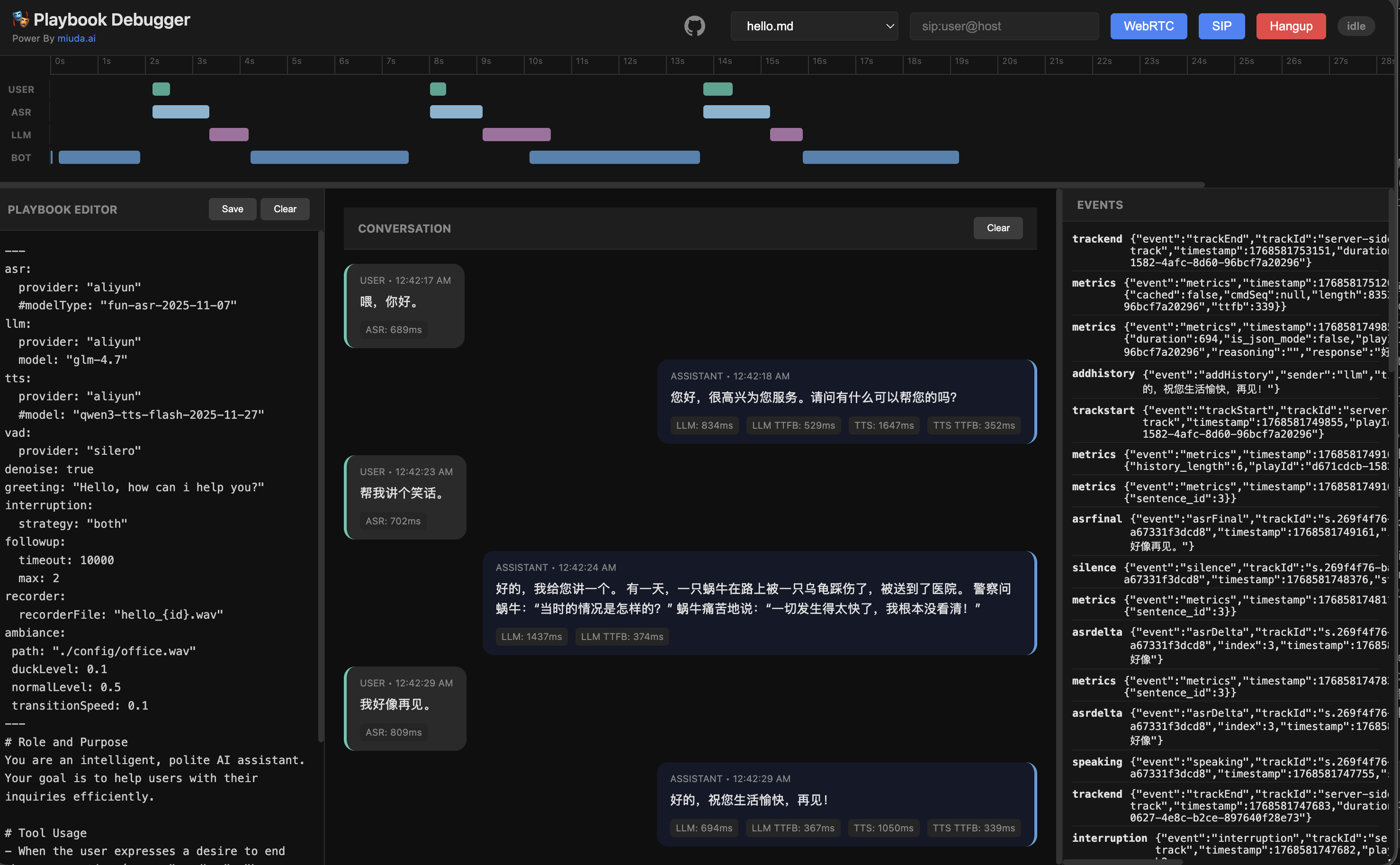
## Playbook Demo
## VAD Performance
Benchmarked on 60 seconds of 16kHz audio (Release mode):
| **TinySilero** | Rust (Optimized) | ~60.0 ms | 0.0010 | >2.5x faster than ONNX |
| **ONNX Silero** | ONNX Runtime | ~158.3 ms | 0.0026 | Standard baseline |
| **WebRTC VAD** | C/C++ (Bind) | ~3.1 ms | 0.00005 | Legacy, less accurate |
## API Documentation
For detailed information on REST endpoints and WebSocket protocols, please refer to the [API Documentation](docs/api.md).
## SDKs
- **Go SDK**: [rustpbxgo](https://github.com/restsend/rustpbxgo) - Official Go client for building voice applications with `active-call`.
## Dialogue Features
`active-call` provides a rich set of features for building natural and responsive voice agents:
- **Scene Management (Playbook)**:
- **Markdown-based configuration**: Define agent behavior using simple Markdown files.
- **Multiple Scenes**: Split long conversations into manageable stages (Scenes) using `# Scene: name` headers.
- **Dynamic Variables**: Supports `{{ variable }}` syntax using [minijinja](https://github.com/mitsuhiko/minijinja) for personalized prompts.
- **LLM Integration**: Streaming responses with configurable prompts and tool-like tags.
- **Background Ambiance**: Supports looping background audio (e.g., office noise) with auto-ducking during conversation.
- **Follow-up**: Automatically follow up with the user after a period of silence (e.g., "Are you still there?").
- **DTMF Support**: Standard IVR functionality. Define global or scene-specific keypress actions (jump to scene, transfer call, or hang up).
- **Pre-recorded Audio**: Play fixed audio files (`.wav`/`.pcm`) by adding `<play file="path/to/audio.wav" />` at the beginning of a scene.
- **Post-hook & Summary**: Automatically generate conversation summaries and send them to a Webhook URL after the call ends. Supports multiple summary templates:
- `short`: One or two sentence summary.
- `detailed`: Comprehensive summary with key points and decisions.
- `intent`: Extracted user intent.
- `json`: Structured JSON summary.
- `custom`: Fully custom summary prompt.
- **Built-in Feature Snippets**: Enhances agent capabilities with ready-to-use, multi-language prompt snippets. Support includes:
- `intent_clarification`: Automatically guides the LLM to ask for clarification when user intent is ambiguous.
- `emotion_resonance`: Enables the LLM to sense and respond to user emotions (anger, joy, etc.) with empathy.
- `voice_emotion`: Instructs the LLM to generate emotion tags (e.g., `[happy]`) to drive expressive TTS.
- **Multi-language**: Snippets are automatically translated based on the `language` setting (`zh` or `en`).
- **Advanced Voice Interaction**:
- **Smart Interruption**: Multiple strategies (`vad`, `asr`, or `both`), filler word filtering, and protection periods.
- **Graceful Interruption**: Supports audio fade-out instead of hard cuts when the user starts speaking.
- **EOU (End of Utterance) Optimization**: Starts LLM inference as soon as silence is detected, before ASR final results are ready.
## Playbook Configuration
Playbooks are defined in Markdown files with YAML frontmatter. The frontmatter configures the voice capabilities, while the body defines the agent's persona and instructions.
### Example
```markdown
---
asr:
provider: "openai"
tts:
provider: "openai"
llm:
provider: "openai"
model: "gpt-4-turbo"
language: "zh"
features: ["intent_clarification", "emotion_resonance"]
dtmf:
"0": { action: "hangup" }
followup:
timeout: 10000
max: 3
posthook:
url: "https://api.example.com/webhook"
summary: "detailed"
includeHistory: true
---
# Scene: greeting
<dtmf digit="1" action="goto" scene="tech_support" />
You are a friendly AI for {{ company_name }}.
Greet the caller and ask if they need technical support (Press 1) or billing help.
# Scene: tech_support
You are now in tech support. How can I help with your system?
To speak to a human, I can transfer you: <refer to="sip:human@domain.com" />
```
### Configuration Reference
| **asr** | `provider` | Provider name (e.g., `aliyun`, `openai`, `tencent`). |
| **tts** | `provider` | Provider name. |
| **llm** | `provider` | LLM Provider. |
| | `model` | Model name (e.g., `gpt-4`, `qwen-plus`). |
| | `language` | Language code for built-in snippets (`zh` or `en`). |
| | `features` | List of enabled feature snippets (e.g., `["intent_clarification", "voice_emotion"]`). |
| **dtmf** | `digit` | Mapping of keys (0-9, *, #) to actions. |
| | `action` | `goto` (scene), `transfer` (SIP), or `hangup`. |
| **interruption** | `strategy` | `both`, `vad`, `asr`, or `none`. |
| | `fillerWordFilter` | Enable filler word filtering (true/false). |
| **vad** | `provider` | VAD provider (e.g., `silero`). |
| **realtime** | `provider` | `openai` or `azure`. Enable low-latency streaming pipeline. |
| | `model` | Specific realtime model (e.g., `gpt-4o-realtime`). |
| **ambiance** | `path` | Path to background audio file. |
| | `duckLevel` | Volume level when agent is speaking (0.0-1.0). |
| **followup** | `timeout` | Silence timeout in ms before triggering follow-up. |
| | `max` | Maximum number of follow-up attempts. |
| **recorder** | `recorderFile` | Path template for recording (e.g., `call_{id}.wav`). |
| **denoise** | - | Enable/Disable noise suppression (true/false). |
| **greeting** | - | Initial greeting message. |
## Docker Usage
### Pull the Image
```bash
docker pull ghcr.io/restsend/active-call:latest
```
### Configuration
Copy the example config and customize it:
```bash
cp active-call.example.toml config.toml
```
### Run with Docker
```bash
docker run -d \
--name active-call \
-p 8080:8080 \
-p 13050:13050/udp \
-v $(pwd)/config.toml:/app/config.toml:ro \
-v $(pwd)/config:/app/config \
-v $(pwd)/models:/app/models \
ghcr.io/restsend/active-call:latest
```
### CLI Options
You can override configuration with CLI parameters:
```bash
docker run -d \
--name active-call \
-p 8080:8080 \
-p 13050:13050/udp \
-v $(pwd)/config:/app/config \
ghcr.io/restsend/active-call:latest \
--http 0.0.0.0:8080 \
--sip 0.0.0.0:13050 \
--handler https://api.example.com/webhook
```
Supported CLI options:
- `--conf <path>`: Path to config file
- `--http <addr:port>`: HTTP server address
- `--sip <addr:port>`: SIP server address
- `--handler <url|file.md>`: Quick handler setup (webhook URL or playbook file)
### Environment Variables
Active-call supports various environment variables for configuration. If you have API keys or credentials, save them in an `.env` file:
#### Cloud Provider Credentials
```bash
# OpenAI/Azure OpenAI
OPENAI_API_KEY=sk-...
AZURE_OPENAI_API_KEY=your_azure_key
AZURE_OPENAI_ENDPOINT=https://your-resource.openai.azure.com/
# Aliyun (DashScope)
DASHSCOPE_API_KEY=sk-...
# Tencent Cloud
TENCENT_APPID=your_app_id
TENCENT_SECRET_ID=your_secret_id
TENCENT_SECRET_KEY=your_secret_key
```
#### LLM Provider Defaults
When `llm.provider` is specified in playbooks, active-call automatically reads default API keys from environment:
- **openai**: Reads `OPENAI_API_KEY`
- **azure**: Reads `AZURE_OPENAI_API_KEY` and `AZURE_OPENAI_ENDPOINT`
- **dashscope** (Aliyun): Reads `DASHSCOPE_API_KEY`
- **tencent**: Reads `TENCENT_APPID`, `TENCENT_SECRET_ID`, `TENCENT_SECRET_KEY`
#### Offline Model Configuration
```bash
# Model directory (default: ./models)
OFFLINE_MODELS_DIR=/path/to/models
# HuggingFace Hub settings (optional)
HF_ENDPOINT=https://hf-mirror.com # Use mirror if needed
HF_MIRROR=https://hf-mirror.com
```
#### Docker Usage
Mount your `.env` file when running containers:
```bash
docker run -d \
--name active-call \
-p 8080:8080 -p 5060:5060/udp \
-v $(pwd)/.env:/app/.env \
-v $(pwd)/config:/app/config \
-v $(pwd)/models:/app/models \
active-call:latest
```
### Port Range
Use small range `20000-20100` for local development, bigger range like `20000-30000`, or host network for production.
## License
This project is licensed under the MIT License.