# Active Call
`active-call` is a standalone Rust crate designed for building AI Voice Agents. It provides a high-performance infrastructure for bridging AI models with real-word telephony and web communications.
## Key Capabilities
### 1. Multi-Protocol Audio Gateway
`active-call` supports a wide range of communication protocols, ensuring compatibility with both legacy and modern systems:
- **SIP (Telephony)**: Supports standard SIP signaling. Can act as a **SIP Client/Extension** to register with PBX systems like **FreeSWITCH** or **Asterisk**, or handle direct SIP incoming/outgoing calls.
- **WebRTC**: Direct browser-to-agent communication with low-latency SRTP.
- **Voice over WebSocket**: A highly flexible API for custom integrations. Push raw PCM/encoded audio over WebSocket and receive real-time events.
### 2. Dual-Engine Dialogue Support
Choose the pipeline that fits your latency and cost requirements:
- **Traditional Serial Pipeline**: Integrated **VAD → ASR → LLM → TTS** flow. Supports various providers (OpenAI, Aliyun, Azure, Tencent) with optimized buffering and endpoints.
- **Realtime Streaming Pipeline**: Native support for **OpenAI/Azure Realtime API**. True full-duplex conversational AI with ultra-low latency, server-side VAD, and emotional nuance.
### 3. Playbook: The Best Practice for Dialogue
The **Playbook** system is our recommended way to build complex, stateful voice agents:
- **Markdown-Driven**: Define personas, instructions, and flows in readable Markdown files.
- **Stateful Scenes**: Manage conversation stages with easy transitions (`Scene` switching).
- **Tool Integration**: Built-in support for DTMF, SIP Refer (Transfer), and custom Function Calling.
- **Advanced Interaction**: Smart interruptions, filler word filtering, background ambiance, and automated post-call summaries via Webhooks.
### 4. High-Performance Media Core
- **Low-Latency VAD**: Includes **TinySilero** (optimized Rust implementation), significantly faster than standard ONNX models.
- **Flexible Processing Chain**: Easily add noise reduction, echo cancellation, or custom audio processors.
- **Codec Support**: PCM16, G.711 (PCMU/PCMA), G.722, and Opus.
## Protocol Flexibility
### Voice over WebSocket
For developers who need full control, `active-call` provides a raw audio-over-websocket interface. This is ideal for custom web apps or integration with existing AI pipelines where you want to handle the audio stream manually.
### SIP PBX Integration
`active-call` can be integrated into existing corporate telephony:
- **As an Extension**: Register `active-call` to your FreeSWITCH or Asterisk PBX like any other VoIP phone. AI agents can then receive calls from internal extensions or external trunks.
- **As a Trunk**: Handle incoming SIP traffic directly from carriers.
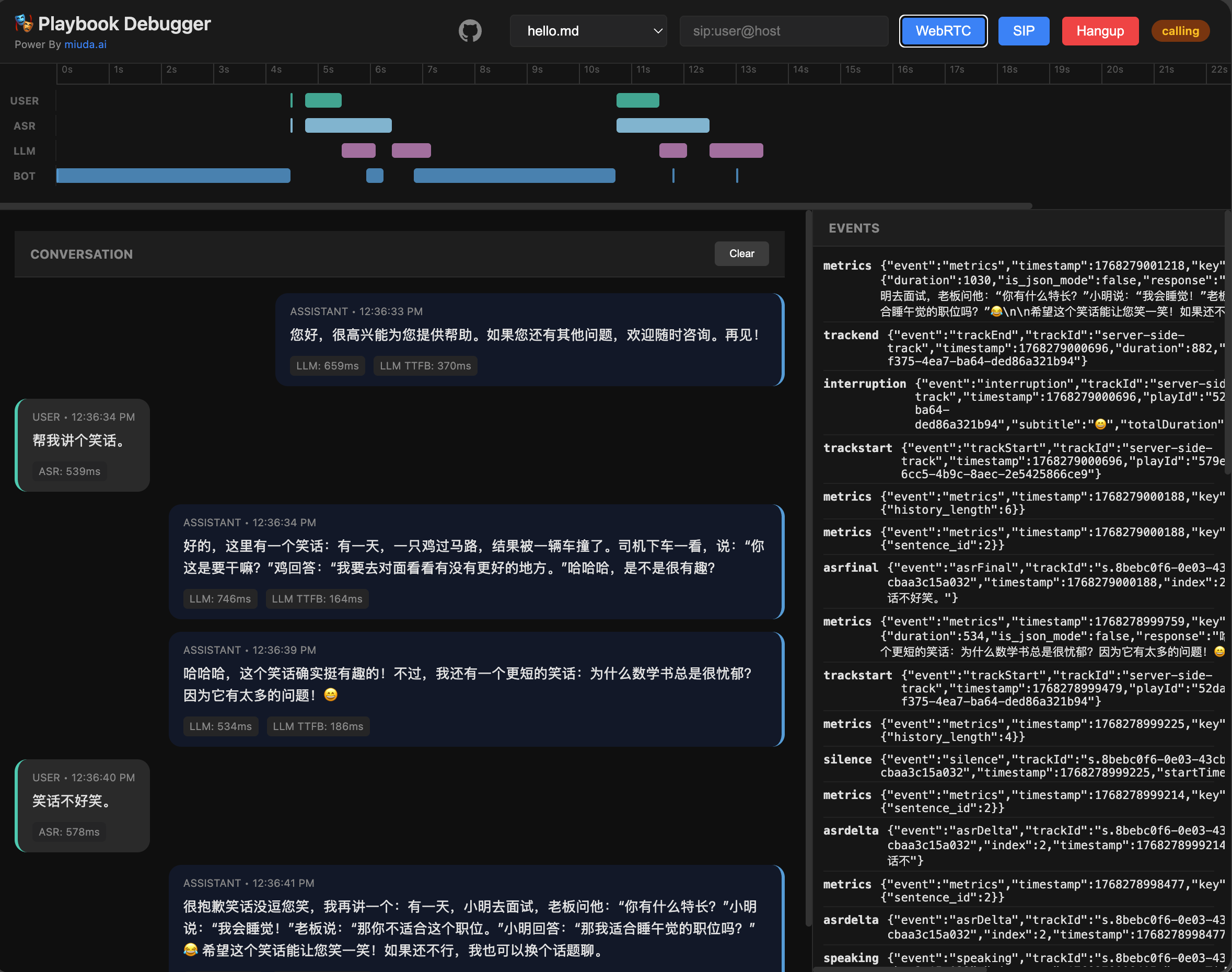
## Playbook Demo
## VAD Performance
Benchmarked on 60 seconds of 16kHz audio (Release mode):
| **TinySilero** | Rust (Optimized) | ~60.0 ms | 0.0010 | >2.5x faster than ONNX |
| **ONNX Silero** | ONNX Runtime | ~158.3 ms | 0.0026 | Standard baseline |
| **WebRTC VAD** | C/C++ (Bind) | ~3.1 ms | 0.00005 | Legacy, less accurate |
## API Documentation
For detailed information on REST endpoints and WebSocket protocols, please refer to the [API Documentation](docs/api.md).
## SDKs
- **Go SDK**: [rustpbxgo](https://github.com/restsend/rustpbxgo) - Official Go client for building voice applications with `active-call`.
## Dialogue Features
`active-call` provides a rich set of features for building natural and responsive voice agents:
- **Scene Management (Playbook)**:
- **Markdown-based configuration**: Define agent behavior using simple Markdown files.
- **Multiple Scenes**: Split long conversations into manageable stages (Scenes) using `# Scene: name` headers.
- **Dynamic Variables**: Supports `{{ variable }}` syntax using [minijinja](https://github.com/mitsuhiko/minijinja) for personalized prompts.
- **LLM Integration**: Streaming responses with configurable prompts and tool-like tags.
- **Background Ambiance**: Supports looping background audio (e.g., office noise) with auto-ducking during conversation.
- **Follow-up**: Automatically follow up with the user after a period of silence (e.g., "Are you still there?").
- **DTMF Support**: Standard IVR functionality. Define global or scene-specific keypress actions (jump to scene, transfer call, or hang up).
- **Pre-recorded Audio**: Play fixed audio files (`.wav`/`.pcm`) by adding `<play file="path/to/audio.wav" />` at the beginning of a scene.
- **Post-hook & Summary**: Automatically generate conversation summaries and send them to a Webhook URL after the call ends. Supports multiple summary templates:
- `short`: One or two sentence summary.
- `detailed`: Comprehensive summary with key points and decisions.
- `intent`: Extracted user intent.
- `json`: Structured JSON summary.
- `custom`: Fully custom summary prompt.
- **Advanced Voice Interaction**:
- **Smart Interruption**: Multiple strategies (`vad`, `asr`, or `both`), filler word filtering, and protection periods.
- **Graceful Interruption**: Supports audio fade-out instead of hard cuts when the user starts speaking.
- **EOU (End of Utterance) Optimization**: Starts LLM inference as soon as silence is detected, before ASR final results are ready.
## Playbook Configuration
Playbooks are defined in Markdown files with YAML frontmatter. The frontmatter configures the voice capabilities, while the body defines the agent's persona and instructions.
### Example
```markdown
---
asr:
provider: "openai"
tts:
provider: "openai"
llm:
provider: "openai"
model: "gpt-4-turbo"
dtmf:
"0": { action: "hangup" }
followup:
timeout: 10000
max: 3
posthook:
url: "https://api.example.com/webhook"
summary: "detailed"
includeHistory: true
---
# Scene: greeting
<dtmf digit="1" action="goto" scene="tech_support" />
You are a friendly AI for {{ company_name }}.
Greet the caller and ask if they need technical support (Press 1) or billing help.
# Scene: tech_support
You are now in tech support. How can I help with your system?
To speak to a human, I can transfer you: <refer to="sip:human@domain.com" />
```
### Configuration Reference
| **asr** | `provider` | Provider name (e.g., `aliyun`, `openai`, `tencent`). |
| **tts** | `provider` | Provider name. |
| **llm** | `provider` | LLM Provider. |
| | `model` | Model name (e.g., `gpt-4`, `qwen-plus`). |
| **dtmf** | `digit` | Mapping of keys (0-9, *, #) to actions. |
| | `action` | `goto` (scene), `transfer` (SIP), or `hangup`. |
| **interruption** | `strategy` | `both`, `vad`, `asr`, or `none`. |
| | `fillerWordFilter` | Enable filler word filtering (true/false). |
| **vad** | `provider` | VAD provider (e.g., `silero`). |
| **realtime** | `provider` | `openai` or `azure`. Enable low-latency streaming pipeline. |
| | `model` | Specific realtime model (e.g., `gpt-4o-realtime`). |
| **ambiance** | `path` | Path to background audio file. |
| | `duckLevel` | Volume level when agent is speaking (0.0-1.0). |
| **followup** | `timeout` | Silence timeout in ms before triggering follow-up. |
| | `max` | Maximum number of follow-up attempts. |
| **recorder** | `recorderFile` | Path template for recording (e.g., `call_{id}.wav`). |
| **denoise** | - | Enable/Disable noise suppression (true/false). |
| **greeting** | - | Initial greeting message. |
## Docker Usage
### Pull the Image
```bash
docker pull ghcr.io/restsend/active-call:latest
```
### Configuration
Copy the example config and customize it:
```bash
cp active-call.example.toml config.toml
```
### Run with Docker
```bash
docker run -d \
--name active-call \
-p 8080:8080 \
-p 13050:13050/udp \
-v $(pwd)/config.toml:/app/config.toml:ro \
-v $(pwd)/config:/app/config \
ghcr.io/restsend/active-call:latest
```
### Environment Variables
If you have API keys, save them in an `.env` file:
```bash
TENCENT_APPID=your_app_id
TENCENT_SECRET_ID=your_secret_id
TENCENT_SECRET_KEY=your_secret_key
DASHSCOPE_API_KEY=your_dashscope_api_key
```
And mount it in the container like :
```bash
-v $(pwd)/.env:/app/.env \
```
### Port Range
Use small range `20000-20100` for local development, bigger range like `20000-30000`, or host network for production.
## License
This project is licensed under the MIT License.