# acme-disk-use
[](https://github.com/blackwhitehere/acme-disk-use/actions/workflows/pipeline.yml)
[](https://crates.io/crates/acme-disk-use)
[](https://docs.rs/acme-disk-use)
[](LICENSE)
> Disclaimer: This is alpha software. Interfaces and cache formats may change without notice.
A replacement for `du` that:
- Caches results of prior runs and invalidates the cache using comparison of a directory's `mtime`
- performs parallel scanning using `rayon`
e.g. a directory of model outputs each writing its output to a new daily data directory
## Features
- **Caching**: Aggregates disk usage stats at directory level and caches results so they can be reused on next invocation if no change to underlying data is found
- **Cache Invalidation**: Scans directories that have changed since last scan based on dir's `mtime` or under which a sub-directory was modified (no matter how nested)
- **Smart Deletion Detection**: Prunes deleted directories from cache without full rescans
- **Human-Readable Output**: Automatically formats sizes in B, KB, MB, GB, or TB
- **Flexible Cache Location**: Configurable via environment variable or defaults to `~/.cache/acme-disk-use/`
## Design Principle
`acme-disk-use` exploits a write pattern where applications write immutable files into incrementally-created nested directories—to dramatically outperform `du` on repeated scans.
### How It Works
**Traditional tools like `du`** traverse the entire directory tree on every invocation, stat-ing and summing every file regardless of whether anything changed. For large trees with hundreds of thousands of files, this becomes prohibitively expensive.
**`acme-disk-use` takes a different approach:**
1. **Per-Directory Caching**: Computes and caches the total disk usage for each directory separately, storing these aggregates in a compact binary cache
2. **Smart Invalidation**: On subsequent runs, checks each directory's modification time (mtime) and presence of new subdirectories to identify what has changed
3. **Selective Re-scanning**: Only re-traverses directories that have been modified or contain new content, reusing cached totals for everything else
4. **Delta Merging**: Combines the freshly computed sizes from changed directories with cached values from stable directories to produce the final total
### Performance Impact
Because immutable-file workloads rarely modify old directories, the vast majority of the tree remains unchanged between scans. This means:
- **Warm-cache runs** skip full I/O and become dominated by fast metadata checks
- **Only changed paths** trigger actual file traversal
- **Cached totals** eliminate redundant work for stable subtrees
The result: `acme-disk-use` with a warm cache is **~10x faster** than `du` on typical workloads (see benchmark results below), since it avoids re-reading files that haven't changed.
## Installation
### From crates.io (Recommended)
Install the latest stable version from [crates.io](https://crates.io/crates/acme-disk-use):
```bash
cargo install acme-disk-use
```
### From GitHub Release
Download pre-built binaries for your platform from the [Releases page](https://github.com/blackwhitehere/acme-disk-use/releases):
**Linux (x86_64):**
```bash
wget https://github.com/blackwhitehere/acme-disk-use/releases/latest/download/acme-disk-use-linux-x86_64
chmod +x acme-disk-use-linux-x86_64
sudo mv acme-disk-use-linux-x86_64 /usr/local/bin/acme-disk-use
```
**macOS (Intel):**
```bash
curl -LO https://github.com/blackwhitehere/acme-disk-use/releases/latest/download/acme-disk-use-macos-x86_64
chmod +x acme-disk-use-macos-x86_64
sudo mv acme-disk-use-macos-x86_64 /usr/local/bin/acme-disk-use
```
**macOS (Apple Silicon):**
```bash
curl -LO https://github.com/blackwhitehere/acme-disk-use/releases/latest/download/acme-disk-use-macos-aarch64
chmod +x acme-disk-use-macos-aarch64
sudo mv acme-disk-use-macos-aarch64 /usr/local/bin/acme-disk-use
```
**Windows:**
Download `acme-disk-use-windows-x86_64.exe` from the releases page and add it to your PATH.
### From Source
Clone the repository and build from source:
```bash
git clone https://github.com/blackwhitehere/acme-disk-use.git
cd acme-disk-use
cargo build --release
# Binary will be at target/release/acme-disk-use
```
### Verify Installation
```bash
acme-disk-use --version
acme-disk-use --help
```
## TODO
- Memory-mapped cache loading for instant startup
- Configurable parallel scanning threshold
- User picks to use logical file size or block size (like du does)
## Usage
### Basic Usage
Scan current directory (output in 1K blocks like `du`):
```bash
acme-disk-use
```
Scan a specific directory:
```bash
acme-disk-use /path/to/directory
```
### Options (du-compatible)
**Human-readable output (`-h`):**
```bash
acme-disk-use -h /path/to/directory
```
**Show raw bytes (`-b`):**
```bash
acme-disk-use -b /path/to/directory
```
**Summarize (`-s`):**
```bash
acme-disk-use -s /path/to/directory
```
**Ignore cache and scan fresh:**
```bash
acme-disk-use --ignore-cache /path/to/directory
```
**Show timing statistics and file count:**
```bash
acme-disk-use --stats /path/to/directory
```
**Clean the cache:**
```bash
acme-disk-use clean
```
**Show help:**
```bash
acme-disk-use --help
```
### Cache Commands
**Display an interactive TUI showing cached directory sizes (similar to ncdu):**
```bash
acme-disk-use cache show
```
**Show a specific cached path:**
```bash
acme-disk-use cache show /path/to/directory
```
### Configuration
**Custom cache location:**
Set the `ACME_DISK_USE_CACHE` environment variable:
```bash
export ACME_DISK_USE_CACHE=/custom/path/to/cache/
acme-disk-use /path/to/directory
```
Or use it inline:
```bash
ACME_DISK_USE_CACHE=/tmp/path/to/cache/ acme-disk-use /path/to/directory
```
**Default cache location:**
- If `ACME_DISK_USE_CACHE` is not set, defaults to `~/.cache/acme-disk-use` on Unix systems
- Falls back to `./cache.bin` if home directory is not available
## Examples
```bash
# Scan data directory (default: 1K blocks like du)
$ acme-disk-use data
1294336data
# Human-readable output (like du -h)
$ acme-disk-use -h data
1.2Gdata
# Show exact byte count (like du -b)
$ acme-disk-use -b data
1342177280data
# Force fresh scan without using cache
$ acme-disk-use --ignore-cache data
1294336data
# Clear all cached data
$ acme-disk-use clean
Cache cleared successfully.
# View cached directory sizes in an interactive TUI
$ acme-disk-use cache show
```
## Benchmark Results
Performance comparison scanning ~220,000 files (nested directory structure):
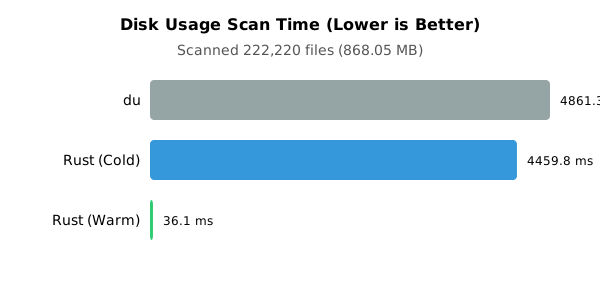
| **Rust (Warm Cache)** | **36.06** | Instant result from cache |
| Rust (Cold Cache) | 4459.78 | Initial scan + cache write |
| du | 4861.26 | Standard traversal |
> Note: Rust (warm cache) is **~135x faster** than `du` in this scenario.
# Development
## Cargo commands
### Check for compile errors:
`cargo check`
### Format files
`cargo fmt`
### Build binaries
`cargo build`
### Run binary
`RUST_LOG=debug cargo run`
### Build documentation
`cargo doc --open`
### Run tests
`cargo test`
### Run benchmarks
Relies on `criterion` library
`cargo bench`
### Profile application
Install `samply`: https://github.com/mstange/samply
`cargo build --profile profiling`
`samply record target/profiling/acme-disk-use`
### Linting
Install `clippy`: `rustup component add clippy`
`cargo clippy --all-targets --all-features -- -D warnings`
## Contributing
We welcome contributions! Please see [CONTRIBUTING.md](CONTRIBUTING.md) for detailed guidelines.
**Quick Start:**
1. Fork the repository
2. Create a feature branch: `git checkout -b feature/your-feature`
3. Make your changes
4. Run tests: `cargo test`
5. Format code: `cargo fmt`
6. Check lints: `cargo clippy --all-targets --all-features -- -D warnings`
7. Commit and push
8. Open a pull request against the `main` branch
## CI/CD
This project uses GitHub Actions for continuous integration and deployment:
- **Unified Pipeline** (`pipeline.yml`): Handles both CI and Releases
- **CI**: Runs on every push to `main` and on pull requests
- ✓ Code formatting check (`cargo fmt`)
- ✓ Linting with clippy (`cargo clippy`)
- ✓ Test suite on Linux and macOS
- **Release**: Triggered by version tags (e.g., `v0.1.0`)
- ✓ Validates version matches Cargo.toml
- ✓ Runs full CI checks
- ✓ Publishes to crates.io
- ✓ Builds binaries for multiple platforms
- ✓ Creates GitHub Release with binaries
**Creating a Release:**
```bash
# Update version in Cargo.toml and CHANGELOG.md
git tag v0.2.0
git push origin main --tags
```
## License
Licensed under the Apache License, Version 2.0. See [LICENSE](LICENSE) for details.
## Acknowledgments
- Built with [Rust](https://www.rust-lang.org/)
- Uses [rayon](https://github.com/rayon-rs/rayon) for parallel processing
- Uses [bincode](https://github.com/bincode-org/bincode) for efficient serialization
- Benchmarking powered by [criterion](https://github.com/bheisler/criterion.rs)