Accepted
===
[](https://crates.io/crates/accepted)
[](https://travis-ci.org/hatoo/Accepted)
[](https://gitter.im/Accepted-text-editor/community?utm_source=badge&utm_medium=badge&utm_campaign=pr-badge&utm_content=badge)
[](https://deps.rs/repo/github/hatoo/Accepted)
[](https://github.com/hatoo/Accepted)
A terminal text editor to be **ACCEPTED**.
## Description
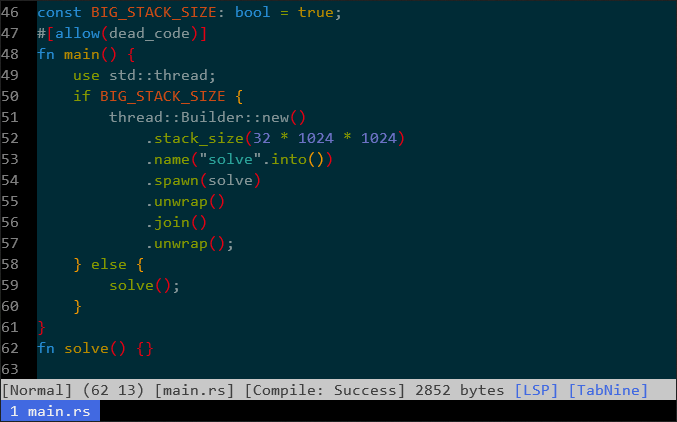
A modal text editor for competitive programmer written with Rust.
Currently Accepted supports Rust and C++.
### Features
* Preconfigured for Rust and C++
* Autoformat with [Rustfmt](https://github.com/rust-lang-nursery/rustfmt) / [ClangFormat](https://clang.llvm.org/docs/ClangFormat.html) / or specify with configuration
* Completion with [TabNine](https://tabnine.com/) / [RLS](https://github.com/rust-lang-nursery/rls) / [Clangd](https://clang.llvm.org/extra/clangd.html) / or Other LSP servers
* Auto compile and show compiler messages (Supports rustc / gcc / clang)
* Easy to test a single a code
* VScode style snippet support
* Mouse support
* rmate protocol
## Install
You need nightly Rust.
```bash
$ cargo install accepted
```
If you want to install `HEAD` version, you can install from git to
```bash
$ cargo install -f --git=https://github.com/hatoo/Accepted
```
### For Rust users
Install rust components.
```
$ rustup component add rls-preview
$ rustup component add rust-src
$ rustup component add rustfmt-preview
```
### For C++ users
Install clang, clang-format and clangd.
# Usage
```
$ acc [file]
```
TODO: More precisely.
## Basic
Many commands of `acc` is same as Vim.
i, I, a, A, o, O to insert mode and Esc to return.
hjkl, w, e, b to move cursor.
y, d, c, v, V works like vim
## Space Prefix
Some of commands can run with space as a prefix.
SPACE -> q to Quit.
SPACE -> s to Save.
SPACE -> a to Save As.
SPACE -> y to Copy all to clipboard
SPACE -> SPACE to Rustfmt.
SPACE -> t to compile and run with clipboard input.
SPACE -> T to compile (optimized) and run with clipboard input.
SPACE -> q to Quit.
SPACE -> r to Start rmate server
## Configuration
You can configure this by toml file placed in `[config_dir]/acc/config.toml`
You can open config file via `$ acc --config` easily.
`config_dir` is defined in [here](https://docs.rs/dirs/1.0.3/dirs/fn.config_dir.html).
Below is default configure.
You can override with your own configure.
```TOML
# Configure to defaults
[file_default]
# Put spaces instead of '\t' when tab key is pressed
hard_tab = false
indent_width = 4
# Set true if you are running in legacy terminal which has no true color
ansi_color = false
# Command for TabNine
tabnine = ["TabNine"]
# Set theme
# You can set either theme name which is bundled by `syntect` and file path for .tmTheme
theme = "Solarized (dark)"
# Configure for *.rs files
[file.rs]
# Setting compiler and its type.
compiler = { command=["rustc", "$FILE_PATH", "--error-format=json"], type="rustc", optimize_option=["-O"] }
# Setting LSP server command
lsp = ["rls"]
# Setting formatter command
formatter = ["rustfmt"]
# Command for testing
test_command = ["./$FILE_STEM"]
[file.cpp]
# Configure for *.cpp files
# Respect clang-format
indent_width = 2
compiler = { command=["clang", "$FILE_PATH", "-o", "$FILE_STEM"], type="gcc", optimize_option=["-O2"] }
lsp = ["clangd"]
formatter = ["clang-format"]
test_command = ["./$FILE_STEM"]
[file.c]
# Same as cpp
indent_width = 2
compiler = { command=["clang", "$FILE_PATH", "-o", "$FILE_STEM"], type="gcc", optimize_option=["-O2"] }
lsp = ["clangd"]
formatter = ["clang-format"]
test_command = ["./$FILE_STEM"]
[file.rb]
indent_width = 2
[file.go]
formatter = ["gofmt"]
hard_tab = true
```
## Contribution
Any kind of contribution including feature request is welcome!!
