# Changelog
All notable changes to this project will be documented in this file.
The format is based on [Keep a Changelog](https://keepachangelog.com/en/1.0.0.html),
and this project adheres to [Semantic Versioning](https://semver.org/spec/v2.0.0.html).
## [1.6.0] - 2026-03-02
### Added
- **Native macOS App (SwiftUI):** Completely redesigned native macOS application with deep system integration.
- URL scheme handlers (`kget://`, `magnet:`)
- File associations (`.torrent` files)
- Menu bar integration with quick actions
- macOS Services menu support
- Native notifications
- Drag-and-drop DMG installer with visual guide (boxes, arrow, instruction text)
- **Improved Cross-Platform GUI:** Major visual overhaul for the egui-based GUI (Linux/Windows).
- Download list with multiple concurrent downloads tracking
- TURBO badge for parallel downloads mode
- ISO badge for ISO files with automatic integrity verification
- Multi-segment progress bar showing parallel connections (C1, C2, C3, C4)
- Verification progress bar with purple theme and shield animation
- Connections indicator (⚡ 4x) for turbo mode
- Real-time speed and ETA display
- Empty state with protocol icons
- One-line URL input with integrated controls
- Compact layout with truncated filenames and URLs
- Proper button sizing and alignment
- **Visual Improvements:**
- Enhanced dark theme with better contrast
- Animated shimmer effects on progress bars
- Status-colored badges and icons
- Improved typography and spacing
- DMG installer background with dark theme, rounded boxes, chevron arrow, and instruction text
- **Native Torrent Client (librqbit):** Built-in BitTorrent support - no external apps needed!
- Magnet link downloads work directly in the GUI
- DHT peer discovery, parallel piece downloading
- Real-time progress with speed and ETA
- Expandable file list showing individual file progress (macOS app)
- Green TORRENT badge in download list
- **Refactored GUI (Linux/Windows):** Complete visual overhaul
- Clean, modern dark theme with consistent color palette
- Responsive layout that adapts to window size
- Smart truncation for long filenames and paths
- Inline folder selector with visual indicator
- Turbo mode and SHA256 verification toggles
- Shimmer animation on progress bars
- Retry button for failed downloads
- Status bar with active/completed counts
- **Cross-Platform Build Script:** `build-cross.sh` for compiling Linux and Windows binaries from macOS
- **Automated Test Suite:** 108+ tests covering torrents, CLI, config, and downloads
- New `tests/torrent_tests.rs` with 42 torrent-specific tests
- `run-tests.sh` script for full test execution
### Changed
- **GUI feature now includes torrent-native:** Building with `--features gui` automatically enables native torrent support
- **Progress calculation:** Fixed weighted progress for multi-file torrents
- **Code quality:** Refactored `gui.rs` from 975 to 780 lines following Clean Code principles
- **Dependencies:** Updated reqwest to 0.13.2 with hickory-dns
### Fixed
- Torrent downloads opening external app instead of downloading in GUI
- Progress bar "spasming" during downloads - now only increases
- DHT persistence lock conflict with `disable_dht_persistence: true`
- Layout overflow issues with long URLs and filenames
### Technical
- Uses `librqbit` 8.1.1 for native BitTorrent protocol
- Session management with `Arc<Session>` for proper cleanup
- JSON output format for torrent file lists and progress
## [1.5.4] - 2026-02-27
### Added
- **macOS App Bundle:** Native `.app` bundle for macOS users with easy drag-and-drop installation.
- **Easier version flag:** Use `kget -v` or `kget --version` to display version (changed from `-V`).
- **Comprehensive test suite:** Added 65+ tests covering unit tests, CLI integration tests, and mock server tests.
- Unit tests for `utils`, `config`, `download`, `optimizer`, `progress`, and URL parsing.
- CLI tests verifying all command-line flags and options.
- Mock server tests using `wiremock` for HTTP download simulation without real network requests.
- **Testing infrastructure:** Added `wiremock`, `assert_cmd`, `predicates`, and `tokio-test` as dev-dependencies.
### Changed
- **Code cleanup:** Resolved all 25 compiler warnings for a cleaner build output.
- **Removed duplicate SFTP stub:** Consolidated SFTP implementation by removing unused `ftp/sftp.rs` file that conflicted with `sftp/mod.rs`.
- **Public API improvements:** Exported `get_filename_from_url_or_default`, `resolve_output_path`, and `print` functions from library root.
### Fixed
- Removed unused imports across multiple modules (`BufWriter`, `Path`, `Read`, `Write`, `Url`, `Session`, `Sftp`, etc.).
- Fixed unnecessary `mut` declarations in `download_whole()`, `download_chunks_parallel()`, and `download_worker()`.
- Prefixed intentionally unused function parameters with `_` (`output_dir`, `quiet`, `proxy`, `optimizer` in torrent module).
- Added `#[allow(dead_code)]` annotations for fields and structs reserved for future use (`TransmissionSettings`, `optimizer` field in downloaders).
## [1.5.3] - 2025-12-23
### Added
- **Torrent backend selection:** magnet links can now be handled by different backends.
- **Default torrent behavior (no extra features):** if the URL is a `magnet:?` link, KGet opens it using the system's default BitTorrent client (automatic detection via OS handler).
- **Optional Transmission RPC backend:** build with `--features torrent-transmission` and set `KGET_TORRENT_BACKEND=transmission` to download via Transmission RPC.
- **Transmission settings helper:** centralized settings for host/port/paths and optional auth (env-compatible).
### Changed
- **GUI footer:** app version is displayed in the bottom-right corner.
- **GUI window sizing:** improved default/min window sizing for a better first launch experience.
### Fixed
- Build fixes and feature-gating improvements for optional components (torrent backends / GUI split).
## [1.5.2] - 2025-12-19
### Added
- **ISO Smart Handling**: Automatic detection of `.iso` files via URL and MIME type.
- **Corruption Prevention**: ISO files now bypass decompression/optimization layers to ensure binary 1:1 integrity.
- **Integrity Verification**: Added optional SHA256 checksum calculation at the end of ISO downloads.
- **Windows Dual Mode**: The application now runs without a console window when launched via Explorer, but automatically attaches to the terminal when run via CLI.
### Fixed
- **Memory & Disk Optimization**: Refactored `AdvancedDownloader` to use streaming writes with `BufWriter`, drastically reducing RAM usage and preventing 100% disk active time issues.
- **Verification Prompt**: Fixed bug where integrity check was running automatically in advanced mode; it now correctly asks the user for confirmation.
- **UI/UX**: Cleaned up terminal output during parallel downloads for a smoother progress bar experience.
- **GUI Icon**: Fixed issue with loading the application window icon.
- Fixed Rust compiler error `E0382` regarding `Mime` type ownership in `download.rs`.
- Improved parallel chunk writing safety for binary-heavy files.
## [1.5.1] - 2025-12-18
### Added
- Optional `gui` Cargo feature to make GUI dependencies opt-in; compile with `--features gui` to enable GUI support.
- Top-level convenience functions: `kget::download(...)` and `kget::advanced_download(...)` for easier library usage.
- `create_progress_bar_factory(...)` exported to let consumers create `indicatif` progress bars.
- `examples/lib_usage.rs` example demonstrating library usage.
- Docker development instructions and `docker-compose` integration to simplify building, testing and contributing.
### Changed
- Updated README and `LIB.md` with library usage instructions and examples.
- `CONTRIBUTING.md` and translations updated with Docker contributor workflow.
- GUI code split: `gui_types` module added so CLI builds without GUI feature.
### Fixed / Misc
- Minor documentation fixes and translation updates (PT-BR/ES).
## [1.5.0] - 2025-05-26
### Added
- New public Rust crate: KGet can now be used as a library in your own Rust projects, click [here](LIB.md) to see more.
- Improved GUI: larger fonts, better layout, and more intuitive controls.
- Clipboard integration for easy pasting of URLs.
- Download button and cancel button now always visible and functional in the GUI.
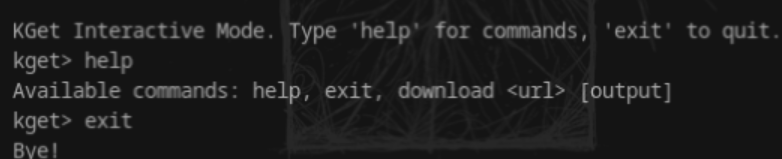
- **Interactive mode:** Run `kget --interactive` for a REPL-like experience with commands such as `download <url> [output]`, `help`, and `exit`.
### Changed
- Project renamed from "KelpsGet" to "KGet" for simplicity and consistency.
- Versioning scheme updated from 0.1.4 to 1.5.0 to allow for more frequent minor updates and clearer release tracking.
- Features list moved from README to CHANGELOG for easier maintenance and to keep the README concise.
### Removed
- Redundant or overly detailed features section from the README (now see CHANGELOG for all features).
## [0.1.4] - 2025-05-22
### Added
- Graphical User Interface (GUI) for easier downloads.
- FTP download support.
- SFTP download support (password and key-based authentication).
- Torrent download support via magnet links (integrates with Transmission daemon).
- Detailed instructions for Transmission daemon setup in README.
### Changed
- Refined output path determination to align comportamento with `wget`.
- Ensured `final_path` is always absolute to prevent "No such file or directory" errors in CWD.
- Updated README in English, Portuguese, and Spanish to reflect all new features and setup instructions.
### Fixed
- Resolved "No such file or directory" error when downloading without `-O` by ensuring absolute paths.
- Corrected `validate_filename` to only check the base filename, not the full path.
- Addressed potential issues with `map_err` in `main.rs` for torrent and HTTP downloads.
## [0.1.3] - 2025-03-11
### Added
- Advanced download mode with parallel chunks and resume capability
- Automatic compression support (gzip, brotli, lz4)
- Intelligent caching system for faster repeated downloads
- Speed limiting and connection control
- Multi-language documentation support
### Changed
- Improved error handling and user feedback
- Enhanced progress bar with more detailed information
- Optimized memory usage for large file downloads
- Updated proxy configuration system
### Fixed
- Fixed proxy authentication issues
- Resolved cache directory creation problems
- Fixed compression level handling
- Corrected file path handling on Windows
### Security
- Added secure proxy connection handling
- Improved URL validation
- Enhanced file name sanitization
- Added space checking before downloads
## [0.1.2] - 2025-03-10
### Added
- Proxy support (HTTP, HTTPS, SOCKS5)
- Proxy authentication
- Custom output file naming
- MIME type detection
### Changed
- Improved download speed calculation
- Enhanced progress bar display
- Better error messages
- Updated documentation
### Fixed
- Fixed connection timeout issues
- Resolved file permission problems
- Corrected URL parsing
- Fixed progress bar display on Windows
## [0.1.1] - 2025-03-09
### Added
- Silent mode for script integration
- Basic progress bar
- File size display
- Download speed tracking
### Changed
- Improved error handling
- Enhanced command-line interface
- Better file handling
- Updated installation instructions
### Fixed
- Fixed path handling issues
- Resolved permission problems
- Corrected progress display
- Fixed file overwrite behavior
## [0.1.0] - 2025-03-08
### Added
- Initial release
- Basic file download functionality
- Command-line interface
- Basic error handling
- Cross-platform support