# KelpsGet now is KGet! v1.5.2 (Latest Release)
A modern, lightweight, and versatile downloader written in Rust for fast and reliable file downloads via command line (CLI) and graphical user interface (GUI).
## Screenshots
- GUI:
<img src="https://github.com/user-attachments/assets/6da6dbd4-b3ae-4669-b64b-ffe3b961beb2" width="600"/>
- Torrent on `localhost:9091/transmission/web/`:
<img src="https://github.com/user-attachments/assets/d80b60d7-f53e-4198-8e11-1cacf0e78958" width="600"/>
- CLI:
<img src="https://github.com/user-attachments/assets/a835c4df-5424-4aaa-b687-2445a99ba067" width="600"/>
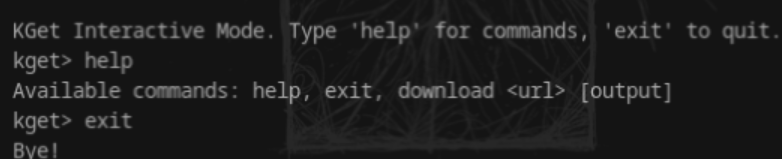
- Interactive:
<img src="https://github.com/user-attachments/assets/c8d03a5c-6459-4f3d-a581-5180797f8b1c" width="600"/>
## How It Works (Summary)
1. **Progress Bar (CLI):** Shows speed, ETA, and transferred bytes.
2. **Smart File Naming:**
* Uses the filename from the URL.
* Defaults to `index.html` if the URL ends with `/`.
3. **Error Handling:** Exits with code 1 on HTTP errors (e.g., 404).
4. **Space Check:** Verifies available disk space.
5. **Automatic Retry:** Retries download on network failure.
6. **ISO Smart Detection:** Detects `.iso` files to ensure raw binary transfer and prevent corruption.
7. **Integrity Check:** Optional SHA256 verification for disk images after download.
8. **Memory Efficient:** Parallel downloads use streaming buffers to maintain a low RAM footprint regardless of file size.
9. **Disk Optimization:** Uses buffered I/O to prevent high disk active time and system freezes during fast transfers.
10. **Advanced Download Mode (HTTP/HTTPS):** Downloads in parallel chunks, supports resume.
11. **Proxy Support:** HTTP, HTTPS, SOCKS5 with authentication.
12. **Optimization Features:** Compression (for cache), file caching, speed limiting.
13. **Torrent Downloads:** Adds magnet links to `transmission-daemon` for download.
14. **FTP/SFTP Downloads:** Connects to FTP/SFTP servers to transfer files.
## Features
See the full list of features and recent changes in the [CHANGELOG](CHANGELOG.md).
## KGet now is a Library too!
If you want to use KGet as a library you can click [here](LIB.md).
### Optional GUI feature
The GUI is provided behind an optional Cargo feature called `gui`. To build or run the binary with the GUI enabled:
```bash
cargo build --features gui
cargo run --features gui -- --gui
```
If you don't enable the `gui` feature, the binary and library will compile without GUI dependencies.
## Installation
### Option 1: Compile from source
You will need Rust installed. If you don't have it, install it from [rustup.rs](https://rustup.rs/).
Install some dependencies:
For Debian/Ubuntu based systems:
```bash
sudo apt update
sudo apt install -y libxcb-render0-dev libxcb-shape0-dev libxcb-xfixes0-dev libxkbcommon-dev libssl-dev pkg-config
```
For Fedora:
```bash
sudo dnf install -y libxcb-devel libxkbcommon-devel openssl-devel pkg-config
```
Clone the repository and compile the project:
```bash
git clone https://github.com/davimf721/KGet.git
cd KGet
cargo build --release
```
The executable will be in `target/release/kget`. You can copy it to a directory in your `PATH`:
```bash
sudo cp target/release/kget /usr/local/bin/
```
### Option 2: Install via Cargo
You can install the published binary from crates.io (the GUI is opt-in via features):
```bash
# Install the binary without GUI (default)
cargo install Kget
# Install the binary with GUI support (compiles GUI deps; system libraries may be required)
cargo install Kget --features gui
#Add to your PATH
$env:PATH += ";$HOME\.cargo\bin"
```
If you encounter issues with the GUI when installing via `cargo install`, compiling from source is more reliable.
### Option 3: Download Pre-compiled Binaries
Check the [Releases](https://github.com/davimf721/KGet/releases) section for the latest binaries for your OS.
#### Linux/macOS:
```bash
chmod +x ksget # Make executable
./kelpsget [URL] # Run directly
```
#### Windows:
Run the `.exe` file directly.
### Additional Requirement for Torrent Downloads: Transmission Daemon
KGet uses the `transmission-daemon` to manage torrent downloads.
**1. Install Transmission Daemon:**
* **Debian/Ubuntu:**
```bash
sudo apt update
sudo apt install transmission-daemon
```
* **Fedora:**
```bash
sudo dnf install transmission-daemon
```
* **Arch Linux:**
```bash
sudo pacman -S transmission-cli
```
**2. Stop the Daemon for Configuration:**
```bash
sudo systemctl stop transmission-daemon
```
**3. Configure Transmission:**
Edit the `settings.json` file. Common locations:
* `/var/lib/transmission-daemon/info/settings.json` (Debian/Ubuntu, if installed as a service)
* `/var/lib/transmission/.config/transmission-daemon/settings.json` (Another common path, check your system)
* `~/.config/transmission-daemon/settings.json` (if run as a user)
Use `sudo nano /var/lib/transmission-daemon/info/settings.json` (or the correct path for your system).
Find and modify these lines:
```json
{
// ...
"rpc-authentication-required": true,
"rpc-enabled": true,
"rpc-password": "transmission", // This is the value KGet uses by default to connect to Transmission (recommended)
"rpc-port": 9091,
"rpc-username": "transmission", // Username KGet uses to connect to Transmission
"rpc-whitelist-enabled": false, // For local access. For remote access, configure IPs.
"download-dir": "/var/lib/transmission-daemon/downloads", // Transmission's default download directory
// ...
}
```
**Important:** After saving and starting `transmission-daemon`, it will replace the plain text `rpc-password` with a hashed version.
**4. (Optional) Adjust Daemon User Permissions:**
If `transmission-daemon` runs as a specific user (e.g., `debian-transmission` or `transmission`), ensure this user has write permissions in the download directories you intend to use with KelpsGet or Transmission itself. You can add your user to the Transmission daemon's group:
```bash
sudo usermod -a -G debian-transmission your_linux_user # For Debian/Ubuntu
# Check the Transmission group/user name on your system
```
**5. Start the Transmission Daemon:**
```bash
sudo systemctl start transmission-daemon
# Check status:
sudo systemctl status transmission-daemon
```
Access `http://localhost:9091` in your browser. You should see the Transmission web interface and be prompted to log in with the `rpc-username` and `rpc-password` you configured.
## Usage
### Command Line (CLI)
```bash
kget [OPTIONS] <URL>
```
**Examples:**
* **HTTP/HTTPS Download:**
```bash
kget https://example.com/file.txt
```
* **Rename Output File:**
```bash
kget -O new_name.txt https://example.com/file.txt
kget -O ~/MyDownloads/ https://example.com/video.mp4 ```
* **FTP Download:**
```bash
kget ftp://user:password@ftp.example.com/archive.zip
kget --ftp ftp://ftp.example.com/pub/file.txt
```
* **SFTP Download:**
(Requires SSH key setup or password if the server allows it)
```bash
kget sftp://user@sftp.example.com/path/file.dat
kget --sftp sftp://user@sftp.example.com/path/file.dat -O local.dat
```
* **Torrent Download (Magnet Link):**
(Requires `transmission-daemon` configured and running)
```bash
kget "magnet:?xt=urn:btih:YOUR_HASH_HERE&dn=TorrentName"
kget --torrent "magnet:?xt=urn:btih:YOUR_HASH_HERE" -O ~/MyTorrents/
```
KelpsGet will add the torrent to Transmission and attempt to open the web interface (`http://localhost:9091`) for management.
* **Silent Mode:**
```bash
kget -q https://example.com/file.txt
```
* **Advanced Download Mode (HTTP/HTTPS):**
```bash
kget -a https://example.com/large_file.zip
```
* **ISO Download with Verification:**
KGet will automatically detect the ISO and ask if you want to verify the SHA256 hash once finished.
* **Use Proxy:**
```bash
kget -p http://proxy:8080 https://example.com/file.txt
```
* **Proxy with Authentication:**
```bash
kget -p http://proxy:8080 --proxy-user user --proxy-pass pass https://example.com/file.txt
```
* **Speed Limit:**
```bash
kget -l 1048576 https://example.com/file.txt ```
* **Disable Compression (KelpsGet-specific, not HTTP):**
```bash
kelpsget --no-compress https://example.com/file.txt
```
* **Disable Cache (KelpsGet-specific):**
```bash
kget --no-cache https://example.com/file.txt
```
### Graphical User Interface (GUI)
To start the GUI:
```bash
kget --gui
```
The GUI allows you to enter the URL, output path, and start downloads. Status and progress are displayed in the interface.
## KGet Configuration
KGet uses a configuration file at:
- Windows: `%APPDATA%\kget\config.json`
- Linux/macOS: `~/.config/kget/config.json`
**Example `config.json` for KGet:**
```json
{
"proxy": {
"enabled": false,
"url": null,
"username": null,
"password": null,
"proxy_type": "Http"
},
"optimization": {
"compression": true, // Compression for KGet cache
"compression_level": 6,
"cache_enabled": true,
"cache_dir": "~/.cache/kget", // Expand ~ manually or use absolute path
"speed_limit": null,
"max_connections": 4
},
"torrent": {
"enabled": true,
"transmission_url": "http://localhost:9091/transmission/rpc",
"username": "transmission", // User configured in Transmission's settings.json
"password": "transmission", // Password configured in Transmission's settings.json
"max_peers": 50,
"max_seeds": 50,
"port": null,
"dht_enabled": true,
"default_download_dir": null // Default directory for torrent downloads via KGet
},
"ftp": {
"default_port": 21,
"passive_mode": true
},
"sftp": {
"default_port": 22,
"key_path": null // Path to private SSH key, e.g., "~/.ssh/id_rsa"
}
}
```
**Note on `cache_dir` and `key_path`:** If using `~`, ensure your program correctly expands the tilde to the user's home directory, or use absolute paths.
## 🔗 Important Links
- 📚 [Documentation](https://davimf721.github.io/KGet/)
- 📦 [crates.io](https://crates.io/crates/Kget)
- 💻 [GitHub](https://github.com/davimf721/KGet)
- 📝 [Changelog](CHANGELOG.md)
## You can see posts about the project in others communities:
- [Dev.to](https://dev.to/davimf7221/kelpsget-v014-modern-download-manager-in-rust-4b9f)
- [r/rust](https://www.reddit.com/r/rust/comments/1kt69vh/after_5_months_of_development_i_finally_released/)
- [PitchHut](https://www.pitchhut.com/project/kelpsget)
- [Hacker News](https://hn.algolia.com/?query=Show%20HN%3A%20KelpsGet%20%E2%80%93%20Modern%20download%20manager%20built%20in%20Rust&type=story&dateRange=all&sort=byDate&storyText=false&prefix&page=0)
## Contributing
Want to contribute? Check out our [contribution guide](CONTRIBUTING.md)!
Found a bug or want to add a feature? Open an issue or send a PR!
🚀 Download files effortlessly with the speed and reliability of Rust. 🚀
## License
This project is licensed under the MIT License - see the [LICENSE](LICENSE) file for details.