Expand description
§bevy_elements
⚠️ Vibe Coded. Written by AI agents working from a human’s direction, covered by tests rather than a line-by-line human review. Read the code before you rely on it for something you care about.
Living environments for Bevy 0.20: a sun and moon on real ephemerides, the bright-star sky, a seeded climate that schedules hourly weather, a GPU wind field, volumetric clouds, rain and snow, lightning and thunder, fog, heightfield terrain with erosion and flooding, ground cover, rocks, dust, paths and trails — all in compute shaders, for anyone building an open world that has to look alive without a weather artist.



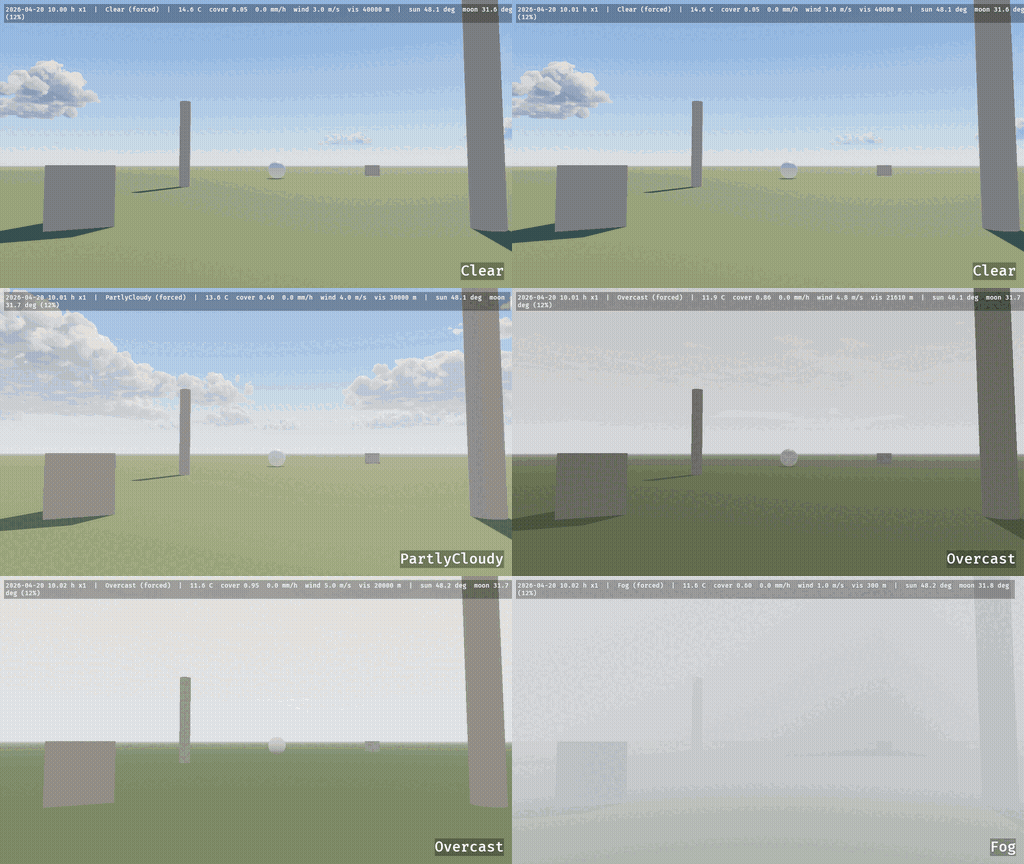
weather_tour forcing WeatherPreset::Clear, PartlyCloudy, Overcast and Fog in turn at 10.00 h on 20 April 2026 — the first three hours of its tour of all ten presets.
Status: usable · Bevy 0.20 · MSRV 1.97.1
Why: the obvious alternative is a sky shader plus a rain particle system, which gives you weather but not a world — nothing to ask about the ground, the water, the light or the wind, and nothing that survives a save. This crate keeps one simulation behind an Environment query, so gameplay reads the weather instead of guessing at it.
§Quick start
cargo add bevy_elementsuse bevy::prelude::*;
use bevy_elements::*;
fn main() {
App::new()
.add_plugins((DefaultPlugins, ElementsPlugins))
.insert_resource(WorldClock::new(CivilDate::new(2026, 6, 21)).at_hour(7.0))
.insert_resource(Climate::temperate())
.add_systems(Startup, setup)
.run();
}
fn setup(mut commands: Commands) {
// The environment follows and renders for the `ElementsCamera`.
commands.spawn((
Camera3d::default(),
ElementsCamera::default(),
Transform::from_xyz(0.0, 160.0, 0.0).looking_at(Vec3::new(100.0, 100.0, 0.0), Vec3::Y),
));
// 2 km of rolling hills, centred on the origin.
commands.spawn(Terrain::procedural(ProceduralTerrain::hills(42)));
}§Try it
cargo run --release --example quickstartThe example lifts the camera to 6 m above the ground and holds it there while the clock runs; add ELEMENTS_FRAMES=600 ELEMENTS_SHOT=/tmp/x.png to capture it unattended.
§What you can do
- Put a living sky over any scene — sun, moon and 8 404 stars from real ephemerides, with exposure that keeps night dark: sky, weather and light.
- Let a seeded climate schedule the weather —
ClearthroughBlizzard, hourly, with seasons and a snow season a game sets by date: climate, seasons and weather. - Rain, snow, fog and lightning that read from every camera — including an orthographic, isometric or strategy view, with
PrecipitationLook::readable()for far-off cameras: precipitation. - Generate, sculpt and save a terrain — procedural presets, a height map or flat ground, brushes that edit the live heightfield, snapshots to save and restore it: terrain.
- Wear the ground down realistically — snow that drifts and melts, wetness and puddles, wind-blown sand, trodden paths and pressed footprints: ground cover, paths.
- Flood it, and answer what the water is doing — shallow-water hydrology with erosion, lakes, rivers, and wakes from anything moving through: rivers, lakes and waves.
- Ask the simulation anything — ground height and normal, water depth and velocity, snow depth, cloud shadow, light needed for a night lamp: gameplay queries.
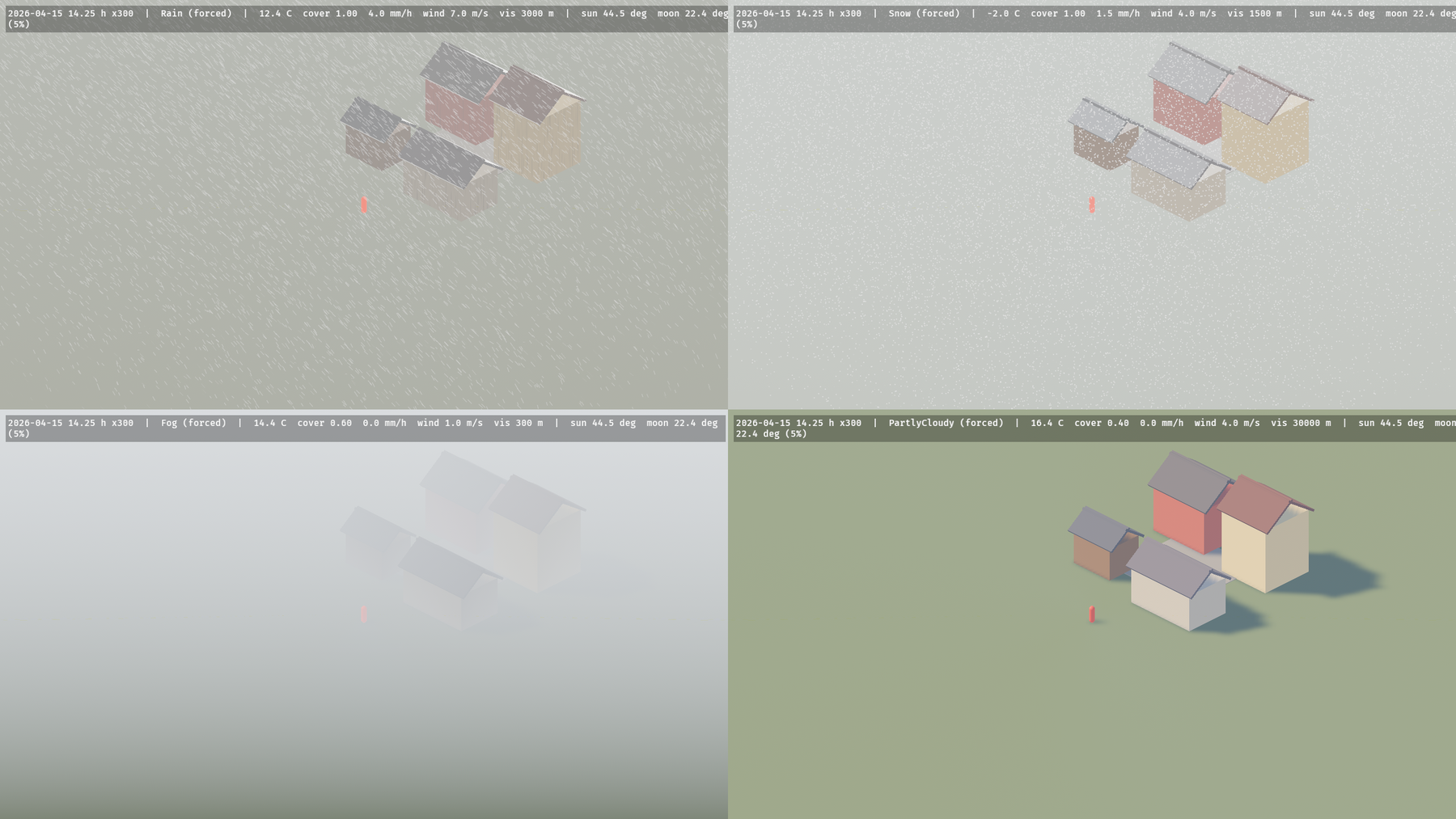
The isometric example: an orthographic camera 1 500 m back, following a walker, in the crate’s rain, snow and fog.
§Part of the Coven
bevy_elements is one crate in the coven, a family of Bevy crates that cover the parts of a game only human authoring scales: world, life, interface and spectacle. In Grimoire it is an optional cargo feature whose map environment panel edits this crate’s own serde settings — the clock, the climate, the forced weather, snow, wetness, rocks and dust.
§Bevy compatibility
| bevy_elements | bevy | notes |
|---|---|---|
| 0.7 | 0.20 | current |
| 0.1 – 0.6 | 0.20 | isomesh needs isomesh/bevy_isomesh 0.0.11; flora needs bevy_flora 0.46 |
§Learn more
- docs.rs — the full API.
- The book page — the crate in the coven’s book.
docs/guide/— every domain in depth: the scene, sky, weather and light, terrain and ground, rivers, lakes and waves, surfaces and voxel snow, gameplay queries, performance, examples, research.docs/gallery.md— every before-and-after capture, the terrain’s rock and the ground’s textures.examples/— 23 runnable examples, fromquickstarttobench_elements.CHANGELOG.md— every release, with the research note behind it.docs/research/— the paper library each system was built from, with every deviation cited.
§Who and licence
Maintained by @Ladvien. Questions and bugs: the issue tracker. Contributions follow the org’s CONTRIBUTING.md; docs follow DOCUMENTATION.md.
MIT OR Apache-2.0, at your option.
Modules§
- astro
- Positional astronomy at Meeus accuracy: pure
f64functions, no ECS. - light
- What a game’s own light has to be, to read against the crate’s exposure.
Structs§
- Celestial
Plugin - Sun, moon and exposure.
- Celestial
Settings - What
CelestialPluginputs in the world. Insert it first to override; both default on. - Civil
Date - A proleptic Gregorian calendar date.
- Climate
- The long-run character of a place. Drives the weather scheduler and the temperature model.
- Climate
History - The weather of the last days, recorded from
Weatheras theWorldClockruns: oneDayConditionsper local calendar day, so a game can ask what the last few days were like (recent,summary, or the same throughEnvironment). - Climate
Plugin - Climate, seasons, weather, surface weathering and the record of recent days.
- Climate
Summary - The days of a window summed up: the counts of the daily indices, the means weighted by the observed hours, the extremes and the totals.
- Cloud
Layer - Where the cloud layer is: a spherical shell whose base and top are altitudes above the
planet surface (
y = 0). - Cloud
Plugin - Volumetric clouds.
- Cloud
Quality - Cloud rendering cost per
ElementsQuality. - Cloud
Shadows - The cloud shadow map: sun (or moon) transmittance through the clouds for the plane
y = 0, 1024²rgba16floatover an 8 km square centred on the camera. R is the direct transmittanceT, G the optical depth (clamped to 60), B the precipitation darkening of the weather map. - Cloud
Weather Map - The 512²
rgba8unormweather map the clouds are built from, covering 32 km around the camera: R coverage, G precipitation (never aboveprecipitation_mm_h / 25, zero where there is no cloud), B cloud type. Sample it with a bilinear, repeating sampler atuv = (p.xz − origin) / extent,pa world position in the metre frame (world ÷crate::ElementsUnits::units_per_metre; the same as world for the default 1.0). - Cover
Band - Where one kind of cover (snow or a wet film) lies on a surface: an amount, the steepest face
that holds it and the heights it reaches. Evaluated per face, from its geometric normal and
its height, by
coverage; the shader of aWeatheredExtensionevaluates the same function per pixel. - Cover
State - The cover layers of the active terrain. Present while a terrain and the plugin exist.
- Cover
Stats - What the cover simulation has done, for tests and examples that wait on game time. Reset when the terrain is rebuilt.
- DayConditions
- One local calendar day of weather at the climate’s reference elevation, as recorded while the clock ran through it.
- Dust
Plugin - Aeolian transport and the dust particles’ and haze’s partner on the ground.
- Dust
Settings - The aeolian transport’s settings. Insert it before the plugin to override the defaults.
- Dust
Stats - What the transport has done, for tests and examples that wait on it. Reset when the terrain is rebuilt.
- Elements
Camera - Marks the camera the environment follows and renders for.
- Elements
Exposure - The camera’s exposure, as the crate meters it, published every frame.
- Elements
Flora Plugin - Drives
bevy_flora’sFloraWind,FloraSeasonandFloraWetnessfrom this crate. - Elements
Globals - What the crate tells every weathered material, rewritten each frame after
ElementsSystems::SimulationbyWeatheredPluginand uploaded to one shared GPU storage buffer (surface_cover::ElementsGlobals, eightvec4<f32>, 128 B). - Elements
Plugins - Every domain plugin that exists in this version, in dependency order.
- Elements
Readback - How often GPU state is copied back for gameplay queries.
- Elements
Units - How many world units make a metre: 1.0 (the default) for a world in metres, 3.2808 for one in
feet, 100.0 in centimetres (
docs/research/units.md). - Environment
- Ask about the environment from gameplay systems. Order such systems
.after(ElementsSystems::Readback). - Environment
Setup - A scene’s clock, place, climate and forced weather: what an author chooses and a game loads.
- Environment
Snapshot - CPU copies of GPU simulation state, filled by the throttled readback
(
ElementsReadback). Read it throughEnvironment. - Erode
Terrain - Start an erosion bake: hydrology runs at the quality’s full substep rate with
rain_mm_hof uniform liquid rain (the weather’s rain is ignored) untilduration_sof simulated time has passed, thenTerrainBakedis written. A bake requested during a bake starts when the first one ends; a bake interrupted by the terrain being rebuilt or removed restarts in full on the next terrain. - Erosion
Settings - Hydraulic and thermal erosion. The water flows whether or not erosion is enabled.
- FogPlugin
- Distance fog on every
ElementsCameraand a ground-fog volume around the followed one. - GeoLocation
- Where the observer stands on Earth.
- Ground
Cover Plugin - Ground cover: snow and wetness maps, their kernels and their readback.
- Ground
Extension - Shades a consumer’s own mesh as the terrain’s ground
(
TerrainRender::External): snow covers it, it darkens and glosses when wet, water standing on it shows as a puddle with ripples while it rains, and cloud shadows fall on it, all by world XZ. It does not displace or blend layers; the mesh keeps its own geometry and vertex shader (so snow whitens it but does not raise it). - Ground
Fog - Marks the camera-following ground-fog
FogVolumethis crate spawns. - Ground
Layer Textures - One ground layer’s PBR set (a Unity Terrain Layer, a glTF material’s maps). The maps are read
as glTF stores them, whatever sRGB flag the images were loaded with: the base colour is
sRGB-encoded; the normal is tangent space with +Y up (OpenGL; DirectX maps set
flip_normal_map_y); the roughness is the G channel and the occlusion the R channel, so one glTF metallic-roughness or occlusion-roughness-metallic image may serve both, and a greyscale map either; the height is the R channel. The images must keep their CPU data (the default when loading). - Ground
Look - What the terrain’s ground cover reads as at a point, in the shader’s own terms
(
Environment::ground_look_at). - Ground
Params - Uniform of
GroundExtension. MirrorsGroundParamsofground.wesl. - Hydrology
Plugin - Hydrology, erosion and the water readback.
- Hydrology
Settings - The water simulation’s settings. Insert it before the plugin to override the defaults.
- Hydrology
Stats - What the simulation has done, for tests and examples that wait on simulated time. Reset when the terrain is rebuilt.
- Imprint
- Presses into the ground under it: a footprint, a hoof, a wheel, a body.
- Lightning
Flash - The current lightning flash: written each frame by the lightning plugin, read by the cloud
march to light the clouds from inside.
intensity_cd0 means no flash. - Lightning
Plugin - Lightning, thunder and the flash resource.
- Lightning
Strike - A bolt struck, at the moment of the flash.
- Moon
- Marks the moon’s
DirectionalLight. - Path
- A route across the terrain.
- PathHit
- The nearest route to a point (
Environment::nearest_path). - Path
Network - The routes over the terrain, published by the game. Insert it or change it at any time: the
mask is rasterised off the frame on Bevy’s
AsyncComputeTaskPool, and the previous mask keeps rendering until the new one is ready (docs/research/paths.md). - Path
State - The path mask the materials read, once it has been rasterised.
- Path
Surface - What the ground under a point is, on or near a route (
Environment::surface_at,Environment::nearest_path). - Paths
Plugin - Lays the game’s
PathNetworkinto the terrain’s ground (docs/research/paths.md). - Precipitation
Blocker - A box that stops precipitation: a roof, an awning, a tent. The box is
half_extentsin the entity’s local space, placed by itsGlobalTransform(rotation and scale included), so any oriented box works. Drops and flakes that reach it are respawned at the top of the box (rain splashes on its top face); the nearestMAX_PRECIPITATION_BLOCKERSto the camera are tested. - Precipitation
Look - How rain and snow are drawn. Draw-only: the particles’ simulation, the wetness and snow they
leave, the splashes, the fog and the gameplay queries never read it. The default is the
physical look;
PrecipitationLook::readableis a stylised one for orthographic and strategy cameras, where physically sized drops and flakes read as sleet and noise. Insert one before the plugins to start with it, or change it at any time. - Precipitation
Plugin - Rain and snow around the followed
ElementsCamera. - Precipitation
State - The GPU particle and splash buffers, for tests and custom effects that want to read them.
- Procedural
Terrain - Parameters of the procedural generator (Musgrave fBm blended with a ridged multifractal).
- Rainbow
Settings - Settings of the rainbow (
crate::CloudPlugin). - Restore
Terrain - Put the ground of a region back as a
TerrainSnapshotheld it: the undo of a stroke that has noSculptTerrain::inverse(Smooth, Flatten, Noise), or of any stroke, without respawning the terrain and so without losing the water, the cover maps or the trails. - Rock
Settings - How many rocks lie on the ground and where. Insert it before the plugin to override the defaults; a change rebuilds the scatter.
- Rock
Stats - How many rocks are on the ground now, and in how many tiles.
- Rocks
Plugin - Rocks scattered on the
Terrain: seeRockSettings. - Scattered
Rock - One scattered rock: the entity that carries its transform. Its two children draw it (a near
and a far mesh, crossfaded by
VisibilityRange); the near child’s mesh is kept in the main world, so a game can build a collider from it when this component is added. - Sculpt
Terrain - One brush stroke on the live
Terrain, applied on the next frame the terrain is live. A drag is a message per sample; one is applied per frame, in order. - Season
Changed - The season changed. Also written once on the first frame, so a reader can sync without
polling
SeasonState. - Season
State - Where the year is, for foliage and anything else that follows the seasons.
- Setup
Error - A setup that failed
EnvironmentSetup::validate, or could not be applied. - Snow
Season - The dates between which snow may fall: a game’s calendar over the physical phase
model (
docs/research/snow-season.md). - Snow
Settings - How snow behaves: its density, how fast it settles and melts, when the wind moves it and which slopes shed it. Insert it before the plugin to override the defaults.
- Snowy
Field - A voxel field with snow on it: the union of
baseand a slab that exists only over each column’s top. - Still
Water - A body of water that stands at a fixed level and is not simulated: a sea, a lake or a moat a
host declares (
docs/research/still-water.md). Insert it as a resource (or remove it). - Strike
Lightning - Script a strike: lightning hits
at(the attachment point, in world units; itsyis the ground height) on the next frame. - Sun
- Marks the sun’s
DirectionalLight. - SunState
- Where the sun and moon are and how much of the moon is lit.
- Surface
Cover - A snow and wetness cover that a material wears whatever the weather is: put it on a
WeatheredExtensionwithwith_cover, for the mesh of a voxel volume, a level’s prop or a preview of a season the scene is not in. - Surface
Setup - The ground, water and cover settings: what an author tunes and a game loads.
- Surface
Weathering - How wet and snowy exposed ground is around the camera. Feeds foliage and any material that wants to look rained or snowed on.
- Terrain
- The terrain. Spawn one entity with it. It is centred on the entity’s
Transform(the grid’s minimum corner istranslation.xz − extent / 2and a stored heighthis the heighttranslation.y + h, both read throughElementsUnits:Terrain’s own lengths are metres); rotation and scale are ignored. One terrain exists at a time: a secondTerrainentity logs a warning and is ignored. - Terrain
Baked - A bake finished: its
duration_sof simulated time has run. - Terrain
Extension - The extension that turns a
StandardMaterialinto the terrain’s displaced, layer-blended ground. The crate fills it. - Terrain
Extension Key - The pipeline key of
TerrainExtension: whether a texture set (TerrainTextures) is bound, and whether one of its layers takes its own colour. The textured path is compiled only into the pipeline that has a set (theGROUND_TEXTURESshader def), so a ground without one pays nothing for it, and the colour lanes only into the pipeline of a set that takes its colour (GROUND_COLOURS): read in the hot path, they cost the meadow’s opaque pass 10 %, which a set over the crate’s colour (the default) does not pay. Changing whether a set takes its colour compiles a pipeline once. - Terrain
Grid - Placement of the terrain’s grid in the metre frame (world ÷
ElementsUnits::units_per_metre): row-majorsize.x × size.ycells, cell(0, 0)centred atorigin + 0.5 · cell_m, the row index running along +Z. - Terrain
Look - A game’s colour grade of the owned terrain’s bare ground (rock, soil, grass, sand, scree) and
of the scattered rocks lying on it, so a palette can grade the ground the way the game grades
its own materials (
docs/research/terrain-look.md). The saturation is applied first, around the colour’s own linear Rec. 709 luminance — 0 renders the ground at its luminance, 1 leaves it, above 1 oversaturates (negative is taken as 0) — and then the tint multiplies the result, so a cooling tint survives a desaturation. The grade applies to the textured albedo too, and before the ground cover: snow and standing water keep their own colours, and wet grass keeps behaving as grass. The default renders the ground as without it, within a float’s rounding. A change is a uniform write (no pipeline is specialised or compiled), so a palette blend may write it every frame.TerrainRender::Externalgrounds and a game’s ownWeatheredMaterials are the game’s to grade. - Terrain
Material Params - Uniform of the owned terrain material. Mirrors
TerrainMaterialParamsofrender.wesl. - Terrain
Plugin - Heightfield terrain with GPU-generated layers.
- Terrain
Setup - A
Terrainas plain data: what a level file stores andterrainbuilds. - Terrain
Snapshot - The terrain surface heights at the last readback: what
Environment::terrain_heightand the wiring in other domains sample. Cloning is cheap (the heights are shared). - Terrain
State - The terrain’s GPU layers and where they sit. Exists while a
Terraindoes. - Terrain
Textures - The ground textures of a
Terrain: for each ground layer (sand, soil, grass) a PBR set — a base colour and, optionally, a normal, roughness, occlusion and height map — which the crate packs into the terrain material’s detail textures (docs/research/terrain-textures.md). Put it on the terrain’s entity; insert, change or remove it at any time. A change is packed off the frame (on Bevy’sAsyncComputeTaskPool) once every map has loaded, and the previous set keeps rendering until the new one is ready. - Thunder
- Thunder reaches the followed camera: written
distance_m / 343s of real time after the matchingLightningStrike. - Trail
Ground - A game’s own ground for the trails, when the crate’s
Terrainis not the ground (docs/research/trails-game-ground.md). - Trail
Settings - Whether trails are pressed and drawn, and how fine. Insert it before the plugin to override the default.
- Trail
State - The published trail field, for a custom ground shader: an
rgba16floattexture of(h, occupancy, ∂h/∂x, ∂h/∂z)per texel,hthe surface’s offset from the undisturbed ground (m, negative in a trench),occupancythe largest|h|over the texel’s 8 × 8 block and the eight blocks around it (0 where there is nothing to draw), the gradient the field’s Sobel gradient; toroidal by world texel. Sample it atworld_xz / (texel_m · texels)with a repeating sampler, withintexels · texel_m / 2ofcentre(bevy_elements::trails::surfacedoes it). Positions are in the crate’s metre frame (world ÷ElementsUnits). - Trails
Plugin - Trails pressed into the ground by
Imprints, drawn by the terrain and ground materials and by everyWeatheredMaterialthat opts in. - Voxel
Ground - Snow, wetness and hydrology for a
VoxelVolume: put it on the volume’s entity. - Voxel
Ground Systems - The systems that scan, edit and swap the snow of
VoxelGroundandVoxelSnowvolumes. Ordered afterElementsSystems::Readback(they read the snow map’s readback) and before bevy_isomesh’sIsomeshSystems. - Voxel
Plugin - Snow on voxel volumes: see
VoxelGroundandVoxelSnow. Added byElementsPluginswith the featureisomesh; it does not add bevy_isomesh’sIsomeshPlugin(the consumer does).VoxelGroundneedsTerrainPlugin,HydrologyPluginandGroundCoverPluginto have been added before it, and idles with a warning otherwise;VoxelSnowruns without them. - Voxel
Snow - A snow slab on a
VoxelVolumethat is not the ground: put it on any number of volumes (walls, rocks, ruins over a game’s own ground). It spawns no terrain and runs no hydrology. - Water
Contact - A body in the water: an ellipsoid of
half_extents(m) along the entity’s local axes, centred on its translation, any rotation. - Water
Extension - The extension that makes a
StandardMaterialone pass of the water: the vertex shader displaces the terrain’s CDLOD patches to the water surface and the fragment shader absorbs, reflects and foams. The crate fills it; the two passes are two material assets that differ in the base’salpha_mode. - Water
Params - Uniform of the water materials. Mirrors
WaterParamsofwater.wesl. - Water
Patch - Marks the entities of the water pool. A patch is drawn twice, by an absorb entity and a surface entity with the same transform and bounds.
- Water
Plugin - Water rendering. Needs the
TerrainPlugin(it reads its selection and layers) and draws whatever the hydrology simulation puts on the terrain. - Water
Settings - How the water looks. Insert it before the plugin to override the defaults.
- Water
Sink - Drains water from the terrain: up to
rate_m3_sfrom the cells withinradius_mof the entity’s position, never more than is there. SeeWaterSource. - Water
Source - Pours water into the terrain:
rate_m3_sspread evenly over the cells withinradius_mof the entity’s position (at least the cell under it). A source off the terrain does nothing. At mostcrate::MAX_WATER_SOURCESsources and as manyWaterSinks are used (lowestEntityfirst). - Water
State - The water’s GPU assets.
- Wave
Settings - The wave field’s settings. Insert it before the plugin to override the default.
- Wave
State - The published wave field, for a custom water shader: a texture array of one
rgba16floatlayer per cascade holding(h, ∂h/∂x, ∂h/∂z, 0)per texel,hthe surface’s rise above the undisturbed water (m), toroidal by world texel. Cascadechas texels oftexel_m[c]; sample it atworld_xz / (texel_m[c] · texels)with a repeating sampler, withintexels · texel_m[c] / 2of the followed camera’s texel. The surface is the sum of the layers. - Waves
Plugin - Ripples and wakes on the hydrology’s water from
WaterContacts, drawn byWaterPlugin. - Weather
- The weather now, blended between presets. Read by every domain.
- Weather
Changed - A weather transition started: by the scheduler, by
WeatherDirector::forceor byWeatherDirector::release. - Weather
Director - Who decides the weather: the seeded scheduler, or the game through
force. - Weathered
Extension - The extension that weathers a
StandardMaterial: seeWeatheredMaterial. - Weathered
Plugin - Weathered materials:
WeatheredMaterial, and theElementsGlobalsthey share. - Wetness
Settings - How the ground gets wet and dries, and when water becomes a puddle. Insert it before the plugin to override the defaults.
- Wind
Field Params - The uniform the
bevy_elements::windWGSL import takes. Bind it with#[uniform(N)] wind: WindFieldParamsand fill it fromWindState::field_params. The field itself is in the metre frame (world ÷units);elements_windtakes a world position and divides it byunits. - Wind
Gust - A gust band started: it travels from
originalongdirection. - Wind
Plugin - The GPU wind field.
- Wind
State - The wind, for shaders, sibling crates and gameplay.
- World
Clock - The game’s calendar and time of day. Advances in
ElementsSystems::ClockbyTime<Virtual>delta ×time_scale.
Enums§
- Elements
Focus - What the camera-relative domains centre on, on the followed
ElementsCamera: the rain and snow box, the wind window and its gusts, the ground fog volume, the strike disc and the thunder distance, the cloud weather and shadow maps, the trails and waves windows, and the mean the surface weathering takes around the view. Without it they centre on the camera. - Elements
Quality - Resolution and step counts for every domain. Read once per frame; changing it at runtime re-creates the affected GPU resources.
- Elements
Systems - The phases of one environment frame, chained in this order in
Update. - Hydrology
Boundary - What happens at the edge of the terrain.
- Path
Kind - What a path is surfaced with.
- Sculpt
Kind - What a stroke does to the ground under it.
wis the brush weight at a cell (sculpt_weight). - Season
- A meteorological season: whole months, December–February is northern winter.
- Stone
Detail - Which of a stone shape’s two meshes to build: the scatter draws
Nearinside22 · Dmetres andFarbeyond. Both wear the same facet colours. - Terrain
Render - Who draws the ground.
- Terrain
Setup Source - Where a
TerrainSetup’s surface comes from, as data. - Terrain
Source - How a terrain’s surface is made.
- Weather
Preset - A named weather state the scheduler moves between.
Constants§
- CLEAR_
AIR_ EXTINCTION - Extinction of clear air, m⁻¹:
KOSCHMIEDER / CLEAR_VISIBILITY_M, the floor of every visibility a weather can carry. - CLEAR_
VISIBILITY_ M - Visibility of the
Clearpreset, m: the air this crate calls clear. A weather’s visibility is measured against it, not against a vacuum (seesky_air_extinction). - DEFAULT_
SCULPT_ HARDNESS - The hardness a stroke made by
SculptTerrain::newtakes. - ELEMENTS_
GLOBALS_ BUFFER - The crate’s globals as a GPU storage buffer, for a material or pass of your own: the 128-byte
ElementsGlobals(wetness, snow cover and snow depth of exposed ground, the rain intensity, the mean cloud transmittance, the cloud shadow map’s placement, the ripple and streak phases, the wind, the light direction, the world units per metre and the trail window), laid out as the WGSLbevy_elements::surface_cover::ElementsGlobals(eightvec4<f32>; the field comments there give each component). - FLASH_
LUMENS - Luminous power of a first return stroke averaged over one 1/60 s frame, lm
(
docs/research/lightning.md, Deviation 8). Candela is this over 4π. - FLORA_
FULL_ WIND_ MS - Wind speed at 10 m, m/s, that
bevy_flora’sFloraWind::strengthof 1 (“a strong wind”) stands for. Gust strengths are converted on the same scale. - FREEZING_
C - The temperature a frost day’s minimum (ETCCDI FD) and an icing day’s maximum (ETCCDI ID) fall below, °C.
- GROUND_
FOG_ EXTENT - Size of the ground-fog volume, m: the near field, around the camera; distance fog carries
the far field. Kept small because Bevy attenuates the light reaching every fog sample by the
volume’s bounding radius (see
volume_light_compensation). - GROUND_
FOG_ TEXELS - Texels of the ground-fog density texture.
- KOSCHMIEDER
- Koschmieder’s constant for a 2 % contrast threshold: extinction = 3.912 / visibility.
- LAPSE_
RATE_ C_ PER_ M - Standard-atmosphere temperature lapse rate, °C per m (ISO 2533: −6.5 K/km).
- MAX_
GUSTS - Most gust bands active at once.
- MAX_
PRECIPITATION_ BLOCKERS - Most blockers uploaded to the GPU per frame; the nearest to the camera win.
- MAX_
WATER_ SOURCES - Most
WaterSources and mostWaterSinks uploaded. - PRECIPITATION_
BOX_ M - Edge of the camera-centred particle box, m.
- SNOW_
ALBEDO - Linear albedo of snow, bit-equal to
bevy_flora’sSNOW_ALBEDOso trees and buildings match. - SNOW_
ROUGHNESS - Perceptual roughness of snow (
bevy_flora’s 0.9; the plan’s 0.6 is Deviation 4 ofdocs/research/snow-cover.md). - SPEED_
OF_ SOUND_ MS - Speed of sound used for the thunder delay, m/s.
- STONE_
SHAPES - The stone grain’s feature size, m (Parameters). How many stone shapes there are: six angular talus blocks, then six rounded meadow rocks.
- STRIKE_
RADIUS_ M - Radius of the disc strikes fall in, centred on the followed camera, m.
- WET_
DAY_ MM - The least precipitation of a wet day, mm of liquid-water equivalent: the ETCCDI’s wet day, RR ≥ 1 mm.
- WIND_
CELL_ M - Wind cell edge, m (horizontal and vertical).
- WIND_
ROUGHNESS_ M - Roughness length of the forcing profile, m (WMO open terrain).
Functions§
- distance_
fog_ falloff - Distance fog for a visibility: grey extinction σ_V in every channel (fog, haze and dust
extinguish independently of wavelength), so every colour reaches 2 % transmittance at exactly
visibility_m; in-scattering at the same rate, so scene and fog weights sum to 1 and a fully fogged pixel takes the fog colour. - evaporation_
mm_ h - Evaporation of an open water surface, mm/h:
0.1 (1 + u/5) (1 + max(T, 0)/20) (1 − RH). - extinction_
for_ visibility - Extinction coefficient for a visibility, m-¹ (Koschmieder, 2 % contrast).
- fog_hue
- Linear-RGB fog colour before brightness: the fog hue, tinted toward sunset orange as the sun
drops below 10° (
celestial::dusk_tint); and toward dust asdustrises. - log_
wind_ speed - Mean wind speed at
height_mabove ground foru10at 10 m, m/s: the neutral log lawu10 · ln(max(z, z0)/z0) / ln(10/z0)with z0 = 0.03 m. - orthographic_
fog_ falloff - Distance fog for an orthographic camera:
near_depth_mis the depth, along the view axis, of the nearest ground the view shows (orthographic_near_depth). Bevy measures fog from the camera’s translation, which an isometric camera puts far behind what it shows, so an exponential would fog the whole frame by the empty stand-off. The fog starts at the bottom of the view and rises with the exponential’s initial slopeσ_V:Linear { start, end: start + 1/σ_V }, exact while the scene’s depth is short of the visibility and fully fogged at a quarter of it (docs/research/view-anchor.mdDeviation 1). - orthographic_
near_ depth - Depth along the view axis of the nearest ground an orthographic view shows, m: the ground
through
focusseen at the bottom edge of a viewview_height_mhigh, looking down along the unitforward. A screen offsetvlands on the groundv · cot θnearer than the focus, withθthe look-down angle (at least 10°); a straight-down view sees all its ground at the focus. - sculpt_
weight - The brush weight at distance
d_mfrom the centre: 1 insidehardness · radius_m, a smoothstep down to 0 atradius_m, 0 beyond. Mirrorssculpt_weightinsculpt.wesl. - sky_
air_ extinction - Extinction of the air the sky must carry above clear air, m⁻¹, for a camera whose
DistanceFoghas extinctionfog_extinction_m:fog_extinction − CLEAR_AIR_EXTINCTION, floored at zero. Every mesh is fogged by the camera’s distance fog, but a sky pixel already has Bevy’s atmosphere (which draws the clear air), so the sky only adds the excess the weather’s visibility implies over theClearpreset’s. Taking the camera’s own extinction keeps the sky and the ground on the same fog at all times; 0 without distance fog, and 0 at and above 40 km, so a clear sky is untouched.docs/research/clouds.mdDeviation 29. - stone_
facet_ tones - The palette tone each facet (joint plane) of stone shape
shapewears, indexed by facet id, the table the scatter’s near and far meshes both read.shapewraps atSTONE_SHAPES. It needs no plugin. - stone_
mesh - The mesh of stone shape
shapeasRocksPlugindraws it, for a host’s own scatter: centred on its bounding box, the long axis along X and one unit long, the short axis up (so scale it by the stone’s length), and vertex colours that carry each joint facet’s palette tone, the mottle and the base’s darkening. Vertex colours multiply aStandardMaterial’sbase_color, so a host’s own material shows the colour change at each joint.shapewraps atSTONE_SHAPES. It needs no plugin. - stone_
palette - The rock palette: basalt, sandstone, limestone and desert varnish, each a linear multiplier
on a rock’s albedo with a mean of exactly 1 (
docs/research/rock-palette.md). It needs no plugin. - volume_
light_ compensation FogVolume::light_intensitythat makes the volume’s sunlit in-scattering right at the camera.
Type Aliases§
- Ground
Material - The ground material for a consumer’s mesh: see
GroundExtension. - Terrain
Material - The terrain’s ground material: a
StandardMaterialextended withTerrainExtension. - Water
Material - One pass of the water: a
StandardMaterialextended withWaterExtension. - Weathered
Material - A
StandardMaterialthat is rained and snowed on: wet surfaces darken and gloss, rain runs down vertical faces, up-facing faces whiten under snow with the curvebevy_florauses, and cloud shadows fall on it. SeeWeatheredExtension.