winit_core/event.rs
1//! The event enums and assorted supporting types.
2use std::cell::LazyCell;
3use std::cmp::Ordering;
4use std::f64;
5use std::sync::{Arc, Mutex, Weak};
6
7use dpi::{PhysicalPosition, PhysicalSize};
8#[cfg(feature = "serde")]
9use serde::{Deserialize, Serialize};
10use smol_str::SmolStr;
11
12use crate::Instant;
13use crate::data_transfer::{DataTransferId, TypedData};
14use crate::error::RequestError;
15use crate::event_loop::{AsyncRequestSerial, DndAction};
16use crate::keyboard::{self, ModifiersKeyState, ModifiersKeys, ModifiersState};
17#[cfg(doc)]
18use crate::window::Window;
19use crate::window::{ActivationToken, Theme};
20
21/// Describes the reason the event loop is resuming.
22#[derive(Debug, Clone, Copy, PartialEq, Eq, Hash)]
23#[non_exhaustive]
24pub enum StartCause {
25 /// Sent if the time specified by [`ControlFlow::WaitUntil`] has been reached. Contains the
26 /// moment the timeout was requested and the requested resume time. The actual resume time is
27 /// guaranteed to be equal to or after the requested resume time.
28 ///
29 /// [`ControlFlow::WaitUntil`]: crate::event_loop::ControlFlow::WaitUntil
30 ResumeTimeReached { start: Instant, requested_resume: Instant },
31
32 /// Sent if the OS has new events to send to the window, after a wait was requested. Contains
33 /// the moment the wait was requested and the resume time, if requested.
34 WaitCancelled { start: Instant, requested_resume: Option<Instant> },
35
36 /// Sent if the event loop is being resumed after the loop's control flow was set to
37 /// [`ControlFlow::Poll`].
38 ///
39 /// [`ControlFlow::Poll`]: crate::event_loop::ControlFlow::Poll
40 Poll,
41
42 /// Sent once, immediately after `run` is called. Indicates that the loop was just initialized.
43 Init,
44}
45
46/// Describes an event from a [`Window`].
47#[derive(Debug, Clone, PartialEq)]
48#[non_exhaustive]
49pub enum WindowEvent {
50 /// The activation token was delivered back and now could be used.
51 ActivationTokenDone { serial: AsyncRequestSerial, token: ActivationToken },
52
53 /// The size of the window's surface has changed.
54 ///
55 /// Contains the new dimensions of the surface (can also be retrieved with
56 /// [`Window::surface_size`]).
57 ///
58 /// This event will not necessarily be emitted upon window creation, query
59 /// [`Window::surface_size`] if you need to determine the surface's initial size.
60 ///
61 /// [`Window::surface_size`]: crate::window::Window::surface_size
62 SurfaceResized(PhysicalSize<u32>),
63
64 /// The position of the window has changed.
65 ///
66 /// Contains the window's new position in desktop coordinates (can also be retrieved with
67 /// [`Window::outer_position`]).
68 ///
69 /// ## Platform-specific
70 ///
71 /// - **iOS / Android / Web / Wayland:** Unsupported.
72 Moved(PhysicalPosition<i32>),
73
74 /// The window has been requested to close.
75 CloseRequested,
76
77 /// The window has been destroyed.
78 Destroyed,
79
80 /// A drag operation has entered the window.
81 ///
82 /// The user can use the `id` to read information about the incoming dragged data, and report
83 /// whether the operation is accepted or rejected back to the operating system (see
84 /// [`crate::event_loop::ActiveEventLoop::set_valid_dnd_actions`](`crate::event_loop::ActiveEventLoop::set_valid_dnd_actions`)).
85 ///
86 /// To read the data being dragged, see
87 /// [`crate::event_loop::ActiveEventLoop::fetch_data_transfer`](`crate::event_loop::ActiveEventLoop::fetch_data_transfer`).
88 DragEntered {
89 /// ID of the data transfer object, see
90 /// [`crate::event_loop::ActiveEventLoop::data_transfer`](`crate::event_loop::ActiveEventLoop::data_transfer`).
91 id: DataTransferId,
92 /// (x,y) coordinates in pixels relative to the top-left corner of the window.
93 ///
94 /// May be negative on some platforms if something is dragged over a window's decorations
95 /// (title bar, frame, etc).
96 ///
97 /// Some platforms will provide this on enter, others do not. If
98 /// [`crate::event_loop::ActiveEventLoop::set_valid_dnd_actions`](`crate::event_loop::ActiveEventLoop::set_valid_dnd_actions`)
99 /// is never called, the default state is for the drag operation to be rejected. The
100 /// position is provided here when available to allow the application to accept a drag
101 /// operation as soon as possible, preventing the cursor from flickering from rejected to
102 /// accepted.
103 position: Option<PhysicalPosition<f64>>,
104 },
105 /// The position of an ongoing drag operation has changed.
106 DragPosition {
107 /// ID of the data transfer object, see
108 /// [`crate::event_loop::ActiveEventLoop::data_transfer`](`crate::event_loop::ActiveEventLoop::data_transfer`).
109 id: DataTransferId,
110 /// (x,y) coordinates in pixels relative to the top-left corner of the window.
111 ///
112 /// May be negative on some platforms if something is dragged over a window's decorations
113 /// (title bar, frame, etc).
114 position: PhysicalPosition<f64>,
115 /// The drag action proposed by the OS, based on the actions supplied in
116 /// [`crate::event_loop::ActiveEventLoop::set_valid_dnd_actions`], the actions available on
117 /// the source, and the held modifier keys.
118 ///
119 /// This may be `None` if the backend has not supplied a valid action. On some platforms
120 /// (in particular, X11), the application is only informed of the proposed action once
121 /// the operation completes.
122 proposed_action: Option<DndAction>,
123 },
124 /// A drag operation has dropped file(s) on the window.
125 DragDropped {
126 /// ID of the data transfer object, see
127 /// [`crate::event_loop::ActiveEventLoop::data_transfer`].
128 id: DataTransferId,
129 /// The drag action proposed by the OS, based on the actions supplied in
130 /// [`crate::event_loop::ActiveEventLoop::set_valid_dnd_actions`], the actions available on
131 /// the source, and the held modifier keys.
132 ///
133 /// This may be `None` if the backend has not supplied a valid action. This is different
134 /// from the drag being canceled: the drag completed successfully, we just don't know
135 /// what action was selected.
136 proposed_action: Option<DndAction>,
137 },
138 /// A drag operation has been canceled or left the window.
139 DragLeft {
140 /// ID of the data transfer object, see
141 /// [`crate::event_loop::ActiveEventLoop::data_transfer`].
142 id: DataTransferId,
143 },
144 /// Data is available for a specific fetch request, see
145 /// [`fetch_data_transfer`](crate::event_loop::ActiveEventLoop::data_transfer).
146 ///
147 /// While winit makes a best effort to only send this event precisely once, on some platforms it
148 /// may not be possible to uniquely determine the window that should receive it. In these
149 /// cases, winit may dispatch the event to all windows that have access to the data
150 /// transfer. If your application should only process this event once per data transfer, the
151 /// `serial` field can be used to deduplicate it.
152 DataTransferReceived {
153 /// ID of the data transfer object, see
154 /// [`crate::event_loop::ActiveEventLoop::data_transfer`].
155 id: DataTransferId,
156 /// Serial returned from `fetch_data_transfer`.
157 serial: AsyncRequestSerial,
158 /// The data for the transfer, with a specific type.
159 value: Arc<dyn TypedData>,
160 },
161
162 /// A drag operation started with `start_drag` has been dropped.
163 OutgoingDragDropped {
164 /// The ID returned from `start_drag`
165 id: DataTransferId,
166 /// The operation selected by the drop destination.
167 ///
168 /// This may be `None` if the backend has not supplied a valid action. This is different
169 /// from the drag being canceled: the drag completed successfully, we just don't know
170 /// what action was selected.
171 action: Option<DndAction>,
172 },
173 /// A drag operation started with `start_drag` has been canceled.
174 OutgoingDragCanceled {
175 /// The ID returned from `start_drag`
176 id: DataTransferId,
177 },
178
179 /// The window gained or lost focus.
180 ///
181 /// The parameter is true if the window has gained focus, and false if it has lost focus.
182 ///
183 /// Windows are unfocused upon creation, but will usually be focused by the system soon
184 /// afterwards.
185 Focused(bool),
186
187 /// An event from the keyboard has been received.
188 ///
189 /// ## Platform-specific
190 /// - **Windows:** The shift key overrides NumLock. In other words, while shift is held down,
191 /// numpad keys act as if NumLock wasn't active. When this is used, the OS sends fake key
192 /// events which are not marked as `is_synthetic`.
193 /// - **iOS:** Unsupported.
194 KeyboardInput {
195 device_id: Option<DeviceId>,
196 event: KeyEvent,
197
198 /// If `true`, the event was generated synthetically by winit
199 /// in one of the following circumstances:
200 ///
201 /// * Synthetic key press events are generated for all keys pressed when a window gains
202 /// focus. Likewise, synthetic key release events are generated for all keys pressed when
203 /// a window goes out of focus. ***Currently, this is only functional on X11 and
204 /// Windows***
205 ///
206 /// Otherwise, this value is always `false`.
207 is_synthetic: bool,
208 },
209
210 /// The keyboard modifiers have changed.
211 ModifiersChanged(Modifiers),
212
213 /// An event from an input method.
214 ///
215 /// **Note:** You have to explicitly enable this event using [`Window::set_ime_allowed`].
216 ///
217 /// ## Platform-specific
218 ///
219 /// - **iOS / Android / Web / Orbital:** Unsupported.
220 Ime(Ime),
221
222 /// The pointer has moved on the window.
223 ///
224 /// Should be emitted regardless of window focus.
225 PointerMoved {
226 device_id: Option<DeviceId>,
227
228 /// (x,y) coordinates in pixels relative to the top-left corner of the window. Because the
229 /// range of this data is limited by the display area and it may have been
230 /// transformed by the OS to implement effects such as pointer acceleration, it
231 /// should not be used to implement non-pointer-like interactions such as 3D camera
232 /// control. For that, consider [`DeviceEvent::PointerMotion`].
233 ///
234 /// ## Platform-specific
235 ///
236 /// **Web:** Doesn't take into account CSS [`border`], [`padding`], or [`transform`].
237 ///
238 /// [`border`]: https://developer.mozilla.org/en-US/docs/Web/CSS/border
239 /// [`padding`]: https://developer.mozilla.org/en-US/docs/Web/CSS/padding
240 /// [`transform`]: https://developer.mozilla.org/en-US/docs/Web/CSS/transform
241 position: PhysicalPosition<f64>,
242
243 /// Indicates whether the event is created by a primary pointer.
244 ///
245 /// A pointer is considered primary when it's a mouse, the first finger in a multi-touch
246 /// interaction, or an unknown pointer source.
247 primary: bool,
248
249 source: PointerSource,
250 },
251
252 /// The pointer has entered the window.
253 ///
254 /// Should be emitted regardless of window focus.
255 PointerEntered {
256 device_id: Option<DeviceId>,
257
258 /// The position of the pointer when it entered the window.
259 ///
260 /// ## Platform-specific
261 ///
262 /// - **Orbital: Always emits `(0., 0.)`.
263 /// - **Web:** Doesn't take into account CSS [`border`], [`padding`], or [`transform`].
264 ///
265 /// [`border`]: https://developer.mozilla.org/en-US/docs/Web/CSS/border
266 /// [`padding`]: https://developer.mozilla.org/en-US/docs/Web/CSS/padding
267 /// [`transform`]: https://developer.mozilla.org/en-US/docs/Web/CSS/transform
268 position: PhysicalPosition<f64>,
269
270 /// Indicates whether the event is created by a primary pointer.
271 ///
272 /// A pointer is considered primary when it's a mouse, the first finger in a multi-touch
273 /// interaction, or an unknown pointer source.
274 primary: bool,
275
276 kind: PointerKind,
277 },
278
279 /// The pointer has left the window.
280 ///
281 /// Should be emitted regardless of window focus.
282 PointerLeft {
283 device_id: Option<DeviceId>,
284
285 /// The position of the pointer when it left the window. The position reported can be
286 /// outside the bounds of the window.
287 ///
288 /// ## Platform-specific
289 ///
290 /// - **Orbital/Windows:** Always emits [`None`].
291 /// - **Web:** Doesn't take into account CSS [`border`], [`padding`], or [`transform`].
292 ///
293 /// [`border`]: https://developer.mozilla.org/en-US/docs/Web/CSS/border
294 /// [`padding`]: https://developer.mozilla.org/en-US/docs/Web/CSS/padding
295 /// [`transform`]: https://developer.mozilla.org/en-US/docs/Web/CSS/transform
296 position: Option<PhysicalPosition<f64>>,
297
298 /// Indicates whether the event is created by a primary pointer.
299 ///
300 /// A pointer is considered primary when it's a mouse, the first finger in a multi-touch
301 /// interaction, or an unknown pointer source.
302 primary: bool,
303
304 kind: PointerKind,
305 },
306
307 /// A mouse wheel movement or touchpad scroll occurred.
308 MouseWheel { device_id: Option<DeviceId>, delta: MouseScrollDelta, phase: TouchPhase },
309
310 /// An mouse button press has been received.
311 PointerButton {
312 device_id: Option<DeviceId>,
313 state: ElementState,
314
315 /// The position of the pointer when the button was pressed.
316 ///
317 /// ## Platform-specific
318 ///
319 /// - **Orbital: Always emits `(0., 0.)`.
320 /// - **Web:** Doesn't take into account CSS [`border`], [`padding`], or [`transform`].
321 ///
322 /// [`border`]: https://developer.mozilla.org/en-US/docs/Web/CSS/border
323 /// [`padding`]: https://developer.mozilla.org/en-US/docs/Web/CSS/padding
324 /// [`transform`]: https://developer.mozilla.org/en-US/docs/Web/CSS/transform
325 position: PhysicalPosition<f64>,
326
327 /// Indicates whether the event is created by a primary pointer.
328 ///
329 /// A pointer is considered primary when it's a mouse, the first finger in a multi-touch
330 /// interaction, or an unknown pointer source.
331 primary: bool,
332
333 button: ButtonSource,
334
335 /// Whether this event is part of the click that activated an otherwise inactive window.
336 ///
337 /// On macOS, AppKit normally consumes the click that brings a window forward without
338 /// delivering it as a regular mouse event (controlled by [`acceptsFirstMouse:`]). Winit
339 /// always delivers it, but tags both the activating press *and* its matching release
340 /// with this flag so applications can short-circuit the whole gesture with a single
341 /// check — e.g. ignore activation clicks for destructive or button-like targets while
342 /// accepting them for low-risk actions (selection, scrolling).
343 ///
344 /// ## Platform-specific
345 ///
346 /// - **Only available on macOS.** Always `false` on every other platform.
347 /// - Only ever `true` for the left mouse button. Intervening drag motion (delivered as
348 /// [`WindowEvent::PointerMoved`]) is not tagged; applications that care about drags
349 /// during the activation gesture must track that state themselves.
350 ///
351 /// [`acceptsFirstMouse:`]: https://developer.apple.com/documentation/appkit/nsview/acceptsfirstmouse(_:)
352 is_macos_activation_click: bool,
353 },
354
355 /// Multi-finger hold gesture on the touchpad or touchscreen without movement.
356 ///
357 /// The `phase` field indicates the lifecycle of the hold gesture:
358 /// - `Started`: One or more fingers are in contact with the touchpad/touchscreen.
359 /// - `Ended`: All fingers have been lifted from the touchpad/touchscreen.
360 /// - `Cancelled`: The hold gesture was interrupted, for example when another finger touches the
361 /// touchpad (causing a new `Started` event with more fingers), or when movement begins and
362 /// transitions to other gestures like pinch, pan, or rotation.
363 ///
364 /// ## Platform-specific
365 ///
366 /// - Only available on **Wayland**.
367 HoldGesture { device_id: Option<DeviceId>, phase: TouchPhase },
368
369 /// Two-finger pinch gesture, often used for magnification.
370 ///
371 /// ## Platform-specific
372 ///
373 /// - Only available on **macOS**, **iOS**, and **Wayland**.
374 /// - On iOS, not recognized by default. It must be enabled when needed.
375 PinchGesture {
376 device_id: Option<DeviceId>,
377 /// Positive values indicate magnification (zooming in) and negative
378 /// values indicate shrinking (zooming out).
379 ///
380 /// This value may be NaN.
381 delta: f64,
382 phase: TouchPhase,
383 },
384
385 /// N-finger pan gesture
386 ///
387 /// ## Platform-specific
388 ///
389 /// - Only available on **iOS** and **Wayland**.
390 /// - On iOS, not recognized by default. It must be enabled when needed.
391 PanGesture {
392 device_id: Option<DeviceId>,
393 /// Change in pixels of pan gesture from last update.
394 delta: PhysicalPosition<f32>,
395 phase: TouchPhase,
396 },
397
398 /// Double tap gesture.
399 ///
400 /// On a Mac, smart magnification is triggered by a double tap with two fingers
401 /// on the trackpad and is commonly used to zoom on a certain object
402 /// (e.g. a paragraph of a PDF) or (sort of like a toggle) to reset any zoom.
403 /// The gesture is also supported in Safari, Pages, etc.
404 ///
405 /// The event is general enough that its generating gesture is allowed to vary
406 /// across platforms. It could also be generated by another device.
407 ///
408 /// Unfortunately, neither [Windows](https://support.microsoft.com/en-us/windows/touch-gestures-for-windows-a9d28305-4818-a5df-4e2b-e5590f850741)
409 /// nor [Wayland](https://wayland.freedesktop.org/libinput/doc/latest/gestures.html)
410 /// support this gesture or any other gesture with the same effect.
411 ///
412 /// ## Platform-specific
413 ///
414 /// - Only available on **macOS 10.8** and later, and **iOS**.
415 /// - On iOS, not recognized by default. It must be enabled when needed.
416 DoubleTapGesture { device_id: Option<DeviceId> },
417
418 /// Two-finger rotation gesture.
419 ///
420 /// Positive delta values indicate rotation counterclockwise and
421 /// negative delta values indicate rotation clockwise.
422 ///
423 /// ## Platform-specific
424 ///
425 /// - Only available on **macOS**, **iOS**, and **Wayland**.
426 /// - On iOS, not recognized by default. It must be enabled when needed.
427 RotationGesture {
428 device_id: Option<DeviceId>,
429 /// change in rotation in degrees
430 delta: f32,
431 phase: TouchPhase,
432 },
433
434 /// Touchpad pressure event.
435 ///
436 /// ## Platform-specific
437 ///
438 /// - **macOS**: Only supported on Apple forcetouch-capable macbooks.
439 /// - **Android / iOS / Wayland / X11 / Windows / Orbital / Web:** Unsupported.
440 TouchpadPressure {
441 device_id: Option<DeviceId>,
442 /// Value between 0 and 1 representing how hard the touchpad is being
443 /// pressed.
444 pressure: f32,
445 /// Represents the click level.
446 stage: i64,
447 },
448
449 /// The window's scale factor has changed.
450 ///
451 /// The following user actions can cause DPI changes:
452 ///
453 /// * Changing the display's resolution.
454 /// * Changing the display's scale factor (e.g. in Control Panel on Windows).
455 /// * Moving the window to a display with a different scale factor.
456 ///
457 /// To update the window size, use the provided [`SurfaceSizeWriter`] handle. By default, the
458 /// window is resized to the value suggested by the OS, but it can be changed to any value.
459 ///
460 /// This event will not necessarily be emitted upon window creation, query
461 /// [`Window::scale_factor`] if you need to determine the window's initial scale factor.
462 ///
463 /// For more information about DPI in general, see the [`dpi`] crate.
464 ///
465 /// [`Window::scale_factor`]: crate::window::Window::scale_factor
466 ScaleFactorChanged {
467 scale_factor: f64,
468 /// Handle to update surface size during scale changes.
469 ///
470 /// See [`SurfaceSizeWriter`] docs for more details.
471 surface_size_writer: SurfaceSizeWriter,
472 },
473
474 /// The system window theme has changed.
475 ///
476 /// Applications might wish to react to this to change the theme of the content of the window
477 /// when the system changes the window theme.
478 ///
479 /// This only reports a change if the window theme was not overridden by [`Window::set_theme`].
480 ///
481 /// ## Platform-specific
482 ///
483 /// - **iOS / Android / X11 / Wayland / Orbital:** Unsupported.
484 ThemeChanged(Theme),
485
486 /// The window has been occluded (completely hidden from view).
487 ///
488 /// This is different to window visibility as it depends on whether the window is closed,
489 /// minimised, set invisible, or fully occluded by another window.
490 ///
491 /// ## Platform-specific
492 ///
493 /// ### iOS
494 ///
495 /// On iOS, the `Occluded(false)` event is emitted in response to an
496 /// [`applicationWillEnterForeground`] callback which means the application should start
497 /// preparing its data. The `Occluded(true)` event is emitted in response to an
498 /// [`applicationDidEnterBackground`] callback which means the application should free
499 /// resources (according to the [iOS application lifecycle]).
500 ///
501 /// [`applicationWillEnterForeground`]: https://developer.apple.com/documentation/uikit/uiapplicationdelegate/1623076-applicationwillenterforeground
502 /// [`applicationDidEnterBackground`]: https://developer.apple.com/documentation/uikit/uiapplicationdelegate/1622997-applicationdidenterbackground
503 /// [iOS application lifecycle]: https://developer.apple.com/documentation/uikit/app_and_environment/managing_your_app_s_life_cycle
504 ///
505 /// ### Others
506 ///
507 /// - **Web:** Doesn't take into account CSS [`border`], [`padding`], or [`transform`].
508 /// - **Android / Wayland / Windows / Orbital:** Unsupported.
509 ///
510 /// [`border`]: https://developer.mozilla.org/en-US/docs/Web/CSS/border
511 /// [`padding`]: https://developer.mozilla.org/en-US/docs/Web/CSS/padding
512 /// [`transform`]: https://developer.mozilla.org/en-US/docs/Web/CSS/transform
513 Occluded(bool),
514
515 /// Emitted when a window should be redrawn.
516 ///
517 /// This gets triggered in a few scenarios:
518 /// - The OS has performed an operation that's invalidated the window's contents (such as
519 /// resizing the window, or changing [the safe area]).
520 /// - The application has explicitly requested a redraw via [`Window::request_redraw`].
521 ///
522 /// Winit will aggregate duplicate redraw requests into a single event, to
523 /// help avoid duplicating rendering work.
524 ///
525 /// [the safe area]: crate::window::Window::safe_area
526 RedrawRequested,
527}
528
529/// Represents the kind type of a pointer event.
530///
531/// ## Platform-specific
532///
533/// **Wayland/X11:** [`Unknown`](Self::Unknown) device types are converted to known variants by the
534/// system.
535#[derive(Clone, Copy, Debug, PartialEq, Eq, Hash)]
536#[non_exhaustive]
537pub enum PointerKind {
538 Mouse,
539 /// See [`PointerSource::Touch`] for more details.
540 ///
541 /// ## Platform-specific
542 ///
543 /// **macOS:** Unsupported.
544 Touch(FingerId),
545 TabletTool(TabletToolKind),
546 Unknown,
547}
548
549/// Represents the pointer type and its data for a pointer event.
550///
551/// **Wayland/X11:** [`Unknown`](Self::Unknown) device types are converted to known variants by the
552/// system.
553#[derive(Clone, Debug, PartialEq)]
554#[non_exhaustive]
555pub enum PointerSource {
556 Mouse,
557 /// Represents a touch event.
558 ///
559 /// Every time the user touches the screen, a [`WindowEvent::PointerEntered`] and a
560 /// [`WindowEvent::PointerButton`] with [`ElementState::Pressed`] event with an unique
561 /// identifier for the finger is emitted. When a finger is lifted, a
562 /// [`WindowEvent::PointerButton`] with [`ElementState::Released`] and a
563 /// [`WindowEvent::PointerLeft`] event is generated with the same [`FingerId`].
564 ///
565 /// After a [`WindowEvent::PointerEntered`] event has been emitted, there may be zero or more
566 /// [`WindowEvent::PointerMoved`] events when the finger is moved or the touch pressure
567 /// changes.
568 ///
569 /// A [`WindowEvent::PointerLeft`] without a [`WindowEvent::PointerButton`] with
570 /// [`ElementState::Released`] event is emitted when the system has canceled tracking this
571 /// touch, such as when the window loses focus, or on mobile devices if the user moves the
572 /// device against their face.
573 ///
574 /// The [`FingerId`] may be reused by the system after a [`WindowEvent::PointerLeft`] event.
575 /// The user should assume that a new [`WindowEvent::PointerEntered`] event received with the
576 /// same ID has nothing to do with the old finger and is a new finger.
577 ///
578 /// ## Platform-specific
579 ///
580 /// **macOS:** Unsupported.
581 Touch {
582 finger_id: FingerId,
583
584 /// Describes how hard the screen was pressed. May be [`None`] if the hardware does not
585 /// support pressure sensitivity.
586 ///
587 /// ## Platform-specific
588 ///
589 /// - **MacOS / Orbital / Wayland / X11:** Always emits [`None`].
590 /// - **Android:** Will never be [`None`]. If the device doesn't support pressure
591 /// sensitivity, force will either be 0.0 or 1.0. Also see the
592 /// [android documentation](https://developer.android.com/reference/android/view/MotionEvent#AXIS_PRESSURE).
593 /// - **Web:** Will never be [`None`]. If the device doesn't support pressure sensitivity,
594 /// force will be 0.5 when a button is pressed or 0.0 otherwise.
595 force: Option<Force>,
596 },
597 TabletTool {
598 /// Describes as which tool kind the interaction happened.
599 kind: TabletToolKind,
600
601 /// Describes how the tool was held and used.
602 data: TabletToolData,
603 },
604 Unknown,
605}
606
607impl From<PointerSource> for PointerKind {
608 fn from(source: PointerSource) -> Self {
609 match source {
610 PointerSource::Mouse => Self::Mouse,
611 PointerSource::Touch { finger_id, .. } => Self::Touch(finger_id),
612 PointerSource::TabletTool { kind, .. } => Self::TabletTool(kind),
613 PointerSource::Unknown => Self::Unknown,
614 }
615 }
616}
617
618/// Represents the pointer type of a [`WindowEvent::PointerButton`].
619///
620/// **Wayland/X11:** [`Unknown`](Self::Unknown) device types are converted to known variants by the
621/// system.
622#[derive(Clone, Debug, PartialEq)]
623#[non_exhaustive]
624pub enum ButtonSource {
625 /// ## Platform-specific
626 ///
627 /// ### macOS
628 ///
629 /// Users may expect holding [<kbd>CTRL</kbd>](ModifiersState::CONTROL) while
630 /// clicking [`MouseButton::Left`] to result in a "secondary" click, but the way these
631 /// clicks behave natively is slightly different from how a physical secondary
632 /// button press would, depending on the content under the cursor when clicked. If
633 /// applications want this behavior they should implement it themselves by interpreting
634 /// [`Left`](MouseButton::Left) clicks as secondary when
635 /// [<kbd>CTRL</kbd>](ModifiersState::CONTROL) is held and their internal logic deems it
636 /// appropriate for the content under the pointer.
637 /// See also https://github.com/rust-windowing/winit/issues/4469.
638 Mouse(MouseButton),
639 /// See [`PointerSource::Touch`] for more details.
640 ///
641 /// ## Platform-specific
642 ///
643 /// **macOS:** Unsupported.
644 Touch {
645 finger_id: FingerId,
646 force: Option<Force>,
647 },
648 TabletTool {
649 kind: TabletToolKind,
650 button: TabletToolButton,
651 data: TabletToolData,
652 },
653 /// A pointer button of unknown source.
654 ///
655 /// Codes are undefined and may not be reproducible across platforms or winit versions.
656 Unknown(u16),
657}
658
659impl ButtonSource {
660 /// Try to convert a [`ButtonSource`] to an equivalent [`MouseButton`]. If a pointer type has no
661 /// special handling in an application, this method can be used to handle it like any generic
662 /// mouse input.
663 pub fn mouse_button(self) -> Option<MouseButton> {
664 match self {
665 ButtonSource::Mouse(mouse) => Some(mouse),
666 ButtonSource::Touch { .. } => Some(MouseButton::Left),
667 ButtonSource::TabletTool { button, .. } => button.into(),
668 ButtonSource::Unknown(_) => None,
669 }
670 }
671}
672
673impl From<MouseButton> for ButtonSource {
674 fn from(mouse: MouseButton) -> Self {
675 Self::Mouse(mouse)
676 }
677}
678
679/// Identifier of an input device.
680///
681/// Whenever you receive an event arising from a particular input device, this event contains a
682/// `DeviceId` which identifies its origin. Note that devices may be virtual (representing an
683/// on-screen cursor and keyboard focus) or physical. Virtual devices typically aggregate inputs
684/// from multiple physical devices.
685#[derive(Debug, Copy, Clone, PartialEq, Eq, PartialOrd, Ord, Hash)]
686pub struct DeviceId(i64);
687
688impl DeviceId {
689 /// Convert the [`DeviceId`] into the underlying integer.
690 ///
691 /// This is useful if you need to pass the ID across an FFI boundary, or store it in an atomic.
692 pub const fn into_raw(self) -> i64 {
693 self.0
694 }
695
696 /// Construct a [`DeviceId`] from the underlying integer.
697 ///
698 /// This should only be called with integers returned from [`DeviceId::into_raw`].
699 pub const fn from_raw(id: i64) -> Self {
700 Self(id)
701 }
702}
703
704/// Identifier of a finger in a touch event.
705///
706/// Whenever a touch event is received it contains a `FingerId` which uniquely identifies the finger
707/// used for the current interaction.
708#[derive(Debug, Copy, Clone, PartialEq, Eq, PartialOrd, Ord, Hash)]
709pub struct FingerId(pub(crate) usize);
710
711impl FingerId {
712 /// Convert the [`FingerId`] into the underlying integer.
713 ///
714 /// This is useful if you need to pass the ID across an FFI boundary, or store it in an atomic.
715 pub const fn into_raw(self) -> usize {
716 self.0
717 }
718
719 /// Construct a [`FingerId`] from the underlying integer.
720 ///
721 /// This should only be called with integers returned from [`FingerId::into_raw`].
722 pub const fn from_raw(id: usize) -> Self {
723 Self(id)
724 }
725}
726
727/// Represents raw hardware events that are not associated with any particular window.
728///
729/// Useful for interactions that diverge significantly from a conventional 2D GUI, such as 3D camera
730/// or first-person game controls. Many physical actions, such as mouse movement, can produce both
731/// device and [window events]. Because window events typically arise from virtual devices
732/// (corresponding to GUI pointers and keyboard focus) the device IDs may not match.
733///
734/// Note that these events are delivered regardless of input focus.
735///
736/// [window events]: WindowEvent
737#[derive(Clone, Copy, Debug, PartialEq)]
738#[non_exhaustive]
739pub enum DeviceEvent {
740 /// Change in physical position of a pointing device.
741 ///
742 /// This represents raw, unfiltered physical motion. Not to be confused with
743 /// [`WindowEvent::PointerMoved`].
744 ///
745 /// ## Platform-specific
746 ///
747 /// **Web:** Only returns raw data, not OS accelerated, if [`CursorGrabMode::Locked`] is used
748 /// and browser support is available.
749 ///
750 /// [`CursorGrabMode::Locked`]: crate::window::CursorGrabMode::Locked
751 PointerMotion {
752 /// (x, y) change in position in unspecified units.
753 ///
754 /// Different devices may use different units.
755 delta: (f64, f64),
756 },
757
758 /// Physical scroll event
759 MouseWheel {
760 delta: MouseScrollDelta,
761 },
762
763 Button {
764 button: ButtonId,
765 state: ElementState,
766 },
767
768 Key(RawKeyEvent),
769}
770
771/// Describes a keyboard input as a raw device event.
772///
773/// Note that holding down a key may produce repeated `RawKeyEvent`s. The
774/// operating system doesn't provide information whether such an event is a
775/// repeat or the initial keypress. An application may emulate this by, for
776/// example keeping a Map/Set of pressed keys and determining whether a keypress
777/// corresponds to an already pressed key.
778#[derive(Debug, Clone, Copy, Eq, PartialEq, Hash)]
779#[cfg_attr(feature = "serde", derive(Serialize, Deserialize))]
780pub struct RawKeyEvent {
781 pub physical_key: keyboard::PhysicalKey,
782 pub state: ElementState,
783}
784
785/// Describes a keyboard input targeting a window.
786#[derive(Debug, Clone, Eq, PartialEq, Hash)]
787pub struct KeyEvent {
788 /// Represents the position of a key independent of the currently active layout.
789 ///
790 /// It also uniquely identifies the physical key (i.e. it's mostly synonymous with a scancode).
791 /// The most prevalent use case for this is games. For example the default keys for the player
792 /// to move around might be the W, A, S, and D keys on a US layout. The position of these keys
793 /// is more important than their label, so they should map to Z, Q, S, and D on an "AZERTY"
794 /// layout. (This value is `KeyCode::KeyW` for the Z key on an AZERTY layout.)
795 ///
796 /// ## Caveats
797 ///
798 /// - Certain niche hardware will shuffle around physical key positions, e.g. a keyboard that
799 /// implements DVORAK in hardware (or firmware)
800 /// - Your application will likely have to handle keyboards which are missing keys that your
801 /// own keyboard has.
802 /// - Certain `KeyCode`s will move between a couple of different positions depending on what
803 /// layout the keyboard was manufactured to support.
804 ///
805 /// **Because of these caveats, it is important that you provide users with a way to configure
806 /// most (if not all) keybinds in your application.**
807 ///
808 /// ## `Fn` and `FnLock`
809 ///
810 /// `Fn` and `FnLock` key events are *exceedingly unlikely* to be emitted by Winit. These keys
811 /// are usually handled at the hardware or OS level, and aren't surfaced to applications. If
812 /// you somehow see this in the wild, we'd like to know :)
813 pub physical_key: keyboard::PhysicalKey,
814
815 /// This value is affected by all modifiers except <kbd>Ctrl</kbd>.
816 ///
817 /// This has two use cases:
818 /// - Allows querying whether the current input is a Dead key.
819 /// - Allows handling key-bindings on platforms which don't support [`key_without_modifiers`].
820 ///
821 /// If you use this field (or [`key_without_modifiers`] for that matter) for keyboard
822 /// shortcuts, **it is important that you provide users with a way to configure your
823 /// application's shortcuts so you don't render your application unusable for users with an
824 /// incompatible keyboard layout.**
825 ///
826 /// ## Platform-specific
827 /// - **Web:** Dead keys might be reported as the real key instead of `Dead` depending on the
828 /// browser/OS.
829 ///
830 /// [`key_without_modifiers`]: Self::key_without_modifiers
831 pub logical_key: keyboard::Key,
832
833 /// Contains the text produced by this keypress.
834 ///
835 /// In most cases this is identical to the content
836 /// of the `Character` variant of `logical_key`.
837 /// However, on Windows when a dead key was pressed earlier
838 /// but cannot be combined with the character from this
839 /// keypress, the produced text will consist of two characters:
840 /// the dead-key-character followed by the character resulting
841 /// from this keypress.
842 ///
843 /// An additional difference from `logical_key` is that
844 /// this field stores the text representation of any key
845 /// that has such a representation. For example when
846 /// `logical_key` is `Key::Named(NamedKey::Enter)`, this field is `Some("\r")`.
847 ///
848 /// This is `None` if the current keypress cannot
849 /// be interpreted as text.
850 ///
851 /// See also [`text_with_all_modifiers`][Self::text_with_all_modifiers].
852 pub text: Option<SmolStr>,
853
854 /// Contains the location of this key on the keyboard.
855 ///
856 /// Certain keys on the keyboard may appear in more than once place. For example, the "Shift"
857 /// key appears on the left side of the QWERTY keyboard as well as the right side. However,
858 /// both keys have the same symbolic value. Another example of this phenomenon is the "1"
859 /// key, which appears both above the "Q" key and as the "Keypad 1" key.
860 ///
861 /// This field allows the user to differentiate between keys like this that have the same
862 /// symbolic value but different locations on the keyboard.
863 ///
864 /// See the [`KeyLocation`] type for more details.
865 ///
866 /// [`KeyLocation`]: crate::keyboard::KeyLocation
867 pub location: keyboard::KeyLocation,
868
869 /// Whether the key is being pressed or released.
870 ///
871 /// See the [`ElementState`] type for more details.
872 pub state: ElementState,
873
874 /// Whether or not this key is a key repeat event.
875 ///
876 /// On some systems, holding down a key for some period of time causes that key to be repeated
877 /// as though it were being pressed and released repeatedly. This field is `true` if and only
878 /// if this event is the result of one of those repeats.
879 ///
880 /// # Example
881 ///
882 /// In games, you often want to ignore repeated key events - this can be
883 /// done by ignoring events where this property is set.
884 ///
885 /// ```no_run
886 /// use winit_core::event::{ElementState, KeyEvent, WindowEvent};
887 /// use winit_core::keyboard::{KeyCode, PhysicalKey};
888 /// # let window_event = WindowEvent::RedrawRequested; // To make the example compile
889 /// match window_event {
890 /// WindowEvent::KeyboardInput {
891 /// event:
892 /// KeyEvent {
893 /// physical_key: PhysicalKey::Code(KeyCode::KeyW),
894 /// state: ElementState::Pressed,
895 /// repeat: false,
896 /// ..
897 /// },
898 /// ..
899 /// } => {
900 /// // The physical key `W` was pressed, and it was not a repeat
901 /// },
902 /// _ => {}, // Handle other events
903 /// }
904 /// ```
905 pub repeat: bool,
906
907 /// Similar to [`text`][Self::text], except that this is affected by <kbd>Ctrl</kbd> and may
908 /// produce ASCII control characters.
909 ///
910 /// For example, pressing <kbd>Ctrl</kbd>+<kbd>space</kbd> produces `Some("\x00")`.
911 ///
912 /// ## Platform-specific
913 ///
914 /// - **Android:** This field is always the same value as `text`.
915 /// - **iOS:** Unimplemented, this field is always the same value as `text`.
916 /// - **Web:** Unsupported, this field is always the same value as `text`.
917 pub text_with_all_modifiers: Option<SmolStr>,
918
919 /// This value ignores all modifiers including, but not limited to <kbd>Shift</kbd>,
920 /// <kbd>Caps Lock</kbd>, and <kbd>Ctrl</kbd>. In most cases this means that the
921 /// unicode character in the resulting string is lowercase.
922 ///
923 /// This is useful for key-bindings / shortcut key combinations.
924 ///
925 /// In case [`logical_key`][Self::logical_key] reports [`Dead`][keyboard::Key::Dead],
926 /// this will still report the key as `Character` according to the current keyboard
927 /// layout. This value cannot be `Dead`.
928 ///
929 /// ## Platform-specific
930 ///
931 /// - **Android:** Unimplemented, this field is always the same value as `logical_key`.
932 /// - **iOS:** Unimplemented, this field is always the same value as `logical_key`.
933 /// - **Web:** Unsupported, this field is always the same value as `logical_key`.
934 pub key_without_modifiers: keyboard::Key,
935}
936
937/// Describes keyboard modifiers event.
938#[derive(Debug, Default, Clone, Copy, PartialEq, Eq, Hash)]
939#[cfg_attr(feature = "serde", derive(Serialize, Deserialize))]
940pub struct Modifiers {
941 pub(crate) state: ModifiersState,
942
943 // NOTE: Currently active modifiers keys (logically, but not necessarily physically, pressed).
944 //
945 // The field providing a metadata, it shouldn't be used as a source of truth.
946 pub(crate) pressed_mods: ModifiersKeys,
947}
948
949impl Modifiers {
950 /// Create a new modifiers from state and pressed mods.
951 pub fn new(state: ModifiersState, pressed_mods: ModifiersKeys) -> Self {
952 Self { state, pressed_mods }
953 }
954
955 /// The logical state of the modifiers.
956 pub fn state(&self) -> ModifiersState {
957 self.state
958 }
959
960 /// The logical state of the left shift key.
961 pub fn lshift_state(&self) -> ModifiersKeyState {
962 self.mod_state(ModifiersKeys::LSHIFT)
963 }
964
965 /// The logical state of the right shift key.
966 pub fn rshift_state(&self) -> ModifiersKeyState {
967 self.mod_state(ModifiersKeys::RSHIFT)
968 }
969
970 /// The logical state of the left alt key.
971 pub fn lalt_state(&self) -> ModifiersKeyState {
972 self.mod_state(ModifiersKeys::LALT)
973 }
974
975 /// The logical state of the right alt key.
976 pub fn ralt_state(&self) -> ModifiersKeyState {
977 self.mod_state(ModifiersKeys::RALT)
978 }
979
980 /// The logical state of the left control key.
981 pub fn lcontrol_state(&self) -> ModifiersKeyState {
982 self.mod_state(ModifiersKeys::LCONTROL)
983 }
984
985 /// The logical state of the right control key.
986 pub fn rcontrol_state(&self) -> ModifiersKeyState {
987 self.mod_state(ModifiersKeys::RCONTROL)
988 }
989
990 /// The logical state of the left super key.
991 pub fn lsuper_state(&self) -> ModifiersKeyState {
992 self.mod_state(ModifiersKeys::LMETA)
993 }
994
995 /// The logical state of the right super key.
996 pub fn rsuper_state(&self) -> ModifiersKeyState {
997 self.mod_state(ModifiersKeys::RMETA)
998 }
999
1000 fn mod_state(&self, modifier: ModifiersKeys) -> ModifiersKeyState {
1001 if self.pressed_mods.contains(modifier) {
1002 ModifiersKeyState::Pressed
1003 } else {
1004 ModifiersKeyState::Unknown
1005 }
1006 }
1007}
1008
1009impl From<ModifiersState> for Modifiers {
1010 fn from(value: ModifiersState) -> Self {
1011 Self { state: value, pressed_mods: Default::default() }
1012 }
1013}
1014
1015/// Describes [input method](https://en.wikipedia.org/wiki/Input_method) events.
1016///
1017/// The `Ime` events must be applied in the order they arrive.
1018///
1019/// This is also called a "composition event".
1020///
1021/// Most keypresses using a latin-like keyboard layout simply generate a
1022/// [`WindowEvent::KeyboardInput`]. However, one couldn't possibly have a key for every single
1023/// unicode character that the user might want to type
1024/// - so the solution operating systems employ is to allow the user to type these using _a sequence
1025/// of keypresses_ instead.
1026///
1027/// A prominent example of this is accents - many keyboard layouts allow you to first click the
1028/// "accent key", and then the character you want to apply the accent to. In this case, some
1029/// platforms will generate the following event sequence:
1030///
1031/// ```ignore
1032/// // Press "`" key
1033/// Ime::Preedit("`", Some((0, 0)))
1034/// // Press "E" key
1035/// Ime::Preedit("", None) // Synthetic event generated by winit to clear preedit.
1036/// Ime::Commit("é")
1037/// ```
1038///
1039/// Additionally, certain input devices are configured to display a candidate box that allow the
1040/// user to select the desired character interactively. (To properly position this box, you must use
1041/// [`Window::set_ime_cursor_area`].)
1042///
1043/// An example of a keyboard layout which uses candidate boxes is pinyin. On a latin keyboard the
1044/// following event sequence could be obtained:
1045///
1046/// ```ignore
1047/// // Press "A" key
1048/// Ime::Preedit("a", Some((1, 1)))
1049/// // Press "B" key
1050/// Ime::Preedit("a b", Some((3, 3)))
1051/// // Press left arrow key
1052/// Ime::Preedit("a b", Some((1, 1)))
1053/// // Press space key
1054/// Ime::Preedit("啊b", Some((3, 3)))
1055/// // Press space key
1056/// Ime::Preedit("", None) // Synthetic event generated by winit to clear preedit.
1057/// Ime::Commit("啊不")
1058/// ```
1059#[derive(Debug, Clone, PartialEq, Eq, Hash)]
1060#[cfg_attr(feature = "serde", derive(Serialize, Deserialize))]
1061#[non_exhaustive]
1062pub enum Ime {
1063 /// Notifies when the IME was enabled.
1064 ///
1065 /// After getting this event you could receive [`Preedit`][Self::Preedit] and
1066 /// [`Commit`][Self::Commit] events. You should also start performing IME related requests
1067 /// like [`Window::set_ime_cursor_area`].
1068 Enabled,
1069
1070 /// Notifies when a new composing text should be set at the cursor position.
1071 ///
1072 /// The value represents a pair of the preedit string and the cursor begin position and end
1073 /// position. When it's `None`, the cursor should be hidden. When `String` is an empty string
1074 /// this indicates that preedit was cleared.
1075 ///
1076 /// The cursor position is byte-wise indexed, assuming UTF-8.
1077 Preedit(String, Option<(usize, usize)>),
1078
1079 /// Notifies when text should be inserted into the editor widget.
1080 ///
1081 /// Right before this event winit will send empty [`Self::Preedit`] event.
1082 Commit(String),
1083
1084 /// Delete text surrounding the cursor or selection.
1085 ///
1086 /// This event does not affect either the pre-edit string.
1087 /// This means that the application must first remove the pre-edit,
1088 /// then execute the deletion, then insert the removed text back.
1089 ///
1090 /// This event assumes text is stored in UTF-8.
1091 DeleteSurrounding {
1092 /// Bytes to remove before the selection
1093 before_bytes: usize,
1094 /// Bytes to remove after the selection
1095 after_bytes: usize,
1096 },
1097
1098 /// Notifies when the IME was disabled.
1099 ///
1100 /// After receiving this event you won't get any more [`Preedit`][Self::Preedit] or
1101 /// [`Commit`][Self::Commit] events until the next [`Enabled`][Self::Enabled] event. You should
1102 /// also stop issuing IME related requests like [`Window::set_ime_cursor_area`] and clear
1103 /// pending preedit text.
1104 Disabled,
1105}
1106
1107/// Describes touch-screen input state.
1108#[derive(Debug, Hash, PartialEq, Eq, Clone, Copy)]
1109#[cfg_attr(feature = "serde", derive(Serialize, Deserialize))]
1110#[allow(clippy::exhaustive_enums)]
1111pub enum TouchPhase {
1112 /// Initial touch contact or gesture start, for example when one or more fingers touch the
1113 /// screen or touchpad.
1114 Started,
1115 /// The touch contact point changed, for example without lifting the finger.
1116 Moved,
1117 /// All touch contact points have been lifted from the touchscreen or touchpad.
1118 ///
1119 /// This event is important as it should clear any state or event in flight that was
1120 /// generated by the preceding `Started` and `Moved` events.
1121 Ended,
1122 /// The event was cancelled and should cancel any event in flight and clear state.
1123 Cancelled,
1124}
1125
1126/// Describes the force of a touch event
1127#[derive(Debug, Clone, Copy, PartialEq)]
1128#[cfg_attr(feature = "serde", derive(Serialize, Deserialize))]
1129#[doc(alias = "Pressure")]
1130#[allow(clippy::exhaustive_enums)]
1131pub enum Force {
1132 /// On iOS, the force is calibrated so that the same number corresponds to
1133 /// roughly the same amount of pressure on the screen regardless of the
1134 /// device.
1135 Calibrated {
1136 /// The force of the touch, where a value of 1.0 represents the force of
1137 /// an average touch (predetermined by the system, not user-specific).
1138 ///
1139 /// The force reported by Apple Pencil is measured along the axis of the
1140 /// pencil. If you want a force perpendicular to the device, you need to
1141 /// calculate this value using the [`TabletToolAngle::altitude`] value.
1142 force: f64,
1143 /// The maximum possible force for a touch.
1144 ///
1145 /// The value of this field is sufficiently high to provide a wide
1146 /// dynamic range for values of the `force` field.
1147 max_possible_force: f64,
1148 },
1149 /// If the platform reports the force as normalized, we have no way of
1150 /// knowing how much pressure 1.0 corresponds to – we know it's the maximum
1151 /// amount of force, but as to how much force, you might either have to
1152 /// press really really hard, or not hard at all, depending on the device.
1153 Normalized(f64),
1154}
1155
1156impl Force {
1157 /// Returns the force normalized to the range between 0.0 and 1.0 inclusive.
1158 ///
1159 /// Instead of normalizing the force, you should prefer to handle
1160 /// [`Force::Calibrated`] so that the amount of force the user has to apply is
1161 /// consistent across devices.
1162 ///
1163 /// Passing in a [`TabletToolAngle`], returns the perpendicular force.
1164 pub fn normalized(&self, angle: Option<TabletToolAngle>) -> f64 {
1165 match self {
1166 Force::Calibrated { force, max_possible_force } => {
1167 let force = match angle {
1168 Some(TabletToolAngle { altitude, .. }) => force / altitude.sin(),
1169 None => *force,
1170 };
1171 force / max_possible_force
1172 },
1173 Force::Normalized(force) => *force,
1174 }
1175 }
1176}
1177
1178/// Identifier for a specific analog axis on some device.
1179pub type AxisId = u32;
1180
1181/// Identifier for a specific button on some device.
1182pub type ButtonId = u32;
1183
1184/// Tablet of the tablet tool.
1185#[derive(Default, Clone, Copy, Debug, PartialEq, Eq, Hash)]
1186#[cfg_attr(feature = "serde", derive(Deserialize, Serialize))]
1187#[non_exhaustive]
1188pub enum TabletToolKind {
1189 #[default]
1190 Pen,
1191 Eraser,
1192 Brush,
1193 Pencil,
1194 Airbrush,
1195 Finger,
1196 Mouse,
1197 Lens,
1198}
1199
1200#[derive(Default, Clone, Debug, PartialEq)]
1201#[cfg_attr(feature = "serde", derive(Deserialize, Serialize))]
1202pub struct TabletToolData {
1203 /// The force applied to the tool against the surface.
1204 ///
1205 /// When the force information is not available, [`None`] is returned.
1206 ///
1207 /// ## Platform-specific
1208 ///
1209 /// **Web:** Has no mechanism to detect support, so this will always be [`Some`].
1210 pub force: Option<Force>,
1211 /// Represents normalized tangential pressure, also known as barrel pressure. In the range of
1212 /// -1 to 1. 0 means no tangential pressure is applied. [`None`] means backend or device has no
1213 /// support.
1214 ///
1215 /// ## Platform-specific
1216 ///
1217 /// **Web:** Has no mechanism to detect support, so this will always be [`Some`] with a value
1218 /// of 0.
1219 pub tangential_force: Option<f32>,
1220 /// The clockwise rotation in degrees of a tool around its own major axis. E.g. twisting a pen
1221 /// around its length. In the range of 0 to 359. [`None`] means backend or device has no
1222 /// support.
1223 ///
1224 /// ## Platform-specific
1225 ///
1226 /// **Web:** Has no mechanism to detect support, so this will always be [`Some`] with a value
1227 /// of 0.
1228 pub twist: Option<u16>,
1229 /// The plane angle in degrees. [`None`] means backend or device has no support.
1230 ///
1231 /// ## Platform-specific
1232 ///
1233 /// **Web:** Has no mechanism to detect support, so this will always be [`Some`] with default
1234 /// values.
1235 pub tilt: Option<TabletToolTilt>,
1236 /// The angular position in radians. [`None`] means backend or device has no support.
1237 ///
1238 /// ## Platform-specific
1239 ///
1240 /// **Web:** Has no mechanism to detect device support, so this will always be [`Some`] with
1241 /// default values unless browser support is lacking.
1242 pub angle: Option<TabletToolAngle>,
1243}
1244
1245impl TabletToolData {
1246 /// Returns [`TabletToolTilt`] if present or calculates it from [`TabletToolAngle`].
1247 pub fn tilt(self) -> Option<TabletToolTilt> {
1248 if let Some(tilt) = self.tilt { Some(tilt) } else { self.angle.map(TabletToolAngle::tilt) }
1249 }
1250
1251 /// Returns [`TabletToolAngle`] if present or calculates it from [`TabletToolTilt`].
1252 pub fn angle(self) -> Option<TabletToolAngle> {
1253 if let Some(angle) = self.angle {
1254 Some(angle)
1255 } else {
1256 self.tilt.map(TabletToolTilt::angle)
1257 }
1258 }
1259}
1260
1261/// The plane angle in degrees of a tool.
1262#[derive(Clone, Copy, Debug, Default, Eq, Hash, Ord, PartialEq, PartialOrd)]
1263#[cfg_attr(feature = "serde", derive(Deserialize, Serialize))]
1264pub struct TabletToolTilt {
1265 /// The plane angle in degrees between the surface Y-Z plane and the plane containing the tool
1266 /// and the surface Y axis. Positive values are to the right. In the range of -90 to 90. 0
1267 /// means the tool is perpendicular to the surface and is the default.
1268 ///
1269 /// 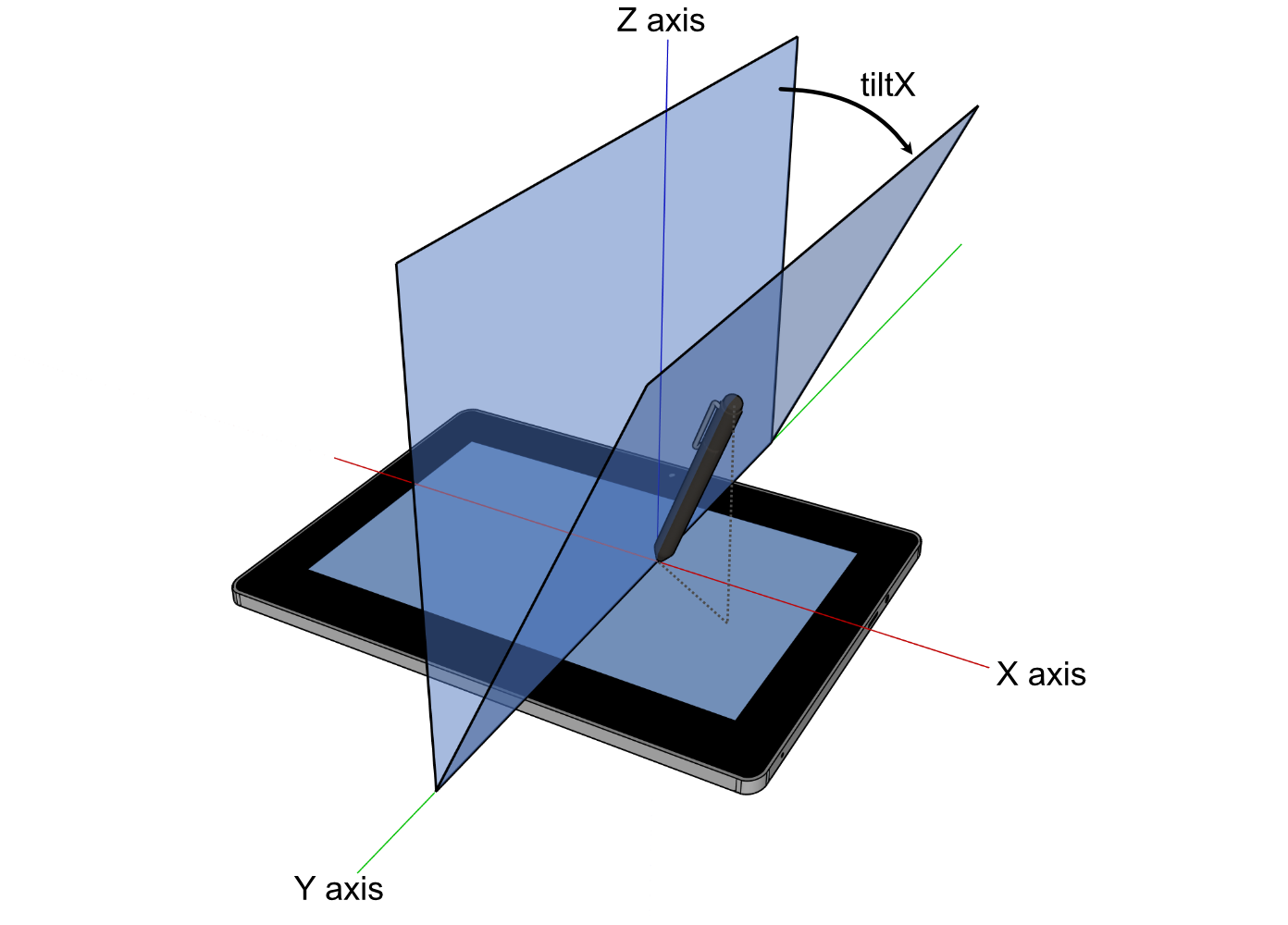
1270 ///
1271 /// <sub>
1272 /// For image attribution, see the
1273 /// <a href="https://github.com/rust-windowing/winit/blob/master/winit/docs/ATTRIBUTION.md">
1274 /// ATTRIBUTION.md
1275 /// </a>
1276 /// file.
1277 /// </sub>
1278 pub x: i8,
1279 /// The plane angle in degrees between the surface X-Z plane and the plane containing the tool
1280 /// and the surface X axis. Positive values are towards the user. In the range of -90 to
1281 /// 90. 0 means the tool is perpendicular to the surface and is the default.
1282 ///
1283 /// 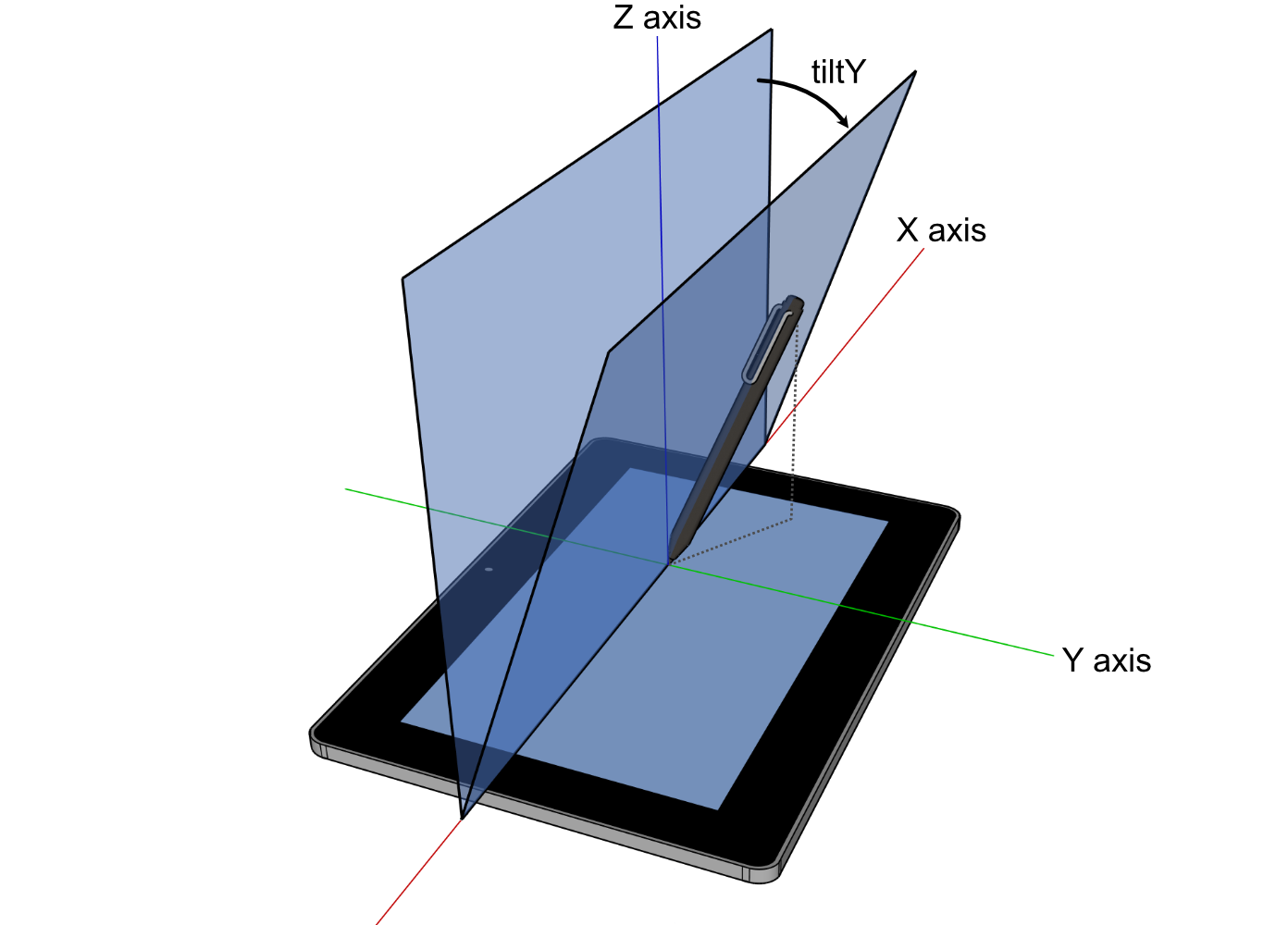
1284 ///
1285 /// <sub>
1286 /// For image attribution, see the
1287 /// <a href="https://github.com/rust-windowing/winit/blob/master/winit/docs/ATTRIBUTION.md">
1288 /// ATTRIBUTION.md
1289 /// </a>
1290 /// file.
1291 /// </sub>
1292 pub y: i8,
1293}
1294
1295impl TabletToolTilt {
1296 pub fn angle(self) -> TabletToolAngle {
1297 // See <https://www.w3.org/TR/2024/WD-pointerevents3-20240326/#converting-between-tiltx-tilty-and-altitudeangle-azimuthangle>.
1298
1299 use std::f64::consts::*;
1300
1301 const PI_0_5: f64 = FRAC_PI_2;
1302 const PI_1_5: f64 = 3. * FRAC_PI_2;
1303 const PI_2: f64 = 2. * PI;
1304
1305 let x = LazyCell::new(|| f64::from(self.x).to_radians());
1306 let y = LazyCell::new(|| f64::from(self.y).to_radians());
1307
1308 let mut azimuth = 0.;
1309
1310 if self.x == 0 {
1311 match self.y.cmp(&0) {
1312 Ordering::Greater => azimuth = PI_0_5,
1313 Ordering::Less => azimuth = PI_1_5,
1314 Ordering::Equal => (),
1315 }
1316 } else if self.y == 0 {
1317 if self.x < 0 {
1318 azimuth = PI;
1319 }
1320 } else if self.x.abs() == 90 || self.y.abs() == 90 {
1321 // not enough information to calculate azimuth
1322 azimuth = 0.;
1323 } else {
1324 // Non-boundary case: neither tiltX nor tiltY is equal to 0 or +-90
1325 azimuth = f64::atan2(y.tan(), x.tan());
1326
1327 if azimuth < 0. {
1328 azimuth += PI_2;
1329 }
1330 }
1331
1332 let altitude = if self.x.abs() == 90 || self.y.abs() == 90 {
1333 0.
1334 } else if self.x == 0 {
1335 PI_0_5 - y.abs()
1336 } else if self.y == 0 {
1337 PI_0_5 - x.abs()
1338 } else {
1339 // Non-boundary case: neither tiltX nor tiltY is equal to 0 or +-90
1340 f64::atan(1. / f64::sqrt(x.tan().powi(2) + y.tan().powi(2)))
1341 };
1342
1343 TabletToolAngle { altitude, azimuth }
1344 }
1345}
1346
1347/// The angular position in radians of a tool.
1348#[derive(Clone, Copy, Debug, PartialEq)]
1349#[cfg_attr(feature = "serde", derive(Deserialize, Serialize))]
1350pub struct TabletToolAngle {
1351 /// The altitude angle in radians between the tools perpendicular position to the surface and
1352 /// the surface X-Y plane. In the range of 0, parallel to the surface, to π/2, perpendicular to
1353 /// the surface. π/2 means the tool is perpendicular to the surface and is the default.
1354 ///
1355 /// 
1356 ///
1357 /// <sub>
1358 /// For image attribution, see the
1359 /// <a href="https://github.com/rust-windowing/winit/blob/master/docs/res/ATTRIBUTION.md">
1360 /// ATTRIBUTION.md
1361 /// </a>
1362 /// file.
1363 /// </sub>
1364 pub altitude: f64,
1365 /// The azimuth angle in radiants representing the rotation between the major axis of the tool
1366 /// and the surface X-Y plane. In the range of 0, 3 o'clock, progressively increasing clockwise
1367 /// to 2π. 0 means the tool is at 3 o'clock or is perpendicular to the surface (`altitude` of
1368 /// π/2) and is the default.
1369 ///
1370 /// 
1371 ///
1372 /// <sub>
1373 /// For image attribution, see the
1374 /// <a href="https://github.com/rust-windowing/winit/blob/master/docs/res/ATTRIBUTION.md">
1375 /// ATTRIBUTION.md
1376 /// </a>
1377 /// file.
1378 /// </sub>
1379 pub azimuth: f64,
1380}
1381
1382impl Default for TabletToolAngle {
1383 fn default() -> Self {
1384 Self { altitude: f64::consts::FRAC_2_PI, azimuth: 0. }
1385 }
1386}
1387
1388impl TabletToolAngle {
1389 pub fn tilt(self) -> TabletToolTilt {
1390 // See <https://www.w3.org/TR/2024/WD-pointerevents3-20240326/#converting-between-tiltx-tilty-and-altitudeangle-azimuthangle>.
1391
1392 use std::f64::consts::*;
1393
1394 const PI_0_5: f64 = FRAC_PI_2;
1395 const PI_1_5: f64 = 3. * FRAC_PI_2;
1396 const PI_2: f64 = 2. * PI;
1397
1398 let mut x = 0.;
1399 let mut y = 0.;
1400
1401 if self.altitude == 0. {
1402 if self.azimuth == 0. || self.azimuth == PI_2 {
1403 x = FRAC_PI_2;
1404 } else if self.azimuth == PI_0_5 {
1405 y = FRAC_PI_2;
1406 } else if self.azimuth == PI {
1407 x = -FRAC_PI_2;
1408 } else if self.azimuth == PI_1_5 {
1409 y = -FRAC_PI_2;
1410 } else if self.azimuth > 0. && self.azimuth < PI_0_5 {
1411 x = FRAC_PI_2;
1412 y = FRAC_PI_2;
1413 } else if self.azimuth > PI_0_5 && self.azimuth < PI {
1414 x = -FRAC_PI_2;
1415 y = FRAC_PI_2;
1416 } else if self.azimuth > PI && self.azimuth < PI_1_5 {
1417 x = -FRAC_PI_2;
1418 y = -FRAC_PI_2;
1419 } else if self.azimuth > PI_1_5 && self.azimuth < PI_2 {
1420 x = FRAC_PI_2;
1421 y = -FRAC_PI_2;
1422 }
1423 }
1424
1425 if self.altitude != 0. {
1426 let altitude = self.altitude.tan();
1427
1428 x = f64::atan(f64::cos(self.azimuth) / altitude);
1429 y = f64::atan(f64::sin(self.azimuth) / altitude);
1430 }
1431
1432 TabletToolTilt { x: x.to_degrees().round() as i8, y: y.to_degrees().round() as i8 }
1433 }
1434}
1435
1436/// Describes the input state of a key.
1437#[derive(Debug, Hash, PartialEq, Eq, Clone, Copy)]
1438#[cfg_attr(feature = "serde", derive(Serialize, Deserialize))]
1439#[allow(clippy::exhaustive_enums)]
1440pub enum ElementState {
1441 Pressed,
1442 Released,
1443}
1444
1445impl ElementState {
1446 /// True if `self == Pressed`.
1447 pub fn is_pressed(self) -> bool {
1448 self == ElementState::Pressed
1449 }
1450}
1451
1452/// Identifies a button of a mouse controller.
1453///
1454/// ## Platform-specific
1455///
1456/// The first three buttons should be supported on all platforms.
1457/// [`Self::Back`] and [`Self::Forward`] are supported on most platforms
1458/// (when using a compatible mouse).
1459///
1460/// - **Android, iOS:** Currently not supported.
1461/// - **Orbital:** Only left/right/middle buttons are supported at this time.
1462/// - **Web, Windows:** Supports left/right/middle/back/forward buttons.
1463/// - **Wayland:** Supports buttons 0..=15.
1464/// - **macOS:** Supports all button variants.
1465/// - **X11:** Technically supports further buttons than this (0..=250), these are emitted in
1466/// `ButtonSource::Unknown`.
1467#[derive(Debug, Hash, PartialEq, Eq, PartialOrd, Ord, Clone, Copy)]
1468#[cfg_attr(feature = "serde", derive(Serialize, Deserialize))]
1469#[repr(u8)]
1470#[allow(clippy::exhaustive_enums)]
1471pub enum MouseButton {
1472 /// The primary (usually left) button
1473 Left = 0,
1474 /// The secondary (usually right) button
1475 Right = 1,
1476 /// The tertiary (usually middle) button
1477 Middle = 2,
1478 /// The first side button, frequently assigned a back function
1479 Back = 3,
1480 /// The second side button, frequently assigned a forward function
1481 Forward = 4,
1482 /// The sixth button
1483 Button6 = 5,
1484 /// The seventh button
1485 Button7 = 6,
1486 /// The eighth button
1487 Button8 = 7,
1488 /// The ninth button
1489 Button9 = 8,
1490 /// The tenth button
1491 Button10 = 9,
1492 /// The eleventh button
1493 Button11 = 10,
1494 /// The twelfth button
1495 Button12 = 11,
1496 /// The thirteenth button
1497 Button13 = 12,
1498 /// The fourteenth button
1499 Button14 = 13,
1500 /// The fifteenth button
1501 Button15 = 14,
1502 /// The sixteenth button
1503 Button16 = 15,
1504 Button17 = 16,
1505 Button18 = 17,
1506 Button19 = 18,
1507 Button20 = 19,
1508 Button21 = 20,
1509 Button22 = 21,
1510 Button23 = 22,
1511 Button24 = 23,
1512 Button25 = 24,
1513 Button26 = 25,
1514 Button27 = 26,
1515 Button28 = 27,
1516 Button29 = 28,
1517 Button30 = 29,
1518 Button31 = 30,
1519 Button32 = 31,
1520}
1521
1522impl MouseButton {
1523 /// Construct from a `u8` if within the range `0..=31`
1524 pub fn try_from_u8(b: u8) -> Option<MouseButton> {
1525 Some(match b {
1526 0 => MouseButton::Left,
1527 1 => MouseButton::Right,
1528 2 => MouseButton::Middle,
1529 3 => MouseButton::Back,
1530 4 => MouseButton::Forward,
1531 5 => MouseButton::Button6,
1532 6 => MouseButton::Button7,
1533 7 => MouseButton::Button8,
1534 8 => MouseButton::Button9,
1535 9 => MouseButton::Button10,
1536 10 => MouseButton::Button11,
1537 11 => MouseButton::Button12,
1538 12 => MouseButton::Button13,
1539 13 => MouseButton::Button14,
1540 14 => MouseButton::Button15,
1541 15 => MouseButton::Button16,
1542 16 => MouseButton::Button17,
1543 17 => MouseButton::Button18,
1544 18 => MouseButton::Button19,
1545 19 => MouseButton::Button20,
1546 20 => MouseButton::Button21,
1547 21 => MouseButton::Button22,
1548 22 => MouseButton::Button23,
1549 23 => MouseButton::Button24,
1550 24 => MouseButton::Button25,
1551 25 => MouseButton::Button26,
1552 26 => MouseButton::Button27,
1553 27 => MouseButton::Button28,
1554 28 => MouseButton::Button29,
1555 29 => MouseButton::Button30,
1556 30 => MouseButton::Button31,
1557 31 => MouseButton::Button32,
1558 _ => return None,
1559 })
1560 }
1561}
1562
1563/// Describes a button of a tool, e.g. a pen.
1564#[derive(Clone, Copy, Debug, Eq, Hash, Ord, PartialEq, PartialOrd)]
1565#[cfg_attr(feature = "serde", derive(Deserialize, Serialize))]
1566#[allow(clippy::exhaustive_enums)]
1567pub enum TabletToolButton {
1568 Contact,
1569 Barrel,
1570 Other(u16),
1571}
1572
1573impl From<TabletToolButton> for Option<MouseButton> {
1574 fn from(tool: TabletToolButton) -> Self {
1575 Some(match tool {
1576 TabletToolButton::Contact => MouseButton::Left,
1577 TabletToolButton::Barrel => MouseButton::Right,
1578 TabletToolButton::Other(1) => MouseButton::Middle,
1579 TabletToolButton::Other(3) => MouseButton::Back,
1580 TabletToolButton::Other(4) => MouseButton::Forward,
1581 TabletToolButton::Other(_) => return None,
1582 })
1583 }
1584}
1585
1586/// Describes a difference in the mouse scroll wheel state.
1587#[derive(Debug, Clone, Copy, PartialEq)]
1588#[cfg_attr(feature = "serde", derive(Serialize, Deserialize))]
1589#[non_exhaustive]
1590pub enum MouseScrollDelta {
1591 /// Amount in lines or rows to scroll in the horizontal
1592 /// and vertical directions.
1593 ///
1594 /// Positive values indicate that the content that is being scrolled should move
1595 /// right and down (revealing more content left and up).
1596 LineDelta(f32, f32),
1597
1598 /// Amount in pixels to scroll in the horizontal and
1599 /// vertical direction.
1600 ///
1601 /// Scroll events are expressed as a `PixelDelta` if
1602 /// supported by the device (eg. a touchpad) and
1603 /// platform.
1604 ///
1605 /// Positive values indicate that the content being scrolled should
1606 /// move right/down.
1607 ///
1608 /// For a 'natural scrolling' touch pad (that acts like a touch screen)
1609 /// this means moving your fingers right and down should give positive values,
1610 /// and move the content right and down (to reveal more things left and up).
1611 PixelDelta(PhysicalPosition<f64>),
1612}
1613
1614/// Handle to synchronously change the size of the window from the [`WindowEvent`].
1615#[derive(Debug, Clone)]
1616pub struct SurfaceSizeWriter {
1617 pub(crate) new_surface_size: Weak<Mutex<PhysicalSize<u32>>>,
1618}
1619
1620impl SurfaceSizeWriter {
1621 pub fn new(new_surface_size: Weak<Mutex<PhysicalSize<u32>>>) -> Self {
1622 Self { new_surface_size }
1623 }
1624
1625 /// Try to request surface size which will be set synchronously on the window.
1626 pub fn request_surface_size(
1627 &mut self,
1628 new_surface_size: PhysicalSize<u32>,
1629 ) -> Result<(), RequestError> {
1630 if let Some(inner) = self.new_surface_size.upgrade() {
1631 *inner.lock().unwrap() = new_surface_size;
1632 Ok(())
1633 } else {
1634 Err(RequestError::Ignored)
1635 }
1636 }
1637
1638 /// Get the currently stashed surface size.
1639 pub fn surface_size(&self) -> Result<PhysicalSize<u32>, RequestError> {
1640 if let Some(inner) = self.new_surface_size.upgrade() {
1641 Ok(*inner.lock().unwrap())
1642 } else {
1643 Err(RequestError::Ignored)
1644 }
1645 }
1646}
1647
1648impl PartialEq for SurfaceSizeWriter {
1649 fn eq(&self, other: &Self) -> bool {
1650 self.new_surface_size.as_ptr() == other.new_surface_size.as_ptr()
1651 }
1652}
1653
1654impl Eq for SurfaceSizeWriter {}
1655
1656#[cfg(test)]
1657mod tests {
1658 use std::collections::{BTreeSet, HashSet};
1659
1660 use dpi::PhysicalPosition;
1661
1662 use crate::event;
1663
1664 macro_rules! foreach_event {
1665 ($closure:expr) => {{
1666 foreach_event!(window: $closure);
1667 foreach_event!(device: $closure);
1668 }};
1669 (window: $closure:expr) => {{
1670 #[allow(unused_mut)]
1671 let mut with_window_event: &mut dyn FnMut(event::WindowEvent) = &mut $closure;
1672 let fid = event::FingerId::from_raw(0);
1673
1674 use crate::event::Ime::Enabled;
1675 use crate::event::WindowEvent::*;
1676 use crate::event::{PointerKind, PointerSource};
1677 use crate::event_loop::DndAction;
1678 use crate::data_transfer::DataTransferId;
1679
1680 let dnd_data = DataTransferId::from_raw(123);
1681
1682 with_window_event(CloseRequested);
1683 with_window_event(Destroyed);
1684 with_window_event(Focused(true));
1685 with_window_event(Moved((0, 0).into()));
1686 with_window_event(SurfaceResized((0, 0).into()));
1687 with_window_event(DragEntered { id: dnd_data, position: None });
1688 with_window_event(DragPosition { id: dnd_data, position: (0, 0).into(), proposed_action: Some(DndAction::Copy) });
1689 with_window_event(DragDropped { id: dnd_data, proposed_action: Some(DndAction::Copy) });
1690 with_window_event(DragLeft { id: dnd_data });
1691 with_window_event(Ime(Enabled));
1692 with_window_event(PointerMoved {
1693 device_id: None,
1694 primary: true,
1695 position: (0, 0).into(),
1696 source: PointerSource::Mouse,
1697 });
1698 with_window_event(ModifiersChanged(event::Modifiers::default()));
1699 with_window_event(PointerEntered {
1700 device_id: None,
1701 primary: true,
1702 position: (0, 0).into(),
1703 kind: PointerKind::Mouse,
1704 });
1705 with_window_event(PointerLeft {
1706 primary: true,
1707 device_id: None,
1708 position: Some((0, 0).into()),
1709 kind: PointerKind::Mouse,
1710 });
1711 with_window_event(MouseWheel {
1712 device_id: None,
1713 delta: event::MouseScrollDelta::LineDelta(0.0, 0.0),
1714 phase: event::TouchPhase::Started,
1715 });
1716 with_window_event(PointerButton {
1717 device_id: None,
1718 primary: true,
1719 state: event::ElementState::Pressed,
1720 position: (0, 0).into(),
1721 button: event::ButtonSource::Unknown(0),
1722 is_macos_activation_click: false,
1723 });
1724 with_window_event(PointerButton {
1725 device_id: None,
1726 primary: true,
1727 state: event::ElementState::Released,
1728 position: (0, 0).into(),
1729 button: event::ButtonSource::Touch {
1730 finger_id: fid,
1731 force: Some(event::Force::Normalized(0.0)),
1732 },
1733 is_macos_activation_click: false,
1734 });
1735 with_window_event(PinchGesture {
1736 device_id: None,
1737 delta: 0.0,
1738 phase: event::TouchPhase::Started,
1739 });
1740 with_window_event(DoubleTapGesture { device_id: None });
1741 with_window_event(RotationGesture {
1742 device_id: None,
1743 delta: 0.0,
1744 phase: event::TouchPhase::Started,
1745 });
1746 with_window_event(PanGesture {
1747 device_id: None,
1748 delta: PhysicalPosition::<f32>::new(0.0, 0.0),
1749 phase: event::TouchPhase::Started,
1750 });
1751 with_window_event(TouchpadPressure { device_id: None, pressure: 0.0, stage: 0 });
1752 with_window_event(ThemeChanged(crate::window::Theme::Light));
1753 with_window_event(Occluded(true));
1754 }};
1755 (device: $closure:expr) => {{
1756 use event::DeviceEvent::*;
1757
1758 #[allow(unused_mut)]
1759 let mut with_device_event: &mut dyn FnMut(event::DeviceEvent) = &mut $closure;
1760
1761 with_device_event(PointerMotion { delta: (0.0, 0.0).into() });
1762 with_device_event(MouseWheel { delta: event::MouseScrollDelta::LineDelta(0.0, 0.0) });
1763 with_device_event(Button { button: 0, state: event::ElementState::Pressed });
1764 }};
1765 }
1766
1767 #[allow(clippy::clone_on_copy)]
1768 #[test]
1769 fn test_event_clone() {
1770 foreach_event!(|event| {
1771 let event2 = event.clone();
1772 assert_eq!(event, event2);
1773 });
1774 }
1775
1776 #[test]
1777 fn test_tilt_angle_conversions() {
1778 use std::f64::consts::*;
1779
1780 use event::{TabletToolAngle, TabletToolTilt};
1781
1782 // See <https://github.com/web-platform-tests/wpt/blob/5af3e9c2a2aba76ade00f0dbc3486e50a74a4506/pointerevents/pointerevent_tiltX_tiltY_to_azimuth_altitude.html#L11-L23>.
1783 const TILT_TO_ANGLE: &[(TabletToolTilt, TabletToolAngle)] = &[
1784 (TabletToolTilt { x: 0, y: 0 }, TabletToolAngle { altitude: FRAC_PI_2, azimuth: 0. }),
1785 (TabletToolTilt { x: 0, y: 90 }, TabletToolAngle { altitude: 0., azimuth: FRAC_PI_2 }),
1786 (TabletToolTilt { x: 0, y: -90 }, TabletToolAngle {
1787 altitude: 0.,
1788 azimuth: 3. * FRAC_PI_2,
1789 }),
1790 (TabletToolTilt { x: 90, y: 0 }, TabletToolAngle { altitude: 0., azimuth: 0. }),
1791 (TabletToolTilt { x: 90, y: 90 }, TabletToolAngle { altitude: 0., azimuth: 0. }),
1792 (TabletToolTilt { x: 90, y: -90 }, TabletToolAngle { altitude: 0., azimuth: 0. }),
1793 (TabletToolTilt { x: -90, y: 0 }, TabletToolAngle { altitude: 0., azimuth: PI }),
1794 (TabletToolTilt { x: -90, y: 90 }, TabletToolAngle { altitude: 0., azimuth: 0. }),
1795 (TabletToolTilt { x: -90, y: -90 }, TabletToolAngle { altitude: 0., azimuth: 0. }),
1796 (TabletToolTilt { x: 0, y: 45 }, TabletToolAngle {
1797 altitude: FRAC_PI_4,
1798 azimuth: FRAC_PI_2,
1799 }),
1800 (TabletToolTilt { x: 0, y: -45 }, TabletToolAngle {
1801 altitude: FRAC_PI_4,
1802 azimuth: 3. * FRAC_PI_2,
1803 }),
1804 (TabletToolTilt { x: 45, y: 0 }, TabletToolAngle { altitude: FRAC_PI_4, azimuth: 0. }),
1805 (TabletToolTilt { x: -45, y: 0 }, TabletToolAngle { altitude: FRAC_PI_4, azimuth: PI }),
1806 ];
1807
1808 for (tilt, angle) in TILT_TO_ANGLE {
1809 assert_eq!(tilt.angle(), *angle, "{tilt:?}");
1810 }
1811
1812 // See <https://github.com/web-platform-tests/wpt/blob/5af3e9c2a2aba76ade00f0dbc3486e50a74a4506/pointerevents/pointerevent_tiltX_tiltY_to_azimuth_altitude.html#L38-L46>.
1813 const ANGLE_TO_TILT: &[(TabletToolAngle, TabletToolTilt)] = &[
1814 (TabletToolAngle { altitude: 0., azimuth: 0. }, TabletToolTilt { x: 90, y: 0 }),
1815 (TabletToolAngle { altitude: FRAC_PI_4, azimuth: 0. }, TabletToolTilt { x: 45, y: 0 }),
1816 (TabletToolAngle { altitude: FRAC_PI_2, azimuth: 0. }, TabletToolTilt { x: 0, y: 0 }),
1817 (TabletToolAngle { altitude: 0., azimuth: FRAC_PI_2 }, TabletToolTilt { x: 0, y: 90 }),
1818 (TabletToolAngle { altitude: FRAC_PI_4, azimuth: FRAC_PI_2 }, TabletToolTilt {
1819 x: 0,
1820 y: 45,
1821 }),
1822 (TabletToolAngle { altitude: 0., azimuth: PI }, TabletToolTilt { x: -90, y: 0 }),
1823 (TabletToolAngle { altitude: FRAC_PI_4, azimuth: PI }, TabletToolTilt { x: -45, y: 0 }),
1824 (TabletToolAngle { altitude: 0., azimuth: 3. * FRAC_PI_2 }, TabletToolTilt {
1825 x: 0,
1826 y: -90,
1827 }),
1828 (TabletToolAngle { altitude: FRAC_PI_4, azimuth: 3. * FRAC_PI_2 }, TabletToolTilt {
1829 x: 0,
1830 y: -45,
1831 }),
1832 ];
1833
1834 for (angle, tilt) in ANGLE_TO_TILT {
1835 assert_eq!(angle.tilt(), *tilt, "{angle:?}");
1836 }
1837 }
1838
1839 #[test]
1840 fn test_force_normalize() {
1841 let force = event::Force::Normalized(0.0);
1842 assert_eq!(force.normalized(None), 0.0);
1843
1844 let force2 = event::Force::Calibrated { force: 5.0, max_possible_force: 2.5 };
1845 assert_eq!(force2.normalized(None), 2.0);
1846
1847 let force3 = event::Force::Calibrated { force: 5.0, max_possible_force: 2.5 };
1848 assert_eq!(
1849 force3.normalized(Some(event::TabletToolAngle {
1850 altitude: std::f64::consts::PI / 2.0,
1851 azimuth: 0.
1852 })),
1853 2.0
1854 );
1855 }
1856
1857 #[allow(clippy::clone_on_copy)]
1858 #[test]
1859 fn ensure_attrs_do_not_panic() {
1860 foreach_event!(|event| {
1861 let _ = format!("{event:?}");
1862 });
1863 let _ = event::StartCause::Init.clone();
1864
1865 let fid = crate::event::FingerId::from_raw(0).clone();
1866 HashSet::new().insert(fid);
1867 let mut set = [fid, fid, fid];
1868 set.sort_unstable();
1869 let mut set2 = BTreeSet::new();
1870 set2.insert(fid);
1871 set2.insert(fid);
1872
1873 HashSet::new().insert(event::TouchPhase::Started.clone());
1874 HashSet::new().insert(event::MouseButton::Left.clone());
1875 HashSet::new().insert(event::Ime::Enabled);
1876
1877 let _ = event::Force::Calibrated { force: 0.0, max_possible_force: 0.0 }.clone();
1878 }
1879}