winit_core/event.rs
1//! The event enums and assorted supporting types.
2use std::cell::LazyCell;
3use std::cmp::Ordering;
4use std::f64;
5use std::path::PathBuf;
6use std::sync::{Mutex, Weak};
7
8use dpi::{PhysicalPosition, PhysicalSize};
9#[cfg(feature = "serde")]
10use serde::{Deserialize, Serialize};
11use smol_str::SmolStr;
12
13use crate::Instant;
14use crate::error::RequestError;
15use crate::event_loop::AsyncRequestSerial;
16use crate::keyboard::{self, ModifiersKeyState, ModifiersKeys, ModifiersState};
17#[cfg(doc)]
18use crate::window::Window;
19use crate::window::{ActivationToken, Theme};
20
21/// Describes the reason the event loop is resuming.
22#[derive(Debug, Clone, Copy, PartialEq, Eq, Hash)]
23pub enum StartCause {
24 /// Sent if the time specified by [`ControlFlow::WaitUntil`] has been reached. Contains the
25 /// moment the timeout was requested and the requested resume time. The actual resume time is
26 /// guaranteed to be equal to or after the requested resume time.
27 ///
28 /// [`ControlFlow::WaitUntil`]: crate::event_loop::ControlFlow::WaitUntil
29 ResumeTimeReached { start: Instant, requested_resume: Instant },
30
31 /// Sent if the OS has new events to send to the window, after a wait was requested. Contains
32 /// the moment the wait was requested and the resume time, if requested.
33 WaitCancelled { start: Instant, requested_resume: Option<Instant> },
34
35 /// Sent if the event loop is being resumed after the loop's control flow was set to
36 /// [`ControlFlow::Poll`].
37 ///
38 /// [`ControlFlow::Poll`]: crate::event_loop::ControlFlow::Poll
39 Poll,
40
41 /// Sent once, immediately after `run` is called. Indicates that the loop was just initialized.
42 Init,
43}
44
45/// Describes an event from a [`Window`].
46#[derive(Debug, Clone, PartialEq)]
47pub enum WindowEvent {
48 /// The activation token was delivered back and now could be used.
49 ActivationTokenDone { serial: AsyncRequestSerial, token: ActivationToken },
50
51 /// The size of the window's surface has changed.
52 ///
53 /// Contains the new dimensions of the surface (can also be retrieved with
54 /// [`Window::surface_size`]).
55 ///
56 /// This event will not necessarily be emitted upon window creation, query
57 /// [`Window::surface_size`] if you need to determine the surface's initial size.
58 ///
59 /// [`Window::surface_size`]: crate::window::Window::surface_size
60 SurfaceResized(PhysicalSize<u32>),
61
62 /// The position of the window has changed.
63 ///
64 /// Contains the window's new position in desktop coordinates (can also be retrieved with
65 /// [`Window::outer_position`]).
66 ///
67 /// ## Platform-specific
68 ///
69 /// - **iOS / Android / Web / Wayland:** Unsupported.
70 Moved(PhysicalPosition<i32>),
71
72 /// The window has been requested to close.
73 CloseRequested,
74
75 /// The window has been destroyed.
76 Destroyed,
77
78 /// A file drag operation has entered the window.
79 DragEntered {
80 /// List of paths that are being dragged onto the window.
81 paths: Vec<PathBuf>,
82 /// (x,y) coordinates in pixels relative to the top-left corner of the window. May be
83 /// negative on some platforms if something is dragged over a window's decorations (title
84 /// bar, frame, etc).
85 position: PhysicalPosition<f64>,
86 },
87 /// A file drag operation has moved over the window.
88 DragMoved {
89 /// (x,y) coordinates in pixels relative to the top-left corner of the window. May be
90 /// negative on some platforms if something is dragged over a window's decorations (title
91 /// bar, frame, etc).
92 position: PhysicalPosition<f64>,
93 },
94 /// The file drag operation has dropped file(s) on the window.
95 DragDropped {
96 /// List of paths that are being dragged onto the window.
97 paths: Vec<PathBuf>,
98 /// (x,y) coordinates in pixels relative to the top-left corner of the window. May be
99 /// negative on some platforms if something is dragged over a window's decorations (title
100 /// bar, frame, etc).
101 position: PhysicalPosition<f64>,
102 },
103 /// The file drag operation has been cancelled or left the window.
104 DragLeft {
105 /// (x,y) coordinates in pixels relative to the top-left corner of the window. May be
106 /// negative on some platforms if something is dragged over a window's decorations (title
107 /// bar, frame, etc).
108 ///
109 /// ## Platform-specific
110 ///
111 /// - **Windows:** Always emits [`None`].
112 position: Option<PhysicalPosition<f64>>,
113 },
114
115 /// The window gained or lost focus.
116 ///
117 /// The parameter is true if the window has gained focus, and false if it has lost focus.
118 ///
119 /// Windows are unfocused upon creation, but will usually be focused by the system soon
120 /// afterwards.
121 Focused(bool),
122
123 /// An event from the keyboard has been received.
124 ///
125 /// ## Platform-specific
126 /// - **Windows:** The shift key overrides NumLock. In other words, while shift is held down,
127 /// numpad keys act as if NumLock wasn't active. When this is used, the OS sends fake key
128 /// events which are not marked as `is_synthetic`.
129 /// - **iOS:** Unsupported.
130 KeyboardInput {
131 device_id: Option<DeviceId>,
132 event: KeyEvent,
133
134 /// If `true`, the event was generated synthetically by winit
135 /// in one of the following circumstances:
136 ///
137 /// * Synthetic key press events are generated for all keys pressed when a window gains
138 /// focus. Likewise, synthetic key release events are generated for all keys pressed when
139 /// a window goes out of focus. ***Currently, this is only functional on X11 and
140 /// Windows***
141 ///
142 /// Otherwise, this value is always `false`.
143 is_synthetic: bool,
144 },
145
146 /// The keyboard modifiers have changed.
147 ModifiersChanged(Modifiers),
148
149 /// An event from an input method.
150 ///
151 /// **Note:** You have to explicitly enable this event using [`Window::set_ime_allowed`].
152 ///
153 /// ## Platform-specific
154 ///
155 /// - **iOS / Android / Web / Orbital:** Unsupported.
156 Ime(Ime),
157
158 /// The pointer has moved on the window.
159 PointerMoved {
160 device_id: Option<DeviceId>,
161
162 /// (x,y) coordinates in pixels relative to the top-left corner of the window. Because the
163 /// range of this data is limited by the display area and it may have been
164 /// transformed by the OS to implement effects such as pointer acceleration, it
165 /// should not be used to implement non-pointer-like interactions such as 3D camera
166 /// control. For that, consider [`DeviceEvent::PointerMotion`].
167 ///
168 /// ## Platform-specific
169 ///
170 /// **Web:** Doesn't take into account CSS [`border`], [`padding`], or [`transform`].
171 ///
172 /// [`border`]: https://developer.mozilla.org/en-US/docs/Web/CSS/border
173 /// [`padding`]: https://developer.mozilla.org/en-US/docs/Web/CSS/padding
174 /// [`transform`]: https://developer.mozilla.org/en-US/docs/Web/CSS/transform
175 position: PhysicalPosition<f64>,
176
177 /// Indicates whether the event is created by a primary pointer.
178 ///
179 /// A pointer is considered primary when it's a mouse, the first finger in a multi-touch
180 /// interaction, or an unknown pointer source.
181 primary: bool,
182
183 source: PointerSource,
184 },
185
186 /// The pointer has entered the window.
187 PointerEntered {
188 device_id: Option<DeviceId>,
189
190 /// The position of the pointer when it entered the window.
191 ///
192 /// ## Platform-specific
193 ///
194 /// - **Orbital: Always emits `(0., 0.)`.
195 /// - **Web:** Doesn't take into account CSS [`border`], [`padding`], or [`transform`].
196 ///
197 /// [`border`]: https://developer.mozilla.org/en-US/docs/Web/CSS/border
198 /// [`padding`]: https://developer.mozilla.org/en-US/docs/Web/CSS/padding
199 /// [`transform`]: https://developer.mozilla.org/en-US/docs/Web/CSS/transform
200 position: PhysicalPosition<f64>,
201
202 /// Indicates whether the event is created by a primary pointer.
203 ///
204 /// A pointer is considered primary when it's a mouse, the first finger in a multi-touch
205 /// interaction, or an unknown pointer source.
206 primary: bool,
207
208 kind: PointerKind,
209 },
210
211 /// The pointer has left the window.
212 PointerLeft {
213 device_id: Option<DeviceId>,
214
215 /// The position of the pointer when it left the window. The position reported can be
216 /// outside the bounds of the window.
217 ///
218 /// ## Platform-specific
219 ///
220 /// - **Orbital/Windows:** Always emits [`None`].
221 /// - **Web:** Doesn't take into account CSS [`border`], [`padding`], or [`transform`].
222 ///
223 /// [`border`]: https://developer.mozilla.org/en-US/docs/Web/CSS/border
224 /// [`padding`]: https://developer.mozilla.org/en-US/docs/Web/CSS/padding
225 /// [`transform`]: https://developer.mozilla.org/en-US/docs/Web/CSS/transform
226 position: Option<PhysicalPosition<f64>>,
227
228 /// Indicates whether the event is created by a primary pointer.
229 ///
230 /// A pointer is considered primary when it's a mouse, the first finger in a multi-touch
231 /// interaction, or an unknown pointer source.
232 primary: bool,
233
234 kind: PointerKind,
235 },
236
237 /// A mouse wheel movement or touchpad scroll occurred.
238 MouseWheel { device_id: Option<DeviceId>, delta: MouseScrollDelta, phase: TouchPhase },
239
240 /// An mouse button press has been received.
241 PointerButton {
242 device_id: Option<DeviceId>,
243 state: ElementState,
244
245 /// The position of the pointer when the button was pressed.
246 ///
247 /// ## Platform-specific
248 ///
249 /// - **Orbital: Always emits `(0., 0.)`.
250 /// - **Web:** Doesn't take into account CSS [`border`], [`padding`], or [`transform`].
251 ///
252 /// [`border`]: https://developer.mozilla.org/en-US/docs/Web/CSS/border
253 /// [`padding`]: https://developer.mozilla.org/en-US/docs/Web/CSS/padding
254 /// [`transform`]: https://developer.mozilla.org/en-US/docs/Web/CSS/transform
255 position: PhysicalPosition<f64>,
256
257 /// Indicates whether the event is created by a primary pointer.
258 ///
259 /// A pointer is considered primary when it's a mouse, the first finger in a multi-touch
260 /// interaction, or an unknown pointer source.
261 primary: bool,
262
263 button: ButtonSource,
264 },
265
266 /// Two-finger pinch gesture, often used for magnification.
267 ///
268 /// ## Platform-specific
269 ///
270 /// - Only available on **macOS**, **iOS**, and **Wayland**.
271 /// - On iOS, not recognized by default. It must be enabled when needed.
272 PinchGesture {
273 device_id: Option<DeviceId>,
274 /// Positive values indicate magnification (zooming in) and negative
275 /// values indicate shrinking (zooming out).
276 ///
277 /// This value may be NaN.
278 delta: f64,
279 phase: TouchPhase,
280 },
281
282 /// N-finger pan gesture
283 ///
284 /// ## Platform-specific
285 ///
286 /// - Only available on **iOS** and **Wayland**.
287 /// - On iOS, not recognized by default. It must be enabled when needed.
288 PanGesture {
289 device_id: Option<DeviceId>,
290 /// Change in pixels of pan gesture from last update.
291 delta: PhysicalPosition<f32>,
292 phase: TouchPhase,
293 },
294
295 /// Double tap gesture.
296 ///
297 /// On a Mac, smart magnification is triggered by a double tap with two fingers
298 /// on the trackpad and is commonly used to zoom on a certain object
299 /// (e.g. a paragraph of a PDF) or (sort of like a toggle) to reset any zoom.
300 /// The gesture is also supported in Safari, Pages, etc.
301 ///
302 /// The event is general enough that its generating gesture is allowed to vary
303 /// across platforms. It could also be generated by another device.
304 ///
305 /// Unfortunately, neither [Windows](https://support.microsoft.com/en-us/windows/touch-gestures-for-windows-a9d28305-4818-a5df-4e2b-e5590f850741)
306 /// nor [Wayland](https://wayland.freedesktop.org/libinput/doc/latest/gestures.html)
307 /// support this gesture or any other gesture with the same effect.
308 ///
309 /// ## Platform-specific
310 ///
311 /// - Only available on **macOS 10.8** and later, and **iOS**.
312 /// - On iOS, not recognized by default. It must be enabled when needed.
313 DoubleTapGesture { device_id: Option<DeviceId> },
314
315 /// Two-finger rotation gesture.
316 ///
317 /// Positive delta values indicate rotation counterclockwise and
318 /// negative delta values indicate rotation clockwise.
319 ///
320 /// ## Platform-specific
321 ///
322 /// - Only available on **macOS**, **iOS**, and **Wayland**.
323 /// - On iOS, not recognized by default. It must be enabled when needed.
324 RotationGesture {
325 device_id: Option<DeviceId>,
326 /// change in rotation in degrees
327 delta: f32,
328 phase: TouchPhase,
329 },
330
331 /// Touchpad pressure event.
332 ///
333 /// ## Platform-specific
334 ///
335 /// - **macOS**: Only supported on Apple forcetouch-capable macbooks.
336 /// - **Android / iOS / Wayland / X11 / Windows / Orbital / Web:** Unsupported.
337 TouchpadPressure {
338 device_id: Option<DeviceId>,
339 /// Value between 0 and 1 representing how hard the touchpad is being
340 /// pressed.
341 pressure: f32,
342 /// Represents the click level.
343 stage: i64,
344 },
345
346 /// The window's scale factor has changed.
347 ///
348 /// The following user actions can cause DPI changes:
349 ///
350 /// * Changing the display's resolution.
351 /// * Changing the display's scale factor (e.g. in Control Panel on Windows).
352 /// * Moving the window to a display with a different scale factor.
353 ///
354 /// To update the window size, use the provided [`SurfaceSizeWriter`] handle. By default, the
355 /// window is resized to the value suggested by the OS, but it can be changed to any value.
356 ///
357 /// This event will not necessarily be emitted upon window creation, query
358 /// [`Window::scale_factor`] if you need to determine the window's initial scale factor.
359 ///
360 /// For more information about DPI in general, see the [`dpi`] crate.
361 ///
362 /// [`Window::scale_factor`]: crate::window::Window::scale_factor
363 ScaleFactorChanged {
364 scale_factor: f64,
365 /// Handle to update surface size during scale changes.
366 ///
367 /// See [`SurfaceSizeWriter`] docs for more details.
368 surface_size_writer: SurfaceSizeWriter,
369 },
370
371 /// The system window theme has changed.
372 ///
373 /// Applications might wish to react to this to change the theme of the content of the window
374 /// when the system changes the window theme.
375 ///
376 /// This only reports a change if the window theme was not overridden by [`Window::set_theme`].
377 ///
378 /// ## Platform-specific
379 ///
380 /// - **iOS / Android / X11 / Wayland / Orbital:** Unsupported.
381 ThemeChanged(Theme),
382
383 /// The window has been occluded (completely hidden from view).
384 ///
385 /// This is different to window visibility as it depends on whether the window is closed,
386 /// minimised, set invisible, or fully occluded by another window.
387 ///
388 /// ## Platform-specific
389 ///
390 /// ### iOS
391 ///
392 /// On iOS, the `Occluded(false)` event is emitted in response to an
393 /// [`applicationWillEnterForeground`] callback which means the application should start
394 /// preparing its data. The `Occluded(true)` event is emitted in response to an
395 /// [`applicationDidEnterBackground`] callback which means the application should free
396 /// resources (according to the [iOS application lifecycle]).
397 ///
398 /// [`applicationWillEnterForeground`]: https://developer.apple.com/documentation/uikit/uiapplicationdelegate/1623076-applicationwillenterforeground
399 /// [`applicationDidEnterBackground`]: https://developer.apple.com/documentation/uikit/uiapplicationdelegate/1622997-applicationdidenterbackground
400 /// [iOS application lifecycle]: https://developer.apple.com/documentation/uikit/app_and_environment/managing_your_app_s_life_cycle
401 ///
402 /// ### Others
403 ///
404 /// - **Web:** Doesn't take into account CSS [`border`], [`padding`], or [`transform`].
405 /// - **Android / Wayland / Windows / Orbital:** Unsupported.
406 ///
407 /// [`border`]: https://developer.mozilla.org/en-US/docs/Web/CSS/border
408 /// [`padding`]: https://developer.mozilla.org/en-US/docs/Web/CSS/padding
409 /// [`transform`]: https://developer.mozilla.org/en-US/docs/Web/CSS/transform
410 Occluded(bool),
411
412 /// Emitted when a window should be redrawn.
413 ///
414 /// This gets triggered in a few scenarios:
415 /// - The OS has performed an operation that's invalidated the window's contents (such as
416 /// resizing the window, or changing [the safe area]).
417 /// - The application has explicitly requested a redraw via [`Window::request_redraw`].
418 ///
419 /// Winit will aggregate duplicate redraw requests into a single event, to
420 /// help avoid duplicating rendering work.
421 ///
422 /// [the safe area]: crate::window::Window::safe_area
423 RedrawRequested,
424}
425
426/// Represents the kind type of a pointer event.
427///
428/// ## Platform-specific
429///
430/// **Wayland/X11:** [`Unknown`](Self::Unknown) device types are converted to known variants by the
431/// system.
432#[derive(Clone, Copy, Debug, PartialEq, Eq, Hash)]
433pub enum PointerKind {
434 Mouse,
435 /// See [`PointerSource::Touch`] for more details.
436 ///
437 /// ## Platform-specific
438 ///
439 /// **macOS:** Unsupported.
440 Touch(FingerId),
441 TabletTool(TabletToolKind),
442 Unknown,
443}
444
445/// Represents the pointer type and its data for a pointer event.
446///
447/// **Wayland/X11:** [`Unknown`](Self::Unknown) device types are converted to known variants by the
448/// system.
449#[derive(Clone, Debug, PartialEq)]
450pub enum PointerSource {
451 Mouse,
452 /// Represents a touch event.
453 ///
454 /// Every time the user touches the screen, a [`WindowEvent::PointerEntered`] and a
455 /// [`WindowEvent::PointerButton`] with [`ElementState::Pressed`] event with an unique
456 /// identifier for the finger is emitted. When a finger is lifted, a
457 /// [`WindowEvent::PointerButton`] with [`ElementState::Released`] and a
458 /// [`WindowEvent::PointerLeft`] event is generated with the same [`FingerId`].
459 ///
460 /// After a [`WindowEvent::PointerEntered`] event has been emitted, there may be zero or more
461 /// [`WindowEvent::PointerMoved`] events when the finger is moved or the touch pressure
462 /// changes.
463 ///
464 /// A [`WindowEvent::PointerLeft`] without a [`WindowEvent::PointerButton`] with
465 /// [`ElementState::Released`] event is emitted when the system has canceled tracking this
466 /// touch, such as when the window loses focus, or on mobile devices if the user moves the
467 /// device against their face.
468 ///
469 /// The [`FingerId`] may be reused by the system after a [`WindowEvent::PointerLeft`] event.
470 /// The user should assume that a new [`WindowEvent::PointerEntered`] event received with the
471 /// same ID has nothing to do with the old finger and is a new finger.
472 ///
473 /// ## Platform-specific
474 ///
475 /// **macOS:** Unsupported.
476 Touch {
477 finger_id: FingerId,
478
479 /// Describes how hard the screen was pressed. May be [`None`] if the hardware does not
480 /// support pressure sensitivity.
481 ///
482 /// ## Platform-specific
483 ///
484 /// - **MacOS / Orbital / Wayland / X11:** Always emits [`None`].
485 /// - **Android:** Will never be [`None`]. If the device doesn't support pressure
486 /// sensitivity, force will either be 0.0 or 1.0. Also see the
487 /// [android documentation](https://developer.android.com/reference/android/view/MotionEvent#AXIS_PRESSURE).
488 /// - **Web:** Will never be [`None`]. If the device doesn't support pressure sensitivity,
489 /// force will be 0.5 when a button is pressed or 0.0 otherwise.
490 force: Option<Force>,
491 },
492 TabletTool {
493 /// Describes as which tool kind the interaction happened.
494 kind: TabletToolKind,
495
496 /// Describes how the tool was held and used.
497 data: TabletToolData,
498 },
499 Unknown,
500}
501
502impl From<PointerSource> for PointerKind {
503 fn from(source: PointerSource) -> Self {
504 match source {
505 PointerSource::Mouse => Self::Mouse,
506 PointerSource::Touch { finger_id, .. } => Self::Touch(finger_id),
507 PointerSource::TabletTool { kind, .. } => Self::TabletTool(kind),
508 PointerSource::Unknown => Self::Unknown,
509 }
510 }
511}
512
513/// Represents the pointer type of a [`WindowEvent::PointerButton`].
514///
515/// **Wayland/X11:** [`Unknown`](Self::Unknown) device types are converted to known variants by the
516/// system.
517#[derive(Clone, Debug, PartialEq)]
518pub enum ButtonSource {
519 Mouse(MouseButton),
520 /// See [`PointerSource::Touch`] for more details.
521 ///
522 /// ## Platform-specific
523 ///
524 /// **macOS:** Unsupported.
525 Touch {
526 finger_id: FingerId,
527 force: Option<Force>,
528 },
529 TabletTool {
530 kind: TabletToolKind,
531 button: TabletToolButton,
532 data: TabletToolData,
533 },
534 /// A pointer button of unknown source.
535 ///
536 /// Codes are undefined and may not be reproducible across platforms or winit versions.
537 Unknown(u16),
538}
539
540impl ButtonSource {
541 /// Try to convert a [`ButtonSource`] to an equivalent [`MouseButton`]. If a pointer type has no
542 /// special handling in an application, this method can be used to handle it like any generic
543 /// mouse input.
544 pub fn mouse_button(self) -> Option<MouseButton> {
545 match self {
546 ButtonSource::Mouse(mouse) => Some(mouse),
547 ButtonSource::Touch { .. } => Some(MouseButton::Left),
548 ButtonSource::TabletTool { button, .. } => button.into(),
549 ButtonSource::Unknown(_) => None,
550 }
551 }
552}
553
554impl From<MouseButton> for ButtonSource {
555 fn from(mouse: MouseButton) -> Self {
556 Self::Mouse(mouse)
557 }
558}
559
560/// Identifier of an input device.
561///
562/// Whenever you receive an event arising from a particular input device, this event contains a
563/// `DeviceId` which identifies its origin. Note that devices may be virtual (representing an
564/// on-screen cursor and keyboard focus) or physical. Virtual devices typically aggregate inputs
565/// from multiple physical devices.
566#[derive(Debug, Copy, Clone, PartialEq, Eq, PartialOrd, Ord, Hash)]
567pub struct DeviceId(i64);
568
569impl DeviceId {
570 /// Convert the [`DeviceId`] into the underlying integer.
571 ///
572 /// This is useful if you need to pass the ID across an FFI boundary, or store it in an atomic.
573 pub const fn into_raw(self) -> i64 {
574 self.0
575 }
576
577 /// Construct a [`DeviceId`] from the underlying integer.
578 ///
579 /// This should only be called with integers returned from [`DeviceId::into_raw`].
580 pub const fn from_raw(id: i64) -> Self {
581 Self(id)
582 }
583}
584
585/// Identifier of a finger in a touch event.
586///
587/// Whenever a touch event is received it contains a `FingerId` which uniquely identifies the finger
588/// used for the current interaction.
589#[derive(Debug, Copy, Clone, PartialEq, Eq, PartialOrd, Ord, Hash)]
590pub struct FingerId(pub(crate) usize);
591
592impl FingerId {
593 /// Convert the [`FingerId`] into the underlying integer.
594 ///
595 /// This is useful if you need to pass the ID across an FFI boundary, or store it in an atomic.
596 pub const fn into_raw(self) -> usize {
597 self.0
598 }
599
600 /// Construct a [`FingerId`] from the underlying integer.
601 ///
602 /// This should only be called with integers returned from [`FingerId::into_raw`].
603 pub const fn from_raw(id: usize) -> Self {
604 Self(id)
605 }
606}
607
608/// Represents raw hardware events that are not associated with any particular window.
609///
610/// Useful for interactions that diverge significantly from a conventional 2D GUI, such as 3D camera
611/// or first-person game controls. Many physical actions, such as mouse movement, can produce both
612/// device and [window events]. Because window events typically arise from virtual devices
613/// (corresponding to GUI pointers and keyboard focus) the device IDs may not match.
614///
615/// Note that these events are delivered regardless of input focus.
616///
617/// [window events]: WindowEvent
618#[derive(Clone, Copy, Debug, PartialEq)]
619pub enum DeviceEvent {
620 /// Change in physical position of a pointing device.
621 ///
622 /// This represents raw, unfiltered physical motion. Not to be confused with
623 /// [`WindowEvent::PointerMoved`].
624 ///
625 /// ## Platform-specific
626 ///
627 /// **Web:** Only returns raw data, not OS accelerated, if [`CursorGrabMode::Locked`] is used
628 /// and browser support is available.
629 ///
630 /// [`CursorGrabMode::Locked`]: crate::window::CursorGrabMode::Locked
631 PointerMotion {
632 /// (x, y) change in position in unspecified units.
633 ///
634 /// Different devices may use different units.
635 delta: (f64, f64),
636 },
637
638 /// Physical scroll event
639 MouseWheel {
640 delta: MouseScrollDelta,
641 },
642
643 Button {
644 button: ButtonId,
645 state: ElementState,
646 },
647
648 Key(RawKeyEvent),
649}
650
651/// Describes a keyboard input as a raw device event.
652///
653/// Note that holding down a key may produce repeated `RawKeyEvent`s. The
654/// operating system doesn't provide information whether such an event is a
655/// repeat or the initial keypress. An application may emulate this by, for
656/// example keeping a Map/Set of pressed keys and determining whether a keypress
657/// corresponds to an already pressed key.
658#[derive(Debug, Clone, Copy, Eq, PartialEq, Hash)]
659#[cfg_attr(feature = "serde", derive(Serialize, Deserialize))]
660pub struct RawKeyEvent {
661 pub physical_key: keyboard::PhysicalKey,
662 pub state: ElementState,
663}
664
665/// Describes a keyboard input targeting a window.
666#[derive(Debug, Clone, Eq, PartialEq, Hash)]
667pub struct KeyEvent {
668 /// Represents the position of a key independent of the currently active layout.
669 ///
670 /// It also uniquely identifies the physical key (i.e. it's mostly synonymous with a scancode).
671 /// The most prevalent use case for this is games. For example the default keys for the player
672 /// to move around might be the W, A, S, and D keys on a US layout. The position of these keys
673 /// is more important than their label, so they should map to Z, Q, S, and D on an "AZERTY"
674 /// layout. (This value is `KeyCode::KeyW` for the Z key on an AZERTY layout.)
675 ///
676 /// ## Caveats
677 ///
678 /// - Certain niche hardware will shuffle around physical key positions, e.g. a keyboard that
679 /// implements DVORAK in hardware (or firmware)
680 /// - Your application will likely have to handle keyboards which are missing keys that your
681 /// own keyboard has.
682 /// - Certain `KeyCode`s will move between a couple of different positions depending on what
683 /// layout the keyboard was manufactured to support.
684 ///
685 /// **Because of these caveats, it is important that you provide users with a way to configure
686 /// most (if not all) keybinds in your application.**
687 ///
688 /// ## `Fn` and `FnLock`
689 ///
690 /// `Fn` and `FnLock` key events are *exceedingly unlikely* to be emitted by Winit. These keys
691 /// are usually handled at the hardware or OS level, and aren't surfaced to applications. If
692 /// you somehow see this in the wild, we'd like to know :)
693 pub physical_key: keyboard::PhysicalKey,
694
695 /// This value is affected by all modifiers except <kbd>Ctrl</kbd>.
696 ///
697 /// This has two use cases:
698 /// - Allows querying whether the current input is a Dead key.
699 /// - Allows handling key-bindings on platforms which don't support [`key_without_modifiers`].
700 ///
701 /// If you use this field (or [`key_without_modifiers`] for that matter) for keyboard
702 /// shortcuts, **it is important that you provide users with a way to configure your
703 /// application's shortcuts so you don't render your application unusable for users with an
704 /// incompatible keyboard layout.**
705 ///
706 /// ## Platform-specific
707 /// - **Web:** Dead keys might be reported as the real key instead of `Dead` depending on the
708 /// browser/OS.
709 ///
710 /// [`key_without_modifiers`]: Self::key_without_modifiers
711 pub logical_key: keyboard::Key,
712
713 /// Contains the text produced by this keypress.
714 ///
715 /// In most cases this is identical to the content
716 /// of the `Character` variant of `logical_key`.
717 /// However, on Windows when a dead key was pressed earlier
718 /// but cannot be combined with the character from this
719 /// keypress, the produced text will consist of two characters:
720 /// the dead-key-character followed by the character resulting
721 /// from this keypress.
722 ///
723 /// An additional difference from `logical_key` is that
724 /// this field stores the text representation of any key
725 /// that has such a representation. For example when
726 /// `logical_key` is `Key::Named(NamedKey::Enter)`, this field is `Some("\r")`.
727 ///
728 /// This is `None` if the current keypress cannot
729 /// be interpreted as text.
730 ///
731 /// See also [`text_with_all_modifiers`][Self::text_with_all_modifiers].
732 pub text: Option<SmolStr>,
733
734 /// Contains the location of this key on the keyboard.
735 ///
736 /// Certain keys on the keyboard may appear in more than once place. For example, the "Shift"
737 /// key appears on the left side of the QWERTY keyboard as well as the right side. However,
738 /// both keys have the same symbolic value. Another example of this phenomenon is the "1"
739 /// key, which appears both above the "Q" key and as the "Keypad 1" key.
740 ///
741 /// This field allows the user to differentiate between keys like this that have the same
742 /// symbolic value but different locations on the keyboard.
743 ///
744 /// See the [`KeyLocation`] type for more details.
745 ///
746 /// [`KeyLocation`]: crate::keyboard::KeyLocation
747 pub location: keyboard::KeyLocation,
748
749 /// Whether the key is being pressed or released.
750 ///
751 /// See the [`ElementState`] type for more details.
752 pub state: ElementState,
753
754 /// Whether or not this key is a key repeat event.
755 ///
756 /// On some systems, holding down a key for some period of time causes that key to be repeated
757 /// as though it were being pressed and released repeatedly. This field is `true` if and only
758 /// if this event is the result of one of those repeats.
759 ///
760 /// # Example
761 ///
762 /// In games, you often want to ignore repeated key events - this can be
763 /// done by ignoring events where this property is set.
764 ///
765 /// ```no_run
766 /// use winit_core::event::{ElementState, KeyEvent, WindowEvent};
767 /// use winit_core::keyboard::{KeyCode, PhysicalKey};
768 /// # let window_event = WindowEvent::RedrawRequested; // To make the example compile
769 /// match window_event {
770 /// WindowEvent::KeyboardInput {
771 /// event:
772 /// KeyEvent {
773 /// physical_key: PhysicalKey::Code(KeyCode::KeyW),
774 /// state: ElementState::Pressed,
775 /// repeat: false,
776 /// ..
777 /// },
778 /// ..
779 /// } => {
780 /// // The physical key `W` was pressed, and it was not a repeat
781 /// },
782 /// _ => {}, // Handle other events
783 /// }
784 /// ```
785 pub repeat: bool,
786
787 /// Similar to [`text`][Self::text], except that this is affected by <kbd>Ctrl</kbd> and may
788 /// produce ASCII control characters.
789 ///
790 /// For example, pressing <kbd>Ctrl</kbd>+<kbd>space</kbd> produces `Some("\x00")`.
791 ///
792 /// ## Platform-specific
793 ///
794 /// - **Android:** Unimplemented, this field is always the same value as `text`.
795 /// - **iOS:** Unimplemented, this field is always the same value as `text`.
796 /// - **Web:** Unsupported, this field is always the same value as `text`.
797 pub text_with_all_modifiers: Option<SmolStr>,
798
799 /// This value ignores all modifiers including, but not limited to <kbd>Shift</kbd>,
800 /// <kbd>Caps Lock</kbd>, and <kbd>Ctrl</kbd>. In most cases this means that the
801 /// unicode character in the resulting string is lowercase.
802 ///
803 /// This is useful for key-bindings / shortcut key combinations.
804 ///
805 /// In case [`logical_key`][Self::logical_key] reports [`Dead`][keyboard::Key::Dead],
806 /// this will still report the key as `Character` according to the current keyboard
807 /// layout. This value cannot be `Dead`.
808 ///
809 /// ## Platform-specific
810 ///
811 /// - **Android:** Unimplemented, this field is always the same value as `logical_key`.
812 /// - **iOS:** Unimplemented, this field is always the same value as `logical_key`.
813 /// - **Web:** Unsupported, this field is always the same value as `logical_key`.
814 pub key_without_modifiers: keyboard::Key,
815}
816
817/// Describes keyboard modifiers event.
818#[derive(Debug, Default, Clone, Copy, PartialEq, Eq, Hash)]
819#[cfg_attr(feature = "serde", derive(Serialize, Deserialize))]
820pub struct Modifiers {
821 pub(crate) state: ModifiersState,
822
823 // NOTE: Currently active modifiers keys (logically, but not necessarily physically, pressed).
824 //
825 // The field providing a metadata, it shouldn't be used as a source of truth.
826 pub(crate) pressed_mods: ModifiersKeys,
827}
828
829impl Modifiers {
830 /// Create a new modifiers from state and pressed mods.
831 pub fn new(state: ModifiersState, pressed_mods: ModifiersKeys) -> Self {
832 Self { state, pressed_mods }
833 }
834
835 /// The logical state of the modifiers.
836 pub fn state(&self) -> ModifiersState {
837 self.state
838 }
839
840 /// The logical state of the left shift key.
841 pub fn lshift_state(&self) -> ModifiersKeyState {
842 self.mod_state(ModifiersKeys::LSHIFT)
843 }
844
845 /// The logical state of the right shift key.
846 pub fn rshift_state(&self) -> ModifiersKeyState {
847 self.mod_state(ModifiersKeys::RSHIFT)
848 }
849
850 /// The logical state of the left alt key.
851 pub fn lalt_state(&self) -> ModifiersKeyState {
852 self.mod_state(ModifiersKeys::LALT)
853 }
854
855 /// The logical state of the right alt key.
856 pub fn ralt_state(&self) -> ModifiersKeyState {
857 self.mod_state(ModifiersKeys::RALT)
858 }
859
860 /// The logical state of the left control key.
861 pub fn lcontrol_state(&self) -> ModifiersKeyState {
862 self.mod_state(ModifiersKeys::LCONTROL)
863 }
864
865 /// The logical state of the right control key.
866 pub fn rcontrol_state(&self) -> ModifiersKeyState {
867 self.mod_state(ModifiersKeys::RCONTROL)
868 }
869
870 /// The logical state of the left super key.
871 pub fn lsuper_state(&self) -> ModifiersKeyState {
872 self.mod_state(ModifiersKeys::LMETA)
873 }
874
875 /// The logical state of the right super key.
876 pub fn rsuper_state(&self) -> ModifiersKeyState {
877 self.mod_state(ModifiersKeys::RMETA)
878 }
879
880 fn mod_state(&self, modifier: ModifiersKeys) -> ModifiersKeyState {
881 if self.pressed_mods.contains(modifier) {
882 ModifiersKeyState::Pressed
883 } else {
884 ModifiersKeyState::Unknown
885 }
886 }
887}
888
889impl From<ModifiersState> for Modifiers {
890 fn from(value: ModifiersState) -> Self {
891 Self { state: value, pressed_mods: Default::default() }
892 }
893}
894
895/// Describes [input method](https://en.wikipedia.org/wiki/Input_method) events.
896///
897/// The `Ime` events must be applied in the order they arrive.
898///
899/// This is also called a "composition event".
900///
901/// Most keypresses using a latin-like keyboard layout simply generate a
902/// [`WindowEvent::KeyboardInput`]. However, one couldn't possibly have a key for every single
903/// unicode character that the user might want to type
904/// - so the solution operating systems employ is to allow the user to type these using _a sequence
905/// of keypresses_ instead.
906///
907/// A prominent example of this is accents - many keyboard layouts allow you to first click the
908/// "accent key", and then the character you want to apply the accent to. In this case, some
909/// platforms will generate the following event sequence:
910///
911/// ```ignore
912/// // Press "`" key
913/// Ime::Preedit("`", Some((0, 0)))
914/// // Press "E" key
915/// Ime::Preedit("", None) // Synthetic event generated by winit to clear preedit.
916/// Ime::Commit("é")
917/// ```
918///
919/// Additionally, certain input devices are configured to display a candidate box that allow the
920/// user to select the desired character interactively. (To properly position this box, you must use
921/// [`Window::set_ime_cursor_area`].)
922///
923/// An example of a keyboard layout which uses candidate boxes is pinyin. On a latin keyboard the
924/// following event sequence could be obtained:
925///
926/// ```ignore
927/// // Press "A" key
928/// Ime::Preedit("a", Some((1, 1)))
929/// // Press "B" key
930/// Ime::Preedit("a b", Some((3, 3)))
931/// // Press left arrow key
932/// Ime::Preedit("a b", Some((1, 1)))
933/// // Press space key
934/// Ime::Preedit("啊b", Some((3, 3)))
935/// // Press space key
936/// Ime::Preedit("", None) // Synthetic event generated by winit to clear preedit.
937/// Ime::Commit("啊不")
938/// ```
939#[derive(Debug, Clone, PartialEq, Eq, Hash)]
940#[cfg_attr(feature = "serde", derive(Serialize, Deserialize))]
941pub enum Ime {
942 /// Notifies when the IME was enabled.
943 ///
944 /// After getting this event you could receive [`Preedit`][Self::Preedit] and
945 /// [`Commit`][Self::Commit] events. You should also start performing IME related requests
946 /// like [`Window::set_ime_cursor_area`].
947 Enabled,
948
949 /// Notifies when a new composing text should be set at the cursor position.
950 ///
951 /// The value represents a pair of the preedit string and the cursor begin position and end
952 /// position. When it's `None`, the cursor should be hidden. When `String` is an empty string
953 /// this indicates that preedit was cleared.
954 ///
955 /// The cursor position is byte-wise indexed, assuming UTF-8.
956 Preedit(String, Option<(usize, usize)>),
957
958 /// Notifies when text should be inserted into the editor widget.
959 ///
960 /// Right before this event winit will send empty [`Self::Preedit`] event.
961 Commit(String),
962
963 /// Delete text surrounding the cursor or selection.
964 ///
965 /// This event does not affect either the pre-edit string.
966 /// This means that the application must first remove the pre-edit,
967 /// then execute the deletion, then insert the removed text back.
968 ///
969 /// This event assumes text is stored in UTF-8.
970 DeleteSurrounding {
971 /// Bytes to remove before the selection
972 before_bytes: usize,
973 /// Bytes to remove after the selection
974 after_bytes: usize,
975 },
976
977 /// Notifies when the IME was disabled.
978 ///
979 /// After receiving this event you won't get any more [`Preedit`][Self::Preedit] or
980 /// [`Commit`][Self::Commit] events until the next [`Enabled`][Self::Enabled] event. You should
981 /// also stop issuing IME related requests like [`Window::set_ime_cursor_area`] and clear
982 /// pending preedit text.
983 Disabled,
984}
985
986/// Describes touch-screen input state.
987#[derive(Debug, Hash, PartialEq, Eq, Clone, Copy)]
988#[cfg_attr(feature = "serde", derive(Serialize, Deserialize))]
989pub enum TouchPhase {
990 Started,
991 Moved,
992 Ended,
993 Cancelled,
994}
995
996/// Describes the force of a touch event
997#[derive(Debug, Clone, Copy, PartialEq)]
998#[cfg_attr(feature = "serde", derive(Serialize, Deserialize))]
999#[doc(alias = "Pressure")]
1000pub enum Force {
1001 /// On iOS, the force is calibrated so that the same number corresponds to
1002 /// roughly the same amount of pressure on the screen regardless of the
1003 /// device.
1004 Calibrated {
1005 /// The force of the touch, where a value of 1.0 represents the force of
1006 /// an average touch (predetermined by the system, not user-specific).
1007 ///
1008 /// The force reported by Apple Pencil is measured along the axis of the
1009 /// pencil. If you want a force perpendicular to the device, you need to
1010 /// calculate this value using the [`TabletToolAngle::altitude`] value.
1011 force: f64,
1012 /// The maximum possible force for a touch.
1013 ///
1014 /// The value of this field is sufficiently high to provide a wide
1015 /// dynamic range for values of the `force` field.
1016 max_possible_force: f64,
1017 },
1018 /// If the platform reports the force as normalized, we have no way of
1019 /// knowing how much pressure 1.0 corresponds to – we know it's the maximum
1020 /// amount of force, but as to how much force, you might either have to
1021 /// press really really hard, or not hard at all, depending on the device.
1022 Normalized(f64),
1023}
1024
1025impl Force {
1026 /// Returns the force normalized to the range between 0.0 and 1.0 inclusive.
1027 ///
1028 /// Instead of normalizing the force, you should prefer to handle
1029 /// [`Force::Calibrated`] so that the amount of force the user has to apply is
1030 /// consistent across devices.
1031 ///
1032 /// Passing in a [`TabletToolAngle`], returns the perpendicular force.
1033 pub fn normalized(&self, angle: Option<TabletToolAngle>) -> f64 {
1034 match self {
1035 Force::Calibrated { force, max_possible_force } => {
1036 let force = match angle {
1037 Some(TabletToolAngle { altitude, .. }) => force / altitude.sin(),
1038 None => *force,
1039 };
1040 force / max_possible_force
1041 },
1042 Force::Normalized(force) => *force,
1043 }
1044 }
1045}
1046
1047/// Identifier for a specific analog axis on some device.
1048pub type AxisId = u32;
1049
1050/// Identifier for a specific button on some device.
1051pub type ButtonId = u32;
1052
1053/// Tablet of the tablet tool.
1054#[derive(Default, Clone, Copy, Debug, PartialEq, Eq, Hash)]
1055#[cfg_attr(feature = "serde", derive(Deserialize, Serialize))]
1056#[non_exhaustive]
1057pub enum TabletToolKind {
1058 #[default]
1059 Pen,
1060 Eraser,
1061 Brush,
1062 Pencil,
1063 Airbrush,
1064 Finger,
1065 Mouse,
1066 Lens,
1067}
1068
1069#[derive(Default, Clone, Debug, PartialEq)]
1070#[cfg_attr(feature = "serde", derive(Deserialize, Serialize))]
1071pub struct TabletToolData {
1072 /// The force applied to the tool against the surface.
1073 ///
1074 /// When the force information is not available, [`None`] is returned.
1075 ///
1076 /// ## Platform-specific
1077 ///
1078 /// **Web:** Has no mechanism to detect support, so this will always be [`Some`].
1079 pub force: Option<Force>,
1080 /// Represents normalized tangential pressure, also known as barrel pressure. In the range of
1081 /// -1 to 1. 0 means no tangential pressure is applied. [`None`] means backend or device has no
1082 /// support.
1083 ///
1084 /// ## Platform-specific
1085 ///
1086 /// **Web:** Has no mechanism to detect support, so this will always be [`Some`] with a value
1087 /// of 0.
1088 pub tangential_force: Option<f32>,
1089 /// The clockwise rotation in degrees of a tool around its own major axis. E.g. twisting a pen
1090 /// around its length. In the range of 0 to 359. [`None`] means backend or device has no
1091 /// support.
1092 ///
1093 /// ## Platform-specific
1094 ///
1095 /// **Web:** Has no mechanism to detect support, so this will always be [`Some`] with a value
1096 /// of 0.
1097 pub twist: Option<u16>,
1098 /// The plane angle in degrees. [`None`] means backend or device has no support.
1099 ///
1100 /// ## Platform-specific
1101 ///
1102 /// **Web:** Has no mechanism to detect support, so this will always be [`Some`] with default
1103 /// values.
1104 pub tilt: Option<TabletToolTilt>,
1105 /// The angular position in radians. [`None`] means backend or device has no support.
1106 ///
1107 /// ## Platform-specific
1108 ///
1109 /// **Web:** Has no mechanism to detect device support, so this will always be [`Some`] with
1110 /// default values unless browser support is lacking.
1111 pub angle: Option<TabletToolAngle>,
1112}
1113
1114impl TabletToolData {
1115 /// Returns [`TabletToolTilt`] if present or calculates it from [`TabletToolAngle`].
1116 pub fn tilt(self) -> Option<TabletToolTilt> {
1117 if let Some(tilt) = self.tilt { Some(tilt) } else { self.angle.map(TabletToolAngle::tilt) }
1118 }
1119
1120 /// Returns [`TabletToolAngle`] if present or calculates it from [`TabletToolTilt`].
1121 pub fn angle(self) -> Option<TabletToolAngle> {
1122 if let Some(angle) = self.angle {
1123 Some(angle)
1124 } else {
1125 self.tilt.map(TabletToolTilt::angle)
1126 }
1127 }
1128}
1129
1130/// The plane angle in degrees of a tool.
1131#[derive(Clone, Copy, Debug, Default, Eq, Hash, Ord, PartialEq, PartialOrd)]
1132#[cfg_attr(feature = "serde", derive(Deserialize, Serialize))]
1133pub struct TabletToolTilt {
1134 /// The plane angle in degrees between the surface Y-Z plane and the plane containing the tool
1135 /// and the surface Y axis. Positive values are to the right. In the range of -90 to 90. 0
1136 /// means the tool is perpendicular to the surface and is the default.
1137 ///
1138 /// 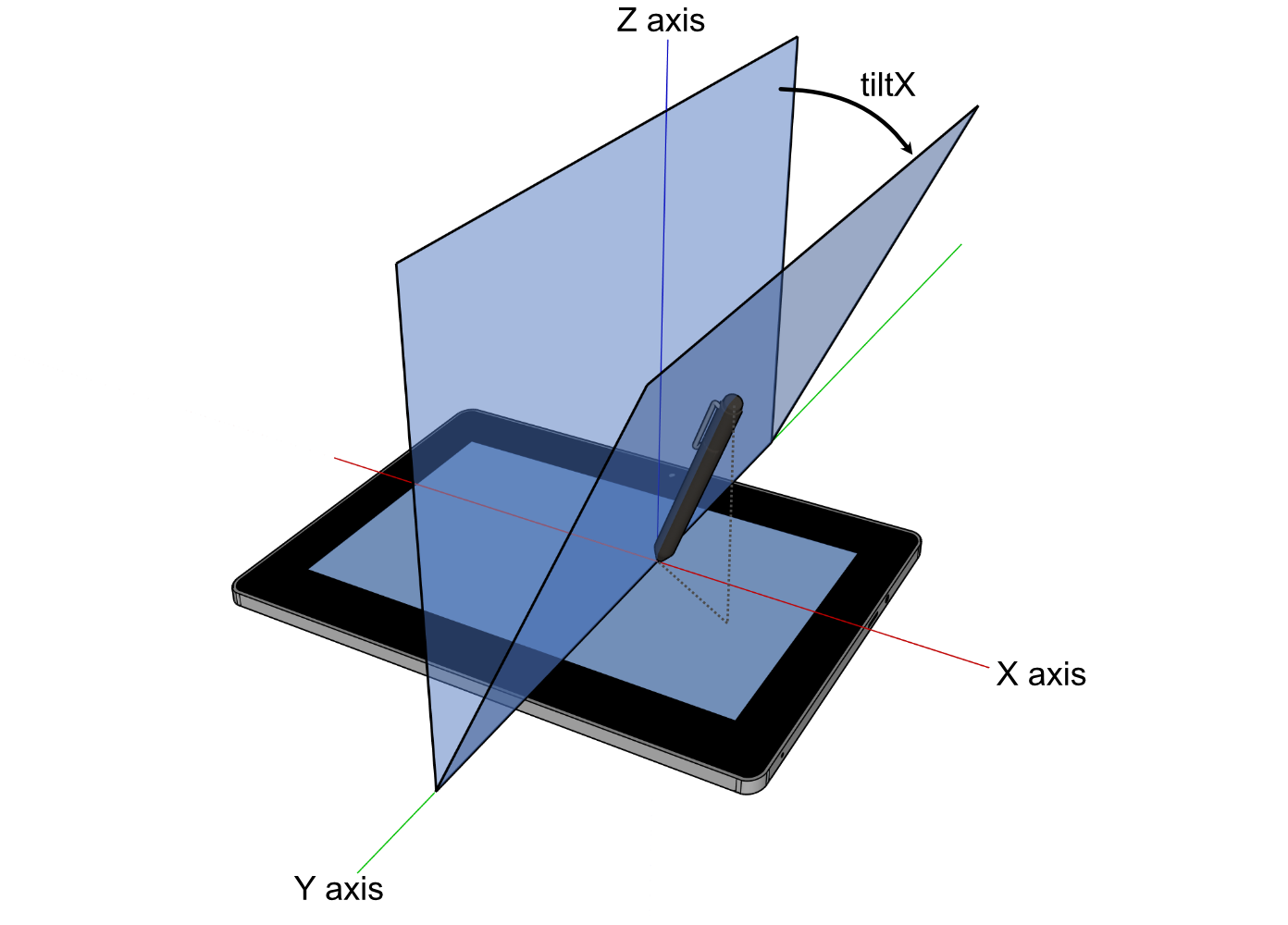
1139 ///
1140 /// <sub>
1141 /// For image attribution, see the
1142 /// <a href="https://github.com/rust-windowing/winit/blob/master/winit/docs/ATTRIBUTION.md">
1143 /// ATTRIBUTION.md
1144 /// </a>
1145 /// file.
1146 /// </sub>
1147 pub x: i8,
1148 /// The plane angle in degrees between the surface X-Z plane and the plane containing the tool
1149 /// and the surface X axis. Positive values are towards the user. In the range of -90 to
1150 /// 90. 0 means the tool is perpendicular to the surface and is the default.
1151 ///
1152 /// 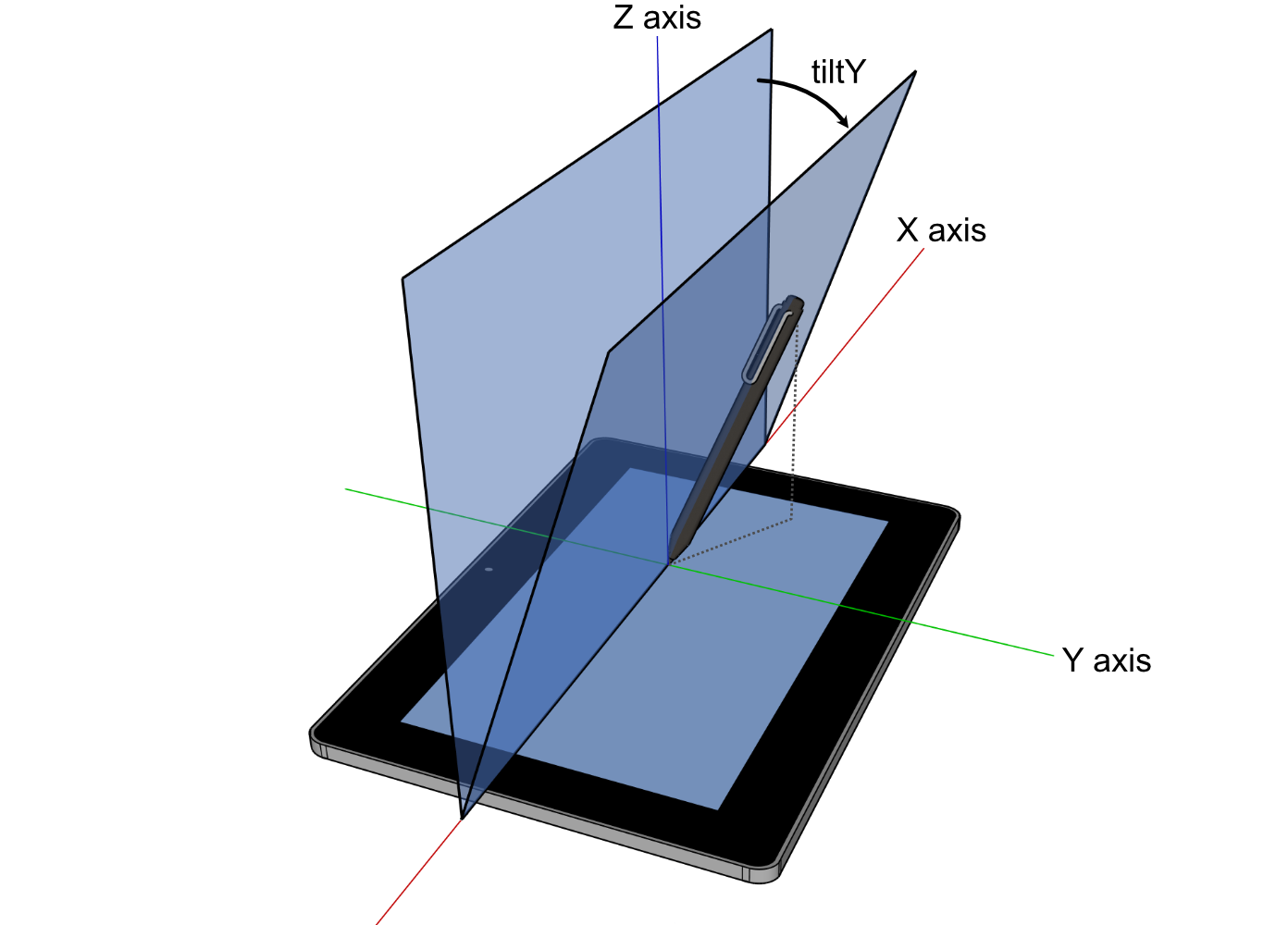
1153 ///
1154 /// <sub>
1155 /// For image attribution, see the
1156 /// <a href="https://github.com/rust-windowing/winit/blob/master/winit/docs/ATTRIBUTION.md">
1157 /// ATTRIBUTION.md
1158 /// </a>
1159 /// file.
1160 /// </sub>
1161 pub y: i8,
1162}
1163
1164impl TabletToolTilt {
1165 pub fn angle(self) -> TabletToolAngle {
1166 // See <https://www.w3.org/TR/2024/WD-pointerevents3-20240326/#converting-between-tiltx-tilty-and-altitudeangle-azimuthangle>.
1167
1168 use std::f64::consts::*;
1169
1170 const PI_0_5: f64 = FRAC_PI_2;
1171 const PI_1_5: f64 = 3. * FRAC_PI_2;
1172 const PI_2: f64 = 2. * PI;
1173
1174 let x = LazyCell::new(|| f64::from(self.x).to_radians());
1175 let y = LazyCell::new(|| f64::from(self.y).to_radians());
1176
1177 let mut azimuth = 0.;
1178
1179 if self.x == 0 {
1180 match self.y.cmp(&0) {
1181 Ordering::Greater => azimuth = PI_0_5,
1182 Ordering::Less => azimuth = PI_1_5,
1183 Ordering::Equal => (),
1184 }
1185 } else if self.y == 0 {
1186 if self.x < 0 {
1187 azimuth = PI;
1188 }
1189 } else if self.x.abs() == 90 || self.y.abs() == 90 {
1190 // not enough information to calculate azimuth
1191 azimuth = 0.;
1192 } else {
1193 // Non-boundary case: neither tiltX nor tiltY is equal to 0 or +-90
1194 azimuth = f64::atan2(y.tan(), x.tan());
1195
1196 if azimuth < 0. {
1197 azimuth += PI_2;
1198 }
1199 }
1200
1201 let altitude;
1202
1203 if self.x.abs() == 90 || self.y.abs() == 90 {
1204 altitude = 0.;
1205 } else if self.x == 0 {
1206 altitude = PI_0_5 - y.abs();
1207 } else if self.y == 0 {
1208 altitude = PI_0_5 - x.abs();
1209 } else {
1210 // Non-boundary case: neither tiltX nor tiltY is equal to 0 or +-90
1211 altitude = f64::atan(1. / f64::sqrt(x.tan().powi(2) + y.tan().powi(2)));
1212 }
1213
1214 TabletToolAngle { altitude, azimuth }
1215 }
1216}
1217
1218/// The angular position in radians of a tool.
1219#[derive(Clone, Copy, Debug, PartialEq)]
1220#[cfg_attr(feature = "serde", derive(Deserialize, Serialize))]
1221pub struct TabletToolAngle {
1222 /// The altitude angle in radians between the tools perpendicular position to the surface and
1223 /// the surface X-Y plane. In the range of 0, parallel to the surface, to π/2, perpendicular to
1224 /// the surface. π/2 means the tool is perpendicular to the surface and is the default.
1225 ///
1226 /// 
1227 ///
1228 /// <sub>
1229 /// For image attribution, see the
1230 /// <a href="https://github.com/rust-windowing/winit/blob/master/docs/res/ATTRIBUTION.md">
1231 /// ATTRIBUTION.md
1232 /// </a>
1233 /// file.
1234 /// </sub>
1235 pub altitude: f64,
1236 /// The azimuth angle in radiants representing the rotation between the major axis of the tool
1237 /// and the surface X-Y plane. In the range of 0, 3 o'clock, progressively increasing clockwise
1238 /// to 2π. 0 means the tool is at 3 o'clock or is perpendicular to the surface (`altitude` of
1239 /// π/2) and is the default.
1240 ///
1241 /// 
1242 ///
1243 /// <sub>
1244 /// For image attribution, see the
1245 /// <a href="https://github.com/rust-windowing/winit/blob/master/docs/res/ATTRIBUTION.md">
1246 /// ATTRIBUTION.md
1247 /// </a>
1248 /// file.
1249 /// </sub>
1250 pub azimuth: f64,
1251}
1252
1253impl Default for TabletToolAngle {
1254 fn default() -> Self {
1255 Self { altitude: f64::consts::FRAC_2_PI, azimuth: 0. }
1256 }
1257}
1258
1259impl TabletToolAngle {
1260 pub fn tilt(self) -> TabletToolTilt {
1261 // See <https://www.w3.org/TR/2024/WD-pointerevents3-20240326/#converting-between-tiltx-tilty-and-altitudeangle-azimuthangle>.
1262
1263 use std::f64::consts::*;
1264
1265 const PI_0_5: f64 = FRAC_PI_2;
1266 const PI_1_5: f64 = 3. * FRAC_PI_2;
1267 const PI_2: f64 = 2. * PI;
1268
1269 let mut x = 0.;
1270 let mut y = 0.;
1271
1272 if self.altitude == 0. {
1273 if self.azimuth == 0. || self.azimuth == PI_2 {
1274 x = FRAC_PI_2;
1275 } else if self.azimuth == PI_0_5 {
1276 y = FRAC_PI_2;
1277 } else if self.azimuth == PI {
1278 x = -FRAC_PI_2;
1279 } else if self.azimuth == PI_1_5 {
1280 y = -FRAC_PI_2;
1281 } else if self.azimuth > 0. && self.azimuth < PI_0_5 {
1282 x = FRAC_PI_2;
1283 y = FRAC_PI_2;
1284 } else if self.azimuth > PI_0_5 && self.azimuth < PI {
1285 x = -FRAC_PI_2;
1286 y = FRAC_PI_2;
1287 } else if self.azimuth > PI && self.azimuth < PI_1_5 {
1288 x = -FRAC_PI_2;
1289 y = -FRAC_PI_2;
1290 } else if self.azimuth > PI_1_5 && self.azimuth < PI_2 {
1291 x = FRAC_PI_2;
1292 y = -FRAC_PI_2;
1293 }
1294 }
1295
1296 if self.altitude != 0. {
1297 let altitude = self.altitude.tan();
1298
1299 x = f64::atan(f64::cos(self.azimuth) / altitude);
1300 y = f64::atan(f64::sin(self.azimuth) / altitude);
1301 }
1302
1303 TabletToolTilt { x: x.to_degrees().round() as i8, y: y.to_degrees().round() as i8 }
1304 }
1305}
1306
1307/// Describes the input state of a key.
1308#[derive(Debug, Hash, PartialEq, Eq, Clone, Copy)]
1309#[cfg_attr(feature = "serde", derive(Serialize, Deserialize))]
1310pub enum ElementState {
1311 Pressed,
1312 Released,
1313}
1314
1315impl ElementState {
1316 /// True if `self == Pressed`.
1317 pub fn is_pressed(self) -> bool {
1318 self == ElementState::Pressed
1319 }
1320}
1321
1322/// Identifies a button of a mouse controller.
1323///
1324/// ## Platform-specific
1325///
1326/// The first three buttons should be supported on all platforms.
1327/// [`Self::Back`] and [`Self::Forward`] are supported on most platforms
1328/// (when using a compatible mouse).
1329///
1330/// - **Android, iOS:** Currently not supported.
1331/// - **Orbital:** Only left/right/middle buttons are supported at this time.
1332/// - **Web, Windows:** Supports left/right/middle/back/forward buttons.
1333/// - **Wayland:** Supports buttons 0..=15.
1334/// - **macOS:** Supports all button variants.
1335/// - **X11:** Technically supports further buttons than this (0..=250), these are emitted in
1336/// `ButtonSource::Unknown`.
1337#[derive(Debug, Hash, PartialEq, Eq, PartialOrd, Ord, Clone, Copy)]
1338#[cfg_attr(feature = "serde", derive(Serialize, Deserialize))]
1339#[repr(u8)]
1340pub enum MouseButton {
1341 /// The primary (usually left) button
1342 Left = 0,
1343 /// The secondary (usually right) button
1344 Right = 1,
1345 /// The tertiary (usually middle) button
1346 Middle = 2,
1347 /// The first side button, frequently assigned a back function
1348 Back = 3,
1349 /// The second side button, frequently assigned a forward function
1350 Forward = 4,
1351 /// The sixth button
1352 Button6 = 5,
1353 /// The seventh button
1354 Button7 = 6,
1355 /// The eighth button
1356 Button8 = 7,
1357 /// The ninth button
1358 Button9 = 8,
1359 /// The tenth button
1360 Button10 = 9,
1361 /// The eleventh button
1362 Button11 = 10,
1363 /// The twelfth button
1364 Button12 = 11,
1365 /// The thirteenth button
1366 Button13 = 12,
1367 /// The fourteenth button
1368 Button14 = 13,
1369 /// The fifteenth button
1370 Button15 = 14,
1371 /// The sixteenth button
1372 Button16 = 15,
1373 Button17 = 16,
1374 Button18 = 17,
1375 Button19 = 18,
1376 Button20 = 19,
1377 Button21 = 20,
1378 Button22 = 21,
1379 Button23 = 22,
1380 Button24 = 23,
1381 Button25 = 24,
1382 Button26 = 25,
1383 Button27 = 26,
1384 Button28 = 27,
1385 Button29 = 28,
1386 Button30 = 29,
1387 Button31 = 30,
1388 Button32 = 31,
1389}
1390
1391impl MouseButton {
1392 /// Construct from a `u8` if within the range `0..=31`
1393 pub fn try_from_u8(b: u8) -> Option<MouseButton> {
1394 Some(match b {
1395 0 => MouseButton::Left,
1396 1 => MouseButton::Right,
1397 2 => MouseButton::Middle,
1398 3 => MouseButton::Back,
1399 4 => MouseButton::Forward,
1400 5 => MouseButton::Button6,
1401 6 => MouseButton::Button7,
1402 7 => MouseButton::Button8,
1403 8 => MouseButton::Button9,
1404 9 => MouseButton::Button10,
1405 10 => MouseButton::Button11,
1406 11 => MouseButton::Button12,
1407 12 => MouseButton::Button13,
1408 13 => MouseButton::Button14,
1409 14 => MouseButton::Button15,
1410 15 => MouseButton::Button16,
1411 16 => MouseButton::Button17,
1412 17 => MouseButton::Button18,
1413 18 => MouseButton::Button19,
1414 19 => MouseButton::Button20,
1415 20 => MouseButton::Button21,
1416 21 => MouseButton::Button22,
1417 22 => MouseButton::Button23,
1418 23 => MouseButton::Button24,
1419 24 => MouseButton::Button25,
1420 25 => MouseButton::Button26,
1421 26 => MouseButton::Button27,
1422 27 => MouseButton::Button28,
1423 28 => MouseButton::Button29,
1424 29 => MouseButton::Button30,
1425 30 => MouseButton::Button31,
1426 31 => MouseButton::Button32,
1427 _ => return None,
1428 })
1429 }
1430}
1431
1432/// Describes a button of a tool, e.g. a pen.
1433#[derive(Clone, Copy, Debug, Eq, Hash, Ord, PartialEq, PartialOrd)]
1434#[cfg_attr(feature = "serde", derive(Deserialize, Serialize))]
1435pub enum TabletToolButton {
1436 Contact,
1437 Barrel,
1438 Other(u16),
1439}
1440
1441impl From<TabletToolButton> for Option<MouseButton> {
1442 fn from(tool: TabletToolButton) -> Self {
1443 Some(match tool {
1444 TabletToolButton::Contact => MouseButton::Left,
1445 TabletToolButton::Barrel => MouseButton::Right,
1446 TabletToolButton::Other(1) => MouseButton::Middle,
1447 TabletToolButton::Other(3) => MouseButton::Back,
1448 TabletToolButton::Other(4) => MouseButton::Forward,
1449 TabletToolButton::Other(_) => return None,
1450 })
1451 }
1452}
1453
1454/// Describes a difference in the mouse scroll wheel state.
1455#[derive(Debug, Clone, Copy, PartialEq)]
1456#[cfg_attr(feature = "serde", derive(Serialize, Deserialize))]
1457pub enum MouseScrollDelta {
1458 /// Amount in lines or rows to scroll in the horizontal
1459 /// and vertical directions.
1460 ///
1461 /// Positive values indicate that the content that is being scrolled should move
1462 /// right and down (revealing more content left and up).
1463 LineDelta(f32, f32),
1464
1465 /// Amount in pixels to scroll in the horizontal and
1466 /// vertical direction.
1467 ///
1468 /// Scroll events are expressed as a `PixelDelta` if
1469 /// supported by the device (eg. a touchpad) and
1470 /// platform.
1471 ///
1472 /// Positive values indicate that the content being scrolled should
1473 /// move right/down.
1474 ///
1475 /// For a 'natural scrolling' touch pad (that acts like a touch screen)
1476 /// this means moving your fingers right and down should give positive values,
1477 /// and move the content right and down (to reveal more things left and up).
1478 PixelDelta(PhysicalPosition<f64>),
1479}
1480
1481/// Handle to synchronously change the size of the window from the [`WindowEvent`].
1482#[derive(Debug, Clone)]
1483pub struct SurfaceSizeWriter {
1484 pub(crate) new_surface_size: Weak<Mutex<PhysicalSize<u32>>>,
1485}
1486
1487impl SurfaceSizeWriter {
1488 pub fn new(new_surface_size: Weak<Mutex<PhysicalSize<u32>>>) -> Self {
1489 Self { new_surface_size }
1490 }
1491
1492 /// Try to request surface size which will be set synchronously on the window.
1493 pub fn request_surface_size(
1494 &mut self,
1495 new_surface_size: PhysicalSize<u32>,
1496 ) -> Result<(), RequestError> {
1497 if let Some(inner) = self.new_surface_size.upgrade() {
1498 *inner.lock().unwrap() = new_surface_size;
1499 Ok(())
1500 } else {
1501 Err(RequestError::Ignored)
1502 }
1503 }
1504
1505 /// Get the currently stashed surface size.
1506 pub fn surface_size(&self) -> Result<PhysicalSize<u32>, RequestError> {
1507 if let Some(inner) = self.new_surface_size.upgrade() {
1508 Ok(*inner.lock().unwrap())
1509 } else {
1510 Err(RequestError::Ignored)
1511 }
1512 }
1513}
1514
1515impl PartialEq for SurfaceSizeWriter {
1516 fn eq(&self, other: &Self) -> bool {
1517 self.new_surface_size.as_ptr() == other.new_surface_size.as_ptr()
1518 }
1519}
1520
1521impl Eq for SurfaceSizeWriter {}
1522
1523#[cfg(test)]
1524mod tests {
1525 use std::collections::{BTreeSet, HashSet};
1526
1527 use dpi::PhysicalPosition;
1528
1529 use crate::event;
1530
1531 macro_rules! foreach_event {
1532 ($closure:expr) => {{
1533 foreach_event!(window: $closure);
1534 foreach_event!(device: $closure);
1535 }};
1536 (window: $closure:expr) => {{
1537 #[allow(unused_mut)]
1538 let mut with_window_event: &mut dyn FnMut(event::WindowEvent) = &mut $closure;
1539 let fid = event::FingerId::from_raw(0);
1540
1541 use crate::event::Ime::Enabled;
1542 use crate::event::WindowEvent::*;
1543 use crate::event::{PointerKind, PointerSource};
1544
1545 with_window_event(CloseRequested);
1546 with_window_event(Destroyed);
1547 with_window_event(Focused(true));
1548 with_window_event(Moved((0, 0).into()));
1549 with_window_event(SurfaceResized((0, 0).into()));
1550 with_window_event(DragEntered { paths: vec!["x.txt".into()], position: (0, 0).into() });
1551 with_window_event(DragMoved { position: (0, 0).into() });
1552 with_window_event(DragDropped { paths: vec!["x.txt".into()], position: (0, 0).into() });
1553 with_window_event(DragLeft { position: Some((0, 0).into()) });
1554 with_window_event(Ime(Enabled));
1555 with_window_event(PointerMoved {
1556 device_id: None,
1557 primary: true,
1558 position: (0, 0).into(),
1559 source: PointerSource::Mouse,
1560 });
1561 with_window_event(ModifiersChanged(event::Modifiers::default()));
1562 with_window_event(PointerEntered {
1563 device_id: None,
1564 primary: true,
1565 position: (0, 0).into(),
1566 kind: PointerKind::Mouse,
1567 });
1568 with_window_event(PointerLeft {
1569 primary: true,
1570 device_id: None,
1571 position: Some((0, 0).into()),
1572 kind: PointerKind::Mouse,
1573 });
1574 with_window_event(MouseWheel {
1575 device_id: None,
1576 delta: event::MouseScrollDelta::LineDelta(0.0, 0.0),
1577 phase: event::TouchPhase::Started,
1578 });
1579 with_window_event(PointerButton {
1580 device_id: None,
1581 primary: true,
1582 state: event::ElementState::Pressed,
1583 position: (0, 0).into(),
1584 button: event::ButtonSource::Unknown(0),
1585 });
1586 with_window_event(PointerButton {
1587 device_id: None,
1588 primary: true,
1589 state: event::ElementState::Released,
1590 position: (0, 0).into(),
1591 button: event::ButtonSource::Touch {
1592 finger_id: fid,
1593 force: Some(event::Force::Normalized(0.0)),
1594 },
1595 });
1596 with_window_event(PinchGesture {
1597 device_id: None,
1598 delta: 0.0,
1599 phase: event::TouchPhase::Started,
1600 });
1601 with_window_event(DoubleTapGesture { device_id: None });
1602 with_window_event(RotationGesture {
1603 device_id: None,
1604 delta: 0.0,
1605 phase: event::TouchPhase::Started,
1606 });
1607 with_window_event(PanGesture {
1608 device_id: None,
1609 delta: PhysicalPosition::<f32>::new(0.0, 0.0),
1610 phase: event::TouchPhase::Started,
1611 });
1612 with_window_event(TouchpadPressure { device_id: None, pressure: 0.0, stage: 0 });
1613 with_window_event(ThemeChanged(crate::window::Theme::Light));
1614 with_window_event(Occluded(true));
1615 }};
1616 (device: $closure:expr) => {{
1617 use event::DeviceEvent::*;
1618
1619 #[allow(unused_mut)]
1620 let mut with_device_event: &mut dyn FnMut(event::DeviceEvent) = &mut $closure;
1621
1622 with_device_event(PointerMotion { delta: (0.0, 0.0).into() });
1623 with_device_event(MouseWheel { delta: event::MouseScrollDelta::LineDelta(0.0, 0.0) });
1624 with_device_event(Button { button: 0, state: event::ElementState::Pressed });
1625 }};
1626 }
1627
1628 #[allow(clippy::clone_on_copy)]
1629 #[test]
1630 fn test_event_clone() {
1631 foreach_event!(|event| {
1632 let event2 = event.clone();
1633 assert_eq!(event, event2);
1634 });
1635 }
1636
1637 #[test]
1638 fn test_tilt_angle_conversions() {
1639 use std::f64::consts::*;
1640
1641 use event::{TabletToolAngle, TabletToolTilt};
1642
1643 // See <https://github.com/web-platform-tests/wpt/blob/5af3e9c2a2aba76ade00f0dbc3486e50a74a4506/pointerevents/pointerevent_tiltX_tiltY_to_azimuth_altitude.html#L11-L23>.
1644 const TILT_TO_ANGLE: &[(TabletToolTilt, TabletToolAngle)] = &[
1645 (TabletToolTilt { x: 0, y: 0 }, TabletToolAngle { altitude: FRAC_PI_2, azimuth: 0. }),
1646 (TabletToolTilt { x: 0, y: 90 }, TabletToolAngle { altitude: 0., azimuth: FRAC_PI_2 }),
1647 (TabletToolTilt { x: 0, y: -90 }, TabletToolAngle {
1648 altitude: 0.,
1649 azimuth: 3. * FRAC_PI_2,
1650 }),
1651 (TabletToolTilt { x: 90, y: 0 }, TabletToolAngle { altitude: 0., azimuth: 0. }),
1652 (TabletToolTilt { x: 90, y: 90 }, TabletToolAngle { altitude: 0., azimuth: 0. }),
1653 (TabletToolTilt { x: 90, y: -90 }, TabletToolAngle { altitude: 0., azimuth: 0. }),
1654 (TabletToolTilt { x: -90, y: 0 }, TabletToolAngle { altitude: 0., azimuth: PI }),
1655 (TabletToolTilt { x: -90, y: 90 }, TabletToolAngle { altitude: 0., azimuth: 0. }),
1656 (TabletToolTilt { x: -90, y: -90 }, TabletToolAngle { altitude: 0., azimuth: 0. }),
1657 (TabletToolTilt { x: 0, y: 45 }, TabletToolAngle {
1658 altitude: FRAC_PI_4,
1659 azimuth: FRAC_PI_2,
1660 }),
1661 (TabletToolTilt { x: 0, y: -45 }, TabletToolAngle {
1662 altitude: FRAC_PI_4,
1663 azimuth: 3. * FRAC_PI_2,
1664 }),
1665 (TabletToolTilt { x: 45, y: 0 }, TabletToolAngle { altitude: FRAC_PI_4, azimuth: 0. }),
1666 (TabletToolTilt { x: -45, y: 0 }, TabletToolAngle { altitude: FRAC_PI_4, azimuth: PI }),
1667 ];
1668
1669 for (tilt, angle) in TILT_TO_ANGLE {
1670 assert_eq!(tilt.angle(), *angle, "{tilt:?}");
1671 }
1672
1673 // See <https://github.com/web-platform-tests/wpt/blob/5af3e9c2a2aba76ade00f0dbc3486e50a74a4506/pointerevents/pointerevent_tiltX_tiltY_to_azimuth_altitude.html#L38-L46>.
1674 const ANGLE_TO_TILT: &[(TabletToolAngle, TabletToolTilt)] = &[
1675 (TabletToolAngle { altitude: 0., azimuth: 0. }, TabletToolTilt { x: 90, y: 0 }),
1676 (TabletToolAngle { altitude: FRAC_PI_4, azimuth: 0. }, TabletToolTilt { x: 45, y: 0 }),
1677 (TabletToolAngle { altitude: FRAC_PI_2, azimuth: 0. }, TabletToolTilt { x: 0, y: 0 }),
1678 (TabletToolAngle { altitude: 0., azimuth: FRAC_PI_2 }, TabletToolTilt { x: 0, y: 90 }),
1679 (TabletToolAngle { altitude: FRAC_PI_4, azimuth: FRAC_PI_2 }, TabletToolTilt {
1680 x: 0,
1681 y: 45,
1682 }),
1683 (TabletToolAngle { altitude: 0., azimuth: PI }, TabletToolTilt { x: -90, y: 0 }),
1684 (TabletToolAngle { altitude: FRAC_PI_4, azimuth: PI }, TabletToolTilt { x: -45, y: 0 }),
1685 (TabletToolAngle { altitude: 0., azimuth: 3. * FRAC_PI_2 }, TabletToolTilt {
1686 x: 0,
1687 y: -90,
1688 }),
1689 (TabletToolAngle { altitude: FRAC_PI_4, azimuth: 3. * FRAC_PI_2 }, TabletToolTilt {
1690 x: 0,
1691 y: -45,
1692 }),
1693 ];
1694
1695 for (angle, tilt) in ANGLE_TO_TILT {
1696 assert_eq!(angle.tilt(), *tilt, "{angle:?}");
1697 }
1698 }
1699
1700 #[test]
1701 fn test_force_normalize() {
1702 let force = event::Force::Normalized(0.0);
1703 assert_eq!(force.normalized(None), 0.0);
1704
1705 let force2 = event::Force::Calibrated { force: 5.0, max_possible_force: 2.5 };
1706 assert_eq!(force2.normalized(None), 2.0);
1707
1708 let force3 = event::Force::Calibrated { force: 5.0, max_possible_force: 2.5 };
1709 assert_eq!(
1710 force3.normalized(Some(event::TabletToolAngle {
1711 altitude: std::f64::consts::PI / 2.0,
1712 azimuth: 0.
1713 })),
1714 2.0
1715 );
1716 }
1717
1718 #[allow(clippy::clone_on_copy)]
1719 #[test]
1720 fn ensure_attrs_do_not_panic() {
1721 foreach_event!(|event| {
1722 let _ = format!("{event:?}");
1723 });
1724 let _ = event::StartCause::Init.clone();
1725
1726 let fid = crate::event::FingerId::from_raw(0).clone();
1727 HashSet::new().insert(fid);
1728 let mut set = [fid, fid, fid];
1729 set.sort_unstable();
1730 let mut set2 = BTreeSet::new();
1731 set2.insert(fid);
1732 set2.insert(fid);
1733
1734 HashSet::new().insert(event::TouchPhase::Started.clone());
1735 HashSet::new().insert(event::MouseButton::Left.clone());
1736 HashSet::new().insert(event::Ime::Enabled);
1737
1738 let _ = event::Force::Calibrated { force: 0.0, max_possible_force: 0.0 }.clone();
1739 }
1740}