waterui_controls/button.rs
1//! Button component for `WaterUI`
2//!
3//! This module provides a Button component that allows users to trigger actions
4//! when clicked.
5//! 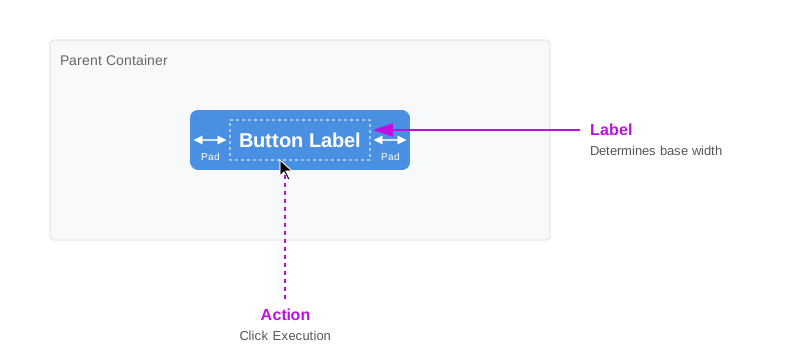
6//!
7//!
8//! # Examples
9//!
10//! ```rust,ignore
11//! use waterui::prelude::*;
12//!
13//! let button = button("Click me").action(|| {
14//! println!("Button clicked!");
15//! });
16//!
17//! // Button with link style
18//! let link_button = button("Visit website")
19//! .style(ButtonStyle::Link)
20//! .action(|| { /* open URL */ });
21//! ```
22//!
23//! Tip: `action` receives a `HandlerFn`, it can extract value from environment and pass it to the action.
24//! To learn more about `HandlerFn`, see the [`HandlerFn`] documentation.
25
26use core::fmt::Debug;
27
28/// Visual style options for buttons.
29///
30/// Different button styles provide different visual emphasis and behavior.
31#[non_exhaustive]
32#[derive(Debug, Clone, Copy, PartialEq, Eq, Hash, Default)]
33pub enum ButtonStyle {
34 /// The default button style, determined by the platform and context.
35 /// On macOS/iOS, this typically renders as a rounded rectangle with background.
36 #[default]
37 Automatic,
38 /// A plain text button without any background or border.
39 /// Suitable for low-emphasis actions.
40 Plain,
41 /// A button styled as a hyperlink, typically with underlined blue text.
42 /// Used for URL navigation and text-based links.
43 Link,
44 /// A button without a visible border, but may show hover/press effects.
45 /// Similar to Plain but with more interactive feedback.
46 Borderless,
47 /// A prominent button style for primary actions.
48 /// Typically rendered with a filled background color.
49 Bordered,
50 /// A prominent button with visible border.
51 /// Similar to Bordered but with more prominent styling.
52 BorderedProminent,
53}
54
55use alloc::boxed::Box;
56use waterui_core::handler::{
57 BoxHandler, Handler, HandlerFn, HandlerFnWithState, IntoHandler, IntoHandlerWithState,
58 into_handler, into_handler_with_state,
59};
60use waterui_core::view::{ConfigurableView, Hook, ViewConfiguration};
61use waterui_core::{Environment, Native, NativeView, impl_debug};
62
63use waterui_core::AnyView;
64use waterui_core::View;
65
66/// Configuration for a button component.
67///
68/// Use the `Button` struct's methods to customize these properties.
69///
70/// # Layout Behavior
71///
72/// Buttons size themselves to fit their label content and never stretch to fill
73/// extra space. In a stack, they take only the space they need.
74///
75// ═══════════════════════════════════════════════════════════════════════════
76// INTERNAL: Layout Contract for Backend Implementers
77// ═══════════════════════════════════════════════════════════════════════════
78//
79// Size: Determined by label content + platform padding.
80//
81// ═══════════════════════════════════════════════════════════════════════════
82#[non_exhaustive]
83pub struct ButtonConfig {
84 /// The label displayed on the button
85 pub label: AnyView,
86 /// The action to execute when the button is clicked
87 pub action: BoxHandler<()>,
88 /// The visual style of the button
89 pub style: ButtonStyle,
90}
91
92impl_debug!(ButtonConfig);
93
94impl NativeView for ButtonConfig {}
95
96impl<Label, Action> View for Button<Label, Action>
97where
98 Label: View,
99 Action: Handler<()>,
100{
101 fn body(self, env: &Environment) -> impl View {
102 let config = self.config();
103 if let Some(hook) = env.get::<Hook<ButtonConfig>>() {
104 hook.apply(env, config)
105 } else {
106 AnyView::new(Native::new(config))
107 }
108 }
109
110 fn stretch_axis(&self) -> waterui_core::layout::StretchAxis {
111 waterui_core::layout::StretchAxis::None
112 }
113}
114
115impl ViewConfiguration for ButtonConfig {
116 type View = Button<AnyView, BoxHandler<()>>;
117
118 fn render(self) -> Self::View {
119 Button {
120 label: self.label,
121 action: self.action,
122 style: self.style,
123 }
124 }
125}
126
127impl<Label, Action> ConfigurableView for Button<Label, Action>
128where
129 Label: View,
130 Action: Handler<()>,
131{
132 type Config = ButtonConfig;
133
134 fn config(self) -> Self::Config {
135 ButtonConfig {
136 label: AnyView::new(self.label),
137 action: Box::new(self.action),
138 style: self.style,
139 }
140 }
141}
142
143/// A button component that can be configured with a label and an action.
144#[derive(Debug, Clone, PartialEq, Eq, Hash, Default)]
145pub struct Button<Label, Action> {
146 label: Label,
147 action: Action,
148 style: ButtonStyle,
149}
150
151impl<Label> Button<Label, ()> {
152 /// Creates a new button with the specified label.
153 ///
154 /// # Arguments
155 ///
156 /// * `label` - The text or view to display on the button
157 pub const fn new(label: Label) -> Self {
158 Self {
159 label,
160 action: (),
161 style: ButtonStyle::Automatic,
162 }
163 }
164}
165
166impl<Label, Action> Button<Label, Action> {
167 /// Sets the visual style of the button.
168 ///
169 /// # Arguments
170 ///
171 /// * `style` - The button style to apply
172 ///
173 /// # Returns
174 ///
175 /// The modified button with the style set
176 #[must_use]
177 pub const fn style(mut self, style: ButtonStyle) -> Self {
178 self.style = style;
179 self
180 }
181
182 /// Sets the action to be performed when the button is clicked.
183 ///
184 /// # Arguments
185 ///
186 /// * `action` - The callback function to execute when button is clicked
187 ///
188 /// # Returns
189 ///
190 /// The modified button with the action set
191 #[must_use]
192 pub fn action<H, P>(self, action: H) -> Button<Label, IntoHandler<H, P, ()>>
193 where
194 H: HandlerFn<P, ()>,
195 P: 'static,
196 {
197 Button {
198 label: self.label,
199 action: into_handler(action),
200 style: self.style,
201 }
202 }
203 /// Sets the action to be performed when the button is clicked, with access to a state.
204 ///
205 /// # Arguments
206 ///
207 /// * `state` - A reference to the state that the action can access.
208 /// * `action` - The callback function to execute when the button is clicked.
209 ///
210 /// # Returns
211 ///
212 /// The modified button with the action and state set.
213 #[must_use]
214 pub fn action_with<H, P, S>(
215 self,
216 state: &S,
217 action: H,
218 ) -> Button<Label, IntoHandlerWithState<H, P, (), S>>
219 where
220 H: HandlerFnWithState<P, (), S>,
221 S: 'static + Clone,
222 P: 'static,
223 {
224 Button {
225 label: self.label,
226 action: into_handler_with_state(action, state.clone()),
227 style: self.style,
228 }
229 }
230}
231
232/// Convenience function to create a new button with the specified label.
233///
234/// # Arguments
235///
236/// * `label` - The text or view to display on the button
237///
238/// # Returns
239///
240/// A new button instance
241pub const fn button<Label>(label: Label) -> Button<Label, ()> {
242 Button::new(label)
243}