tui_logger/lib.rs
1//! # Logger with smart widget for the `tui` and `ratatui` crate
2//!
3//! [](https://deps.rs/repo/github/gin66/tui-logger)
4//! 
5//!
6//!
7//! ## Demo of the widget
8//!
9//! 
10//!
11//! ## Documentation
12//!
13//! [Documentation](https://docs.rs/tui-logger/latest/tui_logger/)
14//!
15//! I have stumbled over an excellent AI-generated description of `tui-logger`, which provides surprisingly deep and (mostly) correct implementation details.
16//! It would have costed me many days to write an equally good description with so many details and diagrams.
17//! This docu can be found [here](https://deepwiki.com/gin66/tui-logger).
18//!
19//! ## Important note for `tui`
20//!
21//! The `tui` crate has been archived and `ratatui` has taken over.
22//! In order to avoid supporting compatibility for an inactive crate,
23//! the v0.9.x releases are the last to support `tui`. In case future bug fixes
24//! are needed, the branch `tui_legacy` has been created to track changes to 0.9.x releases.
25//!
26//! Starting with v0.10 `tui-logger` is `ratatui` only.
27//!
28//! ## Features
29//!
30//! - [X] Logger implementation for the `log` crate
31//! - [X] Logger enable/disable detection via hash table (avoid string compare)
32//! - [X] Hot logger code only copies enabled log messages with timestamp into a circular buffer
33//! - [X] Widgets/move_message() retrieve captured log messages from hot circular buffer
34//! - [X] Lost message detection due to circular buffer
35//! - [X] Log filtering performed on log record target
36//! - [X] Simple Widgets to view logs and configure debuglevel per target
37//! - [X] Logging of enabled logs to file
38//! - [X] Scrollback in log history
39//! - [x] Title of target and log pane can be configured
40//! - [X] `slog` support, providing a Drain to integrate into your `slog` infrastructure
41//! - [X] `tracing` support
42//! - [X] Support to use custom formatter for log events
43//! - [X] Configurable by environment variables
44//! - [X] `wait()` / `wait_timeout()` signaling support via Condvar
45//! - [ ] Allow configuration of target dependent loglevel specifically for file logging
46//! - [X] Avoid duplicating of module_path and filename in every log record
47//! - [ ] Simultaneous modification of all targets' display/hot logging loglevel by key command
48//!
49//! ## Smart Widget
50//!
51//! Smart widget consists of two widgets. Left is the target selector widget and
52//! on the right side the logging messages view scrolling up. The target selector widget
53//! can be hidden/shown during runtime via key command.
54//! The key command to be provided to the TuiLoggerWidget via transition() function.
55//!
56//! The target selector widget looks like this:
57//!
58//! 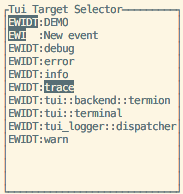
59//!
60//! It controls:
61//!
62//! - Capturing of log messages by the logger
63//! - Selection of levels for display in the logging message view
64//!
65//! The two columns have the following meaning:
66//!
67//! - Code EWIDT: E stands for Error, W for Warn, Info, Debug and Trace.
68//! + Inverted characters (EWIDT) are enabled log levels in the view
69//! + Normal characters show enabled capturing of a log level per target
70//! + If any of EWIDT are not shown, then the respective log level is not captured
71//! - Target of the log events can be defined in the log e.g. `warn!(target: "demo", "Log message");`
72//!
73//! ## Smart Widget Key Commands
74//! ```ignore
75//! | KEY | ACTION
76//! |----------|-----------------------------------------------------------|
77//! | h | Toggles target selector widget hidden/visible
78//! | f | Toggle focus on the selected target only
79//! | UP | Select previous target in target selector widget
80//! | DOWN | Select next target in target selector widget
81//! | LEFT | Reduce SHOWN (!) log messages by one level
82//! | RIGHT | Increase SHOWN (!) log messages by one level
83//! | - | Reduce CAPTURED (!) log messages by one level
84//! | + | Increase CAPTURED (!) log messages by one level
85//! | PAGEUP | Enter Page Mode and scroll approx. half page up in log history.
86//! | PAGEDOWN | Only in page mode: scroll 10 events down in log history.
87//! | ESCAPE | Exit page mode and go back to scrolling mode
88//! | SPACE | Toggles hiding of targets, which have logfilter set to off
89//! ```
90//!
91//! The mapping of key to action has to be done in the application. The respective TuiWidgetEvent
92//! has to be provided to TuiWidgetState::transition().
93//!
94//! Remark to the page mode: The timestamp of the event at event history's bottom line is used as
95//! reference. This means, changing the filters in the EWIDT/focus from the target selector window
96//! should work as expected without jumps in the history. The page next/forward advances as
97//! per visibility of the events.
98//!
99//! ## Basic usage to initialize logger-system:
100//! ```rust
101//! #[macro_use]
102//! extern crate log;
103//! //use tui_logger;
104//!
105//! fn main() {
106//! // Early initialization of the logger
107//!
108//! // Set max_log_level to Trace
109//! tui_logger::init_logger(log::LevelFilter::Trace).unwrap();
110//!
111//! // Set default level for unknown targets to Trace
112//! tui_logger::set_default_level(log::LevelFilter::Trace);
113//!
114//! // code....
115//! }
116//! ```
117//!
118//! For use of the widget please check examples/demo.rs
119//!
120//! ## Demo
121//!
122//! Run demo using termion:
123//!
124//! ```ignore
125//! cargo run --example demo --features termion
126//! ```
127//!
128//! Run demo with crossterm:
129//!
130//! ```ignore
131//! cargo run --example demo --features crossterm
132//! ```
133//!
134//! Run demo using termion and simple custom formatter in bottom right log widget:
135//!
136//! ```ignore
137//! cargo run --example demo --features termion,formatter
138//! ```
139//!
140//! ## Configuration by environment variables
141//!
142//! `tui.logger` uses `env-filter` crate to support configuration by a string or an environment variable.
143//! This is an opt-in by call to one of these two functions.
144//! ```rust
145//! pub fn set_env_filter_from_string(filterstring: &str) {}
146//! pub fn set_env_filter_from_env(env_name: Option<&str>) {}
147//! ```
148//! Default environment variable name is `RUST_LOG`.
149//!
150//! ## `slog` support
151//!
152//! `tui-logger` provides a `TuiSlogDrain` which implements `slog::Drain` and will route all records
153//! it receives to the `tui-logger` widget.
154//!
155//! Enabled by feature "slog-support"
156//!
157//! ## `tracing-subscriber` support
158//!
159//! `tui-logger` provides a `TuiTracingSubscriberLayer` which implements
160//! `tracing_subscriber::Layer` and will collect all events
161//! it receives to the `tui-logger` widget
162//!
163//! Enabled by feature "tracing-support"
164//!
165//! ## `wait()` / `wait_timeout()` signaling support
166//!
167//! For applications that drive rendering from their own event loop and need
168//! to know when to redraw the widget without polling, `tui-logger` exposes
169//! `wait()` and `wait_timeout()`. The waiter is keyed on a monotonic index
170//! that is bumped every time `move_events()` successfully transfers one or
171//! more events. A call to `wait()` captures the current index and blocks
172//! until it advances, then returns the new index. `wait_timeout()` does the
173//! same with a deadline, returning `None` if the timeout expired.
174//!
175//! ```ignore
176//! loop {
177//! tui_logger::wait_timeout(Duration::from_millis(100));
178//! terminal.draw(|f| f.render_widget(&mut app, f.area()))?;
179//! }
180//! ```
181//!
182//! Enabled by feature "waiter"
183//!
184//! ## Custom filtering
185//! ```rust
186//! #[macro_use]
187//! extern crate log;
188//! //use tui_logger;
189//! use env_logger;
190//!
191//! fn main() {
192//! // Early initialization of the logger
193//! let drain = tui_logger::Drain::new();
194//! // instead of tui_logger::init_logger, we use `env_logger`
195//! env_logger::Builder::default()
196//! .format(move |buf, record|
197//! // patch the env-logger entry through our drain to the tui-logger
198//! Ok(drain.log(record))
199//! ).init(); // make this the global logger
200//! // code....
201//! }
202//! ```
203//!
204//! ## Custom formatting
205//!
206//! For experts only ! Configure along the lines:
207//! ```ignore
208//! use tui_logger::LogFormatter;
209//!
210//! let formatter = MyLogFormatter();
211//!
212//! TuiLoggerWidget::default()
213//! .block(Block::bordered().title("Filtered TuiLoggerWidget"))
214//! .formatter(formatter)
215//! .state(&filter_state)
216//! .render(left, buf);
217//! ```
218//! The example demo can be invoked to use a custom formatter as example for the bottom right widget.
219//!
220// Enable docsrs doc_cfg - to display non-default feature documentation.
221#![cfg_attr(docsrs, feature(doc_cfg))]
222#[macro_use]
223extern crate lazy_static;
224
225pub use env_filter;
226
227mod circular;
228pub use crate::circular::CircularBuffer;
229
230#[cfg(feature = "slog-support")]
231#[cfg_attr(docsrs, doc(cfg(feature = "slog-support")))]
232mod slog;
233#[cfg(feature = "slog-support")]
234#[cfg_attr(docsrs, doc(cfg(feature = "slog-support")))]
235pub use crate::slog::TuiSlogDrain;
236
237#[cfg(feature = "tracing-support")]
238#[cfg_attr(docsrs, doc(cfg(feature = "tracing-support")))]
239mod tracing_subscriber;
240#[cfg(feature = "tracing-support")]
241#[cfg_attr(docsrs, doc(cfg(feature = "tracing-support")))]
242pub use crate::tracing_subscriber::TuiTracingSubscriberLayer;
243#[doc(no_inline)]
244pub use log::LevelFilter;
245
246mod widget;
247pub use widget::inner::TuiWidgetEvent;
248pub use widget::inner::TuiWidgetState;
249pub use widget::logformatter::LogFormatter;
250pub use widget::smart::TuiLoggerSmartWidget;
251pub use widget::standard::TuiLoggerWidget;
252pub use widget::target::TuiLoggerTargetWidget;
253
254mod config;
255pub use config::LevelConfig;
256
257mod file;
258pub use file::TuiLoggerFile;
259
260mod logger;
261pub use crate::logger::api::*;
262pub use crate::logger::ExtLogRecord;
263pub use crate::logger::TuiLoggerLevelOutput;
264use crate::logger::*;