Expand description
§Logger with smart widget for the tui and ratatui crate


§Demo of the widget
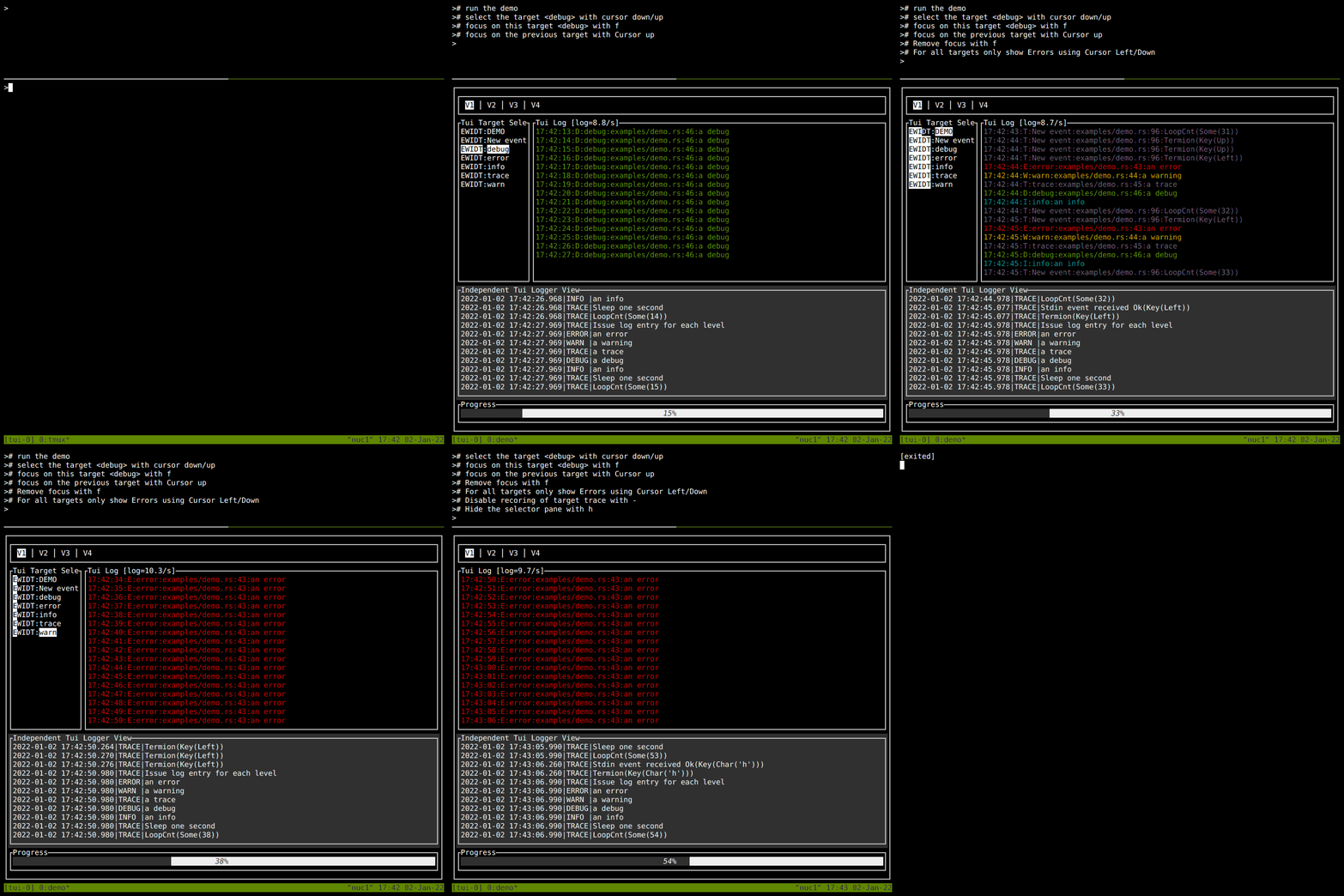
§Documentation
§Important note for tui
The tui crate has been archived and ratatui has taken over.
In order to avoid supporting compatibility for an inactive crate,
the v0.9.x releases are the last to support tui. In case future bug fixes
are needed, the branch tui_legacy has been created to track changes to 0.9.x releases.
Starting with v0.10 tui-logger is ratatui only.
§Features
-
Logger implementation for the
logcrate - Logger enable/disable detection via hash table (avoid string compare)
- Hot logger code only copies enabled log messages with timestamp into a circular buffer
- Widgets/move_message() retrieve captured log messages from hot circular buffer
- Lost message detection due to circular buffer
- Log filtering performed on log record target
- Simple Widgets to view logs and configure debuglevel per target
- Logging of enabled logs to file
- Scrollback in log history
- Title of target and log pane can be configured
-
slogsupport, providing a Drain to integrate into yoursloginfrastructure -
tracingsupport - Allow configuration of target dependent loglevel specifically for file logging
- Avoid duplicating of target, module and filename in every log record
- Simultaneous modification of all targets’ display/hot logging loglevel by key command
§Smart Widget
Smart widget consists of two widgets. Left is the target selector widget and on the right side the logging messages view scrolling up. The target selector widget can be hidden/shown during runtime via key command. The key command to be provided to the TuiLoggerWidget via transition() function.
The target selector widget looks like this:
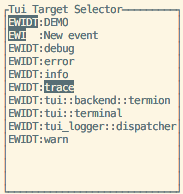
It controls:
- Capturing of log messages by the logger
- Selection of levels for display in the logging message view
The two columns have the following meaning:
- Code EWIDT: E stands for Error, W for Warn, Info, Debug and Trace.
- Inverted characters (EWIDT) are enabled log levels in the view
- Normal characters show enabled capturing of a log level per target
- If any of EWIDT are not shown, then the respective log level is not captured
- Target of the log events can be defined in the log e.g.
warn!(target: "demo", "Log message");
§Smart Widget Key Commands
|  KEY     | ACTION
|----------|-----------------------------------------------------------|
| h        | Toggles target selector widget hidden/visible
| f        | Toggle focus on the selected target only
| UP       | Select previous target in target selector widget
| DOWN     | Select next target in target selector widget
| LEFT     | Reduce SHOWN (!) log messages by one level
| RIGHT    | Increase SHOWN (!) log messages by one level
| -        | Reduce CAPTURED (!) log messages by one level
| +        | Increase CAPTURED (!) log messages by one level
| PAGEUP   | Enter Page Mode and scroll approx. half page up in log history.
| PAGEDOWN | Only in page mode: scroll 10 events down in log history.
| ESCAPE   | Exit page mode and go back to scrolling mode
| SPACE    | Toggles hiding of targets, which have logfilter set to off
The mapping of key to action has to be done in the application. The respective TuiWidgetEvent has to be provided to TuiWidgetState::transition().
Remark to the page mode: The timestamp of the event at event history’s bottom line is used as reference. This means, changing the filters in the EWIDT/focus from the target selector window should work as expected without jumps in the history. The page next/forward advances as per visibility of the events.
§Basic usage to initialize logger-system:
#[macro_use]
extern crate log;
//use tui_logger;

fn main() {
    // Early initialization of the logger

    // Set max_log_level to Trace
    tui_logger::init_logger(log::LevelFilter::Trace).unwrap();

    // Set default level for unknown targets to Trace
    tui_logger::set_default_level(log::LevelFilter::Trace);

    // code....
}
For use of the widget please check examples/demo.rs
§Demo
Run demo using termion:
cargo run --example demo --features termionRun demo with crossterm:
cargo run --example demo --features crossterm§slog support
tui-logger provides a TuiSlogDrain which implements slog::Drain and will route all records
it receives to the tui-logger widget.
Enabled by feature “slog-support”
§tracing-subscriber support
tui-logger provides a TuiTracingSubscriberLayer which implements
tracing_subscriber::Layer and will collect all events
it receives to the tui-logger widget
Enabled by feature “tracing-support”
§Custom filtering
#[macro_use]
extern crate log;
//use tui_logger;
use env_logger;

fn main() {
    // Early initialization of the logger
    let drain = tui_logger::Drain::new();
    // instead of tui_logger::init_logger, we use `env_logger`
    env_logger::Builder::default()
        .format(move |buf, record|
            // patch the env-logger entry through our drain to the tui-logger
            Ok(drain.log(record))
        ).init(); // make this the global logger
    // code....
}§Internals
For logging there are two circular buffers in use:
- “hot” buffer, which is written to during any logging macro invocation
- main buffer, which holds events to be displayed by the widgets.
The size of the “hot” buffer is 1000 and can be modified by set_hot_buffer_depth().
The size of the main buffer is 10000 and can be modified by set_buffer_depth().
Reason for this scheme: The main buffer is locked for a while during widget updates. In order to block the log-macros, this scheme is in use.
The copy from “hot” buffer to main buffer is performed by a call to move_events(),
which is done in a cyclic task, which repeats every 10 ms, or when the hot buffer is half full.
§THANKS TO
- Florian Dehau for his great crate tui-rs
- Antoine Büsch for providing the patches to tui-rs v0.3.0 and v0.6.0
- Adam Sypniewski for providing the patches to tui-rs v0.6.2
- James aka jklong for providing the patch to tui-rs v0.7
- icy-ux for adding slog support and example
- alvinhochun for updating to tui 0.10 and crossterm support
- brooksmtownsend Patch to remove verbose timestamp info
- Kibouo Patch to change Rc/Refcell to thread-safe counterparts
- Afonso Bordado for providing the patch to tui-rs v0.17
- Benjamin Kampmann for providing patch to tui-rs v0.18
- Paul Sanders for providing patch in issue #30
- Ákos Hadnagy for providing patch in #31 for tracing-subscriber support
- Orhun Parmaksız for providing patches in #33, #34, #37 and #46
- purephantom for providing patch in #42 for ratatui update
- Badr Bouslikhin for providing patch in #47 for ratatui update
- ganthern for providing patch in #49 for tui support removal
- Linda_pp for providing patch in #51 for Cell:set_symbol
- Josh McKinney for providing patch in #56 for Copy on TuiWidgetEvent and TuiLoggerWidget
- nick42d for providing patch in #63 for semver checks
- Tom Groenwoldt for providing patch in #65 for ratatui update
§Star History
Structs§
- CircularBuffer is used to store the last elements of an endless sequence. Oldest elements will be overwritten. The implementation focus on speed. So memory allocations are avoided.
- A simple
Drainto log any event directly. - LevelConfig stores the relation target->LevelFilter in a hash table.
- The Smart Widget combines the TuiLoggerWidget and the TuiLoggerTargetWidget into a nice combo, where the TuiLoggerTargetWidget can be shown/hidden.
- This is the definition for the TuiLoggerTargetWidget, which allows configuration of the logger system and selection of log messages.
- TuiSlog
Drain slog-supportslog-compatible Drain that feeds messages totui-logger. - TuiTracing
Subscriber Layer tracing-supporttracing-subscriber-compatible layer that feeds messages totui-logger. - This struct contains the shared state of a TuiLoggerWidget and a TuiLoggerTargetWidget.
Enums§
- The TuiLoggerWidget shows the logging messages in an endless scrolling view. It is controlled by a TuiWidgetState for selected events.
Functions§
- Init the logger and record with
logcrate. - Set the depth of the circular buffer in order to avoid message loss. This will delete all existing messages in the circular buffer.
- Set default levelfilter for unknown targets of the logger
- Set the depth of the hot buffer in order to avoid message loss. This is effective only after a call to move_events()
- Set levelfilter for a specific target in the logger
- Define filename for logging.
- slog_
drain slog-support - tracing_
subscriber_ layer tracing-support