Expand description
§Logger with smart widget for the tui and ratatui crate


§Demo of the widget

§Documentation
I have stumbled over an excellent AI-generated description of tui-logger, which provides surprisingly deep and (mostly) correct implementation details.
It would have costed me many days to write an equally good description with so many details and diagrams.
This docu can be found here.
§Important note for tui
The tui crate has been archived and ratatui has taken over.
In order to avoid supporting compatibility for an inactive crate,
the v0.9.x releases are the last to support tui. In case future bug fixes
are needed, the branch tui_legacy has been created to track changes to 0.9.x releases.
Starting with v0.10 tui-logger is ratatui only.
§Features
-
Logger implementation for the
logcrate - Logger enable/disable detection via hash table (avoid string compare)
- Hot logger code only copies enabled log messages with timestamp into a circular buffer
- Widgets/move_message() retrieve captured log messages from hot circular buffer
- Lost message detection due to circular buffer
- Log filtering performed on log record target
- Simple Widgets to view logs and configure debuglevel per target
- Logging of enabled logs to file
- Scrollback in log history
- Title of target and log pane can be configured
-
slogsupport, providing a Drain to integrate into yoursloginfrastructure -
tracingsupport - Support to use custom formatter for log events
- Configurable by environment variables
-
wait()/wait_timeout()signaling support via Condvar - Allow configuration of target dependent loglevel specifically for file logging
- Avoid duplicating of module_path and filename in every log record
- Simultaneous modification of all targets’ display/hot logging loglevel by key command
§Smart Widget
Smart widget consists of two widgets. Left is the target selector widget and on the right side the logging messages view scrolling up. The target selector widget can be hidden/shown during runtime via key command. The key command to be provided to the TuiLoggerWidget via transition() function.
The target selector widget looks like this:
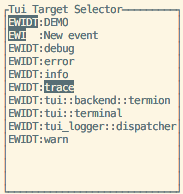
It controls:
- Capturing of log messages by the logger
- Selection of levels for display in the logging message view
The two columns have the following meaning:
- Code EWIDT: E stands for Error, W for Warn, Info, Debug and Trace.
- Inverted characters (EWIDT) are enabled log levels in the view
- Normal characters show enabled capturing of a log level per target
- If any of EWIDT are not shown, then the respective log level is not captured
- Target of the log events can be defined in the log e.g.
warn!(target: "demo", "Log message");
§Smart Widget Key Commands
|  KEY     | ACTION
|----------|-----------------------------------------------------------|
| h        | Toggles target selector widget hidden/visible
| f        | Toggle focus on the selected target only
| UP       | Select previous target in target selector widget
| DOWN     | Select next target in target selector widget
| LEFT     | Reduce SHOWN (!) log messages by one level
| RIGHT    | Increase SHOWN (!) log messages by one level
| -        | Reduce CAPTURED (!) log messages by one level
| +        | Increase CAPTURED (!) log messages by one level
| PAGEUP   | Enter Page Mode and scroll approx. half page up in log history.
| PAGEDOWN | Only in page mode: scroll 10 events down in log history.
| ESCAPE   | Exit page mode and go back to scrolling mode
| SPACE    | Toggles hiding of targets, which have logfilter set to off
The mapping of key to action has to be done in the application. The respective TuiWidgetEvent has to be provided to TuiWidgetState::transition().
Remark to the page mode: The timestamp of the event at event history’s bottom line is used as reference. This means, changing the filters in the EWIDT/focus from the target selector window should work as expected without jumps in the history. The page next/forward advances as per visibility of the events.
§Basic usage to initialize logger-system:
#[macro_use]
extern crate log;
//use tui_logger;

fn main() {
    // Early initialization of the logger

    // Set max_log_level to Trace
    tui_logger::init_logger(log::LevelFilter::Trace).unwrap();

    // Set default level for unknown targets to Trace
    tui_logger::set_default_level(log::LevelFilter::Trace);

    // code....
}
For use of the widget please check examples/demo.rs
§Demo
Run demo using termion:
cargo run --example demo --features termionRun demo with crossterm:
cargo run --example demo --features crosstermRun demo using termion and simple custom formatter in bottom right log widget:
cargo run --example demo --features termion,formatter§Configuration by environment variables
tui.logger uses env-filter crate to support configuration by a string or an environment variable.
This is an opt-in by call to one of these two functions.
pub fn set_env_filter_from_string(filterstring: &str) {}
pub fn set_env_filter_from_env(env_name: Option<&str>) {}
Default environment variable name is RUST_LOG.
§slog support
tui-logger provides a TuiSlogDrain which implements slog::Drain and will route all records
it receives to the tui-logger widget.
Enabled by feature “slog-support”
§tracing-subscriber support
tui-logger provides a TuiTracingSubscriberLayer which implements
tracing_subscriber::Layer and will collect all events
it receives to the tui-logger widget
Enabled by feature “tracing-support”
§wait() / wait_timeout() signaling support
For applications that drive rendering from their own event loop and need
to know when to redraw the widget without polling, tui-logger exposes
wait() and wait_timeout(). The waiter is keyed on a monotonic index
that is bumped every time move_events() successfully transfers one or
more events. A call to wait() captures the current index and blocks
until it advances, then returns the new index. wait_timeout() does the
same with a deadline, returning None if the timeout expired.
loop {
    tui_logger::wait_timeout(Duration::from_millis(100));
    terminal.draw(|f| f.render_widget(&mut app, f.area()))?;
}
Enabled by feature “waiter”
§Custom filtering
#[macro_use]
extern crate log;
//use tui_logger;
use env_logger;

fn main() {
    // Early initialization of the logger
    let drain = tui_logger::Drain::new();
    // instead of tui_logger::init_logger, we use `env_logger`
    env_logger::Builder::default()
        .format(move |buf, record|
            // patch the env-logger entry through our drain to the tui-logger
            Ok(drain.log(record))
        ).init(); // make this the global logger
    // code....
}§Custom formatting
For experts only ! Configure along the lines:
use tui_logger::LogFormatter;

let formatter = MyLogFormatter();

TuiLoggerWidget::default()
.block(Block::bordered().title("Filtered TuiLoggerWidget"))
.formatter(formatter)
.state(&filter_state)
.render(left, buf);
The example demo can be invoked to use a custom formatter as example for the bottom right widget.
Re-exports§
pub use log::LevelFilter;pub use env_filter;
Structs§
- Circular
Buffer - CircularBuffer is used to store the last elements of an endless sequence. Oldest elements will be overwritten. The implementation focus on speed. So memory allocations are avoided.
- Drain
- A simple
Drainto log any event directly. - ExtLog
Record - Level
Config - LevelConfig stores the relation target->LevelFilter in a hash table.
- TuiLogger
File - This closely follows the options of [
TuiLoggerSmartWidget] but is used of logging to a file. - TuiLogger
Smart Widget - The Smart Widget combines the TuiLoggerWidget and the TuiLoggerTargetWidget into a nice combo, where the TuiLoggerTargetWidget can be shown/hidden.
- TuiLogger
Target Widget - This is the definition for the TuiLoggerTargetWidget, which allows configuration of the logger system and selection of log messages.
- TuiLogger
Widget - TuiSlog
Drain slog-support - slog-compatible Drain that feeds messages to
tui-logger. - TuiTracing
Subscriber Layer tracing-support - TuiWidget
State - This struct contains the shared state of a TuiLoggerWidget and a TuiLoggerTargetWidget.
Enums§
- TuiLogger
Error - TuiLogger
Level Output - The TuiLoggerWidget shows the logging messages in an endless scrolling view. It is controlled by a TuiWidgetState for selected events.
- TuiWidget
Event
Traits§
Functions§
- init_
logger - Init the logger.
- move_
events - remove_
env_ filter - Remove env filter - for debugging purposes
- set_
buffer_ depth - Set the depth of the circular buffer in order to avoid message loss. This will delete all existing messages in the circular buffer.
- set_
default_ level - Set default levelfilter for unknown targets of the logger
- set_
env_ filter_ from_ env - Parse environment variable for env_filter
- set_
env_ filter_ from_ string - Parse environment variable for env_filter
- set_
hot_ buffer_ depth - Set the depth of the hot buffer in order to avoid message loss. This is effective only after a call to move_events()
- set_
level_ for_ target - Set levelfilter for a specific target in the logger
- set_
log_ file - Define filename and log formmating options for file dumping.
- wait
waiter - Block the calling thread until new log messages have been moved into the widget’s main buffer, then return the new moved-index.
- wait_
timeout waiter - Like
wait, but blocks for at mosttimeout.